lane assist KIA K900 2020 Owner's Guide
[x] Cancel search | Manufacturer: KIA, Model Year: 2020, Model line: K900, Model: KIA K900 2020Pages: 593, PDF Size: 14.99 MB
Page 403 of 593
![KIA K900 2020 Owners Guide 5137
Driving your vehicle
LFA system operation
With the ignition [ON], select or
release the setting from “AVN →
Setup → Vehicle →Driver
Assistance →Driving Assist → LFA
(Lane Following](/img/2/55052/w960_55052-402.png "KIA K900 2020 Owners Guide 5137
Driving your vehicle
LFA system operation
With the ignition [ON], select or
release the setting from “AVN →
Setup → Vehicle →Driver
Assistance →Driving Assist → LFA
(Lane Following")
5137
Driving your vehicle
LFA system operation
With the ignition [ON], select or
release the setting from “AVN →
Setup → Vehicle →Driver
Assistance →Driving Assist → LFA
(Lane Following Assist)”.
Select the LFA system in the AVN
and meet the following conditions,
the system will operate.
- The Smart Cruise Control is oper- ating
- Vehicle speed is lower than 95 mph (153 km/h)
When the system is activated, the
indicator ( ) on the cluster will illu-
minate. The color of the indicator will
change depending on the condition
of the LFA system.
- Green : Steering assist mode is
ON
- White : Steering assist mode is
OFF
LFA system activation
If the vehicle is inside the lane with
both lanes detected by the system
(lane color changes from gray to
white), and there is no abrupt steer-
ing made by the driver, LFA system
changes to steering assist mode.
The indicator light will come on
green, and the system helps the
vehicle stay in line by controlling the
steering wheel.
When the steering wheel is not con-
trolled temporarily, the indicator light
will flash green and changes to
white.
LFA system ensures the vehicle
stays in its lane. LFA system does
not guarantee 100% safety. Make
sure you make decisions on the road
after checking the road conditions
and safety matters while driving.
Never completely rely on your LFA
system.
Warning
Keep hands on steering wheel
If the driver takes their hands off the
steering wheel for several seconds
while LFA system is activated, the
system will warn the driver.
✽ ✽
NOTICE
Hold the steering wheel tight.
Otherwise, LFA system could mis-
judge that the driver's hands are off
the steering wheel, and the above
warning may occur.
ORJ058180L
Page 404 of 593
Driving your vehicle
138
5
Driving Convenience systems can-
celed
If the driver still does not have their
hands on the steering wheel after the
message "Keep hands on steering
wheel", LFA system will be canceled.
However, if the Smart Cruise Control
is reactivated manually by the driver,
the Lane Following Assist System
will reactivate.
To activate Smart Cruise control,
refer to "Smart Cruise Control
with Stop and Go" in chapter 5.
✽ ✽
NOTICE
• Even though the steering is assist-
ed by the system, the driver may
control the steering wheel.
• The steering wheel may feel heav- ier when the steering wheel is
assisted by the system than when it
is not.
WARNING
The warning message may
appear late according to road
conditions. Therefore, always
have your hands on the steering
wheel while driving.
WARNING
LFA system is a supplemental
system only. It is the responsi-
bility of the driver to safely
steer the vehicle and to main-
tain it in its lane.
Turn off LFA system and drive without using the system in
the following situations:
- In bad weather
- In bad road conditions
- When the steering wheelneeds to be controlled by the
driver frequently.
- When towing a vehicle or trailer
Page 405 of 593
5139
Driving your vehicle
Check Lane Following Assist (LFA)
system
If there is a problem with the system
a message will appear for a few sec-
onds. If the problem continues, we
recommend that you have the vehi-
cle inspected by an authorized retail-
er of Genesis Branded products.LFA system will not be in the
ENABLED state and/or the steering
wheel will not be assisted when:
The turn signal is turned on before
changing a lane. If you change
lanes without the turn signal on,
the steering wheel might be con-
trolled.
The vehicle is not driven in the mid- dle of the lane when the system is
turned on or right after changing a
lane.
ESC (Electronic Stability Control) or VSM (Vehicle Stability
Management) is activated.
The vehicle is driven on a sharp curve.
Vehicle speed is over 95 mph (153 km/h).
The vehicle makes sharp lane changes.
The vehicle brakes suddenly.
Only one lane marker is detected.
The lane is very wide or narrow.
There are more than two lane markers on the road (e.g. construc-
tion area). Radius of a curve is too small.
The vehicle is driven on a steep
incline.
The steering wheel is turned sud- denly.
The system may not operate for 15 seconds after the engine is started
or the camera is initialized.
Page 406 of 593
Driving your vehicle
140
5
Limitations of the System
LFA system may operate premature-
ly even if the vehicle does not depart
from the intended lane, OR, LFA sys-
tem may not assist your steering or
warn you if the vehicle leaves the
intended lane under the following cir-
cumstances: When the lane and road condi-
tions are poor
It is difficult to distinguish the lane
marking from the road surface or
the lane marking is faded or not
clearly marked.
It is difficult to distinguish the color of the lane marker from the road.
There are markings on the road surface that look like a lane marker
that is inadvertently being detected
by the camera.
The lane marker is indistinct or damaged.
The lane marker is merged or divided. (e.g. tollgate)
The lane number increases or decreases or the lane marker are
crossing complicatedly.
There are more than two lane markers on the road in front of you.
The lane marker is very thick or thin.
The lane is very wide or narrow.
The lane marker ahead is not visi- ble due to rain, snow, water on the
road, damaged or stained road
surface, or other factors. The shadow is on the lane marker
by a median strip, trees, guardrail,
noise barriers, etc.
The lane markers are complicated or a structure substitutes for the
lines such as a construction area.
There are crosswalk signs or other symbols on the road.
The lane marker in a tunnel is stained with oil, etc.
The lane suddenly disappears such as at the intersection.
Page 414 of 593
Driving your vehicle
148
5
* Refer to “Smart Cruise Control
(SCC) system” on page 5-100 for
cautions and warnings about vehi-
cle to vehicle distance control and
front radar.
* Refer to “Lane Following Assist (LFA) system” on page 5-135 for
cautions and warnings about
steering control and front camera. This device complies with Part 15
of the FCC rules.
Operation is subject to the following
three conditions:
1. This device may not cause harm-
ful interference, and
2. This device must accept any inter- ference received, including inter-
ference that may cause undesired
operation.
3. Changes or modifications not expressly approved by the party
responsible for compliance could
void the user's authority to operate
the device.Radio frequency radiation
exposure information:
This equipment complies with FCC
radiation exposure limits set forth for
an uncontrolled environment.
This equipment should be installed
and operated with a minimum dis-
tance of 8 in (20 cm) between the
radio (antenna) and your body.
This transmitter must not be colocat-
ed or operating in conjunction with
any other antenna or transmitter.
Page 445 of 593
63
What to do in an emergency
If the engine stalls at a cross-
road or crossing
If the engine stalls at a crossroad or
crossing, set the shift lever in the N
(Neutral) position and then push the
vehicle to a safe place.
If you have a flat tire while
driving
If a tire goes flat while you are driv-
ing:
1. Take your foot off the acceleratorpedal and let the vehicle slow
down while driving straight ahead.
Do not apply the brakes immedi-
ately or attempt to pull off the road
as this may cause a loss of con-
trol. When the vehicle has slowed
to such a speed that it is safe to do
so, brake carefully and pull off the
road. Drive off the road as far as
possible and park on firm level
ground. If you are on a divided
highway, do not park in the median
area between the two traffic lanes. 2. When the vehicle is stopped, turn
on your emergency hazard flash-
ers, set the parking brake and put
the transmission in P.
3. Have all passengers get out of the vehicle. Be sure they all get out on
the side of the vehicle that is away
from traffic.
4. When changing a flat tire, follow the instruction provided later in
this section.
If the engine stalls while driv-
ing
1. Reduce your speed gradually,keeping a straight line. Move cau-
tiously off the road to a safe place.
2. Turn on your emergency flashers.
3. Try to start the engine again. If your vehicle will not start, contact
an authorized K900 Kia dealer or
seek other qualified assistance.
✽ ✽NOTICE
If there was a check engine light and
loss of power or stall, and if safe to
do so, wait at least 10 seconds to
restart the vehicle after it stalls. This
may reset the car so it will no longer
run at low power (limp home) condi-
tion.
IN CASE OF AN EMERGENCY WHILE DRIVING
Page 456 of 593
What to do in an emergency
14
6
IF YOU HAVE A FLAT TIRE (WITH SPARE TIRE)
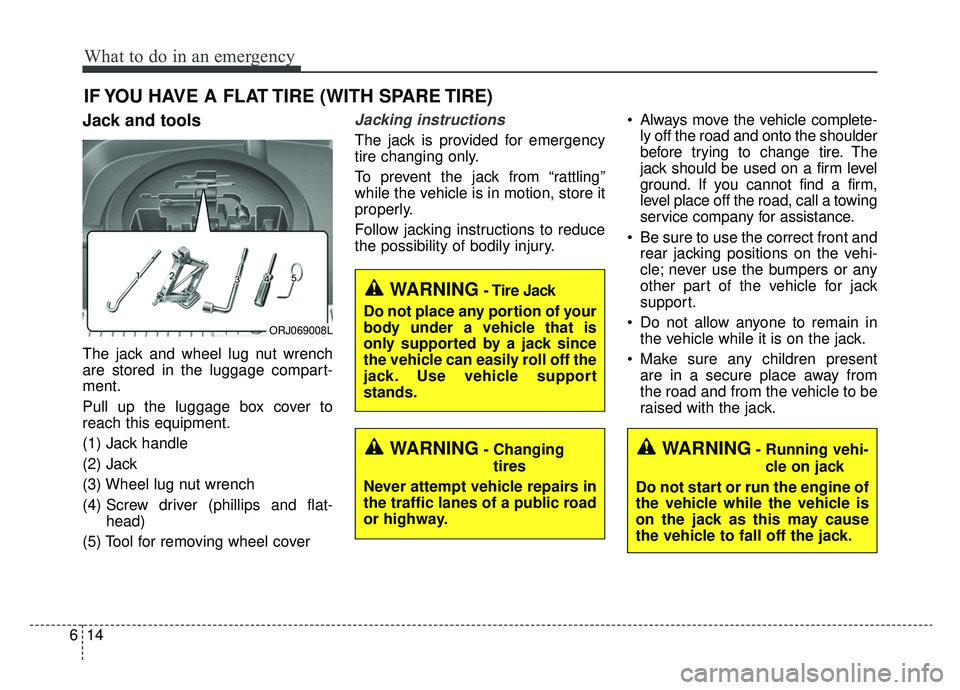
Jack and tools
The jack and wheel lug nut wrench
are stored in the luggage compart-
ment.
Pull up the luggage box cover to
reach this equipment.
(1) Jack handle
(2) Jack
(3) Wheel lug nut wrench
(4) Screw driver (phillips and flat-
head)
(5) Tool for removing wheel cover
Jacking instructions
The jack is provided for emergency
tire changing only.
To prevent the jack from “rattling”
while the vehicle is in motion, store it
properly.
Follow jacking instructions to reduce
the possibility of bodily injury. Always move the vehicle complete-
ly off the road and onto the shoulder
before trying to change tire. The
jack should be used on a firm level
ground. If you cannot find a firm,
level place off the road, call a towing
service company for assistance.
Be sure to use the correct front and rear jacking positions on the vehi-
cle; never use the bumpers or any
other part of the vehicle for jack
support.
Do not allow anyone to remain in the vehicle while it is on the jack.
Make sure any children present are in a secure place away from
the road and from the vehicle to be
raised with the jack.
WARNING- Changing
tires
Never attempt vehicle repairs in
the traffic lanes of a public road
or highway.
ORJ069008L
WARNING- Tire Jack
Do not place any portion of your
body under a vehicle that is
only supported by a jack since
the vehicle can easily roll off the
jack. Use vehicle support
stands.
WARNING- Running vehi- cle on jack
Do not start or run the engine of
the vehicle while the vehicle is
on the jack as this may cause
the vehicle to fall off the jack.
Page 534 of 593

Maintenance
64
7
Fuse NameFuse ratingCircuit Protected
DRIVER POWER
SEAT225ADriver Power Seat Module, Driver Seat Relay Module, Driver Lumbar Support Unit
TRUNK LID10ATrunk Lid Relay, Fuel Lid Relay, Fuel Filler Door & Trunk Lid Switch
MODULE910AMultifunction Switch, Cooling Fan Controller (BLDC (Brushless Direct Current) Type), Surround View
Monitor Unit, Rear Seat Armrest Console Switch
MODULE610AIBU (Integrated Body Control Unit), 4WD (4 Wheel Drive) ECM (Electronic Control Module), ESC
(Electronic Stability Control) Unit, Lane Keeping Assist Unit (Line), Crash Pad Switch, Steering Tilt &
Telescopic Module
POWER HANDLE15ASteering Tilt & Telescopic Module
REAR LH POWER SEAT215ARear Seat Relay Module Left Handle side (8WAY)
PASSENGER
POWER SEAT225APassenger Power Seat Module, Passenger Seat Relay Module, Passenger Lumbar Support Unit
MODULE310AData Link Connector, Front Console Switch, Rain Sensor, Blind-Spot Collision Warning Unit Left Handle
side/Right Handle side, Rear Seat Armrest Console Switch, Rain Sensor
MODULE710A
Multipurpose Check Connector, Multifunction Switch, Keyboard, Audio/Video & Navigation Head Unit, MTS
(Mozen Telematics System) E-Call Module, Air Quality Sensor, AMP (Amplifier), Air Conditioner Control
Module, Electro Chromic Mirror, Front Air Conditioner Controller, Driver/Passenger Seat Relay Module,
Driver/Passenger Seat Warmer Control Module, Rear Seat Warmer Control Module Left Handle side/Right
Handle side, Driver/Passenger Power Seat Module, Driver/Passenger CCS (Climate Control Seat) Module,
Rear Seat CCS (Climate Control Seat) Module Left Handle side/Right Han\
dle side, Rear Seat Armrest
Console Switch
SUNROOF20ASunroof Control Unit (Glass)
Page 586 of 593

I5
Index
Forward Collision-Avoidance Assist (FCA) system - sensor fusion type (front camera + front radar) . . 5-53
System setting and activation . . . . . . . . . . . . . . . . . . 5-53
FCA warning message and system control . . . . . . . 5-55
FCA sensor . . . . . . . . . . . . . . . . . . . . . . . . . . . . . . . . 5-58
System malfunction . . . . . . . . . . . . . . . . . . . . . . . . . 5-60
Limitations of the system . . . . . . . . . . . . . . . . . . . . . 5-62
Recognizing pedestrians or cyclists . . . . . . . . . . . . . 5-66
Forward Collision-Avoidance Assist-Lane-Change Oncoming function (FCA-LO) . . . . . . . . . . . . . . . . 5-69
Function operation . . . . . . . . . . . . . . . . . . . . . . . . . . 5-69
Warning message and function control . . . . . . . . . . 5-69
Limitations . . . . . . . . . . . . . . . . . . . . . . . . . . . . . . . . 5-70
Fuel filler lid . . . . . . . . . . . . . . . . . . . . . . . . . . . . . . . . . 4-44 Opening the fuel filler lid. . . . . . . . . . . . . . . . . . . . . 4-44
Closing the fuel filler lid . . . . . . . . . . . . . . . . . . . . . 4-44
Emergency fuel filler lid release . . . . . . . . . . . . . . . 4-45
Fuel requirements . . . . . . . . . . . . . . . . . . . . . . . . . . . . . . 1-3
Fuses . . . . . . . . . . . . . . . . . . . . . . . . . . . . . . . . . . . . \
. . . 7-53 Inner panel fuse replacement . . . . . . . . . . . . . . . . . . 7-55
Engine compartment fuse replacement . . . . . . . . . . 7-57
Fuse/relay panel description. . . . . . . . . . . . . . . . . . . 7-59
Gross vehicle weight. . . . . . . . . . . . . . . . . . . . . . . . . . . . 8-6 Head Up Display (HUD) . . . . . . . . . . . . . . . . . . . . . . 4-104
Description . . . . . . . . . . . . . . . . . . . . . . . . . . . . . . . 4-104
Head Up Display On/Off . . . . . . . . . . . . . . . . . . . . 4-105
Head Up Display information . . . . . . . . . . . . . . . . 4-105
Head Up Display setting . . . . . . . . . . . . . . . . . . . . 4-105
Highway Driving Assist (HDA) system . . . . . . . . . . . 5-142 Setting and activating HDA system . . . . . . . . . . . . 5-143
Operating conditions . . . . . . . . . . . . . . . . . . . . . . . 5-143
HDA system operation . . . . . . . . . . . . . . . . . . . . . . 5-143
Warning related to steering wheel . . . . . . . . . . . . . 5-144
When the hands-off warning lasts for a certain period of time . . . . . . . . . . . . . . . . . . . . . . . . . . . . 5-145
HDA malfunction . . . . . . . . . . . . . . . . . . . . . . . . . . 5-146
Radio frequency radiation exposure information. . 5-148
Hood . . . . . . . . . . . . . . . . . . . . . . . . . . . . . . . . . . . . \
. . . 4-42 Opening the hood . . . . . . . . . . . . . . . . . . . . . . . . . . . 4-42
Closing the hood . . . . . . . . . . . . . . . . . . . . . . . . . . . 4-43
How to use this manual . . . . . . . . . . . . . . . . . . . . . . . . . 1-2
If the engine overheats . . . . . . . . . . . . . . . . . . . . . . . . . . 6-7
If the engine will not start . . . . . . . . . . . . . . . . . . . . . . . 6-4 If engine doesn't turn over or turns over slowly . . . . 6-4
If engine turns over normally but does not start . . . . 6-4
F
G
H
I
Page 588 of 593
I7
Index
Lane Following Assist (LFA) system . . . . . . . . . . . . . 5-135LFA system operation . . . . . . . . . . . . . . . . . . . . . . 5-137
Limitations of the System . . . . . . . . . . . . . . . . . . . 5-140
Lane Keeping Assist (LKA) system . . . . . . . . . . . . . . . 5-71 LKA system operation . . . . . . . . . . . . . . . . . . . . . . . 5-73
LKA system malfunction . . . . . . . . . . . . . . . . . . . . . 5-78
LKA system function change. . . . . . . . . . . . . . . . . . 5-79
LCD windows . . . . . . . . . . . . . . . . . . . . . . . . . . . . . . . . 4-76 Over view . . . . . . . . . . . . . . . . . . . . . . . . . . . . . . . . . 4-76
Trip information (Trip computer) . . . . . . . . . . . . . . 4-76
LCD modes . . . . . . . . . . . . . . . . . . . . . . . . . . . . . . . 4-80
Distance to empty. . . . . . . . . . . . . . . . . . . . . . . . . . . 4-84
Set up mode . . . . . . . . . . . . . . . . . . . . . . . . . . . . . . . 4-84
Warning messages . . . . . . . . . . . . . . . . . . . . . . . . . . 4-85
Leading Vehicle Departure Alert . . . . . . . . . . . . . . . . 5-119 System setting and system standby . . . . . . . . . . . . 5-119
Light bulbs . . . . . . . . . . . . . . . . . . . . . . . . . . . . . . . . . . 7-77\
Lamp (LED type) bulb replacement . . . . . . . . . . . . 7-77
Light bulb position (Front). . . . . . . . . . . . . . . . . . . . 7-79
Light bulb position (Rear) . . . . . . . . . . . . . . . . . . . . 7-79
Light bulb position (Side) . . . . . . . . . . . . . . . . . . . . 7-80
Headlamp (LED type) bulb replacement . . . . . . . . . 7-80
Rear combination lamp (LED type) bulb replacement . . . . . . . . . . . . . . . . . . . . . . . . . . . . . . 7-80
High mounted stop lamp (LED type) bulb replacement . . . . . . . . . . . . . . . . . . . . . . . . . . . . . . 7-81 License plate lamp (LED type) bulb replacement . . 7-81
Rear fog lamp (LED type) bulb replacement. . . . . . 7-81
Side repeater lamp (LED type) bulb replacement . . 7-82
Map lamp (LED type) bulb replacement . . . . . . . . . 7-82
Vanity mirror lamp (front)(LED type) bulb
replacement . . . . . . . . . . . . . . . . . . . . . . . . . . . . . . 7-82
Room lamp (LED type) bulb replacement . . . . . . . . 7-83
Glove box lamp (LED type) bulb replacement . . . . 7-83
Trunk lamp (LED type) bulb replacement . . . . . . . . 7-83
Lighting. . . . . . . . . . . . . . . . . . . . . . . . . . . . . . . . . . . . \
4-114 Battery saver function . . . . . . . . . . . . . . . . . . . . . . 4-114
Daytime running light . . . . . . . . . . . . . . . . . . . . . . 4-114
Lighting control . . . . . . . . . . . . . . . . . . . . . . . . . . . 4-114
High beam operation . . . . . . . . . . . . . . . . . . . . . . . 4-116
High beam assist . . . . . . . . . . . . . . . . . . . . . . . . . . 4-117
Turn signals and lane change signals . . . . . . . . . . . 4-120
Headlight leveling device . . . . . . . . . . . . . . . . . . . . 4-121
Dynamic Bending Light (DBL) . . . . . . . . . . . . . . . 4-122
Luggage volume . . . . . . . . . . . . . . . . . . . . . . . . . . . . . . . 8-6
Maintenance services . . . . . . . . . . . . . . . . . . . . . . . . . . . 7-5 Owner’s responsibility . . . . . . . . . . . . . . . . . . . . . . . . 7-5
Owner maintenance precautions . . . . . . . . . . . . . . . . 7-6
Mirrors . . . . . . . . . . . . . . . . . . . . . . . . . . . . . . . . . . . . \
. 4-58 Inside rearview mirror . . . . . . . . . . . . . . . . . . . . . . . 4-58
Outside rearview mirror . . . . . . . . . . . . . . . . . . . . . . 4-66
L
M