battery KIA MOHAVE 2014 User Guide
[x] Cancel search | Manufacturer: KIA, Model Year: 2014, Model line: MOHAVE, Model: KIA MOHAVE 2014Pages: 417, PDF Size: 38.72 MB
Page 140 of 417
463
Features of your vehicle
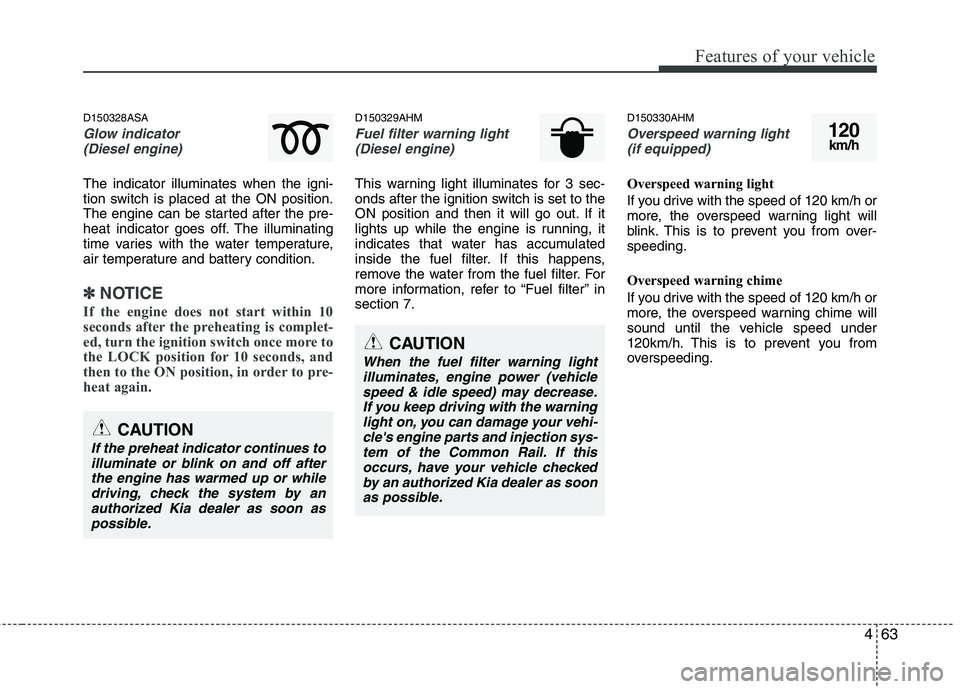
D150328ASA
Glow indicator (Diesel engine)
The indicator illuminates when the igni-
tion switch is placed at the ON position.
The engine can be started after the pre-
heat indicator goes off. The illuminating
time varies with the water temperature,
air temperature and battery condition.
✽✽ NOTICE
If the engine does not start within 10
seconds after the preheating is complet-
ed, turn the ignition switch once more to
the LOCK position for 10 seconds, and
then to the ON position, in order to pre-
heat again.
D150329AHM
Fuel filter warning light (Diesel engine)
This warning light illuminates for 3 sec-
onds after the ignition switch is set to the
ON position and then it will go out. If it
lights up while the engine is running, it
indicates that water has accumulated
inside the fuel filter. If this happens,
remove the water from the fuel filter. For
more information, refer to “Fuel filter” insection 7. D150330AHM
Overspeed warning light
(if equipped)
Overspeed warning light
If you drive with the speed of 120 km/h or
more, the overspeed warning light will
blink. This is to prevent you from over-speeding.
Overspeed warning chime
If you drive with the speed of 120 km/h or
more, the overspeed warning chime will
sound until the vehicle speed under
120km/h. This is to prevent you from
overspeeding.
120km/h
CAUTION
When the fuel filter warning light
illuminates, engine power (vehiclespeed & idle speed) may decrease.If you keep driving with the warninglight on, you can damage your vehi-cle's engine parts and injection sys-
tem of the Common Rail. If thisoccurs, have your vehicle checked by an authorized Kia dealer as soonas possible.
CAUTION
If the preheat indicator continues toilluminate or blink on and off afterthe engine has warmed up or whiledriving, check the system by an
authorized Kia dealer as soon as possible.
Page 142 of 417
465
Features of your vehicle
D150400AHM
LCD display warning (if equipped)
Key is not in vehicle
If the smart key is not in the vehicle and
if any door is opened or closed with the
ENGINE START/STOP button in the
ACC, ON, or START position, the warn-
ing illuminates on the LCD display. Also,
the chime sounds for 5 seconds when
the smart key is not in the vehicle and thedoor is closed.
Always have the smart key with you.Key is not detected
If the smart key is not in the vehicle or is
not detected and you press the ENGINE
START/STOP button, the warning illumi-
nates on the LCD display for 10 seconds.
Also, the immobilizer indicator and the
key holder light blinks for 10 seconds.
Low key battery
If the ENGINE START/STOP button changes to the OFF position when the
smart key in the vehicle discharges, the
warning illuminates on the LCD display
for about 10 seconds. Also, the warning
chime sounds once.
Replace the battery with a new one.Press brake pedal to start engine
If the ENGINE START/STOP button
changes to the ACC position twice by
pressing the button repeatedly without
depressing the brake pedal, the warning
illuminates on the LCD display for about
10 seconds to indicate that you should
depress the brake pedal to start the
engine.
Shift to "P" position
If you try to turn off the engine without the
shift lever in the P (Park) position, the
ENGINE START/STOP button will
change to the ACC position. If the buttonis pressed once more it will change to the
ON position The warning illuminates on
the LCD display for about 10 seconds to
indicate that you should press the
ENGINE START/STOP button with the
shift lever in the P (Park) position to turn
off the engine.
Page 148 of 417
471
Features of your vehicle
D190100BHM
Battery saver function
The purpose of this feature is to pre-vent the battery from being dis-
charged. The system automatically
turns off the parking lights when the
driver removes the ignition key and
opens the driver-side door.
With this feature, the parking lights will turn off automatically if the driver parkson the side of the road at night.
If necessary, to keep the lights on
when the ignition key is removed, per-
form the following:
1) Open the driver-side door.
2) Turn the parking lights OFF and ON again using the light switch on the
steering column. D190300AHM Rescue mode function (if equipped)
If your vehicle has any problem on the
vehicle network system, the headlights
(low beam) turn on automatically with the
ignition switch in the ON position even
though the headlight switch is not turned
on. At this time, the emergency lighting is
not turned off when the headlight switch
is turned off.
D190400AUN
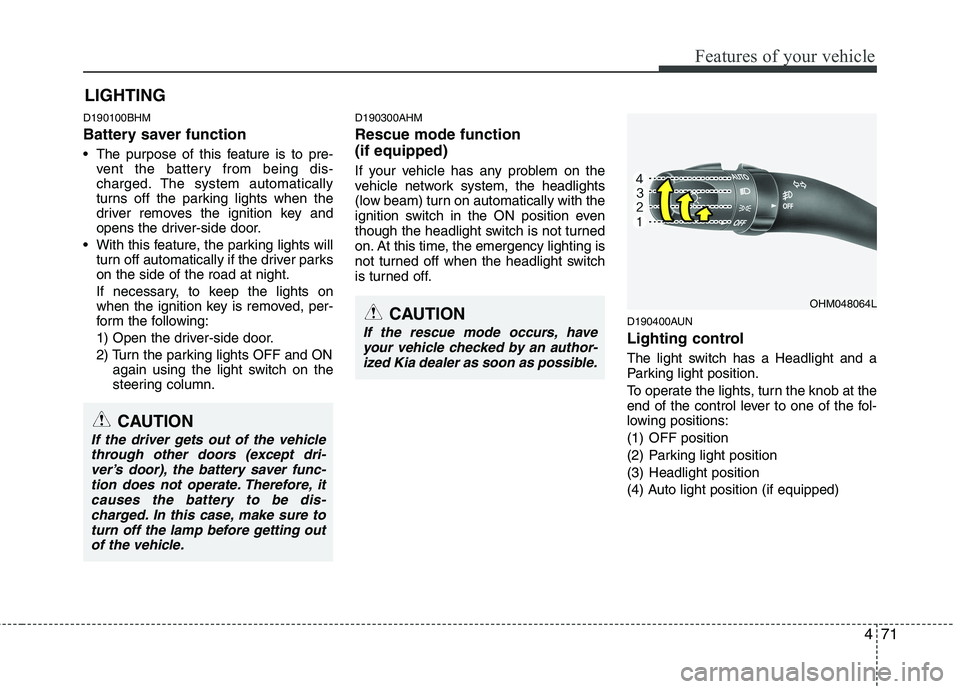
Lighting control
The light switch has a Headlight and a
Parking light position.
To operate the lights, turn the knob at the
end of the control lever to one of the fol-
lowing positions:
(1) OFF position
(2) Parking light position
(3) Headlight position
(4) Auto light position (if equipped)
LIGHTING
CAUTION
If the rescue mode occurs, have
your vehicle checked by an author-
ized Kia dealer as soon as possible.
OHM048064L
CAUTION
If the driver gets out of the vehiclethrough other doors (except dri-ver’s door), the battery saver func-tion does not operate. Therefore, it
causes the battery to be dis-charged. In this case, make sure to turn off the lamp before getting outof the vehicle.
Page 150 of 417
473
Features of your vehicle
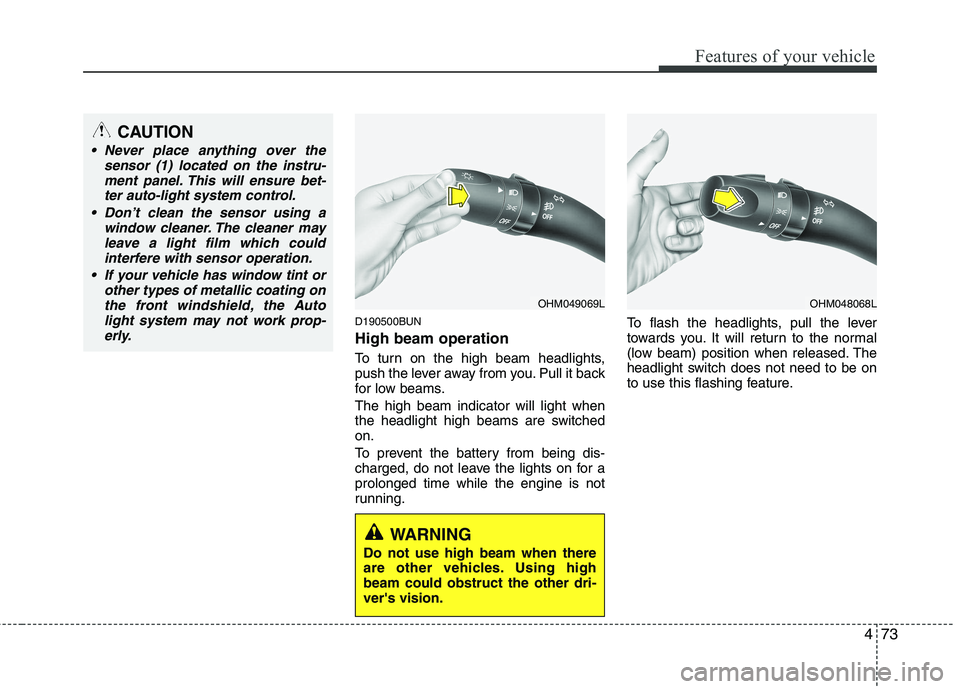
D190500BUN High beam operation
To turn on the high beam headlights,
push the lever away from you. Pull it back
for low beams. The high beam indicator will light when
the headlight high beams are switchedon.
To prevent the battery from being dis-
charged, do not leave the lights on for aprolonged time while the engine is not
running.To flash the headlights, pull the lever
towards you. It will return to the normal
(low beam) position when released. The
headlight switch does not need to be on
to use this flashing feature.
OHM049069LOHM048068L
CAUTION
Never place anything over the
sensor (1) located on the instru-
ment panel. This will ensure bet-ter auto-light system control.
Don’t clean the sensor using a window cleaner. The cleaner may
leave a light film which could interfere with sensor operation.
If your vehicle has window tint or other types of metallic coating onthe front windshield, the Auto
light system may not work prop-erly.
WARNING
Do not use high beam when there
are other vehicles. Using highbeam could obstruct the other dri-ver's vision.
Page 158 of 417
481
Features of your vehicle
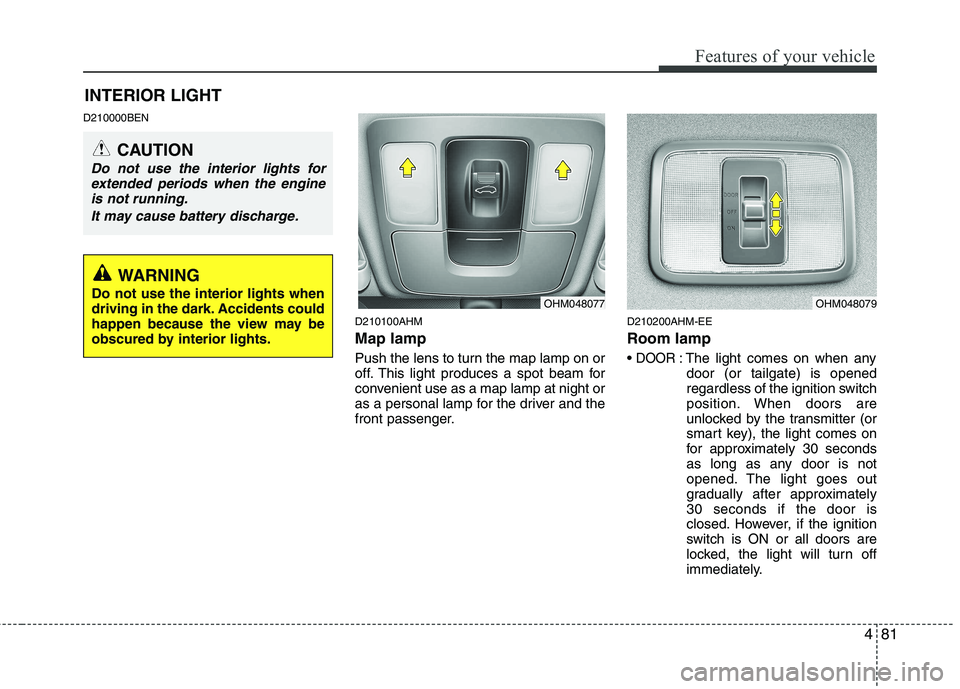
D210000BEND210100AHM Map lamp
Push the lens to turn the map lamp on or
off. This light produces a spot beam for
convenient use as a map lamp at night or
as a personal lamp for the driver and the
front passenger.D210200AHM-EE Room lamp
DOOR: The light comes on when any
door (or tailgate) is opened
regardless of the ignition switch
position. When doors are
unlocked by the transmitter (or
smart key), the light comes on
for approximately 30 seconds
as long as any door is not
opened. The light goes out
gradually after approximately30 seconds if the door is
closed. However, if the ignition
switch is ON or all doors are
locked, the light will turn off
immediately.
INTERIOR LIGHT
CAUTION
Do not use the interior lights for
extended periods when the engineis not running.
It may cause battery discharge.
OHM048077OHM048079
WARNING
Do not use the interior lights when
driving in the dark. Accidents could
happen because the view may be
obscured by interior lights.
Page 163 of 417
Features of your vehicle
86
4
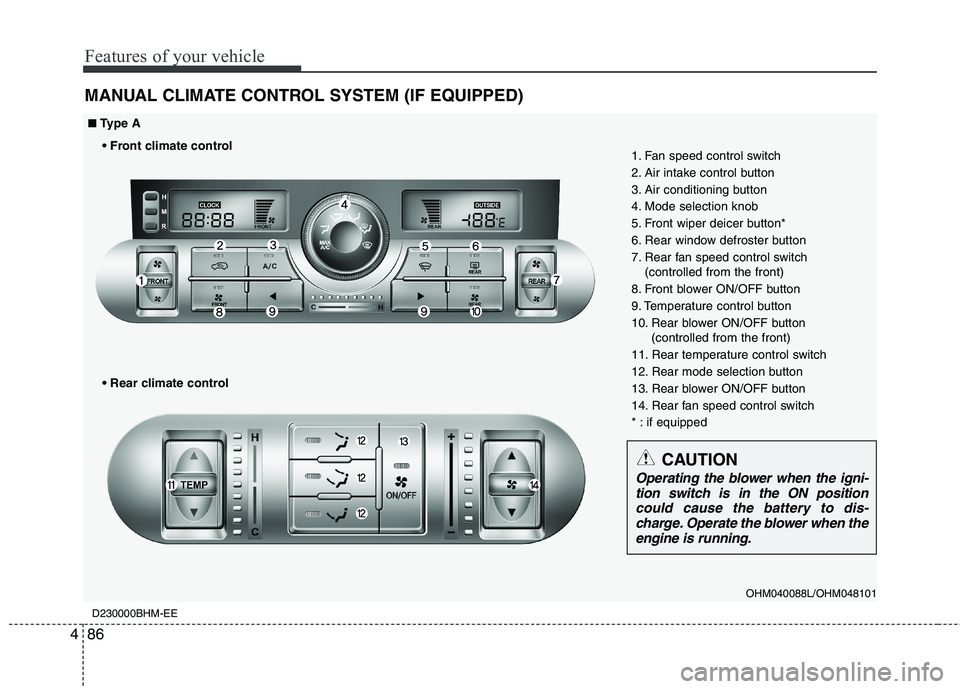
MANUAL CLIMATE CONTROL SYSTEM (IF EQUIPPED)
D230000BHM-EE
OHM040088L/OHM048101
1. Fan speed control switch
2. Air intake control button
3. Air conditioning button
4. Mode selection knob
5. Front wiper deicer button*
6. Rear window defroster button
7. Rear fan speed control switch
(controlled from the front)
8. Front blower ON/OFF button
9. Temperature control button
10. Rear blower ON/OFF button (controlled from the front)
11. Rear temperature control switch
12. Rear mode selection button
13. Rear blower ON/OFF button
14. Rear fan speed control switch
* : if equipped
■■ Type A
CAUTION
Operating the blower when the igni- tion switch is in the ON position could cause the battery to dis-charge. Operate the blower when the
engine is running.
Page 164 of 417
487
Features of your vehicle
OHM040234L/OHM040088
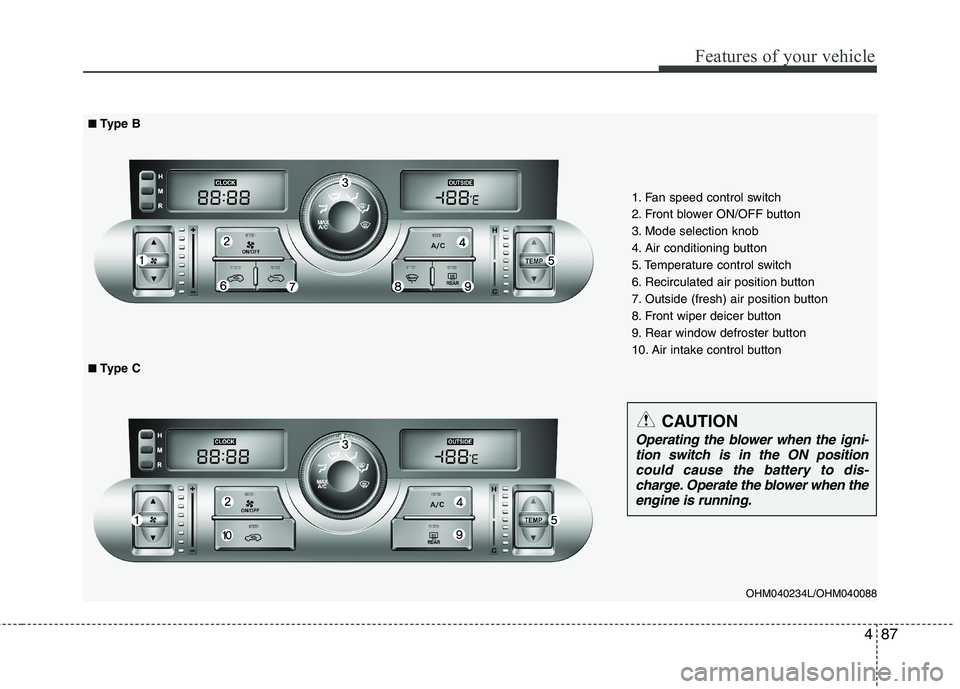
■■Type B
■
■ Type C
1. Fan speed control switch
2. Front blower ON/OFF button
3. Mode selection knob
4. Air conditioning button
5. Temperature control switch
6. Recirculated air position button
7. Outside (fresh) air position button
8. Front wiper deicer button
9. Rear window defroster button
10. Air intake control button
CAUTION
Operating the blower when the igni-
tion switch is in the ON positioncould cause the battery to dis- charge. Operate the blower when the
engine is running.
Page 168 of 417
491
Features of your vehicle
Outside temperature conversion
You can switch the temperature mode
between Centigrade to Fahrenheit as fol-
lows:
While pressing the air intake control
(recirculated air position) button, press
down the temperature control switch for 3
seconds or more.
The display will change from Centigrade
to Fahrenheit or from Fahrenheit to
Centigrade.
If the battery has been discharged or dis-
connected, the temperature mode dis-
play will reset to Centigrade. D230103AHM
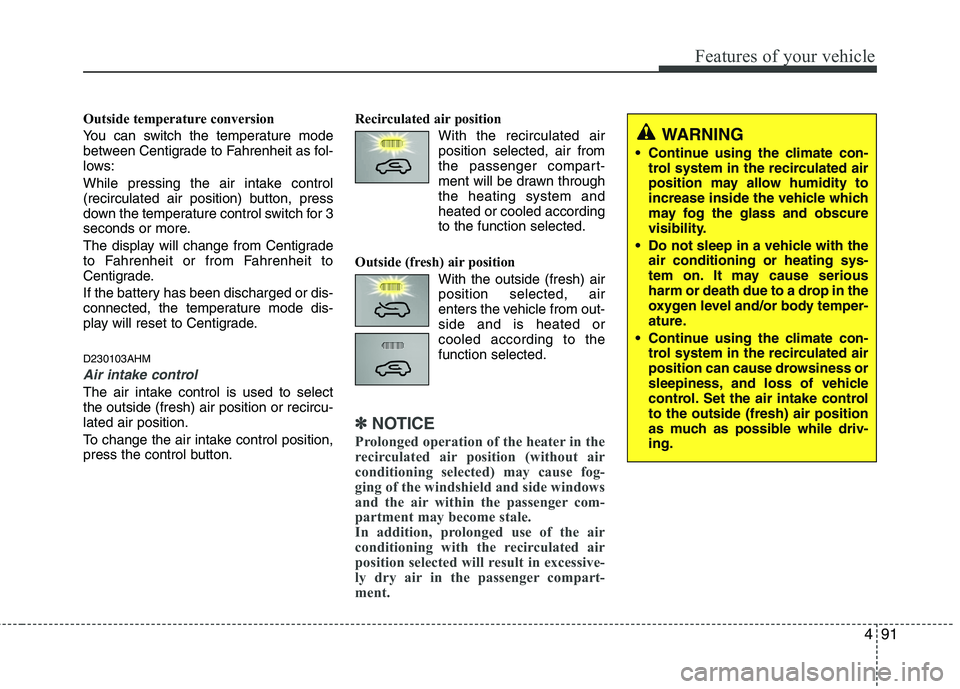
Air intake control
The air intake control is used to select the outside (fresh) air position or recircu-lated air position.
To change the air intake control position,
press the control button.Recirculated air position
With the recirculated airposition selected, air from
the passenger compart-
ment will be drawn throughthe heating system andheated or cooled according
to the function selected.
Outside (fresh) air position With the outside (fresh) airposition selected, air
enters the vehicle from out-side and is heated orcooled according to thefunction selected.
✽✽NOTICE
Prolonged operation of the heater in the
recirculated air position (without air
conditioning selected) may cause fog-
ging of the windshield and side windows
and the air within the passenger com-
partment may become stale.
In addition, prolonged use of the air
conditioning with the recirculated air
position selected will result in excessive-
ly dry air in the passenger compart-
ment.
WARNING
Continue using the climate con- trol system in the recirculated air
position may allow humidity to
increase inside the vehicle which
may fog the glass and obscure
visibility.
Do not sleep in a vehicle with the air conditioning or heating sys-
tem on. It may cause serious
harm or death due to a drop in the
oxygen level and/or body temper-
ature.
Continue using the climate con- trol system in the recirculated air
position can cause drowsiness or
sleepiness, and loss of vehicle
control. Set the air intake controlto the outside (fresh) air position
as much as possible while driv-ing.
Page 176 of 417
499
Features of your vehicle
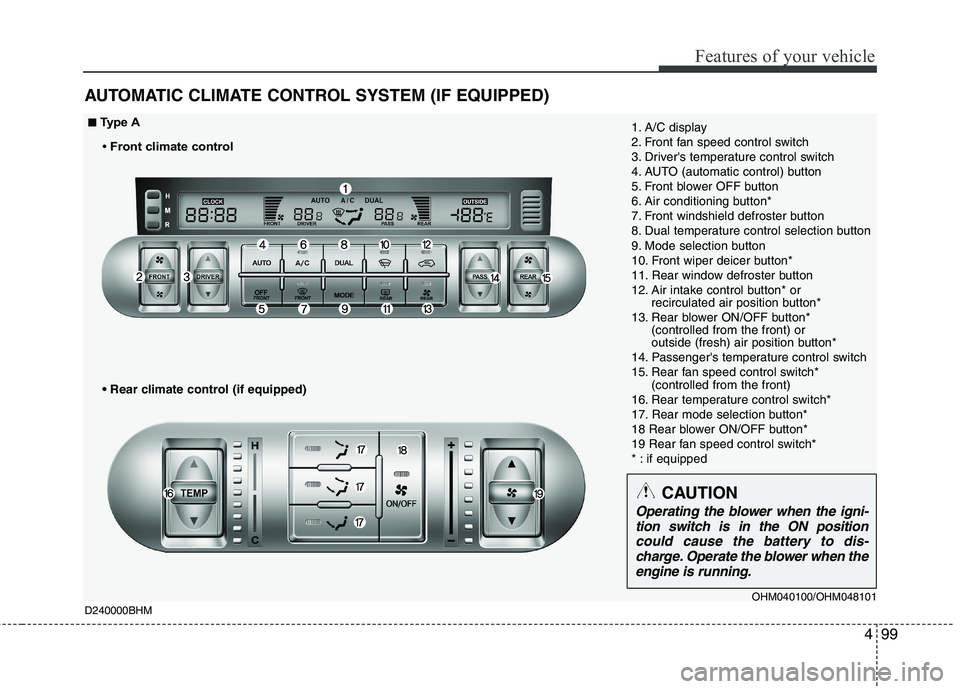
AUTOMATIC CLIMATE CONTROL SYSTEM (IF EQUIPPED)
1. A/C display
2. Front fan speed control switch
3. Driver's temperature control switch
4. AUTO (automatic control) button
5. Front blower OFF button
6. Air conditioning button*
7. Front windshield defroster button
8. Dual temperature control selection button
9. Mode selection button
10. Front wiper deicer button*
11. Rear window defroster button
12. Air intake control button* or recirculated air position button*
13. Rear blower ON/OFF button* (controlled from the front) or
outside (fresh) air position button*
14. Passenger's temperature control switch
15. Rear fan speed control switch* (controlled from the front)
16. Rear temperature control switch*
17. Rear mode selection button*
18 Rear blower ON/OFF button*
19 Rear fan speed control switch*
* : if equipped■■ Type A
Front climate control
D240000BHM
CAUTION
Operating the blower when the igni- tion switch is in the ON position
could cause the battery to dis- charge. Operate the blower when theengine is running.
OHM040100/OHM048101
Page 177 of 417
Features of your vehicle
100
4
OHM040224N/OHM048101
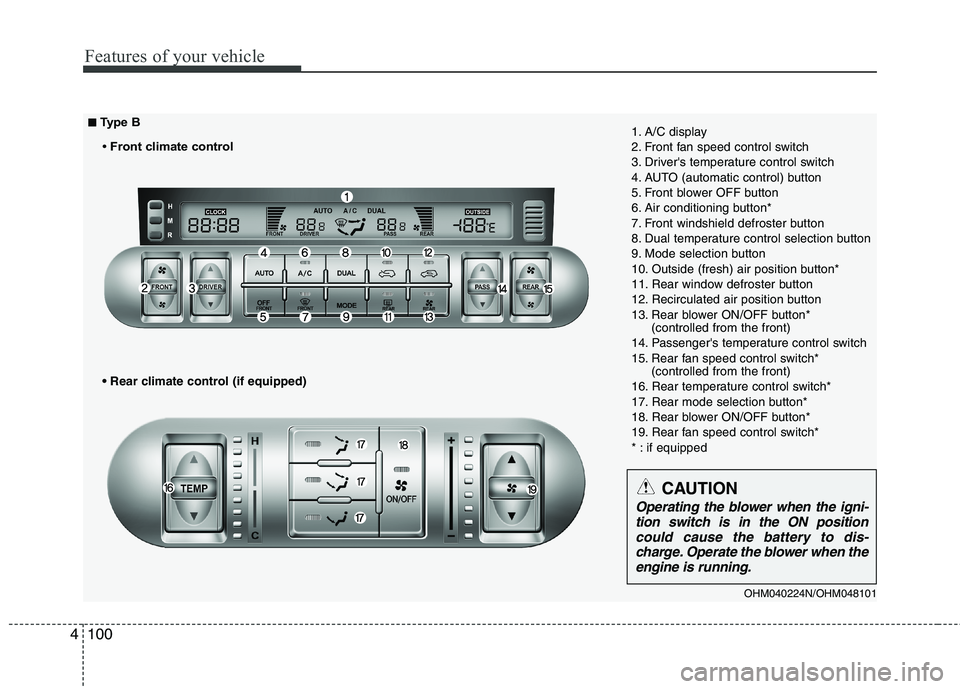
1. A/C display
2. Front fan speed control switch
3. Driver's temperature control switch
4. AUTO (automatic control) button
5. Front blower OFF button
6. Air conditioning button*
7. Front windshield defroster button
8. Dual temperature control selection button
9. Mode selection button
10. Outside (fresh) air position button*
11. Rear window defroster button
12. Recirculated air position button
13. Rear blower ON/OFF button*
(controlled from the front)
14. Passenger's temperature control switch
15. Rear fan speed control switch* (controlled from the front)
16. Rear temperature control switch*
17. Rear mode selection button*
18. Rear blower ON/OFF button*
19. Rear fan speed control switch*
* : if equipped
■
■
Type B
Front climate control
CAUTION
Operating the blower when the igni- tion switch is in the ON position could cause the battery to dis-charge. Operate the blower when the engine is running.