display KIA MOHAVE 2014 Owner's Manual
[x] Cancel search | Manufacturer: KIA, Model Year: 2014, Model line: MOHAVE, Model: KIA MOHAVE 2014Pages: 417, PDF Size: 38.72 MB
Page 214 of 417
4137
Features of your vehicle
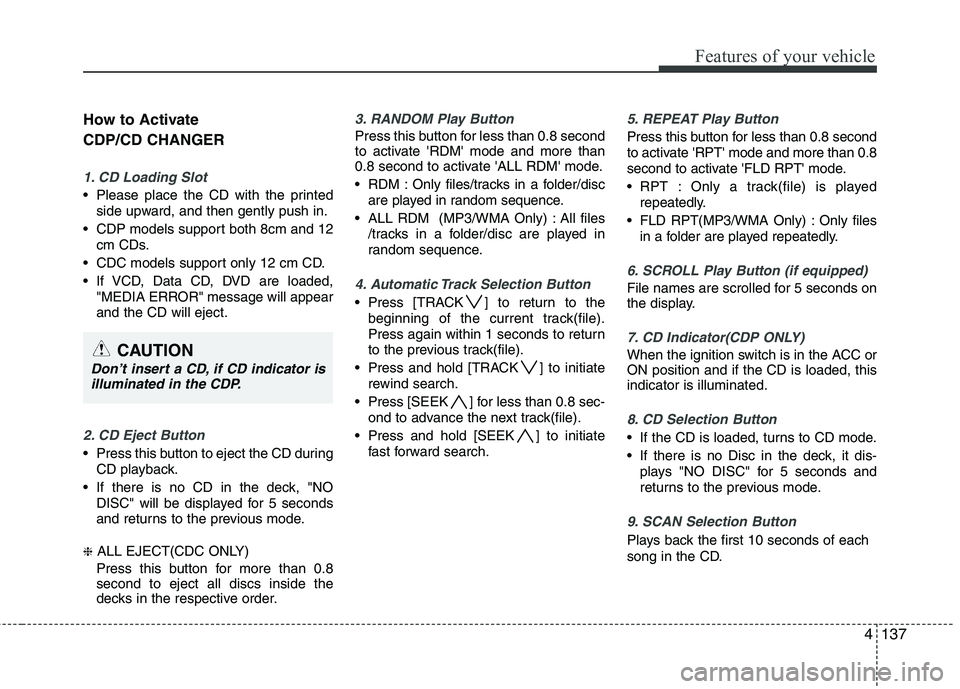
How to Activate CDP/CD CHANGER
1. CD Loading Slot
Please place the CD with the printedside upward, and then gently push in.
CDP models support both 8cm and 12 cm CDs.
CDC models support only 12 cm CD.
If VCD, Data CD, DVD are loaded, "MEDIA ERROR" message will appear and the CD will eject.
2. CD Eject Button
Press this button to eject the CD duringCD playback.
If there is no CD in the deck, "NO DISC" will be displayed for 5 seconds
and returns to the previous mode.
❈ ALL EJECT(CDC ONLY)
Press this button for more than 0.8 second to eject all discs inside the
decks in the respective order.
3. RANDOM Play Button
Press this button for less than 0.8 second
to activate 'RDM' mode and more than
0.8 second to activate 'ALL RDM' mode.
RDM : Only files/tracks in a folder/disc are played in random sequence.
ALL RDM (MP3/WMA Only) : All files /tracks in a folder/disc are played in
random sequence.
4. Automatic Track Selection Button
Press [TRACK ] to return to thebeginning of the current track(file).
Press again within 1 seconds to return
to the previous track(file).
Press and hold [TRACK ] to initiate rewind search.
Press [SEEK ] for less than 0.8 sec- ond to advance the next track(file).
Press and hold [SEEK ] to initiate fast forward search.
5. REPEAT Play Button
Press this button for less than 0.8 second
to activate 'RPT' mode and more than 0.8
second to activate 'FLD RPT' mode.
RPT : Only a track(file) is playedrepeatedly.
FLD RPT(MP3/WMA Only) : Only files in a folder are played repeatedly.
6. SCROLL Play Button (if equipped)
File names are scrolled for 5 seconds on
the display.
7. CD Indicator(CDP ONLY)
When the ignition switch is in the ACC or ON position and if the CD is loaded, thisindicator is illuminated.
8. CD Selection Button
If the CD is loaded, turns to CD mode.
If there is no Disc in the deck, it dis-plays "NO DISC" for 5 seconds and
returns to the previous mode.
9. SCAN Selection Button
Plays back the first 10 seconds of each
song in the CD.
CAUTION
Don’t insert a CD, if CD indicator isilluminated in the CDP.
Page 215 of 417
Features of your vehicle
138
4
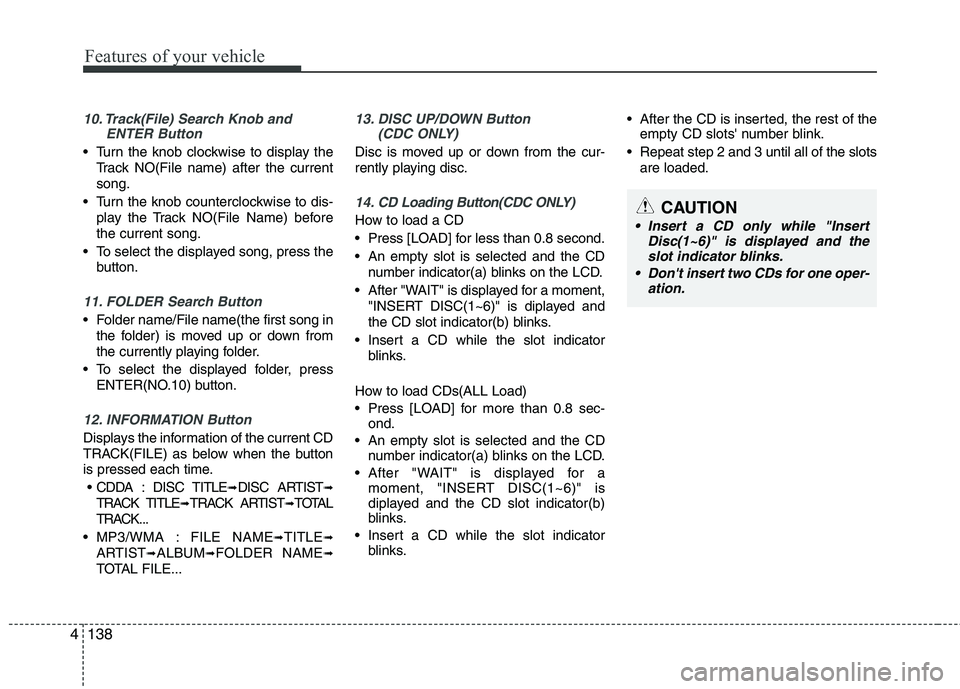
10. Track(File) Search Knob and
ENTER Button
Turn the knob clockwise to display the
Track NO(File name) after the current song.
Turn the knob counterclockwise to dis- play the Track NO(File Name) beforethe current song.
To select the displayed song, press the button.
11. FOLDER Search Button
Folder name/File name(the first song inthe folder) is moved up or down from
the currently playing folder.
To select the displayed folder, press ENTER(NO.10) button.
12. INFORMATION Button
Displays the information of the current CD
TRACK(FILE) as below when the button
is pressed each time.
CDDA : DISC TITLE ➟DISC ARTIST ➟
TRACK TITLE ➟TRACK ARTIST ➟TOTAL
TRACK...
MP3/WMA : FILE NAME ➟TITLE ➟
ARTIST ➟ALBUM ➟FOLDER NAME ➟
TOTAL FILE...
13. DISC UP/DOWN Button (CDC ONLY)
Disc is moved up or down from the cur-
rently playing disc.
14. CD Loading Button(CDC ONLY)
How to load a CD
Press [LOAD] for less than 0.8 second.
An empty slot is selected and the CD
number indicator(a) blinks on the LCD.
After "WAIT" is displayed for a moment, "INSERT DISC(1~6)" is diplayed and
the CD slot indicator(b) blinks.
Insert a CD while the slot indicator blinks.
How to load CDs(ALL Load)
Press [LOAD] for more than 0.8 sec- ond.
An empty slot is selected and the CD number indicator(a) blinks on the LCD.
After "WAIT" is displayed for a moment, "INSERT DISC(1~6)" is
diplayed and the CD slot indicator(b)
blinks.
Insert a CD while the slot indicator blinks. After the CD is inserted, the rest of the
empty CD slots' number blink.
Repeat step 2 and 3 until all of the slots are loaded.CAUTION
Insert a CD only while "Insert Disc(1~6)" is displayed and theslot indicator blinks.
Don't insert two CDs for one oper- ation.
Page 220 of 417
4143
Features of your vehicle
How to Activate USB MEMORY
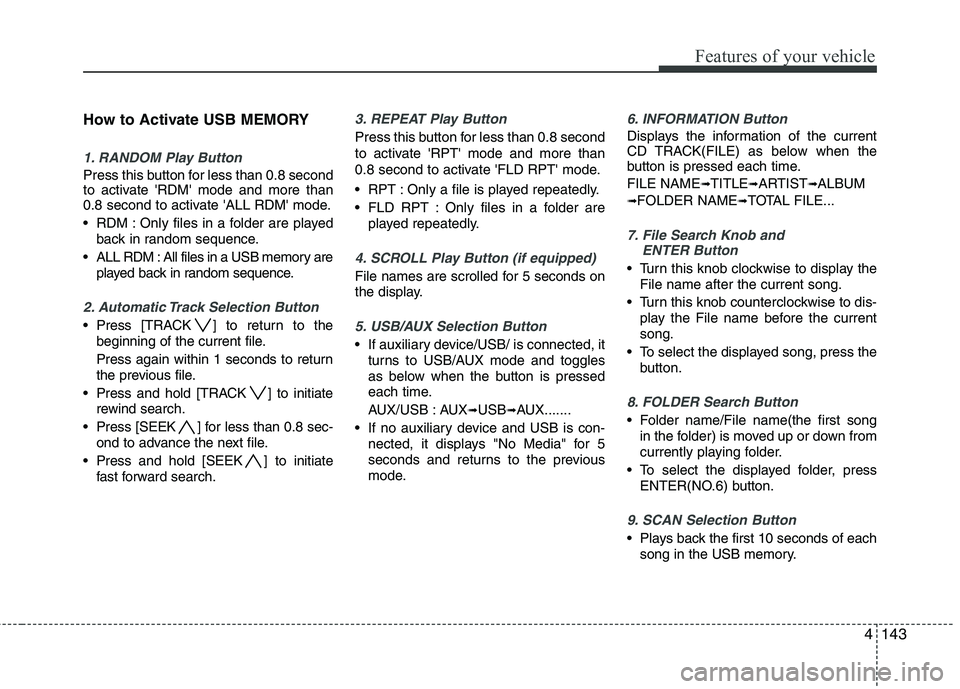
1. RANDOM Play Button
Press this button for less than 0.8 second
to activate 'RDM' mode and more than
0.8 second to activate 'ALL RDM' mode.
RDM : Only files in a folder are playedback in random sequence.
ALL RDM : All files in a USB memory are played back in random sequence.
2. Automatic Track Selection Button
Press [TRACK ] to return to thebeginning of the current file.
Press again within 1 seconds to return
the previous file.
Press and hold [TRACK ] to initiate rewind search.
Press [SEEK ] for less than 0.8 sec- ond to advance the next file.
Press and hold [SEEK ] to initiate fast forward search.
3. REPEAT Play Button
Press this button for less than 0.8 second
to activate 'RPT' mode and more than
0.8 second to activate 'FLD RPT' mode.
RPT : Only a file is played repeatedly.
FLD RPT : Only files in a folder areplayed repeatedly.
4. SCROLL Play Button (if equipped)
File names are scrolled for 5 seconds on
the display.
5. USB/AUX Selection Button
If auxiliary device/USB/ is connected, itturns to USB/AUX mode and toggles
as below when the button is pressed
each time.
AUX/USB : AUX ➟USB ➟AUX.......
If no auxiliary device and USB is con- nected, it displays "No Media" for 5
seconds and returns to the previous
mode.
6. INFORMATION Button
Displays the information of the current
CD TRACK(FILE) as below when the
button is pressed each time. FILE NAME ➟
TITLE ➟ARTIST ➟ALBUM
➟ FOLDER NAME ➟TOTAL FILE...
7. File Search Knob and
ENTER Button
Turn this knob clockwise to display the
File name after the current song.
Turn this knob counterclockwise to dis- play the File name before the current song.
To select the displayed song, press the button.
8. FOLDER Search Button
Folder name/File name(the first songin the folder) is moved up or down from
currently playing folder.
To select the displayed folder, press ENTER(NO.6) button.
9. SCAN Selection Button
Plays back the first 10 seconds of eachsong in the USB memory.
Page 221 of 417
Features of your vehicle
144
4
How to Activate iPod ®
Device
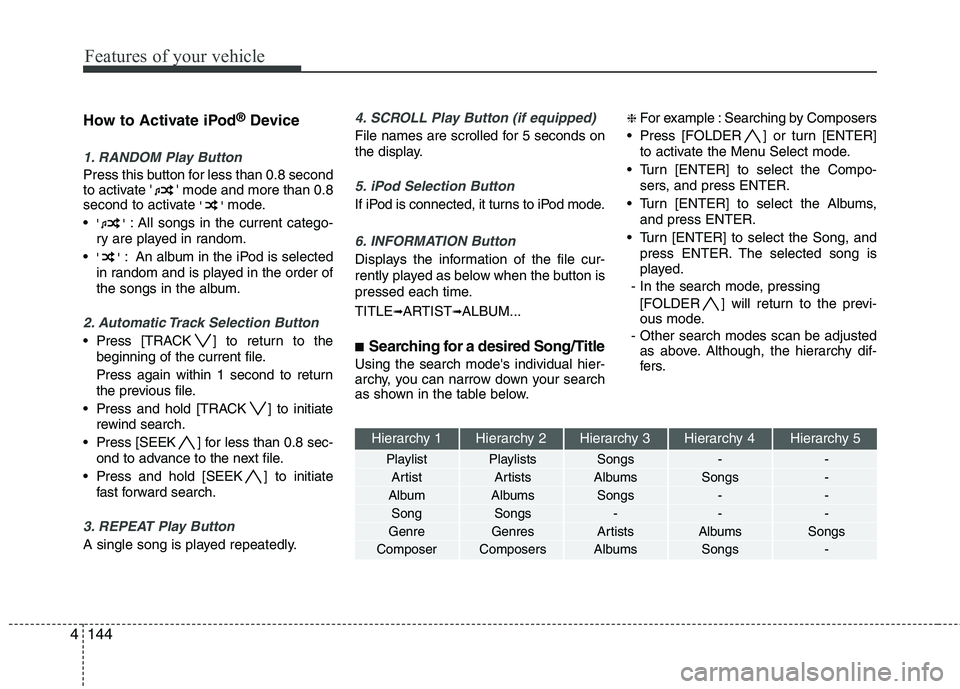
1. RANDOM Play Button
Press this button for less than 0.8 second
to activate ' ' mode and more than 0.8
second to activate ''mode.
'' : All songs in the current catego-
ry are played in random.
'' : An album in the iPod is selected
in random and is played in the order of
the songs in the album.
2. Automatic Track Selection Button
Press [TRACK ] to return to the beginning of the current file.
Press again within 1 second to return
the previous file.
Press and hold [TRACK ] to initiate rewind search.
Press [SEEK ] for less than 0.8 sec- ond to advance to the next file.
Press and hold [SEEK ] to initiate fast forward search.
3. REPEAT Play Button
A single song is played repeatedly.
4. SCROLL Play Button (if equipped)
File names are scrolled for 5 seconds on
the display.
5. iPod Selection Button
If iPod is connected, it turns to iPod mode.
6. INFORMATION Button
Displays the information of the file cur-
rently played as below when the button is
pressed each time. TITLE ➟ARTIST ➟ALBUM...
■ Searching for a desired Song/Title
Using the search mode's individual hier-
archy, you can narrow down your search
as shown in the table below. ❈
For example : Searching by Composers
Press [FOLDER ] or turn [ENTER] to activate the Menu Select mode.
Turn [ENTER] to select the Compo- sers, and press ENTER.
Turn [ENTER] to select the Albums, and press ENTER.
Turn [ENTER] to select the Song, and press ENTER. The selected song is
played.
- In the search mode, pressing [FOLDER ] will return to the previ-
ous mode.
- Other search modes scan be adjusted as above. Although, the hierarchy dif-
fers.
Hierarchy 1 Hierarchy 2 Hierarchy 3 Hierarchy 4 Hierarchy 5
Playlist Playlists Songs - -
Artist Artists Albums Songs -
Album Albums Songs - - Song Songs - - -
Genre Genres Artists Albums Songs
Composer Composers Albums Songs -
Page 226 of 417
4149
Features of your vehicle
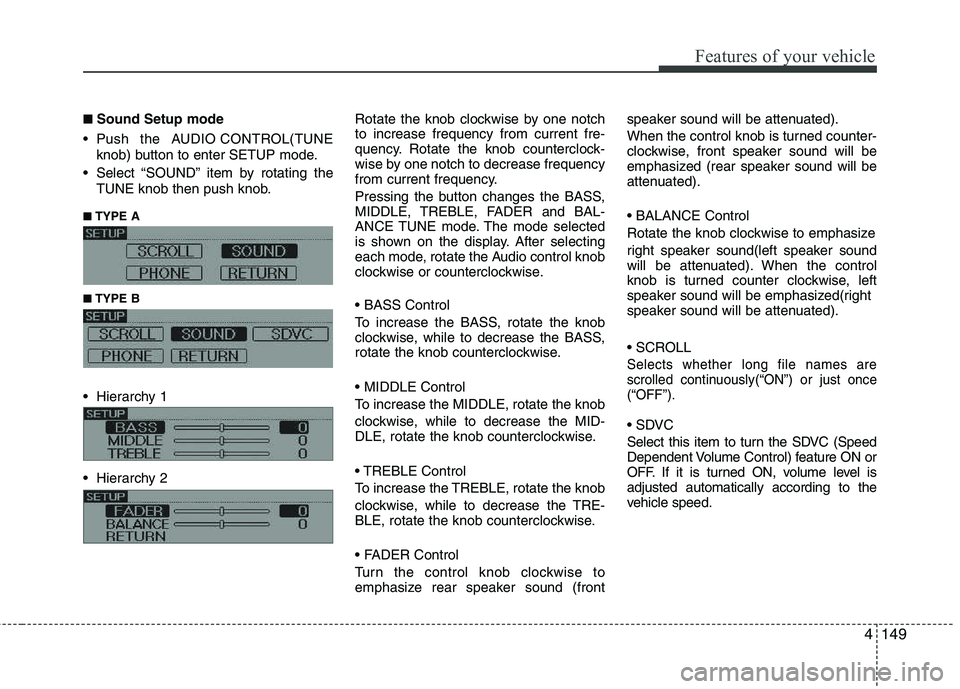
■■Sound Setup mode
Push the AUDIO CONTROL(TUNE knob) button to enter SETUP mode.
Select “SOUND” item by rotating the TUNE knob then push knob.
■
■ TYPE A
■
■ TYPE B
Hierarchy 1
Hierarchy 2 Rotate the knob clockwise by one notch to increase frequency from current fre-
quency. Rotate the knob counterclock-
wise by one notch to decrease frequency
from current frequency.
Pressing the button changes the BASS,
MIDDLE, TREBLE, FADER and BAL-
ANCE TUNE mode. The mode selected
is shown on the display. After selecting
each mode, rotate the Audio control knob
clockwise or counterclockwise.
To increase the BASS, rotate the knob
clockwise, while to decrease the BASS,
rotate the knob counterclockwise.
To increase the MIDDLE, rotate the knob
clockwise, while to decrease the MID-
DLE, rotate the knob counterclockwise.
Control
To increase the TREBLE, rotate the knob
clockwise, while to decrease the TRE-
BLE, rotate the knob counterclockwise.
Turn the control knob clockwise to
emphasize rear speaker sound (frontspeaker sound will be attenuated).
When the control knob is turned counter-
clockwise, front speaker sound will be
emphasized (rear speaker sound will be
attenuated).
Rotate the knob clockwise to emphasize
right speaker sound(left speaker sound
will be attenuated). When the control
knob is turned counter clockwise, left
speaker sound will be emphasized(right
speaker sound will be attenuated).
Selects whether long file names are
scrolled continuously(“ON”) or just once(“OFF”).
Select this item to turn the SDVC (Speed
Dependent Volume Control) feature ON or
OFF. If it is turned ON, volume level isadjusted automatically according to the
vehicle speed.
Page 229 of 417
Features of your vehicle
152
4
Using CD Player
1. CD Slot
Please place the CD with the printed
side upward, and then gently push in.
CDP models support both 8cm and 12 cm CDs.
CDC models support only 12 cm CD.
If VCD, Data CD, DVD are loaded, "MEDIA ERROR" message will appear and the CD will eject.
2. CD Eject Button
Press this button to eject the CD during CD playback.
If there is no CD in the deck, "NO DISC" will be displayed for 5 seconds
and returns to the previous mode.
❈ ALL EJECT(CDC ONLY)
Press this button for more than 0.8 second to eject all discs inside the
decks in the respective order. 3. RANDOM Button
Press this button for less than 0.8 second
to activate 'RDM' mode and more than
0.8 second to activate 'ALL RDM' mode.
RDM : Only files/tracks in a folder/disc
are played in random sequence.
ALL RDM (MP3/WMA Only) : All files /tracks in a folder/disc are played in
random sequence.
4. TRACK Button
Press [TRACK ] to return to the beginning of the current track(file).
Press again within 1 seconds to return
to the previous track(file).
Press and hold [TRACK ] to initiate rewind search.
Press [SEEK ] for less than 0.8 sec- ond to advance the next track(file).
Press and hold [SEEK ] to initiate fast forward search. 5. REPEAT Button
Press this button for less than 0.8 second
to activate 'RPT' mode and more than 0.8
second to activate 'FLD RPT' mode.
RPT : Only a track(file) is played
repeatedly.
FLD RPT(MP3/WMA Only) : Only files in a folder are played repeatedly.
6. SCROLL Button
File names are scrolled for 5 seconds on
the display.
7. CD Indicator(CD Player:PA910HMGB)
When the ignition switch is in the ACCor ON position and if the CD is loaded,this indicator is illuminated.
8. CD Button
If the CD is loaded, turns to CD mode.
If there is no Disc in the deck, it dis- plays "NO DISC" for 5 seconds and
returns to the previous mode.
9. SCAN Button
Plays back the first 10 seconds of each
song in the CD.
CAUTION
Don’t insert a CD, if CD indicator is illuminated in the CDP.
Page 230 of 417
4153
Features of your vehicle
10. TUNE Knob & ENTER Button
Turn the knob clockwise to display theTrack NO(File name) after the current song.
Turn the knob counterclockwise to dis- play the Track NO(File Name) beforethe current song.
To select the displayed song, press the button.
11. FOLDER Button
Folder name/File name(the first song in the folder) is moved up or down from
the currently playing folder.
To select the displayed folder, press ENTER(NO.10) button.
12. INFO(INFORMATION) Button
Displays the information of the current CD
TRACK(FILE) as below when the button
is pressed each time. CDDA : DISC TITLE ➟DISC ARTIST ➟
TRACK TITLE ➟TRACK ARTIST ➟TOTAL
TRACK...
MP3/WMA : FILE NAME ➟TITLE ➟
ARTIST ➟ALBUM ➟FOLDER NAME ➟
TOTAL FILE...13. DISC Button(CD Changer:PA 960)
Disc is moved up or down from the cur-
rently playing disc.
14. LOAD Button(CD Changer:PA 960)
How to load a CD
Press [LOAD] for less than 0.8 second.
An empty slot is selected and the CD
number indicator(a) blinks on the LCD.
After "WAIT" is displayed for a moment, "INSERT DISC(1~6)" is diplayed and
the CD slot indicator(b) blinks.
Insert a CD while the slot indicator blinks.
How to load CDs(ALL Load)
Press [LOAD] for more than 0.8 sec- ond.
An empty slot is selected and the CD number indicator(a) blinks on the LCD.
After "WAIT" is displayed for a moment, "INSERT DISC(1~6)" is
diplayed and the CD slot indicator(b)
blinks.
Insert a CD while the slot indicator blinks. After the CD is inserted, the rest of the
empty CD slots' number blink.
Repeat step 2 and 3 until all of the slots are loaded.CAUTION
Insert a CD only while "Insert Disc(1~6)" is displayed and theslot indicator blinks.
Don't insert two CDs for one oper- ation.
Page 235 of 417
Features of your vehicle
158
4
Using USB device
1. RANDOM Button
Press this button for less than 0.8 second
to activate 'RDM' mode and more than
0.8 second to activate 'ALL RDM' mode.
RDM : Only files in a folder are played
back in random sequence.
ALL RDM : All files in a USB memory are played back in random sequence.
2. TRACK Button
Press [TRACK ] to return to the beginning of the current file.
Press again within 1 seconds to return
the previous file.
Press and hold [TRACK ] to initiate rewind search.
Press [TRACK ] for less than 0.8 second to advance the next file.
Press and hold [TRACK ] to initiate fast forward search. 3. REPEAT Button
Press this button for less than 0.8 second
to activate 'RPT' mode and more than
0.8 second to activate 'FLD RPT' mode.
RPT : Only a file is played repeatedly.
FLD RPT : Only files in a folder are
played repeatedly.
4. SCROLL Button
File names are scrolled for 5 seconds on
the display.
5. AUX/USB Button
If auxiliary device/USB/ is connected, it turns to USB/AUX mode and toggles
as below when the button is pressed
each time.
AUX/USB : AUX ➟USB ➟AUX...
If no auxiliary device and USB is con- nected, it displays "No Media" for 5
seconds and returns to the previous
mode. 6. INFO(INFORMATION) Button
Displays the information of the current
CD TRACK(FILE) as below when the
button is pressed each time. FILE NAME
➟TITLE ➟ARTIST ➟ALBUM
➟ FOLDER NAME ➟TOTAL FILE...
7. TUNE Knob & ENTER Button
Turn this knob clockwise to display the File name after the current song.
Turn this knob counterclockwise to dis- play the File name before the current song.
To select the displayed song, press the button.
8. FOLDER Button
Folder name/File name(the first song in the folder) is moved up or down from
currently playing folder.
To select the displayed folder, press ENTER(NO.6) button.
9. SCAN Button
Plays back the first 10 seconds of each
song in the USB memory.
Page 236 of 417
4159
Features of your vehicle
Using iPod®
1. RANDOM Button
Press this button for less than 0.8 second
to activate ' ' mode and more than 0.8
second to activate ''mode.
'' : All songs in the current catego-
ry are played in random.
'' : An album in the iPod is selected
in random and is played in the order of
the songs in the album.
2. TRACK Button
Press [TRACK ] to return to the beginning of the current file.
Press again within 1 second to return
the previous file.
Press and hold [TRACK ] to initiate rewind search.
Press [TRACK ] for less than 0.8 second to advance to the next file.
Press and hold [TRACK ] to initiate fast forward search.
3. REPEAT Button
A single song is played repeatedly. 4. SCROLL Button
File names are scrolled for 5 seconds on
the display.
5. AUX/USB Button (iPod)
If iPod is connected, it turns to iPod mode.
6. INFO(INFORMATION) Button
Displays the information of the file cur-
rently played as below when the button is
pressed each time. TITLE
➟
ARTIST ➟ALBUM...
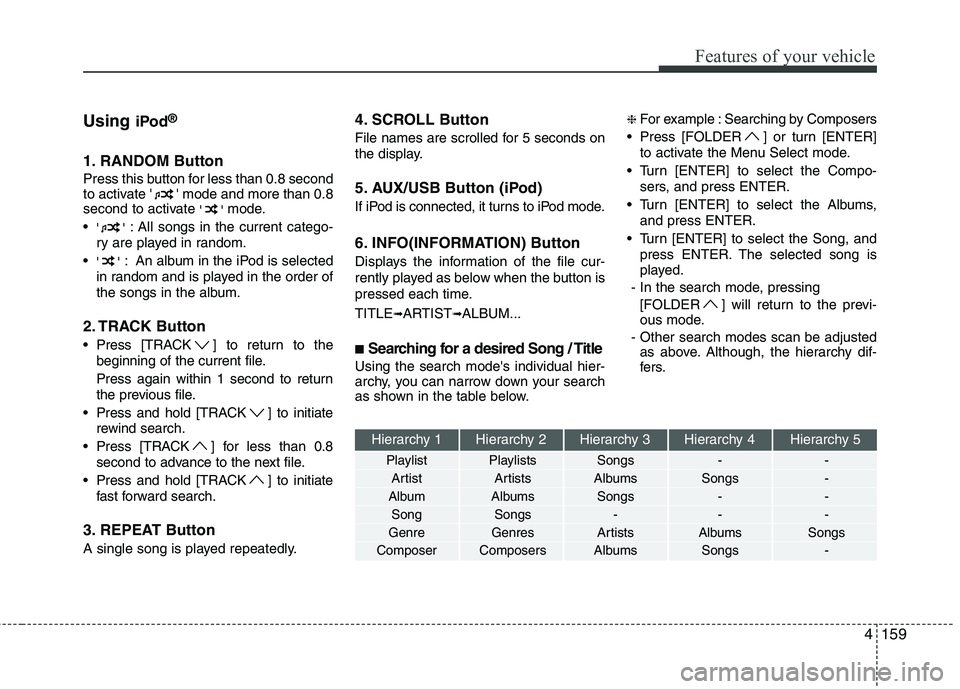
■ Searching for a desired Song / Title
Using the search mode's individual hier-
archy, you can narrow down your search
as shown in the table below. ❈
For example : Searching by Composers
Press [FOLDER ] or turn [ENTER] to activate the Menu Select mode.
Turn [ENTER] to select the Compo- sers, and press ENTER.
Turn [ENTER] to select the Albums, and press ENTER.
Turn [ENTER] to select the Song, and press ENTER. The selected song is
played.
- In the search mode, pressing [FOLDER ] will return to the previ-
ous mode.
- Other search modes scan be adjusted as above. Although, the hierarchy dif-
fers.
Hierarchy 1 Hierarchy 2 Hierarchy 3 Hierarchy 4 Hierarchy 5
Playlist Playlists Songs - -
Artist Artists Albums Songs -
Album Albums Songs - - Song Songs - - -
Genre Genres Artists Albums Songs
Composer Composers Albums Songs -
Page 237 of 417
Features of your vehicle
160
4
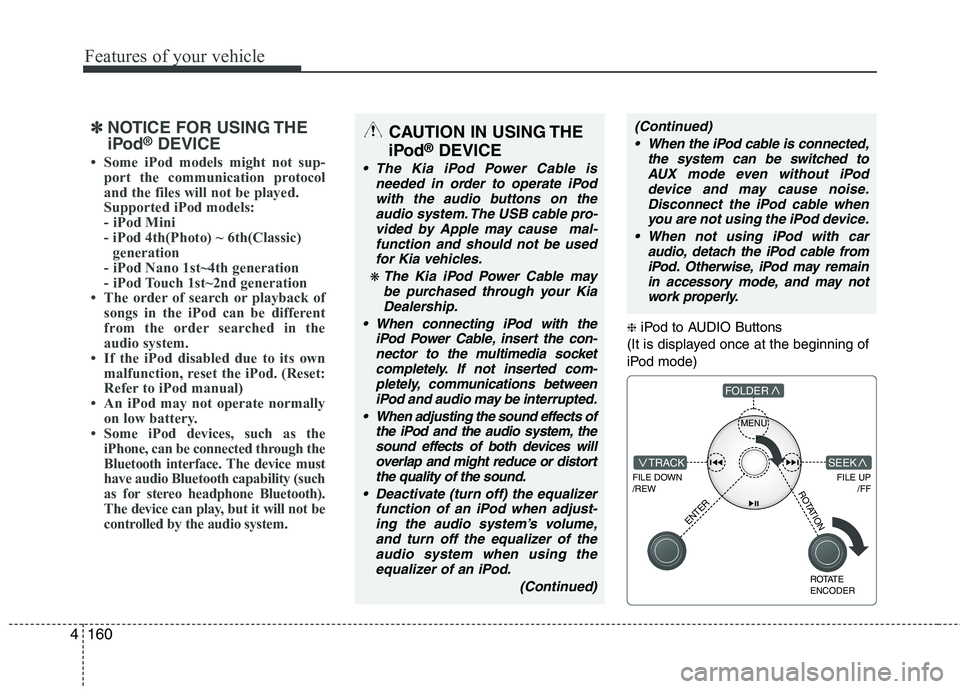
❈ iPod to AUDIO Buttons
(It is displayed once at the beginning of
iPod mode)
MENU
FILE DOWN /REW
FILE UP /FFTRACK
FOLDER
ENTER
ROTATE ENCODER
SEEK
ROTATION
✽✽NOTICE FOR USING THE
iPod ®
DEVICE