USB KIA MOHAVE 2014 Owners Manual
[x] Cancel search | Manufacturer: KIA, Model Year: 2014, Model line: MOHAVE, Model: KIA MOHAVE 2014Pages: 417, PDF Size: 38.72 MB
Page 15 of 417
23
Your vehicle at a glance
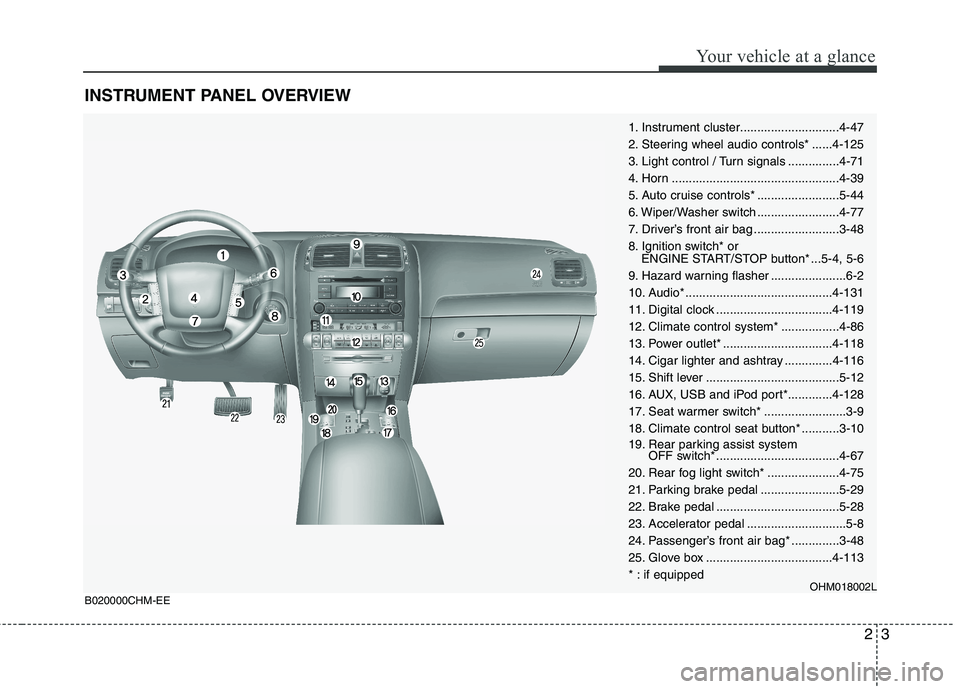
INSTRUMENT PANEL OVERVIEW
1. Instrument cluster.............................4-47
2. Steering wheel audio controls* ......4-125
3. Light control / Turn signals ...............4-71
4. Horn .................................................4-39
5. Auto cruise controls* ........................5-44
6. Wiper/Washer switch ........................4-77
7. Driver’s front air bag .........................3-48
8. Ignition switch* orENGINE START/STOP button* ...5-4, 5-6
9. Hazard warning flasher ......................6-2
10. Audio* ...........................................4-131
11. Digital clock ..................................4-119
12. Climate control system* .................4-86
13. Power outlet* ................................4-118
14. Cigar lighter and ashtray ..............4-116
15. Shift lever .......................................5-12
16. AUX, USB and iPod port*.............4-128
17. Seat warmer switch* ........................3-9
18. Climate control seat button* ...........3-10
19. Rear parking assist system OFF switch* ....................................4-67
20. Rear fog light switch* .....................4-75
21. Parking brake pedal .......................5-29
22. Brake pedal ....................................5-28
23. Accelerator pedal .............................5-8
24. Passenger’s front air bag* ..............3-48
25. Glove box .....................................4-113
* : if equipped OHM018002L
B020000CHM-EE
Page 204 of 417
4127
Features of your vehicle
D300200AEN
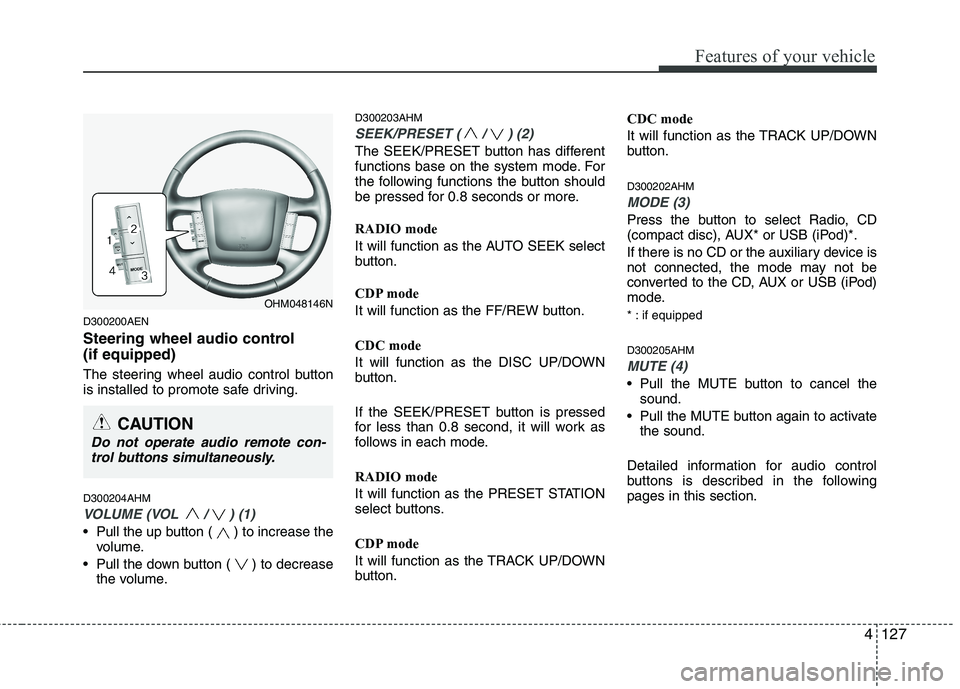
Steering wheel audio control (if equipped)
The steering wheel audio control button
is installed to promote safe driving. D300204AHM
VOLUME (VOL / ) (1)
• Pull the up button ( ) to increase thevolume.
Pull the down button ( ) to decrease the volume. D300203AHM
SEEK/PRESET ( / ) (2)
The SEEK/PRESET button has different
functions base on the system mode. For
the following functions the button should
be pressed for 0.8 seconds or more. RADIO mode
It will function as the AUTO SEEK select
button.
CDP mode
It will function as the FF/REW button. CDC mode
It will function as the DISC UP/DOWN
button.
If the SEEK/PRESET button is pressed
for less than 0.8 second, it will work as
follows in each mode. RADIO mode
It will function as the PRESET STATION
select buttons.
CDP mode
It will function as the TRACK UP/DOWN
button.
CDC mode
It will function as the TRACK UP/DOWN
button. D300202AHM
MODE (3)
Press the button to select Radio, CD
(compact disc), AUX* or USB (iPod)*.
If there is no CD or the auxiliary device is
not connected, the mode may not be
converted to the CD, AUX or USB (iPod)
mode.
* : if equipped D300205AHM
MUTE (4)
Pull the MUTE button to cancel the
sound.
Pull the MUTE button again to activate the sound.
Detailed information for audio control
buttons is described in the followingpages in this section.
OHM048146N
CAUTION
Do not operate audio remote con- trol buttons simultaneously.
Page 205 of 417
Features of your vehicle
128
4
D300600AHM-EE
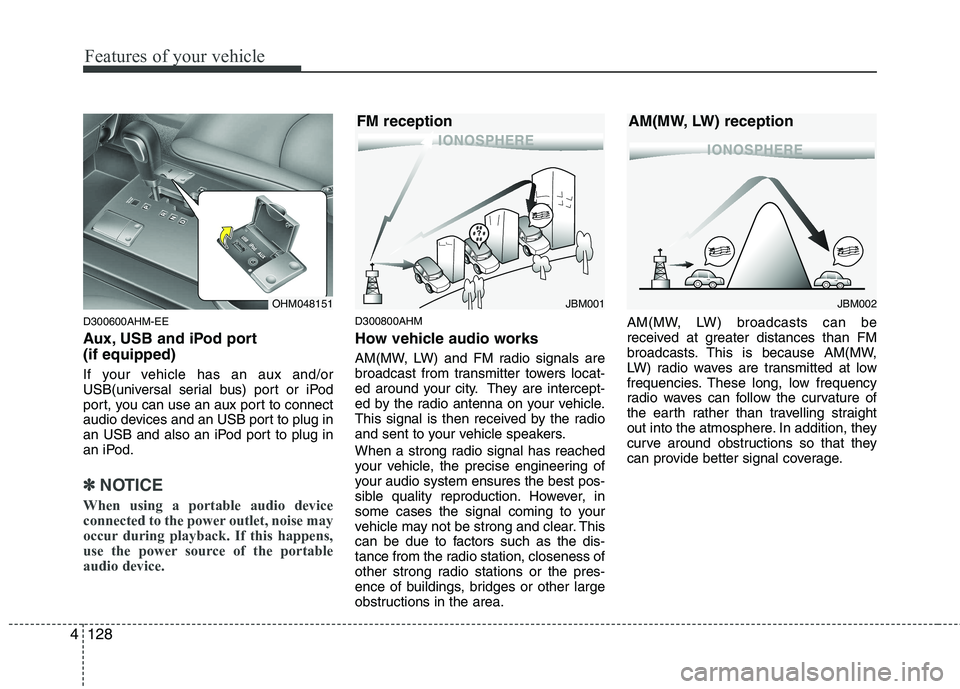
Aux, USB and iPod port (if equipped)
If your vehicle has an aux and/or
USB(universal serial bus) port or iPod
port, you can use an aux port to connect
audio devices and an USB port to plug in
an USB and also an iPod port to plug in
an iPod.
✽✽
NOTICE
When using a portable audio device
connected to the power outlet, noise may
occur during playback. If this happens,
use the power source of the portableaudio device.
D300800AHM
How vehicle audio works
AM(MW, LW) and FM radio signals are
broadcast from transmitter towers locat-
ed around your city. They are intercept-
ed by the radio antenna on your vehicle.
This signal is then received by the radio
and sent to your vehicle speakers.
When a strong radio signal has reached
your vehicle, the precise engineering of
your audio system ensures the best pos-
sible quality reproduction. However, in
some cases the signal coming to your
vehicle may not be strong and clear. This
can be due to factors such as the dis-
tance from the radio station, closeness of
other strong radio stations or the pres-
ence of buildings, bridges or other large
obstructions in the area. AM(MW, LW) broadcasts can be
received at greater distances than FM
broadcasts. This is because AM(MW,
LW) radio waves are transmitted at low
frequencies. These long, low frequency
radio waves can follow the curvature of
the earth rather than travelling straight
out into the atmosphere. In addition, they
curve around obstructions so that they
can provide better signal coverage.
JBM002
AM(MW, LW) receptionJBM001
FM receptionOHM048151
Page 216 of 417
4139
Features of your vehicle
CAUTION - Using USB
device
To use the external USB device,
make sure the device is not con-
nected when starting the vehicle.Connect the device after starting.
If you start the vehicle when the USB device is mounted, it may
damage the USB device. (USB is not ESA)
If the vehicle is started or turned off while the external USB deviceis connected, the external USB
device may not work.
It may not play inauthentic MP3 or WMA files.
1) It can only play MP3 files with the compression rate between8Kbps~320Kbps.
2) It can only play WMA music files with the compression ratebetween 8Kbps~320Kbps.
Take cautions for static electricity when connect or disconnect the
external USB device.
Encoded MP3 PLAYER is not rec- ognizable.
(Continued)
(Continued) Depending on the condition of the external USB device, the con-nected external USB device canbe unrecognizable.
When the formatted byte/sector setting of External USB devices isnot either 512byte or 2048byte,then the device will not be recog-
nized.
USB only a device formatted to FAT 12/16/32.
USB device without USB I/F (IMPLEMENTERS FORUM)authentication may not be recog-
nizable.
Make sure the USB connection terminal does not come in con-tact with human body or any
object.
If you repeat connecting or dis- connecting USB device in a shortperiod of time, it may break thedevice.
You might hear a strange noise when connecting or disconnect-ing USB device.
(Continued)(Continued) If you disconnect the external USB device during playback inUSB mode, the external USBdevice can be damaged or mal-
function. Therefore, disconnectthe external USB device when the engine is turned off or in another
mode. (e.g., radio or CD)
Depending on the type and capacity of the external USBdevice or the type of files storedin the device, there is a difference
in the time taken for recognitionof the device, so you may have to wait.
Do not use the USB device for other purposes than playing
music files.
Use of USB accessories such as recharger or heater using USB I/F(IMPLEMENTERS FORUM) may
lower the performance or cause trouble.
(Continued)
Page 217 of 417
Features of your vehicle
140
4
(Continued)
If you use devices such as a USB hub you purchased separately,the vehicle’s audio system maynot recognize the USB device.
Connect the USB device directly to the multimedia terminal of thevehicle.
If the USB device is divided by logical drives, only the music fileson the highest-priority drive arerecognized by the vehicle’s audio.
Devices such as MP3 Player/ Cellular phone/Digital camera,
those are not recognizable bystandard USB I/F (IMPLE-MENTERS FORUM) can be unrec- ognizable.
USB devices other than standard- ized goods (METAL COVER TYPEUSB) can be unrecognizable.
USB flash memory reader (such as CF, SD, microSD, etc.) or exter-
nal-HDD type devices can beunrecognizable.
Music files protected by DRM(DIGITAL RIGHTS MANAGE-MENT) are not recognizable.
(Continued)(Continued) The data in the USB memory may get lost while using this AUDIO. Itis recommended to back up impor-tant data.
Please avoid using USB memory products which can be used askey chains or cellular phoneaccessories as they could cause
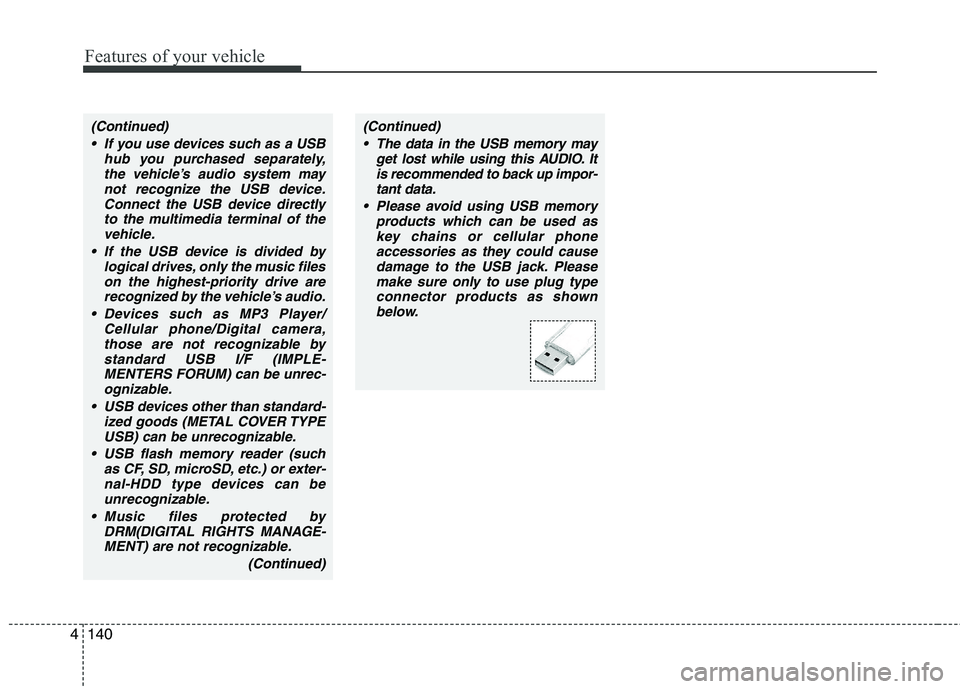
damage to the USB jack. Pleasemake sure only to use plug typeconnector products as shown below.
Page 218 of 417
4141
Features of your vehicle
A-200HMG
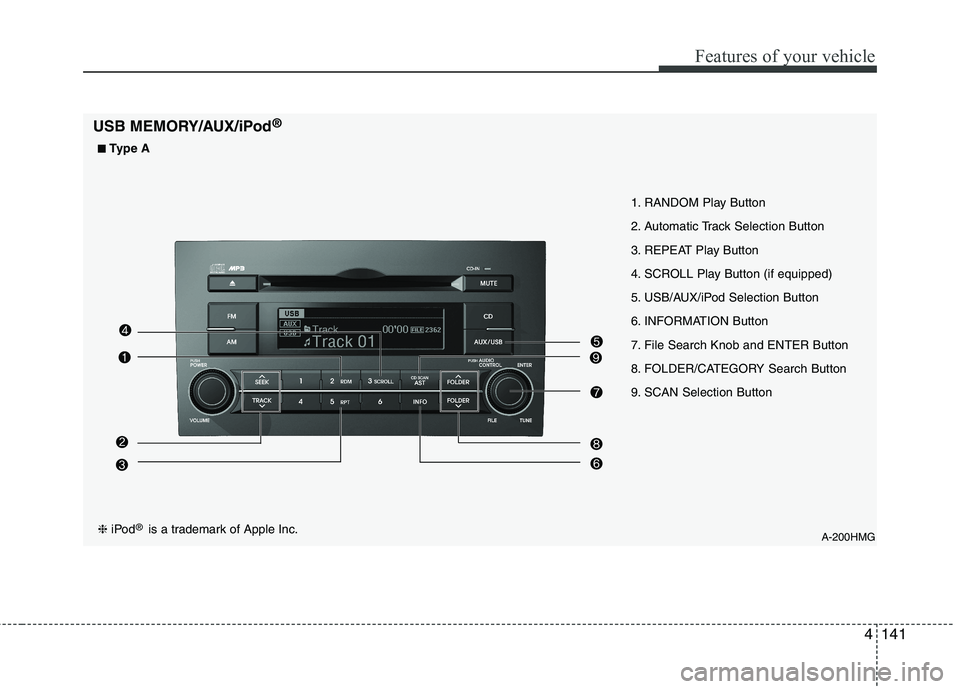
1. RANDOM Play Button
2. Automatic Track Selection Button
3. REPEAT Play Button
4. SCROLL Play Button (if equipped)
5. USB/AUX/iPod Selection Button
6. INFORMATION Button
7. File Search Knob and ENTER Button
8. FOLDER/CATEGORY Search Button
9. SCAN Selection Button
USB MEMORY/AUX/iPod
®❈
iPod ®
is a trademark of Apple Inc.
■
■
Type A
Page 219 of 417
Features of your vehicle
142
4
A-300HMG
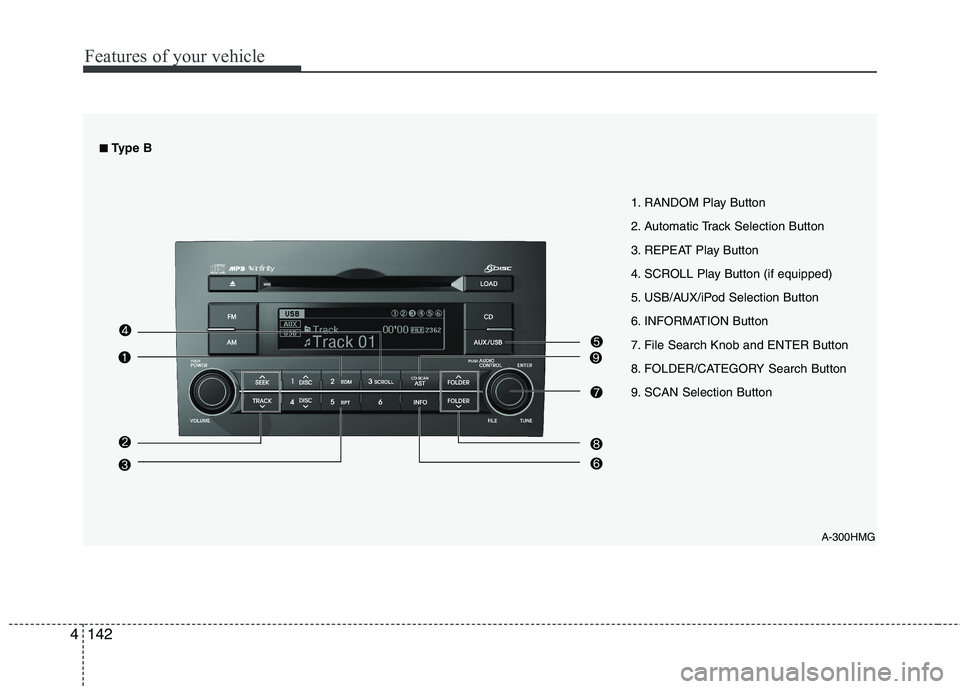
1. RANDOM Play Button
2. Automatic Track Selection Button
3. REPEAT Play Button
4. SCROLL Play Button (if equipped)
5. USB/AUX/iPod Selection Button
6. INFORMATION Button
7. File Search Knob and ENTER Button
8. FOLDER/CATEGORY Search Button
9. SCAN Selection Button
■■
Type B
Page 220 of 417
4143
Features of your vehicle
How to Activate USB MEMORY
1. RANDOM Play Button
Press this button for less than 0.8 second
to activate 'RDM' mode and more than
0.8 second to activate 'ALL RDM' mode.
RDM : Only files in a folder are playedback in random sequence.
ALL RDM : All files in a USB memory are played back in random sequence.
2. Automatic Track Selection Button
Press [TRACK ] to return to thebeginning of the current file.
Press again within 1 seconds to return
the previous file.
Press and hold [TRACK ] to initiate rewind search.
Press [SEEK ] for less than 0.8 sec- ond to advance the next file.
Press and hold [SEEK ] to initiate fast forward search.
3. REPEAT Play Button
Press this button for less than 0.8 second
to activate 'RPT' mode and more than
0.8 second to activate 'FLD RPT' mode.
RPT : Only a file is played repeatedly.
FLD RPT : Only files in a folder areplayed repeatedly.
4. SCROLL Play Button (if equipped)
File names are scrolled for 5 seconds on
the display.
5. USB/AUX Selection Button
If auxiliary device/USB/ is connected, itturns to USB/AUX mode and toggles
as below when the button is pressed
each time.
AUX/USB : AUX ➟USB ➟AUX.......
If no auxiliary device and USB is con- nected, it displays "No Media" for 5
seconds and returns to the previous
mode.
6. INFORMATION Button
Displays the information of the current
CD TRACK(FILE) as below when the
button is pressed each time. FILE NAME ➟
TITLE ➟ARTIST ➟ALBUM
➟ FOLDER NAME ➟TOTAL FILE...
7. File Search Knob and
ENTER Button
Turn this knob clockwise to display the
File name after the current song.
Turn this knob counterclockwise to dis- play the File name before the current song.
To select the displayed song, press the button.
8. FOLDER Search Button
Folder name/File name(the first songin the folder) is moved up or down from
currently playing folder.
To select the displayed folder, press ENTER(NO.6) button.
9. SCAN Selection Button
Plays back the first 10 seconds of eachsong in the USB memory.
Page 231 of 417
Features of your vehicle
154
4
CAUTION IN USING
USB DEVICE
To use an external USB device, make sure the device is not con-nected when starting up the vehi-cle. Connect the device afterstarting up.
If you start the engine when the USB device is connected, it maydamage the USB device. (USBflashdrives are very sensitive to
electric shock.)
If the engine is started up or turned off while the external USBdevice is connected, the externalUSB device may not work.
It may not play inauthentic MP3 or WMA files.
1) It can only play MP3 files with the compression rate between8Kbps~320Kbps.
2) It can only play WMA music files with the compression ratebetween 8Kbps~320Kbps.
Take precautions for static electrici- ty when connecting or disconnect-ing the external USB device.
(Continued)
(Continued) An encrypted MP3 PLAYER is not recognizable.
Depending on the condition of the external USB device, the con-
nected external USB device can be unrecognizable.
When the formatted byte/sector setting of External USB device isnot either 512BYTE or 2048BYTE,
then the device will not be recog- nized.
Use only a USB device formatted to FAT 12/16/32.
USB devices without USB I/F authentication may not be recog-nizable.
Make sure the USB connection terminal does not come in contactwith the human body or other
objects.
If you repeatedly connect or dis- connect the USB device in a shortperiod of time, it may break thedevice.
You may hear a strange noise when connecting or disconnect-ing a USB device.
(Continued)(Continued) If you disconnect the external USB device during playback in USBmode, the external USB device canbe damaged or may malfunction.
Therefore, disconnect the externalUSB device when the audio is turned off or in another mode. (e.g,
Radio or CD)
Depending on the type and capac- ity of the external USB device orthe type of the files stored in thedevice, there is a difference in the
time taken for recognition of thedevice.
Do not use the USB device for pur- poses other than playing musicfiles.
Use of USB accessories such as rechargers or heaters using USBI/F may lower performance orcause trouble.
If you use devices such as a USB hub purchased separately, thevehicle’s audio system may not recognize the USB device. In thatcase, connect the USB device
directly to the multimedia termi- nal of the vehicle.
(Continued)
Page 232 of 417
4155
Features of your vehicle
(Continued)
If the USB device is divided by logical drives, only the music fileson the highest-priority drive arerecognized by car audio.
Devices such as MP3 Player/ Cellular phone/Digital camera canbe unrecognizable by standardUSB I/F can be unrecognizable.
Some non-standard USB devices (METAL COVER TYPE USB) can beunrecognizable.
Some USB flash memory readers (such as CF, SD, microSD, etc.) orexternal-HDD type devices can be unrecognizable.
Music files protected by DRM (DIGITAL RIGHTS MANAGEMENT)are not recognizable.
The data in the USB memory may be lost while using this audio.
Always back up important data ona personal storage device.
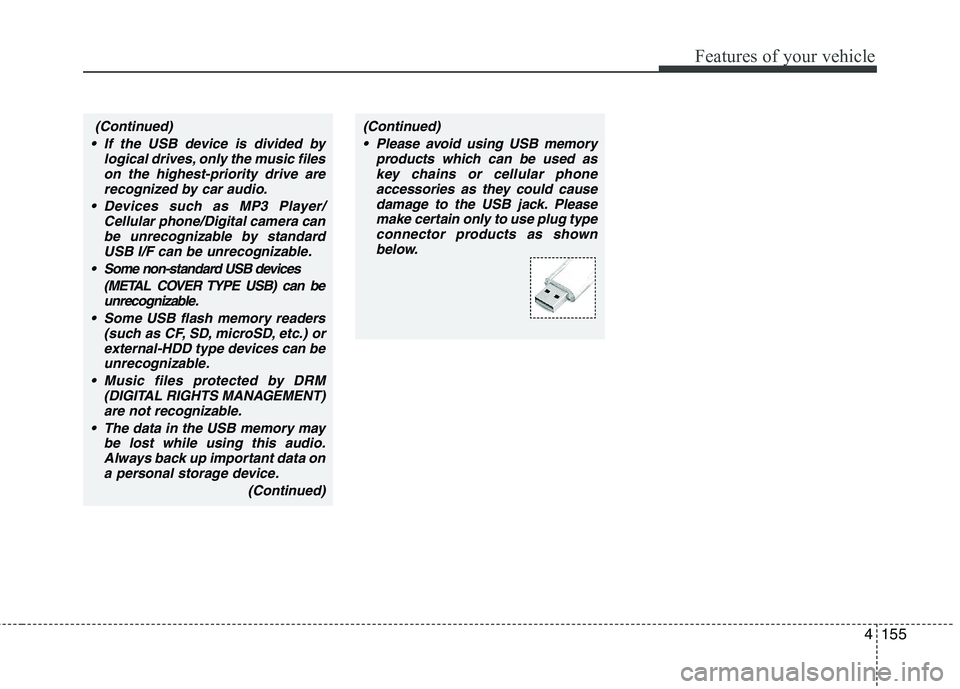
(Continued)(Continued) Please avoid using USB memory products which can be used askey chains or cellular phone
accessories as they could causedamage to the USB jack. Pleasemake certain only to use plug type
connector products as shownbelow.