instrument cluster KIA NIRO 2017 User Guide
[x] Cancel search | Manufacturer: KIA, Model Year: 2017, Model line: NIRO, Model: KIA NIRO 2017Pages: 552, PDF Size: 14.92 MB
Page 321 of 552
633
Driving your vehicle
VSM operation
When the VSM is in operation, ESC
indicator light ( ) blinks.
When the vehicle stability manage-
ment is operating properly, you can
feel a slight pulsation in the vehicle
and/or abnormal steering responses
(EPS- Electronic Power Steering).
This is only the effect of brake and
EPS control and indicates nothing
unusual.
The VSM does not operate when:
Driving on a sloping road such as agradient or incline
Driving in reverse
ESC OFF indicator light ( ) remains on the instrument cluster
EPS indicator light remains on the instrument cluster
VSM operation off
If you press the ESC OFF button to
turn off the ESC, the VSM will also
cancel and the ESC OFF indicator
light ( ) illuminates.
To turn on the VSM, press the button
again. The ESC OFF indicator light
goes out.
Malfunction indicator
The VSM can be deactivated even if
you don’t cancel the VSM operation
by pressing the ESC OFF button. It
indicates that a malfunction has
been detected somewhere in the
Electric Power Steering system or
VSM system. If the ESC indicator
light ( ) or EPS warning light
remains on, take your vehicle to an
authorized Kia dealer and have the
system checked.
✽ ✽ NOTICE
• The VSM is designed to function
above approximately 13 mph (22
km/h) on curves.
• The VSM is designed to function above approximately 6 mph (10
km/h) when a vehicle is braking on
a split-mu surface. A split-mu sur-
face is made of two surfaces which
have different friction forces.
Page 325 of 552
637
Driving your vehicle
The warning light illumi-
nates on the LCD display,
when you cancel the AEB
system. The driver can
monitor the AEB ON/OFF status on
the LCD display. When the warning
light remains ON with the AEB acti-
vated, have your vehicle inspected
by an authorized Kia dealer.
The driver can select the initial warn-
ing activation time in the User
Settings in the instrument cluster
LCD display. The options for the ini-
tial Forward Collision Warning
include the following:
selected, the initial
Forward Collision Warning
is activated earlier than
normal. This setting maxi-
mizes the amount of dis-
tance between the vehicle
or pedestrian ahead before
the initial warning occurs.
The driver feels it is too
sensitive to activate than
expectation, change it to
Normal. If the vehicle in
front stops abruptly, the
driver can notice the warn-
ing alarm is late even
though the early option is
selected.
selected, the initial
Forward Collision
Warning is activated nor-
mally. This setting allows
for a nominal amount of
distance between the
vehicle or pedestrian
ahead before the initial
warning occurs.
selected, the initial Forward
Collision Warning is activat-
ed later than normal. This
setting reduces the amount
of distance between the
vehicle or pedestrian ahead
before the initial warning
occurs. The driver can use it
when the traffic is not busy
on the road and driving
speed is lower.
Page 336 of 552
Driving your vehicle
48
6
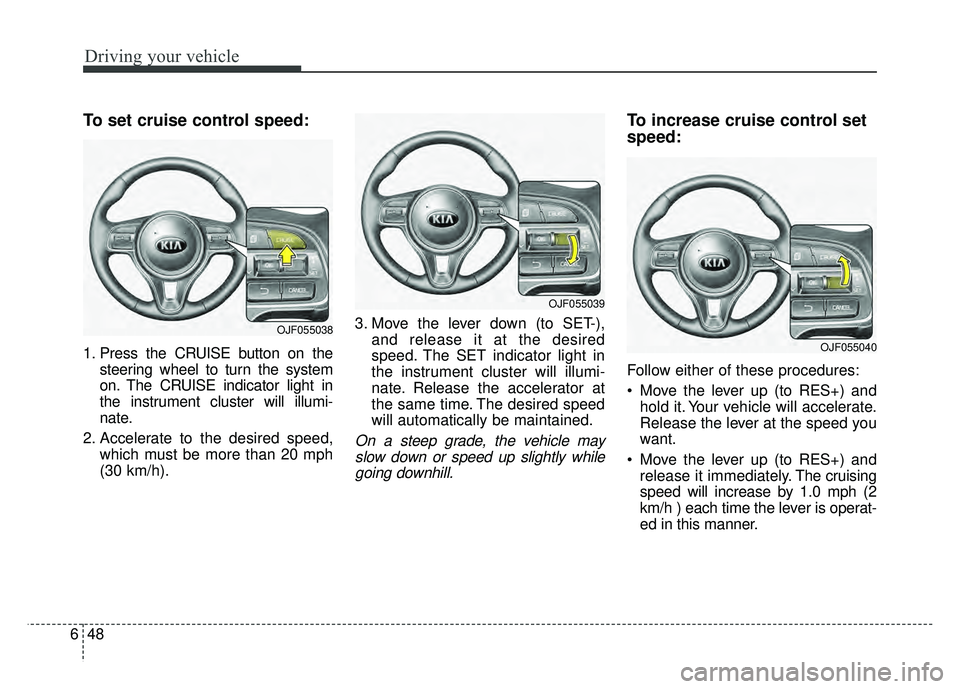
To set cruise control speed:
1. Press the CRUISE button on the
steering wheel to turn the system
on. The CRUISE indicator light in
the instrument cluster will illumi-
nate.
2. Accelerate to the desired speed, which must be more than 20 mph
(30 km/h). 3. Move the lever down (to SET-),
and release it at the desired
speed. The SET indicator light in
the instrument cluster will illumi-
nate. Release the accelerator at
the same time. The desired speed
will automatically be maintained.
On a steep grade, the vehicle mayslow down or speed up slightly whilegoing downhill.
To increase cruise control set
speed:
Follow either of these procedures:
Move the lever up (to RES+) and hold it. Your vehicle will accelerate.
Release the lever at the speed you
want.
Move the lever up (to RES+) and release it immediately. The cruising
speed will increase by 1.0 mph (2
km/h ) each time the lever is operat-
ed in this manner.
OJF055038
OJF055039
OJF055040
Page 338 of 552
Driving your vehicle
50
6
Each of these actions will cancel
cruise control operation (the SETindicator light in the instrument clus-ter will go off), but it will not turn thesystem off. If you wish to resumecruise control operation, move thelever up (to RES+). You will return toyour previously preset speed.To resume cruising speed at
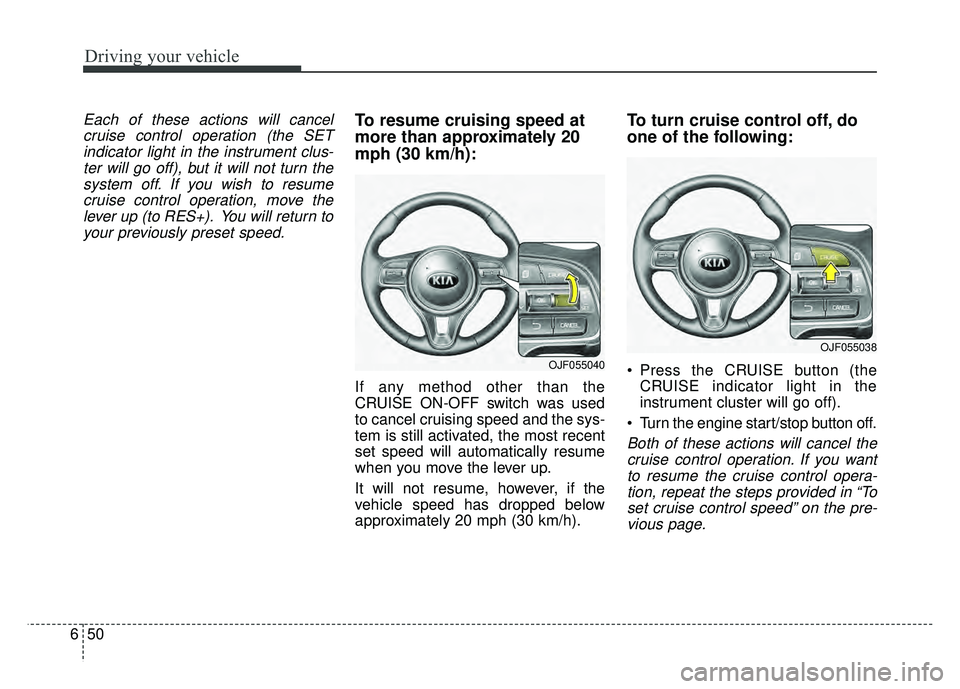
more than approximately 20
mph (30 km/h):
If any method other than the
CRUISE ON-OFF switch was used
to cancel cruising speed and the sys-
tem is still activated, the most recent
set speed will automatically resume
when you move the lever up.
It will not resume, however, if the
vehicle speed has dropped below
approximately 20 mph (30 km/h).
To turn cruise control off, do
one of the following:
Press the CRUISE button (the CRUISE indicator light in the
instrument cluster will go off).
Turn the engine start/stop button off.
Both of these actions will cancel the cruise control operation. If you wantto resume the cruise control opera-tion, repeat the steps provided in “Toset cruise control speed” on the pre-vious page.
OJF055040
OJF055038
Page 339 of 552
651
Driving your vehicle
SMART CRUISE CONTROL SYSTEM (SCC) (IF EQUIPPED)
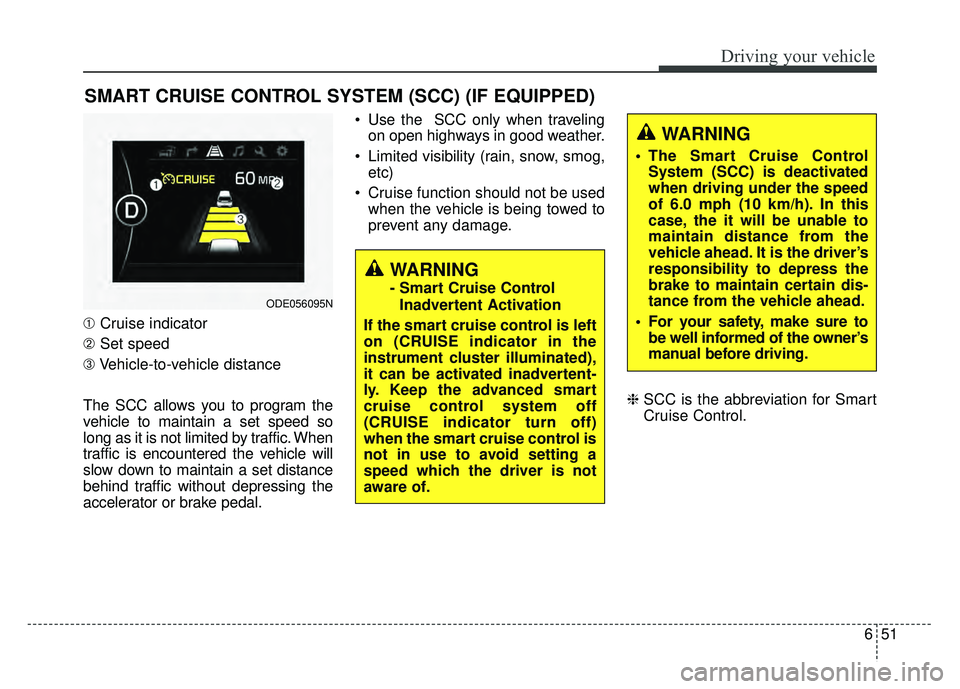
➀Cruise indicator
➁ Set speed
➂ Vehicle-to-vehicle distance
The SCC allows you to program the
vehicle to maintain a set speed so
long as it is not limited by traffic. When
traffic is encountered the vehicle will
slow down to maintain a set distance
behind traffic without depressing the
accelerator or brake pedal. Use the SCC only when traveling
on open highways in good weather.
Limited visibility (rain, snow, smog, etc)
Cruise function should not be used when the vehicle is being towed to
prevent any damage.
\bSCC is the abbreviation for Smart
Cruise Control.
WARNING
- Smart Cruise Control
Inadvertent Activation
If the smart cruise control is left
on (CRUISE indicator in the
instrument cluster illuminated),
it can be activated inadvertent-
ly. Keep the advanced smart
cruise control system off
(CRUISE indicator turn off)
when the smart cruise control is
not in use to avoid setting a
speed which the driver is not
aware of.ODE056095N
WARNING
The Smart Cruise Control System (SCC) is deactivated
when driving under the speed
of 6.0 mph (10 km/h). In this
case, the it will be unable to
maintain distance from the
vehicle ahead. It is the driver’s
responsibility to depress the
brake to maintain certain dis-
tance from the vehicle ahead.
For your safety, make sure to be well informed of the owner’s
manual before driving.
Page 340 of 552
Driving your vehicle
52
6
Speed setting (SCC)
To set cruise control speed:
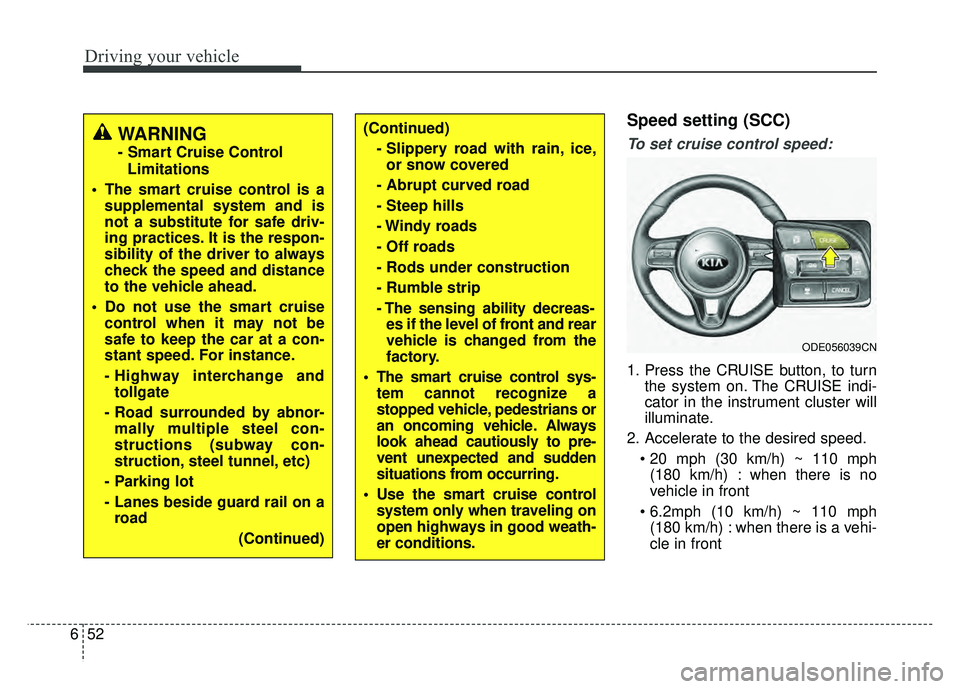
1. Press the CRUISE button, to turn
the system on. The CRUISE indi-
cator in the instrument cluster will
illuminate.
2. Accelerate to the desired speed. (180 km/h) : when there is no
vehicle in front
(180 km/h) : when there is a vehi-
cle in front
(Continued)
- Slippery road with rain, ice,or snow covered
- Abrupt curved road
- Steep hills
- Windy roads
- Off roads
- Rods under construction
- Rumble strip
- The sensing ability decreas- es if the level of front and rear
vehicle is changed from the
factory.
The smart cruise control sys- tem cannot recognize a
stopped vehicle, pedestrians or
an oncoming vehicle. Always
look ahead cautiously to pre-
vent unexpected and sudden
situations from occurring.
Use the smart cruise control system only when traveling on
open highways in good weath-
er conditions.
ODE056039CN
WARNING
- Smart Cruise Control
Limitations
The smart cruise control is a supplemental system and is
not a substitute for safe driv-
ing practices. It is the respon-
sibility of the driver to always
check the speed and distance
to the vehicle ahead.
Do not use the smart cruise control when it may not be
safe to keep the car at a con-
stant speed. For instance.
- Highway interchange andtollgate
- Road surrounded by abnor- mally multiple steel con-
structions (subway con-
struction, steel tunnel, etc)
- Parking lot
- Lanes beside guard rail on a road
(Continued)
Page 344 of 552
Driving your vehicle
56
6
To resume cruise control set
speed:
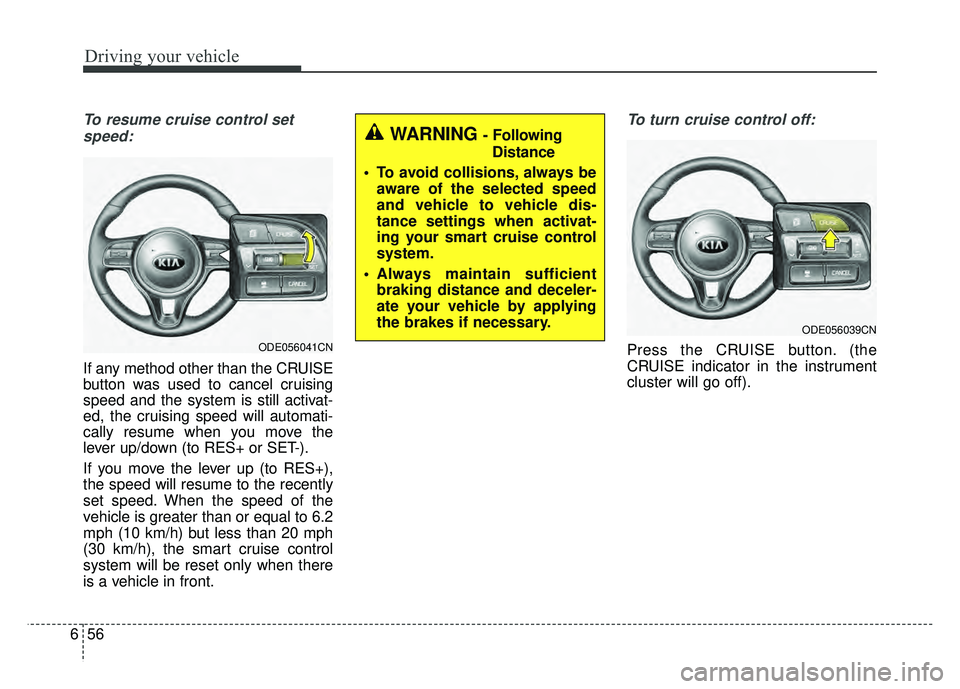
If any method other than the CRUISE
button was used to cancel cruising
speed and the system is still activat-
ed, the cruising speed will automati-
cally resume when you move the
lever up/down (to RES+ or SET-).
If you move the lever up (to RES+),
the speed will resume to the recently
set speed. When the speed of the
vehicle is greater than or equal to 6.2
mph (10 km/h) but less than 20 mph
(30 km/h), the smart cruise control
system will be reset only when there
is a vehicle in front.
To turn cruise control off:
Press the CRUISE button. (the
CRUISE indicator in the instrument
cluster will go off).
ODE056039CN
WARNING - Following Distance
To avoid collisions, always be aware of the selected speed
and vehicle to vehicle dis-
tance settings when activat-
ing your smart cruise control
system.
Always maintain sufficient braking distance and deceler-
ate your vehicle by applying
the brakes if necessary.
ODE056041CN
Page 391 of 552
What to do in an emergency
10
7
IF THE ENGINE OVERHEATS
If your temperature gauge indicates
overheating, you will experience a
loss of power, or hear loud pinging or
knocking, the engine is probably too
hot. If this happens, you should:
1. Turn on the emergency warning
flasher and stop in a safe place.
Move the shift lever to P (Park)
and engage the parking brake.
2. If hot steam does not come out from the engine room, carefully
open the engine room and check
whether the water pump connec-
tor is properly engaged. If the con-
nector is not properly engaged,
stop the engine immediately and
properly engage the connector.
Then, turn the engine on.
3. Turn on the air conditioner. 4. If the “HEV Warning” light turns on
in the driver instrument cluster, or
engine coolant or hot steam emits
from the engine coolant filler, stop
the engine immediately. Then, call
the nearest authorized Kia dealer
for assistance. If the “Engine
Warning” light remains illuminated
or the engine coolant is not flowing
out, keep the engine running.
Open the engine hood for ventila-
tion to help cool down the engine. 5. Check whether the engine coolant
temperature is low enough by
checking its temperature. If the
engine coolant level is low, please
check the connecting parts
between the radiator hose, heater
hose, and water pump for any
signs of leakage. When there is no
sign of leakage, please refill the
engine coolant. If causes and
signs of engine overheating such
as warning light illumination,
engine coolant leakage, or cooling
fan malfunction are found, stop the
vehicle the earliest. Then, call the
nearest authorized Kia dealer for
assistance.
WARNING- Under the
Hood
While the engine is running,
keep hair, hands and clothing
away from moving parts such
as the fan and drive belts to pre-
vent injury.
Page 484 of 552
861
Maintenance
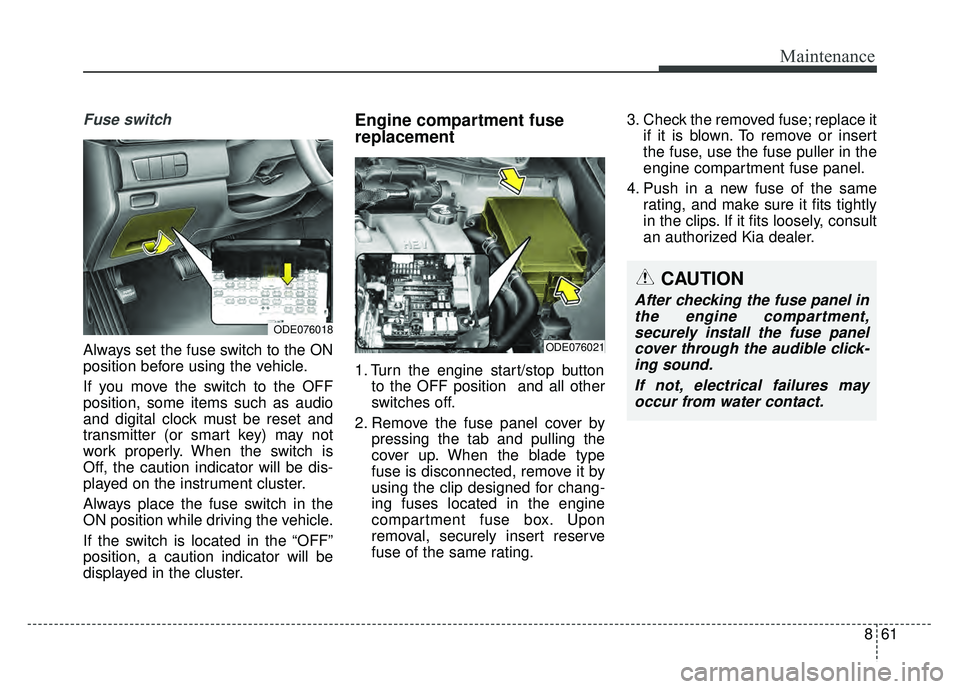
Fuse switch
Always set the fuse switch to the ON
position before using the vehicle.
If you move the switch to the OFF
position, some items such as audio
and digital clock must be reset and
transmitter (or smart key) may not
work properly. When the switch is
Off, the caution indicator will be dis-
played on the instrument cluster.
Always place the fuse switch in the
ON position while driving the vehicle.
If the switch is located in the “OFF”
position, a caution indicator will be
displayed in the cluster.
Engine compartment fuse
replacement
1. Turn the engine start/stop buttonto the OFF position and all other
switches off.
2. Remove the fuse panel cover by pressing the tab and pulling the
cover up. When the blade type
fuse is disconnected, remove it by
using the clip designed for chang-
ing fuses located in the engine
compartment fuse box. Upon
removal, securely insert reserve
fuse of the same rating. 3. Check the removed fuse; replace it
if it is blown. To remove or insert
the fuse, use the fuse puller in the
engine compartment fuse panel.
4. Push in a new fuse of the same rating, and make sure it fits tightly
in the clips. If it fits loosely, consult
an authorized Kia dealer.
CAUTION
After checking the fuse panel inthe engine compartment,securely install the fuse panelcover through the audible click-ing sound.
If not, electrical failures mayoccur from water contact.
ODE076018
ODE076021
Page 487 of 552

Maintenance
64
8
Instrument panel (Driver’s side fuse panel)
Fuse NameFuse ratingCircuit Protected
MODULE 510A
Crash Pad Switch, Electro Chromic Mirror, Audio / Video &Navigation Head Unit, Audio, Shift Lever
Indicator, VESS Unit, Air Conditioner Control Module, Head Lamp Leveling Device Actuator LH/RH, Driver
IMS Module, Front Seat Warmer Control Module, Rear Seat Warmer Control Module, Auto Head Lamp
Leveling Device Module
MODULE 410ALane Departure Warning Control Module, Crash Pad Switch, AEB Module, Blind Spot Detection Radar Left
Handle side/Right Handle side
INTERIOR
LAMP10ALuggage Lamp, Ignition Key ILL. & Door Warning Switch, Front Vanity Lamp LH/RH, Room Lamp, Overhead
Console Lamp
A/BAG15ASRS (Supplemental Restraint System) Control Module
IG 125APrinted Circuit Board Block (Fuse - F35, F36, F37, F38)
CLUSTER10AInstrument Cluster
MODULE 310ABCM (Body Control Module), Dual clutch transmission Shift Lever, Driver/Passenger Door Module, Stop
Lamp Switch
MEMORY 27.5AActive Air Flap Unit
MODULE 810AElectric Water Pump (Engine), Active Air Flap Unit, VPD Sensor,
E/R Junction Block (RLY. 4), BMS Control Module
A/BAG IND7.5AAir Conditioner Control Module, Instrument Cluster
START7.5A[Without Smart Key & Without Immobilizer] Burglaralarm Relay
[With Smart Key / With Immobilizer] Inhibitor Switch