instrument cluster KIA NIRO 2018 Owners Manual
[x] Cancel search | Manufacturer: KIA, Model Year: 2018, Model line: NIRO, Model: KIA NIRO 2018Pages: 616, PDF Size: 18.3 MB
Page 18 of 616

H12
6. Check if the charging cable con-nection indicator of the high volt-
age battery in the instrument clus-
ter is turned ON.
Charging does not occur when the
indicator is OFF. When the charg-
ing connector is not connected
properly, reconnect the charging
cable to charge.
✽ ✽ NOTICE
• Charging is in progress only when
the shift lever is in P (Park).
Charging the battery with the
Engine Start/Stop button in the
ACC position is possible. However,
it may discharge the 12-V battery.
Thus, if possible, charge the bat-
tery with the Engine Start/Stop
button in the OFF position.
• The charging process is interrupt- ed temporarily when the shift lever
is moved from P (Park) to Not P(R
(Reverse)/N (Neutral)/D (Drive))
during charging. To resume(restart)
charging, move the shift lever to the
P (park) position. Then, the charging
process is resumed(restarted).
7. After charging has started, the
estimated charging time is dis-
played on the instrument cluster
for about 1 minute. It is also dis-
played, when the driver’s door is
opened with charging in progress.
When scheduled charging is set,
the estimated charging time is dis-
played as “--" .
ODEPQ017027
CHARGING THE PLUG-IN HYBRID VEHICLE (CONT.)
ODEPQ017028L
Page 24 of 616

H18
✽
✽NOTICE
• The charging is in progress only
with the shift lever is in P (Park).
Charging the battery with the
Engine Start/Stop button in the
ACC position is possible. However,
it may discharge the 12-V battery.
Thus, if possible, charge the bat-
tery with the Engine Start/Stop
button in the OFF position.
• Moving the shift lever from P (Park) to R (Reverse)/N(Neutral)/D
(Drive) stops the charging process.
To restart the charging process,
move the shift lever to P (Park),
press the Engine Start/Stop button
to the OFF position, and discon-
nect the charging cable. Then,
connect the charging cable and
restart the vehicle again.
10. After charging has started, the
estimated charging time is dis-
played on the instrument cluster
for about 1 minute. It is also dis-
played, when the driver’s door is
opened with charging in progress.
When scheduled charging is set,
the estimated charging time is dis-
played as "--".
Unlock Connector in Emergency
If the charging connector does not
unlock for some reason, open the
hood and slightly pull the emergency
cable as shown above. The charging
door will then open.
If a charging door is not opened
immediately with emergency cable in
operation, press a charging door
lightly and pull emergency cable
again.
ODEPQ017028L
ODEPQ017029
CHARGING THE PLUG-IN HYBRID VEHICLE (CONT.)
Page 31 of 616
![KIA NIRO 2018 Owners Manual H25
Changing plug-in hybrid mode
(Plug-in hybrid vehicle)
■EV/HEV Button
Pressing the [EV/HEV] button
changes the plug-in hybrid system
modes, between Electric (Charge
Depleting/CD) mode and Hybrid](/img/2/54817/w960_54817-30.png "KIA NIRO 2018 Owners Manual H25
Changing plug-in hybrid mode
(Plug-in hybrid vehicle)
■EV/HEV Button
Pressing the [EV/HEV] button
changes the plug-in hybrid system
modes, between Electric (Charge
Depleting/CD) mode and Hybrid")
H25
Changing plug-in hybrid mode
(Plug-in hybrid vehicle)
■EV/HEV Button
Pressing the [EV/HEV] button
changes the plug-in hybrid system
modes, between Electric (Charge
Depleting/CD) mode and Hybrid
(Charge Sustaining/CS) mode.
Each time the mode is changed a
corresponding message is displayed
on the instrument cluster as follows.
Plug-in hybrid mode message
: The high-voltage(hybrid) battery is
mainly used to
drive the vehicle.
: The high-voltage(hybrid) battery
and gasoline
engine are used
to charge the high
voltage battery
(hybrid) and drive
the vehicle.
A corresponding message is dis-
played to indicate the selected mode. ■
AVN screen
Press [PHEV] on the [Home] screen
or the [All menus] screen and the
menus related to plug-in
hybrid([ECO driving], [Energy infor
mation], [EV range], [Charging set-
tings], [Charging stations], [Gas sta-
tions]) are displayed.
For more information, please refer to
the Multimedia System Manual that
was separately supplied with your
vehicle.
DRIVING THE HYBRID/PLUG-IN HYBRID VEHICLE
ODEP057110
ODEPQ017016L
ODEPQ017017L
ODEPQ017015L
Page 33 of 616
H27
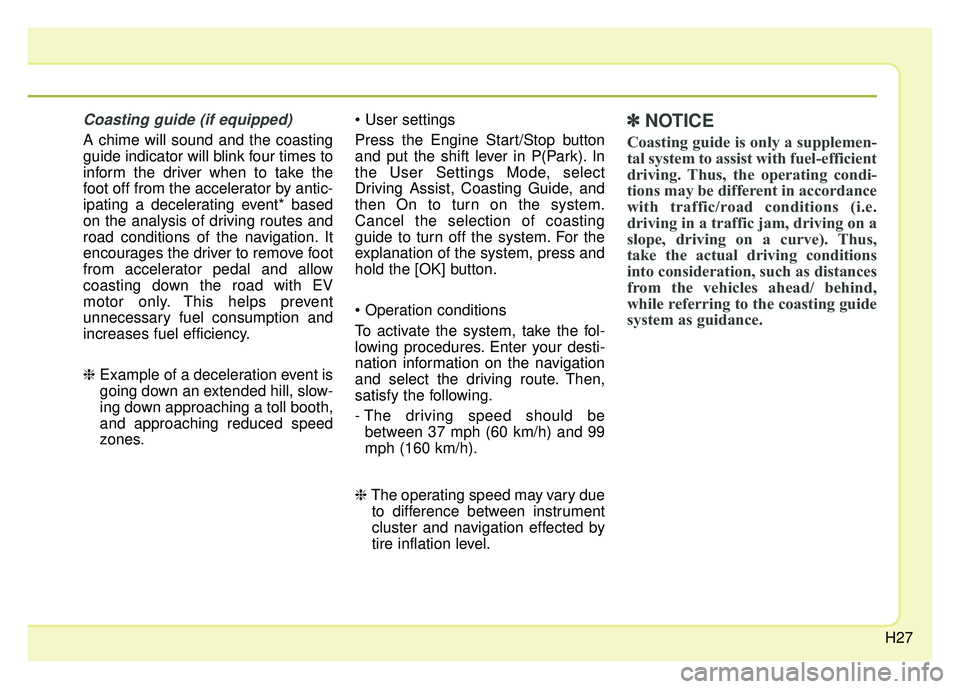
Coasting guide (if equipped)
A chime will sound and the coasting
guide indicator will blink four times to
inform the driver when to take the
foot off from the accelerator by antic-
ipating a decelerating event* based
on the analysis of driving routes and
road conditions of the navigation. It
encourages the driver to remove foot
from accelerator pedal and allow
coasting down the road with EV
motor only. This helps prevent
unnecessary fuel consumption and
increases fuel efficiency.
❈Example of a deceleration event is
going down an extended hill, slow-
ing down approaching a toll booth,
and approaching reduced speed
zones.
Press the Engine Start/Stop button
and put the shift lever in P(Park). In
the User Settings Mode, select
Driving Assist, Coasting Guide, and
then On to turn on the system.
Cancel the selection of coasting
guide to turn off the system. For the
explanation of the system, press and
hold the [OK] button.
To activate the system, take the fol-
lowing procedures. Enter your desti-
nation information on the navigation
and select the driving route. Then,
satisfy the following.
- The driving speed should be
between 37 mph (60 km/h) and 99
mph (160 km/h).
❈ The operating speed may vary due
to difference between instrument
cluster and navigation effected by
tire inflation level.
✽ ✽ NOTICE
Coasting guide is only a supplemen-
tal system to assist with fuel-efficient
driving. Thus, the operating condi-
tions may be different in accordance
with traffic/road conditions (i.e.
driving in a traffic jam, driving on a
slope, driving on a curve). Thus,
take the actual driving conditions
into consideration, such as distances
from the vehicles ahead/ behind,
while referring to the coasting guide
system as guidance.
Page 41 of 616
H35
AUX. BATTERY SAVER+ (For
Plug-in Hybrid, if equipped)
The Aux. Battery Saver+ is a function
that monitors the charging status of
the 12V auxiliary battery.
If the auxiliary battery level is low, the
main high voltage battery charges
the auxiliary battery.
✽ ✽NOTICE
The Aux. Battery Saver+ function will
be ON when the vehicle is delivered. If
the function is not needed, you may
turn it off in the Users Settings mode
on the LCD display. For more infor-
mation, refer to the "System setting"
on the following page.
Mode
When the vehicle is OFF with all
doors, hood and liftgate closed, the
Aux. Battery Saver+ periodically acti-
vates according to the auxiliary bat-
tery status.
When the engine start/stop button is
in the ON position with the charging
connector plugged in, the function
activates according to the auxiliary
battery status to prevent over-dis-
charge of the auxiliary battery.
✽ ✽NOTICE
The Aux. Battery Saver+ activates
maximum of 20 minutes. If the Aux.
Battery Saver+ function activates
more than 10 times consecutively, in
the Automatic Mode the function
will stop activating, judging that
there is a problem with the auxiliary
battery. In this case, drive the vehi-
cle for some period of time. The
function will start activating if the
auxiliary battery returns to normal.
CAUTION
The Aux. Battery Saver+ func-
tion cannot prevent batterydischarge if the auxiliary bat-tery is damaged, worn out,used as a power supply orunauthorized electronicdevices are used.
If the Aux. Battery Saver+ function was activated, a mes-sage will be displayed on theinstrument cluster and thehigh voltage battery level mayhave decreased.
Page 43 of 616
H37
Starting the Hybrid System
1.Carry the smart key into the vehicle.
2.Make sure the parking brake isfirmly applied.
3.Place the shift lever in the P(Park) position.
In N (neutral) position, you can not
start the vehicle.
4.Depress the brake pedal.
5.Press the engine start/stop button.
6.The engine should be started with- out pressing the accelerator. In
extremely cold weather or after the
vehicle has not been operated for
several days, let the engine warm up
without depressing the accelerator.
vehicle, if it is far away from you,
the engine may not start.
ton is in the ACC or ON position,
if any door is open, the system
checks for the smart key. If the
smart key is not in the vehicle, the
warning, "Key is not in vehicle"
will come on, and if all doors are
closed, the chime will also sound
for about 5 seconds. The indica-
tor will turn off while the vehicle is
moving. Keep the smart key in the
vehicle when using the ACC posi-
tion or if the vehicle engine is on. If the starting procedure is fol-
lowed, the " " symbol on the
instrument cluster will turn on. For
more details, Please check chap-
ter 4.
STARTING THE HYBRID/PLUG-IN HYBRID VEHICLE (SMART KEY)
Page 64 of 616
25
Your vehicle at a glance
INSTRUMENT PANEL OVERVIEW
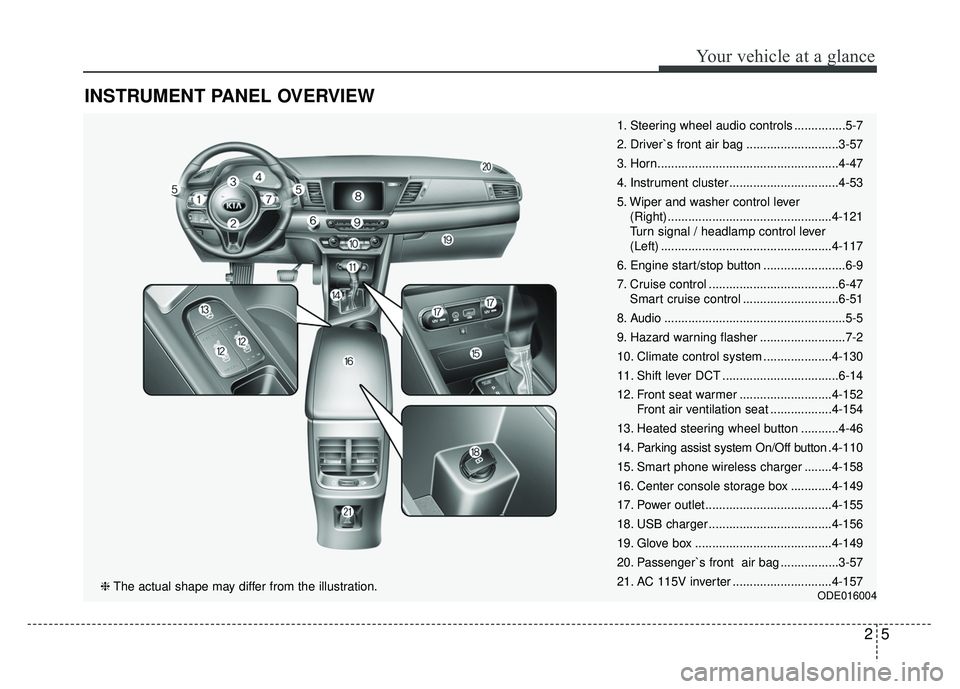
1. Steering wheel audio controls ...............5-7
2. Driver`s front air bag ...........................3-57
3. Horn.....................................................4-47
4. Instrument cluster ................................4-53
5. Wiper and washer control lever (Right) ................................................4-121
Turn signal / headlamp control lever
(Left) ..................................................4-117
6. Engine start/stop button ........................6-9
7. Cruise control ......................................6-47 Smart cruise control ............................6-51
8. Audio .....................................................5-5
9. Hazard warning flasher .........................7-2
10. Climate control system ....................4-130
11. Shift lever DCT ..................................6-14
12. Front seat warmer ...........................4-152 Front air ventilation seat ..................4-154
13. Heated steering wheel button ...........4-46
14. Parking assist system On/Off button .4-110
15. Smart phone wireless charger ........4-158
16. Center console storage box ............4-149
17. Power outlet.....................................4-155
18. USB charger ....................................4-156
19. Glove box ........................................4-149
20. Passenger`s front air bag .................3-57
21. AC 115V inverter .............................4-157
ODE016004❈ The actual shape may differ from the illustration.
Page 135 of 616
Instrument cluster . . . . . . . . . . . . . . . . . . . . . . . . . 4-53
. . . . . . . . . . . . . . . . . . . . . 4-56
. . . . . . . . . . . . . . . . . . . . . . . . . . 4-56
. . . . . . . . . . . . . . . . . . . . . . . . . . . . . . . . . . . . \
. 4-57
. . . . . . . . . . 4-63
LCD windows . . . . . . . . . . . . . . . . . . . . . . . . . . . . . 4-64
. . . . . . . . . . . . . . . . . . . . . . . . . . . . . . . . . . . 4-\
64
for Hybrid) . . . . . 4-64
. . . . . . . . . . . . . . . . . . . . . . . . . . . 4-67
. . . . . . . . . . . . . 4-68
. . . . . . . . . . . . . . . . . . . . . . . . . . . . . . . . . 4-69
for Plug-in Hybrid) . . . . . . . . . . . . . . . . . . . . . . . . . . 4-71
. . . . . . . . . . . . . . . . . . . . . . . . . . . . . . . . . 4-75
Warning and indicator lights . . . . . . . . . . . . . . . . 4-94
. . . . . . . . . . . . . . . . . . . . . . . . . . . . . . . 4-94
Rear parking assist system . . . . . . . . . . . . . . . . . 4-107
system . . . . . . . . . . . . . . . . . . . . . . . . . . . . . . . . . . . . \
4-108
. . . . . . . . . 4-109
. . . . . . . . . . . . . . . . . . . . . . . . . . . . . . . 4-109
Parking assist system . . . . . . . . . . . . . . . . . . . . . . 4-110
. . . . . . . . . . 4-110
system . . . . . . . . . . . . . . . . . . . . . . . . . . . . . . . . . . . . \
4-112
. . . . . . . . . . . . . . . . . . . . . . . . . . . . . . . 4-114
Rearview camera . . . . . . . . . . . . . . . . . . . . . . . . . 4-115
Lighting . . . . . . . . . . . . . . . . . . . . . . . . . . . . . . . . . 4-116
. . . . . . . . . . . . . . . . . . . . . 4-116
. . . . . . . . . . . . . . . . . . . . . . . . 4-116
. . . . . . . . . . . . . . . . . . . . . . . . . . . . . 4-117
. . . . . . . . . . . 4-119
. . . . . . . . . . . . . . . . . . . . . . . . . . . . . 4-120
. . . . . . . . . . . . . . . . . . . . . . . . . . . . . . 4-120
Wipers and washers . . . . . . . . . . . . . . . . . . . . . . . 4-121
. . . . . . . . . . . . . . . . . . . . . . . . . . . 4-121
. . . . . . . . . . . . . . . . . . . . . 4-122
. . . . . . . . . 4-123
Interior lights . . . . . . . . . . . . . . . . . . . . . . . . . . . . 4-125
. . . . . . . . . . . . . . . . . . . 4-125
. . . . . . . . . . . . . . . . . . . . . . . . . . . . . . . . . 4-125
. . . . . . . . . . . . . . . . . . . . . . . . . . . . . . . . . . 4-12\
6
. . . . . . . . . . . . . . . . . . . . . . . . . . 4-127
. . . . . . . . . . . . . . . . . . . . . . . . . . 4-127
4
Page 177 of 616
Features of your vehicle
44
4
Electronic power steering
(EPS)
The power steering uses a motor to
assist you in steering the vehicle. If
the engine is off or if the power steer-
ing system becomes inoperative, the
vehicle may still be steered, but it will
require increased steering effort.
The EPS is controlled by a power
steering control unit which senses
the steering wheel torque and vehi-
cle speed to command the motor.
The steering becomes heavier as the
vehicle’s speed increases and
becomes lighter as the vehicle’s
speed decreases for optimum steer-
ing control.
Should you notice any change in the
effort required to steer during normal
vehicle operation, have the power
steering checked by an authorized
Kia dealer. If the Electronic Power Steering
System does not operate normally,
the warning light will illuminate on
the instrument cluster. The steering
wheel may require increased
steering effort. Take your vehicle to
an authorized Kia dealer and have
the vehicle checked as soon as
possible.
When you operate the steering wheel in low temperature, noise
may occur. If temperature rises, the
noise will likely disappear. This is a
normal condition.
When the vehicle is stationary, and the steering wheel is turned all the
way to the left or right continuous-
ly, the steering wheel becomes
harder to turn. The power assist is
limited to protect the motor from
overheating.
As time passes, the steering wheel
will return to its normal condition.
✽ ✽ NOTICE
The following symptoms may occur
during normal vehicle operation:
• The EPS warning light does not
illuminate.
• The steering gets heavy immedi- ately after turning the Engine
Start/Stop button is ON position.
This happens as the system per-
forms the EPS system diagnostics.
When the diagnostics are complet-
ed, the steering wheel will return
to its normal condition.
• A click noise may be heard from the EPS relay after turning the
Engine Start/Stop button is ON or
OFF position.
• A motor noise may be heard when the vehicle is at a stop or at a low
driving speed.
• If the Electronic Power Steering System does not operate normally,
the warning light will illuminate on
the instrument cluster. The steer-
ing wheel may become difficult to
control or operate abnormally.
Take your vehicle to an authorized
Kia dealer and have the vehicle
checked as soon as possible. (Continued)
STEERING WHEEL
Page 186 of 616
453
Features of your vehicle
INSTRUMENT CLUSTER
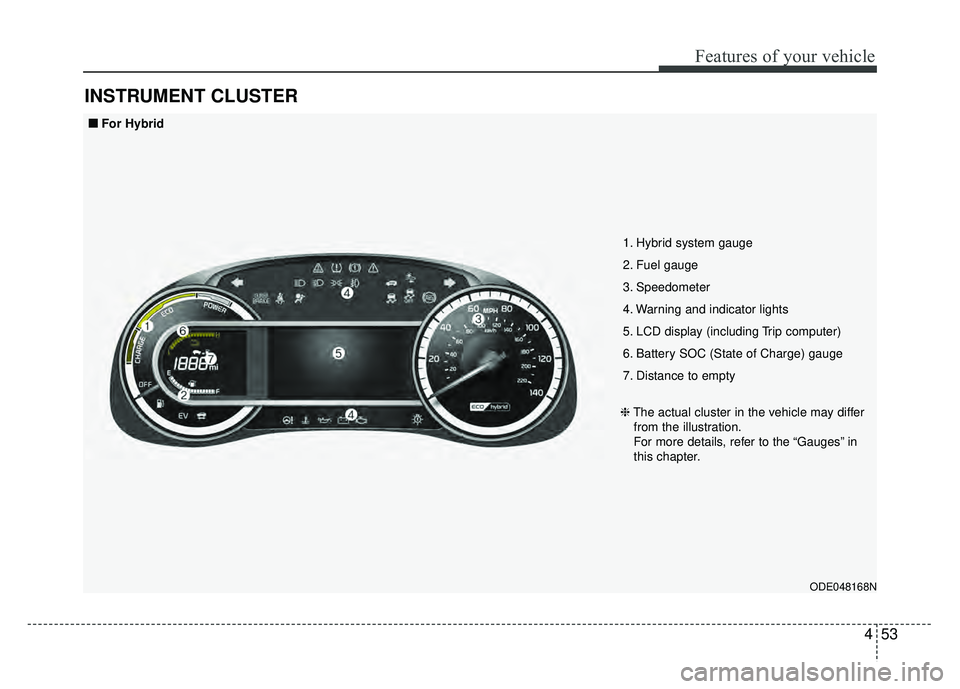
ODE048168N
1. Hybrid system gauge
2. Fuel gauge
3. Speedometer
4. Warning and indicator lights
5. LCD display (including Trip computer)
6. Battery SOC (State of Charge) gauge
7. Distance to empty
❈The actual cluster in the vehicle may differ
from the illustration.
For more details, refer to the “Gauges” in
this chapter.
■ ■
For Hybrid