warning KIA NIRO 2019 Owners Manual
[x] Cancel search | Manufacturer: KIA, Model Year: 2019, Model line: NIRO, Model: KIA NIRO 2019Pages: 611, PDF Size: 15.28 MB
Page 195 of 611
Features of your vehicle
60
4
✽ ✽
NOTICE
• The fuel tank capacity is given in
chapter 9.
• The fuel gauge is supplemented by a low fuel warning light which will
illuminate when the fuel tank is
nearly empty.
• On inclines or curves, the fuel gauge pointer may fluctuate or the
low fuel warning light may come
on earlier than usual due to the
movement of fuel in the tank.
✽ ✽ NOTICE - Fuel gauge
Running out of fuel can expose vehi-
cle occupants to danger. You must
top and obtain additional fuel as
soon as possible after the warning
light comes on or when the gauge
indicator comes close to the “E
(Empty)” level.
✽ ✽NOTICE
Fuel display may not be accurate if
you are filling in sloping places.
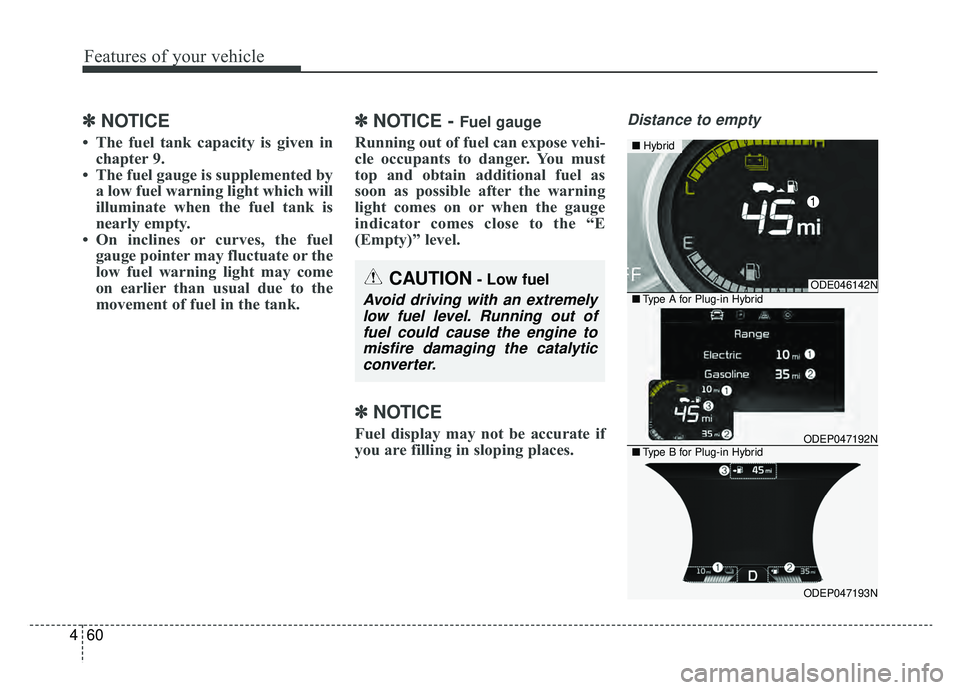
Distance to empty
CAUTION- Low fuel
Avoid driving with an extremely
low fuel level. Running out offuel could cause the engine tomisfire damaging the catalyticconverter.
ODE046142N
ODEP047192N
ODEP047193N
■ Hybrid
■Type A for Plug-in Hybrid
■Type B for Plug-in Hybrid
Page 199 of 611
Features of your vehicle
64
4
Over view
LCD displays show the following var-
ious information to drivers.
- Trip information
- LCD modes
- Warning messages
Trip information (Trip computer,
for Hybrid)
The trip computer is a microcomput-
er-controlled driver information sys-
tem that displays information related
to driving.
✽ ✽
NOTICE
Some driving information stored in
the trip computer (for example
Average Vehicle Speed) resets if the
battery is disconnected.
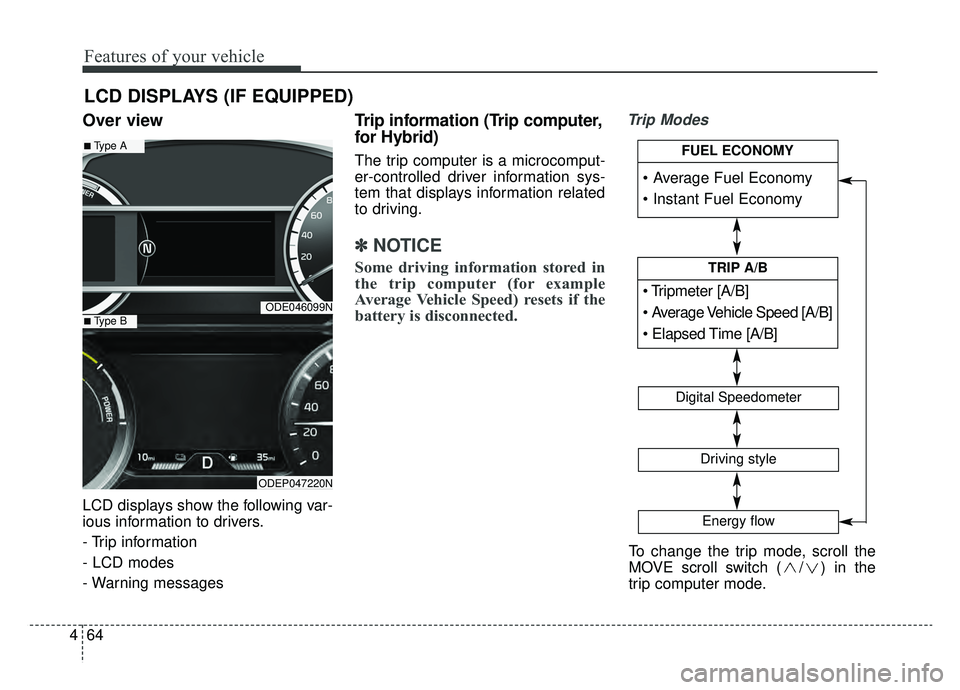
Trip Modes
LCD DISPLAYS (IF EQUIPPED)
ODE046099N
ODEP047220N
■Type A
■Type B
To change the trip mode, scroll the
MOVE scroll switch ( / ) in the
trip computer mode.
[A/B]
TRIP A/B
Digital Speedometer
Driving style
Energy flow
FUEL ECONOMY
Page 203 of 611
Features of your vehicle
68
4
Driving style
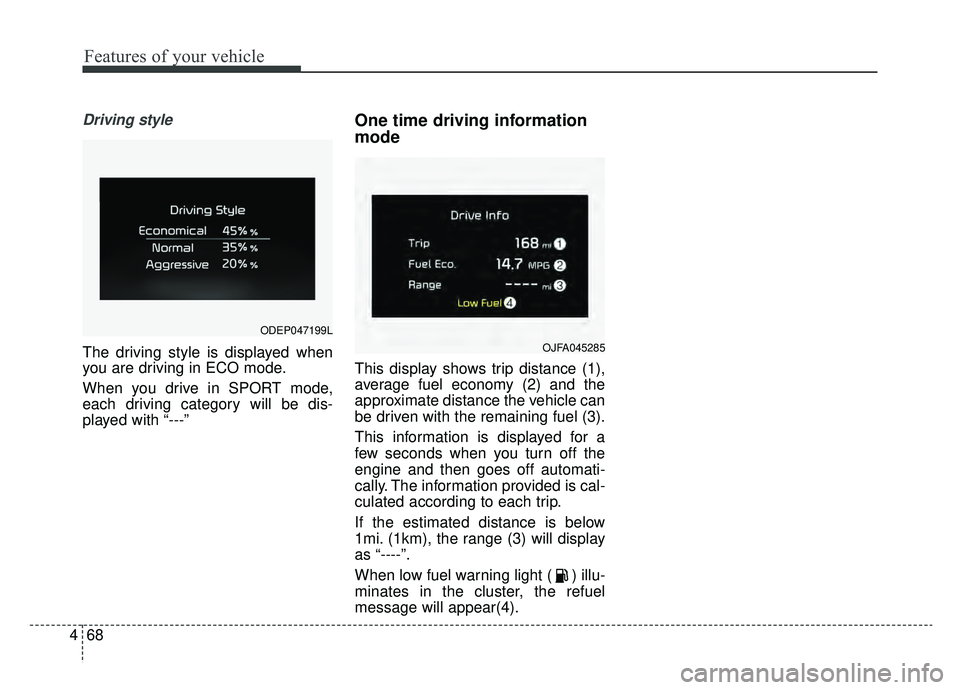
The driving style is displayed when
you are driving in ECO mode.
When you drive in SPORT mode,
each driving category will be dis-
played with “---”
One time driving information
mode
This display shows trip distance (1),
average fuel economy (2) and the
approximate distance the vehicle can
be driven with the remaining fuel (3).
This information is displayed for a
few seconds when you turn off the
engine and then goes off automati-
cally. The information provided is cal-
culated according to each trip.
If the estimated distance is below
1mi. (1km), the range (3) will display
as “----”.
When low fuel warning light ( ) illu-
minates in the cluster, the refuel
message will appear(4).
OJFA045285
ODEP047199L
Page 212 of 611
477
Features of your vehicle
Engine coolant temperature
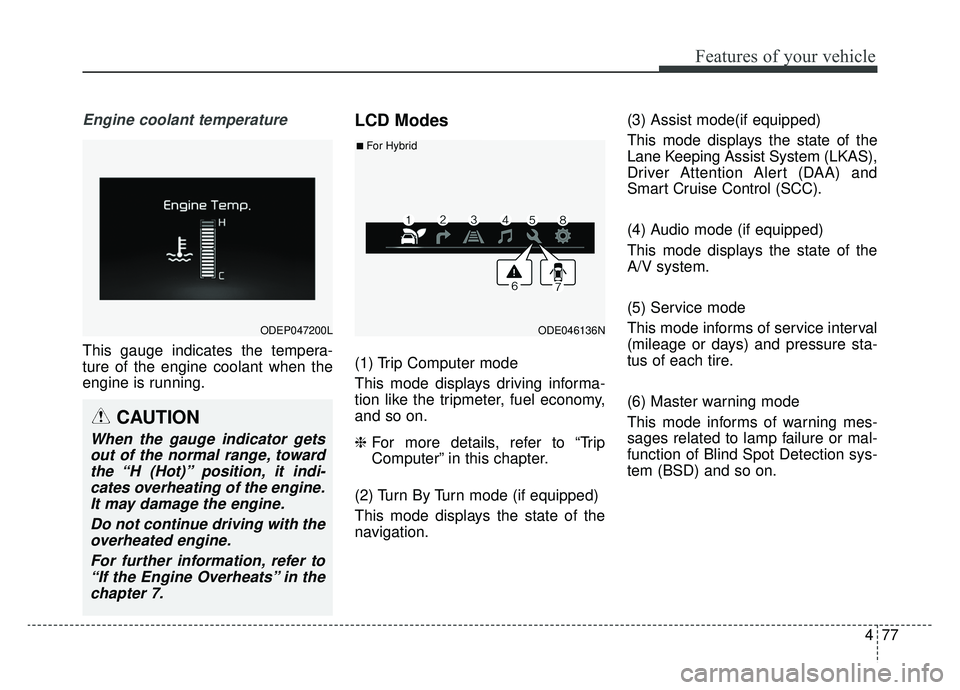
This gauge indicates the tempera-
ture of the engine coolant when the
engine is running.
LCD Modes
(1) Trip Computer mode
This mode displays driving informa-
tion like the tripmeter, fuel economy,
and so on.
❈For more details, refer to “Trip
Computer” in this chapter.
(2) Turn By Turn mode (if equipped)
This mode displays the state of the
navigation. (3) Assist mode(if equipped)
This mode displays the state of the
Lane Keeping Assist System (LKAS),
Driver Attention Alert (DAA) and
Smart Cruise Control (SCC).
(4) Audio mode (if equipped)
This mode displays the state of the
A/V system.
(5) Service mode
This mode informs of service interval
(mileage or days) and pressure sta-
tus of each tire.
(6) Master warning mode
This mode informs of warning mes-
sages related to lamp failure or mal-
function of Blind Spot Detection sys-
tem (BSD) and so on.
ODEP047200LODE046136N
■For Hybrid
CAUTION
When the gauge indicator gets
out of the normal range, towardthe “H (Hot)” position, it indi-cates overheating of the engine.It may damage the engine.
Do not continue driving with theoverheated engine.
For further information, refer to“If the Engine Overheats” in thechapter 7.
Page 213 of 611
Features of your vehicle
78
4
(7) Door open mode
When the any door is not closed
securely, this symbol illuminated.
(8) User settings mode
On this mode, you can change set-
ting of the doors, lamps, and so on.
❈ For controlling the LCD modes,
refer to “LCD window Control” in
this chapter.
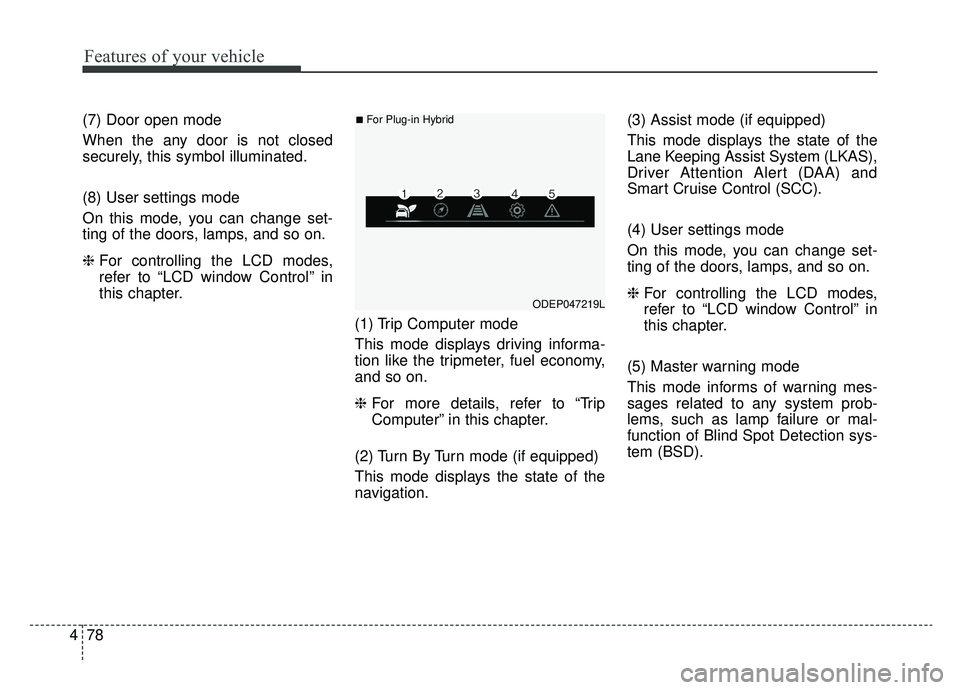
(1) Trip Computer mode
This mode displays driving informa-
tion like the tripmeter, fuel economy,
and so on.
❈For more details, refer to “Trip
Computer” in this chapter.
(2) Turn By Turn mode (if equipped)
This mode displays the state of the
navigation. (3) Assist mode (if equipped)
This mode displays the state of the
Lane Keeping Assist System (LKAS),
Driver Attention Alert (DAA) and
Smart Cruise Control (SCC).
(4) User settings mode
On this mode, you can change set-
ting of the doors, lamps, and so on.
❈
For controlling the LCD modes,
refer to “LCD window Control” in
this chapter.
(5) Master warning mode
This mode informs of warning mes-
sages related to any system prob-
lems, such as lamp failure or mal-
function of Blind Spot Detection sys-
tem (BSD).
ODEP047219L
■For Plug-in Hybrid
Page 216 of 611
481
Features of your vehicle
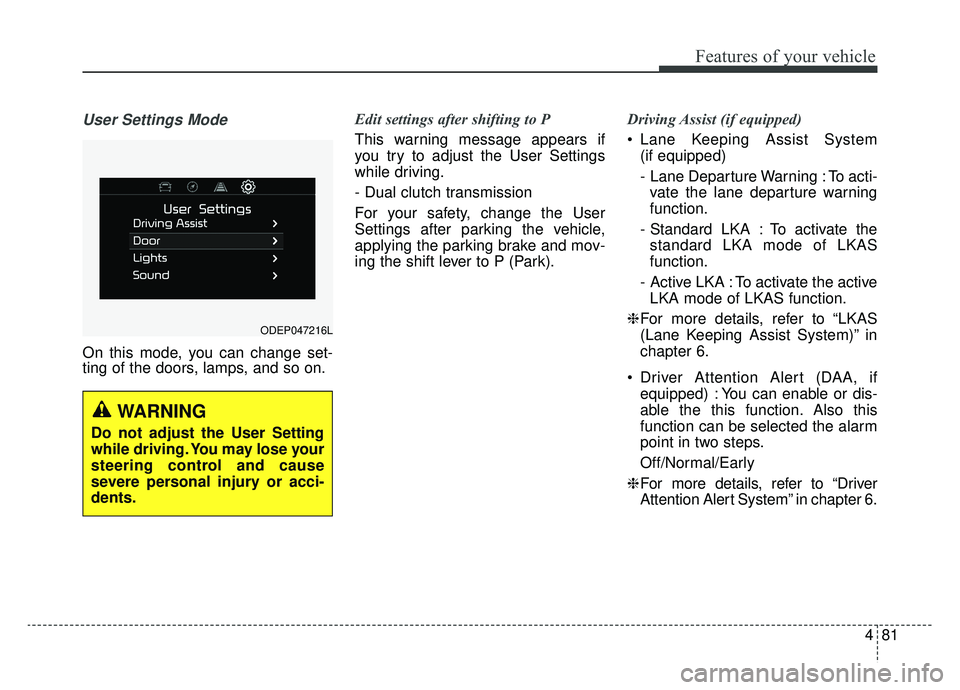
User Settings Mode
On this mode, you can change set-
ting of the doors, lamps, and so on.Edit settings after shifting to P
This warning message appears if
you try to adjust the User Settings
while driving.
- Dual clutch transmission
For your safety, change the User
Settings after parking the vehicle,
applying the parking brake and mov-
ing the shift lever to P (Park).
Driving Assist (if equipped)
Lane Keeping Assist System
(if equipped)
- Lane Departure Warning : To acti-vate the lane departure warning
function.
- Standard LKA : To activate the standard LKA mode of LKAS
function.
- Active LKA : To activate the active LKA mode of LKAS function.
❈ For more details, refer to “LKAS
(Lane Keeping Assist System)” in
chapter 6.
Driver Attention Alert (DAA, if equipped) : You can enable or dis-
able the this function. Also this
function can be selected the alarm
point in two steps.
Off/Normal/Early
❈ For more details, refer to “Driver
Attention Alert System” in chapter 6.
ODEP047216L
WARNING
Do not adjust the User Setting
while driving. You may lose your
steering control and cause
severe personal injury or acci-
dents.
Page 217 of 611
Features of your vehicle
82
4
Smart Cruise Control Response (if
equipped) : Choose the sensitivi-
ty(Slow/Normal/Fast) of the smart
cruise control.
❈ For more details, refer to “Smart
Cruise Control System” in chapter
6.
Autonomous Emergency Braking (if equipped) : If this item is
checked, the AEB function will be
activated.
❈ For more details, refer to
“Autonomous Emergency Braking
(AEB)” in chapter 6.
Forward Collision Warning (if equipped) : Choose the sensitivity
of the forward collision warning.
- Late/Normal/Early
❈ For more details, refer to
“Autonomous Emergency Braking
(AEB)” in chapter 6. BSD (Blind Spot Detection) Sound
(if equipped) : If this item is
checked, the blind spot detection
sound will be activated.
❈ For more details, refer to “Blind Spot
Detection System” in chapter 6.
Rear Cross Traffic Alert (if equipped) : If this item is checked,
the rear cross traffic alert function
will be activate
❈ For more details, refer to “Blind Spot
Detection System” in chapter 6.
Coasting Guide (if equipped) : To activate or deactivate the Coasting
Guide system and sound.
❈ For more information, refer to
“Coasting Guide” in this chapter.
Start Coasting (if equipped) : To adjust the
sensitivity(Late/Normal/Early) of
the Coasting Guide.
❈ For more information, refer to
“Coasting Guide” in this chapter. Door
Automatic Lock
- Enable on Speed : All doors willbe automatically locked when the
vehicle speed exceeds 9.3 mph
(15 km/h).
- Enable on Shift: All doors will be automatically locked if the trans-
mission shift lever is shifted from
the P (Park) position to the R
(Reverse), N (Neutral), or D
(Drive) position.
Automatic Unlock - Disable : The auto door unlockoperation will be canceled.
- Vehicle Off : All doors will be auto- matically unlocked when the
Engine Start/Stop button is set to
the OFF position.
- On Shift to P : All doors will be auto- matically unlocked if the shift lever
is shifted to the P (Park) position.
Two Press Unlock : If this item is checked, the two press unlock will
be activated.
Page 220 of 611

485
Features of your vehicle
Coasting guide (if equipped)
A chime will sound and the coasting
guide indicator will blink four times to
inform the driver when to take the
foot off from the accelerator by antic-
ipating a decelerating event* based
on the analysis of driving routes and
road conditions of the navigation. It
encourages the driver to remove foot
from the pedal and allow coasting
down the road with EV motor only.
This helps prevent unnecessary fuel
consumption and increases fuel effi-
ciency.
❈Example of a deceleration event is
going down an extended hill, slow-
ing down approaching a toll booth,
and approaching reduced speed
zones.
Press the Engine Start/Stop button
and put the shift lever in P(Park). In
the User Settings Mode, select
Driving Assist, Coasting Guide, and
then On to turn on the system.
Cancel the selection of coasting
guide to turn off the system. For the
explanation of the system, press and
hold the [OK] button.
To activate the system, take the fol-
lowing procedures. Enter your desti-
nation information on the navigation
and select the driving route. Select
the ECO mode in the Integrated
Driving Control System. Then, satisfy
the following.
- The driving speed should be
between 37 mph (60 km/h) and 99
mph (160 km/h).
❈ The operating speed may vary due
to difference between instrument
cluster and navigation effected by
tire inflation level.
Warning messages
Warning messages appear on the
LCD to warn the driver. It is located in
the center of the instrument cluster.
The warning message may appear
differently depending on the type of
instrument cluster and some may not
show the warning message at all.
The warning message is shown in
either symbol, symbol and text, or
text type only. You can choose the
preferred language by selecting the
User setting menu in LCD mode.
Page 222 of 611
487
Features of your vehicle
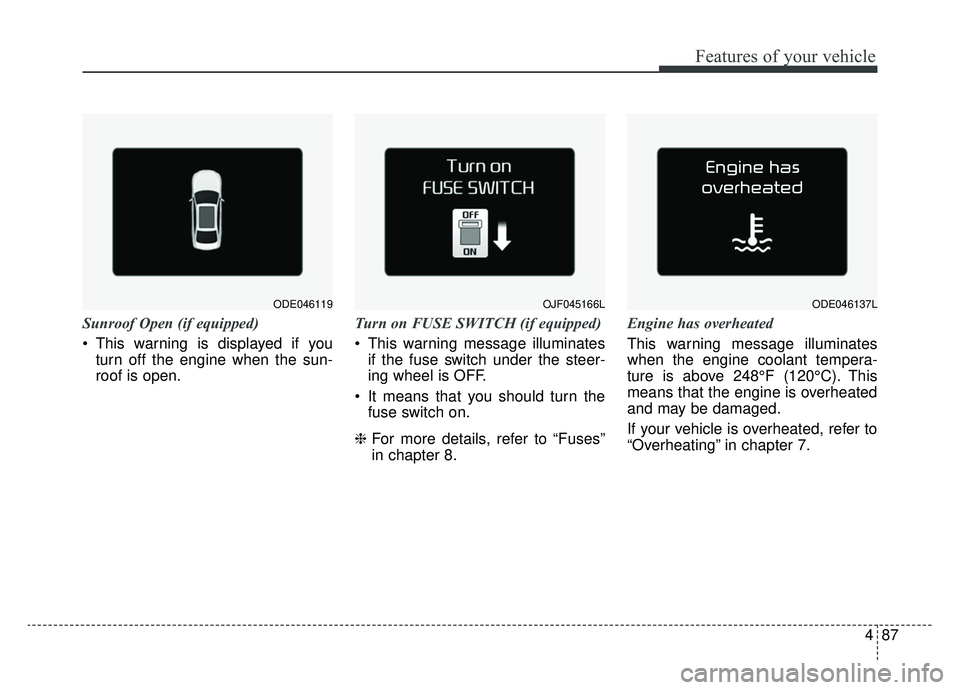
Sunroof Open (if equipped)
This warning is displayed if youturn off the engine when the sun-
roof is open. Turn on FUSE SWITCH (if equipped)
This warning message illuminates
if the fuse switch under the steer-
ing wheel is OFF.
It means that you should turn the fuse switch on.
❈ For more details, refer to “Fuses”
in chapter 8. Engine has overheated
This warning message illuminates
when the engine coolant tempera-
ture is above 248°F (120°C). This
means that the engine is overheated
and may be damaged.
If your vehicle is overheated, refer to
“Overheating” in chapter 7.
OJF045166LODE046119ODE046137L
Page 223 of 611
Features of your vehicle
88
4
Shift to P (for smart key system)
This warning message illuminates
if you try to turn off the engine with-
out the shift lever in P (Park) posi-
tion.
At this time, the Engine Start/Stop Button turns to the ACC position (If
you press the Engine Start/Stop
Button once more, it will turn to the
ON position).
Low Key Battery
(for smart key system)
This warning message illuminates if the battery of the smart key is
discharged when the Engine
Start/Stop Button changes to the
OFF position. Press START button while turn steer-
ing (for smart key system)
This warning message illuminates
if the steering wheel does not
unlock normally when the Engine
Start/Stop Button is pressed.
It means that you should press the Engine Start/Stop Button while
turning the steering wheel right
and left.
Steering wheel unlocked
(for smart key system)
This warning message illuminates if the steering wheel does not lock
when the Engine Start/Stop Button
changes to the OFF position.
Check Steering Wheel Lock System
(for smart key system)
This warning message illuminates if the steering wheel does not lock
normally when the Engine
Start/Stop Button changes to the
OFF position. Press brake pedal to start engine
(for smart key system)
This warning message illuminates
if the Engine Start/Stop Button
changes to the ACC position twice
by pressing the button repeatedly
without depressing the brake pedal.
It means that you should depress the brake pedal to start the engine.
Key not in vehicle (for smart key system)
This warning message illuminates if the smart key is not in the vehicle
when you press the Engine
Start/Stop Button.
It means that you should always have the smart key with you.
Key not detected (for smart key system)
This warning message illuminates if the smart key is not detected
when you press the Engine
Start/Stop Button.