Service KIA NIRO 2019 User Guide
[x] Cancel search | Manufacturer: KIA, Model Year: 2019, Model line: NIRO, Model: KIA NIRO 2019Pages: 611, PDF Size: 15.28 MB
Page 194 of 611
459
Features of your vehicle
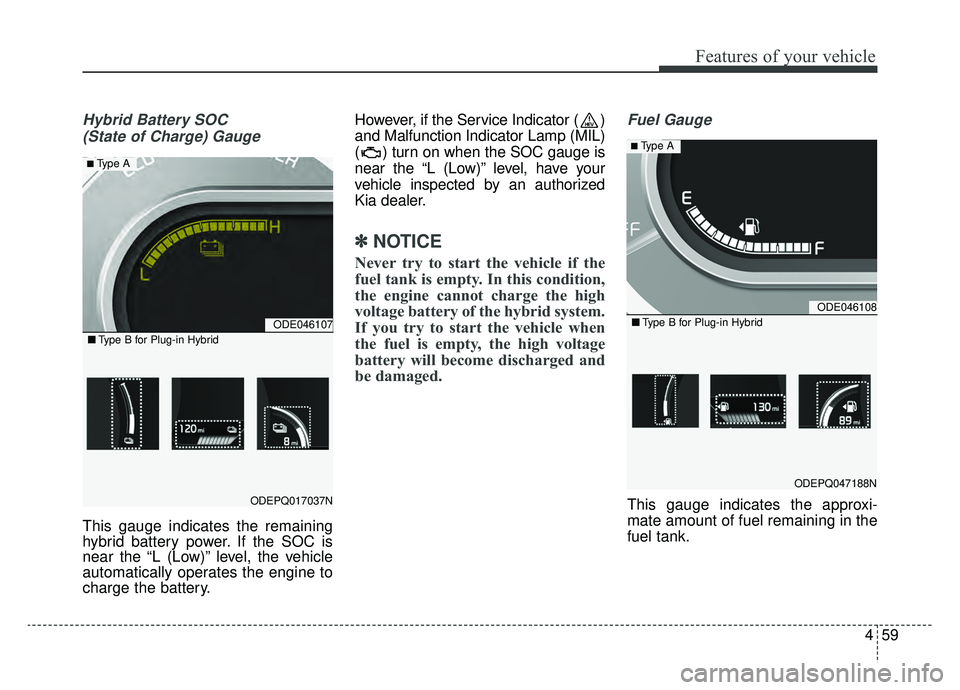
Hybrid Battery SOC (State of Charge) Gauge
This gauge indicates the remaining
hybrid battery power. If the SOC is
near the “L (Low)” level, the vehicle
automatically operates the engine to
charge the battery. However, if the Service Indicator ( )
and Malfunction Indicator Lamp (MIL)
( ) turn on when the SOC gauge is
near the “L (Low)” level, have your
vehicle inspected by an authorized
Kia dealer.
✽ ✽
NOTICE
Never try to start the vehicle if the
fuel tank is empty. In this condition,
the engine cannot charge the high
voltage battery of the hybrid system.
If you try to start the vehicle when
the fuel is empty, the high voltage
battery will become discharged and
be damaged.
Fuel Gauge
This gauge indicates the approxi-
mate amount of fuel remaining in the
fuel tank.
ODE046107
ODEPQ017037N
■ Type B for Plug-in Hybrid
■ Type A
ODE046108
ODEPQ047188N
■Type B for Plug-in Hybrid
■ Type A
Page 212 of 611
477
Features of your vehicle
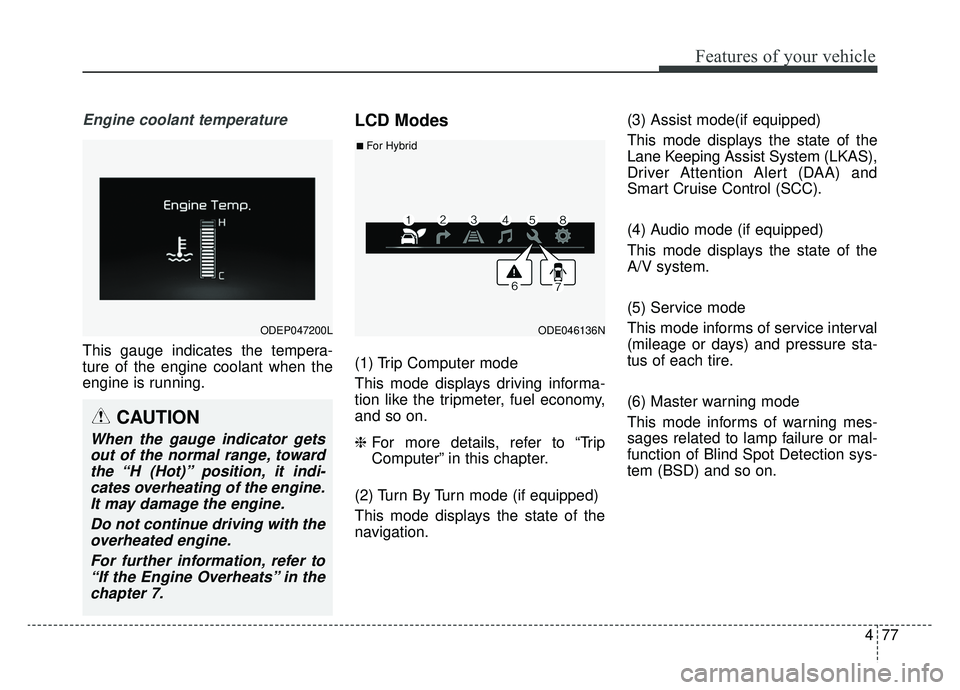
Engine coolant temperature
This gauge indicates the tempera-
ture of the engine coolant when the
engine is running.
LCD Modes
(1) Trip Computer mode
This mode displays driving informa-
tion like the tripmeter, fuel economy,
and so on.
❈For more details, refer to “Trip
Computer” in this chapter.
(2) Turn By Turn mode (if equipped)
This mode displays the state of the
navigation. (3) Assist mode(if equipped)
This mode displays the state of the
Lane Keeping Assist System (LKAS),
Driver Attention Alert (DAA) and
Smart Cruise Control (SCC).
(4) Audio mode (if equipped)
This mode displays the state of the
A/V system.
(5) Service mode
This mode informs of service interval
(mileage or days) and pressure sta-
tus of each tire.
(6) Master warning mode
This mode informs of warning mes-
sages related to lamp failure or mal-
function of Blind Spot Detection sys-
tem (BSD) and so on.
ODEP047200LODE046136N
■For Hybrid
CAUTION
When the gauge indicator gets
out of the normal range, towardthe “H (Hot)” position, it indi-cates overheating of the engine.It may damage the engine.
Do not continue driving with theoverheated engine.
For further information, refer to“If the Engine Overheats” in thechapter 7.
Page 215 of 611
Features of your vehicle
80
4
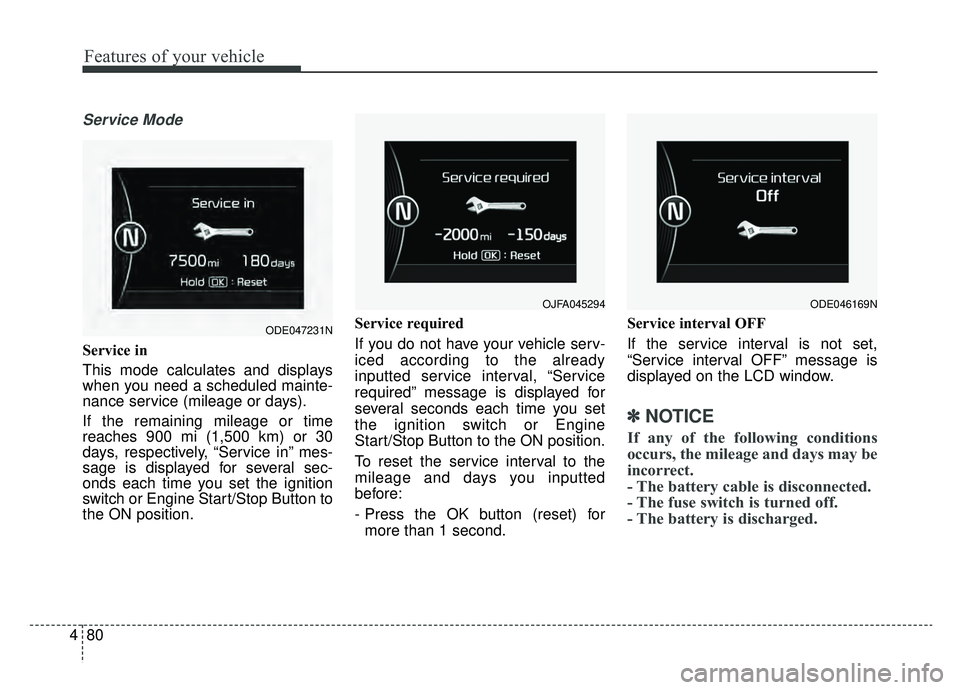
Service Mode
Service in
This mode calculates and displays
when you need a scheduled mainte-
nance service (mileage or days).
If the remaining mileage or time
reaches 900 mi (1,500 km) or 30
days, respectively, “Service in” mes-
sage is displayed for several sec-
onds each time you set the ignition
switch or Engine Start/Stop Button to
the ON position. Service required
If you do not have your vehicle serv-
iced according to the already
inputted service interval, “Service
required” message is displayed for
several seconds each time you set
the ignition switch or Engine
Start/Stop Button to the ON position.
To reset the service interval to the
mileage and days you inputted
before:
- Press the OK button (reset) for
more than 1 second. Service interval OFF
If the service interval is not set,
“Service interval OFF” message is
displayed on the LCD window.
✽ ✽
NOTICE
If any of the following conditions
occurs, the mileage and days may be
incorrect.
- The battery cable is disconnected.
- The fuse switch is turned off.
- The battery is discharged.
OJFA045294
ODE047231N
ODE046169N
Page 218 of 611
483
Features of your vehicle
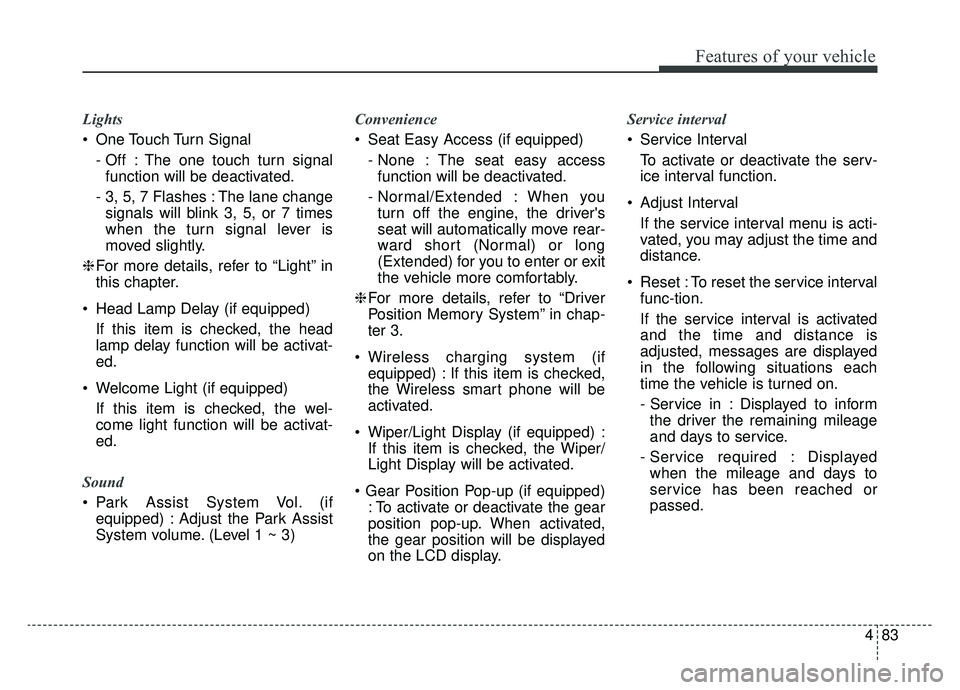
Lights
One Touch Turn Signal- Off : The one touch turn signalfunction will be deactivated.
- 3, 5, 7 Flashes : The lane change signals will blink 3, 5, or 7 times
when the turn signal lever is
moved slightly.
❈ For more details, refer to “Light” in
this chapter.
Head Lamp Delay (if equipped) If this item is checked, the head
lamp delay function will be activat-
ed.
Welcome Light (if equipped) If this item is checked, the wel-
come light function will be activat-
ed.
Sound
Park Assist System Vol. (if equipped) : Adjust the Park Assist
System volume. (Level 1 ~ 3) Convenience
Seat Easy Access (if equipped)
- None : The seat easy accessfunction will be deactivated.
- Normal/Extended : When you turn off the engine, the driver's
seat will automatically move rear-
ward short (Normal) or long
(Extended) for you to enter or exit
the vehicle more comfortably.
❈ For more details, refer to “Driver
Position Memory System” in chap-
ter 3.
Wireless charging system (if equipped) : If this item is checked,
the Wireless smart phone will be
activated.
Wiper/Light Display (if equipped) : If this item is checked, the Wiper/
Light Display will be activated.
: To activate or deactivate the gear
position pop-up. When activated,
the gear position will be displayed
on the LCD display. Service interval
Service Interval
To activate or deactivate the serv-
ice interval function.
Adjust Interval If the service interval menu is acti-
vated, you may adjust the time and
distance.
Reset : To reset the service interval func-tion.
If the service interval is activated
and the time and distance is
adjusted, messages are displayed
in the following situations each
time the vehicle is turned on.
- Service in : Displayed to informthe driver the remaining mileage
and days to service.
- Service required : Displayed when the mileage and days to
service has been reached or
passed.
Page 219 of 611
Features of your vehicle
84
4
✽ ✽
NOTICE
If any of the following conditions
occur, the mileage and number of
days to service may be incorrect.
- The battery cable is disconnected.
- The fuse switch is turned off.
- The battery is discharged.
Other Features
Instrument Cluster layout (if
equipped)
Selecting the mode
Simple/Normal/Detailed changes
the LCD screen of the instrument
cluster. (For Type B cluster of Plug-
in Hybrid)
Aux. Battery Saver + (if equipped) : If this item is checked, the Aux.
Battery Saver + function will be
activated.
❈ For more details, refer to “Aux.
Battery Saver +” in chapter Intro.
Fuel Economy Auto Reset - Off : The average fuel economywill not reset automatically when-
ever refueling.
- After Ignition : The average fuel economy will reset automatically
whenever it has passed 4 hours
after turning OFF the engine.
- After Refueling : The average fuel economy will reset automatically
when refueling.
❈ For more details, refer to “Trip
Computer” in this chapter. Fuel Economy Unit : Choose the
fuel economy unit. (US gallon, UK
gallon)
Temperature Unit : Choose the temperature unit. (°C, °F)
Tire Pressure Unit (if equipped) : Choose the tire pressure unit. (psi,
kPa, bar)
Reset
You can reset the menus in the User
Settings Mode. All menus in the User
Settings Mode are initialized, except
service interval.
Page 224 of 611
489
Features of your vehicle
Press START button again
(for smart key system)
This warning message illuminatesif you can not operate the Engine
Start/Stop Button when there is a
problem with the Engine Start/Stop
Button system.
It means that you could start the engine by pressing the Engine
Start/ Stop Button once more.
If the warning illuminates each time you press the Engine
Start/Stop Button, have your vehi-
cle inspected by an authorized Kia
dealer.
Press START button with smart key
(for smart key system)
This warning message illuminates if you press the Engine Start/Stop
Button while the warning message
“Key not detected” is illuminating.
At this time, the immobilizer indica- tor light blinks. Check fuse “BRAKE SWITCH”
(for smart key system)
This warning message illuminates
if the brake switch fuse is discon-
nected.
It means that you should replace the fuse with a new one. If that is
not possible, you can start the
engine by pressing the Engine
Start/Stop Button for 10 seconds in
the ACC position.
Shift to P or N to start engine
(for smart key system)
This warning message illuminates if you try to start the engine with
the shift lever not in the P (Park) or
N (Neutral) position.
✽ ✽ NOTICE
You can start the engine with the
shift lever in the N (Neutral) posi-
tion. But, for your safety, we recom-
mend that you start the engine with
the shift lever in the P (Park) posi-
tion.
Low Washer Fluid
This warning message illuminates
on the service reminder mode if
the washer fluid level in the reser-
voir is nearly empty.
It means that you should refill the washer fluid.
Low Fuel
This warning message illuminates if the fuel tank is nearly empty.
- When the low fuel level warning
light is illuminates.
Add fuel as soon as possible.
Page 278 of 611
4143
Features of your vehicle
Checking the amount of air
conditioner refrigerant and
compressor lubricant
When the amount of refrigerant is
low, the performance of the air condi-
tioning is reduced. Overfilling also
has a negative impact on the air con-
ditioning system.
Therefore, if abnormal operation is
found, have the system inspected by
an authorized Kia dealer.
CAUTION
It is important that the correcttype and amount of oil andrefrigerant is used, otherwisedamage to the vehicle mayoccur. To prevent damage, theair conditioning system in yourvehicle should only be servicedby trained and certified techni-cians.
WARNING - Vehicles
equipped with R-1234yf
Because the refriger-
ant is mildly inflam-
mable and at very
high pressure, the air
conditioning system
should only be serv-
iced by trained and
certified technicians.
It is important that the correct
type and amount of oil and
refrigerant is used.
Otherwise, it may cause dam-
age to the vehicle and personal
injury.
WARNING
The oil and refrigerant in your
vehicle's air conditioning sys-
tem is under very high pres-
sure. If proper service proce-
dures are not followed an explo-
sion may result. To reduce the
risk of serious injury or death,
the air conditioning system in
your vehicle should only be
serviced by trained and certi-
fied technicians.
Page 309 of 611
Audio system
58 Adjust the volume to levels that
allow the driver to hear sounds
from outside of the vehicle. Driving
in a state where external sounds
cannot be heard may lead to acci-
dents.
Pay attention to the volume setting when turning the device on. A sud-
den output of extreme volume
upon turning the device on could
lead to hearing impairment. (Adjust
the volume to a suitable levels
before turning off the device.)
Turn on the car engine before using this device. Do not operate
the audio system for long periods
of time only with the ignition turned
on as such operations may lead to
battery discharge.
In case of product malfunction, please contact your place of pur-
chase or After Service center.
Placing the audio system within an electromagnetic environment may
result in noise interference.
CAUTION - LCD Monitor
Do not subject the device tosevere shock or impact. Directpressure onto the front side ofthe monitor may cause damageto the LCD.
CAUTION
When cleaning the device, make sure to turn off theaudio system and use a dryand smooth cloth.
Do not place beverages close to the audio system. Spillingbeverages may lead to systemmalfunction.
Never use rough materials, chemical cloths, or solvents(alcohol, benzene, thinners,etc.) as such materials maydamage the device panel orcause color/quality deteriora-tion.
Prevent caustic solutions such as perfume and cosmetic oilfrom contacting the dashboardbecause they may cause dam-age or discoloration.
WARNING - Driver
distraction
Operating the device while driv-
ing could lead to accidents due
to a lack of attention to external
surroundings. First park the
vehicle before operating the
device.
WARNING
Driving while distracted can
result in a loss of vehicle con-
trol that may lead to an acci-
dent, severe personal injury,
and death. The driver’s primary
responsibility is in the safe and
legal operation of a vehicle, and
use of any handheld devices,
other equipment, or vehicle sys-
tems which take the driver’s
eyes, attention and focus away
from the safe operation of a
vehicle or which are not permis-
sible by law should never be
used during operation of the
vehicle.
Page 330 of 611
Audio system
29
5
✽ ✽
NOTICE
• When the incoming call screen is
displayed, audio mode and the set-
tings screen cannot be shown.
Only call volume control is sup-
ported.
• Some Bluetooth
®Wireless Technology
devices may not support the call
reject function.
• Some Bluetooth
®Wireless Technology
devices may not support the phone
number display function.
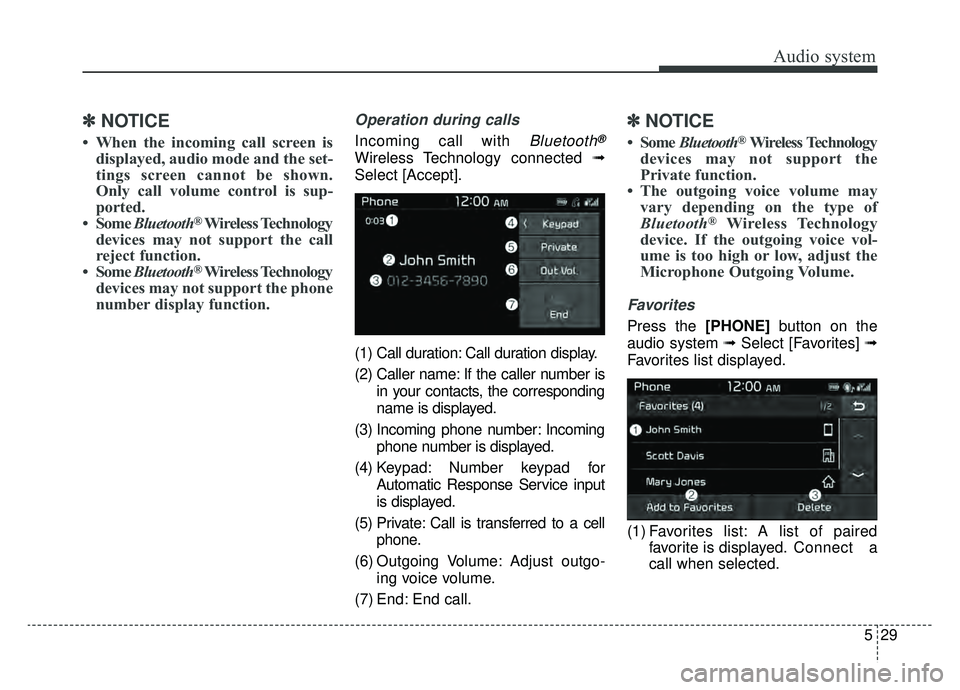
Operation during calls
Incoming call with Bluetooth®
Wireless Technology connected ➟
Select [Accept].
(1) Call duration: Call duration display.
(2) Caller name: If the caller number is in your contacts, the corresponding
name is displayed.
(3) Incoming phone number: Incoming phone number is displayed.
(4) Keypad: Number keypad for Automatic Response Service input
is displayed.
(5) Private: Call is transferred to a cell phone.
(6) Outgoing Volume: Adjust outgo- ing voice volume.
(7) End: End call.
✽ ✽ NOTICE
• Some Bluetooth®Wireless Technology
devices may not support the
Private function.
• The outgoing voice volume may vary depending on the type of
Bluetooth
®Wireless Technology
device. If the outgoing voice vol-
ume is too high or low, adjust the
Microphone Outgoing Volume.
Favorites
Press the [PHONE] button on the
audio system ➟ Select [Favorites] ➟
Favorites list displayed.
(1) Favorites list: A list of paired favorite is displayed. Connect a
call when selected.
Page 352 of 611
Driving your vehicle
16
6
To hold the vehicle on a hill use the
foot brake or the parking brake. If
the vehicle is held by applying the
accelerator pedal on a hill the
clutch and transmission will be
overheated resulting in damage.
At this time, a warning message
(“Steep grade! Press brake pedal”)
will appear on the LCD display.
If the clutch becomes overheated by excessive use of the clutch to
hold on a hill, you may notice a
shudder feeling and a blinking dis-
play on the instrument cluster.
When this occurs, the clutch is dis-
abled until the clutch cools to nor-
mal temperatures. If this occurs,
pull over to a safe location, shift
into P (Park) and apply the foot
brake for a certain time on the LCD
warning until it disappears.
If the LCD warning is active, the foot brake must be applied.
Ignoring the warnings can lead to damage to the transmission. If the display continues to blink, for
your safety, we recommend that you
contact an authorized Kia dealer.
Under certain conditions such as repeated launch on steep grades,
the clutch in the transmission could
overheat.
When the clutch is overheated, the
safe protection mode engages. If
the safe protection mode engages,
the gear position indicator on the
cluster blinks with a chime sound.
At this time, a warning message
(“Transmission temp. is high! Stop
safely”, “Trans hot! Park with engine
on”, “Trans Cooling. Remain parked
for 00 min.”, “Trans Cooled. Resume
driving”) will appear on the LCD dis-
play and driving may not be smooth.
If you ignore this warning, the driv-
ing condition may become worse.
To return the normal driving condi-
tion, stop the vehicle and apply the
foot brake for a few minutes before
driving off. Gear shifts may be more notice-
able than a conventional automatic
transmission. This is a normal
characteristic of this type of dual
clutch transmission.
During the first 1,500 km (1,000 miles), you may feel that the vehi-
cle may not be smooth when accel-
erating at low speed. During this
break-in period, the shift quality
and performance of your new vehi-
cle is continuously optimized.
Always come to a complete stop before shifting into D (Drive) or R
(Reverse).
Do not put the shift lever in N (Neutral) while driving.
CAUTION
To avoid damage to your transaxle, do not try to accel-erate in R (Reverse) or any for-ward gear position with thebrakes on.
When stopped on slope, do not hold the vehicle withaccelerator pedal. Use theservice brake or the parkingbrake.