aux battery KIA NIRO 2019 Owners Manual
[x] Cancel search | Manufacturer: KIA, Model Year: 2019, Model line: NIRO, Model: KIA NIRO 2019Pages: 611, PDF Size: 15.28 MB
Page 12 of 611
H5
Charging Status
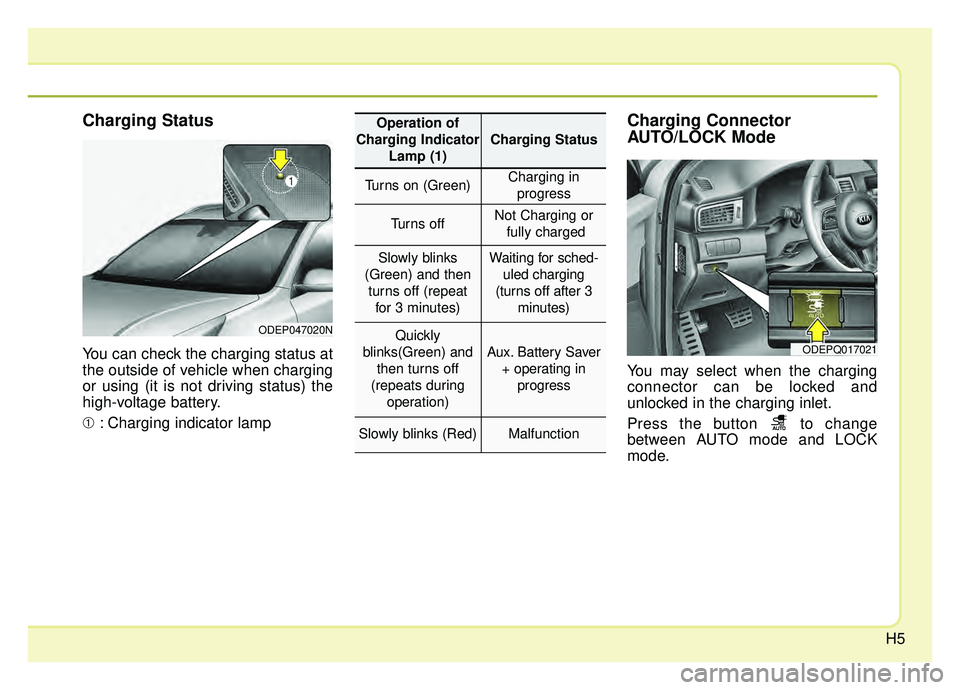
You can check the charging status at
the outside of vehicle when charging
or using (it is not driving status) the
high-voltage battery.
➀: Charging indicator lamp
Charging Connector
AUTO/LOCK Mode
You may select when the charging
connector can be locked and
unlocked in the charging inlet.
Press the button to change
between AUTO mode and LOCK
mode.
ODEP047020N
ODEPQ017021
Operation of
Charging Indicator Lamp (1)
Charging Status
Turns on (Green)Charging inprogress
Turns offNot Charging or fully charged
Slowly blinks
(Green) and then turns off (repeat for 3 minutes)Waiting for sched- uled charging
(turns off after 3 minutes)
Quickly
blinks(Green) and then turns off
(repeats during operation)
Aux. Battery Saver+ operating in progress
Slowly blinks (Red)Malfunction
Page 20 of 611
H13
Unlock Connector in Emergency
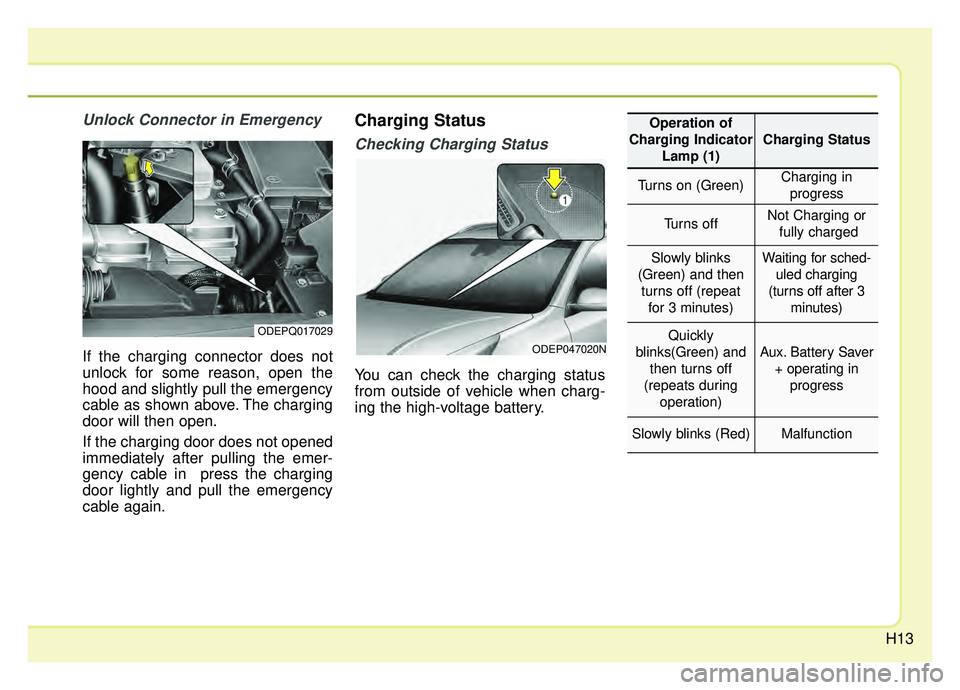
If the charging connector does not
unlock for some reason, open the
hood and slightly pull the emergency
cable as shown above. The charging
door will then open.
If the charging door does not opened
immediately after pulling the emer-
gency cable in press the charging
door lightly and pull the emergency
cable again.
Charging Status
Checking Charging Status
You can check the charging status
from outside of vehicle when charg-
ing the high-voltage battery.
ODEPQ017029
ODEP047020N
Operation of
Charging Indicator Lamp (1)
Charging Status
Turns on (Green)Charging inprogress
Turns offNot Charging or fully charged
Slowly blinks
(Green) and then turns off (repeat for 3 minutes)Waiting for sched- uled charging
(turns off after 3 minutes)
Quickly
blinks(Green) and then turns off
(repeats during operation)
Aux. Battery Saver+ operating in progress
Slowly blinks (Red)Malfunction
Page 26 of 611
H19
Charging Status
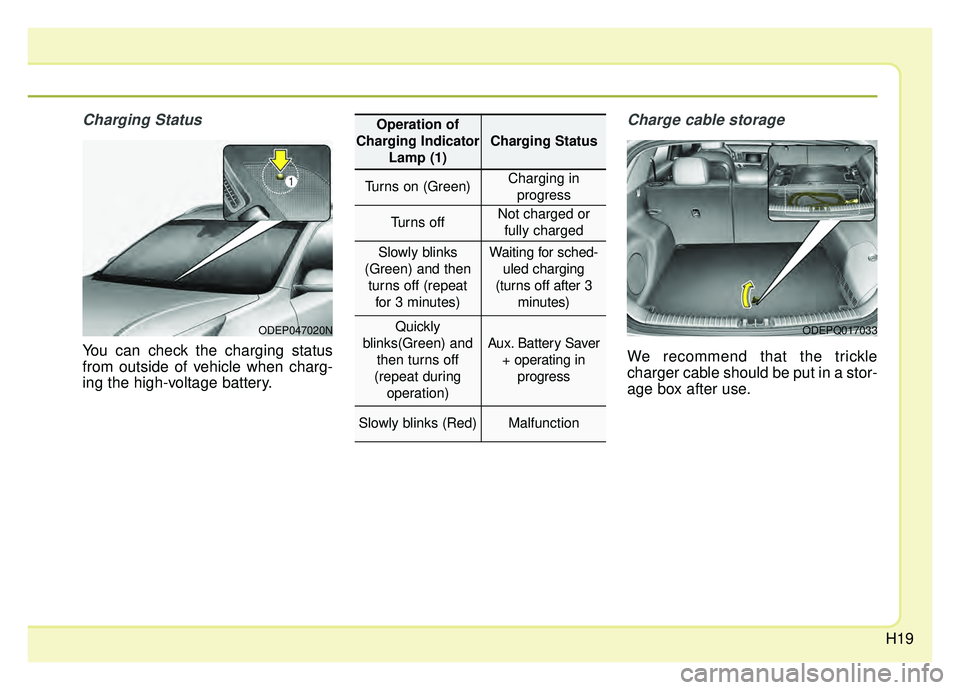
You can check the charging status
from outside of vehicle when charg-
ing the high-voltage battery.
Charge cable storage
We recommend that the trickle
charger cable should be put in a stor-
age box after use.
ODEP047020NODEPQ017033
Operation of
Charging Indicator Lamp (1)
Charging Status
Turns on (Green)Charging inprogress
Turns offNot charged or fully charged
Slowly blinks
(Green) and then turns off (repeat for 3 minutes)Waiting for sched- uled charging
(turns off after 3 minutes)
Quickly
blinks(Green) and then turns off
(repeat during operation)
Aux. Battery Saver + operating in progress
Slowly blinks (Red)Malfunction
Page 42 of 611
H35
AUX. BATTERY SAVER+ (For
Plug-in Hybrid, if equipped)
The Aux. Battery Saver+ is a function
that monitors the charging status of
the 12V auxiliary battery.
If the auxiliary battery level is low, the
main high voltage battery charges
the auxiliary battery.
✽ ✽NOTICE
The Aux. Battery Saver+ function will
be ON when the vehicle is delivered. If
the function is not needed, you may
turn it off in the Users Settings mode
on the LCD display. For more infor-
mation, refer to the "System setting"
on the following page.
Mode
When the vehicle is OFF with all
doors, hood and liftgate closed, the
Aux. Battery Saver+ periodically acti-
vates according to the auxiliary bat-
tery status.
When the engine start/stop button is
in the ON position with the charging
connector plugged in, this function
activates according to the auxiliary
battery status to prevent over-dis-
charge of the auxiliary battery.
✽ ✽NOTICE
The Aux. Battery Saver+ activates
for a maximum of 20 minutes. If the
Aux. Battery Saver+ function acti-
vates more than 10 times consecu-
tively, in the Automatic Mode, this
function will stop activating, judg-
ing that there is a problem with the
auxiliary battery. In this case, drive
the vehicle for some period of time.
The function will start activating if
the auxiliary battery returns to nor-
mal.
✽ ✽NOTICE
If the Aux. Battery Saver+ function
was activated, a message will be dis-
played on the instrument cluster
and the high voltage battery level
may have decreased.
CAUTION
The Aux. Battery Saver+ func-
tion cannot prevent battery dis-charge if the auxiliary battery isdamaged, worn out, used as apower supply or unauthorizedelectronic devices are used.
Page 43 of 611
H36
System setting
The driver can activate the Aux.
Battery Saver+ function by placing
the engine start/stop button to the
ON position and by selecting:
"User Settings ➞Other Features ➞
Aux. Battery Saver+"
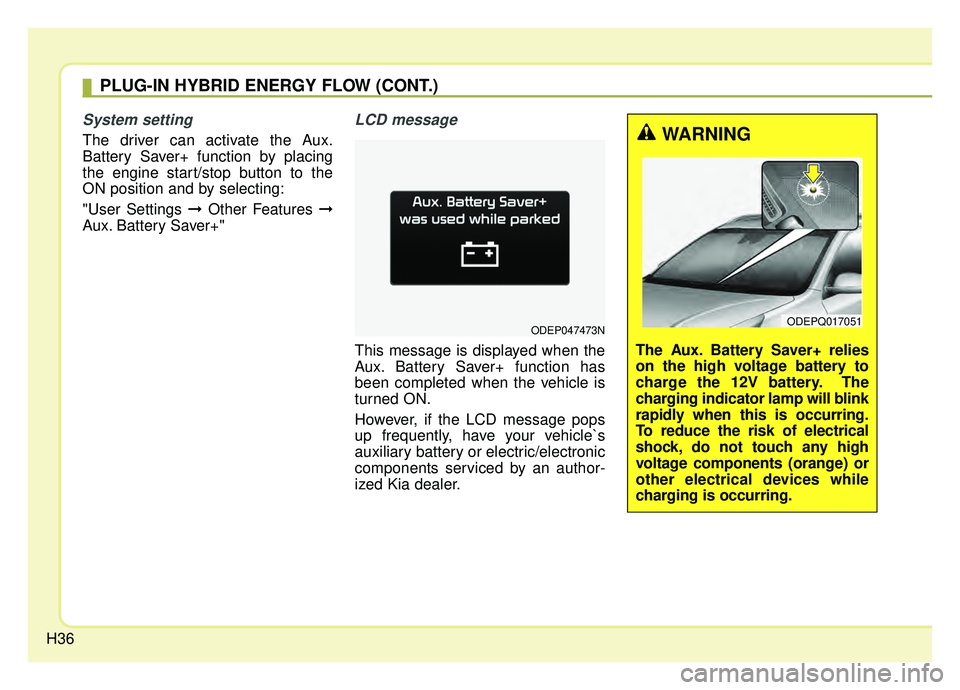
LCD message
This message is displayed when the
Aux. Battery Saver+ function has
been completed when the vehicle is
turned ON.
However, if the LCD message pops
up frequently, have your vehicle`s
auxiliary battery or electric/electronic
components serviced by an author-
ized Kia dealer.
ODEP047473N
WARNING
The Aux. Battery Saver+ relies
on the high voltage battery to
charge the 12V battery. The
charging indicator lamp will blink
rapidly when this is occurring.
To reduce the risk of electrical
shock, do not touch any high
voltage components (orange) or
other electrical devices while
charging is occurring.
ODEPQ017051
PLUG-IN HYBRID ENERGY FLOW (CONT.)
Page 219 of 611
Features of your vehicle
84
4
✽ ✽
NOTICE
If any of the following conditions
occur, the mileage and number of
days to service may be incorrect.
- The battery cable is disconnected.
- The fuse switch is turned off.
- The battery is discharged.
Other Features
Instrument Cluster layout (if
equipped)
Selecting the mode
Simple/Normal/Detailed changes
the LCD screen of the instrument
cluster. (For Type B cluster of Plug-
in Hybrid)
Aux. Battery Saver + (if equipped) : If this item is checked, the Aux.
Battery Saver + function will be
activated.
❈ For more details, refer to “Aux.
Battery Saver +” in chapter Intro.
Fuel Economy Auto Reset - Off : The average fuel economywill not reset automatically when-
ever refueling.
- After Ignition : The average fuel economy will reset automatically
whenever it has passed 4 hours
after turning OFF the engine.
- After Refueling : The average fuel economy will reset automatically
when refueling.
❈ For more details, refer to “Trip
Computer” in this chapter. Fuel Economy Unit : Choose the
fuel economy unit. (US gallon, UK
gallon)
Temperature Unit : Choose the temperature unit. (°C, °F)
Tire Pressure Unit (if equipped) : Choose the tire pressure unit. (psi,
kPa, bar)
Reset
You can reset the menus in the User
Settings Mode. All menus in the User
Settings Mode are initialized, except
service interval.
Page 317 of 611
Audio system
516
✽ ✽NOTICE
-
Using the iPod®Devices
• To use the audio system’s iPod®
control function, use the dedicated
cable provided with your iPod®.
• Connecting the iPod®to the vehi-
cle during play may result in a
loud noise that lasts about one to
two seconds. Connect the iPod
®to
the vehicle after stopping or paus-
ing play.
• Connect the iPod
®with the vehicle
in the ACC ON state to begin
charging.
• When connecting the iPod
®cable,
be sure to fully push the cable into
the port.
• When EQ effects are enabled simultaneously on external
devices, such as iPod
®s and the
audio system, the EQ effects may
overlap, causing sound quality
deterioration or distortion.
Deactivate the EQ function for all
external devices, if possible.
• Noise may occur when your iPod
®
or the AUX port is connected.
Disconnect and store separately
when not in use. (Continued)(Continued)
• There may be noise if the audio
system is used with an iPod
®or
AUX external device connected to
the power jack. In these cases, dis-
connect the iPod
®or external
device from the power jack.
• Play may be interrupted, or device malfunctions may occur depend-
ing on the characteristics of your
iPod
®/iPhone®/iPad®.
• Play may fail if your iPhone®is
connected through both
Bluetooth
®Wireless Technology
and USB. In this case, select Dock
connector or Bluetooth
®Wireless
Technology on your iPhone®to
change the sound output settings.
• If your software version does not support the communication proto-
col or your iPod
®is not recognized
due to device failure, anomalies or
defects, iPod
®mode cannot be
used.
• iPod
®nano (5th generation)
devices may not be recognized if
the battery is low. Charge suffi-
ciently before use. (Continued)(Continued)
• The search and song play order in
the iPod
®device may be different
from the search order in the audio
system.
• If the iPod
®has failed due to an
internal defect, please reset the
iPod
®(consult your iPod®manual).
• Depending on the software ver- sion, the iPod
®may fail to sync
with the system. If the media is
removed or disconnected before
recognition, the previous mode
may not be restored (iPad
®cannot
be charged).
• Cables other than the 1-meter cable provided with iPod
®/iPhone®/iPad®
products may not be recognized.
• When other music apps are used on your iPod
®, the system sync
function may fail due to malfunc-
tion of the iPod
®application.
Page 601 of 611
Index
2I
Air bag - advanced supplemental restraint system . . . . 3-43Adding equipment to or modifying your airbag-equipped vehicle . . . . . . . . . . . . . . . . . . . . . . . 3-68
Air bag warning label. . . . . . . . . . . . . . . . . . . . . . . . 3-68
Air bag warning light . . . . . . . . . . . . . . . . . . . . . . . . 3-46
Curtain air bag . . . . . . . . . . . . . . . . . . . . . . . . . . . . . 3-63
Driver's and passenger's front air bag . . . . . . . . . . . 3-58
How does the air bag system operate? . . . . . . . . . . 3-44
Occupant Detection System (ODS) . . . . . . . . . . . . . 3-50
Side air bag. . . . . . . . . . . . . . . . . . . . . . . . . . . . . . . . 3-61
SRS Care . . . . . . . . . . . . . . . . . . . . . . . . . . . . . . . . . 3-67
SRS components and functions . . . . . . . . . . . . . . . . 3-47
Air cleaner . . . . . . . . . . . . . . . . . . . . . . . . . . . . . . . . . . 8-31\
Filter replacement . . . . . . . . . . . . . . . . . . . . . . . . . . 8-31
Air conditioner compressor label . . . . . . . . . . . . . . . . . 9-11
Air conditioning system . . . . . . . . . . . . . . . . . . . . . . . . . 9-6
Appearance care . . . . . . . . . . . . . . . . . . . . . . . . . . . . . . 8-98 Exterior care . . . . . . . . . . . . . . . . . . . . . . . . . . . . . . . 8-98
Interior care . . . . . . . . . . . . . . . . . . . . . . . . . . . . . . 8-103
Audio (With Touch Screen) . . . . . . . . . . . . . . . . . . . . . . 5-5 Feature of Your Audio . . . . . . . . . . . . . . . . . . . . . . . . 5-6
Media . . . . . . . . . . . . . . . . . . . . . . . . . . . . . . . . . . . . \
5-11
Phone . . . . . . . . . . . . . . . . . . . . . . . . . . . . . . . . . . . . \
5-24
Radio . . . . . . . . . . . . . . . . . . . . . . . . . . . . . . . . . . . . \
5-10
Setup . . . . . . . . . . . . . . . . . . . . . . . . . . . . . . . . . . . . \
. 5-32 Audio System . . . . . . . . . . . . . . . . . . . . . . . . . . . . . . . . . 5-2
Antenna . . . . . . . . . . . . . . . . . . . . . . . . . . . . . . . . . . . 5-\
2
AUX, USB port . . . . . . . . . . . . . . . . . . . . . . . . . . . . . 5-3
Automatic climate control system . . . . . . . . . . . . . . . 4-130 Air Conditioning refrigerant label . . . . . . . . . . . . . 4-144
Automatic heating and air conditioning. . . . . . . . . 4-131
Automatic ventilation . . . . . . . . . . . . . . . . . . . . . . . 4-139
Checking the amount of air conditioner refrigerantand compressor lubricant . . . . . . . . . . . . . . . . . . . 4-143
Climate control air filter. . . . . . . . . . . . . . . . . . . . . 4-142
Manual heating and air conditioning . . . . . . . . . . . 4-133
Sunroof inside air recirculation . . . . . . . . . . . . . . . 4-140
System operation . . . . . . . . . . . . . . . . . . . . . . . . . . 4-140
Autonomous Emergency Braking (AEB) . . . . . . . . . . . 6-36 AEB warning message and system control . . . . . . . 6-39
Brake operation . . . . . . . . . . . . . . . . . . . . . . . . . . . . 6-40
Limitation of the system . . . . . . . . . . . . . . . . . . . . . 6-43
Sensor to detect the distance from the vehiclein front (front radar) . . . . . . . . . . . . . . . . . . . . . . . . 6-41
System malfunction . . . . . . . . . . . . . . . . . . . . . . . . . 6-42
System setting and activation . . . . . . . . . . . . . . . . . . 6-36
Battery (Plug-in Hybrid). . . . . . . . . . . . . . . . . . . . . . . . 8-38 For best battery service . . . . . . . . . . . . . . . . . . . . . . 8-38
Recharging the battery . . . . . . . . . . . . . . . . . . . . . . . 8-39
Reset items . . . . . . . . . . . . . . . . . . . . . . . . . . . . . . . . 8-40
A
B