turn signal KIA NIRO 2019 Owners Manual
[x] Cancel search | Manufacturer: KIA, Model Year: 2019, Model line: NIRO, Model: KIA NIRO 2019Pages: 611, PDF Size: 15.28 MB
Page 65 of 611
25
Your vehicle at a glance
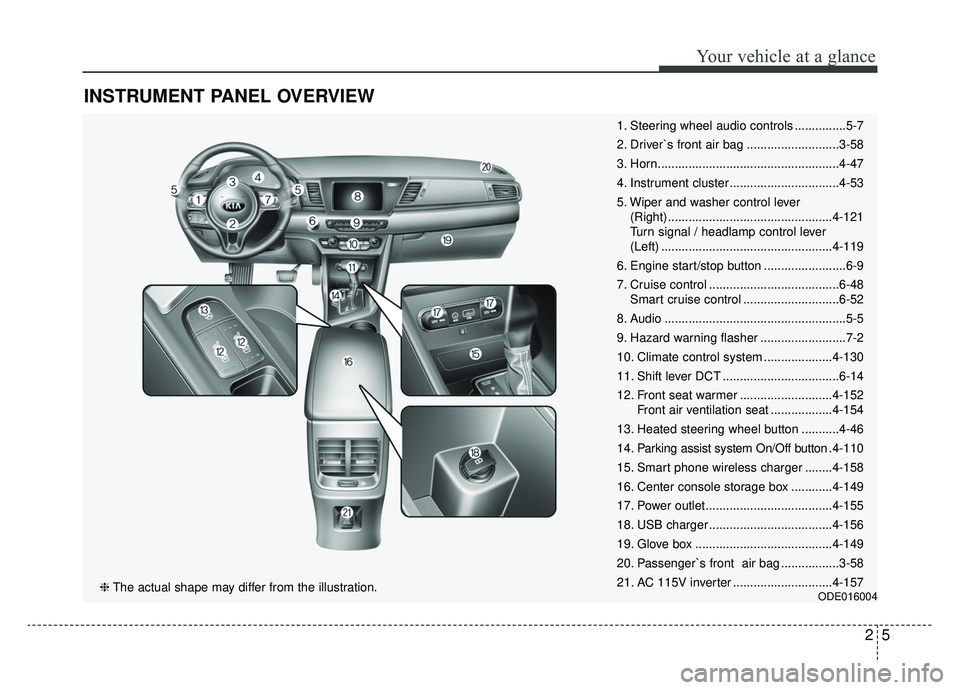
INSTRUMENT PANEL OVERVIEW
1. Steering wheel audio controls ...............5-7
2. Driver`s front air bag ...........................3-58
3. Horn.....................................................4-47
4. Instrument cluster ................................4-53
5. Wiper and washer control lever (Right) ................................................4-121
Turn signal / headlamp control lever
(Left) ..................................................4-119
6. Engine start/stop button ........................6-9
7. Cruise control ......................................6-48 Smart cruise control ............................6-52
8. Audio .....................................................5-5
9. Hazard warning flasher .........................7-2
10. Climate control system ....................4-130
11. Shift lever DCT ..................................6-14
12. Front seat warmer ...........................4-152 Front air ventilation seat ..................4-154
13. Heated steering wheel button ...........4-46
14. Parking assist system On/Off button .4-110
15. Smart phone wireless charger ........4-158
16. Center console storage box ............4-149
17. Power outlet.....................................4-155
18. USB charger ....................................4-156
19. Glove box ........................................4-149
20. Passenger`s front air bag .................3-58
21. AC 115V inverter .............................4-157
ODE016004❈ The actual shape may differ from the illustration.
Page 111 of 611
Safety features of your vehicle
44
3
How does the air bag system
operate?
Air bags are activated (able to
inflate if necessary) only when the
ignition switch is turned to the ON
or START position or when engine
start/stop button has been
changed to ON position.
The appropriate air bags inflate instantly in the event of a serious
frontal collision or side collision in
order to help protect the occupants
from serious physical injury.
There is no single speed at which the air bags will inflate.
Generally, air bags are designed to
inflate based upon the severity of a
collision and its direction. These
two factors determine whether the
sensors produce an electronic
deployment/ inflation signal.
Air bag deployment depends on a number of factors including vehicle
speed, angles of impact, and, the
density and stiffness of the vehi-
cles or objects which your vehicle
hits in the collision. The determin-
ing factors are not limited to those
mentioned above. The front air bags will completely
inflate and deflate in an instant.
It is virtually impossible for you to
see the air bags inflate during an
accident.
It is much more likely that you will
simply see the deflated air bags
hanging out of their storage com-
partments after the collision.
In addition to inflating in serious side collisions, side and/or curtain
air bags will inflate if the sensing
system detects a rollover.
When a rollover is detected, side and/or curtain air bags will remain
inflated longer to help provide pro-
tection from ejection, especially
when used in conjunction with the
seat belts. In order to help provide protection,
the air bags must inflate rapidly.
The speed of the air bag inflation is
a consequence of extremely short
time in which to inflate the air bag
between the occupant and the
vehicle structures before the occu-
pant impacts those structures. This
speed of inflation reduces the risk
of serious or life-threatening
injuries and is thus a necessary
part of the air bag design.
However, air bag inflation can also
cause injuries which can include
facial abrasions, bruises and bro-
ken bones because the inflation
speed also causes the air bags to
expand with a great deal of force.
There are even circumstances under which contact with the
steering wheel or passenger air
bag can cause fatal injuries,
especially if the occupant is
positioned excessively close to
the steering wheel or passenger
air bag.
Page 144 of 611
49
Features of your vehicle
To activate the immobilizer sys-tem:
Turn the ignition key to the OFF posi-
tion. The immobilizer system acti-
vates automatically. Without a valid
ignition key for your vehicle, the
engine will not start.
To deactivate the immobilizersystem:
Insert the ignition key into the key
cylinder and turn it to the ON position.
In order to prevent theft of your vehi-
cle, do not leave spare keys anywhere
in your vehicle. Your Immobilizer pass-
word is a customer unique password
and should be kept confidential. Do
not leave this number anywhere in
your vehicle.
✽ ✽ NOTICE
When starting the engine, do not use
the key with other immobilizer keys
around. Otherwise the engine may
not start or may stop soon after it
starts. Keep each key separate in
order to avoid a starting malfunction.
Do not put metal accessories near
the ignition switch.
Metal accessories may interrupt the
transponder signal and may prevent
the engine from being started.
✽ ✽NOTICE
If you need additional keys or lose
your keys, contact an authorized
Kia dealer.✽ ✽NOTICE - Immobilizer
alterations
Do not change, alter or adjust the
immobilizer system because it could
cause the immobilizer system to
malfunction.
CAUTION- Immobilizer
damage
Do not expose your immobilizersystem to moisture, static elec-tricity or rough handling. Thismay damage your immobilizer.
Page 150 of 611
415
Features of your vehicle
Battery replacement
A smart key battery should last for
several years, but if the smart key is
not working properly, try replacing
the battery with a new one. If you are
unsure how to use your smart key or
replace the battery, contact an
authorized Kia dealer.
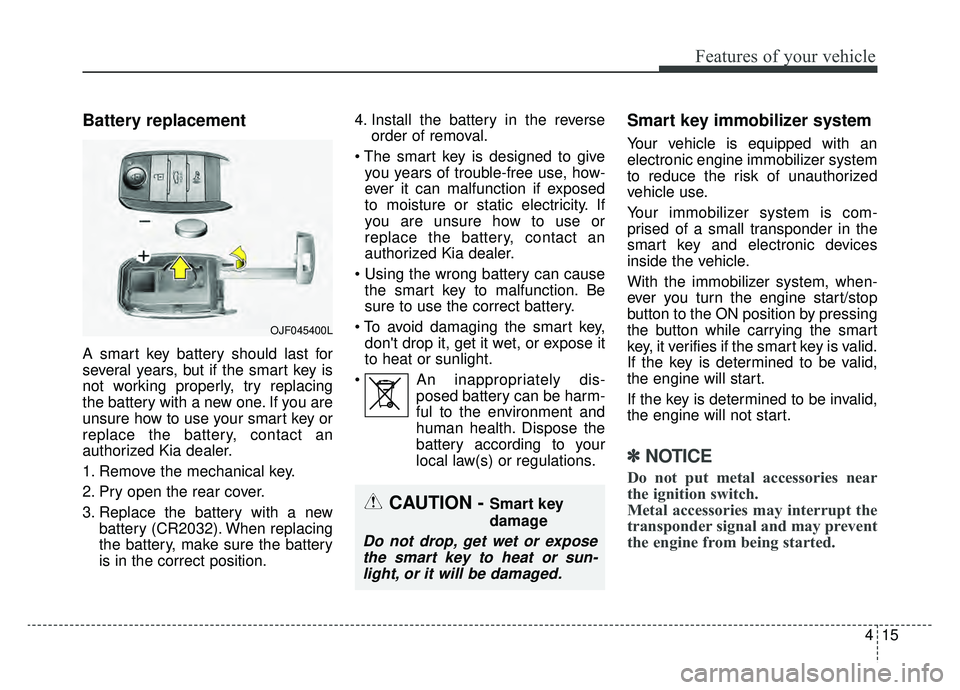
1. Remove the mechanical key.
2. Pry open the rear cover.
3. Replace the battery with a newbattery (CR2032). When replacing
the battery, make sure the battery
is in the correct position. 4. Install the battery in the reverse
order of removal.
you years of trouble-free use, how-
ever it can malfunction if exposed
to moisture or static electricity. If
you are unsure how to use or
replace the battery, contact an
authorized Kia dealer.
the smart key to malfunction. Be
sure to use the correct battery.
don't drop it, get it wet, or expose it
to heat or sunlight.
An inappropriately dis- posed battery can be harm-
ful to the environment and
human health. Dispose the
battery according to your
local law(s) or regulations.
Smart key immobilizer system
Your vehicle is equipped with an
electronic engine immobilizer system
to reduce the risk of unauthorized
vehicle use.
Your immobilizer system is com-
prised of a small transponder in the
smart key and electronic devices
inside the vehicle.
With the immobilizer system, when-
ever you turn the engine start/stop
button to the ON position by pressing
the button while carrying the smart
key, it verifies if the smart key is valid.
If the key is determined to be valid,
the engine will start.
If the key is determined to be invalid,
the engine will not start.
✽ ✽NOTICE
Do not put metal accessories near
the ignition switch.
Metal accessories may interrupt the
transponder signal and may prevent
the engine from being started.
OJF045400L
CAUTION - Smart key
damage
Do not drop, get wet or expose
the smart key to heat or sun-light, or it will be damaged.
Page 218 of 611
483
Features of your vehicle
Lights
One Touch Turn Signal- Off : The one touch turn signalfunction will be deactivated.
- 3, 5, 7 Flashes : The lane change signals will blink 3, 5, or 7 times
when the turn signal lever is
moved slightly.
❈ For more details, refer to “Light” in
this chapter.
Head Lamp Delay (if equipped) If this item is checked, the head
lamp delay function will be activat-
ed.
Welcome Light (if equipped) If this item is checked, the wel-
come light function will be activat-
ed.
Sound
Park Assist System Vol. (if equipped) : Adjust the Park Assist
System volume. (Level 1 ~ 3) Convenience
Seat Easy Access (if equipped)
- None : The seat easy accessfunction will be deactivated.
- Normal/Extended : When you turn off the engine, the driver's
seat will automatically move rear-
ward short (Normal) or long
(Extended) for you to enter or exit
the vehicle more comfortably.
❈ For more details, refer to “Driver
Position Memory System” in chap-
ter 3.
Wireless charging system (if equipped) : If this item is checked,
the Wireless smart phone will be
activated.
Wiper/Light Display (if equipped) : If this item is checked, the Wiper/
Light Display will be activated.
: To activate or deactivate the gear
position pop-up. When activated,
the gear position will be displayed
on the LCD display. Service interval
Service Interval
To activate or deactivate the serv-
ice interval function.
Adjust Interval If the service interval menu is acti-
vated, you may adjust the time and
distance.
Reset : To reset the service interval func-tion.
If the service interval is activated
and the time and distance is
adjusted, messages are displayed
in the following situations each
time the vehicle is turned on.
- Service in : Displayed to informthe driver the remaining mileage
and days to service.
- Service required : Displayed when the mileage and days to
service has been reached or
passed.
Page 238 of 611
4103
Features of your vehicle
Immobilizer IndicatorLight (With Smart Key)
This indicator light illuminates for up
to 30 seconds:
When the vehicle detects the smart key in the vehicle properly
while the Engine Start/Stop Button
is ACC or ON.
- At this time, you can start theengine.
- The indicator light goes off after starting the engine.
This indicator light blinks for a few
seconds:
When the smart key is not in the vehicle.
- At this time, you can not start theengine. This indicator light illuminates for 2
seconds and goes off:
When the vehicle cannot detect the
smart key which is in the vehicle
while the Engine Start/Stop Button
is ON.
In this case, have your vehicle
inspected by an authorized Kia
dealer.
This indicator light blinks:
When the battery of the smart key is weak.
- At this time, you cannot start theengine. However, you can start the
engine if you press the Engine
Start/Stop Button with the smart
key. (For more details, refer to
“Starting the Engine” in chapter 6).
When there is a malfunction with the immobilizer system.
In this case, have your vehicle
inspected by an authorized Kia
dealer.
Turn Signal Indicator
Light
This indicator light blinks:
When you turn the turn signal light on.
If any of the following occurs, there
may be a malfunction with the turn
signal system. In this case, have your
vehicle inspected by an authorized
Kia dealer. - The indicator light does not blinkbut illuminates.
- The indicator light blinks more rapidly.
- The indicator light does not illumi- nate at all.
Page 239 of 611
Features of your vehicle
104
4
High Beam Indicator
Light
This indicator light illuminates:
When the headlights are on and in the high beam position
When the turn signal lever is pulled into the Flash-to-Pass position.
Front Fog Indicator
Light (if equipped)
This indicator light illuminates:
When the front fog lights are on.
Low Beam IndicatorLight (if equipped)
This indicator light illuminates:
When the headlights are on.
Light ON Indicator Light
This indicator light illuminates:
When the tail lights or headlights are on.
Cruise Indicator Light
(if equipped)
This indicator light illuminates:
When the cruise control system is enabled.
❈ For more details, refer to “Cruise
Control System” in chapter 6.
Cruise SET Indicator
Light (if equipped)
This indicator light illuminates:
When the cruise control speed is set.
❈For more details, refer to “Cruise Control System” in chapter 6.
SET
Page 254 of 611
4119
Features of your vehicle
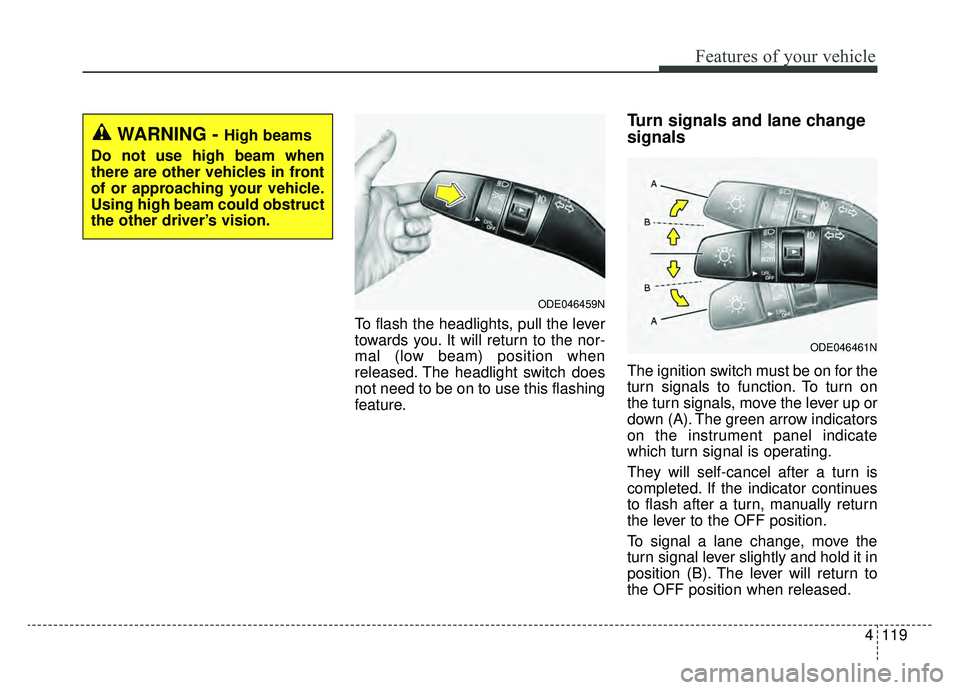
To flash the headlights, pull the lever
towards you. It will return to the nor-
mal (low beam) position when
released. The headlight switch does
not need to be on to use this flashing
feature.
Turn signals and lane change
signals
The ignition switch must be on for the
turn signals to function. To turn on
the turn signals, move the lever up or
down (A). The green arrow indicators
on the instrument panel indicate
which turn signal is operating.
They will self-cancel after a turn is
completed. If the indicator continues
to flash after a turn, manually return
the lever to the OFF position.
To signal a lane change, move the
turn signal lever slightly and hold it in
position (B). The lever will return to
the OFF position when released.
ODE046459N
ODE046461N
WARNING - High beams
Do not use high beam when
there are other vehicles in front
of or approaching your vehicle.
Using high beam could obstruct
the other driver’s vision.
Page 255 of 611
Features of your vehicle
120
4
If an indicator stays on and does not
flash or if it flashes abnormally, one of
the turn signal bulbs may be burned
out and will require replacement.
✽ ✽
NOTICE
If an indicator flash is abnormally
quick or slow, a bulb may be burned
out or have a poor electrical connec-
tion in the circuit.
Check headlight
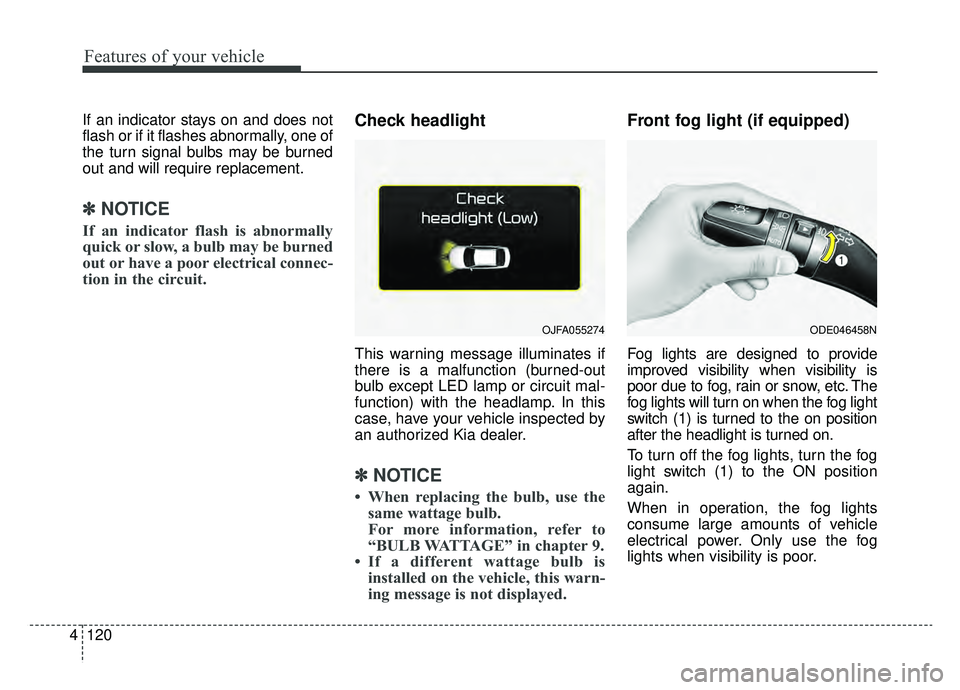
This warning message illuminates if
there is a malfunction (burned-out
bulb except LED lamp or circuit mal-
function) with the headlamp. In this
case, have your vehicle inspected by
an authorized Kia dealer.
✽ ✽NOTICE
• When replacing the bulb, use the
same wattage bulb.
For more information, refer to
“BULB WATTAGE” in chapter 9.
• If a different wattage bulb is installed on the vehicle, this warn-
ing message is not displayed.
Front fog light (if equipped)
Fog lights are designed to provide
improved visibility when visibility is
poor due to fog, rain or snow, etc. The
fog lights will turn on when the fog light
switch (1) is turned to the on position
after the headlight is turned on.
To turn off the fog lights, turn the fog
light switch (1) to the ON position
again.
When in operation, the fog lights
consume large amounts of vehicle
electrical power. Only use the fog
lights when visibility is poor.
OJFA055274ODE046458N
Page 303 of 611
Audio system
25
✽ ✽NOTICE
If you install an after market HID
head lamp, your vehicle’s audio and
electronic device may malfunction.
Antenna
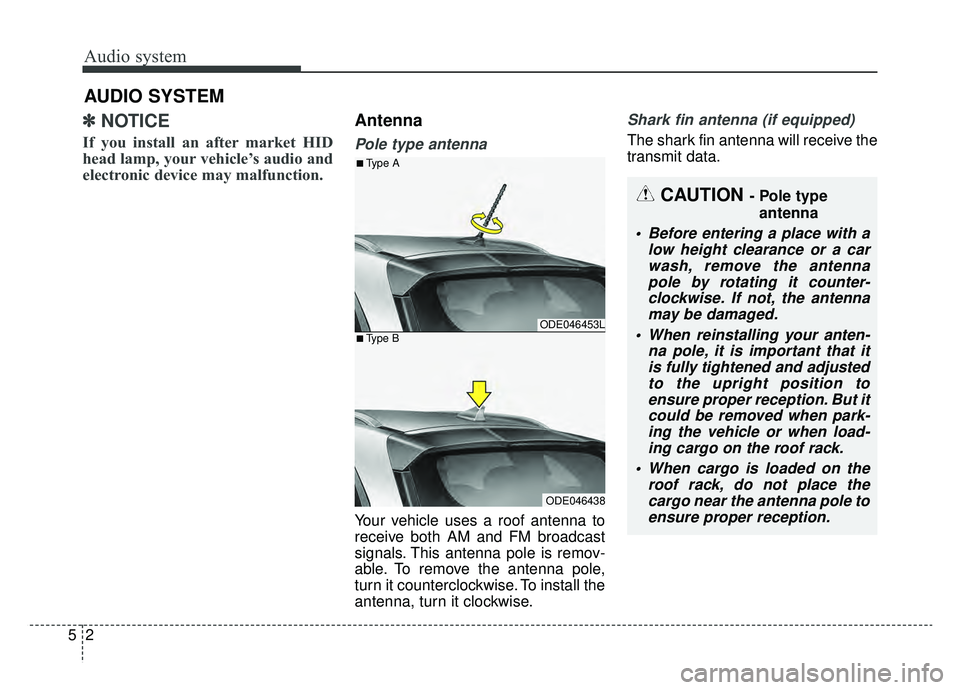
Pole type antenna
Your vehicle uses a roof antenna to
receive both AM and FM broadcast
signals. This antenna pole is remov-
able. To remove the antenna pole,
turn it counterclockwise. To install the
antenna, turn it clockwise.
Shark fin antenna (if equipped)
The shark fin antenna will receive the
transmit data.
AUDIO SYSTEM
CAUTION - Pole type
antenna
• Before entering a place with a low height clearance or a carwash, remove the antennapole by rotating it counter-clockwise. If not, the antennamay be damaged.
When reinstalling your anten- na pole, it is important that itis fully tightened and adjustedto the upright position toensure proper reception. But itcould be removed when park-ing the vehicle or when load-ing cargo on the roof rack.
When cargo is loaded on the roof rack, do not place thecargo near the antenna pole toensure proper reception.
ODE046453L
ODE046438
■Type A
■Type B