air condition KIA NIRO 2021 User Guide
[x] Cancel search | Manufacturer: KIA, Model Year: 2021, Model line: NIRO, Model: KIA NIRO 2021Pages: 710, PDF Size: 14.77 MB
Page 154 of 710
Features of your vehicle
14 4
Remote start
You can start the vehicle using the
remote start button (5) of the smart
key.
To start the vehicle remotely:
Lock the doors by pressing the
door lock button (1) within 32 feet
(10 m) distance from the vehicle.
Press the remote start button (5)
for over 2 seconds within 4 sec-
onds after locking the doors.
Press the remote start button (5)
once to turn off the vehicle.
Air conditioner/heater system main-
tains the status before turning off the
vehicle. If no further action for oper-
ating/driving the vehicle is taken, the
vehicle will be turned off 10 minutes
after starting the vehicle remotely.
Start-up
You can start the engine without
inserting the key.
❈ For detailed information refer to
“ENGINE START/STOP button” in
chapter 5.CAUTION
• Laws in your country may
restrict the use of remote
start. You should check coun-
try regulations before using
this remote starting system.
It is only possible to start the
vehicle remotely when shifted
to P (Park).
If the hood or the liftgate is
opened, you cannot start the
vehicle remotely.
Page 155 of 710

415
Features of your vehicle
Smart key precautions
If you lose your smart key, you will
not be able to start the engine. Tow
the vehicle, if necessary, and con-
tact an authorized Kia dealer.
A maximum of 2 smart keys can be
registered to a single vehicle. If you
lose a smart key, you should imme-
diately take the vehicle and key to
your authorized Kia dealer to pro-
tect it from potential theft.
The smart key will not work if any
of following occurs:
- The smart key is close to a radio
transmitter such as a radio sta-
tion or an airport which can inter-
fere with normal operation of the
smart key.
- The smart key is near a mobile
two-way radio system or a cellu-
lar phone.
- Another vehicle’s smart key is
being operated close to your
vehicle.If the smart key does not work cor-
rectly, you may lock and unlock the
door with the mechanical key. If
you have a problem with the smart
key, contact an authorized Kia
dealer.
If the smart key is in close proximi-
ty to your cell phone or smart
phone, the signal from the smart
key could be blocked by normal
operation of your cell phone or
smart phone.
This is especially important when
the phone is active such as making
calls, receiving calls, text messag-
ing, and/or sending/receiving
emails. Avoid placing the smart key
and your cell phone or smart
phone in the same pants or jacket
pocket and maintain adequate dis-
tance between the two devices.This device complies with Part 15
of the FCC rules.
Operation is subject to the following
two conditions:
1. This device may not cause harmful
interference, and
2. This device must accept any inter-
ference received, including inter-
ference that may cause undesired
operation.
✽ ✽
NOTICE
Changes or modifications not
expressly approved by the party
responsible for compliance could
void the user’s authority to operate
the equipment. If the keyless entry
system is inoperative due to changes
or modifications not expressly
approved by the party responsible
for compliance, it will not be cov-
ered by your manufacturer’s vehicle
warranty.
CAUTION - Transmitter
Keep the smart key away from
water or any liquid as it can
become damaged and not func-
tion properly.
Page 245 of 710
4105
Features of your vehicle
Switching to Hybrid mode to
allow heating or air conditioning
(Plug-in hybrid)
When the outdoor temperature is
lower than 8.6°F (-13°C), and you
turn the climate control On for
heating, the above message will be
displayed in the cluster. Then, the
vehicle will automatically switch to
HEV mode.
When the outdoor temperature is
higher than 14°F (-10°C), or you
turn the climate control Off, the
vehicle will automatically return to
EV mode.
Switching to Hybrid mode for
self-diagnosis (Plug-in hybrid)
This message is displayed for self-
diagnosis of the hybrid mode sys-
tem.
Page 263 of 710

4123
Features of your vehicle
This function will activate when
backing up with the ignition switch
or ENGINE START/STOP button to
the ON position.
If the vehicle is moving at a speed
over 3 mph (5 km/h), the function
may not be activated correctly.
The sensing distance while the
back-up warning function is in
operation is approximately 48 in
(120 cm) at the rear bumper center
area, 24 in (60 cm) at the rear
bumper both side area.
When more than two objects are
sensed at the same time, the clos-
est one will be recognized first.
Types of warning sound
When an object is 24 in to 48 in (60
cm to 120 cm) from the rear
bumper: Buzzer beeps intermit-
tently.
When an object is 12 in to 24 in (30
cm to 60 cm) from the rear
bumper: Buzzer beeps more fre-
quently.
When an object is within 12 in (30
cm) of the rear bumper:
Buzzer sounds continuously.
Non-operational conditions of
Reverse Parking Distance
Warning
Reverse Parking Distance
Warning may not operate properly
when:
1. Moisture is frozen to the sensor. (It
will operate normally once the
moisture clears.
2. The sensor is covered with foreign
matter, such as snow or water, or
the sensor cover is blocked. (It will
operate normally when the materi-
al is removed or the sensor is no
longer blocked.)
3. Driving on uneven road surfaces
(unpaved roads, gravel, bumps,
gradient).
4. Objects generating excessive
noise (vehicle horns, loud motor-
cycle engines, or truck air brakes)
are within range of the sensor.
5. Heavy rain or water spray exists.
6. Wireless transmitters or mobile
phones are within range of the
sensor.
7. The sensor is covered with snow.
8. Trailer towingThe detecting range may decrease
when:
1. The sensor is covered with foreign
matter such as snow or water.
(The sensing range will return to
normal when removed.)
2. Outside air temperature is
extremely hot or cold.
The following objects may not be
recognized by the sensor:
1. Sharp or slim objects such as
ropes, chains or small poles.
2. Objects which tend to absorb the
sensor frequency such as clothes,
sound absorbent material or snow.
3. Undetectable objects smaller than
4 in (100 cm) in height and nar-
rower than 6 in (14 cm) in diame-
ter.
Page 269 of 710
4129
Features of your vehicle
Operating condition
1.Place the light switch in the AUTO
position.
2.Turn on the high beam by pushing
the lever away from you.
The High Beam Assist ( ) indica-
tor will illuminate.
3.High Beam Assist will turn on when
vehicle speed is above 25 mph (40
km/h).
High Beam Assist is operating,
High Beam Assist will turn off and
the high beam will be on continu-
ously. The High Beam Assist (
) indicator will turn off.
when High Beam Assist is oper-
ating, High Beam Assist will turn
off.
4.If the light switch is placed to the
headlamp position, High Beam
Assist will turn off and the low
beam will be on continuously.The high beam switches to low beam
in the below conditions.
When High Beam Assist is off.
When the light switch is not in the
AUTO position.
When the headlamp is detected
from the on-coming vehicle.
When the tail lamp is detected
from the front vehicle.
When the surrounding is bright
enough high beams are not need-
ed.
When streetlights or other lights
are detected.
When vehicle speed is below 15
mph (24 km/h).
When headlamp / taillamp of bicy-
cle/motorcycle is detectedThe function may not operate nor-
mally in the below conditions.
When the light from the on-coming
or front vehicle is not detected
because of lamp damage, hidden
from sight, etc.
When the lamp of the on-coming or
front vehicle is covered with dust,
snow or water.
When the light from the on-coming
or front vehicle is not detected
because of exhaust fume, smoke,
fog, snow, etc.
When the front window is covered
with foreign matters such as ice,
dust, fog, or is damaged.
When there is a similar shape lamp
with the front vehicle’s lamps.
When it is hard to see because of
fog, heavy rain or snow.
When the headlamp is not repaired
or replaced at an authorized deal-
er.
When headlamp aiming is not
properly adjusted.
When driving on a narrow curved
road or rough road.
Page 281 of 710
4141
Features of your vehicle
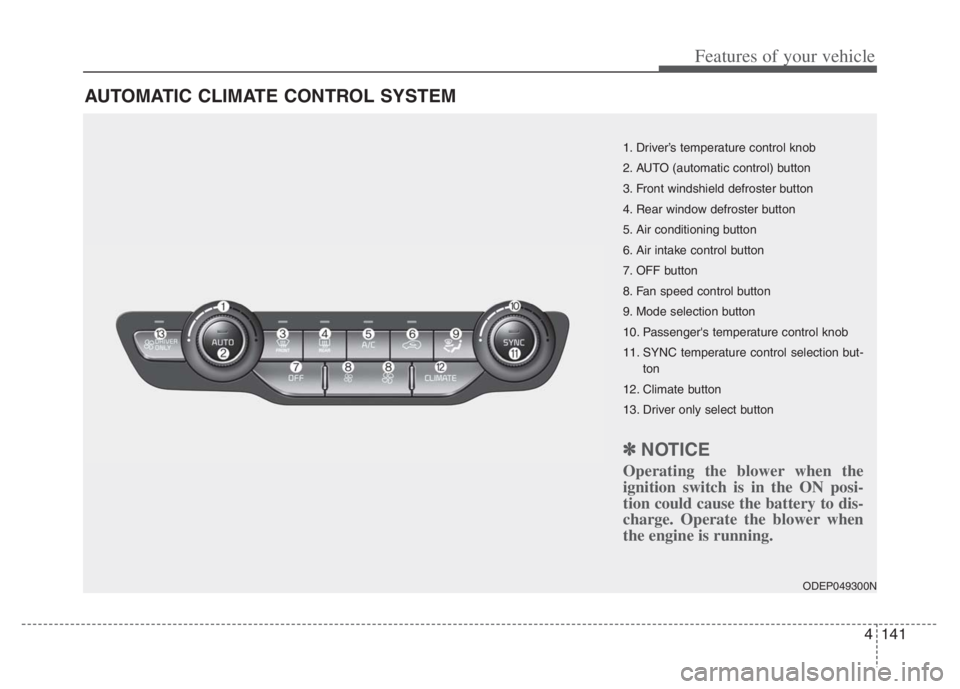
AUTOMATIC CLIMATE CONTROL SYSTEM
ODEP049300N
1. Driver’s temperature control knob
2. AUTO (automatic control) button
3. Front windshield defroster button
4. Rear window defroster button
5. Air conditioning button
6. Air intake control button
7. OFF button
8. Fan speed control button
9. Mode selection button
10. Passenger's temperature control knob
11. SYNC temperature control selection but-
ton
12. Climate button
13. Driver only select button
✽ ✽
NOTICE
Operating the blower when the
ignition switch is in the ON posi-
tion could cause the battery to dis-
charge. Operate the blower when
the engine is running.
Page 282 of 710
Features of your vehicle
142 4
Automatic heating and air con-
ditioning
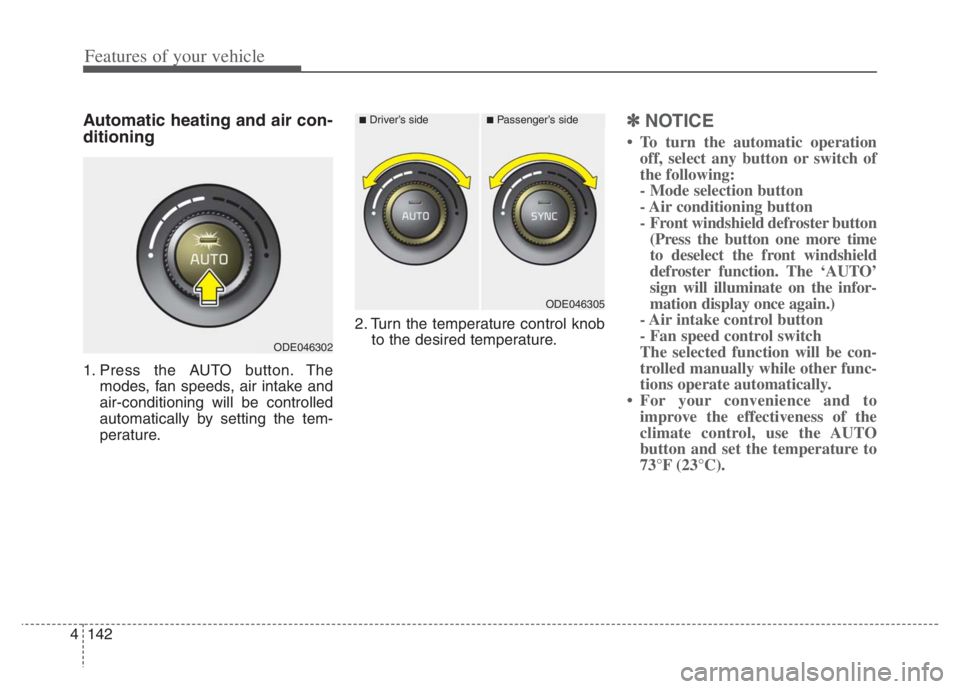
1. Press the AUTO button. The
modes, fan speeds, air intake and
air-conditioning will be controlled
automatically by setting the tem-
perature.2. Turn the temperature control knob
to the desired temperature.
✽ ✽
NOTICE
• To turn the automatic operation
off, select any button or switch of
the following:
- Mode selection button
- Air conditioning button
- Front windshield defroster button
(Press the button one more time
to deselect the front windshield
defroster function. The ‘AUTO’
sign will illuminate on the infor-
mation display once again.)
- Air intake control button
- Fan speed control switch
The selected function will be con-
trolled manually while other func-
tions operate automatically.
• For your convenience and to
improve the effectiveness of the
climate control, use the AUTO
button and set the temperature to
73°F (23°C).
ODE046302
■Driver’s side■Passenger’s side
ODE046305
Page 284 of 710
Features of your vehicle
144 4
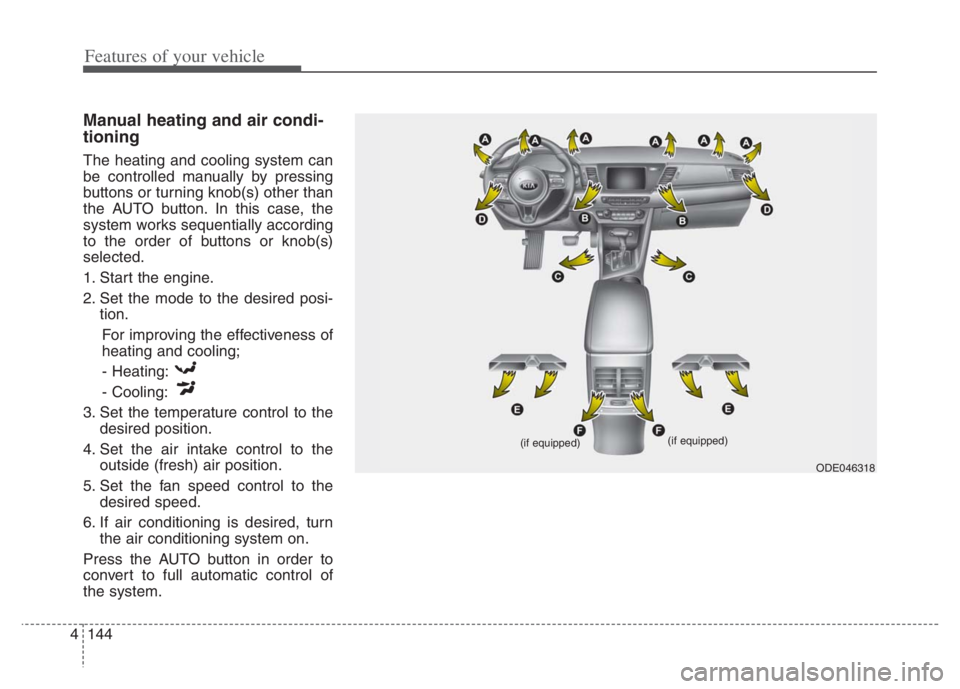
Manual heating and air condi-
tioning
The heating and cooling system can
be controlled manually by pressing
buttons or turning knob(s) other than
the AUTO button. In this case, the
system works sequentially according
to the order of buttons or knob(s)
selected.
1. Start the engine.
2. Set the mode to the desired posi-
tion.
For improving the effectiveness of
heating and cooling;
- Heating:
- Cooling:
3. Set the temperature control to the
desired position.
4. Set the air intake control to the
outside (fresh) air position.
5. Set the fan speed control to the
desired speed.
6. If air conditioning is desired, turn
the air conditioning system on.
Press the AUTO button in order to
convert to full automatic control of
the system.
ODE046318 (if equipped)
(if equipped)
Page 288 of 710
Features of your vehicle
148 4
Air intake control
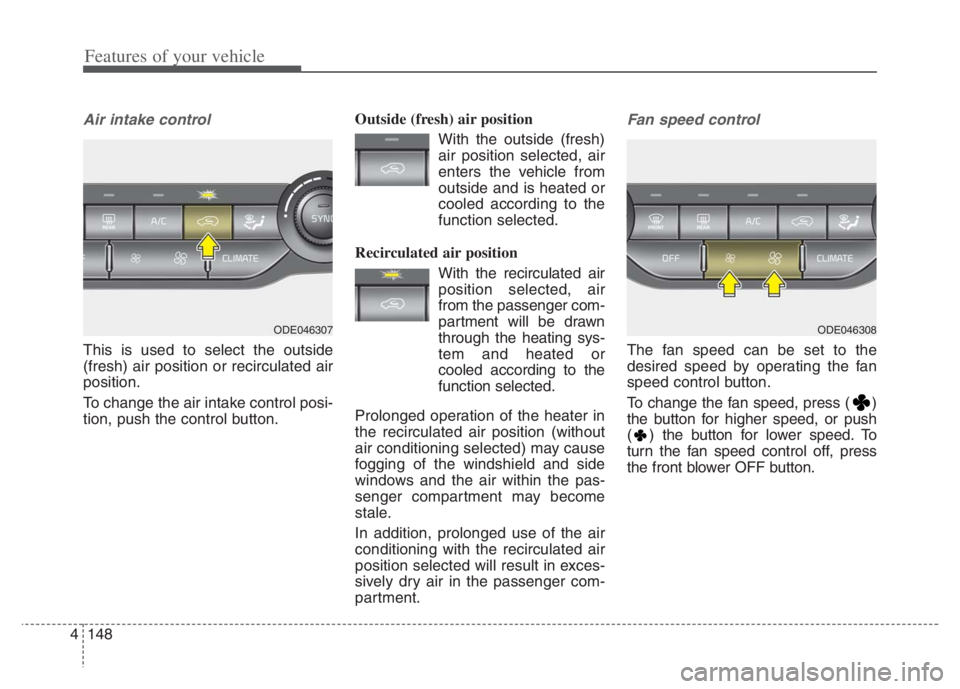
This is used to select the outside
(fresh) air position or recirculated air
position.
To change the air intake control posi-
tion, push the control button.Outside (fresh) air position
With the outside (fresh)
air position selected, air
enters the vehicle from
outside and is heated or
cooled according to the
function selected.
Recirculated air position
With the recirculated air
position selected, air
from the passenger com-
partment will be drawn
through the heating sys-
tem and heated or
cooled according to the
function selected.
Prolonged operation of the heater in
the recirculated air position (without
air conditioning selected) may cause
fogging of the windshield and side
windows and the air within the pas-
senger compartment may become
stale.
In addition, prolonged use of the air
conditioning with the recirculated air
position selected will result in exces-
sively dry air in the passenger com-
partment.
Fan speed control
The fan speed can be set to the
desired speed by operating the fan
speed control button.
To change the fan speed, press ( )
the button for higher speed, or push
( ) the button for lower speed. To
turn the fan speed control off, press
the front blower OFF button.
ODE046308ODE046307
Page 289 of 710
4149
Features of your vehicle
Air conditioning
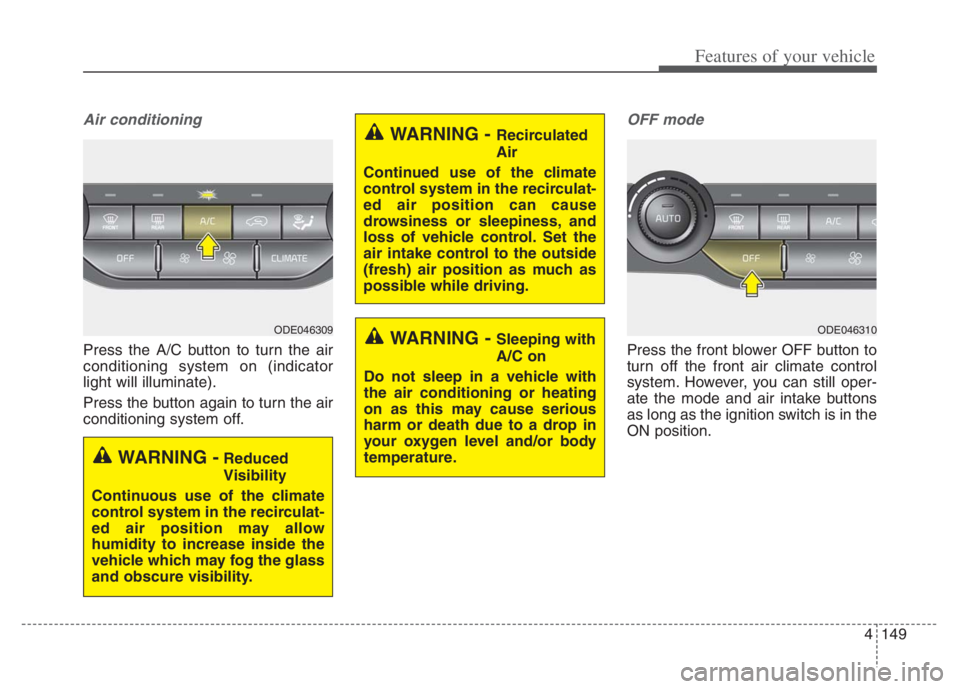
Press the A/C button to turn the air
conditioning system on (indicator
light will illuminate).
Press the button again to turn the air
conditioning system off.
OFF mode
Press the front blower OFF button to
turn off the front air climate control
system. However, you can still oper-
ate the mode and air intake buttons
as long as the ignition switch is in the
ON position.
WARNING - Recirculated
Air
Continued use of the climate
control system in the recirculat-
ed air position can cause
drowsiness or sleepiness, and
loss of vehicle control. Set the
air intake control to the outside
(fresh) air position as much as
possible while driving.
WARNING - Sleeping with
A/C on
Do not sleep in a vehicle with
the air conditioning or heating
on as this may cause serious
harm or death due to a drop in
your oxygen level and/or body
temperature.
WARNING -Reduced
Visibility
Continuous use of the climate
control system in the recirculat-
ed air position may allow
humidity to increase inside the
vehicle which may fog the glass
and obscure visibility.
ODE046309ODE046310