phone KIA NIRO 2021 User Guide
[x] Cancel search | Manufacturer: KIA, Model Year: 2021, Model line: NIRO, Model: KIA NIRO 2021Pages: 710, PDF Size: 14.77 MB
Page 307 of 710
4167
Features of your vehicle
Sun visor
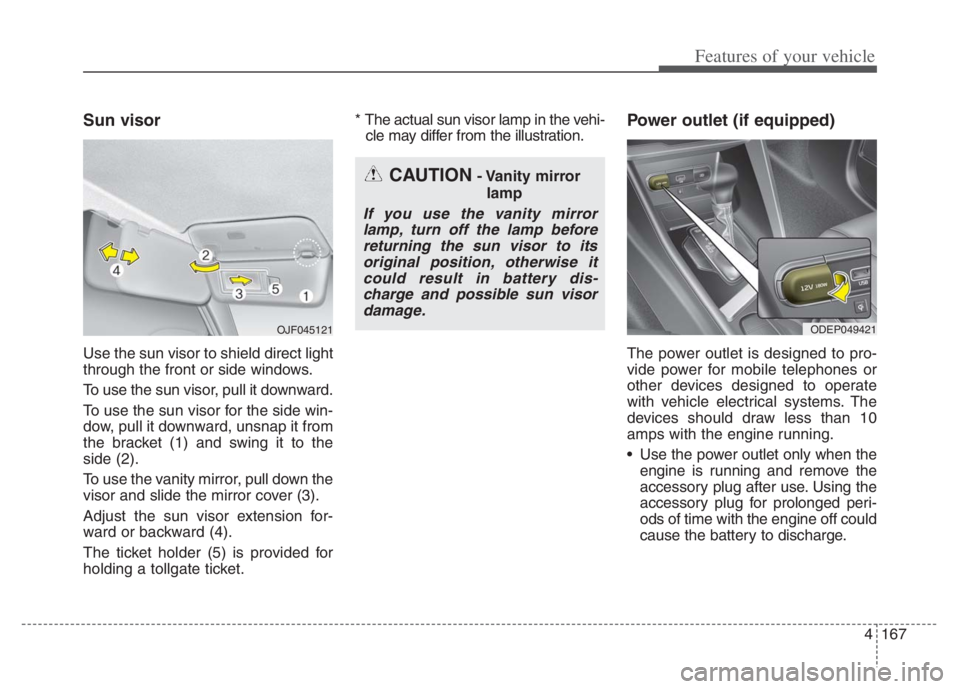
Use the sun visor to shield direct light
through the front or side windows.
To use the sun visor, pull it downward.
To use the sun visor for the side win-
dow, pull it downward, unsnap it from
the bracket (1) and swing it to the
side (2).
To use the vanity mirror, pull down the
visor and slide the mirror cover (3).
Adjust the sun visor extension for-
ward or backward (4).
The ticket holder (5) is provided for
holding a tollgate ticket.* The actual sun visor lamp in the vehi-
cle may differ from the illustration.
Power outlet (if equipped)
The power outlet is designed to pro-
vide power for mobile telephones or
other devices designed to operate
with vehicle electrical systems. The
devices should draw less than 10
amps with the engine running.
Use the power outlet only when the engine is running and remove the
accessory plug after use. Using the
accessory plug for prolonged peri-
ods of time with the engine off could
cause the battery to discharge.
CAUTION- Vanity mirror
lamp
If you use the vanity mirrorlamp, turn off the lamp beforereturning the sun visor to itsoriginal position, otherwise itcould result in battery dis-charge and possible sun visordamage.
ODEP049421 OJF045121
Page 309 of 710

4169
Features of your vehicle
Use the USB charger when the
engine is running to prevent bat-
tery discharge.
Only devices that fit the USB port
can be used.
The USB charger can be used only
for battery charging purposes.
Battery chargers cannot be
charged.Wireless smart phone charg-
ing system (if equipped)
A wireless smart phone charging
system is located in front of the cen-
ter console
Firmly close all doors, and turn the
ignition to ACC or IGN ON. To start
wireless charging, place the smart
phone equipped with wireless charg-
ing function on the wireless charging
pad.For best wireless charging results,
place the smart phone on the center
of the charging pad.
The wireless charging system is
designed for one smart phone
equipped with QI per single usage
only. Please refer to the smart phone
accessory cover or the smart phone
manufacturer homepage to check
whether your smart phone supports
QI function.
ODEP049424
Page 310 of 710
Features of your vehicle
170 4
Wireless smart phone charging
1. Remove any object on the smart
phone charging pad including the
smart key. If there is any foreign
object on the pad other than a
smart phone, the wireless charging
function may not operate properly.
2. Place the smart phone on the cen-
ter of the wireless charging pad.
3. The indicator light will change to
orange once the wireless charging
begins. After the charging is com-
plete, the orange light will change
to green.
4. You can choose to turn the wireless
charging function to either ON or
OFF by selecting the USM on the
instrument cluster. (Please refer to
“Instrument Cluster” for details).
If the wireless charging does not
work, gently move your smart phone
around the pad until the charging
indicator light turns orange.
Depending on the smart phone, the
charging indicator light may not turn
green even after the charging is com-
plete.If the wireless charging is not func-
tioning properly, the orange light will
blink and flash for ten seconds then
turn off. In such cases, remove the
smart phone from the pad and
replace it on the pad again, or double
check the charging status.
If you leave the smart phone on the
charging pad when the vehicle igni-
tion is in OFF, the vehicle will alert
you through warning messages and
sound (applicable for vehicles with
voice guidance function) after the
‘Good bye’ function on the instru-
ment cluster ends.WARNING - Distracted
driving
Driving while distracted can
result in a loss of vehicle con-
trol that may lead to an acci-
dent, severe personal injury,
and death. The driver’s primary
responsibility is in the safe and
legal operation of a vehicle, and
any handheld devices, other
equipment, or vehicle systems
which take the driver’s eyes,
attention and focus away from
the safe operation of a vehicle
or which are not permissible by
law should never be used dur-
ing operation of the vehicle.
Page 311 of 710
4171
Features of your vehicle
✽ ✽
NOTICE
• When the interior temperature of
the wireless charging system rises
above a set temperature, the wire-
less charging will cease to func-
tion. After the interior tempera-
ture drops below the threshold,
the wireless charging function will
resume.
• The wireless charging may not
function properly when there is a
heavy accessory cover on the
smart phone.
• The wireless charging will stop
when using the wireless smart key
search function to prevent radio
wave disruption.
• The wireless charging will stop
when the smart key is moved out
of the vehicle with the ignition in
ON.
• The wireless charging will stop
when any of the doors is opened
(applicable for vehicles equipped
with smart keys).
(Continued)(Continued)
• The wireless charging will stop
when the vehicle is turned OFF.
• The wireless charging will stop
when the smart phone is not in
complete contact with the wireless
charging pad.
• Items equipped with magnetic
components such as credit card,
telephone card, bankbook or any
transportation ticket may become
damaged during wireless charg-
ing.
• Place the smart phone on the cen-
ter of the charge pad for best
results. The smart phone may not
charge when placed near the rim
of the charging pad. When the
smart phone does get charged, it
may heat up excessively.
• For smart phones without built-in
wireless charging system, an
appropriate accessory has to be
equipped in order to use the vehi-
cle's wireless charging system.
(Continued)CAUTION - Liquid in
Wireless Smart Phone
Charger
To prevent liquid from damag-
ing the wireless smart phone
charging system in your vehi-
cle, be sure not to spill liquid
over the charging system when
charging your phone.
CAUTION - Metal in
Wireless Charging System
If any metallic object such as a
coin is located between the
wireless charging system and
the smart phone, the charging
may be disrupted. Also, the
metallic object may heat up and
potentially damage the charging
system. If there is any metallic
object between the smart phone
and the charging pad, immedi-
ately remove the smart phone.
Remove the metallic object after
it has cooled down.
Page 312 of 710
Features of your vehicle
172 4
(Continued)
• Smart phones of some manufac-
turers may display messages on
weak current. This is due to the
particular characteristic of the
smart phone and does not imply a
malfunction on wireless charging
function.
• The indicator light of some manu-
facturers’ smart phones may still
be orange after the smart phone is
fully charged. This is due to the
particular characteristic of the
smart phone and not a malfunc-
tion of the wireless charging.
• When any smart phone without a
wireless charging function or a
metallic object is placed on the
charging pad, a small noise may
sound. This small sound is due to
the vehicle discerning compatibili-
ty of the object placed on the
charging pad. It does not affect
your vehicle or the smart phone in
any way. This device complies with part 15
of the FCC Rules
Operation is subject to the follow-
ing two conditions:
(1) This device may not cause harm-
ful interference, and
(2) this device must accept any inter-
ference received, including inter-
ference that may cause unde-
sired operation.
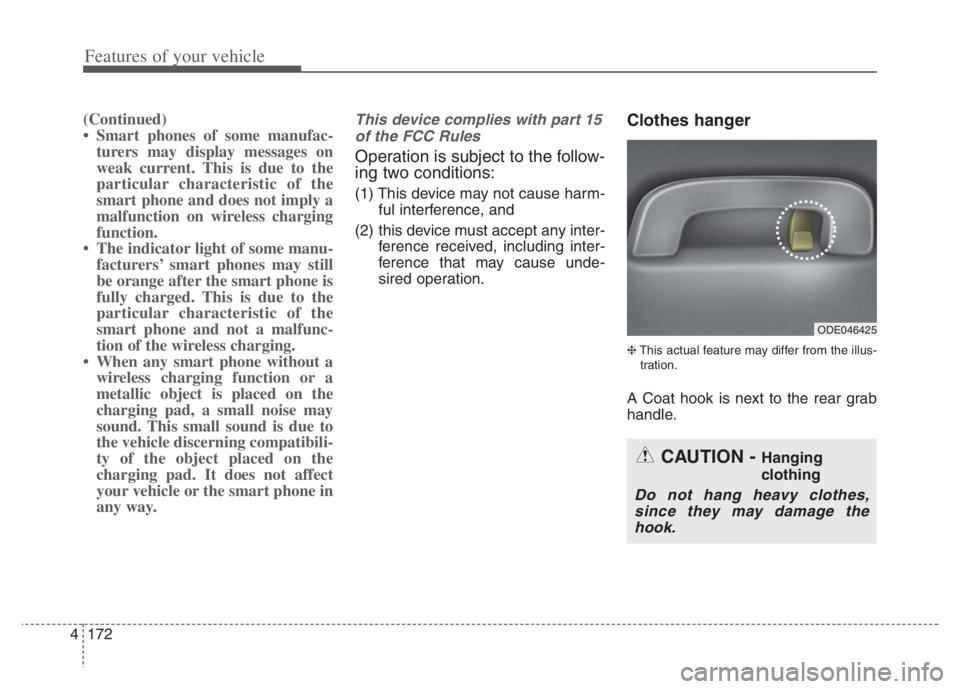
Clothes hanger
❈This actual feature may differ from the illus-
tration.
A Coat hook is next to the rear grab
handle.
ODE046425
CAUTION - Hanging
clothing
Do not hang heavy clothes,
since they may damage the
hook.
Page 321 of 710
4181
Features of your vehicle
Using a cellular phone or a two-
way radio
When a cellular phone is used inside
the vehicle, noise may be produced
from the audio system. This does not
mean that something is wrong with
the audio equipment. In such a case,
try to operate mobile devices as far
from the audio equipment as possible.
When using a communication sys-
tem such as a cellular phone or a
radio set inside the vehicle, a sepa-
rate external antenna must be fitted.
When a cellular phone or a radio set
is used with an internal antenna
alone, it may interfere with the vehi-
cle's electrical system and adversely
affect safe operation of the vehicle.
WARNING- Cell phone use
Do not use a cellular phone
while driving. Stop at a safe
location to use a cellular phone.
WARNING- Distracted
driving
Driving while distracted can
result in a loss of vehicle control
that may lead to an accident,
severe personal injury, and death.
The driver's primary responsibili-
ty is in the safe and legal opera-
tion of a vehicle, and use of any
handheld devices, other equip-
ment, or vehicle systems which
take the driver's eyes, attention
and focus away from the safe
operation of a vehicle or which
are not permissible by law should
never be used during operation
of the vehicle.
Page 627 of 710
763
Maintenance
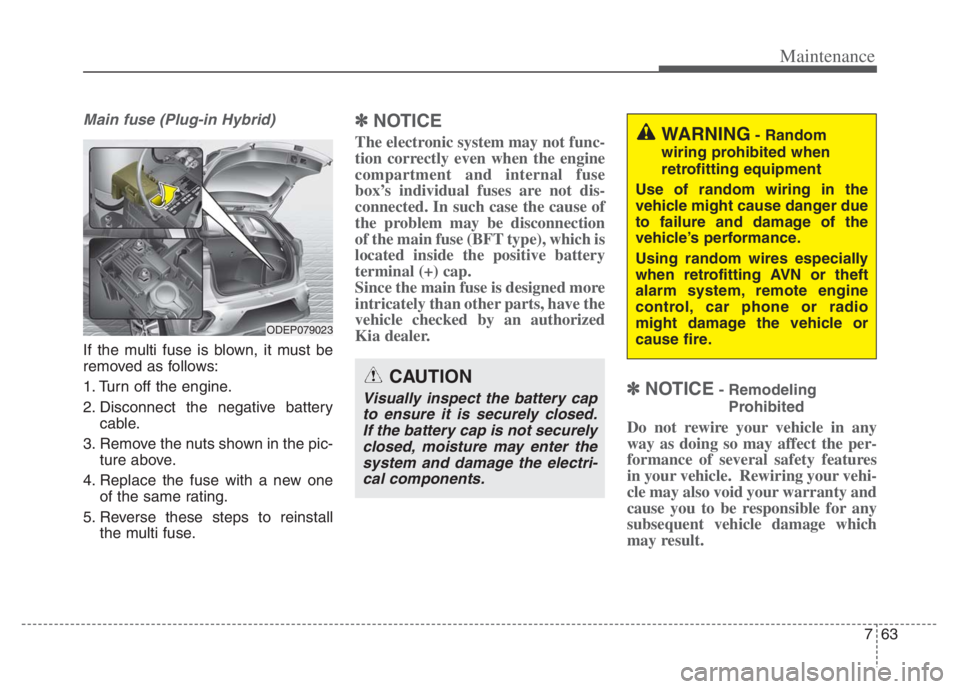
Main fuse (Plug-in Hybrid)
If the multi fuse is blown, it must be
removed as follows:
1. Turn off the engine.
2. Disconnect the negative battery
cable.
3. Remove the nuts shown in the pic-
ture above.
4. Replace the fuse with a new one
of the same rating.
5. Reverse these steps to reinstall
the multi fuse.
✽ ✽
NOTICE
The electronic system may not func-
tion correctly even when the engine
compartment and internal fuse
box’s individual fuses are not dis-
connected. In such case the cause of
the problem may be disconnection
of the main fuse (BFT type), which is
located inside the positive battery
terminal (+) cap.
Since the main fuse is designed more
intricately than other parts, have the
vehicle checked by an authorized
Kia dealer.
✽ ✽
NOTICE- Remodeling
Prohibited
Do not rewire your vehicle in any
way as doing so may affect the per-
formance of several safety features
in your vehicle. Rewiring your vehi-
cle may also void your warranty and
cause you to be responsible for any
subsequent vehicle damage which
may result.
CAUTION
Visually inspect the battery cap
to ensure it is securely closed.
If the battery cap is not securely
closed, moisture may enter the
system and damage the electri-
cal components.
WARNING- Random
wiring prohibited when
retrofitting equipment
Use of random wiring in the
vehicle might cause danger due
to failure and damage of the
vehicle’s performance.
Using random wires especially
when retrofitting AVN or theft
alarm system, remote engine
control, car phone or radio
might damage the vehicle or
cause fire.
ODEP079023
Page 704 of 710

Index
6I
Components of the Tire Mobility Kit . . . . . . . . . . . 6-32
Distributing the sealant . . . . . . . . . . . . . . . . . . . . . . 6-35
Introduction . . . . . . . . . . . . . . . . . . . . . . . . . . . . . . . 6-29
Notes on the safe use of the Tire Mobility Kit . . . . 6-30
Technical Data . . . . . . . . . . . . . . . . . . . . . . . . . . . . . 6-38
Using the Tire Mobility Kit . . . . . . . . . . . . . . . . . . . 6-33
Important safety precautions . . . . . . . . . . . . . . . . . . . . . 3-2
Air bag hazards . . . . . . . . . . . . . . . . . . . . . . . . . . . . . 3-2
Always wear your seat belt . . . . . . . . . . . . . . . . . . . . 3-2
Control your speed . . . . . . . . . . . . . . . . . . . . . . . . . . . 3-3
Driver distraction . . . . . . . . . . . . . . . . . . . . . . . . . . . . 3-2
Keep your vehicle in safe condition. . . . . . . . . . . . . . 3-3
Restrain all children . . . . . . . . . . . . . . . . . . . . . . . . . . 3-2
In case of an emergency while driving . . . . . . . . . . . . . . 6-3
If the engine stalls at a crossroad or crossing . . . . . . 6-3
If the engine stalls while driving . . . . . . . . . . . . . . . . 6-3
If you have a flat tire while driving . . . . . . . . . . . . . . 6-3
Infotainment system . . . . . . . . . . . . . . . . . . . . . . . . . . 4-178
Antenna . . . . . . . . . . . . . . . . . . . . . . . . . . . . . . . . . 4-178
How vehicle radio works . . . . . . . . . . . . . . . . . . . . 4-179
USB port. . . . . . . . . . . . . . . . . . . . . . . . . . . . . . . . . 4-178
Instrument cluster . . . . . . . . . . . . . . . . . . . . . . . . . . . . . 4-67
Dual clutch transmission shift indicator . . . . . . . . . 4-75
Gauges . . . . . . . . . . . . . . . . . . . . . . . . . . . . . . . . . . . 4-69
Instrument Cluster Control. . . . . . . . . . . . . . . . . . . . 4-69
Instrument panel overview . . . . . . . . . . . . . . . . . . . . . . . 2-5
Interior features. . . . . . . . . . . . . . . . . . . . . . . . . . . . . . 4-164
Air ventilation seat . . . . . . . . . . . . . . . . . . . . . . . . . 4-166Cargo security screen . . . . . . . . . . . . . . . . . . . . . . . 4-174
Clothes hanger . . . . . . . . . . . . . . . . . . . . . . . . . . . . 4-172
Cup holder . . . . . . . . . . . . . . . . . . . . . . . . . . . . . . . 4-164
Floor mat anchor(s) . . . . . . . . . . . . . . . . . . . . . . . . 4-173
Luggage net holder. . . . . . . . . . . . . . . . . . . . . . . . . 4-174
Power outlet . . . . . . . . . . . . . . . . . . . . . . . . . . . . . . 4-167
Seat warmer . . . . . . . . . . . . . . . . . . . . . . . . . . . . . . 4-164
Sun visor. . . . . . . . . . . . . . . . . . . . . . . . . . . . . . . . . 4-167
USB charger . . . . . . . . . . . . . . . . . . . . . . . . . . . . . . 4-168
Wireless smart phone charging system . . . . . . . . . 4-169
Interior lights . . . . . . . . . . . . . . . . . . . . . . . . . . . . . . . 4-136
Automatic turn off function . . . . . . . . . . . . . . . . . . 4-136
Liftgate room lamp. . . . . . . . . . . . . . . . . . . . . . . . . 4-138
Map lamp . . . . . . . . . . . . . . . . . . . . . . . . . . . . . . . 4-136
Room lamp . . . . . . . . . . . . . . . . . . . . . . . . . . . . . . . 4-137
Vanity mirror lamp . . . . . . . . . . . . . . . . . . . . . . . . . 4-138
Interior overview. . . . . . . . . . . . . . . . . . . . . . . . . . . . . . . 2-4
Key positions . . . . . . . . . . . . . . . . . . . . . . . . . . . . . . . . . 5-7
Ignition switch position . . . . . . . . . . . . . . . . . . . . . . . 5-7
Illuminated ignition switch . . . . . . . . . . . . . . . . . . . . 5-7
Starting the hybrid system . . . . . . . . . . . . . . . . . . . . . 5-9
K