instrument panel KIA NIRO 2021 Owner's Manual
[x] Cancel search | Manufacturer: KIA, Model Year: 2021, Model line: NIRO, Model: KIA NIRO 2021Pages: 710, PDF Size: 14.77 MB
Page 286 of 710
Features of your vehicle
146 4
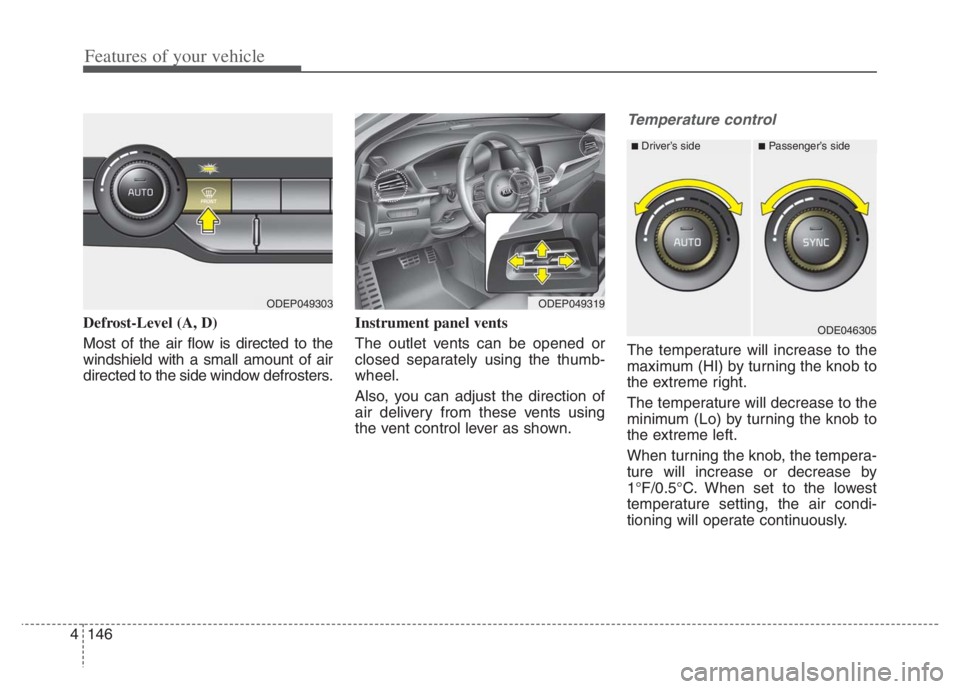
Defrost-Level (A, D)
Most of the air flow is directed to the
windshield with a small amount of air
directed to the side window defrosters.Instrument panel vents
The outlet vents can be opened or
closed separately using the thumb-
wheel.
Also, you can adjust the direction of
air delivery from these vents using
the vent control lever as shown.
Temperature control
The temperature will increase to the
maximum (HI) by turning the knob to
the extreme right.
The temperature will decrease to the
minimum (Lo) by turning the knob to
the extreme left.
When turning the knob, the tempera-
ture will increase or decrease by
1°F/0.5°C. When set to the lowest
temperature setting, the air condi-
tioning will operate continuously.
ODEP049319
■Driver’s side■Passenger’s side
ODE046305
ODEP049303
Page 411 of 710

Driving your vehicle
88 5
LKA operation
To activate/deactivate LKA :
With the ignition switch or ENGINE
START/STOP button in the ON posi-
tion, press the Lane Safety button
located on the instrument panel on
the lower left hand side of the driver.
The indicator ( )in the cluster dis-
play will initially illuminate white.
When the indicator(white) was acti-
vated in the previous ignition cycle,
the function turns on without any
control. If you press the Lane Safety
button again, the indicator on the
cluster display will go off.
(Continued)
The function detects lane
markers and controls the
steering wheel by a front view
camera, therefore, if the lane
markers are hard to detect,
the function may not work
properly. Always be cautious
when using the function.
When the lane markers are
hard to detect, please refer to
“DRIVER’S ATTENTION”.
Do not remove or damage the
related parts of the front view
camera function.
Do not place objects on the
crash pad that reflect light
such as mirrors, white paper,
etc. it may cause malfunction
of LKA if sunlight is reflected.
You may not hear warning
sound of LKA because of the
excessive audio sound.
(Continued)(Continued)
If other beeps such as the
seat belt warning sound are in
operation and override LKA
alarming function, LKA beeps
may not occur.
At high vehicle speeds, the
steering torque needed for
assistance may not be suffi-
cient to keep your vehicle
within the lane. If so, the vehi-
cle may move out of its lane.
Always obey the speed limit
when using LKA.
If you attach objects to the
steering wheel, the function
may not assist steering.
If you attach objects to the
steering wheel, hands off
alarm may not work properly.
ODEP059113
Page 473 of 710

Driving your vehicle
150 5
LFA operation
To use Lane Following Assist two
steps are necessary:
(1) LFA has to be enabled, and
(2) SCC has to be activated
With the ignition switch or ENGINE
START/STOP button in the [ON],
select or release the setting from
“User setting Driver Assistance
Driving Assist Lane Following
Assist”.
Select LFA in the user setting of the
instrument panel.
LFA status is remembered by the
function and therefore does not need
to be enabled again for each new
journey.
(Continued)
- Depending on your surround-
ings and road conditions, LFA
could fail to recognize the
lane and stop working. In turn,
extra caution is required
while driving with LFA on.
- Be sure to check the non-
operating conditions and cau-
tions for the driver before
using LFA.
- Do not place reflective materi-
als such as white paper or
mirror on the crash pad.
Sunlight reflections can cause
a malfunction in LFA.
- Too big sound from the sound
function can interrupt the
alarming sound from LFA.
(Continued)(Continued)
- Keeping your hands off the
wheel while driving will trigger
the hands-off warning and
deactivate the steering-assist
function. Put your hands back
on the wheel, then the steer-
ing-assist system will be re-
activated.
- When driving at a high speed,
the steering assist force can
become weak and the vehicle
can drive out of its lane. Extra
caution is required, and com-
ply with the speed limit.
- Attaching an object to the
steering wheel could deter
steering assistance.
- Attaching an object to the
steering wheel could deter the
hands-off alarming system.
Page 474 of 710
5151
Driving your vehicle
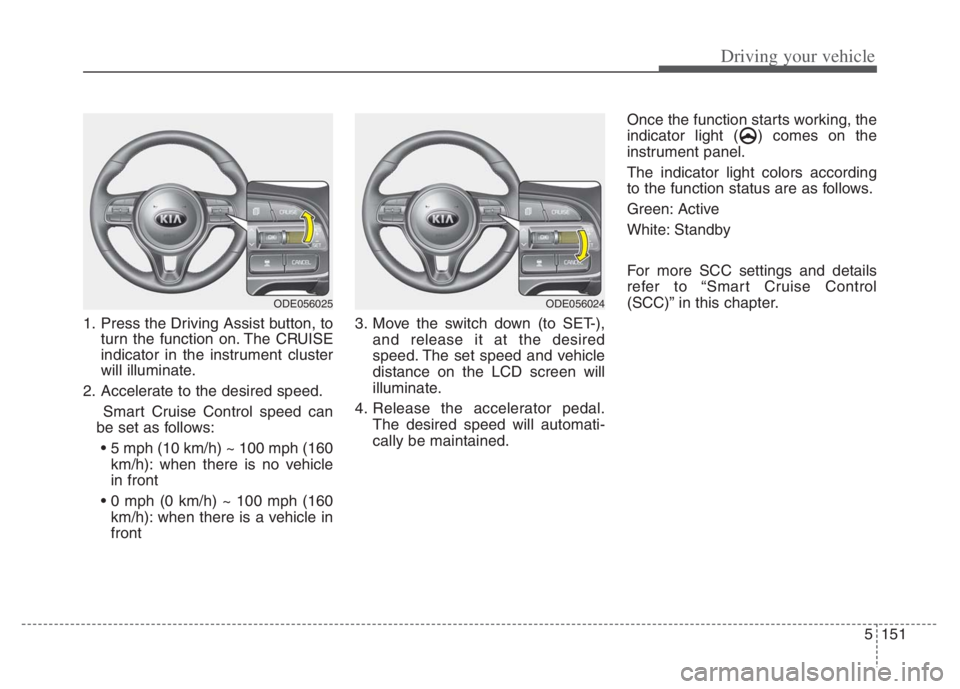
1. Press the Driving Assist button, to
turn the function on. The CRUISE
indicator in the instrument cluster
will illuminate.
2. Accelerate to the desired speed.
Smart Cruise Control speed can
be set as follows:
km/h): when there is no vehicle
in front
km/h): when there is a vehicle in
front3. Move the switch down (to SET-),
and release it at the desired
speed. The set speed and vehicle
distance on the LCD screen will
illuminate.
4. Release the accelerator pedal.
The desired speed will automati-
cally be maintained.Once the function starts working, the
indicator light ( ) comes on the
instrument panel.
The indicator light colors according
to the function status are as follows.
Green: Active
White: Standby
For more SCC settings and details
refer to “Smart Cruise Control
(SCC)” in this chapter.
ODE056025ODE056024
Page 480 of 710
![KIA NIRO 2021 Owners Manual 5157
Driving your vehicle
Setting and activating HDA
With the ignition switch or ENGINE
START/STOP button in the [ON],
select or release the setting from
“User Setting Driver Assistance
Drivi](/img/2/54800/w960_54800-479.png "KIA NIRO 2021 Owners Manual 5157
Driving your vehicle
Setting and activating HDA
With the ignition switch or ENGINE
START/STOP button in the [ON],
select or release the setting from
“User Setting Driver Assistance
Drivi")
5157
Driving your vehicle
Setting and activating HDA
With the ignition switch or ENGINE
START/STOP button in the [ON],
select or release the setting from
“User Setting Driver Assistance
Driving Assist Highway Driving
Assist”.
Select HDA in the User setting of the
instrument panel. and the function
will operate if the following conditions
are met :
If the engine is turned off then on
again, the function maintains the last
setting.
Operating conditions
If you activate HDA in the User set-
ting of the instrument panel. and the
following conditions are met, HDA
will be ready to operate, and the indi-
cator light ( ) will come on
green in the cluster.
When driving on the highway main
line.
When Smart Cruise Control is in
operation (Vehicle deceleration
and acceleration control)
- Refer to “Smart Cruise Control
(SCC)” in this chapter.
- If SCC is in standby mode (SCC
is on but speed is not set), HDA
will be in the same mode. The
white indicator ( ) light will
be turned on.
When the vehicle speed is below
95 mph (153 km/h)
HDA operation
The speed is automatically set in
accordance with the steering control
and the highway speed limit when all
the operating conditions are met.
Page 625 of 710

761
Maintenance
Fuse switch
Always set the fuse switch to the ON
position before using the vehicle.
If you move the switch to the OFF
position, some items such as audio
and digital clock must be reset and
transmitter (or smart key) may not
work properly. When the switch is
Off, the caution indicator will be dis-
played on the instrument cluster.
Always place the fuse switch in the
ON position while driving the vehicle.
If the switch is located in the “OFF”
position, a caution indicator will be
displayed in the cluster.
Engine compartment fuse
replacement
1. Turn the engine start/stop button
to the OFF position and all other
switches off.
2. Remove the fuse panel cover by
pressing the tab and pulling the
cover up. When the blade type
fuse is disconnected, remove it by
using the clip designed for chang-
ing fuses located in the engine
compartment fuse box. Upon
removal, securely insert reserve
fuse of the same rating.
ODEP079018
ODEP079021
CAUTION - Fuse Panel
Covers
Set all switches to ON before
driving.
If the vehicle is going to be
unused for over 1 month, set
all switches to OFF to prevent
the batteries from draining.
The contact points of the
switches may wear out with
excessive use. Please refrain
from excessive use of the
switches (except for long-term
parking for over 1 month).
Page 630 of 710

Maintenance
66 7
Instrument panel (Driver’s side fuse panel) (Hybrid)
Fuse NameFuse ratingCircuit Protected
MODULE 510A
Electro Chromic Mirror, Audio/Video & Navigation Head Unit, Audio, Shift Lever Indicator, Air Conditioner
Control Module, Rear Seat Warmer Control Module, Front Air Ventilation Seat Control Module, Front Seat
Warmer Control Module, Head Lamp Leveling Device Actuator LH/RH, Crash Pad Switch, AMP (Amplifier),
Keyboard, OBD
MODULE 410ALane Keeping Assist Control Module, Crash Pad Switch, Blind-Spot Collision Warning (BCW) Radar Left
Handle side/Right Handle side, EPB, VESS
INTERIOR
LAMP10AFront Vanity Lamp LH/RH, Room Lamp, Overhead Console Lamp, Luggage Lamp, Mood Lamp, Wireless
Charger, Rain sensor, Driver warning switch
A/BAG15APassenger Occupant Detection Sensor, ACU
IG 125AEngine Room Junction Block (Fuse - DCT4, HPCU2, ACTIVE HYDRAULIC BOOSTER3, ECU3)
CLUSTER10AInstrument Cluster
MODULE 310ABCM (Body Control Module), DCT (Dual Clutch Transmission) Shift Lever, Stop Lamp Switch, Driver Door
Module, Passenger Door Module
MEMORY 27.5AActive Air Flap Unit, VESS
MODULE 810AActive Air Flap Unit, Electric Water Pump (Engine), Engine Room Junction Block (Battery C/Fan Relay),
BMS (Battery Management System) Control Module
A/BAG IND7.5AAir Conditioner Control Module, Instrument Cluster
START7.5A[With Smart Key/With Immobilizer] Inhibitor Switch
Page 634 of 710
Maintenance
70 7
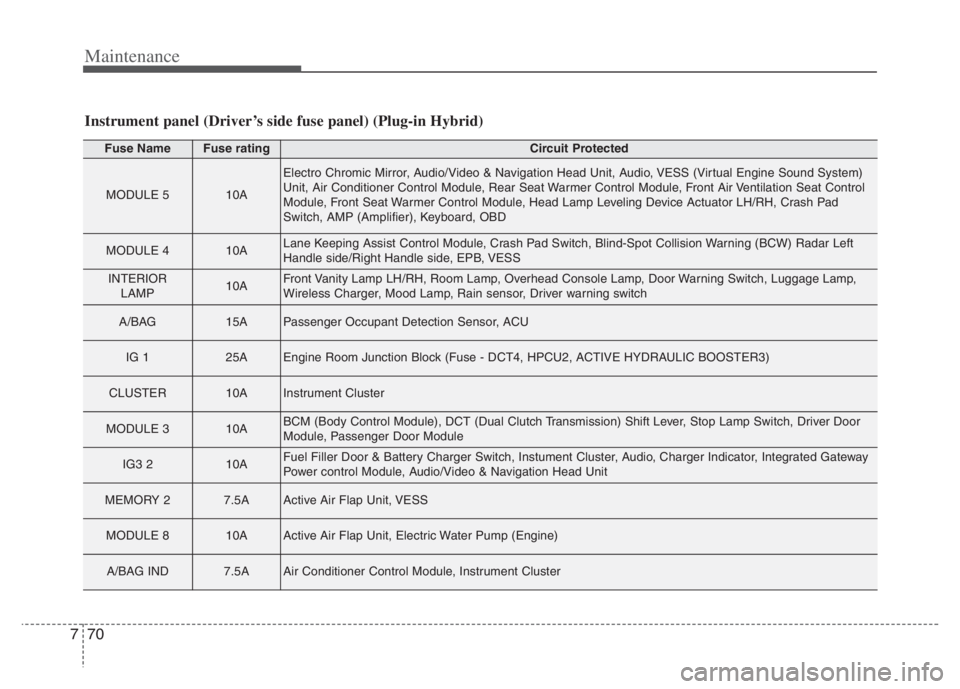
Instrument panel (Driver’s side fuse panel) (Plug-in Hybrid)
Fuse NameFuse ratingCircuit Protected
MODULE 510A
Electro Chromic Mirror, Audio/Video & Navigation Head Unit, Audio, VESS (Virtual Engine Sound System)
Unit, Air Conditioner Control Module, Rear Seat Warmer Control Module, Front Air Ventilation Seat Control
Module, Front Seat Warmer Control Module, Head Lamp Leveling Device Actuator LH/RH, Crash Pad
Switch, AMP (Amplifier), Keyboard, OBD
MODULE 410ALane Keeping Assist Control Module, Crash Pad Switch, Blind-Spot Collision Warning (BCW) Radar Left
Handle side/Right Handle side, EPB, VESS
INTERIOR
LAMP10AFront Vanity Lamp LH/RH, Room Lamp, Overhead Console Lamp, Door Warning Switch, Luggage Lamp,
Wireless Charger, Mood Lamp, Rain sensor, Driver warning switch
A/BAG15APassenger Occupant Detection Sensor, ACU
IG 125AEngine Room Junction Block (Fuse - DCT4, HPCU2, ACTIVE HYDRAULIC BOOSTER3)
CLUSTER10AInstrument Cluster
MODULE 310ABCM (Body Control Module), DCT (Dual Clutch Transmission) Shift Lever, Stop Lamp Switch, Driver Door
Module, Passenger Door Module
IG3 210AFuel Filler Door & Battery Charger Switch, Instument Cluster, Audio, Charger Indicator, Integrated Gateway
Power control Module, Audio/Video & Navigation Head Unit
MEMORY 27.5AActive Air Flap Unit, VESS
MODULE 810AActive Air Flap Unit, Electric Water Pump (Engine)
A/BAG IND7.5AAir Conditioner Control Module, Instrument Cluster
Page 639 of 710
775
Maintenance
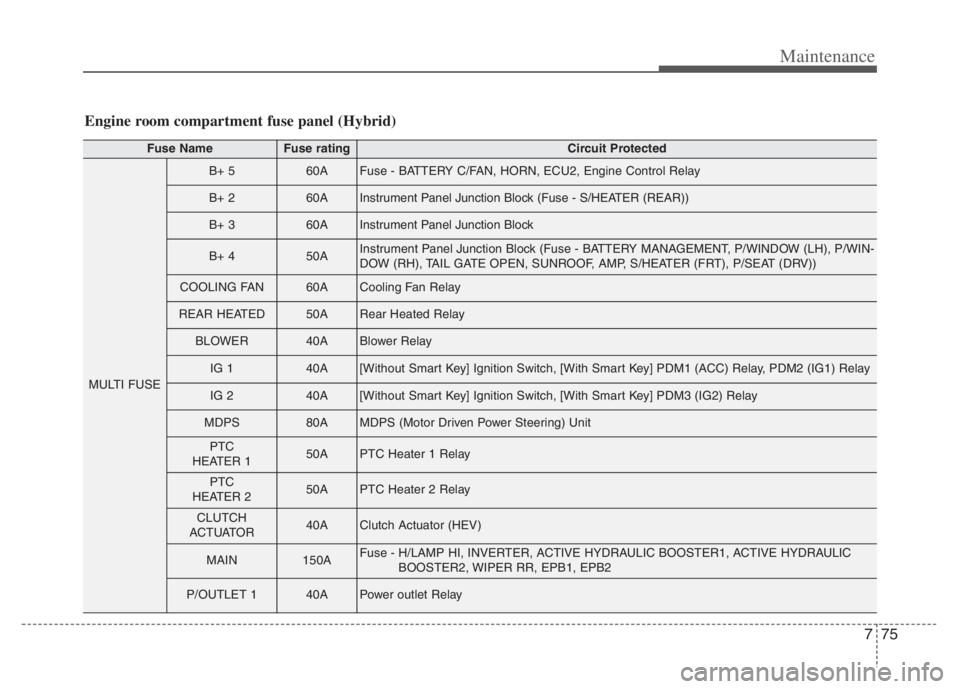
Engine room compartment fuse panel (Hybrid)
Fuse NameFuse ratingCircuit Protected
MULTI FUSE
B+ 560AFuse - BATTERY C/FAN, HORN, ECU2, Engine Control Relay
B+ 260AInstrument Panel Junction Block (Fuse - S/HEATER (REAR))
B+ 360AInstrument Panel Junction Block
B+ 450AInstrument Panel Junction Block (Fuse - BATTERY MANAGEMENT, P/WINDOW (LH), P/WIN-
DOW (RH), TAIL GATE OPEN, SUNROOF, AMP, S/HEATER (FRT), P/SEAT (DRV))
COOLING FAN60ACooling Fan Relay
REAR HEATED50ARear Heated Relay
BLOWER40ABlower Relay
IG 140A[Without Smart Key] Ignition Switch, [With Smart Key] PDM1 (ACC) Relay, PDM2 (IG1) Relay
IG 240A[Without Smart Key] Ignition Switch, [With Smart Key] PDM3 (IG2) Relay
MDPS80AMDPS (Motor Driven Power Steering) Unit
PTC
HEATER 150APTC Heater 1 Relay
PTC
HEATER 250APTC Heater 2 Relay
CLUTCH
ACTUATOR40AClutch Actuator (HEV)
MAIN150AFuse - H/LAMP HI, INVERTER, ACTIVE HYDRAULIC BOOSTER1, ACTIVE HYDRAULIC
BOOSTER2, WIPER RR, EPB1, EPB2
P/OUTLET 140APower outlet Relay
Page 640 of 710
Maintenance
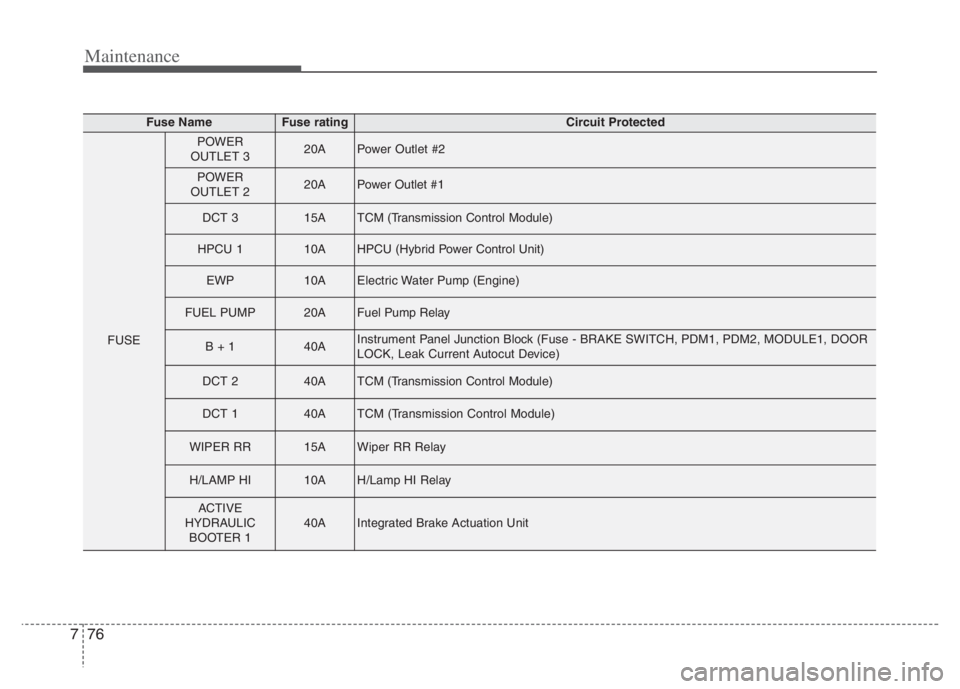
76 7
Fuse NameFuse ratingCircuit Protected
FUSE
POWER
OUTLET 320APower Outlet #2
POWER
OUTLET 220APower Outlet #1
DCT 315ATCM (Transmission Control Module)
HPCU 110AHPCU (Hybrid Power Control Unit)
EWP10AElectric Water Pump (Engine)
FUEL PUMP20AFuel Pump Relay
B + 140AInstrument Panel Junction Block (Fuse - BRAKE SWITCH, PDM1, PDM2, MODULE1, DOOR
LOCK, Leak Current Autocut Device)
DCT 240ATCM (Transmission Control Module)
DCT 140ATCM (Transmission Control Module)
WIPER RR15AWiper RR Relay
H/LAMP HI10AH/Lamp HI Relay
ACTIVE
HYDRAULIC
BOOTER 140AIntegrated Brake Actuation Unit