tow KIA NIRO 2021 Owner's Manual
[x] Cancel search | Manufacturer: KIA, Model Year: 2021, Model line: NIRO, Model: KIA NIRO 2021Pages: 710, PDF Size: 14.77 MB
Page 247 of 710

4107
Features of your vehicle
Parking Brake & Brake
Fluid Warning Light
This warning light illuminates:
Once you set the ignition switch or
ENGINE START/STOP button to
the ON position.
- It illuminates for approximately 3
seconds
- It remains on if the parking brake
is applied.
When the parking brake is applied.
When the brake fluid level in the
reservoir is low.
- If the warning light illuminates
with the parking brake released, it
indicates the brake fluid level in
reservoir is low.If the brake fluid level in the reservoir
is low:
1. Drive carefully to the nearest safe
location and stop your vehicle.
2. With the engine stopped, check
the brake fluid level immediately
and add fluid as required (For
more details, refer to “Brake Fluid”
in chapter 7).
Then check all brake components
for fluid leaks. If any leaks in the
brake system are still found, the
warning light remains on, or the
brakes do not operate properly, do
not drive the vehicle.
In this case, have your vehicle
towed to an authorized Kia dealer
and inspected.Dual-diagonal braking system
Your vehicle is equipped with dual-
diagonal braking systems. This
means you still have braking on two
wheels even if one of the dual sys-
tems should fail.
With only one of the dual systems
working, greater pedal pressure is
required to stop the vehicle.
Also, the vehicle will require
increased stopping distance with
only a portion of the brake system
working.
If the brakes fail while you are driv-
ing, shift to a lower gear for addition-
al engine braking and stop the vehi-
cle as soon as it is safe to do so.
Driving the vehicle with a warning
light ON is dangerous. If the Parking
Brake & Brake Fluid Warning Light
illuminate with the parking brake
released, it indicates that the brake
fluid level is low.
In this case, have your vehicle
inspected by an authorized Kia deal-
er.
Page 263 of 710

4123
Features of your vehicle
This function will activate when
backing up with the ignition switch
or ENGINE START/STOP button to
the ON position.
If the vehicle is moving at a speed
over 3 mph (5 km/h), the function
may not be activated correctly.
The sensing distance while the
back-up warning function is in
operation is approximately 48 in
(120 cm) at the rear bumper center
area, 24 in (60 cm) at the rear
bumper both side area.
When more than two objects are
sensed at the same time, the clos-
est one will be recognized first.
Types of warning sound
When an object is 24 in to 48 in (60
cm to 120 cm) from the rear
bumper: Buzzer beeps intermit-
tently.
When an object is 12 in to 24 in (30
cm to 60 cm) from the rear
bumper: Buzzer beeps more fre-
quently.
When an object is within 12 in (30
cm) of the rear bumper:
Buzzer sounds continuously.
Non-operational conditions of
Reverse Parking Distance
Warning
Reverse Parking Distance
Warning may not operate properly
when:
1. Moisture is frozen to the sensor. (It
will operate normally once the
moisture clears.
2. The sensor is covered with foreign
matter, such as snow or water, or
the sensor cover is blocked. (It will
operate normally when the materi-
al is removed or the sensor is no
longer blocked.)
3. Driving on uneven road surfaces
(unpaved roads, gravel, bumps,
gradient).
4. Objects generating excessive
noise (vehicle horns, loud motor-
cycle engines, or truck air brakes)
are within range of the sensor.
5. Heavy rain or water spray exists.
6. Wireless transmitters or mobile
phones are within range of the
sensor.
7. The sensor is covered with snow.
8. Trailer towingThe detecting range may decrease
when:
1. The sensor is covered with foreign
matter such as snow or water.
(The sensing range will return to
normal when removed.)
2. Outside air temperature is
extremely hot or cold.
The following objects may not be
recognized by the sensor:
1. Sharp or slim objects such as
ropes, chains or small poles.
2. Objects which tend to absorb the
sensor frequency such as clothes,
sound absorbent material or snow.
3. Undetectable objects smaller than
4 in (100 cm) in height and nar-
rower than 6 in (14 cm) in diame-
ter.
Page 268 of 710
Features of your vehicle
128 4
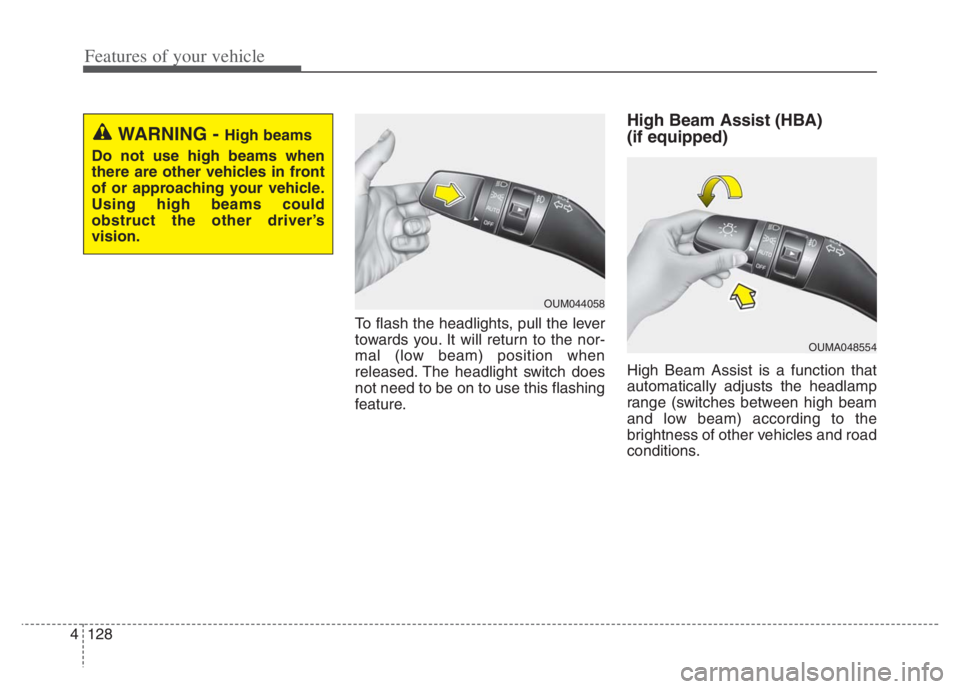
To flash the headlights, pull the lever
towards you. It will return to the nor-
mal (low beam) position when
released. The headlight switch does
not need to be on to use this flashing
feature.
High Beam Assist (HBA)
(if equipped)
High Beam Assist is a function that
automatically adjusts the headlamp
range (switches between high beam
and low beam) according to the
brightness of other vehicles and road
conditions.
OUM044058
WARNING - High beams
Do not use high beams when
there are other vehicles in front
of or approaching your vehicle.
Using high beams could
obstruct the other driver’s
vision.
OUMA048554
Page 270 of 710

Features of your vehicle
130 4
When driving downhill or uphill.
When only part of the vehicle in
front is visible on a crossroad or
curved road.
When there is a traffic light, reflect-
ing sign, flashing sign or mirror.
When the road conditions are bad
such as being wet or covered with
snow.
When the front vehicle’s head-
lamps are off but the fog lamps on.
When a vehicle suddenly appears
from a curve.
When the vehicle is tilted from a
flat tire or being towed.
When Lane Keeping Assist warn-
ing light illuminates. (if equipped)✽ ✽
NOTICE
• Do not place any accessories,
stickers or tint the windshield.
• Have the windshield glass replaced
from an authorized dealer.
• Do not remove or damage related
parts of High Beam Assist.
• Be careful that water doesn’t get
into the High Beam Assist unit.
• Do not place objects on the dash-
board that reflect light such as
mirrors, white paper, etc. The
function may malfunction if sun-
light is reflected.
• At times, High Beam Assist may
not work properly, always check
the road conditions for your safe-
ty. When the function does not
operate normally, manually
change between the high beam
and low beam.
Turn signals and lane change
signals
The ignition switch must be on for the
turn signals to function. To turn on
the turn signals, move the lever up or
down (A). The green arrow indicators
on the instrument panel indicate
which turn signal is operating.
They will self-cancel after a turn is
completed. If the indicator continues
to flash after a turn, manually return
the lever to the OFF position.
To signal a lane change, move the
turn signal lever slightly and hold it in
position (B). The lever will return to
the OFF position when released.
OUM044060
Page 273 of 710

4133
Features of your vehicle
✽ ✽
NOTICE
If there is heavy accumulation of
snow or ice on the windshield, defrost
the windshield for about 10 minutes,
or until the snow and/or ice is
removed before using the windshield
wipers to ensure proper operation.
If you do not remove the snow
and/or ice before using the wiper
and washer, it may damage the
wiper and washer system.
Front windshield washers
In the OFF position, pull the lever
gently toward you to spray washer
fluid on the windshield and to run the
wipers 1-3 cycles.
Use this function when the wind-
shield is dirty.
The spray and wiper operation will
continue until you release the lever.
If the washer does not work, check
the washer fluid level. If the fluid level
is not sufficient, you will need to add
appropriate non-abrasive windshield
washer fluid to the washer reservoir.The reservoir filler neck is located in
the front of the engine compartment
on the passenger side.
OQL045409
CAUTION - Washer pump
To prevent possible damage to
the washer pump, do not oper-
ate the washer when the fluid
reservoir is empty.
Page 285 of 710
4145
Features of your vehicle
Mode selection
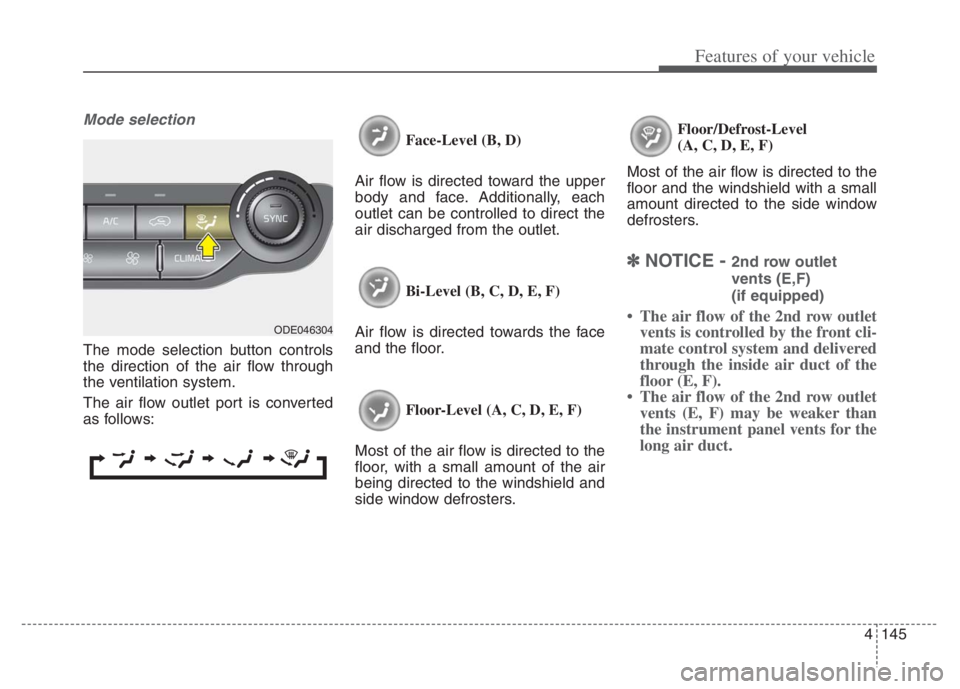
The mode selection button controls
the direction of the air flow through
the ventilation system.
The air flow outlet port is converted
as follows:Face-Level (B, D)
Air flow is directed toward the upper
body and face. Additionally, each
outlet can be controlled to direct the
air discharged from the outlet.
Bi-Level (B, C, D, E, F)
Air flow is directed towards the face
and the floor.
Floor-Level (A, C, D, E, F)
Most of the air flow is directed to the
floor, with a small amount of the air
being directed to the windshield and
side window defrosters.Floor/Defrost-Level
(A, C, D, E, F)
Most of the air flow is directed to the
floor and the windshield with a small
amount directed to the side window
defrosters.
✽ ✽
NOTICE - 2nd row outlet
vents (E,F)
(if equipped)
• The air flow of the 2nd row outlet
vents is controlled by the front cli-
mate control system and delivered
through the inside air duct of the
floor (E, F).
• The air flow of the 2nd row outlet
vents (E, F) may be weaker than
the instrument panel vents for the
long air duct.ODE046304
Page 299 of 710
4159
Features of your vehicle
Automatic climate control system
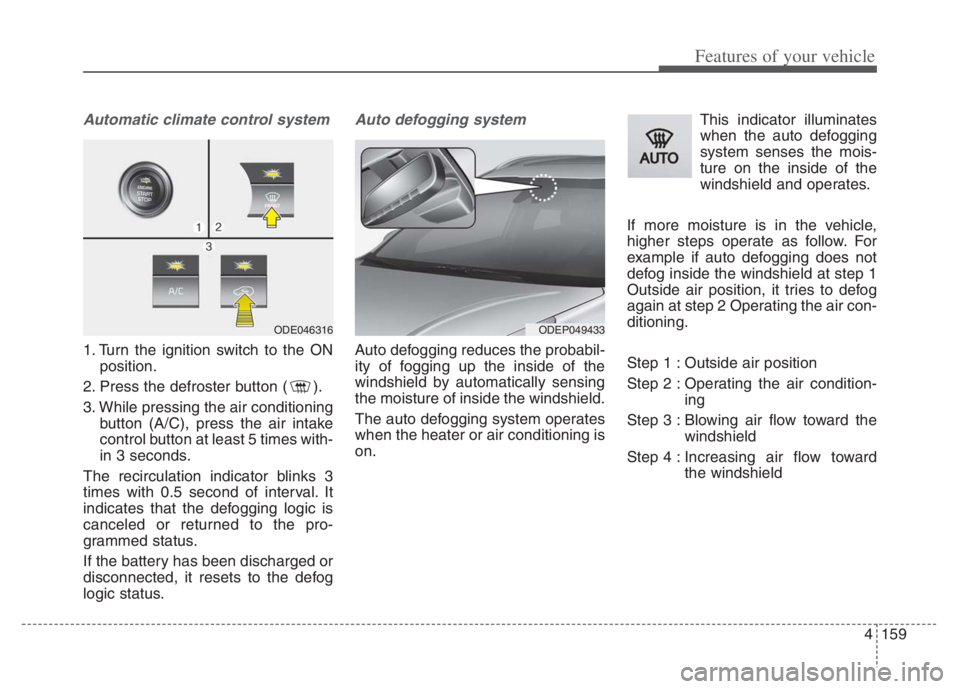
1. Turn the ignition switch to the ON
position.
2. Press the defroster button ( ).
3. While pressing the air conditioning
button (A/C), press the air intake
control button at least 5 times with-
in 3 seconds.
The recirculation indicator blinks 3
times with 0.5 second of interval. It
indicates that the defogging logic is
canceled or returned to the pro-
grammed status.
If the battery has been discharged or
disconnected, it resets to the defog
logic status.
Auto defogging system
Auto defogging reduces the probabil-
ity of fogging up the inside of the
windshield by automatically sensing
the moisture of inside the windshield.
The auto defogging system operates
when the heater or air conditioning is
on.This indicator illuminates
when the auto defogging
system senses the mois-
ture on the inside of the
windshield and operates.
If more moisture is in the vehicle,
higher steps operate as follow. For
example if auto defogging does not
defog inside the windshield at step 1
Outside air position, it tries to defog
again at step 2 Operating the air con-
ditioning.
Step 1 : Outside air position
Step 2 : Operating the air condition-
ing
Step 3 : Blowing air flow toward the
windshield
Step 4 : Increasing air flow toward
the windshield
ODEP049433 ODE046316
Page 306 of 710
Features of your vehicle
166 4
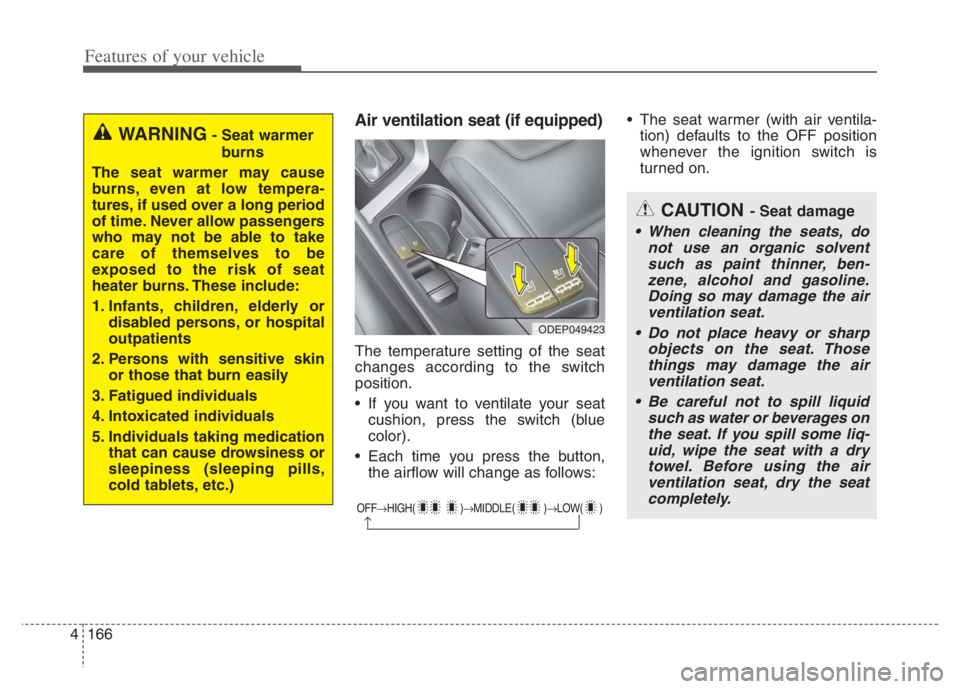
Air ventilation seat (if equipped)
The temperature setting of the seat
changes according to the switch
position.
If you want to ventilate your seat
cushion, press the switch (blue
color).
Each time you press the button,
the airflow will change as follows: The seat warmer (with air ventila-
tion) defaults to the OFF position
whenever the ignition switch is
turned on.
OFFHIGH( )MIDDLE( )LOW( )
CAUTION - Seat damage
When cleaning the seats, do
not use an organic solvent
such as paint thinner, ben-
zene, alcohol and gasoline.
Doing so may damage the air
ventilation seat.
Do not place heavy or sharp
objects on the seat. Those
things may damage the air
ventilation seat.
Be careful not to spill liquid
such as water or beverages on
the seat. If you spill some liq-
uid, wipe the seat with a dry
towel. Before using the air
ventilation seat, dry the seat
completely.
ODEP049423
WARNING- Seat warmer
burns
The seat warmer may cause
burns, even at low tempera-
tures, if used over a long period
of time. Never allow passengers
who may not be able to take
care of themselves to be
exposed to the risk of seat
heater burns. These include:
1. Infants, children, elderly or
disabled persons, or hospital
outpatients
2. Persons with sensitive skin
or those that burn easily
3. Fatigued individuals
4. Intoxicated individuals
5. Individuals taking medication
that can cause drowsiness or
sleepiness (sleeping pills,
cold tablets, etc.)
Page 319 of 710
4179
Features of your vehicle
How vehicle radio works
FM reception
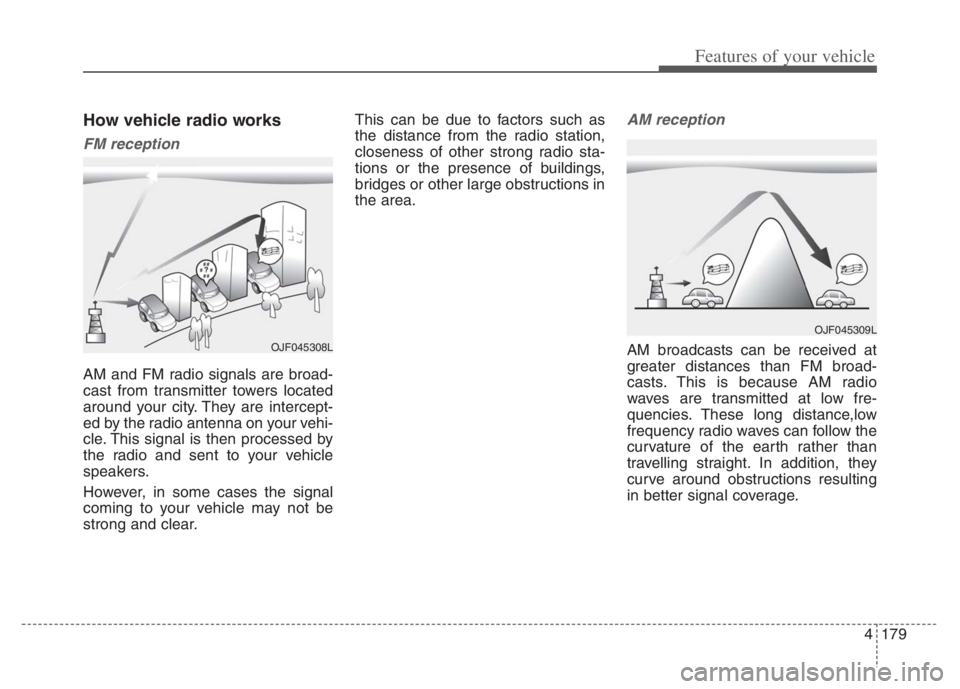
AM and FM radio signals are broad-
cast from transmitter towers located
around your city. They are intercept-
ed by the radio antenna on your vehi-
cle. This signal is then processed by
the radio and sent to your vehicle
speakers.
However, in some cases the signal
coming to your vehicle may not be
strong and clear.This can be due to factors such as
the distance from the radio station,
closeness of other strong radio sta-
tions or the presence of buildings,
bridges or other large obstructions in
the area.
AM reception
AM broadcasts can be received at
greater distances than FM broad-
casts. This is because AM radio
waves are transmitted at low fre-
quencies. These long distance,low
frequency radio waves can follow the
curvature of the earth rather than
travelling straight. In addition, they
curve around obstructions resulting
in better signal coverage.OJF045308L
OJF045309L
Page 326 of 710
Special driving conditions . . . . . . . . . . . . . . . . . . 5-184
. . . . . . . . . . . . . . . . 5-184
. . . . . . . . . . . . . . . . . . . . . . . . . . 5-186
. . . . . . . . . . . . . . . . . . . . . . . . . . . 5-186
. . . . . . . . . . . . . . . . . . . . . . . . . . . . . 5-187
. . . . . . . . . . . . . . . . . . . . . . . . . . 5-187
. . . . . . . . . . . . . . . . . . . . . 5-188
. . . . . . . . . . . . . . . . . . . . . . . . . . . . 5-188
. . . . . . . . . . . . . . . . . . . . . . . . . . . . 5-188
Winter driving . . . . . . . . . . . . . . . . . . . . . . . . . . . 5-189
. . . . . . . . . . . . . . . . . . . . . . 5-189
. . . . . . . . . 5-191
. . . . . . . . . . . . . . . . . . . . . 5-191
. . . . . . 5-191
. . . . . . . . . . . . . . . . . . . 5-192
in system . . . . . . . . . . . . . . . . . . . . . . . . . . . . . . . . . . 5-19\
2
. . . . . . . . . . . . 5-192
. . . 5-192
. . . . . . . . . . . . . . . . . . 5-192
Trailer Towing . . . . . . . . . . . . . . . . . . . . . . . . . . . 5-192
Vehicle load limit . . . . . . . . . . . . . . . . . . . . . . . . . 5-193
. . . . . . . . . . . . . 5-193
. . . . . . . . . . . . . . . . . . . . . . . . . . . 5-196
Vehicle weight . . . . . . . . . . . . . . . . . . . . . . . . . . . . 5-197
. . . . . . . . . . . . . . . . . . . . . . . . . . . 5-197
. . . . . . . . . . . . . . . . . . . . . . . . . . 5-197
. . . . . . . . . . . . . . . . . . . . . . . . . . . . . . . 5-197
. . . . . . . . . . . . . . . . . . . . . 5-197
. . . . . . . . . . . . . . 5-197
. . . . . . . . . . . . . . . . . . 5-197
. . . . . . . . . . . 5-197
5