wiper KIA NIRO 2021 Owners Manual
[x] Cancel search | Manufacturer: KIA, Model Year: 2021, Model line: NIRO, Model: KIA NIRO 2021Pages: 710, PDF Size: 14.77 MB
Page 63 of 710
Your vehicle at a glance
2 2
EXTERIOR OVERVIEW
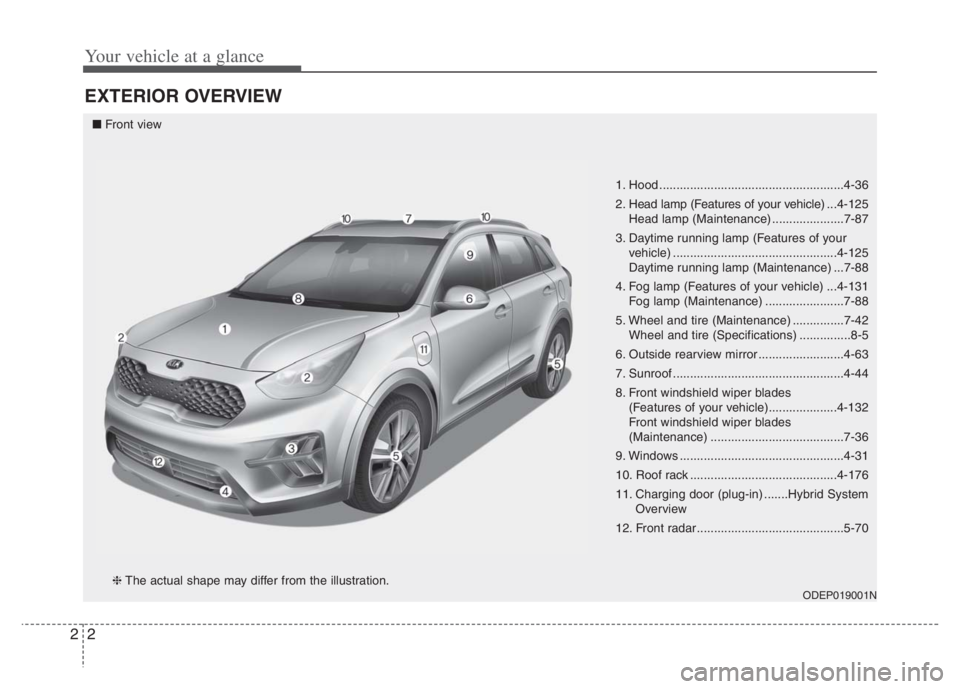
1. Hood ......................................................4-36
2. Head lamp (Features of your vehicle) ...4-125
Head lamp (Maintenance) .....................7-87
3. Daytime running lamp (Features of your
vehicle) ................................................4-125
Daytime running lamp (Maintenance) ...7-88
4. Fog lamp (Features of your vehicle) ...4-131
Fog lamp (Maintenance) .......................7-88
5. Wheel and tire (Maintenance) ...............7-42
Wheel and tire (Specifications) ...............8-5
6. Outside rearview mirror .........................4-63
7. Sunroof ..................................................4-44
8. Front windshield wiper blades
(Features of your vehicle)....................4-132
Front windshield wiper blades
(Maintenance) .......................................7-36
9. Windows ................................................4-31
10. Roof rack ...........................................4-176
11. Charging door (plug-in) .......Hybrid System
Overview
12. Front radar ...........................................5-70
ODEP019001N
■Front view
❈The actual shape may differ from the illustration.
Page 64 of 710

23
Your vehicle at a glance
1. Door locks .............................................4-22
2. Fuel filler door ..............................4-38, 4-40
3. Rear combination lamp
(Maintenance) .......................................7-88
4. High mounted stop lamp
(Maintenance) .......................................7-89
5. Liftgate...................................................4-28
6. Antenna ...............................................4-178
7. Rear wiper and Rear view
camera (Features of your
vehicle) .....................................4-132, 4-121
Rear window wiper blade (Maintenance) ...7-36
8. Rear ultrasonic sensors ......................4-122
ODEP010002N
■Rear view
❈The actual shape may differ from the illustration.
Page 66 of 710
25
Your vehicle at a glance
INSTRUMENT PANEL OVERVIEW
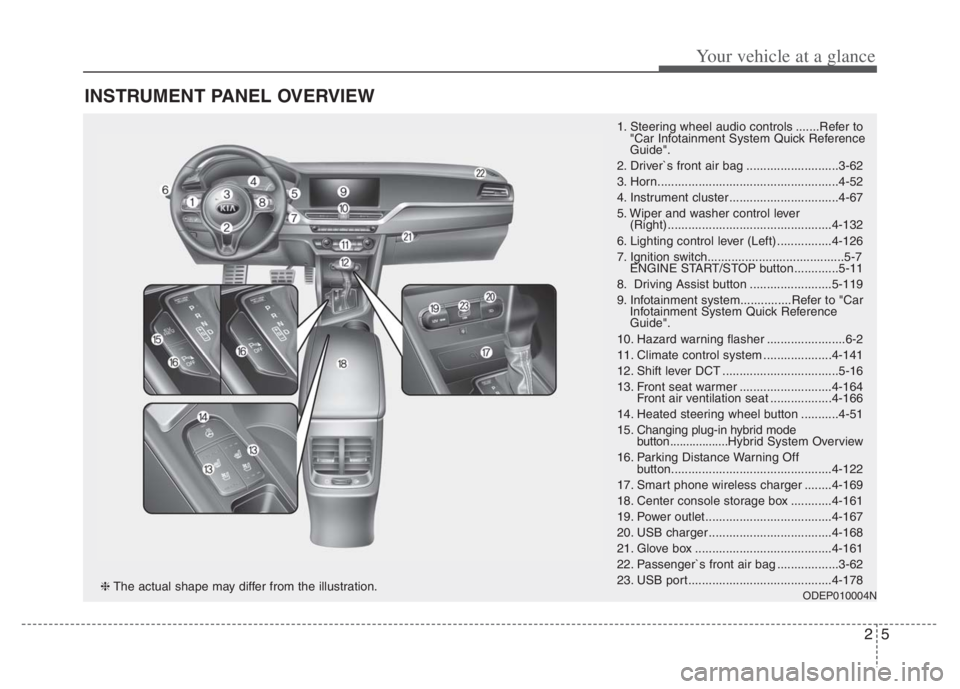
1. Steering wheel audio controls .......Refer to
"Car Infotainment System Quick Reference
Guide".
2. Driver`s front air bag ...........................3-62
3. Horn.....................................................4-52
4. Instrument cluster ................................4-67
5. Wiper and washer control lever
(Right) ................................................4-132
6. Lighting control lever (Left) ................4-126
7. Ignition switch........................................5-7
ENGINE START/STOP button .............5-11
8. Driving Assist button ........................5-119
9. Infotainment system...............Refer to "Car
Infotainment System Quick Reference
Guide".
10. Hazard warning flasher .......................6-2
11. Climate control system ....................4-141
12. Shift lever DCT ..................................5-16
13. Front seat warmer ...........................4-164
Front air ventilation seat ..................4-166
14. Heated steering wheel button ...........4-51
15. Changing plug-in hybrid mode
button..................Hybrid System Overview
16. Parking Distance Warning Off
button...............................................4-122
17. Smart phone wireless charger ........4-169
18. Center console storage box ............4-161
19. Power outlet.....................................4-167
20. USB charger ....................................4-168
21. Glove box ........................................4-161
22. Passenger`s front air bag ..................3-62
23. USB port..........................................4-178
ODEP010004N❈The actual shape may differ from the illustration.
Page 142 of 710
Mirrors . . . . . . . . . . . . . . . . . . . . . . . . . . . . . . . . . . 4-53
. . . . . . . . . . . . . . . . . . . . . . . . 4-53
Instrument cluster . . . . . . . . . . . . . . . . . . . . . . . . . 4-67
. . . . . . . . . . . . . . . . . . . . 4-69
. . . . . . . . . . . . . . . . . . . . . . . . . . . . . . . . . . . . . 4-69
. . . . . . . . . . 4-75
LCD Display . . . . . . . . . . . . . . . . . . . . . . . . . . . . . . 4-77
. . . . . . . . . . . . . . . . . . . . . . . . . 4-77
. . . . . . . . . . . . . . . . . . . . . . . . . . 4-78
. . . . . . . . . . . . . . . . . . . . 4-90
. . . . . . . . . . . . . . . . . . . . . . . . . . . . 4-95
Warning and indicator lights . . . . . . . . . . . . . . . 4-106
. . . . . . . . . . . . . . . . . . . . . . . . . . . . . . 4-106
. . . . . . . . . . . . . . . . . . . . . . . . . . . . . 4-115
Rear View Monitor (RVM) . . . . . . . . . . . . . . . . . 4-121
Reverse Parking Distance Warning (PDW) . . . . 4-122
. 4-122
Distance Warning . . . . . . . . . . . . . . . . . . . . . . . . . . 4-123
. . 4-124
. . . . . . . . . . . . . . . . . . . . . . . . . . . . . . . 4-124
Lighting . . . . . . . . . . . . . . . . . . . . . . . . . . . . . . . . . 4-125
. . . . . . . . . . . . . . . . . . . . . 4-125 . . . . . . . . . . . . . . . . . . . . . . . . 4-125
. . . . . . . . . . . . . . . . . . . . . . . . . . . . . 4-126
. . . . . . . . . . . . . . . . . . . . . 4-128
. . . . . . . . . . . 4-130
. . . . . . . . . . . . . . . . . . . . . . . . . . . . 4-131
. . . . . . . . . . . . . . . . . . . . . . . . . . . . . . 4-131
Wipers and washers . . . . . . . . . . . . . . . . . . . . . . . 4-132
. . . . . . . . . . . . . . . . . . . . . . . . . . 4-132
. . . . . . . . . . . . . . . . . . . . . 4-133
. . . . . . . . . 4-134
Interior lights . . . . . . . . . . . . . . . . . . . . . . . . . . . . 4-136
. . . . . . . . . . . . . . . . . . . 4-136
. . . . . . . . . . . . . . . . . . . . . . . . . . . . . . . . . 4-136
. . . . . . . . . . . . . . . . . . . . . . . . . . . . . . . . . 4-137
. . . . . . . . . . . . . . . . . . . . . . . . . . 4-138
. . . . . . . . . . . . . . . . . . . . . . . . . . 4-138
Welcome system . . . . . . . . . . . . . . . . . . . . . . . . . . 4-139
. . . . . . . . . . 4-139
. . . . . . . . . . . . . . . . . . . . . . . . . . . . . . . 4-139
Defroster . . . . . . . . . . . . . . . . . . . . . . . . . . . . . . . . 4-140
. . . . . . . . . . . . . . . . . . . . . . . 4-140
Automatic climate control system. . . . . . . . . . . . 4-141
. . . . . . . . . 4-142
4
Page 226 of 710

Features of your vehicle
86 4
ItemsExplanation
Seat Easy Access
Off : The seat easy access function will be deactivated.
Normal/Extended: When you turn off the engine, the driver's seat will automatically move rear-
ward short (Normal) or long (Extended) for you to enter or exit the vehicle more comfortably.
If you change the ignition key or ENGINE START/STOP button from OFF to ACC position, the
driver’s seat will return to the original position.
❈For more details, refer to “Driver Position Memory System” in chapter 3.
Welcome Mirror/Light If this item checked, the Welcome Mirror/Light will be activated.
Wireless Charging System If this item checked, the wireless charging system in the front seat will be activated.
Wiper/Lights Display If this item checked, the Wiper/Lights Display will be activated.
Auto Rear Wiper (in R) If this item checked, the Auto rear wiper will be activated.
Gear Position Pop-up If this item is checked, the Gear position pop-up display will be activated.
Coasting Guide Enable Coasting Guide : To activate or deactivate the Coasting guide.
Sound : To activate or deactivate the Coasting guide sound.
Start Coasting Choose the initial guiding time for Coasting guide. (Early/Normal/Late)
Icy road warning If this item is checked, the Icy road warning display will be activated.
Rear Occupant Alert If this item is checked, the Rear Occupant Alert (ROA) display will be activated.
5. Convenience (if equipped)
❈The information provided may differ depending on which functions are applicable to your vehicle.
Page 236 of 710
Features of your vehicle
96 4
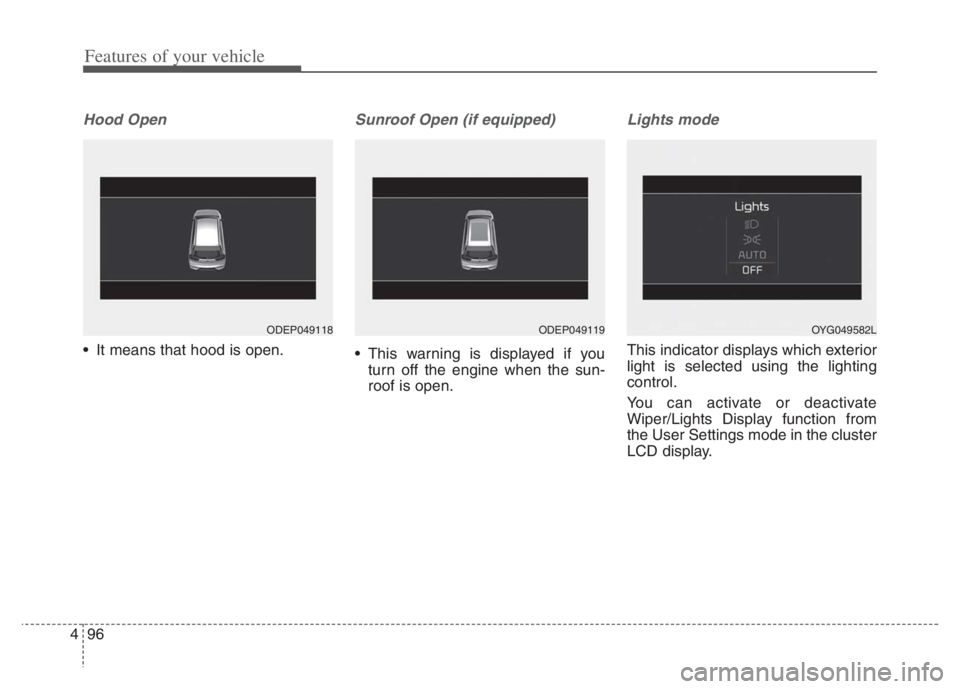
Hood Open
It means that hood is open.
Sunroof Open (if equipped)
This warning is displayed if you
turn off the engine when the sun-
roof is open.
Lights mode
This indicator displays which exterior
light is selected using the lighting
control.
You can activate or deactivate
Wiper/Lights Display function from
the User Settings mode in the cluster
LCD display.
ODEP049118ODEP049119OYG049582L
Page 237 of 710

497
Features of your vehicle
Wiper mode
This indicator displays which wiper
speed is selected using the wiper
control.
You can activate or deactivate
Wiper/Lights Display function from
the User Settings mode in the cluster
LCD display.
Turn FUSE SWITCH on
• This warning message illuminatesif the fuse switch in the Inner fuse
panel is OFF.
It means that you should turn the fuse switch on.
❈ For more details, refer to “Fuses”
in chapter 7.
Engine has Overheated
This warning message illuminates
when the engine coolant tempera-
ture is above 248°F (120°C). This
means that the engine is overheated
and may be damaged.
If your vehicle is overheated, refer to
“Overheating” in chapter 6.
Shift to P (for smart key system)
This warning message illuminates
if you try to turn off the engine with-
out the shift lever in P (Park) posi-
tion.
At this time, the ENGINE START/STOP button turns to the
ACC position (If you press the
ENGINE START/STOP button once
more, it will turn to the ON position).
Low key battery
(for smart key system)
This warning message illuminates if the battery of the smart key is
discharged when the ENGINE
START/STOP button changes to
the OFF position.
ODEP049604N
ODEP049605N
■ Front
■Rear
Page 267 of 710
4127
Features of your vehicle
Auto light position
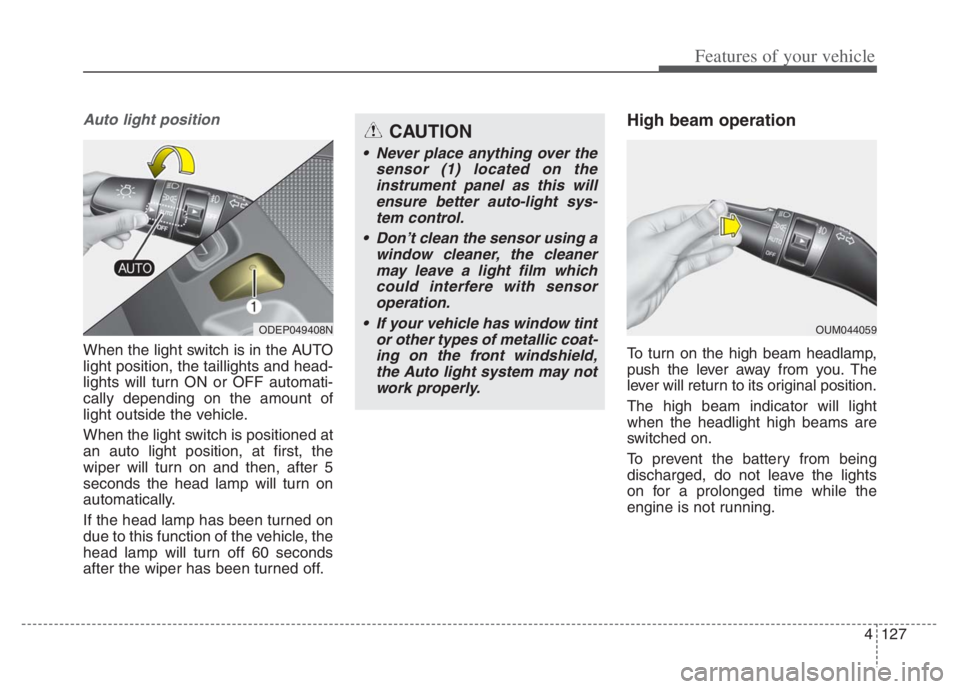
When the light switch is in the AUTO
light position, the taillights and head-
lights will turn ON or OFF automati-
cally depending on the amount of
light outside the vehicle.
When the light switch is positioned at
an auto light position, at first, the
wiper will turn on and then, after 5
seconds the head lamp will turn on
automatically.
If the head lamp has been turned on
due to this function of the vehicle, the
head lamp will turn off 60 seconds
after the wiper has been turned off.
High beam operation
To turn on the high beam headlamp,
push the lever away from you. The
lever will return to its original position.
The high beam indicator will light
when the headlight high beams are
switched on.
To prevent the battery from being
discharged, do not leave the lights
on for a prolonged time while the
engine is not running.
ODEP049408NOUM044059
CAUTION
Never place anything over the
sensor (1) located on the
instrument panel as this will
ensure better auto-light sys-
tem control.
Don’t clean the sensor using a
window cleaner, the cleaner
may leave a light film which
could interfere with sensor
operation.
If your vehicle has window tint
or other types of metallic coat-
ing on the front windshield,
the Auto light system may not
work properly.
Page 272 of 710
Features of your vehicle
132 4
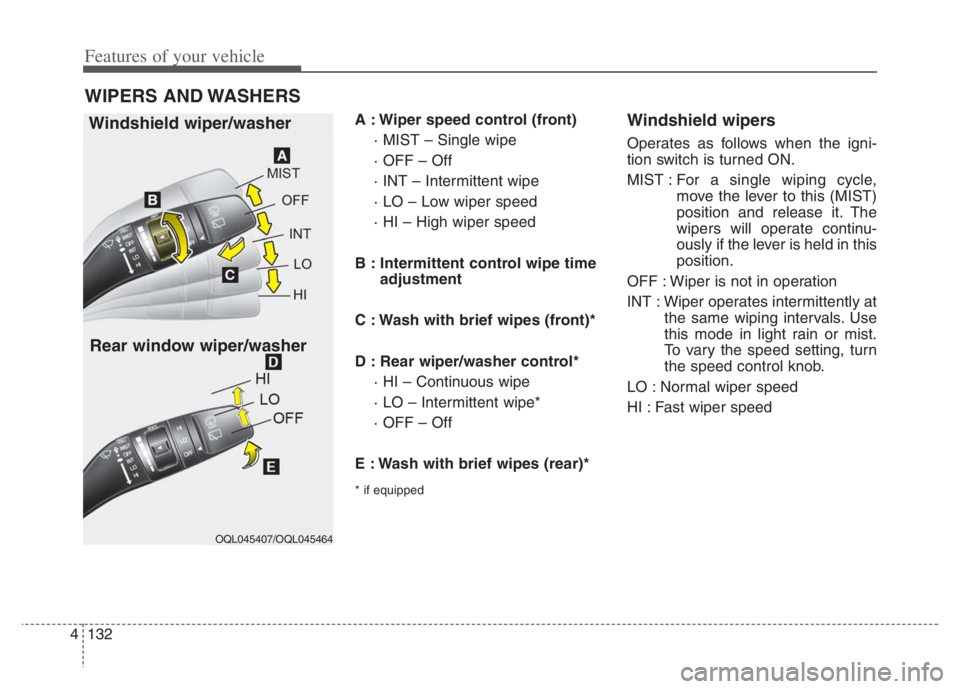
A : Wiper speed control (front)
· MIST – Single wipe
· OFF – Off
· INT – Intermittent wipe
· LO – Low wiper speed
· HI – High wiper speed
B : Intermittent control wipe time
adjustment
C : Wash with brief wipes (front)*
D : Rear wiper/washer control*
· HI – Continuous wipe
· LO – Intermittent wipe*
· OFF – Off
E : Wash with brief wipes (rear)*
* if equipped
Windshield wipers
Operates as follows when the igni-
tion switch is turned ON.
MIST : For a single wiping cycle,
move the lever to this (MIST)
position and release it. The
wipers will operate continu-
ously if the lever is held in this
position.
OFF : Wiper is not in operation
INT : Wiper operates intermittently at
the same wiping intervals. Use
this mode in light rain or mist.
To vary the speed setting, turn
the speed control knob.
LO : Normal wiper speed
HI : Fast wiper speed
WIPERS AND WASHERS
Windshield wiper/washer
OQL045407/OQL045464
Rear window wiper/washer
Page 273 of 710

4133
Features of your vehicle
✽ ✽
NOTICE
If there is heavy accumulation of
snow or ice on the windshield, defrost
the windshield for about 10 minutes,
or until the snow and/or ice is
removed before using the windshield
wipers to ensure proper operation.
If you do not remove the snow
and/or ice before using the wiper
and washer, it may damage the
wiper and washer system.
Front windshield washers
In the OFF position, pull the lever
gently toward you to spray washer
fluid on the windshield and to run the
wipers 1-3 cycles.
Use this function when the wind-
shield is dirty.
The spray and wiper operation will
continue until you release the lever.
If the washer does not work, check
the washer fluid level. If the fluid level
is not sufficient, you will need to add
appropriate non-abrasive windshield
washer fluid to the washer reservoir.The reservoir filler neck is located in
the front of the engine compartment
on the passenger side.
OQL045409
CAUTION - Washer pump
To prevent possible damage to
the washer pump, do not oper-
ate the washer when the fluid
reservoir is empty.