carplay KIA NIRO 2022 Quick Start Guide Base Audio
[x] Cancel search | Manufacturer: KIA, Model Year: 2022, Model line: NIRO, Model: KIA NIRO 2022Pages: 164, PDF Size: 4.61 MB
Page 142 of 164
10-4
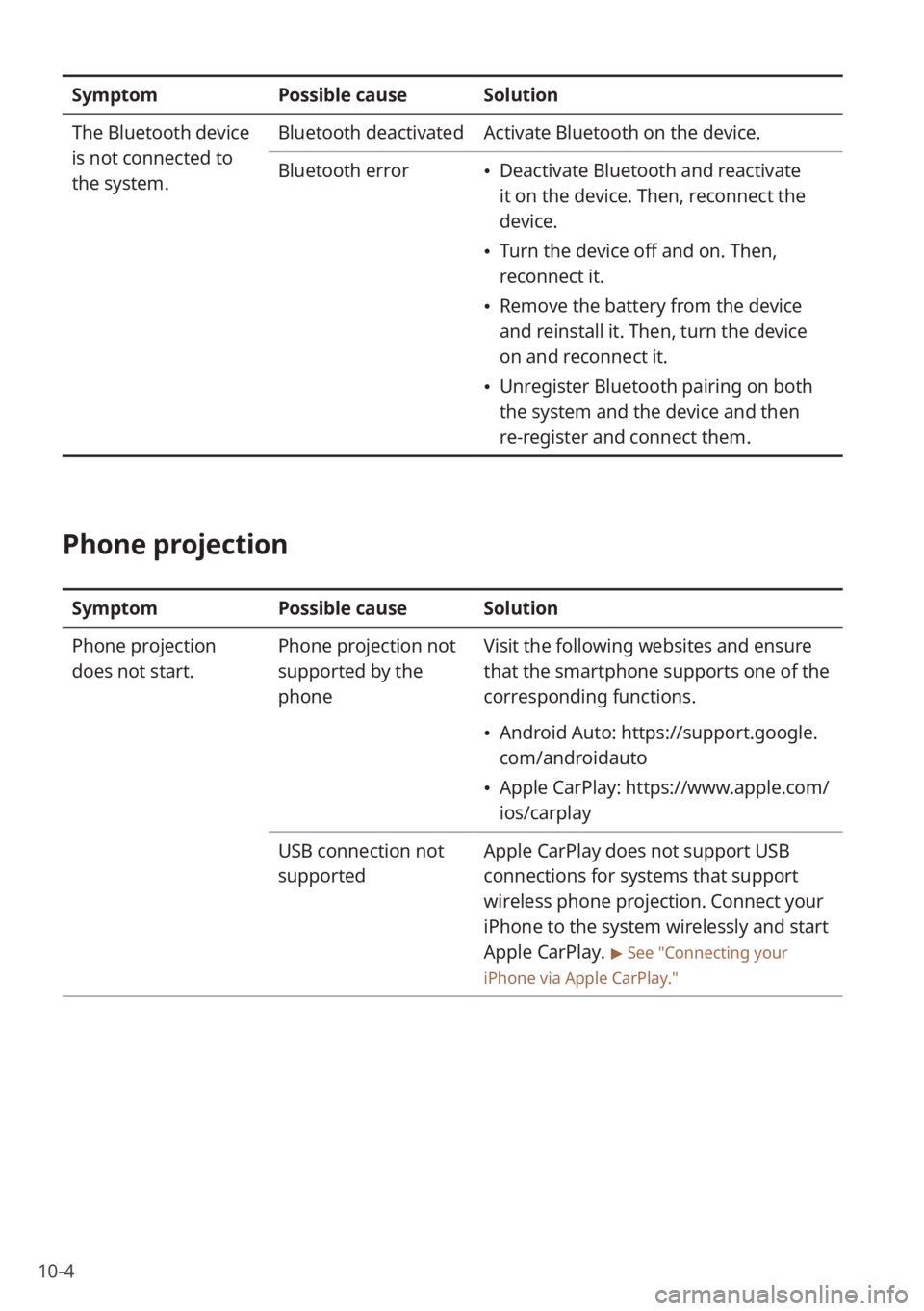
SymptomPossible causeSolution
The Bluetooth device
is not connected to
the system. Bluetooth deactivated
Activate Bluetooth on the device.
Bluetooth error
\225 Deactivate Bluetooth and reactivate
it on the device. Then, reconnect the
device.
\225Turn the device off and on. Then,
reconnect it.
\225Remove the battery from the device
and reinstall it. Then, turn the device
on and reconnect it.
\225Unregister Bluetooth pairing on both
the system and the device and then
re-register and connect them.
Phone projection
Symptom Possible causeSolution
Phone projection
does not start. Phone projection not
supported by the
phoneVisit the following websites and ensure
that the smartphone supports one of the
corresponding functions.
\225
Android Auto: https://support.google.
com/androidauto
\225Apple CarPlay: https://www.apple.com/
ios/carplay
USB connection not
supported Apple CarPlay does not support USB
connections for systems that support
wireless phone projection. Connect your
iPhone to the system wirelessly and start
Apple CarPlay.
> See ″Connecting your
iPhone via Apple CarPlay .″
Page 156 of 164
10-18
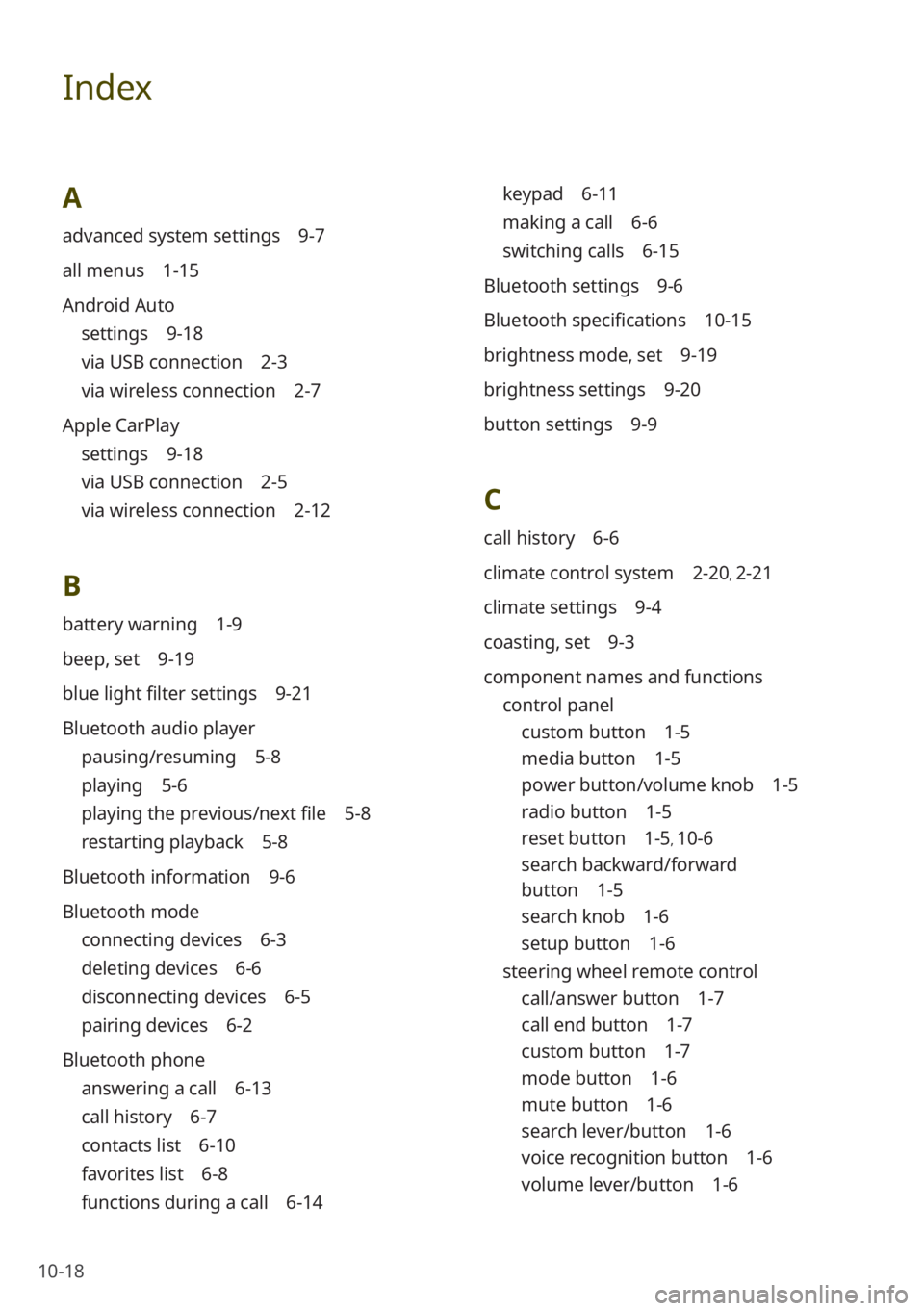
Index
A
advanced system settings 9-7
all menus 1-15
Android Auto
settings 9-18
via USB connection 2-3
via wireless connection 2-7
Apple CarPlay
settings 9-18
via USB connection 2-5
via wireless connection 2-12
B
battery warning 1-9
beep, set 9-19
blue light filter settings 9-21
Bluetooth audio player
pausing/resuming 5-8
playing 5-6
playing the previous/next file 5-8
restarting playback 5-8
Bluetooth information 9-6
Bluetooth mode
connecting devices 6-3
deleting devices 6-6
disconnecting devices 6-5
pairing devices 6-2
Bluetooth phone
answering a call 6-13
call history 6-7
contacts list 6-10
favorites list 6-8
functions during a call 6-14
keypad 6-11
making a call 6-6
switching calls 6-15
Bluetooth settings 9-6
Bluetooth specifications 10-15
brightness mode, set 9-19
brightness settings 9-20
button settings 9-9
C
call history 6-6
climate control system 2-20, 2-21
climate settings 9-4
coasting, set 9-3
component names and functions control panel
custom button 1-5
media button 1-5
power button/volume knob 1-5
radio button 1-5
reset button 1-5, 10-6
search backward/forward
button 1-5
search knob 1-6
setup button 1-6
steering wheel remote control
call/answer button 1-7
call end button 1-7
custom button 1-7
mode button 1-6
mute button 1-6
search lever/button 1-6
voice recognition button 1-6
volume lever/button 1-6
Page 157 of 164
10-19
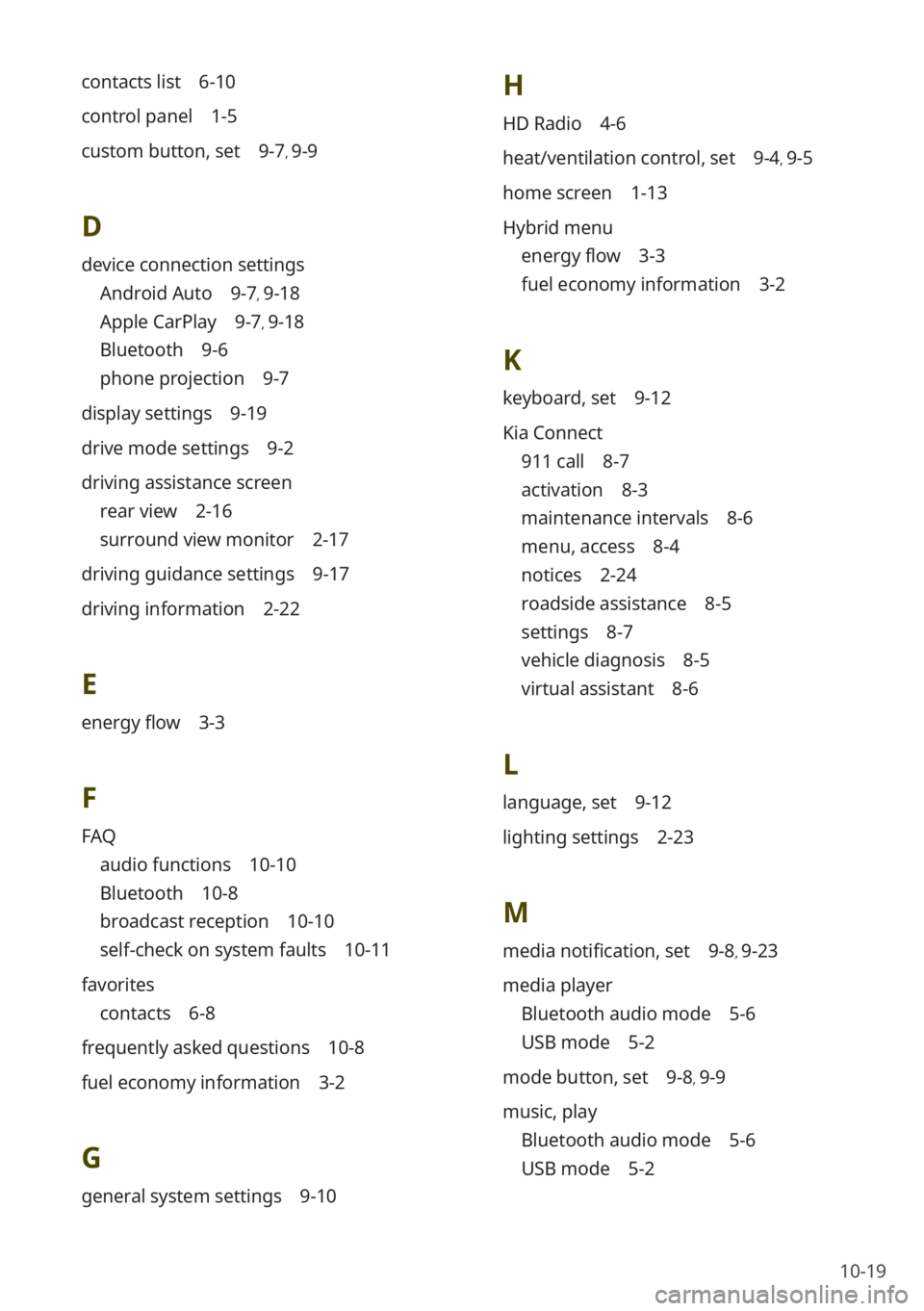
contacts list 6-10
control panel 1-5
custom button, set 9-7, 9-9
D
device connection settings
Android Auto 9-7, 9-18
Apple CarPlay 9-7, 9-18
Bluetooth 9-6
phone projection 9-7
display settings 9-19
drive mode settings 9-2
driving assistance screen
rear view 2-16
surround view monitor 2-17
driving guidance settings 9-17
driving information 2-22
E
energy flow 3-3
F
FAQ
audio functions 10-10
Bluetooth 10-8
broadcast reception 10-10
self-check on system faults 10-11
favorites
contacts 6-8
frequently asked questions 10-8
fuel economy information 3-2
G
general system settings 9-10
H
HD Radio 4-6
heat/ventilation control, set 9-4, 9-5
home screen 1-13
Hybrid menu
energy flow 3-3
fuel economy information 3-2
K
keyboard, set 9-12
Kia Connect
911 call 8-7
activation 8-3
maintenance intervals 8-6
menu, access 8-4
notices 2-24
roadside assistance 8-5
settings 8-7
vehicle diagnosis 8-5
virtual assistant 8-6
L
language, set 9-12
lighting settings 2-23
M
media notification, set 9-8, 9-23
media player
Bluetooth audio mode 5-6
USB mode 5-2
mode button, set 9-8, 9-9
music, play
Bluetooth audio mode 5-6
USB mode 5-2
Page 158 of 164
10-20
N
noise reduction 9-17
P
parking guides 2-16
phone
dialed calls 6-8
missed calls 6-8
received calls 6-8
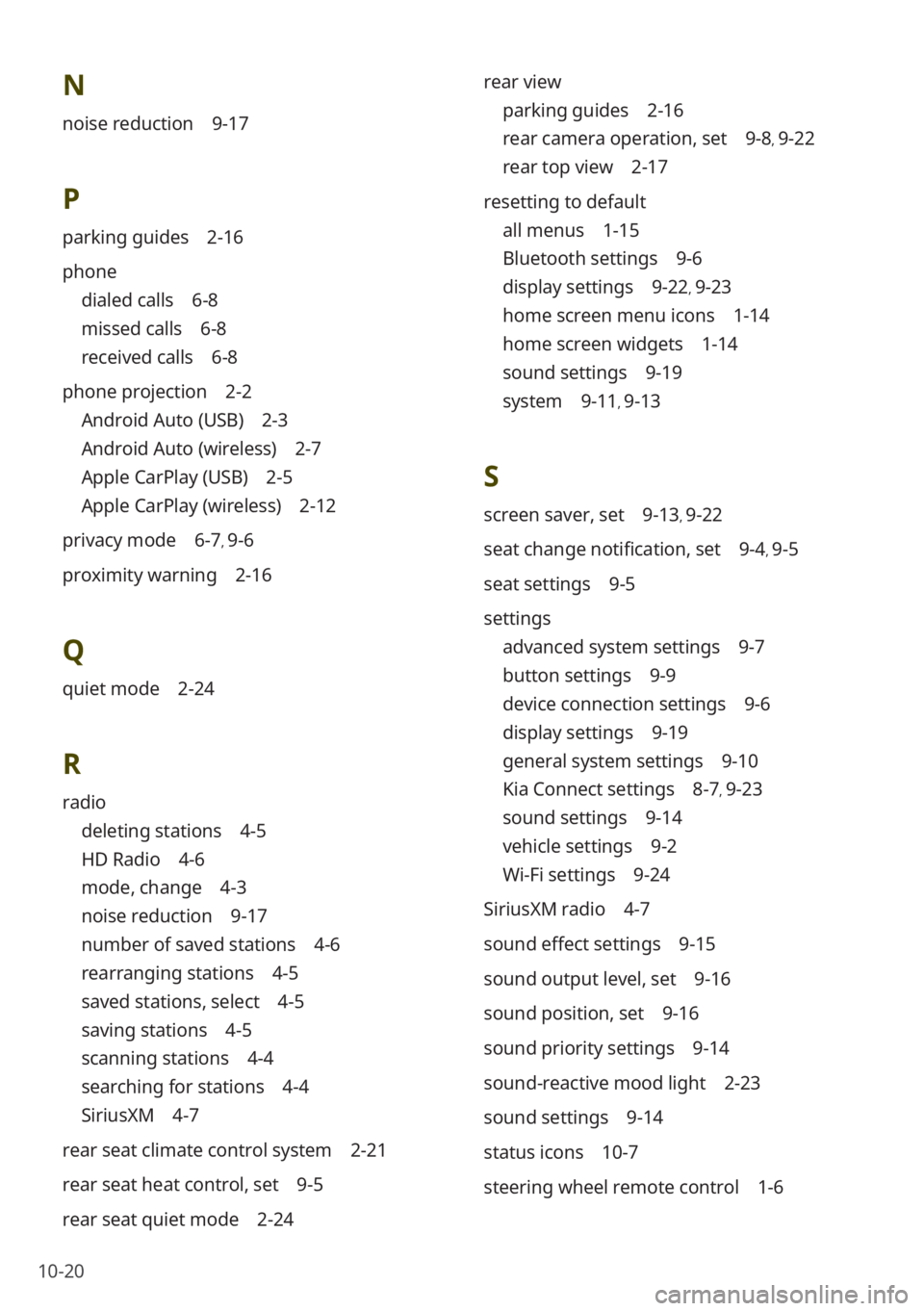
phone projection 2-2
Android Auto (USB) 2-3
Android Auto (wireless) 2-7
Apple CarPlay (USB) 2-5
Apple CarPlay (wireless) 2-12
privacy mode 6-7, 9-6
proximity warning 2-16
Q
quiet mode 2-24
R
radio
deleting stations 4-5
HD Radio 4-6
mode, change 4-3
noise reduction 9-17
number of saved stations 4-6
rearranging stations 4-5
saved stations, select 4-5
saving stations 4-5
scanning stations 4-4
searching for stations 4-4
SiriusXM 4-7
rear seat climate control system 2-21
rear seat heat control, set 9-5
rear seat quiet mode 2-24 rear view
parking guides 2-16
rear camera operation, set 9-8, 9-22
rear top view 2-17
resetting to default
all menus 1-15
Bluetooth settings 9-6
display settings 9-22, 9-23
home screen menu icons 1-14
home screen widgets 1-14
sound settings 9-19
system 9-11, 9-13
S
screen saver, set 9-13, 9-22
seat change notification, set 9-4, 9-5
seat settings 9-5
settings
advanced system settings 9-7
button settings 9-9
device connection settings 9-6
display settings 9-19
general system settings 9-10
Kia Connect settings 8-7, 9-23
sound settings 9-14
vehicle settings 9-2
Wi-Fi settings 9-24
SiriusXM radio 4-7
sound effect settings 9-15
sound output level, set 9-16
sound position, set 9-16
sound priority settings 9-14
sound-reactive mood light 2-23
sound settings 9-14
status icons 10-7
steering wheel remote control 1-6
Page 159 of 164
10-21
playing 5-2
playing the previous/next file 5-5
repeat play 5-5
restarting playback 5-5
rewinding/fast forwarding 5-4
shuffle play 5-5
USB port 5-2
V
valet mode 2-25
vehicle settings 9-2
voice memos
playing 7-3
recording 7-3
volume settings 9-14, 9-15
W
Wi-Fi
settings 9-24
specifications 10-16
wireless phone projection
Android Auto 2-7
Apple CarPlay 2-12
surround view monitor
display settings 2-19
rear top view 2-19
surround view while backing up 2-18
surround view while driving 2-17
system information 9-10
system reset 10-6
system specifications
Bluetooth 10-15
common 10-14
media player 10-12
modem RF 10-15
radio 10-14
Wi-Fi 10-16
system, turn on/off 1-8
T
time and date settings 9-11
touch screen, control 1-9
touch sound, set 9-19
troubleshooting
Bluetooth connection 10-3
display 10-2
phone projection 10-4
sound 10-2
system operation 10-6
USB playback 10-3
U
USB mode
connecting devices 5-2
device specifications 10-13
file specifications 10-12
USB player
accessing lists 5-6
hiding files 5-5
pausing/resuming 5-4
Page 160 of 164
10-22
Trademarks
\225Bluetooth® Wireless Technology
A compatible Bluetooth
® Wireless
Technology-enabled cell phone is
required to use Bluetooth
® Wireless
Technology. The Bluetooth® word
mark and logos are registered
trademarks owned by Bluetooth SIG,
Inc. and any use of such marks by Kia
is under license. Other trademarks
and trade names are those of their
respective owners. A Bluetooth
®
enabled cell phone is required to use
Bluetooth
® Wireless Technology.
Bluetooth® Wireless Technology phone
compatibility can be checked by visiting
https://www.kia.com.
\225 Wi-Fi®, the Wi-Fi logo, and the Wi-Fi
CERTIFIED logo are registered
trademarks of Wi-Fi Alliance.
\225 Google, Android, Android Auto, and
Google Play are registered trademarks
of Google LLC. Distracted driving
can result in a loss of vehicle control.
Never use a handheld device or vehicle
system that takes your focus away from
safe vehicle operation.
\225Apple®, Apple CarPlay™, iPad®, iPad
mini™, iPhone®, iPod®, iPod classic®,
iPod nano®, iPod touch®, iTunes®,
and Siri® are trademarks of Apple Inc.
Distracted driving can result in a loss of
vehicle control. Never use a handheld
device or vehicle system that takes your
focus away from safe vehicle operation.
\225 HD Radio™ Technology is manufactured
under license from iBiquity Digital
Corporation. U.S. and Foreign Patents.
For patents, see https://dts.com/
patents/. HD Radio and the HD, HD
Radio, and ″ARC″ logos are registered
trademarks or trademarks of iBiquity
Digital Corporation in the United States
and/or other countries.
\225 Sirius, XM, SiriusXM and all related
marks and logos are trademarks of
SiriusXM Radio Inc.
\225Other trademarks and trade names are
those of their respective owners.
Open Source
Information
To obtain the source code developed
under the open source license installed
on this product, please visit https://
www.mobis.co.kr/en/tech/rnd.do#open .
You can download all applicable license
notices, including the source code. If you
send an e-mail to MOBIS_OSSrequest@
mobis.co.kr within three years of
purchasing this product to request an
open source code for the software on this
product, you will receive it in CD-ROM
and other storage mediums with minimal
charge, such as costs for medium and
transportation.