voice navigation KIA NIRO EV 2023 Navigation System Quick Reference Guide
[x] Cancel search | Manufacturer: KIA, Model Year: 2023, Model line: NIRO EV, Model: KIA NIRO EV 2023Pages: 380, PDF Size: 14.16 MB
Page 319 of 380
9-83
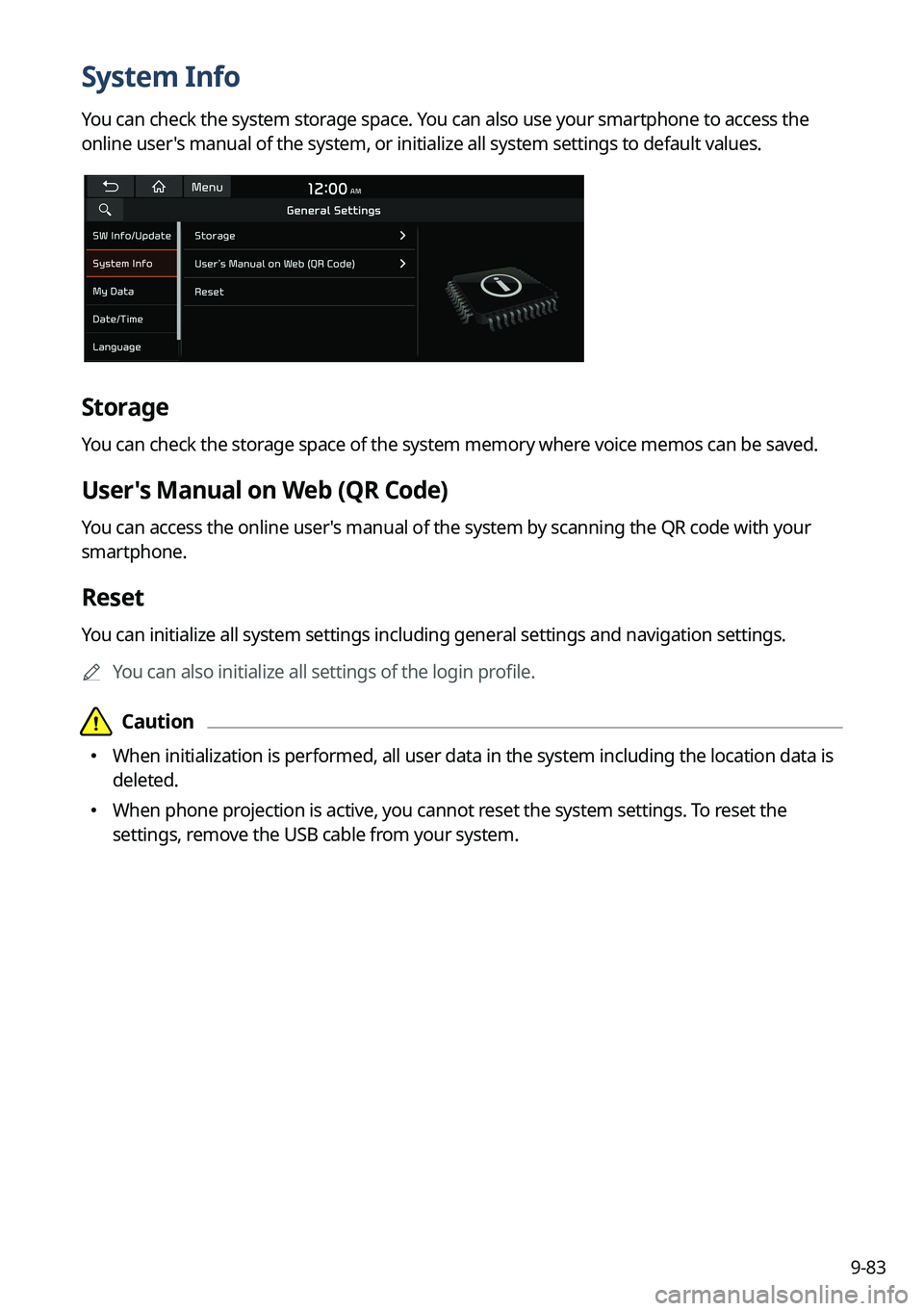
System Info
You can check the system storage space. You can also use your smartphone to access the
online user's manual of the system, or initialize all system settings to default values.
Storage
You can check the storage space of the system memory where voice memos can be saved.
User's Manual on Web (QR Code)
You can access the online user's manual of the system by scanning the QR code with your
smartphone.
Reset
You can initialize all system settings including general settings and navigation settings.
A
You can also initialize all settings of the login profile.
Page 323 of 380

9-87
Configuring the general system settings
(Type2)
You can configure general settings for date, time, language, and the like. You can also check
information of the system.
1 On the All Menus screen, press Setup >
General.
The general settings screen appears.
2 Configure the settings required:
A
Press >
Search for Settings or press and enter a keyword to search for a
setting item. You can also search for a setting item by voice.
SW Info/Update
You can see the versions of system components. You can also update the system to the latest
version.
A
For details on how to update the system software using a USB storage device, refer to
the following:
> see Navigation Update site, "How to Update the Map and Software for your
Infotainment System."
A
For details on how to update the system software via a wireless connection, refer to the
following:
> see " Wireless update (if equipped)."
Page 357 of 380
11-9
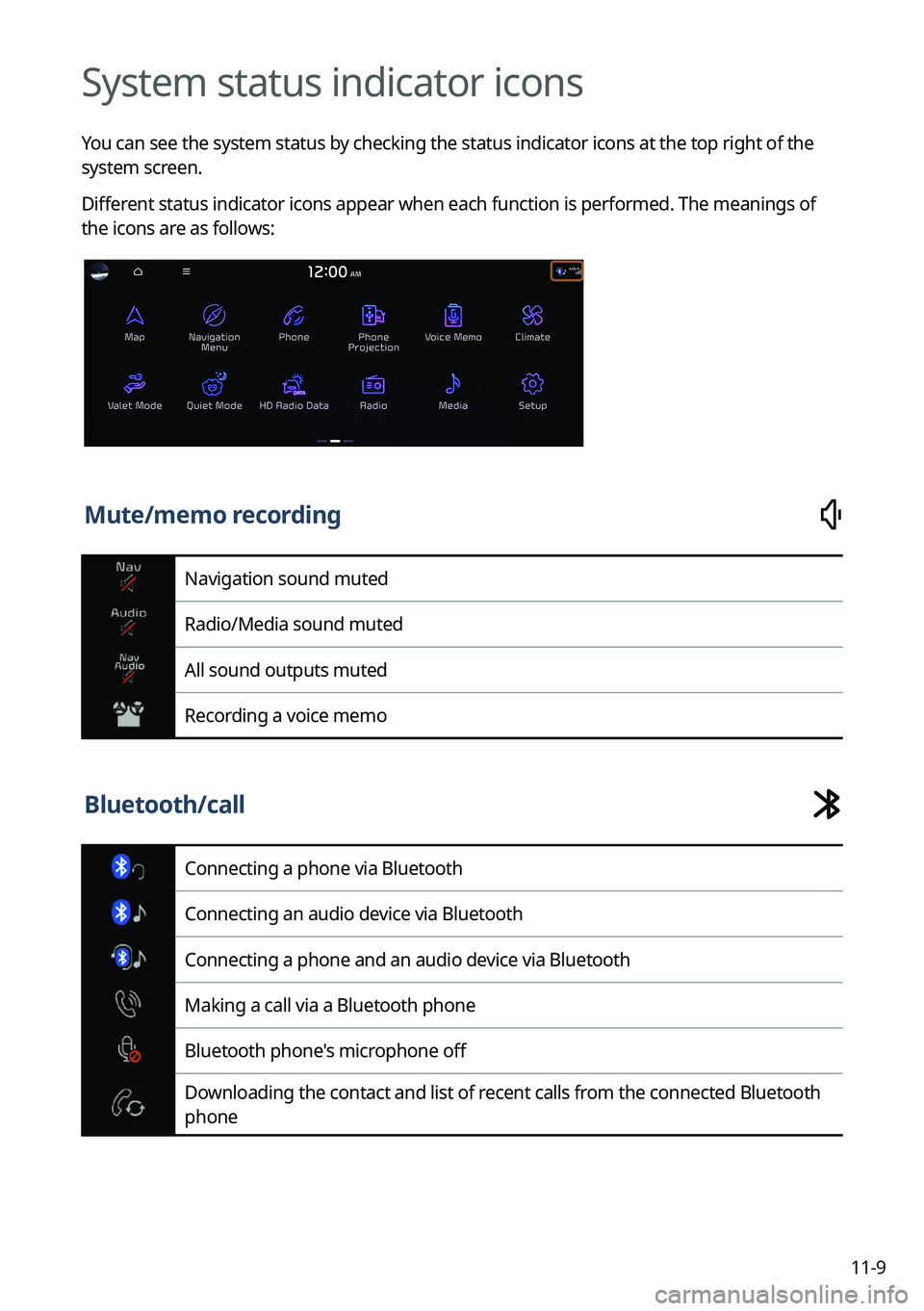
System status indicator icons
You can see the system status by checking the status indicator icons at the top right of the
system screen.
Different status indicator icons appear when each function is performed. The meanings of
the icons are as follows:
Mute/memo recording
Navigation sound muted
Radio/Media sound muted
All sound outputs muted
Recording a voice memo
Bluetooth/call
Connecting a phone via Bluetooth
Connecting an audio device via Bluetooth
Connecting a phone and an audio device via Bluetooth
Making a call via a Bluetooth phone
Bluetooth phone's microphone off
Downloading the contact and list of recent calls from the connected Bluetooth
phone
Page 371 of 380
11-23
Destination search 5-3
Finding the route Adding a waypoint 5-16
Address search 5-10
Frequently visited places 5-25
Gas stations 5-29
Location registration
Deleting a POI 5-27
Editing a POI 5-27
Registration after search 5-23
Map 5-6
Map update 9-106
Previous Destinations 5-14
Rest area information 5-8
Saving the current position 5-24
Searching for POIs 5-12
Volume adjustment 5-9
H
HD Radio Data 2-23
HD Radio™ 3-15
Home screen 1-11
K
Kia ConnectKia Connect menu
Diagnosing the vehicle 8-9
Kia Connect Center 8-10
Maintenance service 8-10
Roadside Assistance 8-5
Route guidance service 8-13
Schedule details 8-5
Settings 8-12, 9-77
Voice Local Search 8-11
Weather info 8-8
Service 8-2
E
Editing a location 5-27
Editing a route 5-16
Electric Vehicle 2-29
Charging management features 2-34,
2-48
Battery level 2-37, 2-51
Charge and climate controls 2-35, 2-48
Charging current 2-38
Location-based charging 2-37
Drivable range 2-31, 2-42
Nearby charging stations 2-32, 2-44
Eco-driving information 2-38, 2-45
Environmental contribution information
2-39
EV economy history 2-39, 2-46
Electric Vehicle screen 2-30, 2-41
Energy information 2-33, 2-45
Energy information screen 2-33, 2-45
EV settings 2-40, 2-51
EV Route 2-40
Warning 2-40
Winter Mode 2-40
EV charging stations 5-30
F
FAQ
Bluetooth 11-12
Broadcast reception 11-13
Kia Connect 11-13
Navigation 11-12
Self-inspection method upon failure
11-14
Finding a route easily 5-3
Page 372 of 380
11-24
L
Listening to musicBluetooth audio 4-8
USB music 4-2
Location registration 5-23
M
Map 5-6
Map update 9-106
Media device connection 4-2
Media player Bluetooth audio 4-8
USB music 4-2
Messages 6-17
N
Navigation 5-2, 5-10
Navigation settings 9-63, 9-68
Notifications 2-27
P
Parking assist guide lines 2-8
Phone 6-6
Phone projection Android Auto 2-4
Apple CarPlay 2-6
Previous Destinations 5-14
Product specifications Bluetooth 11-17
Common specifications 11-17
LTE RF 11-18
Media player 11-15
Radio 11-17
Wi-Fi 11-19
Proximity Warning 2-9
R
Radio Changing the channel 3-9, 3-10, 3-11
Changing the radio mode 3-8, 3-9
Deleting a channel 3-13, 3-14
Saving radio channels 3-12, 3-13
Scanning channels 3-10, 3-11
Rear-seat climate control function 2-16
Rear-seat conversation mode 2-18
Rear-seat quiet mode 2-20
Rear-seat view 2-19
Rear view screen 2-8
Recent calls list 6-6
S
Save searched place 5-23
Saving frequently visited places 5-25
Saving the current position 5-24
Settings Advanced settings 9-42
Bluetooth settings 9-41
Button settings 9-46, 9-48
Data/network settings 9-79
Device connections settings 9-35, 9-37
Display settings 9-94, 9-99
General settings 9-82, 9-87
Kia Connect settings 9-77
Media settings 9-105
Navigation settings 9-63,
9-68
Screen saver settings 9-102
Screen theme/layout settings 9-93
Sound settings 9-51, 9-55
User profile settings 9-80, 9-81
UVO settings 9-75
Vehicle settings 9-3, 9-15
Voice recognition settings 9-61, 9-62
Siri Eyes Free 7-29
Page 373 of 380
11-25
U
Update 9-106
USB file specifications 11-15
USB music 4-2
USB port 4-2
USB storage device specifications 11-16
UVOUVO menu
Settings 9-75
V
Valet mode 2-28
Voice memo 7-30
Voice recognitionCall commands 7-9, 7-14
Help 7-5
Navigation commands 7-10, 7-15
Other commands 7-13
POI name 7-19
Radio commands 7-11, 7-16
Rear-seat function commands 7-13,
7-18
Search commands 7-13, 7-18
Settings 9-61, 9-62
Use of speech recognition functions
7-3, 7-7
Vehicle control commands 7-11, 7-17
Volume setting 7-5, 7-8
W
Wi-Fi Hotspot
Specifications 11-19
Wireless update 10-2
SiriusXM™ 3-17
Changing to SiriusXM mode 3-17, 3-18,
3-20
Featured Favorites channels 3-27, 3-28
Searching for channels 3-21, 3-22
Selecting channels 3-23, 3-24
Viewing the program schedule 3-25,
3-26
Software update 9-106
Solutions Bluetooth connection 11-5
Navigation system operation 11-8
Phone projection 11-6
Sound and display 11-2
System operation 11-7
USB playback 11-4
Sound Mood Lamp 2-21
Sounds of Nature 2-22
Split screen 1-15
Steering wheel remote control 1-4
Surround view monitor Door opening/mirror folding alert 2-11
Rear view video 2-12
System Info 9-82, 9-87
System status indicator icons 11-9
System update 9-106
T
Touch screen 1-8
Turning on/off the system
1-6