USB port KIA NIRO HYBRID EV 2021 Owners Manual
[x] Cancel search | Manufacturer: KIA, Model Year: 2021, Model line: NIRO HYBRID EV, Model: KIA NIRO HYBRID EV 2021Pages: 667, PDF Size: 9.17 MB
Page 66 of 667
25
Your vehicle at a glance
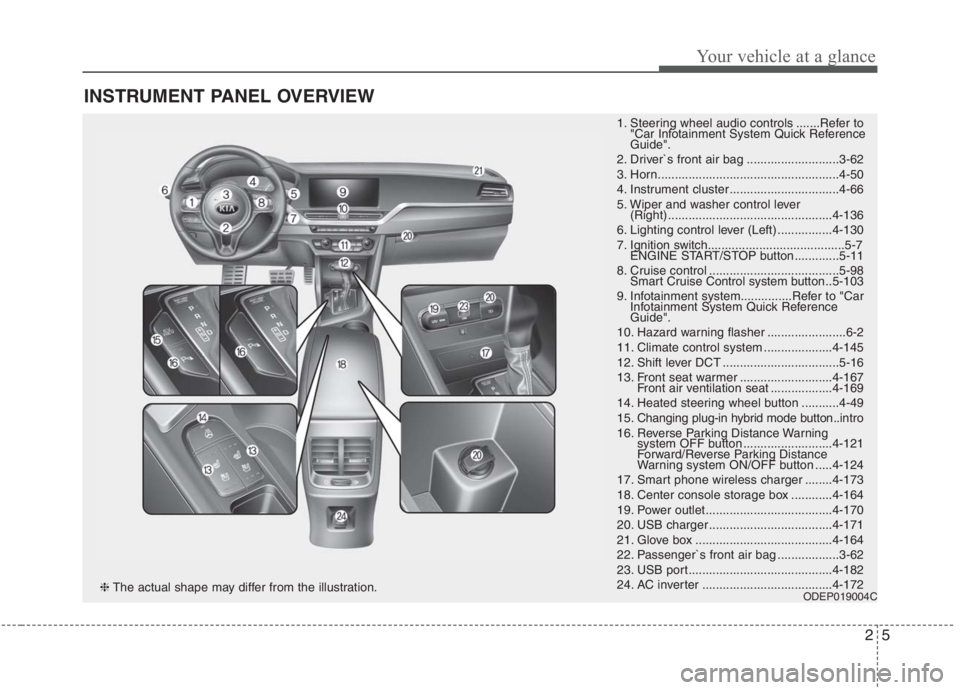
INSTRUMENT PANEL OVERVIEW
1. Steering wheel audio controls .......Refer to
"Car Infotainment System Quick Reference
Guide".
2. Driver`s front air bag ...........................3-62
3. Horn.....................................................4-50
4. Instrument cluster ................................4-66
5. Wiper and washer control lever
(Right) ................................................4-136
6. Lighting control lever (Left) ................4-130
7. Ignition switch........................................5-7
ENGINE START/STOP button .............5-11
8. Cruise control ......................................5-98
Smart Cruise Control system button ..5-103
9. Infotainment system...............Refer to "Car
Infotainment System Quick Reference
Guide".
10. Hazard warning flasher .......................6-2
11. Climate control system ....................4-145
12. Shift lever DCT ..................................5-16
13. Front seat warmer ...........................4-167
Front air ventilation seat ..................4-169
14. Heated steering wheel button ...........4-49
15. Changing plug-in hybrid mode button..intro
16. Reverse Parking Distance Warning
system OFF button ..........................4-121
Forward/Reverse Parking Distance
Warning system ON/OFF button .....4-124
17. Smart phone wireless charger ........4-173
18. Center console storage box ............4-164
19. Power outlet.....................................4-170
20. USB charger ....................................4-171
21. Glove box ........................................4-164
22. Passenger`s front air bag ..................3-62
23. USB port..........................................4-182
24. AC inverter ......................................4-172
ODEP019004C❈The actual shape may differ from the illustration.
Page 312 of 667
Features of your vehicle
172 4
The battery charging state may be
monitored on the electrical device.
Disconnect the USB cable from the
USB port after use.
Some devices are not supported
for fast charging but will be
charged with normal speed.
Use the USB charger when the
engine is running to prevent bat-
tery discharge.
Only devices that fit the USB port
can be used.
The USB charger can be used only
for battery charging purposes.
Battery chargers cannot be
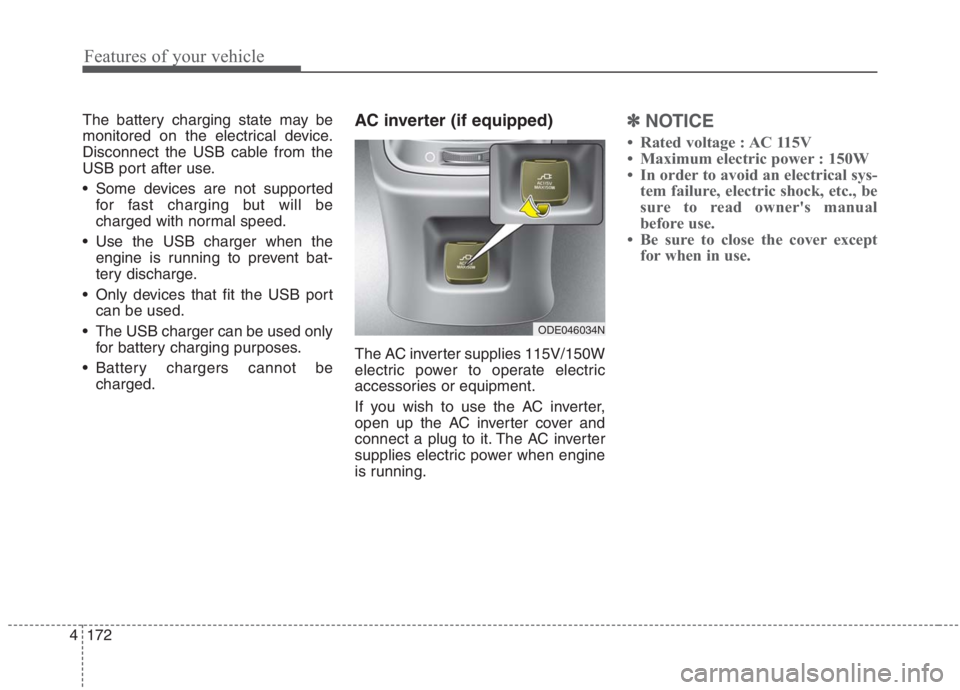
charged.AC inverter (if equipped)
The AC inverter supplies 115V/150W
electric power to operate electric
accessories or equipment.
If you wish to use the AC inverter,
open up the AC inverter cover and
connect a plug to it. The AC inverter
supplies electric power when engine
is running.
✽ ✽
NOTICE
• Rated voltage : AC 115V
• Maximum electric power : 150W
• In order to avoid an electrical sys-
tem failure, electric shock, etc., be
sure to read owner's manual
before use.
• Be sure to close the cover except
for when in use.
ODE046034N
Page 322 of 667
Features of your vehicle
182
4
✽
✽
NOTICE
If you install an after market HID
head lamp, your vehicle’s audio and
electronic device may malfunction.
❈ If your vehicle is equipped with
Infotainment system, refer to a
separately supplied manual for
detailed information.
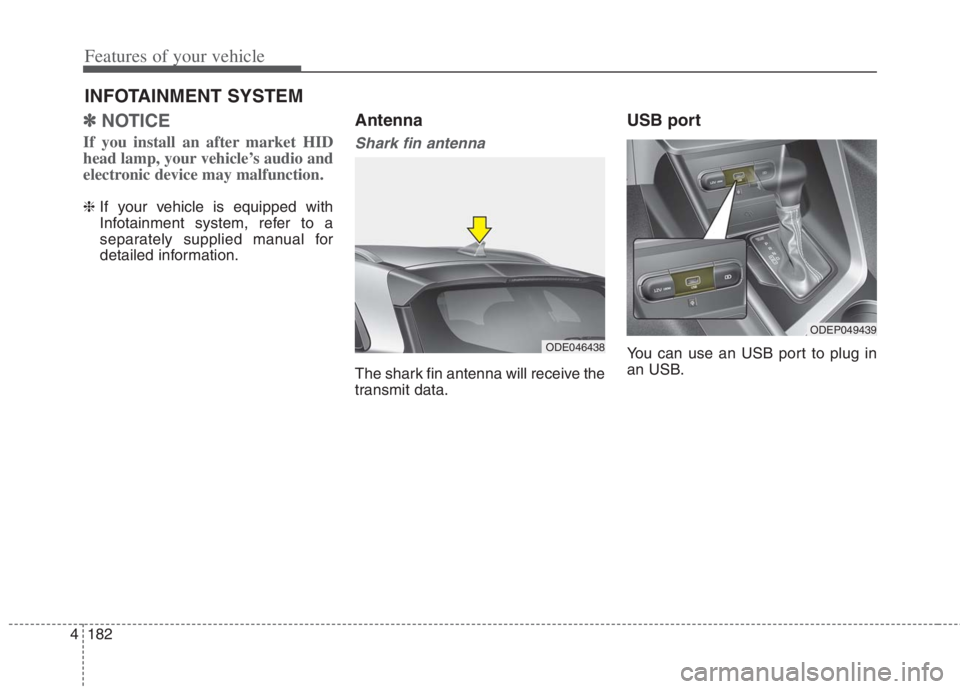
Antenna
Shark fin antenna
The shark fin antenna will receive the
transmit data.
USB port
You can use an USB port to plug in
an USB.
INFOTAINMENT SYSTEM
ODE046438
ODEP049439
Page 661 of 667
I5
Index
Fuel requirements . . . . . . . . . . . . . . . . . . . . . . . . . . . . . . 1-2
Do not use methanol . . . . . . . . . . . . . . . . . . . . . . . . . 1-3
Fuel additives . . . . . . . . . . . . . . . . . . . . . . . . . . . . . . . 1-4
Gasoline containing alcohol and methanol . . . . . . . . 1-2
Operation in foreign countries . . . . . . . . . . . . . . . . . . 1-4
Fuses . . . . . . . . . . . . . . . . . . . . . . . . . . . . . . . . . . . . . . . 7-58
Engine compartment fuse replacement . . . . . . . . . . 7-61
Fuse/relay panel description. . . . . . . . . . . . . . . . . . . 7-64
Inner panel fuse replacement . . . . . . . . . . . . . . . . . . 7-59
Gross vehicle weight. . . . . . . . . . . . . . . . . . . . . . . . . . . . 8-6
HEV/PHEV powertrain . . . . . . . . . . . . . . . . . . . . . . . . . 1-5
Hood . . . . . . . . . . . . . . . . . . . . . . . . . . . . . . . . . . . . . . . 4-34
Closing the hood . . . . . . . . . . . . . . . . . . . . . . . . . . . 4-35
Opening the hood . . . . . . . . . . . . . . . . . . . . . . . . . . . 4-34
If An Accident Occurs . . . . . . . . . . . . . . . . . . . . . . . . . 6-44
If the engine overheats . . . . . . . . . . . . . . . . . . . . . . . . . 6-11
If the engine will not start . . . . . . . . . . . . . . . . . . . . . . . 6-4
If engine doesn't turn over or turns over slowly . . . . 6-4
If engine turns over normally but does not start . . . . 6-4If you have a flat tire (with spare tire) . . . . . . . . . . . . . 6-19
Changing tires . . . . . . . . . . . . . . . . . . . . . . . . . . . . . 6-20
Jack and tools . . . . . . . . . . . . . . . . . . . . . . . . . . . . . . 6-19
Removing and storing the spare tire . . . . . . . . . . . . 6-20
If you have a flat tire (with Tire Mobility Kit). . . . . . . 6-28
Checking the tire inflation pressure . . . . . . . . . . . . . 6-36
Components of the Tire Mobility Kit . . . . . . . . . . . 6-32
Distributing the sealant . . . . . . . . . . . . . . . . . . . . . . 6-35
Introduction . . . . . . . . . . . . . . . . . . . . . . . . . . . . . . . 6-29
Notes on the safe use of the Tire Mobility Kit . . . . 6-30
Technical Data . . . . . . . . . . . . . . . . . . . . . . . . . . . . . 6-38
Using the Tire Mobility Kit . . . . . . . . . . . . . . . . . . . 6-33
Important safety precautions . . . . . . . . . . . . . . . . . . . . . 3-2
Air bag hazards . . . . . . . . . . . . . . . . . . . . . . . . . . . . . 3-2
Always wear your seat belt . . . . . . . . . . . . . . . . . . . . 3-2
Control your speed . . . . . . . . . . . . . . . . . . . . . . . . . . . 3-3
Driver distraction . . . . . . . . . . . . . . . . . . . . . . . . . . . . 3-2
Keep your vehicle in safe condition. . . . . . . . . . . . . . 3-3
Restrain all children . . . . . . . . . . . . . . . . . . . . . . . . . . 3-2
In case of an emergency while driving . . . . . . . . . . . . . . 6-3
If the engine stalls at a crossroad or crossing . . . . . . 6-3
If the engine stalls while driving . . . . . . . . . . . . . . . . 6-3
If you have a flat tire while driving . . . . . . . . . . . . . . 6-3
Infotainment system . . . . . . . . . . . . . . . . . . . . . . . . . . 4-182
Antenna . . . . . . . . . . . . . . . . . . . . . . . . . . . . . . . . . 4-182
How vehicle radio works . . . . . . . . . . . . . . . . . . . . 4-183
USB port. . . . . . . . . . . . . . . . . . . . . . . . . . . . . . . . . 4-182
H
I
G