alarm KIA NIRO HYBRID EV 2021 Owners Manual
[x] Cancel search | Manufacturer: KIA, Model Year: 2021, Model line: NIRO HYBRID EV, Model: KIA NIRO HYBRID EV 2021Pages: 667, PDF Size: 9.17 MB
Page 17 of 667
H12
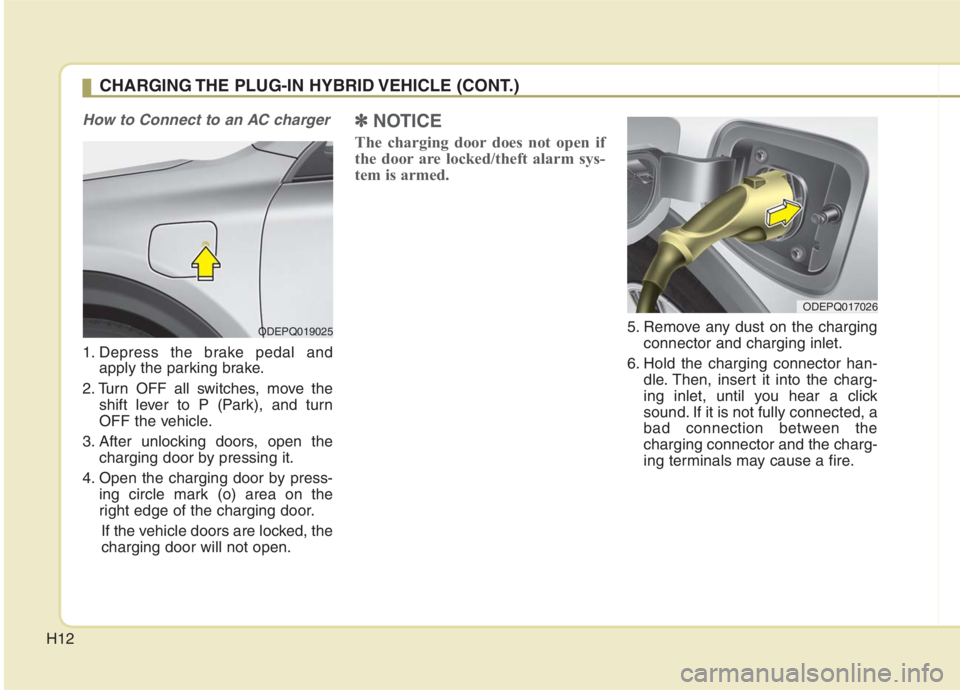
How to Connect to an AC charger
1. Depress the brake pedal and
apply the parking brake.
2. Turn OFF all switches, move the
shift lever to P (Park), and turn
OFF the vehicle.
3. After unlocking doors, open the
charging door by pressing it.
4. Open the charging door by press-
ing circle mark (o) area on the
right edge of the charging door.
If the vehicle doors are locked, the
charging door will not open.
✽ ✽
NOTICE
The charging door does not open if
the door are locked/theft alarm sys-
tem is armed.
5. Remove any dust on the charging
connector and charging inlet.
6. Hold the charging connector han-
dle. Then, insert it into the charg-
ing inlet, until you hear a click
sound. If it is not fully connected, a
bad connection between the
charging connector and the charg-
ing terminals may cause a fire.
CHARGING THE PLUG-IN HYBRID VEHICLE (CONT.)
ODEPQ019025
ODEPQ017026
Page 23 of 667
H18
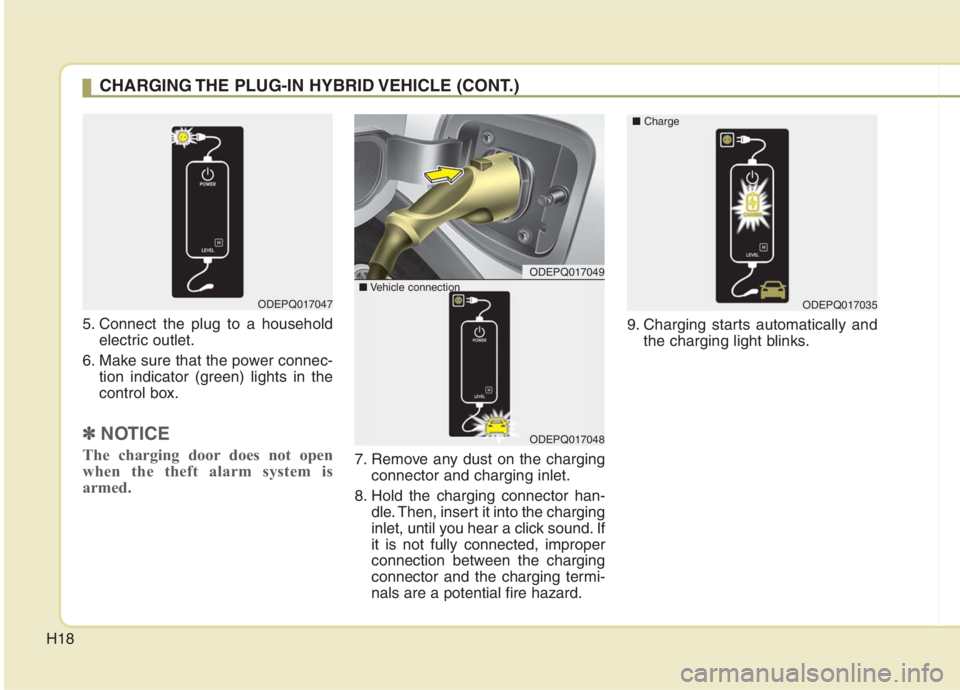
5. Connect the plug to a household
electric outlet.
6. Make sure that the power connec-
tion indicator (green) lights in the
control box.
✽ ✽
NOTICE
The charging door does not open
when the theft alarm system is
armed.7. Remove any dust on the charging
connector and charging inlet.
8. Hold the charging connector han-
dle. Then, insert it into the charging
inlet, until you hear a click sound. If
it is not fully connected, improper
connection between the charging
connector and the charging termi-
nals are a potential fire hazard.9. Charging starts automatically and
the charging light blinks.
ODEPQ017047
CHARGING THE PLUG-IN HYBRID VEHICLE (CONT.)
ODEPQ017049
ODEPQ017048
■Vehicle connection
ODEPQ017035 ■Charge
Page 90 of 667
323
Safety features of your vehicle
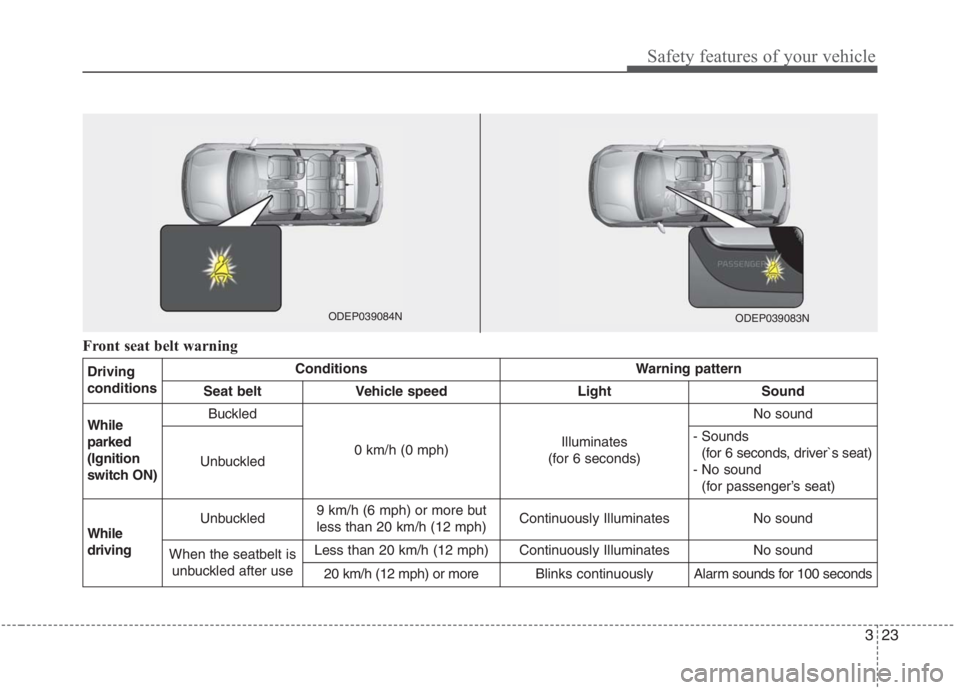
Front seat belt warning
Driving
conditionsConditionsWarning pattern
Seat beltVehicle speedLightSound
While
parked
(Ignition
switch ON)Buckled
0 km/h (0 mph)Illuminates
(for 6 seconds)
No sound
Unbuckled
- Sounds
(for 6 seconds, driver`s seat)
- No sound
(for passenger’s seat)
While
drivingUnbuckled9 km/h (6 mph) or more but
less than 20 km/h (12 mph)Continuously IlluminatesNo sound
When the seatbelt is
unbuckled after useLess than 20 km/h (12 mph)Continuously IlluminatesNo sound
20 km/h (12 mph) or moreBlinks continuouslyAlarm sounds for 100 seconds
ODEP039083NODEP039084N
Page 141 of 667
Features of your vehicle
Folding key . . . . . . . . . . . . . . . . . . . . . . . . . . . . . . . . 4-4
• Record your key number . . . . . . . . . . . . . . . . . . . . . . . 4-4
. . . . . . . . . . . . . . . . . . . . . . . . . . . . . . . . 4-4
. . . . . . . . . . . . . . . . . . . . . . . . 4-6
. . . . . . . . . . . . . . . . . . . . . . . . . . . 4-7
. . . . . . . . . . . . . . . . . . . . . . . . . . . . 4-8
Smart key . . . . . . . . . . . . . . . . . . . . . . . . . . . . . . . . 4-11
. . . . . . . . . . . . . . . . . . . . . . 4-11
. . . . . . . . . . . . . . . . . . . . . . . . . . . 4-11
. . . . . . . . . . . . . . . . . . . . . . . . . . . . . . 4-14
. . . . . . . . . . . . . . . . . . . . . . . . . 4-14
. . . . . . . . . . . . . . . . . . . . . . . . 4-14
. . . . . . . . . . . . . . . . . . . . . . . . . . 4-15
. . . . . . . . . . . . . . . . . . 4-16
Theft-alarm system . . . . . . . . . . . . . . . . . . . . . . . . 4-18
. . . . . . . . . . . . . . . . . . . . . . . . . . . . . . . . . 4-18
. . . . . . . . . . . . . . . . . . . . . . . . . . . . 4-19
Door locks . . . . . . . . . . . . . . . . . . . . . . . . . . . . . . . . 4-21
. . . . 4-21
. . . . . . . . . . . . . . . . . 4-25
Liftgate . . . . . . . . . . . . . . . . . . . . . . . . . . . . . . . . . . 4-26\
. . . . . . . . . . . . . . . . . . . . . . . . . . . 4-26
Windows . . . . . . . . . . . . . . . . . . . . . . . . . . . . . . . . . 4-29
. . . . . . . . . . . . . . . . . . . . . . . . . . . . . . 4-30
Hood. . . . . . . . . . . . . . . . . . . . . . . . . . . . . . . . . . . . \
. 4-34
. . . . . . . . . . . . . . . . . . . . . . . . . . . . 4-34
. . . . . . . . . . . . . . . . . . . . . . . . . . . . . 4-35
Fuel filler door (Hybrid) . . . . . . . . . . . . . . . . . . . . 4-36
. . . . . . . . . . . . . . . . . . . . 4-36
. . . . . . . . . . . . . . . . . . . . . 4-37
Fuel filler door (Plug-in hybrid) . . . . . . . . . . . . . . 4-38
. . . . . . . . . . . . . . . . . . . . 4-38
. . . . . . . . . . . . . . . . . . . . . 4-39
Sunroof . . . . . . . . . . . . . . . . . . . . . . . . . . . . . . . . . . 4-42\
. . . . . . . . . . . . . . . . . . . . . . . . . . . 4-43
. . . . . . . . . . . . . . . . . . . . . . . . . . . . 4-44
. . . . . . . . . . . . . . . . . . . . . . . . . . . . . . . . . . . 4-\
45
. . . . . . . . . . . . . . . . . . . . . . . . . 4-45
Steering wheel . . . . . . . . . . . . . . . . . . . . . . . . . . . . . 4-47
. . . . . . . . . . . . . . . . . . 4-47
. . . . . . . . . . . . . . . . . . . . . 4-48
. . . . . . . . . . . . . . . . . . . . . . . . . 4-49
. . . . . . . . . . . . . . . . . . . . . . . . . . . . . . . . . . . . \
. . . 4-50
4
Page 158 of 667
Features of your vehicle
18 4
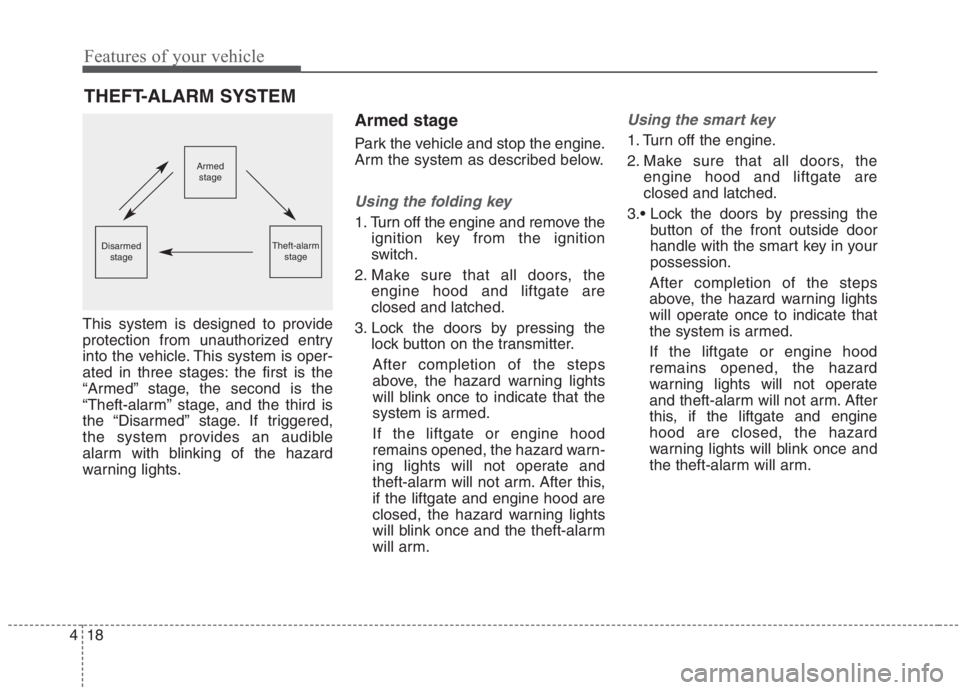
This system is designed to provide
protection from unauthorized entry
into the vehicle. This system is oper-
ated in three stages: the first is the
“Armed” stage, the second is the
“Theft-alarm” stage, and the third is
the “Disarmed” stage. If triggered,
the system provides an audible
alarm with blinking of the hazard
warning lights.
Armed stage
Park the vehicle and stop the engine.
Arm the system as described below.
Using the folding key
1. Turn off the engine and remove the
ignition key from the ignition
switch.
2. Make sure that all doors, the
engine hood and liftgate are
closed and latched.
3. Lock the doors by pressing the
lock button on the transmitter.
After completion of the steps
above, the hazard warning lights
will blink once to indicate that the
system is armed.
If the liftgate or engine hood
remains opened, the hazard warn-
ing lights will not operate and
theft-alarm will not arm. After this,
if the liftgate and engine hood are
closed, the hazard warning lights
will blink once and the theft-alarm
will arm.
Using the smart key
1. Turn off the engine.
2. Make sure that all doors, the
engine hood and liftgate are
closed and latched.
button of the front outside door
handle with the smart key in your
possession.
After completion of the steps
above, the hazard warning lights
will operate once to indicate that
the system is armed.
If the liftgate or engine hood
remains opened, the hazard
warning lights will not operate
and theft-alarm will not arm. After
this, if the liftgate and engine
hood are closed, the hazard
warning lights will blink once and
the theft-alarm will arm.
THEFT-ALARM SYSTEM
Armed
stage
Theft-alarm
stageDisarmed
stage
Page 159 of 667
419
Features of your vehicle
lock button on the smart key.
After completion of the steps
above, the hazard warning lights
will operate once to indicate that
the system is armed.
If the liftgate or engine hood
remains opened, the hazard
warning lights will not operate
and theft-alarm will not arm. After
this, if the liftgate and engine
hood are closed, the hazard
warning lights will blink once and
the theft-alarm will arm.Do not arm the system until all
passengers have left the vehicle. If
the system is armed while a pas-
senger(s) remains in the vehicle,
the alarm may be activated when
the remaining passenger(s)
leaves the vehicle. If any door (or
liftgate) or engine hood is opened
within 30 seconds after the sys-
tem enters the armed stage, the
system will be disarmed to pre-
vent unnecessary alarm.Theft-alarm stage
The alarm will be activated if any of
the following occurs while the system
is armed.
A front or rear door is opened with-
out using the transmitter (or smart
key).
The liftgate is opened without
using the transmitter (or smart
key).
The engine hood is opened.
The horn will sound and the hazard
warning lights will blink continuously
for approximately 27 seconds. To
turn off the system, unlock the doors
with the transmitter (or smart key).
Page 160 of 667
Features of your vehicle
20 4
Disarmed stage
The system will be disarmed when:
Folding key
- The door unlock button is pressed.
- The engine is started. (within 3
seconds)
- The ignition switch is in the “ON”
position for 30 seconds or more.
Smart key
- The door unlock button is pressed.
- The button of the front outside door
is pressed while carrying the smart
key.
- The engine is started. (within 3
seconds)
After the doors are unlocked, the
hazard warning lights will blink twice
to indicate that the system is dis-
armed.
After pressing the unlock button, if
any door (or liftgate) is not opened
within 30 seconds, the system will be
rearmed.
✽ ✽
NOTICE
• Without smart key system
If the system is not disarmed with
the transmitter, insert the key into
the ignition switch and start the
engine. Then the system will be
disarmed.
• With smart key system
If the system is not disarmed with
the smart key, open the door with
the mechanical key and start the
engine. Then the system will be
disarmed.
• If you lose your keys, Kia recom-
mends to visit an authorized Kia
dealer/service partner.CAUTION
Do not change, alter or adjust the
theft-alarm system because it
could cause the theft-alarm sys-
tem to malfunction have the sys-
tem serviced by a professional
workshop. Kia recommends to
visit an authorized Kia
dealer/service partner.
Malfunctions caused by improp-
er alterations, adjustments or
modifications to the theft-alarm
system are not covered by your
vehicle manufacturer warranty.
Page 208 of 667
Features of your vehicle
68 4
Instrument Cluster Control
Adjusting Instrument Cluster
Illumination
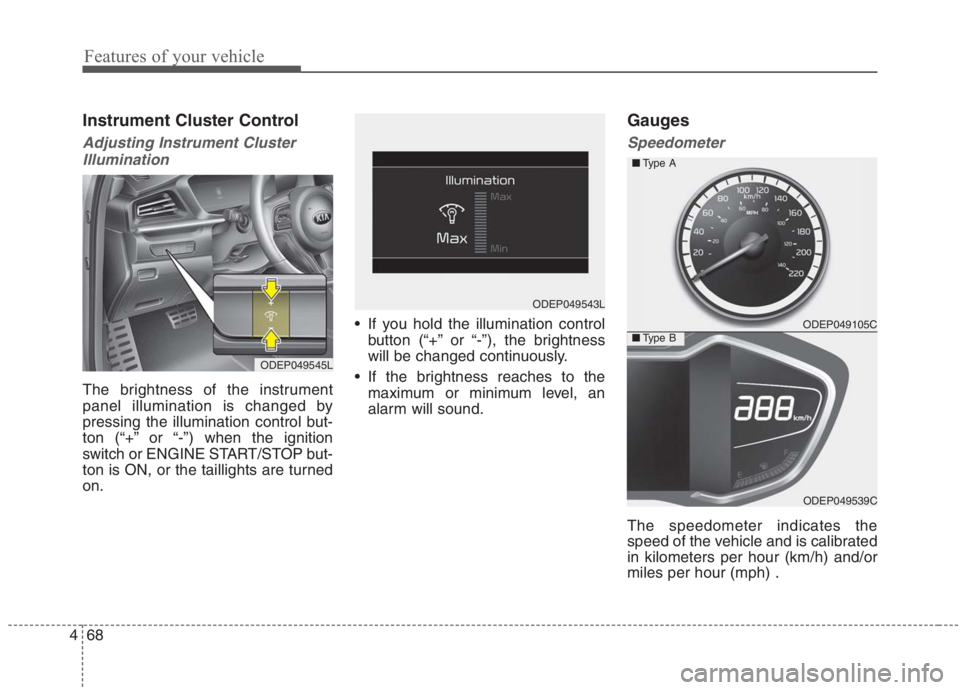
The brightness of the instrument
panel illumination is changed by
pressing the illumination control but-
ton (“+” or “-”) when the ignition
switch or ENGINE START/STOP but-
ton is ON, or the taillights are turned
on. If you hold the illumination control
button (“+” or “-”), the brightness
will be changed continuously.
If the brightness reaches to the
maximum or minimum level, an
alarm will sound.
Gauges
Speedometer
The speedometer indicates the
speed of the vehicle and is calibrated
in kilometers per hour (km/h) and/or
miles per hour (mph) .
ODEP049545L
ODEP049543L
ODEP049105C
ODEP049539C ■Type A
■Type B
Page 280 of 667
Features of your vehicle
140 4
Do not use the interior lights for
extended periods when the engine is
not running.
It may cause battery discharge.Automatic turn off function
The interior lights automatically turn
off approximately 20 minutes after
the ignition switch is turned off, if the
lights are in the ON position.
If your vehicle is equipped with the
theft alarm system, the interior lights
automatically turn off approximately
5 seconds after the system is armed.
Map lamp
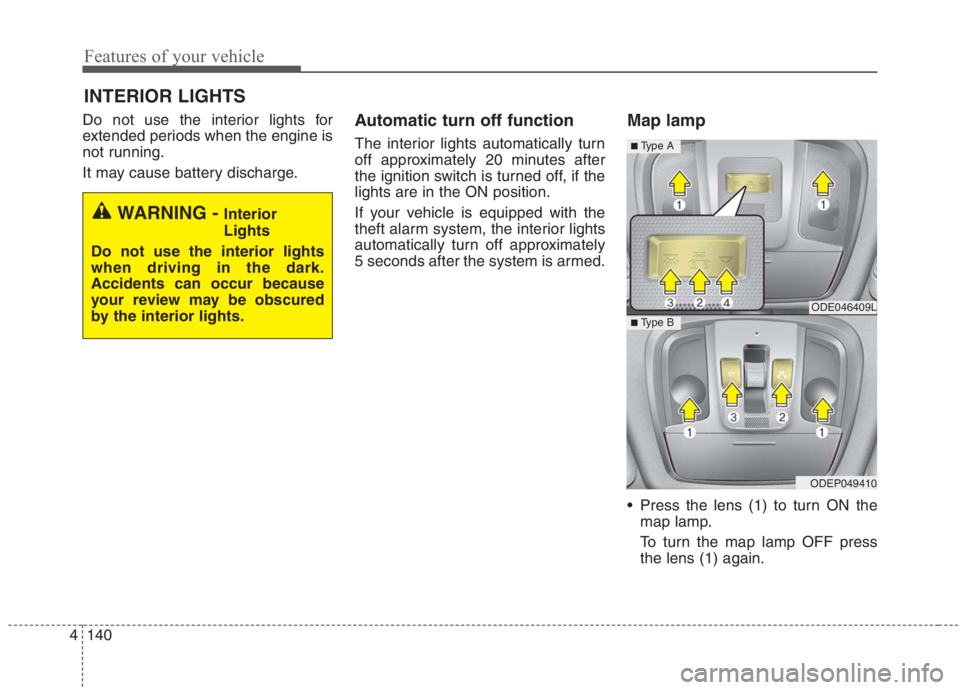
Press the lens (1) to turn ON the
map lamp.
To turn the map lamp OFF press
the lens (1) again.
INTERIOR LIGHTS
WARNING - Interior
Lights
Do not use the interior lights
when driving in the dark.
Accidents can occur because
your review may be obscured
by the interior lights.
ODE046409L
ODEP049410
■ Type B
■ Type A
Page 379 of 667
553
Driving your vehicle
FCA system is to reduce or to avoid
accident risk. It recognizes the dis-
tance from the vehicle ahead, the
pedestrian or the cyclist through the
sensors (i.e. front view camera and
front radar), and, if necessary, warns
the driver of accident risk with the
warning message or the warning
alarms and apply emergency brak-
ing.
❈FCA stands for Forward Collision-
Avoidance Assist.
❈Sensor fusion (front view camera
+ front radar) FCA system oper-
ates for the vehicle ahead, the
pedestrian or the cyclist in front.System setting and activation
Forward safety
The driver can activate FCA system
by placing the ignition switch or
ENGINE START/STOP button to the
ON position and by selecting:
“User Settings →Driver Assistance
→Forward Safety”
- If you select “Active Assist”, FCA
system activates. FCA produces
warning messages and warning
alarms in accordance with the col-
lision risk levels. Also, it controls
the brakes in accordance with the
collision risk levels.
- If you select “Warning Only”, FCA
system activates and produces
only warning alarms in accordance
with the collision risk levels. You
should control the brake directly
because FCA system do not con-
trol the brake.
- If you select “Off ”, FCA system
deactivates,
FORWARD COLLISION-AVOIDANCE ASSIST (FCA) (SENSOR FUSION) (IF EQUIPPED)
WARNING
Take the following precautions
when using Forward Collision-
Avoidance Assist system:
This system is only a supple-
mental system and it is not
intended to, nor does it replace
the need for the extreme care
and attention of the driver. The
sensing range and objects
detectable by the sensors are
limited. Pay attention to the
road conditions at all times.
NEVER drive too fast in accor-
dance with the road condi-
tions or while cornering.
Always drive cautiously to
prevent unexpected and sud-
den situations from occur-
ring. FCA system does not
stop the vehicle completely
and is only intended to help
mitigate an imminent colli-
sion.