reset KIA NIRO PHEV 2018 Owner's Manual
[x] Cancel search | Manufacturer: KIA, Model Year: 2018, Model line: NIRO PHEV, Model: KIA NIRO PHEV 2018Pages: 616, PDF Size: 18.3 MB
Page 309 of 616
Audio system
510
Radio
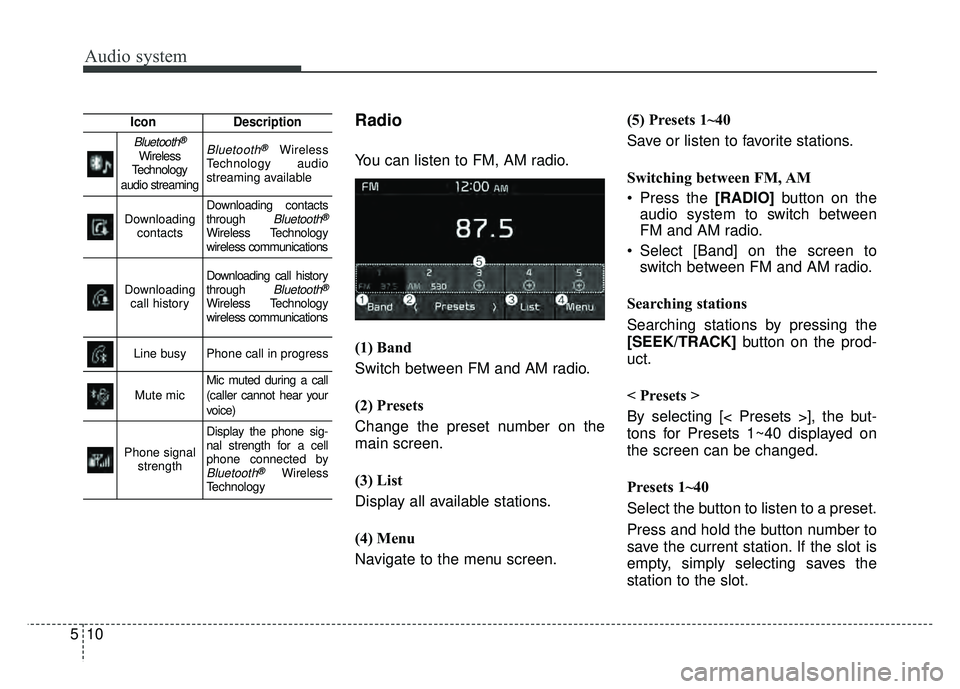
You can listen to FM, AM radio.
(1) Band
Switch between FM and AM radio.
(2) Presets
Change the preset number on the
main screen.
(3) List
Display all available stations.
(4) Menu
Navigate to the menu screen.(5) Presets 1~40
Save or listen to favorite stations.
Switching between FM, AM
Press the [RADIO]
button on the
audio system to switch between
FM and AM radio.
Select [Band] on the screen to switch between FM and AM radio.
Searching stations
Searching stations by pressing the
[SEEK/TRACK] button on the prod-
uct.
< Presets >
By selecting [< Presets >], the but-
tons for Presets 1~40 displayed on
the screen can be changed.
Presets 1~40
Select the button to listen to a preset.
Press and hold the button number to
save the current station. If the slot is
empty, simply selecting saves the
station to the slot.
IconDescription
Bluetooth®
Wireless
Technology
audio streamingBluetooth®Wireless
Technology audio
streaming available
Downloading contactsDownloading contacts
through Bluetooth®
Wireless Technology
wireless communications
Downloading call historyDownloading call history
through Bluetooth®
Wireless Technology
wireless communications
Line busyPhone call in progress
Mute micMic muted during a call
(caller cannot hear your
voice)
Phone signal strength
Display the phone sig-
nal strength for a cell
phone connected by
Bluetooth®Wireless
Technology
Page 310 of 616
![KIA NIRO PHEV 2018 Owners Manual Audio system
11
5
List
A list of all available stations is dis-
played. Select the desired station.
Favorite stations can be saved to
[Presets] by selecting [+].
Menu
Select [Menu], and select the des](/img/2/54767/w960_54767-309.png "KIA NIRO PHEV 2018 Owners Manual Audio system
11
5
List
A list of all available stations is dis-
played. Select the desired station.
Favorite stations can be saved to
[Presets] by selecting [+].
Menu
Select [Menu], and select the des")
Audio system
11
5
List
A list of all available stations is dis-
played. Select the desired station.
Favorite stations can be saved to
[Presets] by selecting [+].
Menu
Select [Menu], and select the desired
function.
Presets: Save up to 40 frequently
used stations.
To listen to a preset, select the
desired station.
Press and hold the desired slot
from 1 through 40. This saves the
current station in the selected slot.
If the slot is empty, simply selecting
saves the station to the slot.
Scan: All stations available in the current location of the vehicle are
played for five seconds each.
Information: View detailed station information.
Sound Settings: Audio sound set- tings can be changed.
Station Info: Set whether to receive
station information such as Station
Name, Program Type or Information.Media
✽ ✽ NOTICE - Using MP3
Supported audio formats
✽
✽ NOTICE
File formats other than the formats
above may not be recognized or
playable. Information such as file-
name may not be displayed.
Range of supported compressed file
types
1. Bitrate range (Kbps)
Page 315 of 616
Audio system
516
✽
✽NOTICE
-
Using the iPod®Devices
• To use the audio system’s iPod®
control function, use the dedicated
cable provided with your iPod®.
• Connecting the iPod®to the vehi-
cle during play may result in a
loud noise that lasts about one to
two seconds. Connect the iPod
®to
the vehicle after stopping or paus-
ing play.
• Connect the iPod
®with the vehicle
in the ACC ON state to begin
charging.
• When connecting the iPod
®cable,
be sure to fully push the cable into
the port.
• When EQ effects are enabled simultaneously on external
devices, such as iPod
®s and the
audio system, the EQ effects may
overlap, causing sound quality
deterioration or distortion.
Deactivate the EQ function for all
external devices, if possible.
• Noise may occur when your iPod
®
or the AUX port is connected.
Disconnect and store separately
when not in use. (Continued)(Continued)
• There may be noise if the audio
system is used with an iPod
®or
AUX external device connected to
the power jack. In these cases, dis-
connect the iPod
®or external
device from the power jack.
• Play may be interrupted, or device malfunctions may occur depend-
ing on the characteristics of your
iPod
®/iPhone®/iPad®.
• Play may fail if your iPhone®is
connected through both
Bluetooth
®Wireless Technology
and USB. In this case, select Dock
connector or Bluetooth
®Wireless
Technology on your iPhone®to
change the sound output settings.
• If your software version does not support the communication proto-
col or your iPod
®is not recognized
due to device failure, anomalies or
defects, iPod
®mode cannot be
used.
• iPod
®nano (5th generation)
devices may not be recognized if
the battery is low. Charge suffi-
ciently before use. (Continued)(Continued)
• The search and song play order in
the iPod
®device may be different
from the search order in the audio
system.
• If the iPod
®has failed due to an
internal defect, please reset the
iPod
®(consult your iPod®manual).
• Depending on the software ver- sion, the iPod
®may fail to sync
with the system. If the media is
removed or disconnected before
recognition, the previous mode
may not be restored (iPad
®cannot
be charged).
• Cables other than the 1-meter cable provided with iPod
®/iPhone®/iPad®
products may not be recognized.
• When other music apps are used on your iPod
®, the system sync
function may fail due to malfunc-
tion of the iPod
®application.
Page 333 of 616
![KIA NIRO PHEV 2018 Owners Manual Audio system
534
System
Press the [SETUP]button on the
audio system ➟ Select [System].
Memory Information: View My Music memory usage.
Language: Change the user lan- guage.
Default: Reset the aud](/img/2/54767/w960_54767-332.png "KIA NIRO PHEV 2018 Owners Manual Audio system
534
System
Press the [SETUP]button on the
audio system ➟ Select [System].
Memory Information: View My Music memory usage.
Language: Change the user lan- guage.
Default: Reset the aud")
Audio system
534
System
Press the [SETUP]button on the
audio system ➟ Select [System].
Memory Information: View My Music memory usage.
Language: Change the user lan- guage.
Default: Reset the audio system.
System Information: At the System Information screen, Software version
information, updates are available.
- System Update: At the System Information screen, insert the
USB memory with the latest file
downloaded, and then select the
[Update] to begin updating. The
system with then reboot auto-
matically.
✽ ✽ NOTICE
• The system resets to the default
values, and all saved data and set-
tings are lost.
• This product needs supplemented software updates and additional
functions, which collectively may
take some time to complete,
depending on the amount of data.
• If the Power is disconnected or the USB is removed during an update,
the data might be damaged. Please
wait until the update is complete
while engine is on.
Screen Saver
Set the information displayed when
the audio system is switched off or
the screen is turned off.
Press the [SETUP] button on the
audio system ➟ Select [Screen
Saver].
Analog: An analog clock is dis- played.
Digital: A digital clock is displayed.
None: No information is displayed.
Display Off
To prevent glare, the screen can be
turned off with the audio system in
operation.
Press the [SETUP] button on the
audio system ➟ Select [Display Off].
✽ ✽
NOTICE
Use ‘Screen Saver’ to set the Notice
to be displayed when the screen is
turned off.
Page 336 of 616
Blind Spot Detection system (BSD) . . . . . . . . . . . 6-66
BSD (Blind Spot Detection)/LCA (Lane Change Assist) . . . . . . . . . . . . . . . . . . . . 6-67
RCTA (Rear Cross Traffic Alert). . . . . . . . . . . . . . . . 6-70
Limitations condition . . . . . . . . . . . . . . . . . . . . . . . . . 6-72
Lane Keeping Assist System (LKAS) . . . . . . . . . . 6-74
LKAS operation. . . . . . . . . . . . . . . . . . . . . . . . . . . . . . 6-75
Warning light and message. . . . . . . . . . . . . . . . . . . . . 6-78
Driver's attention. . . . . . . . . . . . . . . . . . . . . . . . . . . . . 6-80
LKAS function change . . . . . . . . . . . . . . . . . . . . . . . . 6-81
Driver Attention Alert system (DAA) . . . . . . . . . . 6-82
System setting and activation . . . . . . . . . . . . . . . . . . . 6-82
Resetting the system . . . . . . . . . . . . . . . . . . . . . . . . . . 6-84
System disabled . . . . . . . . . . . . . . . . . . . . . . . . . . . . . . 6-84
System malfunction . . . . . . . . . . . . . . . . . . . . . . . . . . . 6-84
Economical operation . . . . . . . . . . . . . . . . . . . . . . 6-87
Special driving conditions . . . . . . . . . . . . . . . . . . . 6-89
Hazardous driving conditions . . . . . . . . . . . . . . . . . . 6-89
Reducing the risk of a rollover. . . . . . . . . . . . . . . . . . 6-89
Rocking the vehicle . . . . . . . . . . . . . . . . . . . . . . . . . . . 6-91
Smooth cornering . . . . . . . . . . . . . . . . . . . . . . . . . . . . 6-91
Driving at night . . . . . . . . . . . . . . . . . . . . . . . . . . . . . . 6-92
Driving in the rain . . . . . . . . . . . . . . . . . . . . . . . . . . . . 6-92
Driving in flooded areas . . . . . . . . . . . . . . . . . . . . . . . 6-93 Driving off-road . . . . . . . . . . . . . . . . . . . . . . . . . . . . . . 6-93
Highway driving . . . . . . . . . . . . . . . . . . . . . . . . . . . . . 6-93
Winter driving . . . . . . . . . . . . . . . . . . . . . . . . . . . . 6-94
Snowy or icy conditions . . . . . . . . . . . . . . . . . . . . . . . 6-94
Use high quality ethylene glycol coolant . . . . . . . . . . 6-96
Check battery and cables . . . . . . . . . . . . . . . . . . . . . . 6-96
Change to "winter weight" oil if necessary . . . . . . . 6-96
Check spark plugs and ignition system. . . . . . . . . . . 6-96
To keep locks from freezing . . . . . . . . . . . . . . . . . . . . 6-97
Use approved window washer anti-freeze in system. 6-97 Don’t let your parking brake freeze . . . . . . . . . . . . . 6-97
Don't let ice and snow accumulate underneath . . . . 6-97
Carry emergency equipment . . . . . . . . . . . . . . . . . . . 6-97
Trailer towing . . . . . . . . . . . . . . . . . . . . . . . . . . . . . 6-97
Vehicle load limit . . . . . . . . . . . . . . . . . . . . . . . . . . 6-98
Tire and loading information label . . . . . . . . . . . . . . 6-98
Certification label . . . . . . . . . . . . . . . . . . . . . . . . . . . 6-101
Vehicle weight . . . . . . . . . . . . . . . . . . . . . . . . . . . . 6-102
Base curb weight . . . . . . . . . . . . . . . . . . . . . . . . . . . . 6-102
Vehicle curb weight . . . . . . . . . . . . . . . . . . . . . . . . . . 6-102
Cargo weight . . . . . . . . . . . . . . . . . . . . . . . . . . . . . . . 6-102
GAW (Gross Axle Weight) . . . . . . . . . . . . . . . . . . . . 6-102
GAWR (Gross Axle Weight Rating) . . . . . . . . . . . . 6-102
GVW (Gross Vehicle Weight) . . . . . . . . . . . . . . . . . . 6-102
GVWR (Gross Vehicle Weight Rating) . . . . . . . . . . 6-102
6
Page 390 of 616
Driving your vehicle
56
6
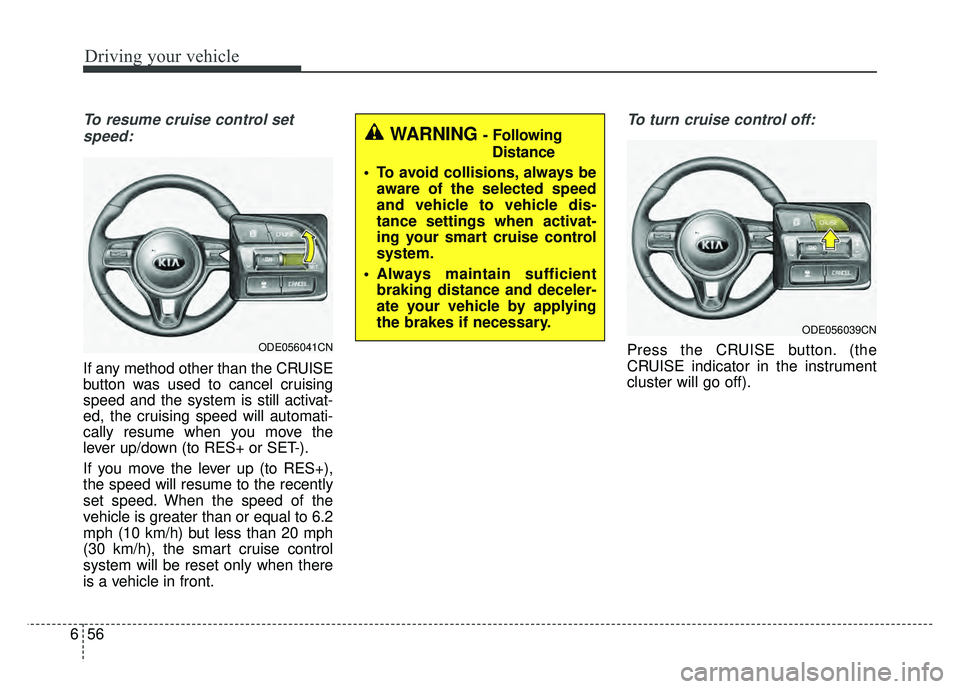
To resume cruise control set
speed:
If any method other than the CRUISE
button was used to cancel cruising
speed and the system is still activat-
ed, the cruising speed will automati-
cally resume when you move the
lever up/down (to RES+ or SET-).
If you move the lever up (to RES+),
the speed will resume to the recently
set speed. When the speed of the
vehicle is greater than or equal to 6.2
mph (10 km/h) but less than 20 mph
(30 km/h), the smart cruise control
system will be reset only when there
is a vehicle in front.
To turn cruise control off:
Press the CRUISE button. (the
CRUISE indicator in the instrument
cluster will go off).
ODE056039CN
WARNING - Following Distance
To avoid collisions, always be aware of the selected speed
and vehicle to vehicle dis-
tance settings when activat-
ing your smart cruise control
system.
Always maintain sufficient braking distance and deceler-
ate your vehicle by applying
the brakes if necessary.
ODE056041CN
Page 418 of 616

Driving your vehicle
84
6
Resetting the system
The last break time is set to 00:00
and the driver's attention level is
set to 5 (very attentive) when the
driver resets the Driver Attention
Alert system.
The Driver Attention Alert system resets in the following situations.
- The engine is turned OFF.
- The driver unfastens the seat beltand then opens the driver’s door.
- Stop lasting more than 10 min- utes.
The Driver Attention Alert system operates again, when the driver
restarts driving.
System disabled
The Driver Attention Alert system
enters the ready status and displays
the 'Disabled' screen in the following
situations.
- The camera sensor keeps failing todetect the lanes.
- Driving speed remains under 40 mph (64 km/h) or over 110 mph
(177 km/h).
System malfunction
When the “Check Driver Attention
Alert” warning message appears, the
system is not working properly. In this
case, have the vehicle inspected by
an authorized Kia dealer.
ODE057138LODE057139L
Page 439 of 616
73
What to do in an emergency
If the engine stalls at a cross-
road or crossing
If the engine stalls at a crossroad or
crossing, set the shift lever in the N
(Neutral) position and then push the
vehicle to a safe place.
If you have a flat tire while
driving
If a tire goes flat while you are driv-
ing:
1. Take your foot off the acceleratorpedal and let the vehicle slow
down while driving straight ahead.
Do not apply the brakes immedi-
ately or attempt to pull off the road
as this may cause a loss of con-
trol. When the vehicle has slowed
to such a speed that it is safe to do
so, brake carefully and pull off the
road. Drive off the road as far as
possible and park on firm level
ground. If you are on a divided
highway, do not park in the median
area between the two traffic lanes. 2. When the vehicle is stopped, turn
on your emergency hazard flash-
ers, set the parking brake and put
the transaxle in P.
3. Have all passengers get out of the vehicle. Be sure they all get out on
the side of the vehicle that is away
from traffic.
4. When changing a flat tire, follow the instruction provided later in
this section.
If the engine stalls while driv-
ing
1. Reduce your speed gradually,keeping a straight line. Move cau-
tiously off the road to a safe place.
2. Turn on your emergency flashers.
3. Try to start the hybrid system again. If your vehicle will not start,
contact an authorized Kia dealer
or seek other qualified assistance.
✽ ✽NOTICE
If there was a check engine light and
loss of power or stall and if safe to do
so, wait at least 10 seconds to restart
the vehicle after it stalls. This may
reset the car so it will no longer run
at low power (limp home) condition.
IN CASE OF AN EMERGENCY WHILE DRIVING
Page 441 of 616
75
What to do in an emergency
EMERGENCY STARTING
Before Jump Starting
(For Hybrid)
Over discharge of 12V battery
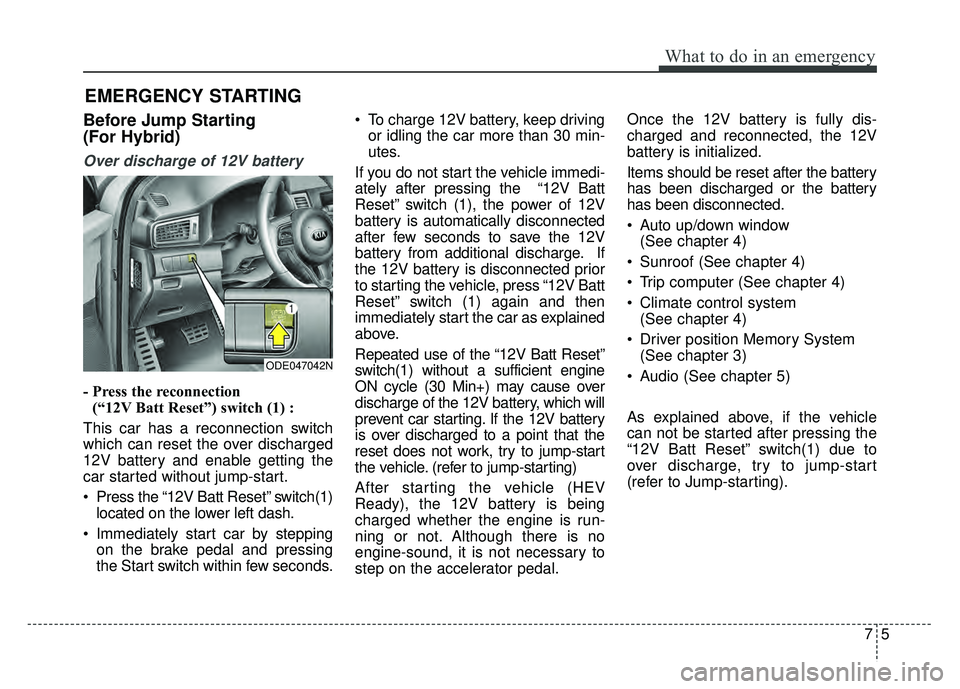
- Press the reconnection(“12V Batt Reset”) switch (1) :
This car has a reconnection switch
which can reset the over discharged
12V battery and enable getting the
car started without jump-start.
Press the “12V Batt Reset” switch(1) located on the lower left dash.
Immediately start car by stepping on the brake pedal and pressing
the Start switch within few seconds. To charge 12V battery, keep driving
or idling the car more than 30 min-
utes.
If you do not start the vehicle immedi-
ately after pressing the “12V Batt
Reset” switch (1), the power of 12V
battery is automatically disconnected
after few seconds to save the 12V
battery from additional discharge. If
the 12V battery is disconnected prior
to starting the vehicle, press “12V Batt
Reset” switch (1) again and then
immediately start the car as explained
above.
Repeated use of the “12V Batt Reset”
switch(1) without a sufficient engine
ON cycle (30 Min+) may cause over
discharge of the 12V battery, which will
prevent car starting. If the 12V battery
is over discharged to a point that the
reset does not work, try to jump-start
the vehicle. (refer to jump-starting)
After starting the vehicle (HEV
Ready), the 12V battery is being
charged whether the engine is run-
ning or not. Although there is no
engine-sound, it is not necessary to
step on the accelerator pedal. Once the 12V battery is fully dis-
charged and reconnected, the 12V
battery is initialized.
Items should be reset after the battery
has been discharged or the battery
has been disconnected.
Auto up/down window
(See chapter 4)
Sunroof (See chapter 4)
Trip computer (See chapter 4)
Climate control system (See chapter 4)
Driver position Memory System (See chapter 3)
Audio (See chapter 5)
As explained above, if the vehicle
can not be started after pressing the
“12V Batt Reset” switch(1) due to
over discharge, try to jump-start
(refer to Jump-starting).
ODE047042N
Page 442 of 616
What to do in an emergency
67
Charging method for 12V battery
(A) It is recommended to charge the12V battery by starting and run-
ning the vehicle (HEV Ready
Mode) for a minimum of 30 min-
utes if a 12V reset, or jump start
has been used.
(B) If you can not start the vehicle :
After connecting the jumper cables at the recommended locations, you
should press “12V batt Reset”
switch(1) to charge the battery.
The voltage range of the charger should be 13.3~14V and its current
range should be less than 60A.
(13.8V is recommended).
External power source using 12V
battery(Except the use of dash cameras)
The use of external power acces-
sories may reduce performance and
function of the vehicle. Especially,
the use of dash cameras may cause
a shut off the power of the vehicle
prior to the dash camera’s automatic
shut-down.
If the power of the car is shut off,
start the vehicle as explained above
(refer to “Over discharge of 12V bat-
tery”)
CAUTION
• The use of an improper charg- er with a voltage and currentrange higher than specifiedmay cause overheating anddamage to the 12V battery.
The use of an incorrect charg- er will lead to a power shut-offto save the 12V battery. Stopusing the incorrect chargeronce the power of the vehicleis shut off.