Distance KIA NIRO PHEV 2018 Owner's Guide
[x] Cancel search | Manufacturer: KIA, Model Year: 2018, Model line: NIRO PHEV, Model: KIA NIRO PHEV 2018Pages: 616, PDF Size: 18.3 MB
Page 335 of 616

Driving your vehicle
Before driving . . . . . . . . . . . . . . . . . . . . . . . . . . . . . . 6-4
Before entering vehicle . . . . . . . . . . . . . . . . . . . . . . . . . 6-4
Necessary inspections . . . . . . . . . . . . . . . . . . . . . . . . . . 6-4
Before starting . . . . . . . . . . . . . . . . . . . . . . . . . . . . . . . . 6-4
Key positions . . . . . . . . . . . . . . . . . . . . . . . . . . . . . . . 6-6
Illuminated ignition switch . . . . . . . . . . . . . . . . . . . . . . 6-6
Ignition switch position . . . . . . . . . . . . . . . . . . . . . . . . . 6-6
Starting the hybrid system . . . . . . . . . . . . . . . . . . . . . . 6-7
Engine start/stop button . . . . . . . . . . . . . . . . . . . . . 6-9
Illuminated engine start/stop button . . . . . . . . . . . . . . 6-9
Engine start/stop button position. . . . . . . . . . . . . . . . . 6-9
Starting the hybrid system . . . . . . . . . . . . . . . . . . . . . 6-11
Dual Clutch Transmission (DCT) . . . . . . . . . . . . . 6-14
Dual clutch transmission operation . . . . . . . . . . . . . . 6-14
Good driving practices . . . . . . . . . . . . . . . . . . . . . . . . 6-21
Brake system . . . . . . . . . . . . . . . . . . . . . . . . . . . . . . 6-23
Power brakes . . . . . . . . . . . . . . . . . . . . . . . . . . . . . . . . 6-23
Parking brake – Foot type . . . . . . . . . . . . . . . . . . . . . 6-25
Anti-lock Brake System (ABS) . . . . . . . . . . . . . . . . . . 6-27
Electronic Stability Control (ESC) . . . . . . . . . . . . . . 6-29
Vehicle Stability Management (VSM) . . . . . . . . . . . . 6-32
Hill-start Assist Control (HAC) . . . . . . . . . . . . . . . . . 6-34
Good braking practices. . . . . . . . . . . . . . . . . . . . . . . . 6-34
Autonomous Emergency Braking (AEB) . . . . . . . 6-36
System setting and activation . . . . . . . . . . . . . . . . . . . 6-36
AEB warning message and system control . . . . . . . . 6-39
Brake operation . . . . . . . . . . . . . . . . . . . . . . . . . . . . . . 6-40
Sensor to detect the distance from the vehicle in front (Front radar) . . . . . . . . . . . . . . . . . . . . . . . . . . . . . . . 6-41
System malfunction . . . . . . . . . . . . . . . . . . . . . . . . . . . 6-42
Limitation of the system . . . . . . . . . . . . . . . . . . . . . . . 6-43
Cruise control system. . . . . . . . . . . . . . . . . . . . . . . 6-47
To set cruise control speed . . . . . . . . . . . . . . . . . . . . . 6-48
To increase cruise control set speed . . . . . . . . . . . . . . 6-48
To decrease the cruising speed . . . . . . . . . . . . . . . . . . 6-49
To temporarily accelerate with the cruise control on . 6-49
To cancel cruise control, do one of the following . . . 6-49
To resume cruising speed at more than approximately 20 mph (30 km/h) . . . . . . . . . . . . . . . . . . . . . . . . . . . 6-50
To turn cruise control off, do one of the following . . 6-50
Smart Cruise Control system (SCC) . . . . . . . . . . 6-51
Speed setting (SCC). . . . . . . . . . . . . . . . . . . . . . . . . . . 6-52
Vehicle to vehicle distance setting (SCC) . . . . . . . . . 6-57
To adjust the sensitivity of smart cruise control . . . 6-60
To convert to cruise control mode . . . . . . . . . . . . . . . 6-60
Limitations of the system . . . . . . . . . . . . . . . . . . . . . . 6-61
6
Page 361 of 616
627
Driving your vehicle
Anti-lock brake system (ABS)
ABS (or ESC) will not prevent acci-
dents due to improper or dangerous
driving maneuvers. Even though
vehicle control is improved during
emergency braking, always maintain
a safe distance between you and
objects ahead. Vehicle speeds
should always be reduced during
extreme road conditions. The vehicle
should be driven at reduced speeds
in the following circumstances:
When driving on rough, gravel orsnow-covered roads
When driving with tire chains installed
When driving on roads where the road surface is pitted or has differ-
ent surface heights.
Driving in these conditions increases
the stopping distance for your vehicle. The ABS continuously senses the
speed of the wheels. If the wheels
are going to lock, the ABS system
repeatedly modulates the hydraulic
brake pressure to the wheels.
When you apply your brakes under
conditions which may lock the
wheels, you may hear a “tik-tik’’
sound from the brakes, or feel a cor-
responding sensation in the brake
pedal. This is normal and it means
your ABS is active.
In order to obtain the maximum benefit
from your ABS in an emergency situa-
tion, do not attempt to modulate your
brake pressure and do not try to pump
your brakes. Press your brake pedal as
hard as possible or as hard as the sit-
uation allows the ABS to control the
force being delivered to the brakes.
✽ ✽
NOTICE
A click sound may be heard in the
engine compartment when the vehi-
cle begins to move after the engine is
started. These conditions are normal
and indicate that the anti-lock brake
system is functioning properly.
Even with the anti-lock brake sys-
tem, your vehicle still requires suf-
ficient stopping distance. Always
maintain a safe distance from the
vehicle in front of you.
Always slow down when cornering. The anti-lock brake system cannot
prevent accidents resulting from
excessive speeds.
On loose or uneven road surfaces, operation of the anti-lock brake
system may result in a longer stop-
ping distance than for vehicles
equipped with a conventional
brake system.
Page 368 of 616
Driving your vehicle
34
6
The Vehicle Stability Management
system is not a substitute for safe
driving practices but a supplemen-
tary function only. It is the responsi-
bility of the driver to always check
the speed and the distance to the
vehicle ahead. Always hold the
steering wheel firmly while driving.
Your vehicle is designed to activate according to the driver’s intention,
even with installed VSM. Always fol-
low all the normal precautions for
driving at safe speeds for the condi-
tions – including driving in clement
weather and on a slippery road.
✽ ✽ NOTICE
For maximum protection, always
wear your seat belt. No system, no
matter how advanced, can compen-
sate for all driver error and/or driv-
ing conditions. Always drive respon-
sibly.
Hill-start assist control (HAC)
A vehicle has the tendency to roll
back on a steep hill when it starts to
go after stopping. The Hill-start
Assist Control (HAC) prevents the
vehicle from rolling back by applying
the brakes automatically for about 2
seconds. The brakes are released
when the accelerator pedal is
depressed or after about 2 seconds.
The HAC is activated only for about 2
seconds, so when the vehicle is
starting off always depress the accel-
erator pedal.
Good braking practices
Check to be sure the parking brake
is not engaged and the parking
brake indicator light is out before
driving away.
Driving through water may get the brakes wet. They can also get wet
when the vehicle is washed. Wet
brakes can be dangerous! Your
vehicle will not stop as quickly if the
brakes are wet. Wet brakes may
cause the vehicle to pull to one side.
To dry the brakes, apply the brakes
lightly until the braking action
returns to normal, taking care to
keep the vehicle under control at all
times. If the braking action does not
return to normal, stop as soon as it
is safe to do so and call an author-
ized Kia dealer for assistance.
Don't coast down hills with the vehicle out of gear. This is extreme-
ly hazardous. Keep the vehicle in
gear at all times, use the brakes to
slow down, then shift to a lower
gear so that engine braking will
help you maintain a safe speed.
WARNING- Maintaining
Brake Pressure on Incline
HAC does not replace the need
to apply brakes while stopped on
an incline. While stopped, make
sure you maintain brake pres-
sure sufficient to prevent your
vehicle from rolling backward
and causing an accident. Don’t
release the brake pedal until you
are ready to accelerate forward.
Page 370 of 616

Driving your vehicle
36
6
AUTONOMOUS EMERGENCY BRAKING (AEB) (IF EQUIPPED)
The AEB system is to reduce or to
avoid accident risk. It recognizes the
distance from the vehicle ahead or
the pedestrian through the sensors
(i.e. radar and camera), and, if nec-
essary, warns the driver of accident
risk with the warning message or the
warning alarms.✽ ✽
NOTICE
Take the following precautions when
using the Autonomous Emergency
Braking (AEB):
• This system is only a supplemental
system and it is not intended to,
nor does it replace the need for
extreme care and attention of the
driver. The sensing range and
objects detectable by the sensors
are limited. Pay attention to the
road conditions at all times.
• NEVER drive too fast in accor- dance with the road conditions or
while cornering.
• Always drive cautiously to prevent unexpected and sudden situations
from occurring. AEB does not stop
the vehicle completely and does
not avoid collisions.
System setting and activation
System setting
The driver can activate the AEB by
placing the engine start/stop button
to the ON position and by selecting
'User Settings', 'Driving Assist', and
'Autonomous Emergency Braking
System'. The AEB deactivates, when
the driver cancels the system setting.
WARNING
-
Autonomous Emergency
Braking (AEB) Limitations
The AEB system is a supple-
mental system and is not a sub-
stitute for safe driving prac-
tices. It is the responsibility of
the driver to always check the
speed and distance to the vehi-
cle ahead to ensure it is safety
to use the AEB system.
Page 371 of 616
637
Driving your vehicle
The warning light illumi-
nates on the LCD display,
when you cancel the AEB
system. The driver can
monitor the AEB ON/OFF status on
the LCD display. When the warning
light remains ON with the AEB acti-
vated, have your vehicle inspected
by an authorized Kia dealer.
The driver can select the initial warn-
ing activation time in the User
Settings in the instrument cluster
LCD display. The options for the ini-
tial Forward Collision Warning
include the following:
selected, the initial
Forward Collision Warning
is activated earlier than
normal. This setting maxi-
mizes the amount of dis-
tance between the vehicle
or pedestrian ahead before
the initial warning occurs.
The driver feels it is too
sensitive to activate than
expectation, change it to
Normal. If the vehicle in
front stops abruptly, the
driver can notice the warn-
ing alarm is late even
though the early option is
selected.
selected, the initial
Forward Collision
Warning is activated nor-
mally. This setting allows
for a nominal amount of
distance between the
vehicle or pedestrian
ahead before the initial
warning occurs.
selected, the initial Forward
Collision Warning is activat-
ed later than normal. This
setting reduces the amount
of distance between the
vehicle or pedestrian ahead
before the initial warning
occurs. The driver can use it
when the traffic is not busy
on the road and driving
speed is lower.
Page 375 of 616
641
Driving your vehicle
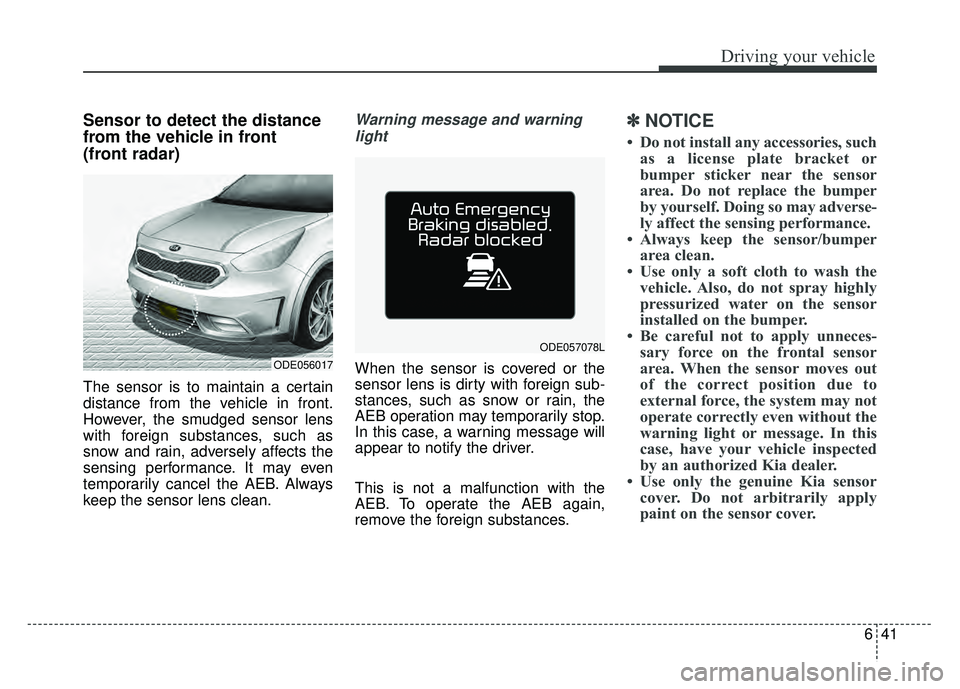
Sensor to detect the distance
from the vehicle in front
(front radar)
The sensor is to maintain a certain
distance from the vehicle in front.
However, the smudged sensor lens
with foreign substances, such as
snow and rain, adversely affects the
sensing performance. It may even
temporarily cancel the AEB. Always
keep the sensor lens clean.
Warning message and warninglight
When the sensor is covered or the
sensor lens is dirty with foreign sub-
stances, such as snow or rain, the
AEB operation may temporarily stop.
In this case, a warning message will
appear to notify the driver.
This is not a malfunction with the
AEB. To operate the AEB again,
remove the foreign substances.
✽ ✽ NOTICE
• Do not install any accessories, such
as a license plate bracket or
bumper sticker near the sensor
area. Do not replace the bumper
by yourself. Doing so may adverse-
ly affect the sensing performance.
• Always keep the sensor/bumper area clean.
• Use only a soft cloth to wash the vehicle. Also, do not spray highly
pressurized water on the sensor
installed on the bumper.
• Be careful not to apply unneces- sary force on the frontal sensor
area. When the sensor moves out
of the correct position due to
external force, the system may not
operate correctly even without the
warning light or message. In this
case, have your vehicle inspected
by an authorized Kia dealer.
• Use only the genuine Kia sensor cover. Do not arbitrarily apply
paint on the sensor cover.
ODE056017
ODE057078L
Page 385 of 616
651
Driving your vehicle
SMART CRUISE CONTROL SYSTEM (SCC) (IF EQUIPPED)
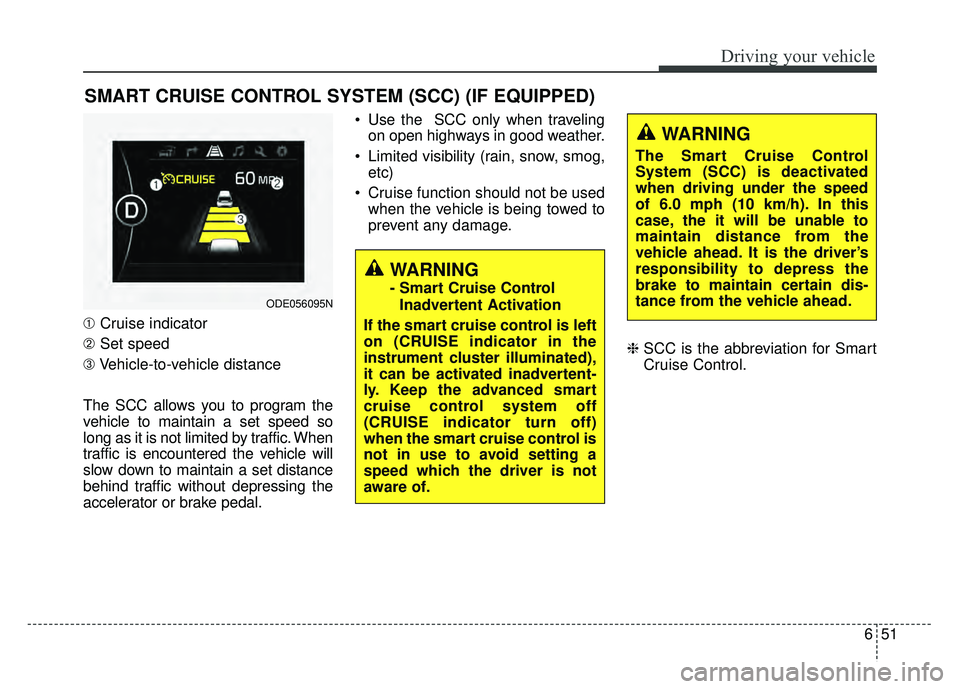
➀Cruise indicator
➁ Set speed
\b Vehicle-to-vehicle distance
The SCC allows you to program the
vehicle to maintain a set speed so
long as it is not limited by traffic. When
traffic is encountered the vehicle will
slow down to maintain a set distance
behind traffic without depressing the
accelerator or brake pedal. Use the SCC only when traveling
on open highways in good weather.
Limited visibility (rain, snow, smog, etc)
Cruise function should not be used when the vehicle is being towed to
prevent any damage.
❈SCC is the abbreviation for Smart
Cruise Control.
WARNING
- Smart Cruise Control
Inadvertent Activation
If the smart cruise control is left
on (CRUISE indicator in the
instrument cluster illuminated),
it can be activated inadvertent-
ly. Keep the advanced smart
cruise control system off
(CRUISE indicator turn off)
when the smart cruise control is
not in use to avoid setting a
speed which the driver is not
aware of.ODE056095N
WARNING
The Smart Cruise Control
System (SCC) is deactivated
when driving under the speed
of 6.0 mph (10 km/h). In this
case, the it will be unable to
maintain distance from the
vehicle ahead. It is the driver’s
responsibility to depress the
brake to maintain certain dis-
tance from the vehicle ahead.
Page 386 of 616
Driving your vehicle
52
6
Speed setting (SCC)
To set cruise control speed:
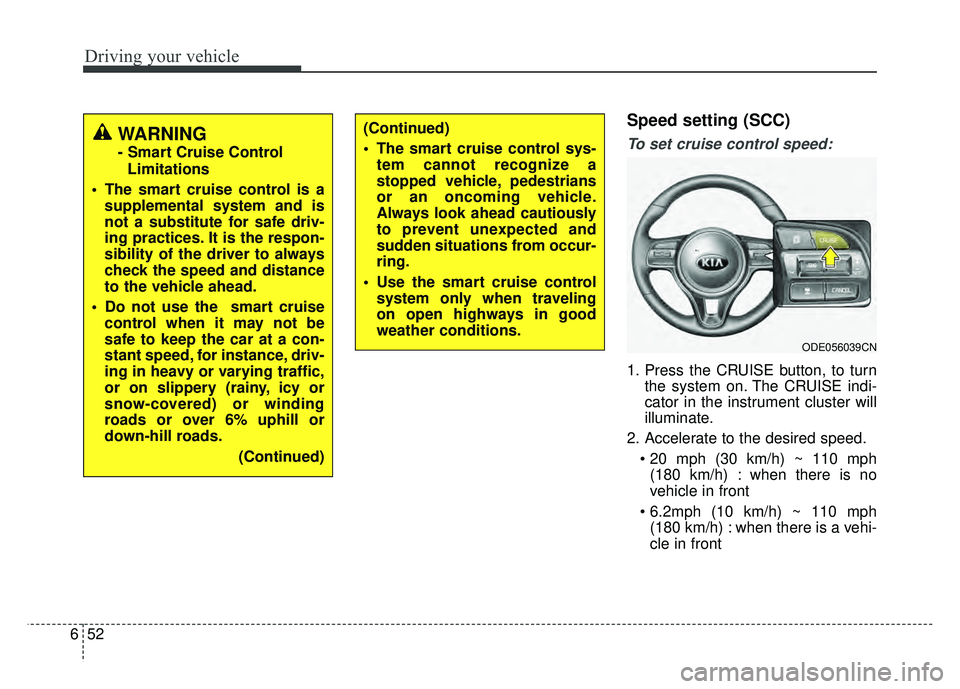
1. Press the CRUISE button, to turn
the system on. The CRUISE indi-
cator in the instrument cluster will
illuminate.
2. Accelerate to the desired speed. (180 km/h) : when there is no
vehicle in front
(180 km/h) : when there is a vehi-
cle in front
(Continued)
The smart cruise control sys- tem cannot recognize a
stopped vehicle, pedestrians
or an oncoming vehicle.
Always look ahead cautiously
to prevent unexpected and
sudden situations from occur-
ring.
Use the smart cruise control system only when traveling
on open highways in good
weather conditions.
ODE056039CN
WARNING
- Smart Cruise Control
Limitations
The smart cruise control is a supplemental system and is
not a substitute for safe driv-
ing practices. It is the respon-
sibility of the driver to always
check the speed and distance
to the vehicle ahead.
Do not use the smart cruise control when it may not be
safe to keep the car at a con-
stant speed, for instance, driv-
ing in heavy or varying traffic,
or on slippery (rainy, icy or
snow-covered) or winding
roads or over 6% uphill or
down-hill roads.
(Continued)
Page 387 of 616
653
Driving your vehicle
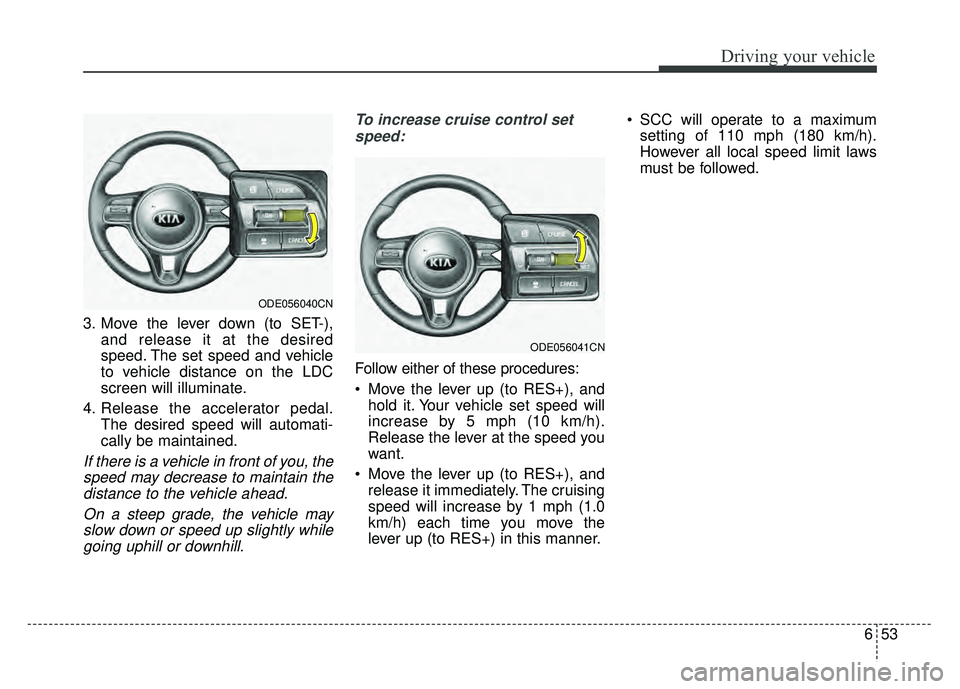
3. Move the lever down (to SET-),and release it at the desired
speed. The set speed and vehicle
to vehicle distance on the LDC
screen will illuminate.
4. Release the accelerator pedal. The desired speed will automati-
cally be maintained.
If there is a vehicle in front of you, thespeed may decrease to maintain thedistance to the vehicle ahead.
On a steep grade, the vehicle mayslow down or speed up slightly whilegoing uphill or downhill. To increase cruise control set
speed:
Follow either of these procedures:
Move the lever up (to RES+), and hold it. Your vehicle set speed will
increase by 5 mph (10 km/h).
Release the lever at the speed you
want.
Move the lever up (to RES+), and release it immediately. The cruising
speed will increase by 1 mph (1.0
km/h) each time you move the
lever up (to RES+) in this manner. SCC will operate to a maximum
setting of 110 mph (180 km/h).
However all local speed limit laws
must be followed.
ODE056041CN
ODE056040CN
Page 388 of 616
Driving your vehicle
54
6
To decrease the cruise control
set speed:
Follow either of these procedures:
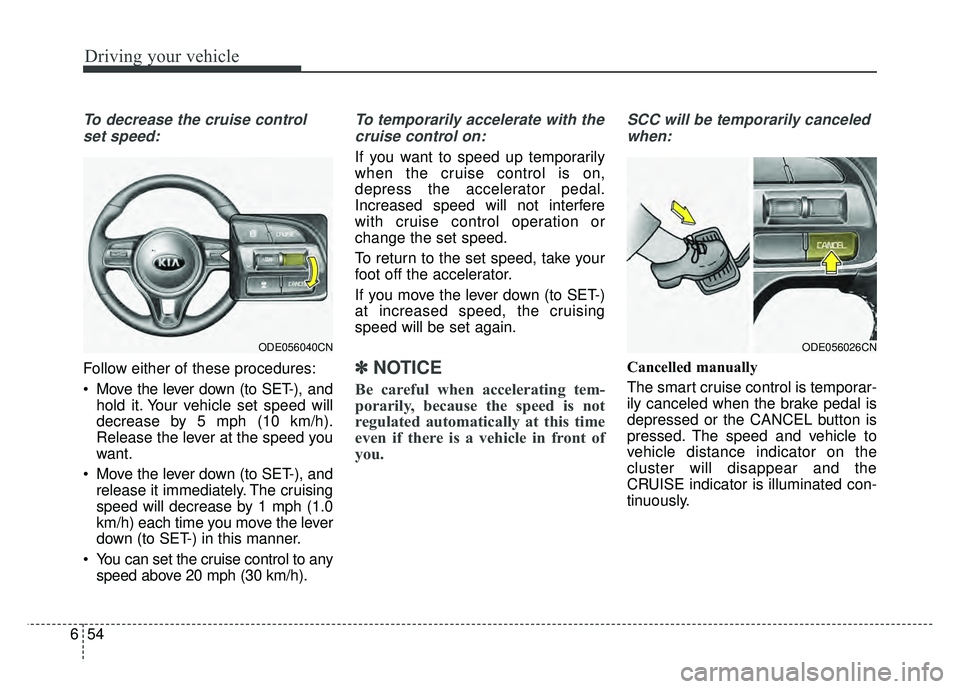
Move the lever down (to SET-), and hold it. Your vehicle set speed will
decrease by 5 mph (10 km/h).
Release the lever at the speed you
want.
Move the lever down (to SET-), and release it immediately. The cruising
speed will decrease by 1 mph (1.0
km/h) each time you move the lever
down (to SET-) in this manner.
You can set the cruise control to any speed above 20 mph (30 km/h).
To temporarily accelerate with the
cruise control on:
If you want to speed up temporarily
when the cruise control is on,
depress the accelerator pedal.
Increased speed will not interfere
with cruise control operation or
change the set speed.
To return to the set speed, take your
foot off the accelerator.
If you move the lever down (to SET-)
at increased speed, the cruising
speed will be set again.
✽ ✽ NOTICE
Be careful when accelerating tem-
porarily, because the speed is not
regulated automatically at this time
even if there is a vehicle in front of
you.
SCC will be temporarily canceled
when:
Cancelled manually
The smart cruise control is temporar-
ily canceled when the brake pedal is
depressed or the CANCEL button is
pressed. The speed and vehicle to
vehicle distance indicator on the
cluster will disappear and the
CRUISE indicator is illuminated con-
tinuously.
ODE056026CNODE056040CN