Ac charge KIA NIRO PHEV 2019 User Guide
[x] Cancel search | Manufacturer: KIA, Model Year: 2019, Model line: NIRO PHEV, Model: KIA NIRO PHEV 2019Pages: 611, PDF Size: 15.28 MB
Page 20 of 611
H13
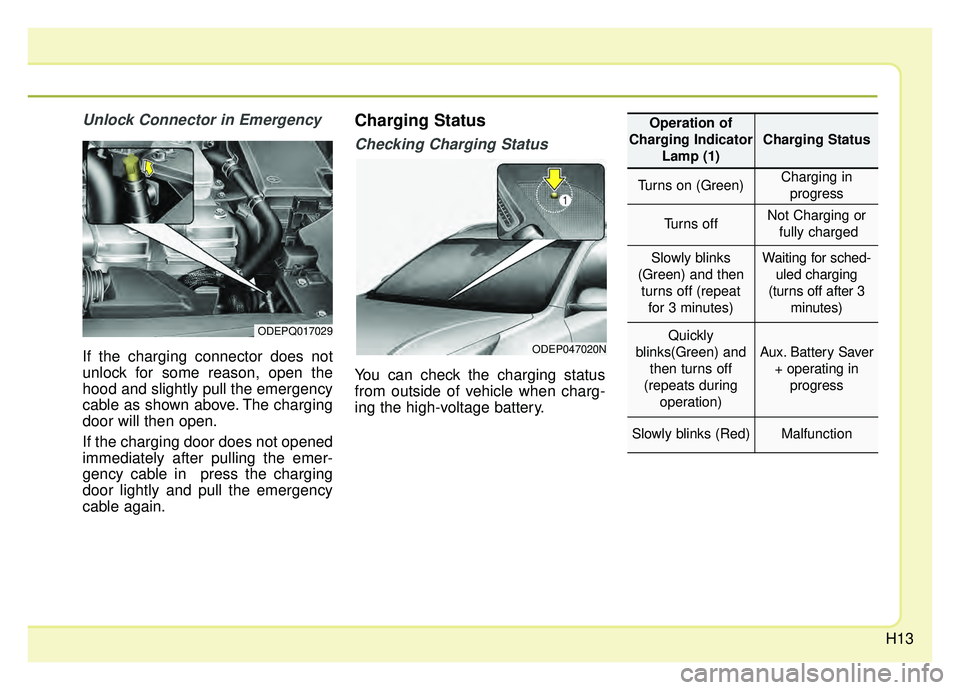
Unlock Connector in Emergency
If the charging connector does not
unlock for some reason, open the
hood and slightly pull the emergency
cable as shown above. The charging
door will then open.
If the charging door does not opened
immediately after pulling the emer-
gency cable in press the charging
door lightly and pull the emergency
cable again.
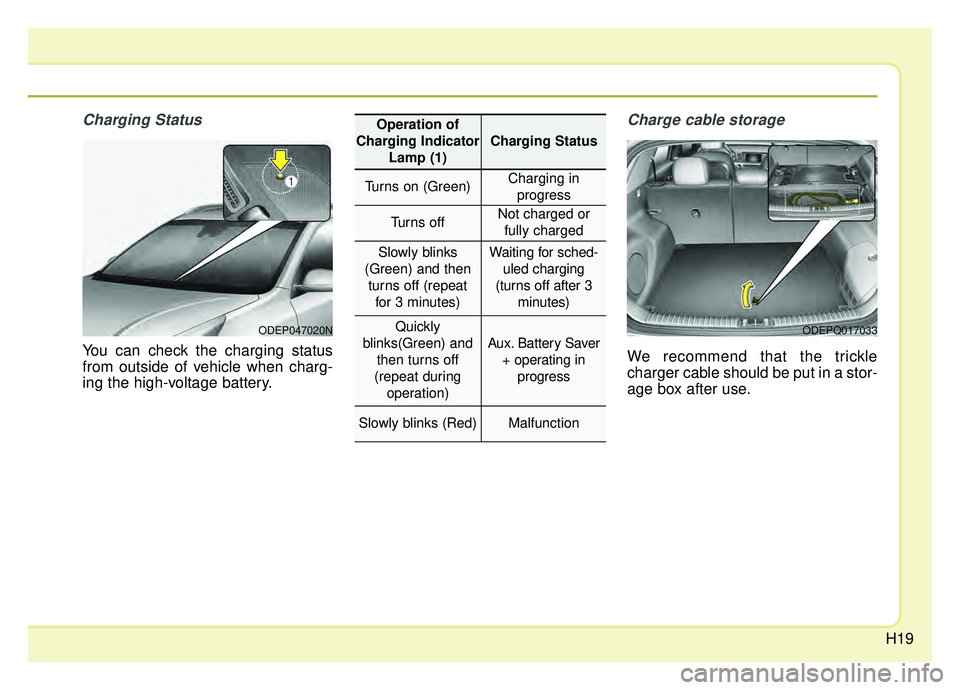
Charging Status
Checking Charging Status
You can check the charging status
from outside of vehicle when charg-
ing the high-voltage battery.
ODEPQ017029
ODEP047020N
Operation of
Charging Indicator Lamp (1)
Charging Status
Turns on (Green)Charging inprogress
Turns offNot Charging or fully charged
Slowly blinks
(Green) and then turns off (repeat for 3 minutes)Waiting for sched- uled charging
(turns off after 3 minutes)
Quickly
blinks(Green) and then turns off
(repeats during operation)
Aux. Battery Saver+ operating in progress
Slowly blinks (Red)Malfunction
Page 21 of 611

H14
How to Disconnect a AC Charger
1.The vehicle must be in the AUTOmode or the doors must be
unlocked in order to be able to dis-
connect the charging connector. A
lock system prevents charger
cable disconnection when the vehi-
cle's doors are locked.
2.While holding the charging con-nector, pressing the locking
release button (1) and then pull it
out.
To prevent charging cable theft, the
charging connector cannot be dis-
connected from the inlet when the
doors are locked. Unlock all doors
to disconnect the charging connec-
tor from the inlet.
However, if the vehicle is in the
charging connector AUTO mode,
the charging connector automati-
cally unlocks from the inlet when
charging is completed. If the connector does not unlock
automatically after the charging is
completed in AUTO mode, the con-
nector will unlock when all the
doors are unlocked.
For more details, refer to “Charging
Connector AUTO/ LOCK Mode” in
this chapter.
ODEPQ017031
CHARGING THE PLUG-IN HYBRID VEHICLE (CONT.)
CAUTION
In order to disconnect the
charging connector, unlock thedoors to unlatch the chargingconnector lock system. If not,the charging connector and thevehicle's charging inlet may bedamaged.
CAUTION
When disconnecting the charg-ing connector, do not try to dis-connect it by force while notpressing the release button.This may damage the chargingconnector and vehicle charginginlet.
Page 22 of 611
H15
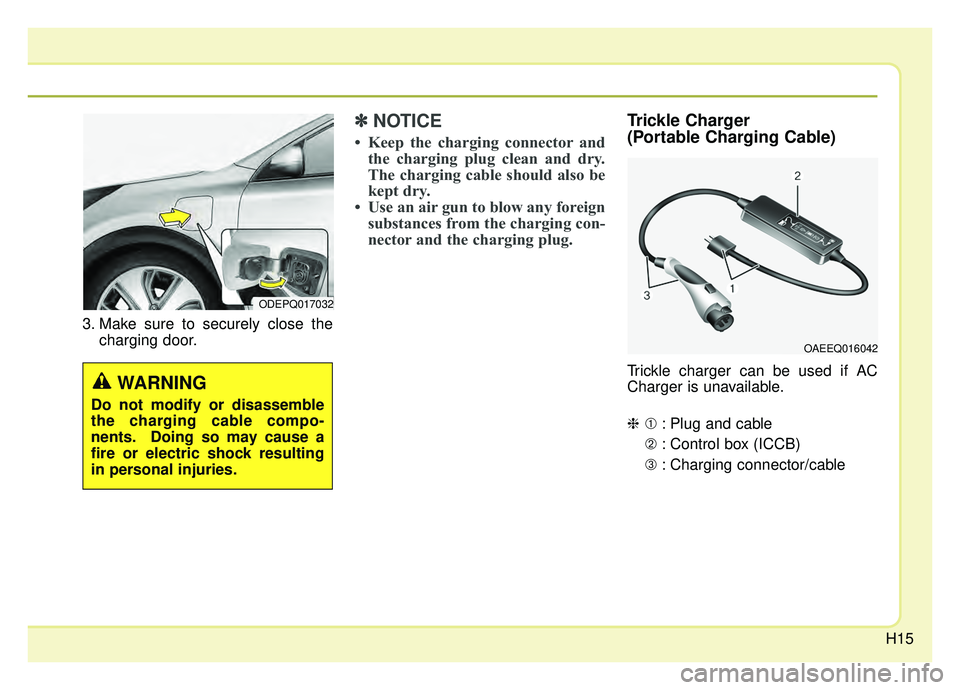
3. Make sure to securely close thecharging door.
✽ ✽NOTICE
• Keep the charging connector and
the charging plug clean and dry.
The charging cable should also be
kept dry.
• Use an air gun to blow any foreign substances from the charging con-
nector and the charging plug.
Trickle Charger
(Portable Charging Cable)
Trickle charger can be used if AC
Charger is unavailable.
❈➀ : Plug and cable
➁ : Control box (ICCB)
➂ : Charging connector/cable
OAEEQ016042
ODEPQ017032
WARNING
Do not modify or disassemble
the charging cable compo-
nents. Doing so may cause a
fire or electric shock resulting
in personal injuries.
Page 24 of 611
H17
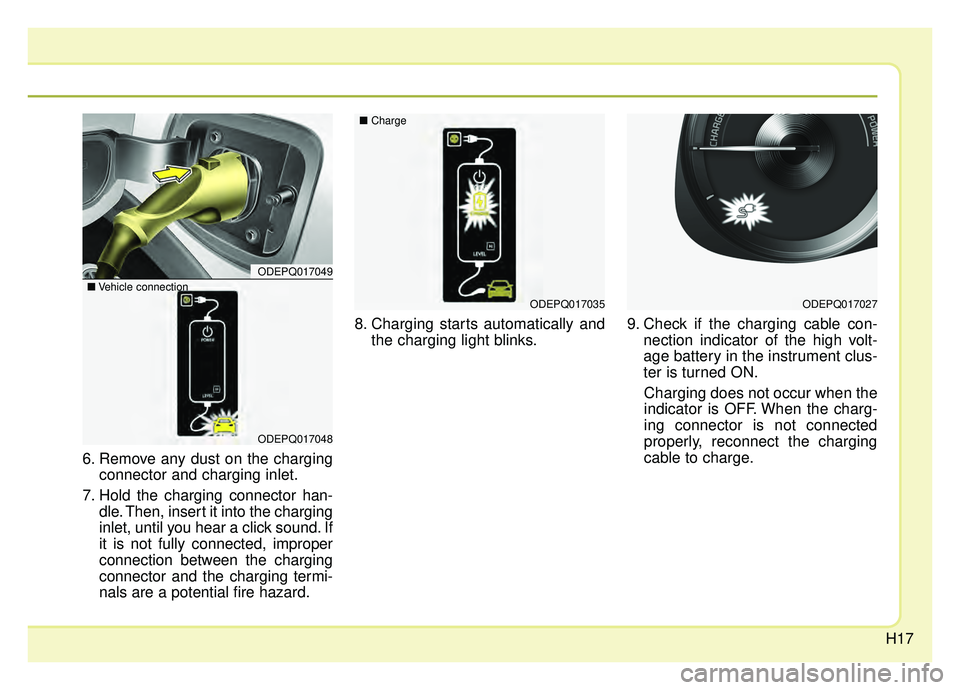
6. Remove any dust on the chargingconnector and charging inlet.
7. Hold the charging connector han- dle. Then, insert it into the charging
inlet, until you hear a click sound. If
it is not fully connected, improper
connection between the charging
connector and the charging termi-
nals are a potential fire hazard. 8. Charging starts automatically and
the charging light blinks. 9. Check if the charging cable con-
nection indicator of the high volt-
age battery in the instrument clus-
ter is turned ON.
Charging does not occur when the
indicator is OFF. When the charg-
ing connector is not connected
properly, reconnect the charging
cable to charge.
ODEPQ017035ODEPQ017027
ODEPQ017049
ODEPQ017048
\b Vehicle connection \b
Charge
Page 25 of 611
H18
✽ ✽NOTICE
• The charging is in progress only
with the shift lever is in P (Park).
Charging the battery with the
Engine Start/Stop button in the
ACC position is possible. However,
it may discharge the 12-V battery.
Thus, if possible, charge the bat-
tery with the Engine Start/Stop
button in the OFF position.
• Moving the shift lever from P (Park) to R (Reverse)/N(Neutral)/D
(Drive) stops the charging process.
To restart the charging process,
move the shift lever to P (Park),
press the Engine Start/Stop button
to the OFF position, and discon-
nect the charging cable. Then,
connect the charging cable and
restart the vehicle again.
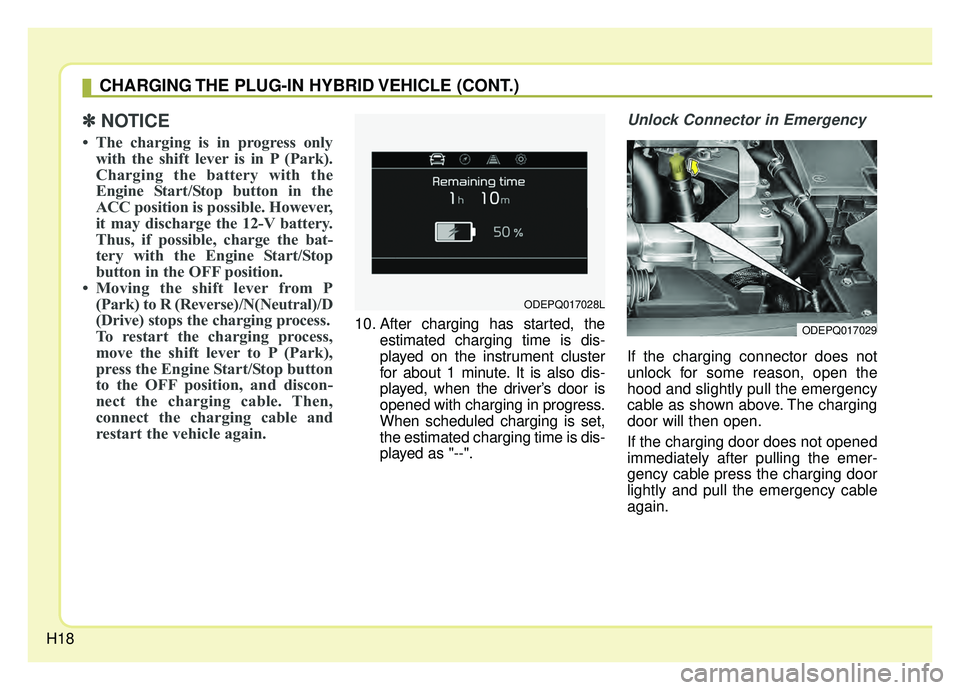
10. After charging has started, the
estimated charging time is dis-
played on the instrument cluster
for about 1 minute. It is also dis-
played, when the driver’s door is
opened with charging in progress.
When scheduled charging is set,
the estimated charging time is dis-
played as "--".
Unlock Connector in Emergency
If the charging connector does not
unlock for some reason, open the
hood and slightly pull the emergency
cable as shown above. The charging
door will then open.
If the charging door does not opened
immediately after pulling the emer-
gency cable press the charging door
lightly and pull the emergency cable
again.
ODEPQ017028L
ODEPQ017029
CHARGING THE PLUG-IN HYBRID VEHICLE (CONT.)
Page 26 of 611
H19
Charging Status
You can check the charging status
from outside of vehicle when charg-
ing the high-voltage battery.
Charge cable storage
We recommend that the trickle
charger cable should be put in a stor-
age box after use.
ODEP047020NODEPQ017033
Operation of
Charging Indicator Lamp (1)
Charging Status
Turns on (Green)Charging inprogress
Turns offNot charged or fully charged
Slowly blinks
(Green) and then turns off (repeat for 3 minutes)Waiting for sched- uled charging
(turns off after 3 minutes)
Quickly
blinks(Green) and then turns off
(repeat during operation)
Aux. Battery Saver + operating in progress
Slowly blinks (Red)Malfunction
Page 27 of 611
H20
CHARGING THE PLUG-IN HYBRID VEHICLE (CONT.)
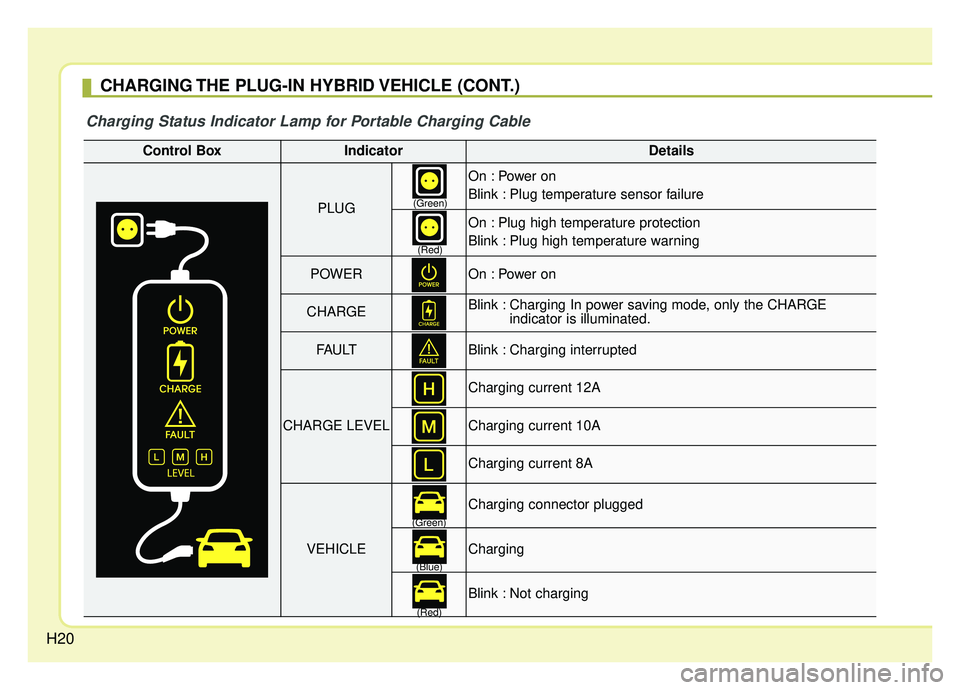
Charging Status Indicator Lamp for Portable Charging Cable
Control BoxIndicatorDetails
PLUG
On : Power on
Blink : Plug temperature sensor failure
On : Plug high temperature protection
Blink : Plug high temperature warning
POWEROn : Power on
CHARGEBlink : Charging In power saving mode, only the CHARGE indicator is illuminated.
FAU LTBlink : Charging interrupted
CHARGE LEVEL
Charging current 12A
Charging current 10A
Charging current 8A
VEHICLE
Charging connector plugged
Charging
Blink : Not charging
(Green)
(Red)
(Green) (Blue)
(Red)
Page 31 of 611
H24
Precautions for PortableCharging Cable (ICCB: In-Cable Control Box)
Use a portable charging cable that is certified by Kia.
Do not try to repair, disassemble, or adjust the portable charging cable.
Do not use an extension cord or adapter.
Stop using immediately if failure warning light occurs.
Do not touch the plug and charging connector with wet hands.
Do not touch the terminal part of the AC Charging connector and the AC
Charging inlet on the vehicle.
Do not connect the charging con- nector to voltage that does not
comply with regulations.
Do not use the portable charging cable if it is worn out, exposed, or
there exists any type of damage on
the portable charging cable. If the ICCB case and AC
Charging
connector is damaged, cracked, or
the wires are exposed in any way,
do not use the portable charging
cable.
Do not let children operate or touch the portable charging cable.
Keep the control box free of water.
Keep the AC Chargingconnector or
plug terminal free of foreign sub-
stances.
Do not step on the cable or cord. Do not pull the cable or cord and
do not twist or bend it.
Do not charge when there is light- ning.
Do not drop the control box, charg- ing connector, or place a heavy
object on the control box.
Do not place an object that can generate high temperatures near
the charger when charging. Charging with a worn out or dam-
aged household electric outlet can
result in a risk of electric shock. If
you are unsure about the condition
of a household electric outlet, have
it checked by a licensed electri-
cian.
Stop using the portable charging cable immediately if the household
electric outlet or any components
are overheating or you smell burn-
ing.
CHARGING THE PLUG-IN HYBRID VEHICLE (CONT.)
Page 32 of 611
![KIA NIRO PHEV 2019 User Guide H25
Changing plug-in hybrid mode
(Plug-in hybrid vehicle)
\bEV/HEV Button
Pressing the [EV/HEV] button
changes the plug-in hybrid system
modes, between Electric (Charge
Depleting/CD) mode and Hybrid
(](/img/2/54762/w960_54762-31.png "KIA NIRO PHEV 2019 User Guide H25
Changing plug-in hybrid mode
(Plug-in hybrid vehicle)
\bEV/HEV Button
Pressing the [EV/HEV] button
changes the plug-in hybrid system
modes, between Electric (Charge
Depleting/CD) mode and Hybrid
(")
H25
Changing plug-in hybrid mode
(Plug-in hybrid vehicle)
\bEV/HEV Button
Pressing the [EV/HEV] button
changes the plug-in hybrid system
modes, between Electric (Charge
Depleting/CD) mode and Hybrid
(Charge Sustaining/CS) mode.
Each time the mode is changed a
corresponding message is displayed
on the instrument cluster as follows.
Plug-in hybrid mode message
: The high-voltage(hybrid) battery is
mainly used to
drive the vehicle.
: The high-voltage(hybrid) battery
and gasoline
engine are used
to charge the high
voltage battery
(hybrid) and drive
the vehicle.
A corresponding message is dis-
played to indicate the selected mode. \b
AVN screen
Press [PHEV] on the [Home] screen
or the [All menus] screen and the
menus related to plug-in
hybrid([ECO driving], [Energy infor
mation], [EV range], [Charging set-
tings], [Charging stations], [Gas sta-
tions]) are displayed.
For more information, please refer to
the Multimedia System Manual that
was separately supplied with your
vehicle.
DRIVING THE HYBRID/PLUG-IN HYBRID VEHICLE
ODEP057110
ODEPQ017016L
ODEPQ017017L
ODEPQ017015L
Page 36 of 611
H29
Refuel to prevent Hybrid batteryDamage
This message is displayed when the
fuel tank is nearly empty.
You should refill the fuel tank to pre-
vent hybrid battery damage.
Check Virtual Engine SoundSystem
This message is displayed when
there is a problem with the Virtual
Engine Sound System (VESS).
In this case, have the system
inspected by an authorized Kia deal-
er.
Remaining charge time(Plug-in hybrid vehicle)
The message is displayed to notify
the remaining time to fully charge the
battery.
Charger Error! (Plug-in hybrid vehicle)
This message is displayed when
there is a problem with the charger.
Low/High System Temp.Maintaining Hybrid mode(Plug-in hybrid vehicle)
This message is displayed when the
temperature of the high-voltage
(hybrid) battery is too low or too high.
This warning message is to protect
the battery and the hybrid system.
Low/High System Temp.Switching to Hybrid mode (Plug-in hybrid vehicle)
This message is displayed when the
temperature of the high-voltage
(hybrid) battery is too low or high.
This warning message is to protect
the battery and the hybrid system.
Switching to Hybrid mode to allowheating (Plug-in hybrid vehicle)
When the coolant temperature is lower than 57 °F (-14 °C), and you
turn the climate control On for
heating, this message will be dis-
played in the cluster. Then, the
vehicle will automatically switch to
HEV mode.
When the coolant temperature is higher than 57 °F (-14 °C), or you
turn the climate control Off, the
vehicle will automatically return to
EV mode.