ECO mode KIA NIRO PHEV 2019 Service Manual
[x] Cancel search | Manufacturer: KIA, Model Year: 2019, Model line: NIRO PHEV, Model: KIA NIRO PHEV 2019Pages: 611, PDF Size: 15.28 MB
Page 356 of 611
Driving your vehicle
20
6
SPORT Mode / ECO Mode
When you drive after changing the
gear shift lever to manual mode, the
vehicle will automatically shift to
SPORT mode. When you drive the
vehicle after putting the gear shift
lever to ‘D’, the vehicle will automati-
cally shift to ECO mode. Each auto-
matic change in shift will be dis-
played on the instrument cluster.
ECO mode
This driving mode increases fuel effi-
ciency. The actual fuel mileage will
depend on your driving habits and
road conditions.
SPORT mode
This driving mode provides sporty
driving experience. Be aware that fuel
efficiency may decrease in this mode.Shift lock system
For your safety, the dual clutch trans-
mission has a shift lock system which
prevents shifting the transaxle from P
(Park) into R (Reverse) unless the
brake pedal is depressed.
To shift the transaxle from P (Park)
into R (Reverse):
1. Depress and hold the brake pedal.
2. Start the engine or turn the ignition
switch to the ON position.
3. Move the shift lever.
If the brake pedal is repeatedly
depressed and released with the shift
lever in the P (Park) position, a chat-
tering noise & vibration near the shift
lever may be heard. This is a normal
condition. Shift-lock override
If the shift lever cannot be moved
from the P (Park) position into R
(Reverse) position with the brake
pedal depressed, continue depress-
ing the brake, then do the following:
1. Place the ignition switch in the
LOCK/OFF position.
2. Apply the parking brake.
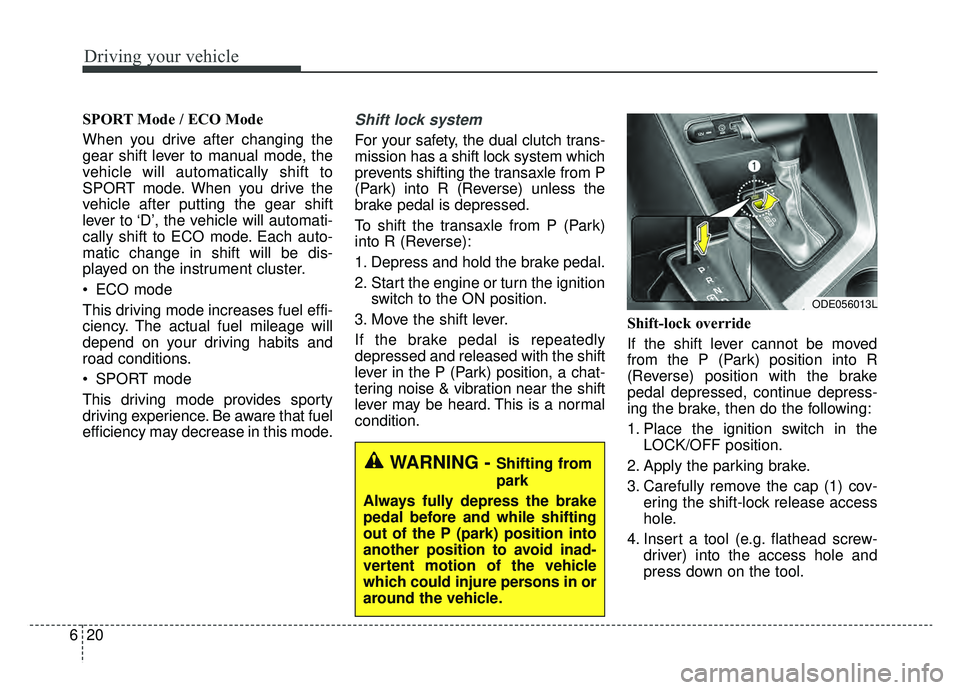
3. Carefully remove the cap (1) cov- ering the shift-lock release access
hole.
4. Insert a tool (e.g. flathead screw- driver) into the access hole and
press down on the tool.
ODE056013L
WARNING - Shifting from
park
Always fully depress the brake
pedal before and while shifting
out of the P (park) position into
another position to avoid inad-
vertent motion of the vehicle
which could injure persons in or
around the vehicle.
Page 397 of 611
661
Driving your vehicle
Always keep the sensor andbumper clean.
Use only a genuine Kia sensor cover for your vehicle.
Do not install accessories around the sensor and do not replace the
bumper by yourself. It may interfere
with the sensor performance.
Impact damage to the sensor or sensor area may cause the sensor
to move slightly off position and
result in the SCC not operating
correctly without any warning or
indicator from the cluster. If this
occurs, have your vehicle checked
by an authorized Kia dealer as
soon as possible.To adjust the sensitivity of
Smart Cruise Control
The sensitivity of vehicle speed when
following the front vehicle to maintain
the set distance can be adjusted. Go
to the User Settings Mode (Driving
Assist) and select SCC (Smart
Cruise Control). You may select one
of the three stages you prefer.
Slow:
Vehicle speed to maintain the set
distance to the vehicle ahead is
slower than normal speed.
Normal: Vehicle speed to maintain the set
distance to the vehicle ahead is
normal
Fast: Vehicle speed to maintain the set
distance to the vehicle ahead is
faster than normal speed.
✽ ✽ NOTICE
The system remembers the last
selected mode.
To convert to cruise control
mode:
The driver may choose to only use
the cruise control mode (speed con-
trol function) by doing as follows:
1.Turn the SCC on (the cruise indica-
tor light will be on but the system
will not be activated).
2.Push the distance to distance switch for more than 2 seconds.
3.Choose between “Smart cruise control (SCC) mode” and “Cruise
control (CC) mode”.
CAUTION - Sensor
Damage
To prevent sensor cover dam-age from occurring, wash thecar with a soft cloth.
WARNING
When using the cruise control
mode, you must manually
assess the distance to other
vehicles as the system will not
automatically brake to slow
down for other vehicles.
Page 406 of 611
Driving your vehicle
70
6
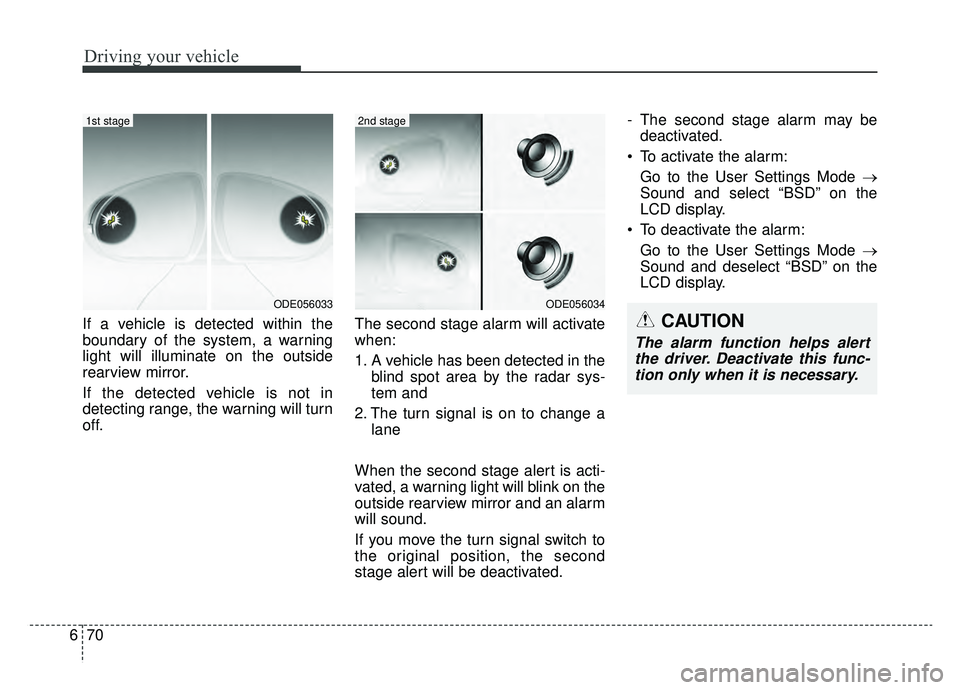
If a vehicle is detected within the
boundary of the system, a warning
light will illuminate on the outside
rearview mirror.
If the detected vehicle is not in
detecting range, the warning will turn
off. The second stage alarm will activate
when:
1. A vehicle has been detected in the
blind spot area by the radar sys-
tem and
2. The turn signal is on to change a lane
When the second stage alert is acti-
vated, a warning light will blink on the
outside rearview mirror and an alarm
will sound.
If you move the turn signal switch to
the original position, the second
stage alert will be deactivated. - The second stage alarm may be
deactivated.
To activate the alarm: Go to the User Settings Mode →
Sound and select “BSD” on the
LCD display.
To deactivate the alarm: Go to the User Settings Mode →
Sound and deselect “BSD” on the
LCD display.
ODE056034
2nd stage
ODE056033
1st stage
CAUTION
The alarm function helps alertthe driver. Deactivate this func-tion only when it is necessary.
Page 425 of 611
689
Driving your vehicle
Your vehicle's fuel economy depends
mainly on your style of driving, where
you drive and when you drive.
Each of these factors affects how
many miles (kilometers) you can get
from a gallon (liter) of fuel. To operate
your vehicle as economically as pos-
sible, use the following driving sug-
gestions to help save money in both
fuel and repairs:
Drive smoothly. Accelerate at amoderate rate. Don't make "jack-
rabbit" starts or full-throttle shifts
and maintain a steady cruising
speed. Don't race between stop-
lights. Try to adjust your speed to
the traffic so you don't have to
change speeds unnecessarily.
Avoid heavy traffic whenever pos- sible. Always maintain a safe dis-
tance from other vehicles so you
can avoid unnecessary braking.
This also reduces brake wear.
Drive at a moderate speed. The faster you drive, the more fuel your
vehicle uses. Driving at a moderate
speed, especially on the highway,
is one of the most effective ways to
reduce fuel consumption. Don't "ride" the brake pedal. This
can increase fuel consumption and
also increase wear on these com-
ponents. In addition, driving with
your foot resting on the brake pedal
may cause the brakes to overheat,
which reduces their effectiveness
and may lead to more serious con-
sequences.
Take care of your tires. Keep them inflated to the recommended pres-
sure. Incorrect inflation, either too
much or too little, results in unnec-
essary tire wear. Check the tire
pressures at least once a month.
Be sure that the wheels are aligned correctly. Improper align-
ment can result from hitting curbs
or driving too fast over irregular
surfaces. Poor alignment causes
faster tire wear and may also result
in other problems as well as
greater fuel consumption. Keep your vehicle in good condi-
tion. For better fuel economy and
reduced maintenance costs, main-
tain your vehicle in accordance
with the maintenance schedule in
chapter 8. If you drive your vehicle
in severe conditions, more frequent
maintenance is required (see
chapter 8 for details).
Keep your vehicle clean. For maxi- mum service, your vehicle should
be kept clean and free of corrosive
materials. It is especially important
that mud, dirt, ice, etc. not be
allowed to accumulate on the
underside of the vehicle. This extra
weight can result in increased fuel
consumption and also contribute to
corrosion.
Travel lightly. Don't carry unneces- sary weight in your vehicle. Weight
reduces fuel economy.
Don't let the engine idle longer than necessary. If you are waiting
(and not in traffic), turn off your
engine and restart only when
you're ready to go.
ECONOMICAL OPERATION
Page 446 of 611
What to do in an emergency
67
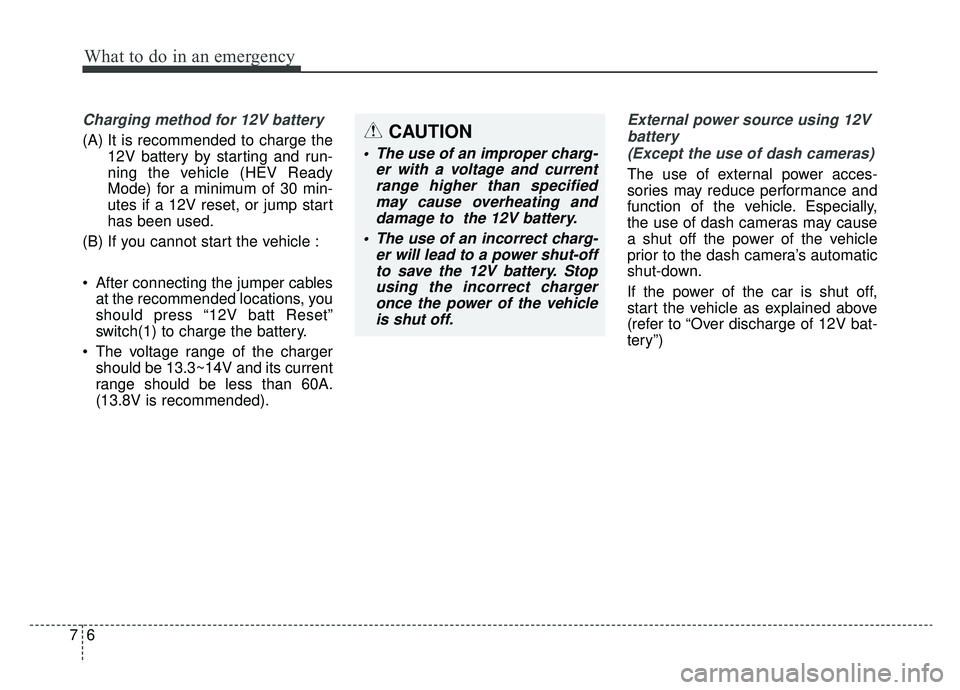
Charging method for 12V battery
(A) It is recommended to charge the12V battery by starting and run-
ning the vehicle (HEV Ready
Mode) for a minimum of 30 min-
utes if a 12V reset, or jump start
has been used.
(B) If you cannot start the vehicle :
After connecting the jumper cables at the recommended locations, you
should press “12V batt Reset”
switch(1) to charge the battery.
The voltage range of the charger should be 13.3~14V and its current
range should be less than 60A.
(13.8V is recommended).
External power source using 12V
battery(Except the use of dash cameras)
The use of external power acces-
sories may reduce performance and
function of the vehicle. Especially,
the use of dash cameras may cause
a shut off the power of the vehicle
prior to the dash camera’s automatic
shut-down.
If the power of the car is shut off,
start the vehicle as explained above
(refer to “Over discharge of 12V bat-
tery”)
CAUTION
• The use of an improper charg- er with a voltage and currentrange higher than specifiedmay cause overheating anddamage to the 12V battery.
The use of an incorrect charg- er will lead to a power shut-offto save the 12V battery. Stopusing the incorrect chargeronce the power of the vehicleis shut off.
Page 484 of 611
Maintenance
10
8
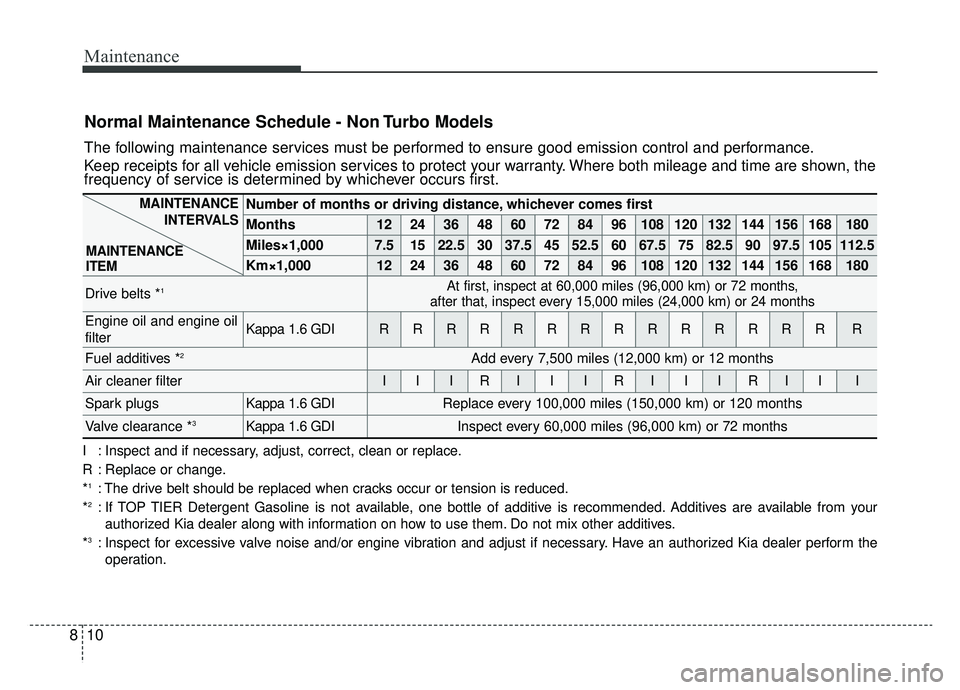
Normal Maintenance Schedule - Non Turbo Models
The following maintenance services must be performed to ensure good emission control and performance.
Keep receipts for all vehicle emission services to protect your warranty. Where both mileage and time are shown, the
frequency of service is determined by whichever occurs first.
Number of months or driving distance, whichever comes first
Months1224364860728496108120132144156168180
Miles×1,0007.51522.530 37.5 45 52.5 60 67.5 75 82.5 90 97.5 105 112.5
Km×1,00012 24 36 48 60 72 84 96 108 120 132 144 156 168 180
Drive belts *1At first, inspect at 60,000 miles (96,000 km) or 72 months,
after that, inspect every 15,000 miles (24,000 km) or 24 months
Engine oil and engine oil
filterKappa 1.6 GDIRRRRRRRRRRRRRRR
Fuel additives *2Add every 7,500 miles (12,000 km) or 12 months
Air cleaner filterIIIRIIIRIIIRIII
Spark plugsKappa 1.6 GDIReplace every 100,000 miles (150,000 km) or 120 months
Valve clearance *3Kappa 1.6 GDIInspect every 60,000 miles (96,000 km) or 72 months
MAINTENANCE
INTERVALS
MAINTENANCE
ITEM
I : Inspect and if necessary, adjust, correct, clean or replace.
R : Replace or change.
*
1: The drive belt should be replaced when cracks occur or tension is reduced.
*2: If TOP TIER Detergent Gasoline is not available, one bottle of additive is recommended. Additives are available from your authorized Kia dealer along with information on how to use them. Do not mix other additives.
*
3: Inspect for excessive valve noise and/or engine vibration and adjust if necessary. Have an authorized Kia dealer perform the operation.
Page 486 of 611
Maintenance
12
8
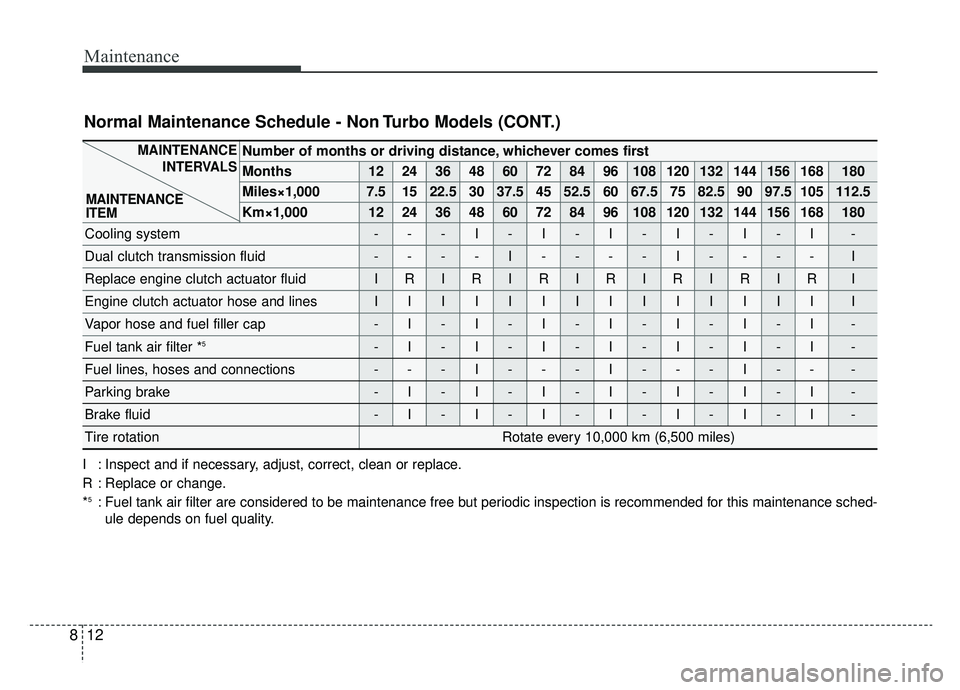
Number of months or driving distance, whichever comes first
Months1224364860728496108120132144156168180
Miles×1,0007.51522.530 37.5 45 52.5 60 67.5 75 82.5 90 97.5 105 112.5
Km×1,00012 24 36 48 60 72 84 96 108 120 132 144 156 168 180
Cooling system---I-I-I-I-I-I-
Dual clutch transmission fluid----I----I----I
Replace engine clutch actuator fluidIRIRIRIRIRIRIRI
Engine clutch actuator hose and linesIIIIIIIIIIIIIII
Vapor hose and fuel filler cap-I-I-I-I-I-I-I-
Fuel tank air filter *5-I-I-I-I-I-I-I-
Fuel lines, hoses and connections---I---I---I---
Parking brake-I-I-I-I-I-I-I-
Brake fluid-I-I-I-I-I-I-I-
Tire rotationRotate every 10,000 km (6,500 miles)
MAINTENANCE
INTERVALS
MAINTENANCE
ITEM
Normal Maintenance Schedule - Non Turbo Models (CONT.)
I : Inspect and if necessary, adjust, correct, clean or replace.
R : Replace or change.
*
5: Fuel tank air filter are considered to be maintenance free but periodic inspection is recommended for this maintenance sched- ule depends on fuel quality.
Page 527 of 611
853
Maintenance
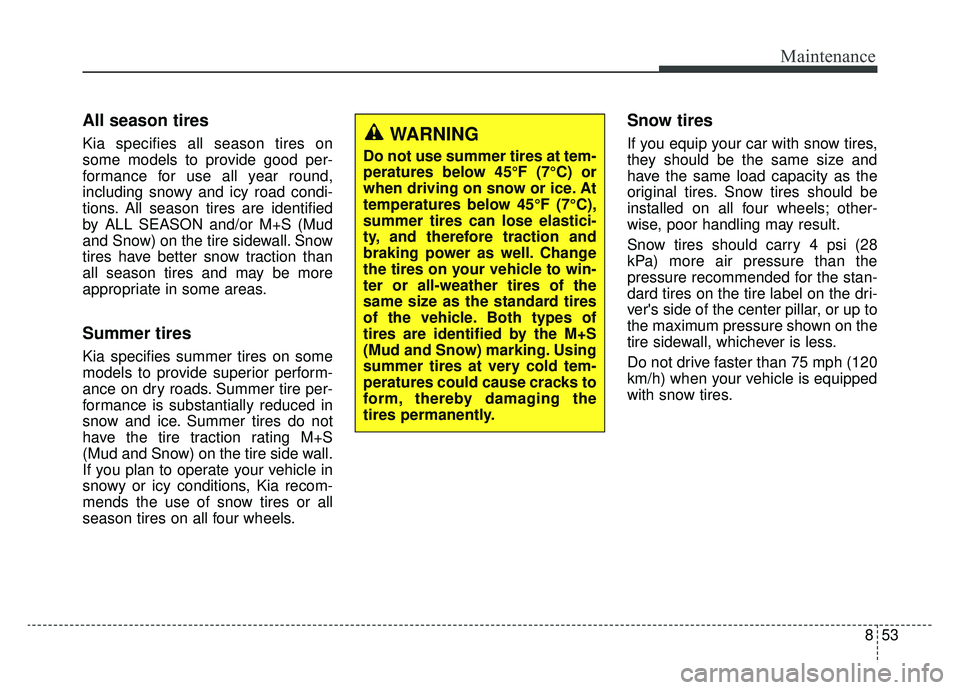
All season tires
Kia specifies all season tires on
some models to provide good per-
formance for use all year round,
including snowy and icy road condi-
tions. All season tires are identified
by ALL SEASON and/or M+S (Mud
and Snow) on the tire sidewall. Snow
tires have better snow traction than
all season tires and may be more
appropriate in some areas.
Summer tires
Kia specifies summer tires on some
models to provide superior perform-
ance on dry roads. Summer tire per-
formance is substantially reduced in
snow and ice. Summer tires do not
have the tire traction rating M+S
(Mud and Snow) on the tire side wall.
If you plan to operate your vehicle in
snowy or icy conditions, Kia recom-
mends the use of snow tires or all
season tires on all four wheels.
Snow tires
If you equip your car with snow tires,
they should be the same size and
have the same load capacity as the
original tires. Snow tires should be
installed on all four wheels; other-
wise, poor handling may result.
Snow tires should carry 4 psi (28
kPa) more air pressure than the
pressure recommended for the stan-
dard tires on the tire label on the dri-
ver's side of the center pillar, or up to
the maximum pressure shown on the
tire sidewall, whichever is less.
Do not drive faster than 75 mph (120
km/h) when your vehicle is equipped
with snow tires.WARNING
Do not use summer tires at tem-
peratures below 45°F (7°C) or
when driving on snow or ice. At
temperatures below 45°F (7°C),
summer tires can lose elastici-
ty, and therefore traction and
braking power as well. Change
the tires on your vehicle to win-
ter or all-weather tires of the
same size as the standard tires
of the vehicle. Both types of
tires are identified by the M+S
(Mud and Snow) marking. Using
summer tires at very cold tem-
peratures could cause cracks to
form, thereby damaging the
tires permanently.
Page 595 of 611
Specifications, Consumer information, Reporting safety defects
12
9
Roadside Assistance is provided on all new current
model year Kia Vehicles from the date the vehicle is deliv-
ered to the first retail buyer or otherwise put into use (in-
service date), whichever is earlier, for a period of 60
months or 60,000 miles, whichever is earlier, subject to
the terms, conditions and exclusions set forth in the Kia
Warranty and Consumer Information Manual applicable
to your model year vehicle.
KMA reserves the right to limit or deny services or other
benefits to any owner or driver when, in KMA's judgment,
the claims and/or service requests are excessive in fre-
quency or type of occurrence.
Toll free consumer assistance
Kia's toll-free Consumer Assistance hot line is staffed
from 5:00 AM to 6:00 PM PST, Monday through Friday
and is accessible by dialing 1-800-333-4Kia (4542).
For more information regarding assistance available,
please refer to your Kia Warranty & Consumer
Information Manual.
Emergency roadside assistance
Kia's toll free Roadside Assistance hot line is staffed 24
hours a day, 365 days a year and is accessible by dialing
1-800-333-4Kia (4542).
Please note that you must provide your Vehicle
Identification Number (VIN) to verify coverage at the time
of your call. The VIN can be found on the dash of your
vehicle on the driver’s side, on the door jamb of the dri-
ver’s door, your vehicle’s registration or proof of insur-
ance card.
Kia utilizes a network of over 30,000 roadside assistance
providers. Should you accidentally run out of fuel, require
a battery jump, or need help changing a tire, a Kia
Roadside Assistance Representative will dispatch some-
one to deliver a small quantity of gas, change a flat tire
with your inflated spare, or arrange a battery jump to
allow you to proceed to your destination. We have access
to a network of over 10,000 locksmiths to help you should
you become locked out of your Kia.
In the event that mechanical difficulty renders your vehi-
cle undriveable due to a warranty-related concern, Kia’s
Roadside Assistance Representative will arrange to
transport your vehicle to the nearest Kia dealer or to an
authorized Kia alternative service location.
CONSUMER ASSISTANCE (U.S. ONLY)
Page 607 of 611
Index
8I
Parking assist system . . . . . . . . . . . . . . . . . . . . . . . . . 4-110Non-operational conditions of parkingassist system . . . . . . . . . . . . . . . . . . . . . . . . . . . . . 4-112
Operation of the parking assist system . . . . . . . . . 4-110
Self-diagnosis . . . . . . . . . . . . . . . . . . . . . . . . . . . . . 4-114
Parking brake . . . . . . . . . . . . . . . . . . . . . . . . . . . . . . . . 8-30 Checking the parking brake . . . . . . . . . . . . . . . . . . . 8-30
Rear parking assist system . . . . . . . . . . . . . . . . . . . . . 4-107 Non-operational conditions of rear parkingassist system . . . . . . . . . . . . . . . . . . . . . . . . . . . . . 4-108
Operation of the rear parking assist system . . . . . . 4-107
Rear parking assist system precautions . . . . . . . . . 4-109
Self-diagnosis . . . . . . . . . . . . . . . . . . . . . . . . . . . . . 4-109
Rearview camera. . . . . . . . . . . . . . . . . . . . . . . . . . . . . 4-115
Recommended lubricants and capacities . . . . . . . . . . . . 9-7 Recommended SAE viscosity number. . . . . . . . . . . . 9-8
Refrigerant label . . . . . . . . . . . . . . . . . . . . . . . . . . . . . . 9-11
Reporting Safety Defects (U.S. only) . . . . . . . . . . . . . . 9-16
Road warning . . . . . . . . . . . . . . . . . . . . . . . . . . . . . . . . . 7-2 Hazard warning flasher . . . . . . . . . . . . . . . . . . . . . . . 7-2 Scheduled maintenance service . . . . . . . . . . . . . . . . . . . 8-9
Seat . . . . . . . . . . . . . . . . . . . . . . . . . . . . . . . . . . . . \
. . . . . 3-4
Driver position memory system (For power seat) . . . 3-9
Front seat adjustment - manual . . . . . . . . . . . . . . . . . 3-7
Front seat adjustment - power . . . . . . . . . . . . . . . . . . 3-8
Headrest (For front seat) . . . . . . . . . . . . . . . . . . . . . 3-11
Rear seat adjustment . . . . . . . . . . . . . . . . . . . . . . . . 3-14
Seatback pocket . . . . . . . . . . . . . . . . . . . . . . . . . . . . 3-14
Seat belts . . . . . . . . . . . . . . . . . . . . . . . . . . . . . . . . . . . . \
3-20 Care of seat belts . . . . . . . . . . . . . . . . . . . . . . . . . . . 3-31
Pre-tensioner seat belt . . . . . . . . . . . . . . . . . . . . . . . 3-27
Seat belt precautions . . . . . . . . . . . . . . . . . . . . . . . . 3-29
Seat belt restraint system . . . . . . . . . . . . . . . . . . . . . 3-20
Smart Cruise Control system (SCC) . . . . . . . . . . . . . . 6-52 Limitations of the system . . . . . . . . . . . . . . . . . . . . . 6-62
Speed setting (SCC) . . . . . . . . . . . . . . . . . . . . . . . . . 6-53
To adjust the sensitivity of Smart Cruise Control . . 6-61
To convert to cruise control mode . . . . . . . . . . . . . . 6-61
Vehicle to vehicle distance setting (SCC) . . . . . . . . 6-58
Smart key . . . . . . . . . . . . . . . . . . . . . . . . . . . . . . . . . . . 4-\
11 Battery replacement . . . . . . . . . . . . . . . . . . . . . . . . . 4-15
Loss of the smart key . . . . . . . . . . . . . . . . . . . . . . . . 4-14
Record your key number . . . . . . . . . . . . . . . . . . . . . 4-11
Smart key function . . . . . . . . . . . . . . . . . . . . . . . . . . 4-11
PS
R