CS mode KIA NIRO PHEV 2021 User Guide
[x] Cancel search | Manufacturer: KIA, Model Year: 2021, Model line: NIRO PHEV, Model: KIA NIRO PHEV 2021Pages: 710, PDF Size: 14.77 MB
Page 35 of 710
H30
Warning and indicator lights
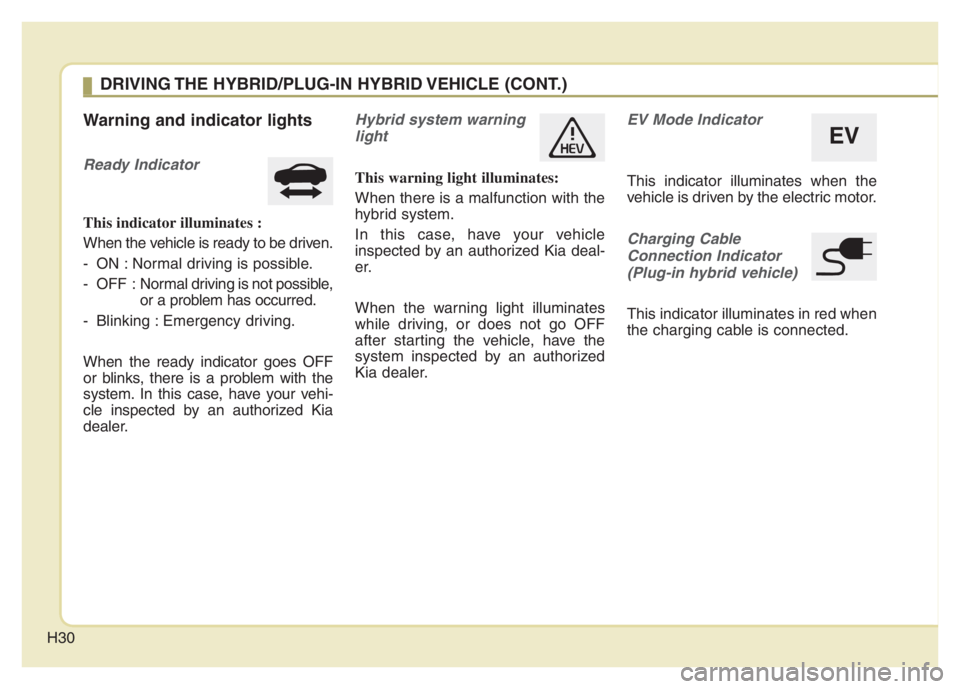
Ready Indicator
This indicator illuminates :
When the vehicle is ready to be driven.
- ON : Normal driving is possible.
- OFF : Normal driving is not possible,
or a problem has occurred.
- Blinking : Emergency driving.
When the ready indicator goes OFF
or blinks, there is a problem with the
system. In this case, have your vehi-
cle inspected by an authorized Kia
dealer.
Hybrid system warning
light
This warning light illuminates:
When there is a malfunction with the
hybrid system.
In this case, have your vehicle
inspected by an authorized Kia deal-
er.
When the warning light illuminates
while driving, or does not go OFF
after starting the vehicle, have the
system inspected by an authorized
Kia dealer.
EV Mode Indicator
This indicator illuminates when the
vehicle is driven by the electric motor.
Charging Cable
Connection Indicator
(Plug-in hybrid vehicle)
This indicator illuminates in red when
the charging cable is connected.
EV
DRIVING THE HYBRID/PLUG-IN HYBRID VEHICLE (CONT.)
Page 36 of 710

H31
Coasting guide (if equipped)
A chime will sound and the coasting
guide indicator will blink four times to
inform the driver when to take the foot
off from the accelerator by anticipat-
ing a decelerating event* based on
the analysis of driving routes and
road conditions according to the nav-
igation system. It encourages the
driver to remove foot from accelerator
pedal and allow coasting down the
road with EV motor only. This helps
prevent unnecessary fuel consump-
tion and increases fuel efficiency.
❈Examples of a deceleration events
is going down an extended hill,
slowing down while approaching a
toll booth, and approaching
reduced speed zones.
Press the Engine Start/Stop button
and put the shift lever in P(Park). In
the User Settings Mode, select
Driving Assist, Coasting Guide, and
then On to turn on the system.
Cancel the selection of coasting
guide to turn off the system. For the
explanation of the system, press and
hold the [OK] button.
To activate the system, take the fol-
lowing procedures. Enter your desti-
nation information on the navigation
and select the driving route. Then,
satisfy the following.
- The driving speed should be
between 37 mph (60 km/h) and 99
mph (160 km/h).
❈The operating speed may vary due
to difference between instrument
cluster and navigation effected by
tire inflation level.
✽ ✽
NOTICE
Coasting guide is only a supplemen-
tal system to assist with fuel-efficient
driving. Thus, the operating condi-
tions may be different in accordance
with traffic/road conditions (i.e.
driving in a traffic jam, driving on a
slope, driving on a curve). Thus,
take the actual driving conditions
into consideration, such as distances
from the vehicles ahead/ behind,
while referring to the coasting guide
system as guidance.
Page 38 of 710
H33
Refuel to prevent Hybrid battery
Damage
This message is displayed when the
fuel tank is nearly empty.
You should refill the fuel tank to pre-
vent hybrid battery damage.
Check Virtual Engine Sound
System
This message is displayed when
there is a problem with the Virtual
Engine Sound System (VESS).
In this case, have the system
inspected by an authorized Kia deal-
er.
Charging stopped. Check the
cable connection
This warning message is displayed
when charging is stopped because
the charging connector is not cor-
rectly connected to the charging inlet
In this case, separate the charging
connector and re-connect it and
check whether there is any problem
(external damage, foreign sub-
stances, etc.) with the charging con-
nector and charging inlet.
Remaining charge time
(Plug-in hybrid vehicle)
The message is displayed to notify
the remaining time to fully charge the
battery.
Charging stopped. Please check
the AC charger (Plug-in hybrid
vehicle)
This message is displayed when
there is a problem with the charger.
Low/High System Temp.
Maintaining Hybrid mode
(Plug-in hybrid vehicle)
This message is displayed when the
temperature of the high-voltage
(hybrid) battery is too low or too high.
This warning message is to protect
the battery and the hybrid system.
Low/High System Temp.
Switching to Hybrid mode
(Plug-in hybrid vehicle)
This message is displayed when the
temperature of the high-voltage
(hybrid) battery is too low or high.
This warning message is to protect
the battery and the hybrid system.
Page 39 of 710
H34
Switching to Hybrid mode to allow
heating (Plug-in hybrid vehicle)
When the outdoor temperature is
lower than 8.6°F (-13°C), and you
turn the climate control On for
heating, this message will be dis-
played in the cluster. Then, the
vehicle will automatically switch to
HEV mode.
When the outdoor temperature is
higher than 14°F (-10°C), or you
turn the climate control Off, the
vehicle will automatically return to
EV mode.
Wait until fuel door opens
(Plug-in hybrid vehicle)
This message is displayed when you
attempt to open the fuel filler lid with
the fuel tank pressurized. Wait until
the fuel tank is depressurized.
✽ ✽
NOTICE
• It may take up to 20 seconds to
open fuel filler lid.
• When the fuel filler lid is frozen
and does not open after 20 seconds
at freezing temperature, slightly
tap the fuel filler lid and then
attempt to open it.
Fuel door open
(Plug-in hybrid vehicle)
This message is displayed when the
fuel filler lid is opened.
Also means "Ready to refuel".
Check fuel door
(Plug-in hybrid vehicle)
This message is displayed when the
fuel filler lid is open or an abnormal-
ity has occurred.
Charging Door Open
(Plug-in hybrid vehicle)
This message indicates that the
charging door is open.
(Driving with the charging door open
may result in moisture inflow or dam-
age. This message is used to prevent
such occurrences.)
DRIVING THE HYBRID/PLUG-IN HYBRID VEHICLE (CONT.)
Page 40 of 710
H35
Unplug vehicle to start
(Plug-in hybrid vehicle)
This message is displayed when you
start the engine without unplugging
the charging cable. Unplug the
charging cable, and then start the
vehicle.
Maintaining Hybrid mode to con-
tinue heating
(Plug-in hybrid vehicle)
This message is displayed when
heating is in operation and the HEV
mode is maintained to meet the
heating operating conditions when
attempting to switch to EV mode by
pressing the [EV/HEV] button.
EV / HEV modes
(Plug-in hybrid vehicle)
A corresponding message is dis-
played when a mode is selected by
pressing the [EV/HEV] button.
Page 41 of 710

H36
Kia hybrid system notifies the drivers
of energy flow in various operating
modes. Eleven Modes show drivers
the current operating condition.
Vehicle Stop
This mode means the vehicle is at a
stop. (There is no energy flow.)
EV Propulsion
Electric power is used to move the
vehicle.
(Battery ➞Wheel)
Power Assist
Electric and Engine power are used
to move the vehicle.
(Battery & Engine ➞Wheel)
Engine Only Propulsion
Engine power is used to move the
vehicle.
(Engine ➞Wheel)
Engine Generation
Vehicle is stopped with the Engine
charging the hybrid battery.
(Engine ➞Battery)
ENERGY FLOW
ODEP040202N
ODEP040203N
ODEP040204N
ODEP040205NODEP047201N
Page 43 of 710
H38
AUX. BATTERY SAVER+ (For
Plug-in Hybrid, if equipped)
The Aux. Battery Saver+ is a function
that monitors the charging status of
the 12V auxiliary battery.
If the auxiliary battery level is low, the
main high voltage battery charges
the auxiliary battery.
✽ ✽
NOTICE
The Aux. Battery Saver+ function will
be ON when the vehicle is delivered. If
the function is not needed, you may
turn it off in the Users Settings mode
on the LCD display. For more infor-
mation, refer to the "System setting"
on the following page.
Mode
When the vehicle is OFF with all
doors, hood and liftgate closed, the
Aux. Battery Saver+ periodically acti-
vates according to the auxiliary bat-
tery status.
When the engine start/stop button is
in the ON position with the charging
connector plugged in, this function
activates according to the auxiliary
battery status to prevent over-dis-
charge of the auxiliary battery.
✽ ✽
NOTICE
The Aux. Battery Saver+ activates
for a maximum of 20 minutes. If the
Aux. Battery Saver+ function acti-
vates more than 10 times consecu-
tively, in the Automatic Mode, this
function will stop activating, judg-
ing that there is a problem with the
auxiliary battery. In this case, drive
the vehicle for some period of time.
The function will start activating if
the auxiliary battery returns to nor-
mal.
✽ ✽
NOTICE
If the Aux. Battery Saver+ function
was activated, the high voltage bat-
tery level may have decreased.
CAUTION
The Aux. Battery Saver+ func-
tion cannot prevent battery dis-
charge if the auxiliary battery is
damaged, worn out, used as a
power supply or if unauthorized
electronic devices are used.
PLUG-IN HYBRID ENERGY FLOW
Page 46 of 710

H41
ECONOMICAL and SAFE
OPERATION of Hybrid system
Drive smoothly. Accelerate at a
moderate rate and maintain a
steady cruising speed. Don't make
"jack-rabbit" starts. Don't race
between stoplights.
Avoid heavy traffic whenever pos-
sible. Always maintain a safe dis-
tance from other vehicles so you
can avoid unnecessary braking.
This also reduces brake wear.
The regenerative brake generates
energy when the vehicle deceler-
ates.
When the hybrid battery power is
low, the hybrid system automatical-
ly recharges the hybrid battery.
When the engine runs in "N" posi-
tion, the hybrid system cannot gen-
erate electricity. The hybrid battery
cannot recharge in "N" position.
Please refer to chapter 6.
✽ ✽
NOTICE
When the hybrid system is in ready
mode, the engine will automatically
start and stop as needed.
The " " symbol will illuminate in
the cluster when the system is oper-
ational.
CAUTION - Extended
cranking
Do not crank the engine for a
prolonged period of time with-
out the engine starting. This
could result in damage to the
HEV battery and result in total
discharge.
Page 65 of 710
Your vehicle at a glance
4 2
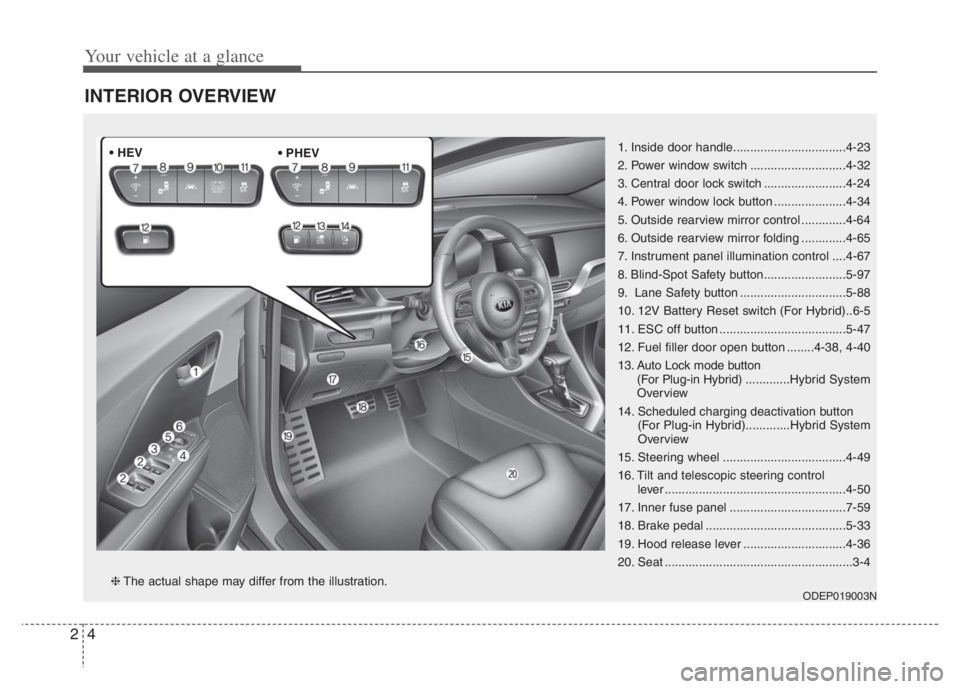
INTERIOR OVERVIEW
1. Inside door handle.................................4-23
2. Power window switch ............................4-32
3. Central door lock switch ........................4-24
4. Power window lock button .....................4-34
5. Outside rearview mirror control .............4-64
6. Outside rearview mirror folding .............4-65
7. Instrument panel illumination control ....4-67
8. Blind-Spot Safety button........................5-97
9. Lane Safety button ...............................5-88
10. 12V Battery Reset switch (For Hybrid)..6-5
11. ESC off button .....................................5-47
12. Fuel filler door open button ........4-38, 4-40
13. Auto Lock mode button
(For Plug-in Hybrid).............Hybrid System
Overview
14. Scheduled charging deactivation button
(For Plug-in Hybrid).............Hybrid System
Overview
15. Steering wheel ....................................4-49
16. Tilt and telescopic steering control
lever .....................................................4-50
17. Inner fuse panel ..................................7-59
18. Brake pedal .........................................5-33
19. Hood release lever ..............................4-36
20. Seat .......................................................3-4
ODEP019003N❈The actual shape may differ from the illustration. • HEV
Page 66 of 710

25
Your vehicle at a glance
INSTRUMENT PANEL OVERVIEW
1. Steering wheel audio controls .......Refer to
"Car Infotainment System Quick Reference
Guide".
2. Driver`s front air bag ...........................3-62
3. Horn.....................................................4-52
4. Instrument cluster ................................4-67
5. Wiper and washer control lever
(Right) ................................................4-132
6. Lighting control lever (Left) ................4-126
7. Ignition switch........................................5-7
ENGINE START/STOP button .............5-11
8. Driving Assist button ........................5-119
9. Infotainment system...............Refer to "Car
Infotainment System Quick Reference
Guide".
10. Hazard warning flasher .......................6-2
11. Climate control system ....................4-141
12. Shift lever DCT ..................................5-16
13. Front seat warmer ...........................4-164
Front air ventilation seat ..................4-166
14. Heated steering wheel button ...........4-51
15. Changing plug-in hybrid mode
button..................Hybrid System Overview
16. Parking Distance Warning Off
button...............................................4-122
17. Smart phone wireless charger ........4-169
18. Center console storage box ............4-161
19. Power outlet.....................................4-167
20. USB charger ....................................4-168
21. Glove box ........................................4-161
22. Passenger`s front air bag ..................3-62
23. USB port..........................................4-178
ODEP010004N❈The actual shape may differ from the illustration.