Level 2 KIA NIRO PHEV 2022 Owner's Manual
[x] Cancel search | Manufacturer: KIA, Model Year: 2022, Model line: NIRO PHEV, Model: KIA NIRO PHEV 2022Pages: 710, PDF Size: 10.35 MB
Page 241 of 710

4101
Features of your vehicle
Park with engine On to chargebattery
This warning message illuminates
when the hybrid battery power
(SOC) level is low.
In this case, park the vehicle in a
safe location and wait until the hybrid
battery is charged.
Refuel to prevent Hybrid batterydamage
This warning message illuminates
when the fuel tank is nearly empty.
You should refill the fuel tank to pre-
vent hybrid battery damage.
Refill inverter coolant
This warning message illuminates
when the inverter coolant is nearly
empty.
You should refill the inverter coolant.
Check brake system
This warning message illuminates
when the brake performance is low
or the regenerative brake does not
work properly due to a failure in the
brake system.
In this case, it may take longer for the
brake pedal to operate and the brak-
ing distance may become longer.
Stop vehicle and check brakesystem
This warning message is displayed
when a failure occurs in the brake
system.
In this case, park the vehicle in a
safe location and tow your vehicle to
the nearest authorized Kia dealer
and have the vehicle inspected.
Coasting guide (if equipped)
A chime will sound and the coasting
guide indicator will blink four times to
inform the driver when to take the
foot off the accelerator by anticipat-
ing a decelerating event* based on
an analysis of driving routes and
road conditions based on the naviga-
tion. It encourages the driver to
remove foot from the pedal and allow
coasting down the road with EV
motor only. This helps prevent
unnecessary fuel consumption and
may increases fuel efficiency.
ODEP049583L
Page 242 of 710

Features of your vehicle
102
4
❈ Example of a deceleration event is
going down an extended hill, slow-
ing down approaching a toll booth,
and approaching reduced speed
zones.
The driver can activate or deactivate
the Coasting Guide by placing the igni-
tion switch or ENGINE START/STOP
in the ON position and by selecting
“User Settings Convenience
Coasting Guide Enable Coasting
Guide”.
For the explanation of the system,
press and hold the [OK] bu tton.
To activate the system, take the fol-
lowing procedures. Enter your desti-
nation information on the navigation
and select the driving route. Select
the ECO mode by driving the vehicle
in D (Drive). Then, satisfy the follow-
ing.
- The driving speed should be
between 37 mph (60 km/h) and 99
mph (160km/h).
❈ The operating speed may vary due
to difference between instrument
cluster and navigation effected by
tire inflation level.Unplug vehicle to start
(Plug-in hybrid)
The message is displayed when you
start the engine without unplugging
the charging cable. Unplug the
charging cable, and then start the
vehicle.
Remaining Time (Plug-in hybrid)
The message is displayed to notify
the remaining time to fully charge the
battery.
Page 243 of 710

4103
Features of your vehicle
Shift to P to charge (Plug-in hybrid)
The message is displayed when the
charging connector is plugged with
the shift lever in R (Reverse), N
(Neutral) or D (Drive). Move the shift
lever to P (Park) and re-start the
charging process.
Electric Mode/AutomaticMode/Hybrid Mode (Plug-in hybrid)
A corresponding message is dis-
played when a mode is selected by
pressing the EV/HEV button.
Low battery. Maintaining Hybridmode (Plug-in hybrid)
This message is displayed when
unable to convert to EV mode even
when pressing the EV/HEV button
during HEV mode driving due to
insufficient high-voltage (hybrid) bat-
tery level.
Low system temperature.Switching to Hybrid mode/Highsystem temperature. Switching toHybrid mode (Plug-in hybrid)
This message is displayed when the
temperature of the high-voltage
(hybrid) battery is too low or high.
This warning message is to protect
the battery and the hybrid system.
Low system temperature.Maintaining Hybrid mode/Highsystem temperature. MaintainingHybrid mode (Plug-in hybrid)
This message is displayed when the
temperature of the high-voltage
(hybrid) battery is too low or too high.
This warning message is to protect
the battery and the hybrid system.
Wait until fuel door opens (Plug-in hybrid)
This message is displayed when you
attempt to open the fuel filler door
with the fuel tank pressurized. Wait
until the fuel tank is depressurized.
Page 247 of 710

4107
Features of your vehicle
Parking Brake & BrakeFluid Warning Light
This warning light illuminates:
Once you set the ignition switch or ENGINE START/STOP button to
the ON position.
- It illuminates for approximately 3seconds
- It remains on if the parking brake is applied.
When the parking brake is applied.
When the brake fluid level in the reservoir is low.
- If the warning light illuminateswith the parking brake released, it
indicates the brake fluid level in
reservoir is low. If the brake fluid level in the reservoir
is low:
1. Drive carefully to the nearest safe
location and stop your vehicle.
2. With the engine stopped, check the brake fluid level immediately
and add fluid as required (For
more details, refer to “Brake Fluid”
in chapter 7).
Then check all brake components
for fluid leaks. If any leaks in the
brake system are still found, the
warning light remains on, or the
brakes do not operate properly, do
not drive the vehicle.
In this case, have your vehicle
towed to an authorized Kia dealer
and inspected. Dual-diagonal braking system
Your vehicle is equipped with dual-
diagonal braking systems. This
means you still have braking on two
wheels even if one of the dual sys-
tems should fail.
With only one of the dual systems
working, greater pedal pressure is
required to stop the vehicle.
Also, the vehicle will require
increased stopping distance with
only a portion of the brake system
working.
If the brakes fail while you are driv-
ing, shift to a lower gear for addition-
al engine braking and stop the vehi-
cle as soon as it is safe to do so.
Driving the vehicle with a warning
light ON is dangerous. If the Parking
Brake & Brake Fluid Warning Light
illuminate with the parking brake
released, it indicates that the brake
fluid level is low.
In this case, have your vehicle
inspected by an authorized Kia deal-
er.
Page 251 of 710

4111
Features of your vehicle
Engine Oil PressureWarning Light
This warning light illuminates:
Once you set the ignition switch or ENGINE START/STOP button to
the ON position.
- It remains on until the engine isstarted.
When the engine oil pressure is low.
Drive carefully to the nearest safe location and stop your vehicle.
Turn the engine off and check the engine oil level (For more details,
refer to “Engine Oil” section in
chapter 7). If the level is low, add oil
as required.
If the warning light remains on after adding oil or if oil is not available,
have the vehicle inspected by an
authorized Kia dealer. Continued
driving with the warning light on
may cause engine failure.
✽ ✽ NOTICE
When engine oil pressure decreases
due to insufficient engine oil, etc.,
the Engine Oil Pressure warning
light will illuminate.
Low Fuel Level Warning
Light
This warning light illuminates:
When the fuel tank is nearly empty.
Add fuel as soon as possible.
CAUTION - Low Fuel
Level
Driving with the Low Fuel Levelwarning light on or with the fuellevel below “E” can cause theengine to misfire and damagethe catalytic converter (ifequipped).
Page 273 of 710
4133
Features of your vehicle
✽ ✽NOTICE
If there is heavy accumulation of
snow or ice on the windshield, defrost
the windshield for about 10 minutes,
or until the snow and/or ice is
removed before using the windshield
wipers to ensure proper operation.
If you do not remove the snow
and/or ice before using the wiper
and washer, it may damage the
wiper and washer system.
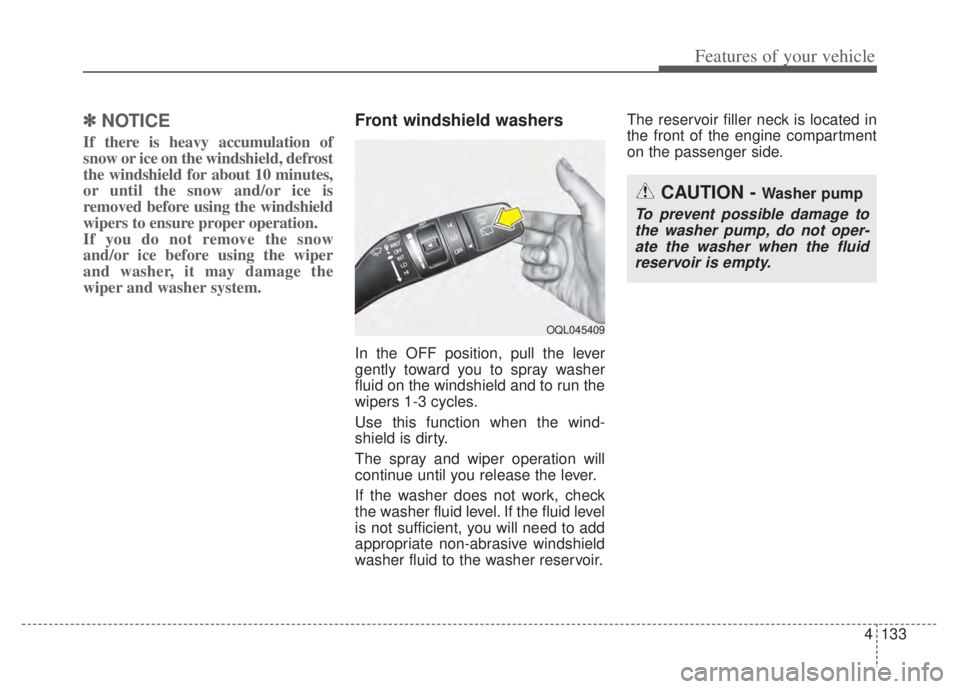
Front windshield washers
In the OFF position, pull the lever
gently toward you to spray washer
fluid on the windshield and to run the
wipers 1-3 cycles.
Use this function when the wind-
shield is dirty.
The spray and wiper operation will
continue until you release the lever.
If the washer does not work, check
the washer fluid level. If the fluid level
is not sufficient, you will need to add
appropriate non-abrasive windshield
washer fluid to the washer reservoir. The reservoir filler neck is located in
the front of the engine compartment
on the passenger side.
OQL045409
CAUTION - Washer pump
To prevent possible damage to
the washer pump, do not oper-ate the washer when the fluidreservoir is empty.
Page 285 of 710

4145
Features of your vehicle
Mode selection
The mode selection button controls
the direction of the air flow through
the ventilation system.
The air flow outlet port is converted
as follows:Face-Level (B, D)
Air flow is directed toward the upper
body and face. Additionally, each
outlet can be controlled to direct the
air discharged from the outlet.
Bi-Level (B, C, D, E, F)
Air flow is directed towards the face
and the floor.
Floor-Level (A, C, D, E, F)
Most of the air flow is directed to the
floor, with a small amount of the air
being directed to the windshield and
side window defrosters. Floor/Defrost-Level
(A, C, D, E, F)
Most of the air flow is directed to the
floor and the windshield with a small
amount directed to the side window
defrosters.
✽ ✽ NOTICE - 2nd row outlet
vents (E,F)
(if equipped)
• The air flow of the 2nd row outlet
vents is controlled by the front cli-
mate control system and delivered
through the inside air duct of the
floor (E, F).
• The air flow of the 2nd row outlet vents (E, F) may be weaker than
the instrument panel vents for the
long air duct.ODE046304
Page 286 of 710

Features of your vehicle
146
4
Defrost-Level (A, D)
Most of the air flow is directed to the
windshield with a small amount of air
directed to the side window defrosters. Instrument panel vents
The outlet vents can be opened or
closed separately using the thumb-
wheel.
Also, you can adjust the direction of
air delivery from these vents using
the vent control lever as shown.
Temperature control
The temperature will increase to the
maximum (HI) by turning the knob to
the extreme right.
The temperature will decrease to the
minimum (Lo) by turning the knob to
the extreme left.
When turning the knob, the tempera-
ture will increase or decrease by
1°F/0.5°C. When set to the lowest
temperature setting, the air condi-
tioning will operate continuously.
ODEP041319L
■Driver’s side■Passenger’s side
ODE046305
ODEP049303
Page 287 of 710

4147
Features of your vehicle
✽ ✽NOTICE
When starting the vehicle in cold
weather using manual temperature
control, operate the system in the fol-
lowing method to improve heating.
- Turn off or lower the blower, right
after starting the engine.
- Allow the engine to warm up dur- ing this time since the air flow from
the heater is still cold.
- After a few minutes of engine warm up, turn on or set the fan to
a higher level and adjust the tem-
perature setting to hot.
Adjusting the driver and passenger
side temperature equally
Press the “SYNC” button to adjust
the driver and passenger side tem-
perature equally.
The passenger side temperature
will be set to the same temperature
as the driver side temperature.
Turn the driver side temperature control knob. The driver and pas-
senger side temperature will be
adjusted equally. Adjusting the driver and passenger
side temperature individually
Press the “SYNC” button again to
adjust the driver and passenger
side temperature individually. The
illumination of button turns off.
Operate the driver side tempera- ture control knob to adjust the driv-
er side temperature.
Operate the passenger side tem- perature control knob to adjust the
passenger side temperature.
Temperature conversion
You can switch the temperature
mode from Centigrade to Fahrenheit
as follows:
While pressing the OFF button,
press the AUTO button for 3 seconds
or more. The display will change from
Centigrade to Fahrenheit, or from
Fahrenheit to Centigrade. If the bat-
tery has been discharged or discon-
nected, the temperature mode dis-
play will reset to Fahrenheit.
ODE046306
Page 289 of 710
4149
Features of your vehicle
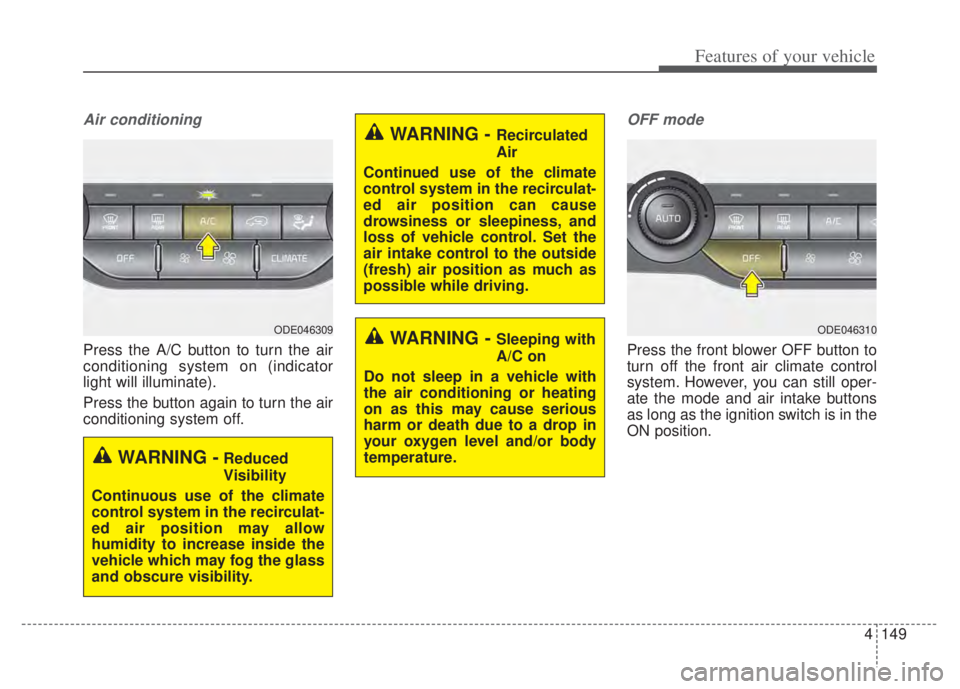
Air conditioning
Press the A/C button to turn the air
conditioning system on (indicator
light will illuminate).
Press the button again to turn the air
conditioning system off.
OFF mode
Press the front blower OFF button to
turn off the front air climate control
system. However, you can still oper-
ate the mode and air intake buttons
as long as the ignition switch is in the
ON position.
WARNING - Recirculated
Air
Continued use of the climate
control system in the recirculat-
ed air position can cause
drowsiness or sleepiness, and
loss of vehicle control. Set the
air intake control to the outside
(fresh) air position as much as
possible while driving.
WARNING - Sleeping with
A/C on
Do not sleep in a vehicle with
the air conditioning or heating
on as this may cause serious
harm or death due to a drop in
your oxygen level and/or body
temperature.
WARNING -Reduced
Visibility
Continuous use of the climate
control system in the recirculat-
ed air position may allow
humidity to increase inside the
vehicle which may fog the glass
and obscure visibility.
ODE046309ODE046310