change time KIA NIRO PHEV 2022 Owner's Manual
[x] Cancel search | Manufacturer: KIA, Model Year: 2022, Model line: NIRO PHEV, Model: KIA NIRO PHEV 2022Pages: 710, PDF Size: 10.35 MB
Page 345 of 710
![KIA NIRO PHEV 2022 Owners Manual Driving your vehicle
22
5
3.While pressing the brake pedal,
turn the ignition switch or ENGINE
START/STOP button [OFF].
- For smart key equipped vehicles,the ignition switch or ENGINE
START/STOP but](/img/2/54743/w960_54743-344.png "KIA NIRO PHEV 2022 Owners Manual Driving your vehicle
22
5
3.While pressing the brake pedal,
turn the ignition switch or ENGINE
START/STOP button [OFF].
- For smart key equipped vehicles,the ignition switch or ENGINE
START/STOP but")
Driving your vehicle
22
5
3.While pressing the brake pedal,
turn the ignition switch or ENGINE
START/STOP button [OFF].
- For smart key equipped vehicles,the ignition switch or ENGINE
START/STOP button can be
moved to [OFF] only when the
shift lever is in [P].
4.Change the gear shift lever to [N] (Neutral) while pressing the brake
pedal and pushing [SHIFT LOCK
RELEASE] button or inserting,
pressing down a tool (e.g. flathead
screw-driver) into the [SHIFT LOCK
RELEASE] access hole at the same
time. Then, the vehicle will move
when external force is applied.
WARNING - Parking In
Neutral
With the exception of parking in neutral gear, always park the
vehicle in [P] (Park) for safety
and apply the parking brake.
Before parking in [N] (Neutral) gear, make sure the parking
ground is level and flat. Do not
park in [N] gear on any slopes
or gradients. If parked and left
in [N], the vehicle may move
and cause serious damage or
injury.
After the ignition switch or ENGINE START/STOP button
has been turned off, the
Electronic Parking Brake can-
not be disengaged.
(Continued)(Continued)
For EPB (Electronic ParkingBrake) equipped vehicles with
[AUTO HOLD] function used
while driving, if the ignition
switch or ENGINE
START/STOP button has been
turned [OFF], the Electronic
Parking Brake will be engaged
automatically. Therefore,
[AUTO HOLD] function should
be turned off before the igni-
tion button is turned off.
Page 347 of 710
![KIA NIRO PHEV 2022 Owners Manual Driving your vehicle
24
5
Paddle shifter (if equipped)
The paddle shift function is available
when the shift lever is in the
sport/manual mode. With the shift lever in the manual mode
Pull the [+] or](/img/2/54743/w960_54743-346.png "KIA NIRO PHEV 2022 Owners Manual Driving your vehicle
24
5
Paddle shifter (if equipped)
The paddle shift function is available
when the shift lever is in the
sport/manual mode. With the shift lever in the manual mode
Pull the [+] or")
Driving your vehicle
24
5
Paddle shifter (if equipped)
The paddle shift function is available
when the shift lever is in the
sport/manual mode. With the shift lever in the manual mode
Pull the [+] or [-] paddle shifter once
to shift up or down one gear.
✽ ✽
NOTICE
If you pull the [+] and [-] paddle
shifters at the same time, you cannot
shift the gear.
SPORT Mode / ECO Mode
When you drive after changing the
gear shift lever to manual mode, the
vehicle will automatically shift to
SPORT mode. When you drive the
vehicle after putting the gear shift
lever to ‘D’, the vehicle will automati-
cally shift to ECO mode. Each auto-
matic change in shift will be dis-
played on the instrument cluster.
ECO mode
This driving mode increases fuel effi-
ciency. The actual fuel mileage will
depend on your driving habits and
road conditions.
SPORT mode
This driving mode provides sporty
driving experience. Be aware that fuel
efficiency may decrease in this mode.
ODEP051294L
Page 365 of 710

Driving your vehicle
42
5
Leaving
If you press the accelerator pedal
with the shift lever in D (Drive) or
manual mode, the Auto Hold will be
released automatically and the vehi-
cle will start to move. The indicator
changes from green to white.Cancel
To cancel the Auto Hold operation,
press the Auto Hold switch. The
AUTO HOLD indicator will go out.
To cancel the Auto Hold operation
when the vehicle is at a standstill,
press the Auto Hold switch while
depressing the brake pedal.
✽ ✽
NOTICE
• The Auto Hold does not operate
when:
- The driver's door is opened
- The engine hood is opened
- The shift lever is in P (Park) or R(Reverse)
- The EPB is applied
• For your safety, the Auto Hold automatically switches to EPB in
such cases:
- The driver's door is opened
- The engine hood is opened
- The vehicle is in a standstill formore than 10 minutes
- The vehicle is standing on a steep slope
- The vehicle moved several times (Continued)
ODEP059289
WARNING
When driving off from Auto
Hold by depressing the acceler-
ator pedal, always check the
surrounding area near your
vehicle.
Slowly depress the accelerator
pedal for a smooth launch.
Page 421 of 710

Driving your vehicle
98
5
Warning Timing
The driver can select the initial
warning activation time select “User
Settings Driver Assistance
Warning Timing”
The options for the initial Blind- Spot Collision Warning includes
the following: - Normal:
When this condition is selected,the initial Blind-Spot Collision
Warning is activated normally. If
this setting feels too sensitive
change the option to ‘Normal’.
The warning activation time may feel late if the side/rear vehicle
abruptly accelerates.
- Later: Select this warning activation
time when the traffic is light and
you are driving in a low speed.
✽ ✽ NOTICE
If you change the warning timing,
the warning time of other functions
may change. Always be aware
before changing the warning timing.
Operating conditions
The function enters the ready status,
when ‘Warning Only’ is selected and
the following conditions are satisfied:
(1) Blind-Spot Collision Warning will
activate when:
- The vehicle speed above approxi- mately 20 mph (30 km/h).
OYG059344L
Page 431 of 710

Driving your vehicle
108
5
- Normal :
Driver Attention Warning helps
warn the driver of his/her fatigue
level or inattentive driving practices
faster than ‘Later’ mode.
- Later : Driver Attention Warning helps
warn the driver of his/her fatigue
level or inattentive driving practices
later than Normal mode.
The set-up of Driver Attention Warning will be maintained, as
selected, when the engine is re-
started.
✽ ✽ NOTICE
Other driver assistance functions
like Forward Collision-Avoidance
Assist, etc. can be changed when
warning time setting is changed.
Display of the driver's attention
level The driver can monitor their driving conditions on the LCD display.
- Select ‘Driving Assist’ mode andthen “Driver Attention Warning”
(For more information, refer to
“LCD Display” in chapter 4.)
If your vehicle is equipped with
additional Infotainment System,
please scan the QR code in a sep-
arately supplied Car Infotainment
System Quick Reference Guide.
The driver's attention level is dis- played on the scale of 1 to 5. The
lower the level is, the more inatten-
tive the driver is.
The level decreases when the driv- er does not take a break for a cer-
tain period of time.
OYG050347L
OJF058422L
OJF058424L
■ Function off
■ Attentive driving
■ Inattentive driving
Page 445 of 710

Driving your vehicle
122
5
Although Smart Cruise Control will
operate to a maximum setting of up
to 110 mph (180km/h), all local
speed limit laws must always be
followed.To decrease Smart Cruise Control
set speed:
Follow either of these procedures:
Push the switch down (to SET-), and hold it. Your vehicle set speed will
decrease by 5 mph (10 km/h).
Release the switch at the speed
you want.
Push the switch down (to SET-), and release it immediately. The
cruising speed will decrease by 1.0
mph (1.0 km/h) each time you
move the switch down (to SET-) in
this manner.
You can set the speed to 20 mph (30 km/h).
To temporarily accelerate with
Smart Cruise Control on :
If you want to speed up temporarily
when Cruise Control is on, depress
the accelerator pedal. Increased
speed will not interfere with Smart
Cruise Control operation or change
the set speed.
To return to the set speed, take your
foot off the accelerator.
If you move the switch down (to SET-)
at increased speed, the cruising
speed will be set again.
WARNING
Check driving conditions before
using the switch as driving
speed increases rapidly when
you push up and hold the
switch.
ODEEV051024
WARNING
Be careful when accelerating
temporarily, because the speed
is not controlled automatically
at this time even if there is a
vehicle in front of you.
Page 451 of 710
Driving your vehicle
128
5
Each time the button is pressed, the
vehicle distance changes as follows:
For example, if you drive at 56 mph
(90 km/h), the distance maintain as
follows;
Distance 4 - approximately 172 feet
(52.5 m)
Distance 3 - approximately 130 feet (40 m)
Distance 2 - approximately 106 feet (32.5 m)
Distance 1 - approximately 82 feet
(25 m) ✽ ✽
NOTICE
The distance is set to the last set dis-
tance when the function is used for
the first time after starting the
engine.
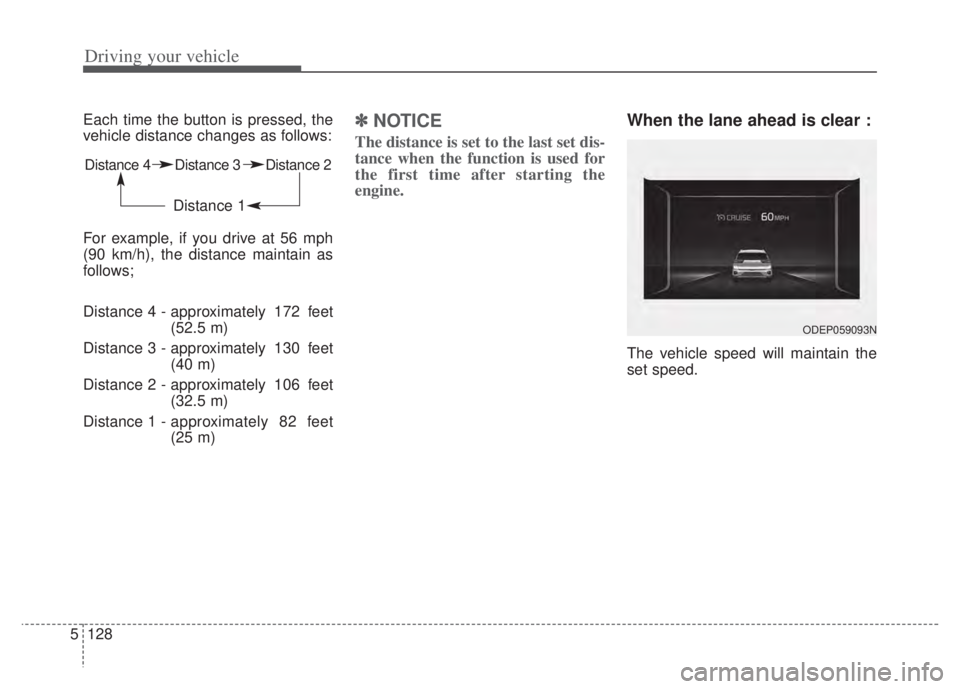
When the lane ahead is clear :
The vehicle speed will maintain the
set speed.
Distance 4 Distance 3 Distance 2
Distance 1
ODEP059093N
Page 467 of 710

Driving your vehicle
144
5
Navigation-based Smart Cruise
Control operating
If temporary deceleration is required
in the standby state and Navigation-
based Smart Cruise Control is oper-
ating, the green ( ) symbol will
illuminate on the cluster.
If the Set Speed Auto Change func-
tion operates, the green ( )sym-
bol and green set speed will illumi-
nate on the cluster, and an audible
alarm will sound.
✽ ✽ NOTICE
Highway Auto Curve Slowdown and
Set Speed Auto Change function
uses the same ( ) symbol.
Highway Auto Curve Slowdown
Depending on the curve ahead on
the highway (or motorway), the
vehicle will decelerate, and after
passing the curve, the vehicle will
accelerate to Smart Cruise Control
set speed.
Vehicle deceleration time may dif- fer depending on the vehicle speed
and the degree of the curve on the
road. The higher the driving speed,
the faster the vehicle will deceler-
ate. Limitations of Navigation-based
Smart Cruise Control
Navigation-based Smart Cruise
Control may not operate normally
under the following circumstances:
The navigation is not working prop-
erly.
The navigation is not updated to include the latest information about
road curvature and changes.
Speed limit and road information in the navigation is not updated
The map information and the actu- al road is different because of real-
time GPS data or map information
error
The navigation searches for a route while driving
GPS signals are blocked in areas such as a tunnel
A road that divides into two or more roads and joins again
The driver goes off course the route set in the navigation
The route to the destination is changed or canceled by resetting
the navigation (including TPEG
change)
ODEP050010N
Page 470 of 710

5147
Driving your vehicle
After you pass through a tollgateon a highway, Navigation-based
Smart Cruise Control operates
based on the first lane. If you enter
one of the other lanes, the function
might not properly decelerate.
The vehicle will accelerate if the driver depresses the accelerate
pedal while Navigation-based
Smart Cruise Control is operating,
and function will not decelerate the
vehicle. If not depressing the accel-
erator pedal sufficiently, the vehicle
speed may decrease.
If the driver accelerates and releases the accelerator pedal
while the Navigation-based Smart
Cruise Control is operating, the
vehicle may not decelerate suffi-
ciently or may rapidly decelerate to
a safe speed.
If the curve is too large or too small, Navigation-based Smart
Cruise Control may not operate.✽ ✽ NOTICE
• When the function is activated, the
vehicle decelerates automatically
before reaching the curved road
according to its curvature, and the
driving speed returns to the speed
set by Smart Cruise Control after
passing the curved section.
• The speed information on the clus- ter and navigation may differ
• The time gap could occur between the navigation's guidance and
when Navigation-based Smart
Cruise Control operation starts
and ends.
• Even if you are driving at a speed lower than Smart Cruise Control
set speed, acceleration may be lim-
ited by the speeding cameras and
curve sections ahead.
• If Navigation-based Smart Cruise Control is operating while leaving
the main road to enter an inter-
change, junction, rest area, etc.,
the function may operate for a cer-
tain period of time.
• Deceleration by Navigation-based Smart Cruise Control may not be
sufficient due to road conditions
such as uneven road surfaces, nar-
row lanes, etc.
This device complies with Part 15
of the FCC rules.
Operation is subject to the following
three conditions:
1. This device may not cause harmful
interference, and
2. This device must accept any inter- ference received, including inter-
ference that may cause undesired
operation.
3. Changes or modifications not expressly approved by the party
responsible for compliance could
void the user's authority to operate
the device.
Radio frequency radiation expo-
sure information:
This equipment complies with FCC
radiation exposure limits set forth for
an uncontrolled environment. This
equipment should be installed and
operated with minimum distance of 8
in (20 cm) between the radiator
(antenna) and your body.
This transmitter must not be colocat-
ed or operating in conjunction with
any other antenna or transmitter.
Page 475 of 710

Driving your vehicle
152
5
Lane Following Assist mal-
function
The warning message popped up
(turned off after a certain period of
time)means a problem with Lane
Following Assist. If this occurs, we
recommend that the function be
checked by an authorized Kia dealer.
Limitation of Lane Following
Assist
If the driver turns on the turn signal
light or the emergency warning
light to change the lane
- Operate the turn signal lightswitch before changing the lane
- If you change the lane without operating the turn signal lights,
steering reaction force of the
wheel may occur.
Once Lane Following Assist is turned on or the lane is changed,
the vehicle should be in the center
of the road to switch to the steering
assist mode. If the driver keeps
driving along the lane, Lane
Following Assist will not assist the
steering.
When the ESC or VSM is activat- ed, the function does not assist
steering.
When driving on a curved road at a high speed, steering assist mode
may not work.
When driving at a speed faster than 110 mph (180 km/h), steering
assist mode may not work.
CAUTION
It is the driver’s responsibility to operate the steering wheelwhile driving.
With Lane Following Assist on, the driver can steer thevehicle by operating the wheelon his own.
We recommend that the driver turns off Lane FollowingAssist and operates the steer-ing wheel by himself in the fol-lowing cases
- bad weather- bad road conditions- when frequent operation of the steering wheel is required
- when towing other vehicle or trailers
The steering wheel can feel heavy or light if LaneFollowing Assist is assistingthe steering.
ODEP059265L