lock KIA NIRO PHEV 2022 Owner's Guide
[x] Cancel search | Manufacturer: KIA, Model Year: 2022, Model line: NIRO PHEV, Model: KIA NIRO PHEV 2022Pages: 710, PDF Size: 10.35 MB
Page 141 of 710

Features of your vehicle
Folding key . . . . . . . . . . . . . . . . . . . . . . . . . . . . . . . . 4-4
• Record your key number . . . . . . . . . . . . . . . . . . . . . . . 4-4
. . . . . . . . . . . . . . . . . . . . . . . . . . . . . . . . 4-4
. . . . . . . . . . . . . . . . . . . . . . . . 4-6
. . . . . . . . . . . . . . . . . . . . . . . . . . . 4-7
. . . . . . . . . . . . . . . . . . . . . . . . . . . . 4-8
Smart key . . . . . . . . . . . . . . . . . . . . . . . . . . . . . . . . 4-11
. . . . . . . . . . . . . . . . . . . . . . 4-11
. . . . . . . . . . . . . . . . . . . . . . . . . . . 4-11
. . . . . . . . . . . . . . . . . . . . . . . . 4-15
. . . . . . . . . . . . . . . . . . . . . 4-16
. . . . . . . . . . . . . . . . . . . . . . . . . . 4-16
. . . . . . . . . . . . . . . . . . . . . . . . . . . 4-17
Theft-alarm system . . . . . . . . . . . . . . . . . . . . . . . . 4-19
. . . . . . . . . . . . . . . . . . . . . . . . . . . . . . . . . 4-19
. . . . . . . . . . . . . . . . . . . . . . . . . . . . 4-20
Door locks . . . . . . . . . . . . . . . . . . . . . . . . . . . . . . . . 4-22
. . . . 4-22
. . . . . . 4-23
. . . . . . . . . . . . . . . . . 4-26
. . . . . . . . . . . . . 4-26
Liftgate . . . . . . . . . . . . . . . . . . . . . . . . . . . . . . . . . . 4-28\
. . . . . . . . . . . . . . . . . . . . . . . . . . . 4-28
Windows . . . . . . . . . . . . . . . . . . . . . . . . . . . . . . . . . 4-31
. . . . . . . . . . . . . . . . . . . . . . . . . . . . . . 4-32
Hood. . . . . . . . . . . . . . . . . . . . . . . . . . . . . . . . . . . . \
. 4-36
. . . . . . . . . . . . . . . . . . . . . . . . . . . . 4-36
. . . . . . . . . . . . . . . . . . . . . . . . . . . . . 4-37
Fuel filler door (Hybrid) . . . . . . . . . . . . . . . . . . . . 4-38
. . . . . . . . . . . . . . . . . . . . 4-38
. . . . . . . . . . . . . . . . . . . . . 4-39
Fuel filler door (Plug-in hybrid) . . . . . . . . . . . . . . 4-40
. . . . . . . . . . . . . . . . . . . . 4-40
. . . . . . . . . . . . . . . . . . . . . 4-41
Sunroof . . . . . . . . . . . . . . . . . . . . . . . . . . . . . . . . . . 4-44\
. . . . . . . . . . . . . . . . . . . . . . . . . . . . . . . 4-45
. . . . . . . . . . . . . . . . . . . . . . . . . . . . . . 4-46
. . . . . . . . . . . . . . . . . . . . . . . . . 4-47
Steering wheel . . . . . . . . . . . . . . . . . . . . . . . . . . . . . 4-49
. . . . . . . . . . . . . . . . . . 4-49
. . . . . . . . . . . . . . . . . . . . 4-50
. . . . . . . . . . . . . . . . . . . . . . . . . 4-51
. . . . . . . . . . . . . . . . . . . . . . . . . . . . . . . . . . . . \
. . . 4-52
4
Page 144 of 710
Features of your vehicle
44
Record your key number
The key code num-
ber is stamped on
the key code tag
attached to the key
set. Should you
lose your keys, this number will
enable an authorized Kia dealer to
duplicate the keys easily. Remove
the key code tag and store it in a safe
place. Also, record the key code
number and keep it in a safe place,
but not in the vehicle.
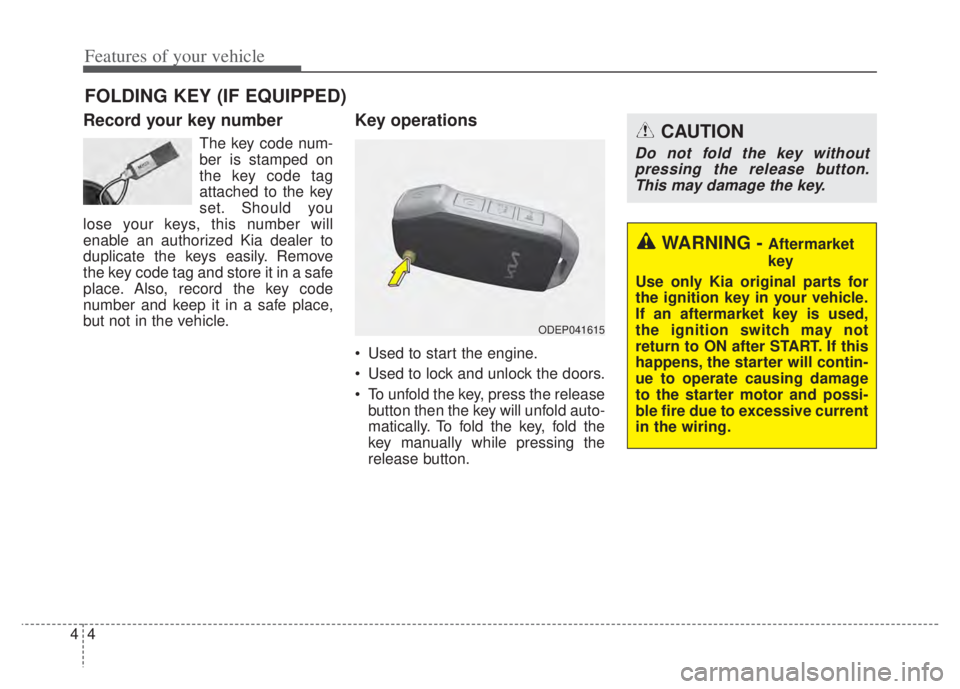
Key operations
• Used to start the engine.
Used to lock and unlock the doors.
To unfold the key, press the release button then the key will unfold auto-
matically. To fold the key, fold the
key manually while pressing the
release button.
FOLDING KEY (IF EQUIPPED)
CAUTION
Do not fold the key withoutpressing the release button.This may damage the key.
WARNING - Aftermarket
key
Use only Kia original parts for
the ignition key in your vehicle.
If an aftermarket key is used,
the ignition switch may not
return to ON after START. If this
happens, the starter will contin-
ue to operate causing damage
to the starter motor and possi-
ble fire due to excessive current
in the wiring.
ODEP041615
Page 145 of 710
45
Features of your vehicle
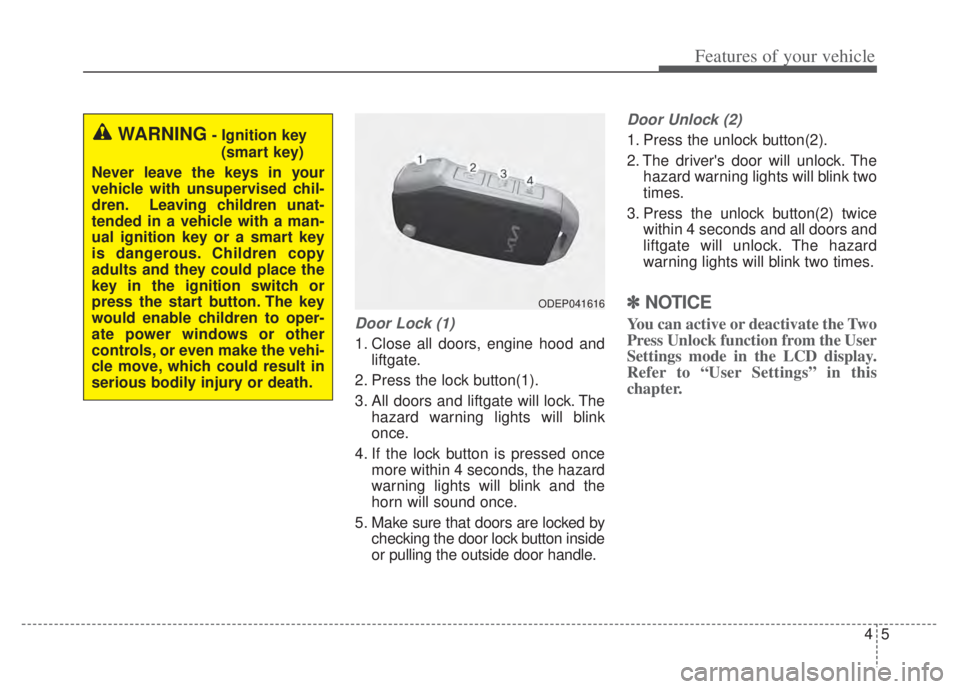
Door Lock (1)
1. Close all doors, engine hood andliftgate.
2. Press the lock button(1).
3. All doors and liftgate will lock. The hazard warning lights will blink
once.
4. If the lock button is pressed once more within 4 seconds, the hazard
warning lights will blink and the
horn will sound once.
5. Make sure that doors are locked by checking the door lock button inside
or pulling the outside door handle.
Door Unlock (2)
1. Press the unlock button(2).
2. The driver's door will unlock. Thehazard warning lights will blink two
times.
3. Press the unlock button(2) twice within 4 seconds and all doors and
liftgate will unlock. The hazard
warning lights will blink two times.
✽ ✽NOTICE
You can active or deactivate the Two
Press Unlock function from the User
Settings mode in the LCD display.
Refer to “User Settings” in this
chapter.
WARNING- Ignition key
(smart key)
Never leave the keys in your
vehicle with unsupervised chil-
dren. Leaving children unat-
tended in a vehicle with a man-
ual ignition key or a smart key
is dangerous. Children copy
adults and they could place the
key in the ignition switch or
press the start button. The key
would enable children to oper-
ate power windows or other
controls, or even make the vehi-
cle move, which could result in
serious bodily injury or death.
ODEP041616
Page 146 of 710

Features of your vehicle
64
Liftgate unlock (3)
The liftgate is unlocked if the button
is pressed for more than 1 second.
Also, once the liftgate is opened and
then closed, the liftgate will be locked
automatically.
Panic (4)
The horn sounds and hazard warn-
ing lights flash for about 27 seconds
if this button is pressed for more than
0.5 seconds. To stop the horn and
lights, press any button on the trans-
mitter.
Transmitter precautions
The transmitter will not work if anyof following occur:
- The ignition key is in the ignitionswitch.
- You exceed the operating dis- tance limit (about 30 feet [10 m]).
- The battery in the transmitter is weak.
- Other vehicles or objects are blocking the signal.
- The weather is extremely cold.
- The transmitter is close to a radio transmitter such as a radio sub-
station or an airport which can
interfere with normal operation of
the transmitter.
Page 147 of 710

47
Features of your vehicle
When the transmitter does not workcorrectly, open and close the door
with the ignition key. If you have a
problem with the transmitter, con-
tact an authorized Kia dealer.
If the transmitter is in close proxim- ity to your mobile phone, the signal
could be blocked by your mobile
phones normal operational signals.
This is especially important when
the phone is active such as making
and receiving calls, text messag-
ing, and/or sending/receiving
emails. Avoid placing the transmit-
ter and your mobile phone in the
same pants or jacket pocket and
always try to maintain an adequate
distance between the two devices.
✽ ✽ NOTICE
If the keyless entry system is inoper-
ative due to exposure to water or liq-
uids, it will not be covered by your
manufacturer’s vehicle warranty.
Battery replacement
The transmitter uses a 3 volt lithium
battery which will normally last for
several years. When replacement is
necessary, use the following proce-
dure.
1. Insert a slim tool into the slot and
gently pry open the transmitter
center cover.
2. Replace the battery with a new battery (CR2032). When replacing
the battery, make sure the battery
is positioned correctly.
3. Install the battery in the reverse order of removal.
CAUTION - Transmitter
Keep the transmitter away fromwater or any liquid as it canbecome damaged and not func-tion properly if wet.
OBD048032
Page 151 of 710

411
Features of your vehicle
Record your key number
The key code number
is stamped on the bar
code tag attached to
the key set. Should
you lose your keys,
this number will enable an author-
ized Kia dealer to duplicate the keys
easily. Remove the bar code tag and
store it in a safe place. Also, record
the code number and keep it in a
safe and handy place, but not in the
vehicle.
Smart key function
1. Door lock
2. Door unlock
3. Liftgate open
4. Panic alarm
5. Remote start (if equipped)
With a smart key, you can lock or
unlock a door (and liftgate) and start
the engine.
Refer to the following for more details.
SMART KEY (IF EQUIPPED)
WARNING- Smart key
Never leave the keys in your
vehicle with unsupervised chil-
dren. Leaving children unat-
tended in a vehicle with a man-
ual a smart key is dangerous.
Children copy adults and they
could press the start button.
The key would enable children
to operate power windows or
other controls, or even make
the vehicle move, which could
result in serious bodily injury or
death.
OBD041539
Page 152 of 710
Features of your vehicle
12
4
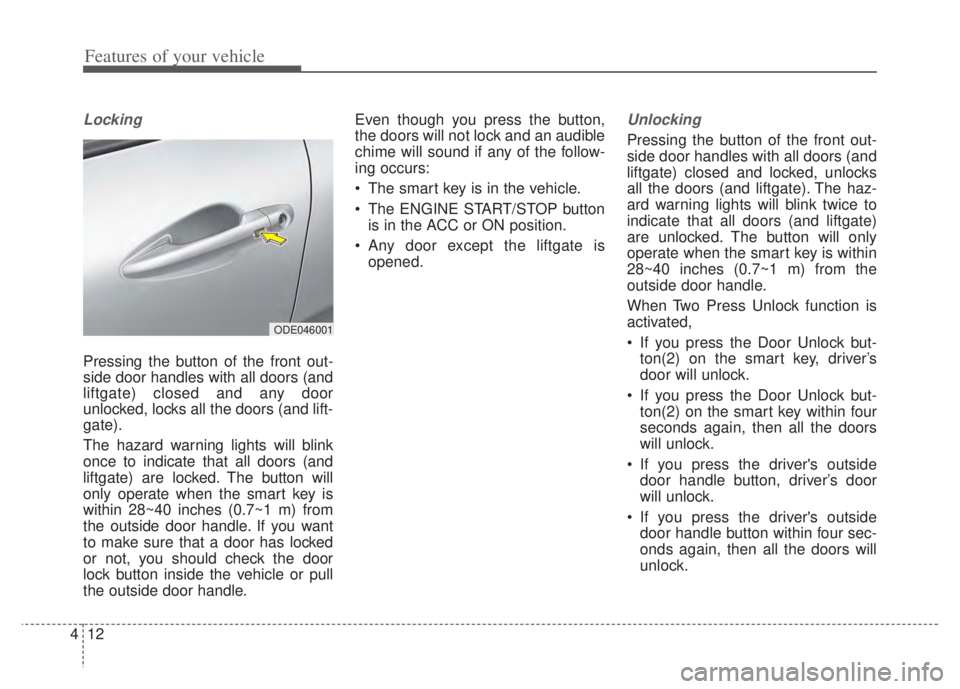
Locking
Pressing the button of the front out-
side door handles with all doors (and
liftgate) closed and any door
unlocked, locks all the doors (and lift-
gate).
The hazard warning lights will blink
once to indicate that all doors (and
liftgate) are locked. The button will
only operate when the smart key is
within 28~40 inches (0.7~1 m) from
the outside door handle. If you want
to make sure that a door has locked
or not, you should check the door
lock button inside the vehicle or pull
the outside door handle. Even though you press the button,
the doors will not lock and an audible
chime will sound if any of the follow-
ing occurs:
The smart key is in the vehicle.
The ENGINE START/STOP button
is in the ACC or ON position.
Any door except the liftgate is opened.
Unlocking
Pressing the button of the front out-
side door handles with all doors (and
liftgate) closed and locked, unlocks
all the doors (and liftgate). The haz-
ard warning lights will blink twice to
indicate that all doors (and liftgate)
are unlocked. The button will only
operate when the smart key is within
28~40 inches (0.7~1 m) from the
outside door handle.
When Two Press Unlock function is
activated,
If you press the Door Unlock but-ton(2) on the smart key, driver’s
door will unlock.
If you press the Door Unlock but- ton(2) on the smart key within four
seconds again, then all the doors
will unlock.
If you press the driver's outside door handle button, driver’s door
will unlock.
If you press the driver's outside door handle button within four sec-
onds again, then all the doors will
unlock.
ODE046001
Page 153 of 710

413
Features of your vehicle
✽ ✽NOTICE
You can active or deactivate the Two
Press Unlock function from the User
Settings mode in the LCD display.
Refer to “User Settings” in this
chapter.
Liftgate open
To open:
1. Make sure you have the smart key
in your possession.
2. Either press the switch inside the liftgate emblem or press the lift-
gate open button (3) on the smart
key for more than one second.
3. Once the liftgate is opened and then closed, the liftgate will lock
automatically.
✽ ✽NOTICE
The Liftgate unlock will only oper-
ate If you are within 28~40 inches
(0.7~1 m) from the outside liftgate
handle.
Panic alarm
Press and hold the panic alarm but-
ton (4) for more than one second.
The horn sounds and hazard warn-
ing lights flash for 30 seconds. To
cancel the panic mode, press any
button on the smart key.
Page 154 of 710

Features of your vehicle
14
4
Remote start (if equipped)
You can start the vehicle using the
remote start button (5) of the smart
key.
To start the vehicle remotely:
Lock the doors by pressing the
door lock button (1) within 32 feet
(10 m) distance from the vehicle.
Press the remote start button (5) for over 2 seconds within 4 sec-
onds after locking the doors.
Press the remote start button (5)
once to turn off the vehicle.
Air conditioner/heater system main-
tains the status before turning off the
vehicle. If no further action for oper-
ating/driving the vehicle is taken, the
vehicle will be turned off 10 minutes
after starting the vehicle remotely.
Start-up
You can start the engine without
inserting the key.
❈ For detailed information refer to
“ENGINE START/STOP button” in
chapter 5.CAUTION
• Laws in your country may
restrict the use of remotestart. You should check coun-try regulations before usingthis remote starting system.
It is only possible to start the vehicle remotely when shiftedto P (Park).
If the hood or the liftgate is opened, you cannot start thevehicle remotely.
Page 155 of 710

415
Features of your vehicle
Smart key precautions
If you lose your smart key, you willnot be able to start the engine. Tow
the vehicle, if necessary, and con-
tact an authorized Kia dealer.
A maximum of 2 smart keys can be registered to a single vehicle. If you
lose a smart key, you should imme-
diately take the vehicle and key to
your authorized Kia dealer to pro-
tect it from potential theft.
The smart key will not work if any of following occurs:
- The smart key is close to a radiotransmitter such as a radio sta-
tion or an airport which can inter-
fere with normal operation of the
smart key.
- The smart key is near a mobile two-way radio system or a cellu-
lar phone.
- Another vehicle’s smart key is being operated close to your
vehicle. If the smart key does not work cor-
rectly, you may lock and unlock the
door with the mechanical key. If
you have a problem with the smart
key, contact an authorized Kia
dealer.
If the smart key is in close proximi- ty to your cell phone or smart
phone, the signal from the smart
key could be blocked by normal
operation of your cell phone or
smart phone.
This is especially important when
the phone is active such as making
calls, receiving calls, text messag-
ing, and/or sending/receiving
emails. Avoid placing the smart key
and your cell phone or smart
phone in the same pants or jacket
pocket and maintain adequate dis-
tance between the two devices. This device complies with Part 15
of the FCC rules.
Operation is subject to the following
two conditions:
1. This device may not cause harmful
interference, and
2. This device must accept any inter- ference received, including inter-
ference that may cause undesired
operation.
✽ ✽NOTICE
Changes or modifications not
expressly approved by the party
responsible for compliance could
void the user’s authority to operate
the equipment. If the keyless entry
system is inoperative due to changes
or modifications not expressly
approved by the party responsible
for compliance, it will not be cov-
ered by your manufacturer’s vehicle
warranty.
CAUTION - Transmitter
Keep the smart key away from
water or any liquid as it canbecome damaged and not func-tion properly.