KIA NIRO PHEV 2023 Navigation System Quick Reference Guide
Manufacturer: KIA, Model Year: 2023, Model line: NIRO PHEV, Model: KIA NIRO PHEV 2023Pages: 372, PDF Size: 13.33 MB
Page 261 of 372
9-35
Configuring the device connections settings
(Type1)
You can manage Bluetooth devices or configure their operation settings. You can also
activate the phone projection so that you can control the smartphone Apps on the system
screen after connecting the smartphone to the system.
1 On the All Menus screen, press Setup >
Device Connections.
The device connection settings screen appears.
2 Configure the settings required:
A
Press Menu >
Search for Settings or press and enter a keyword to search for a
setting item. You can also search for a setting item by voice.
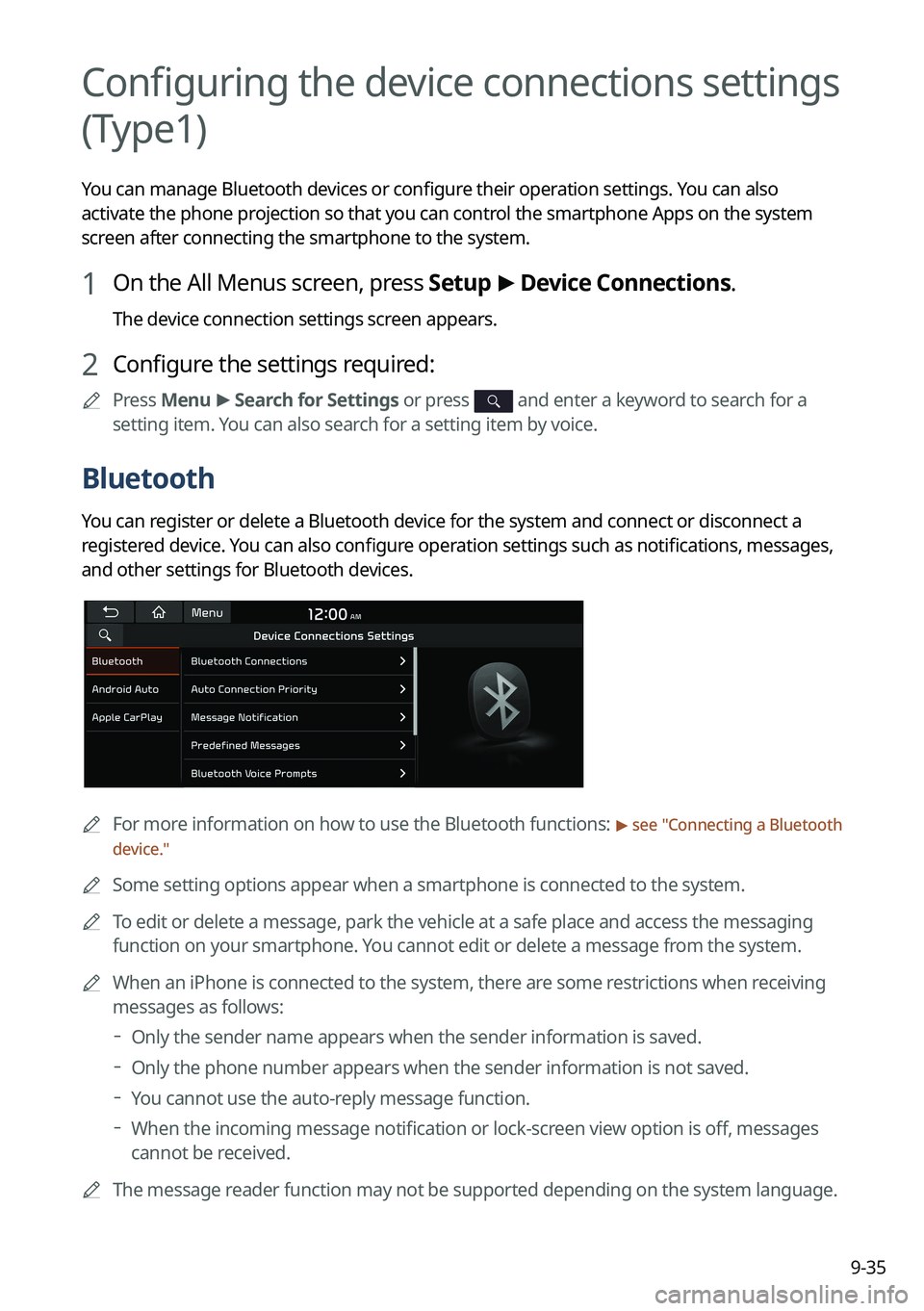
Bluetooth
You can register or delete a Bluetooth device for the system and connect or disconnect a
registered device. You can also configure operation settings such as notifications, messages,
and other settings for Bluetooth devices.
A
For more information on how to use the Bluetooth functions: > see "Connecting a Bluetooth
device."
A
Some setting options appear when a smartphone is connected to the system.
A
To edit or delete a message, park the vehicle at a safe place and access the messaging
function on your smartphone. You cannot edit or delete a message from the system.
A
When an iPhone is connected to the system, there are some restrictions when receiving
messages as follows:
Only the sender name appears when the sender information is saved.
Only the phone number appears when the sender information is not saved.
You cannot use the auto-reply message function.
When the incoming message notification or lock-screen view option is off, messages
cannot be received.
A
The message reader function may not be supported depending on the system language.
Page 262 of 372

9-36
Bluetooth Connections
You can register or delete a Bluetooth device from the system and connect or disconnect a
registered device.
A
You can add one Bluetooth hands-free kit or up to two Bluetooth audio devices.
Auto Connection Priority
Set the priority order for automatic Bluetooth connection to the system when it turns on.
A
On the device list, press
on the right and drag the item to reposition.
Message Notification
Set to receive message notifications.
A
This option may not be available in some phone models.
Predefined Messages
Edit message templates for quick replies.
A
This option may not be available in some phone models.
Bluetooth Voice Prompts
Set whether to hear voice prompts for events related to Bluetooth connections.
Privacy Mode
Enable or disable Privacy Mode. Hide data including contacts and call history from showing
up on the system screen to protect privacy.
Bluetooth System Info
You can see and edit the Bluetooth information of the system.
Reset
You can delete all registered Bluetooth devices and initialize Bluetooth settings. All data for
Bluetooth devices are also deleted.
Page 263 of 372

9-37
Android Auto
You can activate the Android Auto function to pair your Android smartphone with the system.
Apple CarPlay
You can activate the Apple CarPlay function to pair your iPhone with the system.
Configuring the device connections settings
(Type2)
You can manage Bluetooth devices or configure their operation settings. You can also
activate the phone projection so that you can control the smartphone Apps on the system
screen after connecting the smartphone to the system.
1 On the All Menus screen, press Setup >
Device Connections.
The device connection settings screen appears.
2 Configure the settings required:
A
Press >
Search for Settings or press and enter a keyword to search for a
setting item. You can also search for a setting item by voice.
Page 264 of 372

9-38
Device Connections
You can register or delete a Bluetooth device from the system and connect or disconnect a
registered device.
AYou can add one Bluetooth hands-free kit or up to two Bluetooth audio devices.
A
On the device list, press
on the right and drag to reposition set the priority order.
Message Notification
Set to receive message notifications.
AThis option may not be available in some phone models.
Page 265 of 372

9-39
Predefined Messages
Edit message templates for quick replies.
AThis option may not be available in some phone models.
Bluetooth Voice Prompts
Set whether to hear voice prompts for events related to Bluetooth connections.
Privacy Mode
Enable or disable Privacy Mode. Hide data including contacts and call history from showing
up on the system screen to protect privacy.
Page 266 of 372

9-40
Bluetooth System Info
You can see and edit the Bluetooth information of the system.
Phone Projection Settings
You can activate the phone projection connection function to pair your smartphone with the
system.
Android Auto
You can activate the Android Auto function to pair your Android smartphone with the system.
Apple CarPlay
You can activate the Apple CarPlay function to pair your iPhone with the system.
Page 267 of 372

9-41
Bluetooth (if equipped)
You can register or delete a Bluetooth device for the system and connect or disconnect a
registered device. You can also configure operation settings such as notifications, messages,
and other settings for Bluetooth devices.
A
For more information on how to use the Bluetooth functions: > see "Connecting a Bluetooth
device."
A
Some setting options appear when a smartphone is connected to the system.
A
To edit or delete a message, park the vehicle at a safe place and access the messaging
function on your smartphone. You cannot edit or delete a message from the system.
A
When an iPhone is connected to the system, there are some restrictions when receiving
messages as follows:
Only the sender name appears when the sender information is saved.
Only the phone number appears when the sender information is not saved.
You cannot use the auto-reply message function.
When the incoming message notification or lock-screen view option is off, messages
cannot be received.
A
The message reader function may not be supported depending on the system language.
Bluetooth Connections
You can register or delete a Bluetooth device from the system and connect or disconnect a
registered device.
A
You can add one Bluetooth hands-free kit or up to two Bluetooth audio devices.
Auto Connection Priority
Set the priority order for automatic Bluetooth connection to the system when it turns on.
A
On the device list, press
on the right and drag the item to reposition.
Message Notification
Set to receive message notifications.
A
This option may not be available in some phone models.
Page 268 of 372

9-42
Predefined Messages
Edit message templates for quick replies.
A
This option may not be available in some phone models.
Bluetooth Voice Prompts
Set whether to hear voice prompts for events related to Bluetooth connections.
Privacy Mode
Enable or disable Privacy Mode. Hide data including contacts and call history from showing
up on the system screen to protect privacy.
Bluetooth System Info
You can see and edit the Bluetooth information of the system.
Configuring the advanced system settings
(Type1)
(if equipped)
You can configure the settings for notification and button actions.
1 On the All Menus screen, press Setup >
Advanced.
The advanced settings screen appears.
2 Configure the settings required:
Page 269 of 372
9-43
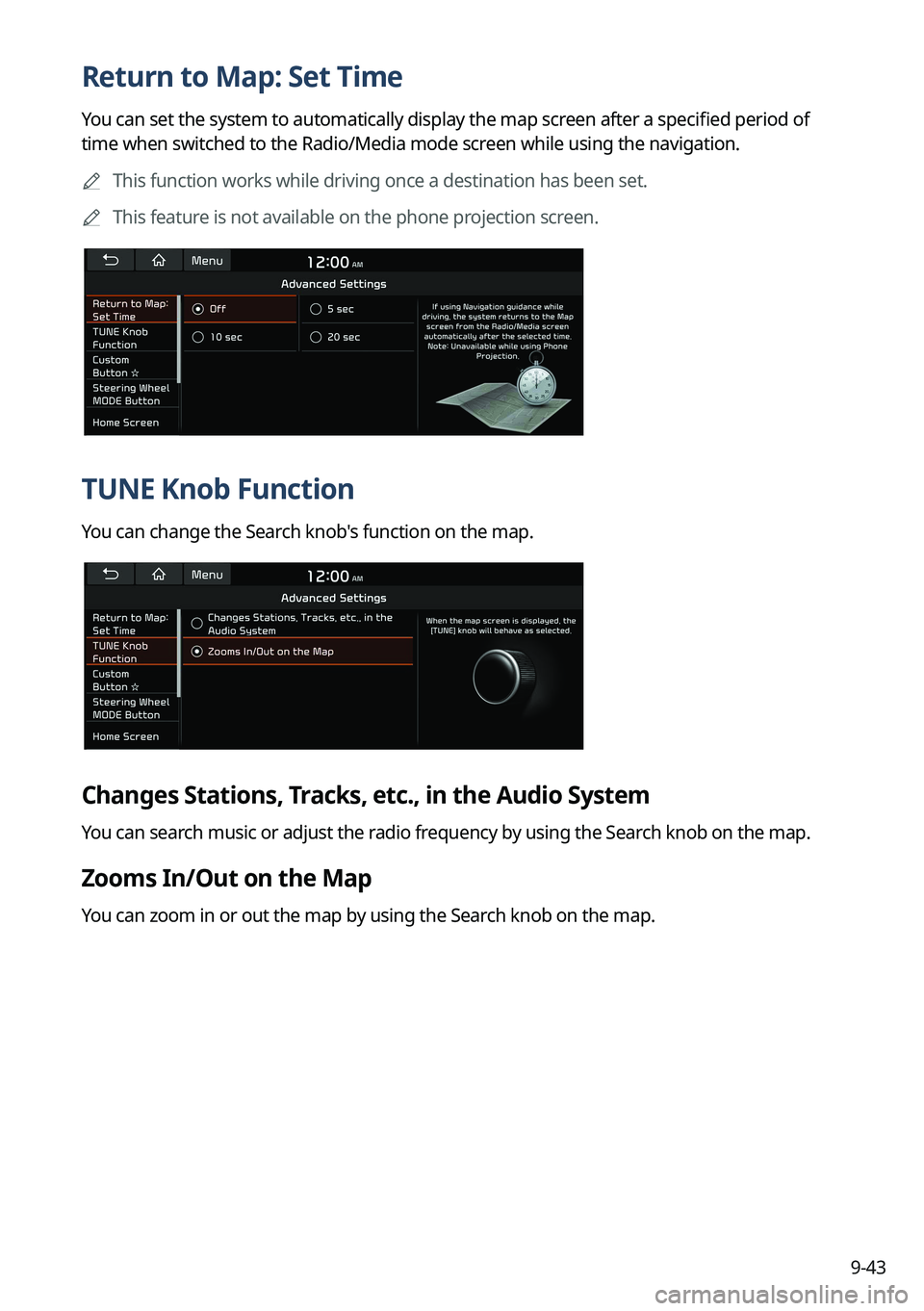
Return to Map: Set Time
You can set the system to automatically display the map screen after a specified period of
time when switched to the Radio/Media mode screen while using the navigation.
A
This function works while driving once a destination has been set.
A
This feature is not available on the phone projection screen.
TUNE Knob Function
You can change the Search knob's function on the map.
Changes Stations, Tracks, etc., in the Audio System
You can search music or adjust the radio frequency by using the Search knob on the map.
Zooms In/Out on the Map
You can zoom in or out the map by using the Search knob on the map.
Page 270 of 372

9-44
Custom Button ☆
You can set the frequently used functions by pressing the custom button on the control
panel. Set the frequently used functions as custom buttons to access them easily.
A
The screen may differ depending on the vehicle model and specifications.
Steering Wheel MODE Button
You can select the media mode to run when the [ MODE] button on the steering wheel is
pressed.
A
The screen may differ depending on the vehicle model and specifications.
Home Screen
You can change the layout of the Home screen.