clock KIA Opirus 2004 1.G User Guide
[x] Cancel search | Manufacturer: KIA, Model Year: 2004, Model line: Opirus, Model: KIA Opirus 2004 1.GPages: 296, PDF Size: 29.34 MB
Page 254 of 296
717
Maintenance
1
2
3
4
5
6
7
8
9
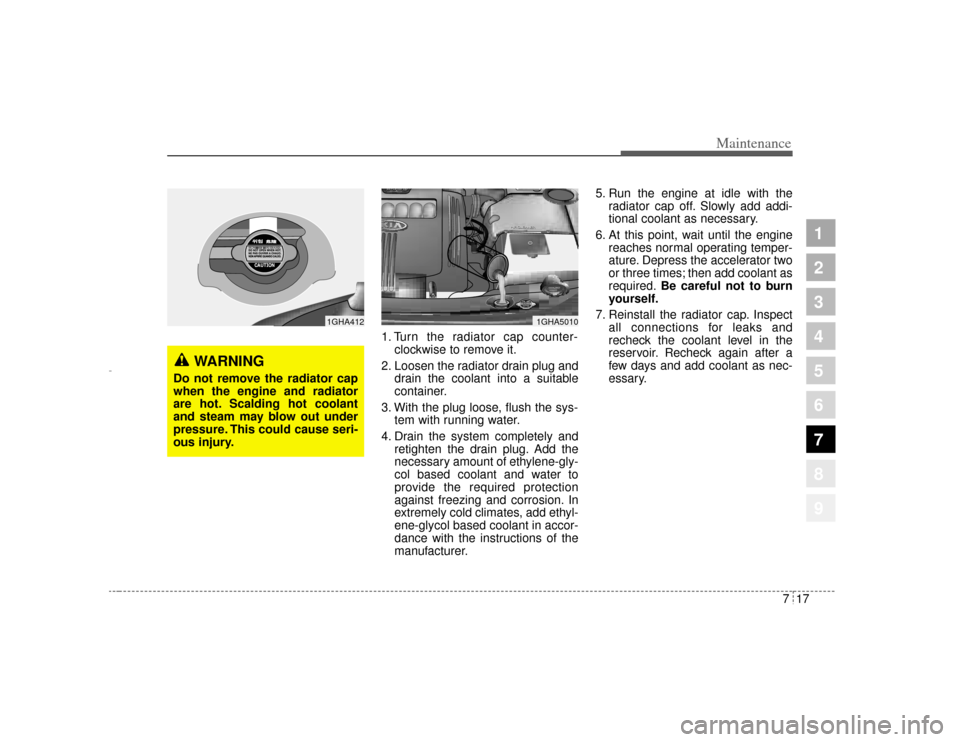
1. Turn the radiator cap counter-clockwise to remove it.
2. Loosen the radiator drain plug and drain the coolant into a suitable
container.
3. With the plug loose, flush the sys- tem with running water.
4. Drain the system completely and retighten the drain plug. Add the
necessary amount of ethylene-gly-
col based coolant and water to
provide the required protection
against freezing and corrosion. In
extremely cold climates, add ethyl-
ene-glycol based coolant in accor-
dance with the instructions of the
manufacturer. 5. Run the engine at idle with the
radiator cap off. Slowly add addi-
tional coolant as necessary.
6. At this point, wait until the engine reaches normal operating temper-
ature. Depress the accelerator two
or three times; then add coolant as
required. Be careful not to burn
yourself.
7. Reinstall the radiator cap. Inspect all connections for leaks and
recheck the coolant level in the
reservoir. Recheck again after a
few days and add coolant as nec-
essary.
1GHA5010
1GHA412
WARNING
Do not remove the radiator cap
when the engine and radiator
are hot. Scalding hot coolant
and steam may blow out under
pressure. This could cause seri-
ous injury.
Opirus CAN 7-1.qxd 7/8/03 2:25 PM Page 17
Page 270 of 296
733
Maintenance
1
2
3
4
5
6
7
8
9
Items to be reset after the batteryhas been discharged or the bat-tery has been disconnected. Driver seat position memory sys-
tem (See page 3-25)
Power window (See page 3-69)
Clock (See page 3-74)
Climate control system (See pages
4-86 and 4-88)
Audio (See the audio manual)
Sunroof (See page 3-105)
✽ ✽
NOTICE• Before performing maintenance
or recharging the battery, turn off
all accessories and stop the engine.
• The negative battery cable must be removed first and installed last
when the battery is disconnected.
WARNING
- Recharging
battery
When recharging the battery,
observe the following precau-
tions:
The battery must be removed
from the vehicle and placed in
an area with good ventilation.
Do not allow cigarettes,
sparks, or flame near the bat-
tery.
Watch the battery during
charging, and stop or reduce
the charging rate if the battery
cells begin gassing (boiling)
violently or if the temperature
of the electrolyte of any cell
exceeds 49°C (120°F).
Wear eye protection when
checking the battery during
charging.
(Continued)
(Continued)
Disconnect the battery charg-
er in the following order.
1. Turn off the battery charger main switch.
2. Unhook the negative clamp from the negative battery ter-
minal.
3. Unhook the positive clamp from the positive battery ter-
minal.
Opirus CAN 7-1.qxd 7/8/03 2:25 PM Page 33
Page 279 of 296
Maintenance42
7
1
2
3
4
5
6
7
8
9
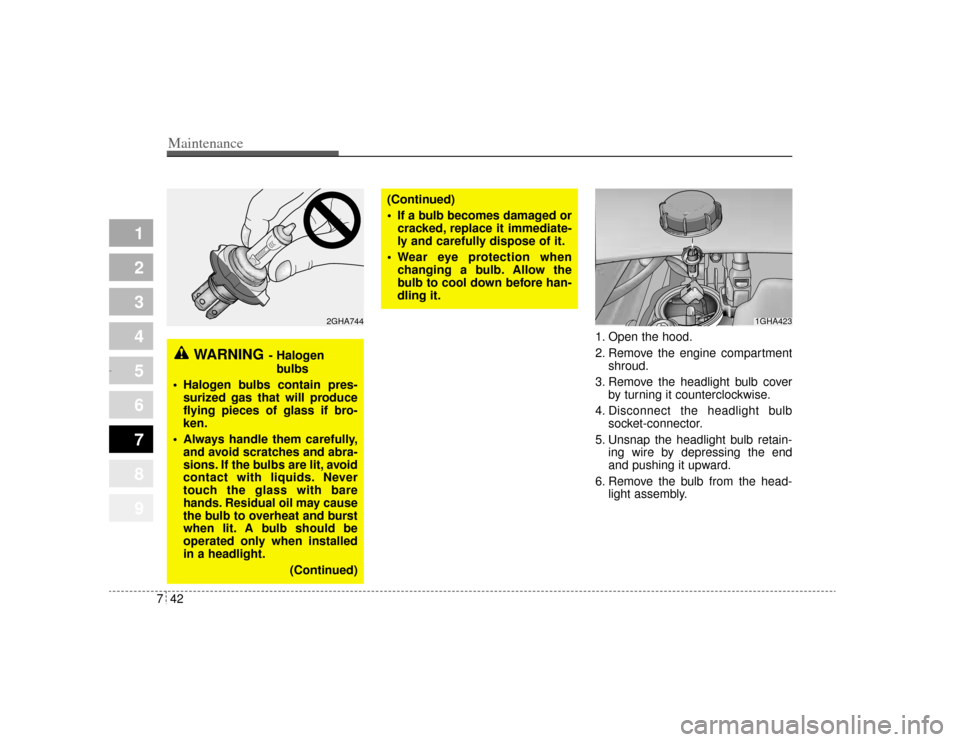
1. Open the hood.
2. Remove the engine compartment
shroud.
3. Remove the headlight bulb cover by turning it counterclockwise.
4. Disconnect the headlight bulb socket-connector.
5. Unsnap the headlight bulb retain- ing wire by depressing the end
and pushing it upward.
6. Remove the bulb from the head- light assembly.
WARNING
- Halogen
bulbs
Halogen bulbs contain pres-
surized gas that will produce
flying pieces of glass if bro-
ken.
Always handle them carefully,
and avoid scratches and abra-
sions. If the bulbs are lit, avoid
contact with liquids. Never
touch the glass with bare
hands. Residual oil may cause
the bulb to overheat and burst
when lit. A bulb should be
operated only when installed
in a headlight.
(Continued)
(Continued)
If a bulb becomes damaged or
cracked, replace it immediate-
ly and carefully dispose of it.
Wear eye protection when
changing a bulb. Allow the
bulb to cool down before han-
dling it.
1GHA423
2GHA744
Opirus CAN 7-1.qxd 7/8/03 2:26 PM Page 42
Page 280 of 296
743
Maintenance
1
2
3
4
5
6
7
8
9
6. Install a new headlight bulb andsnap the headlight bulb retaining
wire into position by aligning the
wire with the groove on the bulb.
7. Connect the headlight bulb socket- connector.
8. Install the headlight bulb cover by turning it clockwise.
Headlight (HID type), position
and front fog light, turn signal
light and side mark light bulb
replacementIf the light bulb is not operating, have
the vehicle checked by an authorized
Kia Dealer.
* HID : High Intensity Discharge
WARNING
- HID Headlight
low beam (if equipped)
Do not attempt to replace or
inspect the low beam (XENON
bulb) due to electric shock dan-
ger. If the low beam (XENON
bulb) is not working, have your
vehicle checked by an
Authorized Kia Dealer.
Opirus CAN 7-1.qxd 7/8/03 2:26 PM Page 43
Page 283 of 296
Maintenance46
7
1
2
3
4
5
6
7
8
9
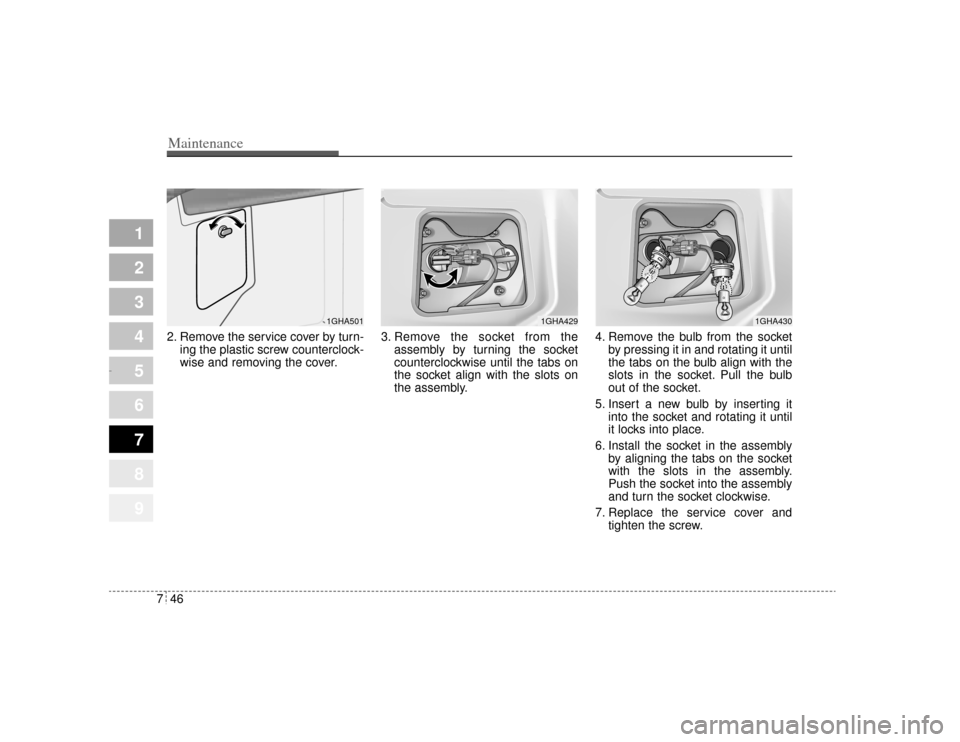
2. Remove the service cover by turn-
ing the plastic screw counterclock-
wise and removing the cover. 3. Remove the socket from the
assembly by turning the socket
counterclockwise until the tabs on
the socket align with the slots on
the assembly. 4. Remove the bulb from the socket
by pressing it in and rotating it until
the tabs on the bulb align with the
slots in the socket. Pull the bulb
out of the socket.
5. Insert a new bulb by inserting it into the socket and rotating it until
it locks into place.
6. Install the socket in the assembly by aligning the tabs on the socket
with the slots in the assembly.
Push the socket into the assembly
and turn the socket clockwise.
7. Replace the service cover and tighten the screw.
1GHA430
1GHA429
1GHA501
Opirus CAN 7-1.qxd 7/8/03 2:26 PM Page 46