fuse KIA Optima 2007 2.G Owner's Manual
[x] Cancel search | Manufacturer: KIA, Model Year: 2007, Model line: Optima, Model: KIA Optima 2007 2.GPages: 294, PDF Size: 3.37 MB
Page 9 of 294
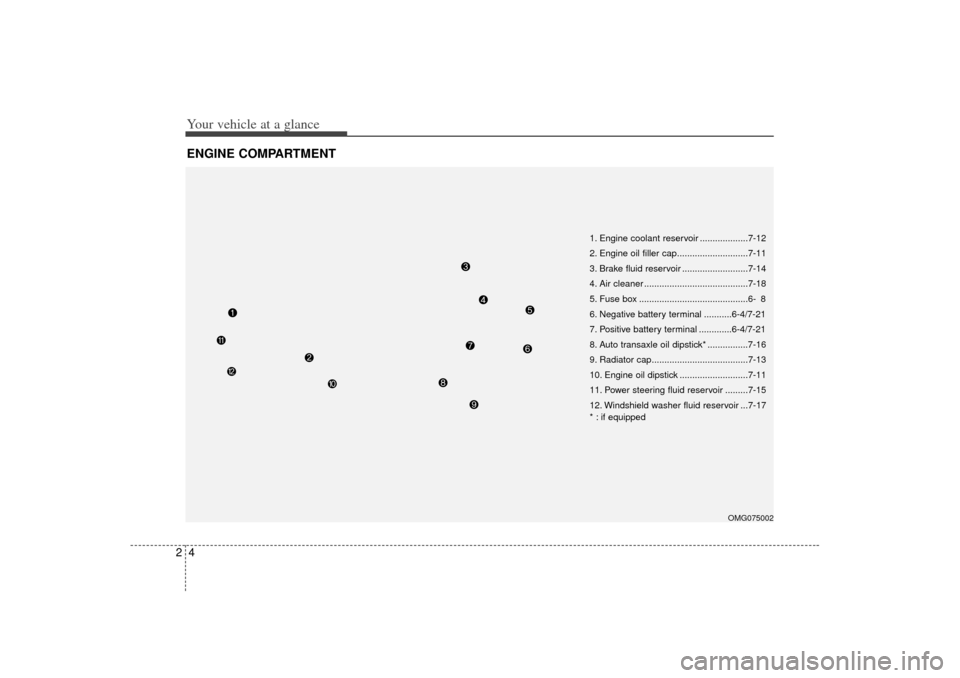
Your vehicle at a glance42ENGINE COMPARTMENT
OMG075002
1. Engine coolant reservoir ...................7-12
2. Engine oil filler cap............................7-11
3. Brake fluid reservoir ..........................7-14
4. Air cleaner .........................................7-18
5. Fuse box ...........................................6- 8
6. Negative battery terminal ...........6-4/7-21
7. Positive battery terminal .............6-4/7-21
8. Auto transaxle oil dipstick* ................7-16
9. Radiator cap......................................7-13
10. Engine oil dipstick ...........................7-11
11. Power steering fluid reservoir .........7-15
12. Windshield washer fluid reservoir ...7-17
* : if equipped
Page 24 of 294
315
Knowing your vehicle
Power windows (if equipped)The ignition switch must be in the ON
position for power windows to operate.
Each door has a power window switch
that controls that door’s window.
However, the driver has a power window
lock switch which can block the operation
of passenger windows.
If you notice buffeting and pulsation
(wind shock) with either side window
open, you should open the opposite win-
dow slightly to reduce the condition.✽ ✽ NOTICE• To protect the power window system
from the possibility of damage, do not
open or close two windows at the same
time. This will also ensure the longevi-
ty of the fuse.
• Never try to operate the main switch on the driver's door and the individ-
ual door window switch in opposing
directions at the same time. If this is
done, the window will stop and cannot
be opened or closed.
Window opening and closingThe driver’ s door has a master power
window switch that controls all the win-
dows in the vehicle. To open or close a
window, press down (5) or pull up (5) the
front portion of the corresponding switch.
Automatic power window (driver’s window, if equipped)Type A - Automatic power window down
Depressing the power window switch
momentarily to the second detent posi-
tion (6) completely lowers the driver ’s
window even when the switch is
released. To stop the window at the
desired position while the window is in
operation, pull up the switch momentarily
to the opposite direction of the window
movement.
OMG035012
OMG035013
Page 98 of 294

389
Knowing your vehicle
✽
✽NOTICE• Use the power outlet when the engine
is running, and remove a plug from
the power outlet after using the elec-
tric appliance. Using the power outlet
excessively or while the engine is not
running or leaving appliances plugged
into the power outlet when not in use
will cause battery discharge
• Only use the electric appliances which are less than 12V and 10A in electric
capacity.
• Adjust the air-conditioner or heater to the lowest operation level when you
have to use the power socket while
using air-conditioner or heater.
• Close the cover when not in use.
• Some electronic devices can cause electronic interference when plugged
into a vehicle’s power outlet. These
devices may cause excessive audio
static and malfunctions in other elec-
tronic systems or devices used in your
vehicle.
Digital clock (if equipped)Whenever the battery terminals or mem-
ory fuse are disconnected, you must
reset the time.
When the ignition switch is in the ACC or
ON position, the clock buttons operates
as follows: HOUR:
Pressing the “H”button with your fin-
ger, a pencil or similar object will
advance the time displayed by one
hour.
MINUTE: Pressing the “M”button with your fin-
ger, a pencil or similar object will
advance the time displayed by one
minute.
RESET:
To clear away minutes, press the “R”
button with your finger, a pencil or sim-
ilar object. Then the clock will be set
precisely on the hour.
For example, if the “R ” button is
pressed while the time is between 9:01
and 9:29, the display will be reset to
9:00.
9:01 ~ 9:29 ➾ 9:00
9:30 ~ 9:59 ➾ 10:00
To change the 12 hour format to the 24
hour format, press the “R”button for
more than 5 seconds.
For example, if the “R”button is pressed
for more than 5 seconds while the time is
10:15 p.m., the display will be changed to
22:15.
OMG035090
Page 117 of 294
Knowing your vehicle108
3✽
✽
NOTICE• To assure proper operation of the unit,
keep the vehicle interior temperature
within a normal range by using the
vehicle's air conditioning or heating
system.
• When replacing the fuse, replace it with a fuse having the correct capaci-
ty.
• All stored bookmarks are all erased when the car battery is disconnected
or power to the vehicle is lost. If this
occurs, the bookmarks will have to be
reset.
• This equipment is designed to be used only in a 12 volt DC battery system
with negative ground.
• This unit is made of precision parts. Do not attempt to disassemble or
adjust any parts.
• When driving your vehicle, be sure to keep the volume of the unit set low
enough to allow you to hear sounds
coming from the outside.
• Do not expose this equipment (includ- ing the speakers and CD) to water or
excessive moisture.
✽ ✽ NOTICE• Do not insert warped or poor quality
discs into the CD player as damage to
the unit may occur.
• Do not insert anything like coins into the player slot as damage to the unit
may occur.
• Do not place beverages close to the audio system. The playback mecha-
nism may be damaged if you spill
them.
• Do not strike or allow anything to impact the audio system, damage to
the system mechanisms could occur.
• Off-road or rough surface driving may cause the compact disc to skip.
Do not use the compact disc when
driving in such conditions as damage
to the compact disc face could occur.
• Do not attempt to grab or pull the compact disc out while the disc is
being pulled into the audio unit by the
self-loading mechanism. Damage to
the audio unit and compact disc could
occur.
• Avoid using recorded compact discs in your audio unit. Original compact
discs are recommended for best
results.
Page 123 of 294
Knowing your vehicle114
3✽
✽
NOTICE• To assure proper operation of the unit,
keep the vehicle interior temperature
within a normal range by using the
vehicle's air conditioning or heating
system.
• When replacing the fuse, replace it with a fuse having the correct capaci-
ty.
• The preset station frequencies are all erased when the car battery is discon-
nected. Therefore, all data will have to
be set again if this should occur.
• Do not add any oil to the rotating parts. Keep magnets, screwdrivers
and other metallic objects away from
the tape mechanism and head.
• This equipment is designed to be used only in a 12 volt DC battery system
with negative ground.
• This unit is made of precision parts. Do not attempt to disassemble or
adjust any parts.
• When driving your vehicle, be sure to keep the volume of the unit set low
enough to allow you to hear sounds
coming from the outside.
• Do not expose this equipment (includ- ing the speakers and tape) to water or
excessive moisture.
✽ ✽ NOTICE• Do not insert anything like coins into
the player slot as damage to the unit
may occur.
• Do not place beverages close to the audio system. The playback mecha-
nism may be damaged if you spill
them.
• Do not strike or allow anything to impact the audio system, damage to
the system mechanisms could occur.
Page 127 of 294
Knowing your vehicle118
3✽
✽
NOTICE• To assure proper operation of the unit,
keep the vehicle interior temperature
within a normal range by using the
vehicle's air conditioning or heating
system.
• When replacing the fuse, replace it with a fuse having the correct capaci-
ty.
• All stored bookmarks are all erased when the car battery is disconnected
or power to the vehicle is lost. If this
occurs, the bookmarks will have to be
reset.
• This equipment is designed to be used only in a 12 volt DC battery system
with negative ground.
• This unit is made of precision parts. Do not attempt to disassemble or
adjust any parts.
• When driving your vehicle, be sure to keep the volume of the unit set low
enough to allow you to hear sounds
coming from the outside.
• Do not expose this equipment (includ- ing the speakers and tape) to water or
excessive moisture.
✽ ✽ NOTICE• Do not insert warped or poor quality
discs into the CD player as damage to
the unit may occur.
• Do not insert anything like coins into the player slot as damage to the unit
may occur.
• Do not place beverages close to the audio system. The playback mecha-
nism may be damaged if you spill
them.
• Do not strike or allow anything to impact the audio system, damage to
the system mechanisms could occur.
• Off-road or rough surface driving may cause the compact disc to skip.
Do not use the compact disc when
driving in such conditions as damage
to the compact disc face could occur.
• Do not attempt to grab or pull the compact disc out while the disc is
being pulled into the audio unit by the
self-loading mechanism. Damage to
the audio unit and compact disc could
occur.
• Avoid using recorded compact discs in your audio unit. Original compact
discs are recommended.
Page 133 of 294
Knowing your vehicle124
3✽
✽
NOTICE• To assure proper operation of the unit,
keep the vehicle interior temperature
within a normal range by using the
vehicle's air conditioning or heating
system.
• When replacing the fuse, replace it with a fuse having the correct capaci-
ty.
• The preset station frequencies are all erased when the car battery is discon-
nected. Therefore, all data will have to
be set again if this should occur.
• Do not add any oil to the rotating parts. Keep magnets, screwdrivers
and other metallic objects away from
the tape mechanism and head.
• This equipment is designed to be used only in a 12 volt DC battery system
with negative ground.
• This unit is made of precision parts. Do not attempt to disassemble or
adjust any parts.
• When driving your vehicle, be sure to keep the volume of the unit set low
enough to allow you to hear sounds
coming from the outside.
• Do not expose this equipment (includ- ing the speakers and tape) to water or
excessive moisture.
✽ ✽ NOTICE• Do not insert anything like coins into
the player slot as damage to the unit
may occur.
• Do not place beverages close to the audio system. The playback mecha-
nism may be damaged if you spill
them.
• Do not strike or allow anything to impact the audio system, damage to
the system mechanisms could occur.
Page 138 of 294
3 129
Knowing your vehicle
13. FILE SEARCH Knob (TUNE Select Knob) You can skip the track (file) by turning
the FILE SEARCH knob clockwise or
counterclockwise.
After selecting the desired track (file),
press the FILE SEARCH knob to play-
back the track (file).
If you do not press the FILE SEARCH
knob within five seconds, the search
will stop.14. DIRECTORY SEARCH (DIR) Button You can move through the folder by
pushing the DIR button to up ( ) and
down( ).
After moving the desired folder, press the FILE SEARCH knob to play back in
the selected folder. If you do not press
the FILE SEARCH knob within 5 sec-
onds, the folder searching function will
be released. It can not be operated in a
single folder.
✽ ✽ NOTICE• To assure proper operation of the unit,
keep the vehicle interior temperature
within a normal range by using the
vehicle's air conditioning or heating
system.
• When replacing the fuse, replace it with a fuse having the correct capaci-
ty.
• Stored bookmarks are all erased when the car battery is disconnected or
power to the vehicle is lost. If this
occurs, the bookmarks will have to be
reset.
• This equipment is designed to be used only in a 12 volt DC battery system
with negative ground.
• This unit is made of precision parts. Do not attempt to disassemble or
adjust any parts.
• When driving your vehicle, be sure to keep the volume of the unit set low
enough to allow you to hear sounds
coming from the outside.
• Do not expose this equipment (includ- ing the speakers and tape) to water or
excessive moisture.
✽ ✽ NOTICE• Do not insert warped or poor quality
discs into the CD player as damage to
the unit may occur.
• Do not insert anything like coins into the player slot as damage to the unit
may occur.
• Do not place beverages close to the audio system. The playback mecha-
nism may be damaged if you spill
them.
• Do not strike or allow anything to impact the audio system, damage to
the system mechanisms could occur.
• Off-road or rough surface driving may cause the compact disc to skip.
Do not use the compact disc when
driving in such conditions as damage
to the compact disc face could occur.
• Do not attempt to grab or pull the compact disc out while the disc is
being pulled into the audio unit by the
self-loading mechanism. Damage to
the audio unit and compact disc could
occur.
• Avoid using recorded compact discs in your audio unit. Original compact
discs are recommended.
Page 226 of 294
In case of an emergency66ELECTRICAL CIRCUIT PROTECTIONFuses A vehicle’s electrical system is protected
from electrical overload damage by
fuses.This vehicle has two fuse panels, one
located in the driver's side panel bolster,
the other in the engine compartment
near the battery.
If any of your vehicle’s lights, acces-
sories, or controls do not work, check the
appropriate circuit fuse. If a fuse has
blown, the element inside the fuse will be
melted.
If the electrical system does not work,
first check the driver’s side fuse panel.
Always replace a blown fuse with one of
the same rating.
If the replacement fuse blows, this indi-
cates an electrical problem. Avoid using
the system involved and immediately
consult an authorized Kia dealer.
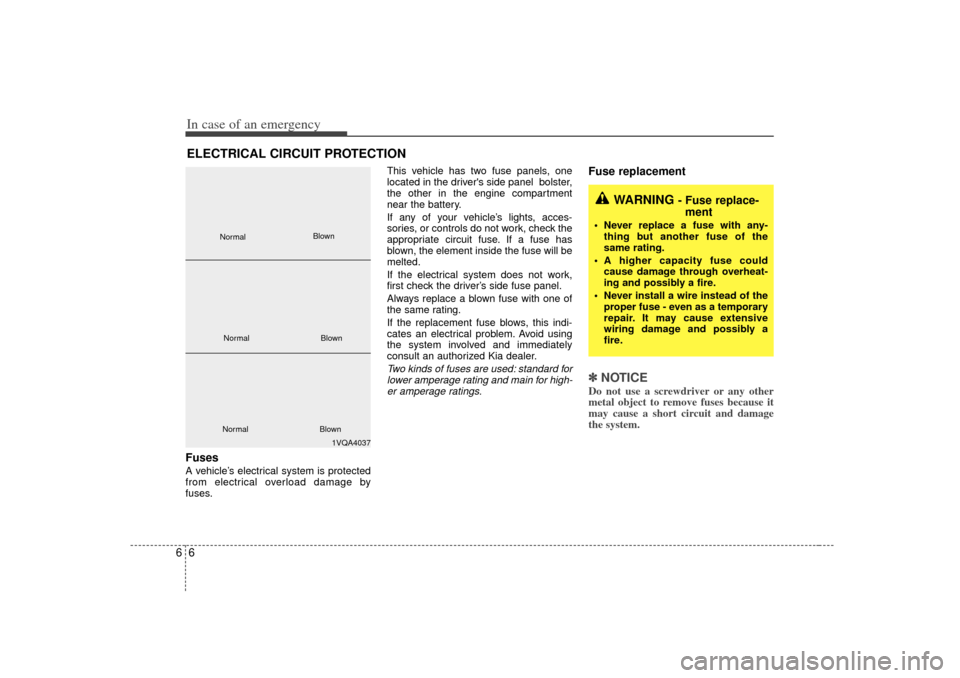
Two kinds of fuses are used: standard for
lower amperage rating and main for high-er amperage ratings.
Fuse replacement ✽ ✽ NOTICEDo not use a screwdriver or any other
metal object to remove fuses because it
may cause a short circuit and damage
the system.
WARNING
- Fuse replace-
ment
Never replace a fuse with any-
thing but another fuse of the
same rating.
A higher capacity fuse could cause damage through overheat-
ing and possibly a fire.
Never install a wire instead of the proper fuse - even as a temporary
repair. It may cause extensive
wiring damage and possibly a
fire.
1VQA4037
Normal
Normal
Blown
Blown
Normal Blown
Page 227 of 294
67
In case of an emergency
Driver-side panel bolster1. Turn the ignition switch and all otherswitches off.
2. Open the cover. 3. Pull the suspected fuse straight out.
Use the removal tool (1) provided in
the engine compartment fuse/relay
box.
4. Check the removed fuse; replace it if it is blown.
Spare fuses are provided in the fusepanel.
5. Push in a new fuse of the same rating, and make sure it fits tightly in the clips.
If it fits loosely, consult an authorized Kia
dealer.
If you do not have a spare, use a fuse of the same rating from a circuit you maynot need for operating the vehicle, such as the audio fuse.If the headlights or other electrical com-
ponents do not work and the fuses are
OK, check the fuse block in the engine
compartment. If a fuse is blown, it must
be replaced.
OMG065003
OMG065004