wheel KIA Optima 2008 2.G User Guide
[x] Cancel search | Manufacturer: KIA, Model Year: 2008, Model line: Optima, Model: KIA Optima 2008 2.GPages: 289, PDF Size: 4.78 MB
Page 137 of 289
4
Ignition switch / 4-2
Starting the engine / 4-3
Manual transaxle / 4-4
Automatic transaxle / 4-6
Brake system / 4-10
Steering wheel / 4-16
Cruise control system / 4-18
Electronic stability control / 4-21
Instrument cluster / 4-24
Gauges / 4-25
Warnings and indicators / 4-30
Compass - Z-Nav™ compass / 4-36
Rear parking assist system / 4-37
Lighting / 4-40
Wipers and washers / 4-43
Defroster / 4-46
Hazard warning flasher / 4-47
Manual climate control system / 4-48
Automatic climate control / 4-55
Windshield defrosting and defogging / 4-63
Driving your vehicle
Page 138 of 289
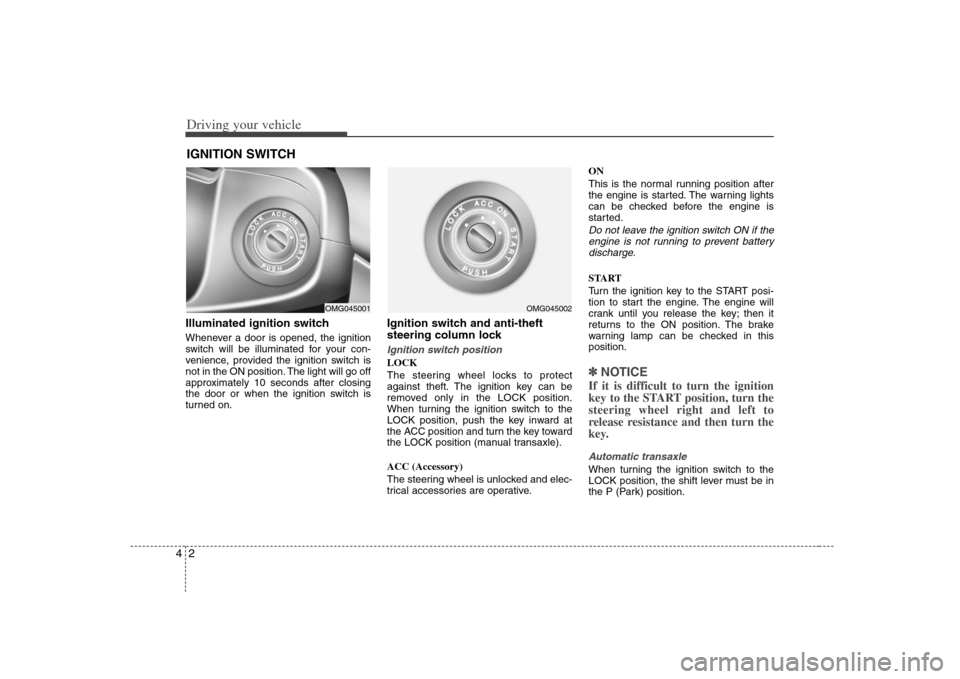
Driving your vehicle2 4Illuminated ignition switchWhenever a door is opened, the ignition
switch will be illuminated for your con-
venience, provided the ignition switch is
not in the ON position. The light will go off
approximately 10 seconds after closing
the door or when the ignition switch is
turned on.
Ignition switch and anti-theft
steering column lock Ignition switch positionLOCK
The steering wheel locks to protect
against theft. The ignition key can be
removed only in the LOCK position.
When turning the ignition switch to the
LOCK position, push the key inward at
the ACC position and turn the key toward
the LOCK position (manual transaxle).
ACC (Accessory)
The steering wheel is unlocked and elec-
trical accessories are operative.ON
This is the normal running position after
the engine is started. The warning lights
can be checked before the engine is
started.
Do not leave the ignition switch ON if the
engine is not running to prevent battery
discharge.START
Turn the ignition key to the START posi-
tion to start the engine. The engine will
crank until you release the key; then it
returns to the ON position. The brake
warning lamp can be checked in this
position.✽ ✽
NOTICEIf it is difficult to turn the ignition
key to the START position, turn the
steering wheel right and left to
release resistance and then turn the
key.Automatic transaxleWhen turning the ignition switch to the
LOCK position, the shift lever must be in
the P (Park) position.
IGNITION SWITCH
OMG045001
OMG045002
Page 139 of 289
43
Driving your vehicle
STARTING THE ENGINE 1. Make sure the parking brake is
applied.
2.Manual Transaxle- Depress the
clutch pedal fully and shift the
transaxle into Neutral. Keep the clutch
pedal depressed while turning the
ignition switch to the start position.
The starter will not operate if the
clutch pedal is not fully depressed.
Automatic Transaxle- Place the
transaxle shift lever in P (Park).
Depress the brake pedal fully.
You can also start the engine when
the shift lever is in the N (Neutral)
position.
3. Turn the ignition switch to START and
hold it there until the engine starts (a
maximum of 10 seconds), then
release the key.
4. In extremely cold weather (below
0°F / -18°C) or after the vehicle has
not been operated for several days, let
the engine warm up without depress-
ing the accelerator.
Whether the engine is cold or warm, it
should be started without depressing
the accelerator.✽ ✽
NOTICEDo not engage the starter for more than
10 seconds. If the engine stalls or fails to
start, wait 5 to 10 seconds before re-
engaging the starter. Excessive or
improper use of the starter may damage
it. The starter will not operate if:
Manual Transaxle- the clutch pedal is
not fully depressed.
Automatic Transaxle- the shift lever
is NOT in the P (Park) or N (Neutral)
position.
WARNING
- Ignition key
• Never turn the ignition switch to
LOCK or ACC while the vehicle is
moving. This would result in loss
of directional control and braking
function, which could cause an
accident or collision.
Before leaving the driver’s seat,
always make sure the shift lever
is engaged in 1
stgear for manual
transaxle or P (Park) for automat-
ic transaxle. Then, set the parking
brake fully and shut the engine
off. Unexpected and sudden vehi-
cle movement may occur if these
precautions are not taken.
Never reach for the ignition
switch, or any other controls
through the steering wheel while
the vehicle is in motion. The pres-
ence of your hand or arm in this
area could cause a loss of vehicle
control, an accident and serious
bodily injury or death.
Do not place any movable objects
around the driver’s seat as they
may move while driving, interfere
with the driver and lead to an
accident.
CAUTION -
Stall
If the engine stalls while you are in
motion, do not attempt to move the
shift lever to the P (Park) position. If
traffic and road conditions permit,
you may put the shift lever in the N
(Neutral) position while the vehicle
is still moving and turn the ignition
switch to the START position in an
attempt to restart the engine.
WARNING
Always wear appropriate shoes
when operating your vehicle.
Unsuitable shoes (high heels, ski
boots,etc.) may interfere with your
ability to use the brake and acceler-
ator pedal, and the clutch (if
equipped).
Page 143 of 289
47
Driving your vehicle
✽ ✽
NOTICE• To avoid damage to your transaxle, do
not accelerate the engine in R
(Reverse) or any forward gear posi-
tion with the brakes on.
• When stopped on an uphill grade, do
not hold the vehicle stationary with
engine power. Use the service brake
or the parking brake.
• Do not shift from N (Neutral) or P
(Park) into D (Drive), or R (Reverse)
when the engine is above idle speed.Transaxle rangesP (Park)This position locks the transaxle and pre-
vents the front wheels from rotating.
Always come to a complete stop before
shifting into this position.
✽ ✽
NOTICEThe transaxle may be damaged if you
shift into P (Park) while the vehicle is in
motion.R (Reverse)Use this position to drive the vehicle
backward.
✽ ✽
NOTICEAlways come to a complete stop before
shifting into or out of R (Reverse); you
may damage the transaxle if you shift
into R while the vehicle is in motion.N (Neutral)With the gearshift in the N position, the
wheels and transaxle are not locked. The
vehicle will roll freely even on the slight-
est incline unless the parking brake or
service brakes are applied.D (Drive)This is the normal forward driving posi-
tion. The transaxle will automatically shift
through a 5-gear sequence, providing the
best fuel economy and power.
For extra power when passing another
vehicle or climbing grades, depress the
accelerator fully, at which time the
transaxle will automatically downshift to
the next lower gear.✽ ✽
NOTICEAlways come to a complete stop before
shifting into D (Drive).
(Continued)
Do not use the P (Park) position in
place of the parking brake.
Always make sure the shift lever
is latched in the P (Park) position
AND set the parking brake fully.
Before leaving the driver’s seat,
always make sure the shift lever
is in the P (Park) position. Set the
parking brake fully, shut the
engine off and take the key with
you. Unexpected and sudden
vehicle movement can occur if
you do not follow these precau-
tions in the order specified.
Never leave a child unattended in
a vehicle.
WARNING
- Automatic
transaxle
Shifting into P (Park) while the
vehicle is in motion will cause the
drive wheels to lock which will
cause you to lose control of the
vehicle.
(Continued)
Page 148 of 289
Driving your vehicle12 4Setting the driver's position1. Be sure the parking brake is engaged.
2. Move the accelerator and brake ped-
als to the front most position by push-
ing the “▼” portion of the switch.
3. Adjust the seat position and the steer-
ing wheel angle properly.
4. Move the pedals toward you until you
can fully depress the brake pedal by
pushing the “▲” portion of the switch.
5. Depress the pedals a few times to get
used to the feel after adjusting.
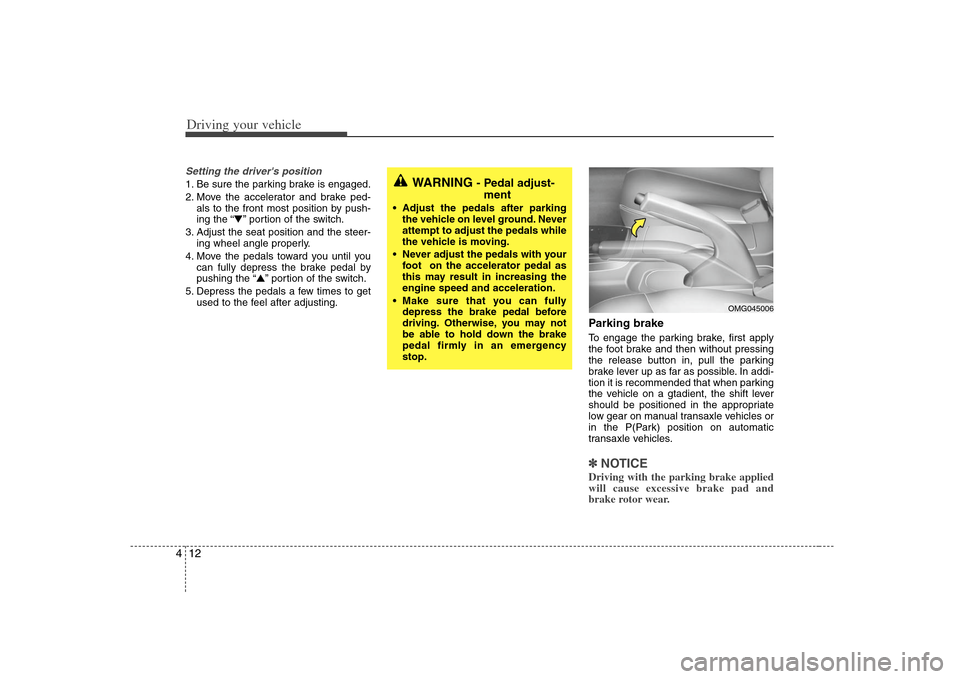
Parking brake To engage the parking brake, first apply
the foot brake and then without pressing
the release button in, pull the parking
brake lever up as far as possible. In addi-
tion it is recommended that when parking
the vehicle on a gtadient, the shift lever
should be positioned in the appropriate
low gear on manual transaxle vehicles or
in the P(Park) position on automatic
transaxle vehicles.✽ ✽
NOTICEDriving with the parking brake applied
will cause excessive brake pad and
brake rotor wear.
WARNING
- Pedal adjust-
ment
Adjust the pedals after parking
the vehicle on level ground. Never
attempt to adjust the pedals while
the vehicle is moving.
Never adjust the pedals with your
foot on the accelerator pedal as
this may result in increasing the
engine speed and acceleration.
Make sure that you can fully
depress the brake pedal before
driving. Otherwise, you may not
be able to hold down the brake
pedal firmly in an emergency
stop.
OMG045006
Page 150 of 289
Driving your vehicle14 4Parking on curbed streets When parking your vehicle on an uphill
grade, park as close to the curb as
possible and turn the front wheels
away from the curb so that the front
wheels will contact the curb if the vehi-
cle moves backward.
When parking your vehicle on a down-
hill grade, park as close to the curb as
possible and turn the front wheels
toward the curb so that the front
wheels will contact the curb if the vehi-
cle moves forward.
Anti-lock brake system (ABS)
(if equipped)
The ABS continuously senses the speed
of the wheels. If the wheels are going to
lock, the ABS repeatedly modulates the
hydraulic brake pressure to the wheels.
When you apply your brakes under con-
ditions which may lock the wheels, you
may hear a “tik-tik’’ sound from the
brakes, or feel a corresponding sensation
in the brake pedal. This is normal and it
means your ABS is active.
In order to obtain the maximum benefit
from your ABS in an emergency situation,
do not attempt to modulate your brake
pressure and do not try to pump your
brakes. Press your brake pedal as hard
as possible or as hard as the situation
warrants and allow the ABS to control the
force being delivered to the brakes.
Even with the anti-lock brake system,
your vehicle still requires sufficient
stopping distance. Always maintain a
safe distance from the vehicle in front
of you.
Always slow down when cornering.
The anti-lock brake system cannot pre-
vent accidents resulting from exces-
sive speeds.
On loose or uneven road surfaces,
operation of the anti-lock brake system
may result in a longer stopping dis-
tance than for vehicles equipped with a
conventional brake system.
WARNING
- ABS Brakes
Your ABS is not a substitute for
good driving judgement. You can
still have an accident. In fact, your
ABS will probably not be able to
prevent an accident in the following
driving conditions:
Dangerous driving, such as
neglecting safety precautions,
speeding, or driving too close to
the vehicle in front of you.
Driving at high speed in situa-
tions providing considerably less
traction, such as wet conditions
where hydroplaning could occur.
Driving too fast on poor road sur-
faces. The ABS is designed to
improve maximum braking effec-
tiveness on typical highways and
roads in good condition. On poor
road surfaces, the ABS may actu-
ally reduce braking effectiveness.
Page 152 of 289
Driving your vehicle16 4Power steering (if equipped)Power steering uses energy from the
engine to assist you in steering the vehi-
cle. If the engine is off or if the power
steering system becomes inoperative,
the vehicle may still be steered, but it will
require increased steering effort.
Should you notice any change in the
effort required to steer during normal
vehicle operation, have the power steer-
ing checked by an authorized Kia dealer.✽ ✽
NOTICE• Never hold the steering wheel against
a stop (extreme right or left turn) for
more than 5 seconds with the engine
running. Holding the steering wheel
for more than 5 seconds in either posi-
tion may cause damage to the power
steering pump.
• If the power steering drive belt breaks
or if the power steering pump mal-
functions, the steering effort will
greatly increase.
✽ ✽
NOTICEIf the vehicle is parked for extended
periods outside in cold weather (below -
10 °C/14 °F), the power steering may
require increased effort when the engine
is first started. This is caused by
increased fluid viscosity due to the cold
weather and does not indicate a mal-
function.
When this happens, increase the engine
RPM by depressing the accelerator until
the RPM reaches 1,500 rpm then release
or let the engine idle for two or three
minutes to warm up the fluid.
Tilt and telescopic steering
(if equipped)A tilt and telescopic steering wheel
allows you to adjust the steering wheel
before you drive. You can also raise it to
the highest level to give your legs more
room when you exit and enter the vehi-
cle.
The steering wheel should be positioned
so that it is comfortable for you to drive,
while permitting you to see the instru-
ment panel warning lights and gauges.
STEERING WHEEL
WARNING -
Steering wheel
Never adjust the angle of steering
wheel while driving. You may lose
your steering control and cause
severe personal injury or acci-
dents.
After adjusting, push the steering
wheel both up and down to be
certain it is locked in position.
Page 153 of 289
417
Driving your vehicle
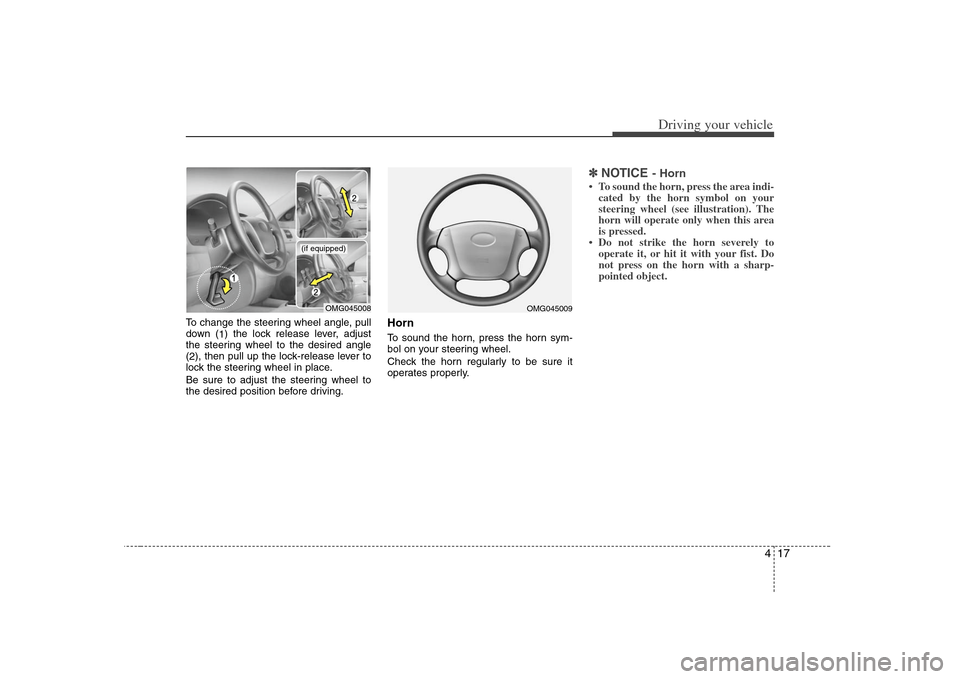
To change the steering wheel angle, pull
down (
1) the lock release lever, adjust
the steering wheel to the desired angle
(
2), then pull up the lock-release lever to
lock the steering wheel in place.
Be sure to adjust the steering wheel to
the desired position before driving.
HornTo sound the horn, press the horn sym-
bol on your steering wheel.
Check the horn regularly to be sure it
operates properly.
✽ ✽
NOTICE
- Horn
• To sound the horn, press the area indi-
cated by the horn symbol on your
steering wheel (see illustration). The
horn will operate only when this area
is pressed.
• Do not strike the horn severely to
operate it, or hit it with your fist. Do
not press on the horn with a sharp-
pointed object.
OMG045008
(if equipped)
OMG045009
Page 154 of 289
Driving your vehicle18 4The cruise control system allows you to
program the vehicle to maintain a con-
stant speed without resting your foot on
the accelerator pedal.
With cruise control, you can set and
automatically maintain any speed of
between 40 km/h (24 mph) and
160 km/h (96 mph).
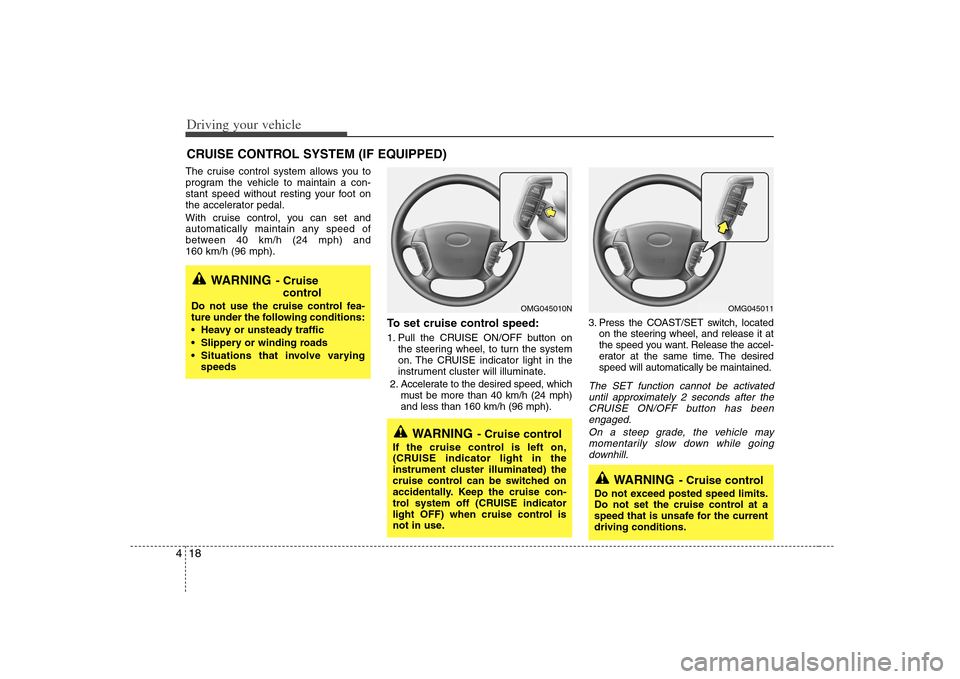
To set cruise control speed:1. Pull the CRUISE ON/OFF button on
the steering wheel, to turn the system
on. The CRUISE indicator light in the
instrument cluster will illuminate.
2. Accelerate to the desired speed, which
must be more than 40 km/h (24 mph)
and less than 160 km/h (96 mph).3. Press the COAST/SET switch, located
on the steering wheel, and release it at
the speed you want. Release the accel-
erator at the same time. The desired
speed will automatically be maintained.
The SET function cannot be activated
until approximately 2 seconds after the
CRUISE ON/OFF button has been
engaged.
On a steep grade, the vehicle may
momentarily slow down while going
downhill.
CRUISE CONTROL SYSTEM (IF EQUIPPED)
WARNING
- Cruise
control
Do not use the cruise control fea-
ture under the following conditions:
Heavy or unsteady traffic
Slippery or winding roads
Situations that involve varying
speeds
WARNING
- Cruise control
If the cruise control is left on,
(CRUISE indicator light in the
instrument cluster illuminated) the
cruise control can be switched on
accidentally. Keep the cruise con-
trol system off (CRUISE indicator
light OFF) when cruise control is
not in use.
WARNING
- Cruise control
Do not exceed posted speed limits.
Do not set the cruise control at a
speed that is unsafe for the current
driving conditions.
OMG045010N
OMG045011
Page 155 of 289
419
Driving your vehicle
To cancel cruise control, do one
of the following: Press the brake pedal.
Press the clutch pedal with a manual
transaxle or shift into N (Neutral) with an
automatic transaxle.
Press the CANCEL switch located on
the steering wheel.
Press the COAST/SET and
RES/ACCEL switches at the same
time.Each of these actions will cancel cruise
control operation (the “SET” indicator
light in the instrument cluster will go
OFF), but it will not turn the system off. If
you wish to resume cruise control opera-
tion, press the RES/ACCEL switch locat-
ed on your steering wheel. You will return
to your previously preset speed.
To turn cruise control off, do one
of the following: Push the CRUISE ON/OFF button on
the steering wheel (the CRUISE indi-
cator light in the instrument cluster will
go OFF).
Turn the ignition off.Both of these actions cancel cruise con-
trol operation. If you want to resume
cruise control operation, repeat the steps
provided in “To Set Cruise Control
Speed” on the previous page.
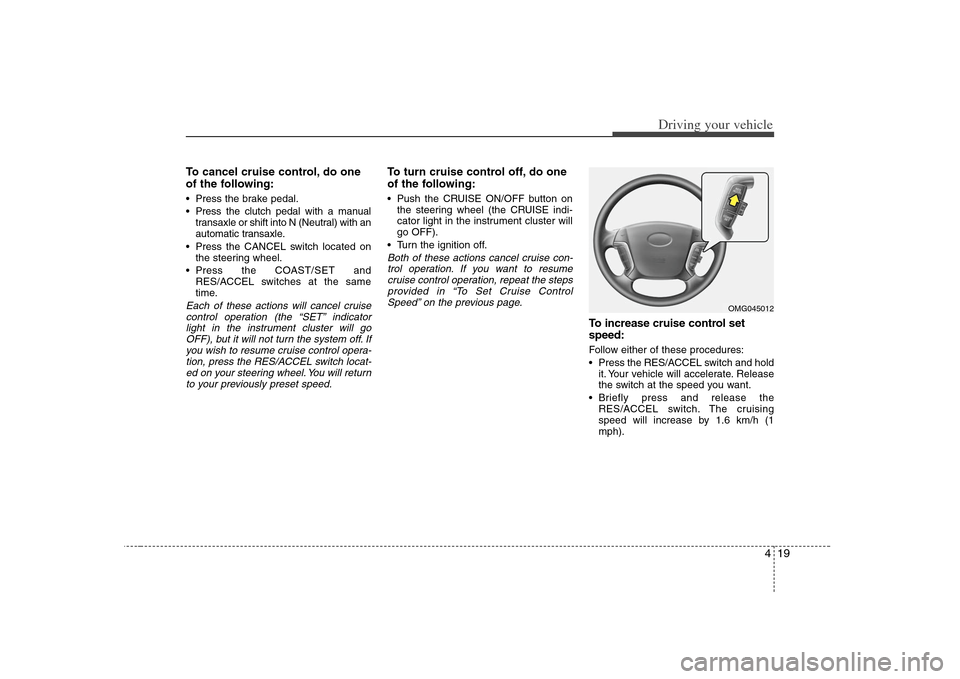
To increase cruise control set
speed:Follow either of these procedures:
Press the RES/ACCEL switch and hold
it. Your vehicle will accelerate. Release
the switch at the speed you want.
Briefly press and release the
RES/ACCEL switch. The cruising
speed will increase by 1.6 km/h (1
mph).
OMG045012