ignition KIA Optima 2009 2.G Owner's Guide
[x] Cancel search | Manufacturer: KIA, Model Year: 2009, Model line: Optima, Model: KIA Optima 2009 2.GPages: 326, PDF Size: 4.37 MB
Page 79 of 326
413
Features of your vehicle
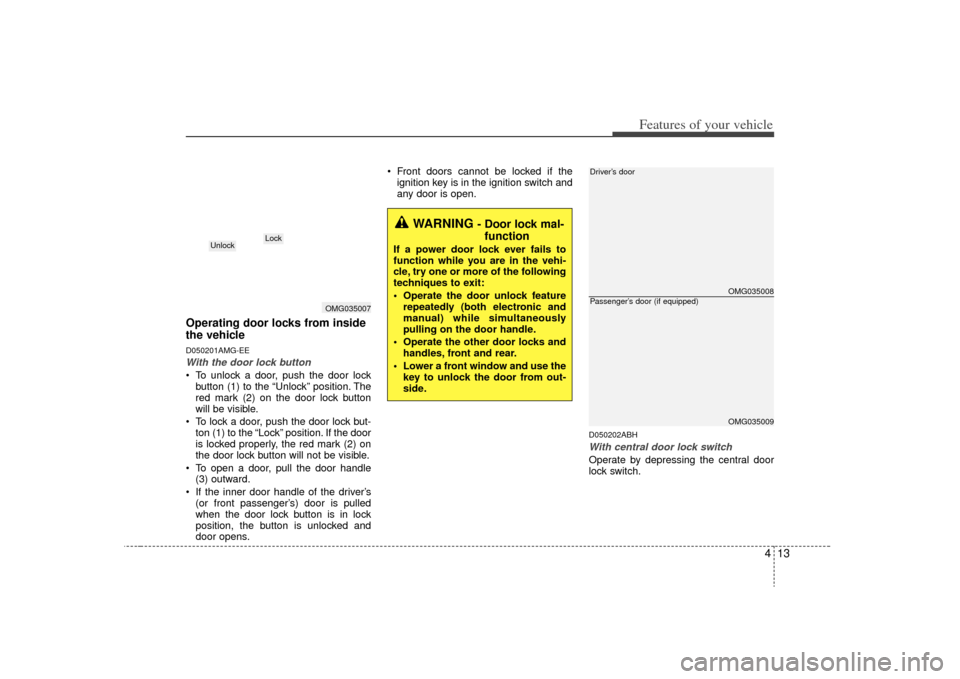
Operating door locks from inside
the vehicleD050201AMG-EEWith the door lock button To unlock a door, push the door lockbutton (1) to the “Unlock” position. The
red mark (2) on the door lock button
will be visible.
To lock a door, push the door lock but- ton (1) to the “Lock” position. If the door
is locked properly, the red mark (2) on
the door lock button will not be visible.
To open a door, pull the door handle (3) outward.
If the inner door handle of the driver’s (or front passenger’s) door is pulled
when the door lock button is in lock
position, the button is unlocked and
door opens. Front doors cannot be locked if the
ignition key is in the ignition switch and
any door is open.
D050202ABHWith central door lock switchOperate by depressing the central door
lock switch.
WARNING
- Door lock mal-function
If a power door lock ever fails to
function while you are in the vehi-
cle, try one or more of the following
techniques to exit:
Operate the door unlock feature
repeatedly (both electronic and
manual) while simultaneously
pulling on the door handle.
Operate the other door locks and handles, front and rear.
Lower a front window and use the key to unlock the door from out-
side.
OMG035007
Lock
Unlock
OMG035008OMG035009
Driver’s doorPassenger’s door (if equipped)
Page 80 of 326
Features of your vehicle14
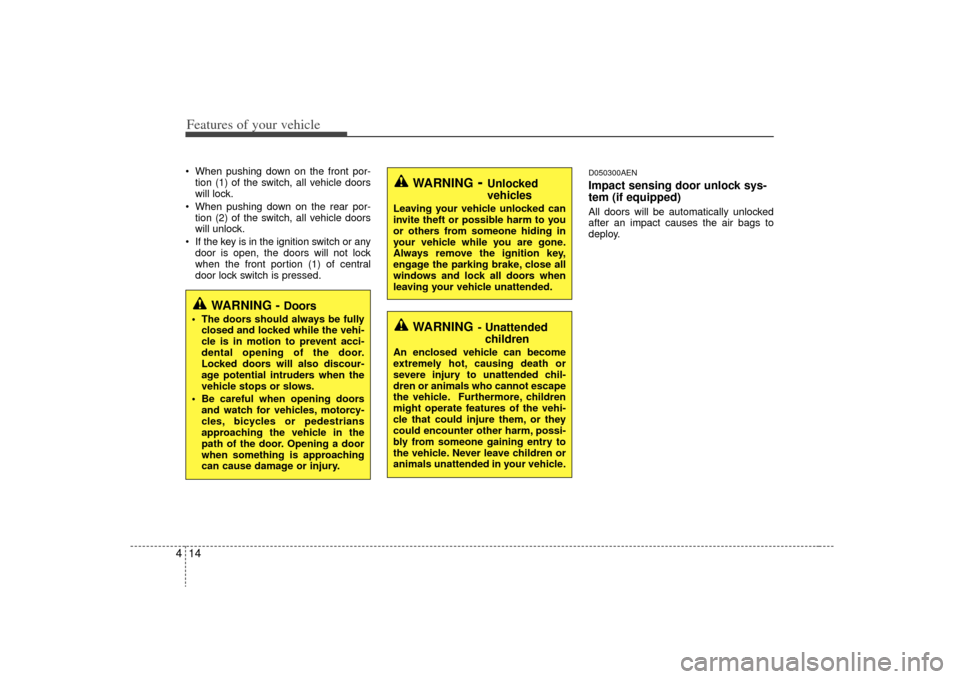
4 When pushing down on the front por-
tion (1) of the switch, all vehicle doors
will lock.
When pushing down on the rear por- tion (2) of the switch, all vehicle doors
will unlock.
If the key is in the ignition switch or any door is open, the doors will not lock
when the front portion (1) of central
door lock switch is pressed.
D050300AENImpact sensing door unlock sys-
tem (if equipped)All doors will be automatically unlocked
after an impact causes the air bags to
deploy.
WARNING
- Unlocked
vehicles
Leaving your vehicle unlocked can
invite theft or possible harm to you
or others from someone hiding in
your vehicle while you are gone.
Always remove the ignition key,
engage the parking brake, close all
windows and lock all doors when
leaving your vehicle unattended.
WARNING
- Unattendedchildren
An enclosed vehicle can become
extremely hot, causing death or
severe injury to unattended chil-
dren or animals who cannot escape
the vehicle. Furthermore, children
might operate features of the vehi-
cle that could injure them, or they
could encounter other harm, possi-
bly from someone gaining entry to
the vehicle. Never leave children or
animals unattended in your vehicle.
WARNING -
Doors
The doors should always be fully
closed and locked while the vehi-
cle is in motion to prevent acci-
dental opening of the door.
Locked doors will also discour-
age potential intruders when the
vehicle stops or slows.
Be careful when opening doors and watch for vehicles, motorcy-
cles, bicycles or pedestrians
approaching the vehicle in the
path of the door. Opening a door
when something is approaching
can cause damage or injury.
Page 85 of 326
419
Features of your vehicle
D080100ABHPower windowsThe ignition switch must be in the ON
position for power windows to operate.
Each door has a power window switch
that controls the door's window. The driv-
er has a power window lock switch which
can block the operation of passenger
windows. The power windows can be
operated for approximately 30 seconds
after the ignition key is removed or turned
to the ACC or LOCK position. However, if
the front doors are opened, the power
windows cannot be operated within the
30 second period after ignition key
removal.✽ ✽NOTICEWhile driving with the rear windows
down or with the sunroof (if equipped)
in an open (or partially open position),
your vehicle may demonstrate a wind
buffeting or pulsation noise. This
noise is a normal occurrence and can be
reduced or eliminated by taking the fol-
lowing actions. If the noise occurs with
one or both of the rear windows down,
partially lower both front windows
approximately one inch. If you expe-
rience the noise with the sunroof open,
slightly reduce the size of the sunroof
opening.
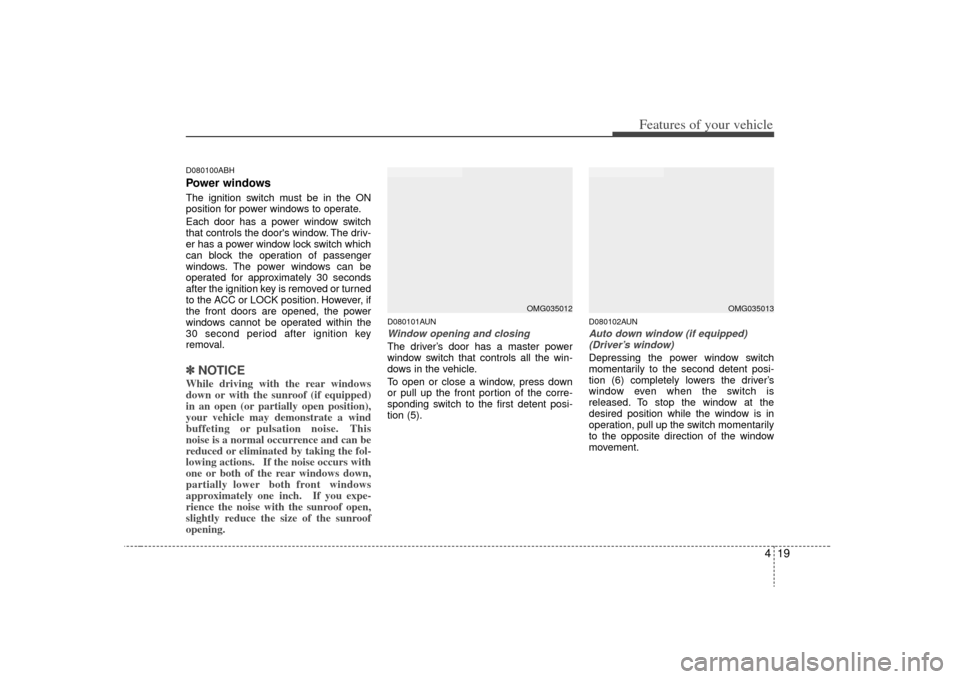
D080101AUNWindow opening and closingThe driver’s door has a master power
window switch that controls all the win-
dows in the vehicle.
To open or close a window, press down
or pull up the front portion of the corre-
sponding switch to the first detent posi-
tion (5).
D080102AUNAuto down window (if equipped)
(Driver’s window)Depressing the power window switch
momentarily to the second detent posi-
tion (6) completely lowers the driver’s
window even when the switch is
released. To stop the window at the
desired position while the window is in
operation, pull up the switch momentarily
to the opposite direction of the window
movement.
OMG035012
OMG035013
Page 86 of 326
Features of your vehicle20
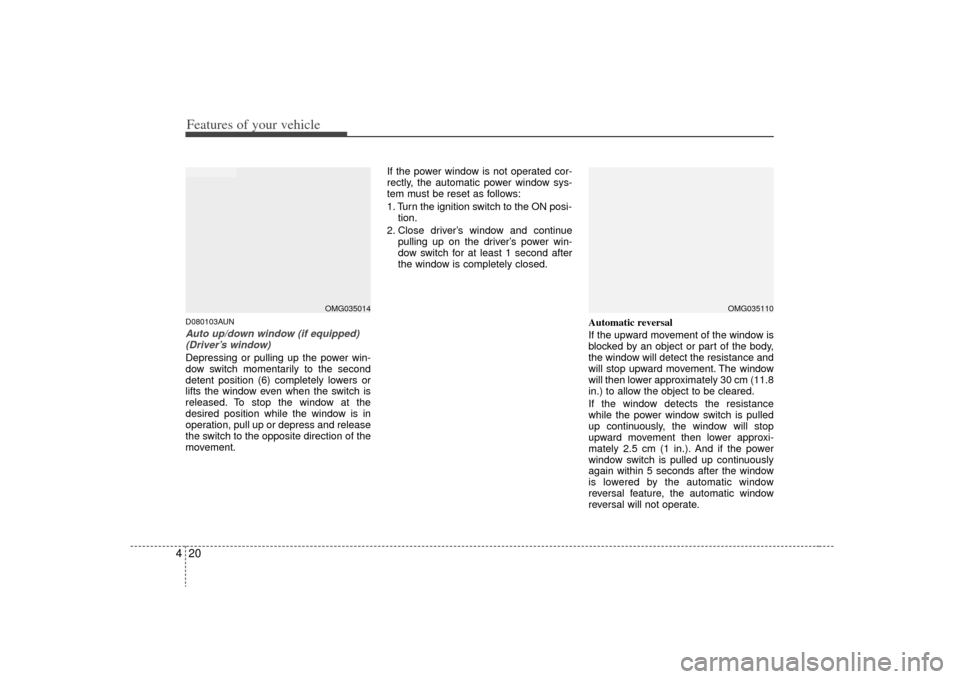
4D080103AUNAuto up/down window (if equipped)
(Driver’s window)Depressing or pulling up the power win-
dow switch momentarily to the second
detent position (6) completely lowers or
lifts the window even when the switch is
released. To stop the window at the
desired position while the window is in
operation, pull up or depress and release
the switch to the opposite direction of the
movement. If the power window is not operated cor-
rectly, the automatic power window sys-
tem must be reset as follows:
1. Turn the ignition switch to the ON posi-
tion.
2. Close driver’s window and continue pulling up on the driver’s power win-
dow switch for at least 1 second after
the window is completely closed.
Automatic reversal
If the upward movement of the window is
blocked by an object or part of the body,
the window will detect the resistance and
will stop upward movement. The window
will then lower approximately 30 cm (11.8
in.) to allow the object to be cleared.
If the window detects the resistance
while the power window switch is pulled
up continuously, the window will stop
upward movement then lower approxi-
mately 2.5 cm (1 in.). And if the power
window switch is pulled up continuously
again within 5 seconds after the window
is lowered by the automatic window
reversal feature, the automatic window
reversal will not operate.
OMG035110
OMG035014
Page 88 of 326
Features of your vehicle22
4
WARNING -
Windows
NEVER leave the ignition key in
the vehicle.
NEVER leave any child unattend- ed in the vehicle. Even very
young children may inadvertently
cause the vehicle to move, entan-
gle themselves in the windows,
or otherwise injure themselves or
others.
Always double check to make sure all arms, hands, head and
other obstructions are safely out
of the way before closing a win-
dow.
Do not allow children to play with the power windows. Keep the dri-
ver’s door power window lock
switch in the LOCK position
(depressed). Serious injury can
result from unintentional window
operation by the child.
Do not extend a face or arms out- side through the window opening
while driving.
CAUTION
To prevent possible damage to the power window system, do notopen or close two windows ormore at the same time. This will also ensure the longevity of thefuse.
Never try to operate the main switch on the driver's door andthe individual door window switch in opposing directions atthe same time. If this is done, thewindow will stop and cannot beopened or closed.
Page 93 of 326

427
Features of your vehicle
D110000AUNIf your vehicle is equipped with this fea-
ture, you can slide or tilt your sunroof
with the sunroof control buttons located
on the overhead console.
1. Slide button
2. Tilt button
3. Close button
The sunroof can only be opened, closed,
or tilted when the ignition switch is in the
ON position.
✽ ✽NOTICE• In cold and wet climates, sunroof may
not work properly due to freezing
conditions.
• After washing the car or after there is rain, be sure to wipe off any water
that is on the sunroof before operating
it.✽ ✽ NOTICEThe sunroof cannot slide when it is in
the tilt position nor can it be tilted while
in an open or slide position.
D110100AMGSliding the sunroof To open the sunroof (autoslide feature),
press the slide button ( ) on the over-
head console for more than 0.5 second.
The sunroof will slide all the way open. To
stop the sunroof sliding at any point,
press any sunroof control button.
To close the sunroof (autoslide feature),
press the close button ( ) on the over-
head console for more than 0.5 second.
The sunroof will slide all the way close.
To stop the sunroof sliding at any point,
press any sunroof control button.
SUNROOF (IF EQUIPPED)
OMG035092
CAUTION
Do not continue to press the sun-
roof control button(s) after the sun-roof is in the fully open, closed, ortilt position(s). Damage to the motoror system components could occur.
WARNING
Never adjust the sunshade while
driving. This could result in loss of
control and an accident that may
cause death, serious injury, or
property damage.
OMG037093OMG037218
Page 95 of 326
429
Features of your vehicle
D110300ANFSunshade The sunshade will automatically open
with the glass panel when the glass
panel moves. Close it manually if you
want it closed.
D110500BMGResetting the sunroofWhenever the vehicle battery is discon-
nected or discharged, you have to reset
your sunroof system as follows:
1. Turn the ignition switch to the ON posi-tion and close the sunroof completely.
2. Release the close button.
3. Press and hold the close button until the sunroof has returned to the original
position of tilt after it is raised a little
higher than the maximum tilt position.
Then, release the button.
4. Press and hold the close button until the sunroof is operated as follows;
TILT DOWN →SLIDE OPEN →
SLIDE CLOSE
Then, release the button. When this is complete, the sunroof sys-
tem is reset.
OMG037093
CAUTION
If the sunroof is not reset when the
vehicle battery is disconnected ordischarged, or corresponding fuse is blown, the sunroof may operateimproperly.
Page 99 of 326

433
Features of your vehicle
To operate the electric rearview mirror
Press the ON/OFF button (1) to turnthe automatic dimming function on.
The mirror indicator light will illuminate.
Press the ON/OFF button to turn the
automatic dimming function off. The
mirror indicator light will turn off.
The mirror defaults to the ON position whenever the ignition switch is turned
on.
D140105AEN-ECElectric chromic mirror (ECM) withHomeLink
®system and compass
(if equipped)
Your vehicle may be equipped with a
Gentex Automatic-Dimming Mirror with a
Z-Nav™ Electronic Compass Display
and an Integrated HomeLink
®Wireless
Control System. During nighttime driving,
this feature will automatically detect and
reduce rearview mirror glare while the
compass indicates the direction the vehi-
cle is pointed. The HomeLink®Universal
Transceiver allows you to activate your
garage door(s), electric gate, home light-
ing, etc. (1) Channel 1 button
(2) Channel 2 button
(3) Status indicator LED
(4) Channel 3 button
(5) Rear light sensor
(6) Dimming ON/OFF button
(7) Compass control button
(8) Compass display (if equipped)
B520C01MG
OMG035073
Page 100 of 326

Features of your vehicle34
4Automatic-Dimming Night Vision
Safety™ (NVS
®) Mirror
The NVS
®Mirror in your vehicle is the
most advanced way to reduce annoying
glare in the rearview mirror during any
driving situation. For more information
regarding NVS
®mirrors and other appli-
cations, please refer to the Gentex web-
site:
www.gentex.com Automatic-dimming function
Your mirror will automatically dim upon
detecting glare from the vehicles travel-
ing behind you. The auto-dimming func-
tion can be controlled by the Dimming
ON/OFF Button:
1. Pressing the button turns the auto-
dimming function OFF which is indicat-
ed by the green Status Indicator LED
turning off.
2. Pressing the button again turns the auto-dimming function ON which is
indicated by the green Status Indicator
LED turning on.
✽ ✽NOTICEThe mirror defaults to the ON position
each time the vehicle is started.
Z-Nav™ Compass Display
The NVS™ Mirror in your vehicle is also
equipped with a Z-Nav™ Compass that
shows the vehicle Compass heading in
the Display Window using the 8 basic
cardinal headings (N, NE, E, SE, etc.).
Compass function
The Compass can be turned ON and
OFF and will remember the last state
when the ignition is cycled. To turn the
display feature ON/OFF:
1. Press and release the button to
turn the display feature OFF.
2. Press and release the button again to turn the display back ON.
Additional options can be set with press
and hold sequences of the button and
are detailed below.
There is a difference between magnetic
north and true north. The compass in the
mirror can compensate for this difference
when it knows the Magnetic Zone in
which it is operating. This is set either by
the dealer or by the user. The operating
Zone Numbers for North America are
shown in the figure on the following sec-
tion.
CAUTION
The NVS
®
Mirror automatically
reduces glare during driving condi- tions based upon light levels moni- tored in front of the vehicle andfrom the rear of the vehicle. Theselight sensors are visible through openings in the front and rear of themirror case. Any object thatobstructs either light sensor will degrade the automatic dimmingcontrol feature.
Page 109 of 326
443
Features of your vehicle
D150100AUNInstrument panel illumination
(if equipped)When the vehicle’s parking lights or
headlights are on, rotate the illumination
control knob to adjust the instrument
panel illumination intensity.
GaugesD150201AUN-ECSpeedometer The speedometer indicates the forward
speed of the vehicle.
The speedometer is calibrated in kilome-
ters per hour and miles per hour.
D150202AFDTachometer The tachometer indicates the approxi-
mate number of engine revolutions per
minute (rpm).
Use the tachometer to select the correct
shift points and to prevent lugging and/or
over-revving the engine.
The tachometer pointer may move slight-
ly when the ignition switch is in ACC or
ON position with the engine OFF. This
movement is normal and will not affect
the accuracy of the tachometer once the
engine is running.
OMG049042
OMG049043C
OMG049044
CAUTION
Do not operate the engine within thetachometer's RED ZONE.
This may cause severe engine damage.