audio KIA Optima 2010 3.G User Guide
[x] Cancel search | Manufacturer: KIA, Model Year: 2010, Model line: Optima, Model: KIA Optima 2010 3.GPages: 336, PDF Size: 6.46 MB
Page 172 of 336
Features of your vehicle
106
4
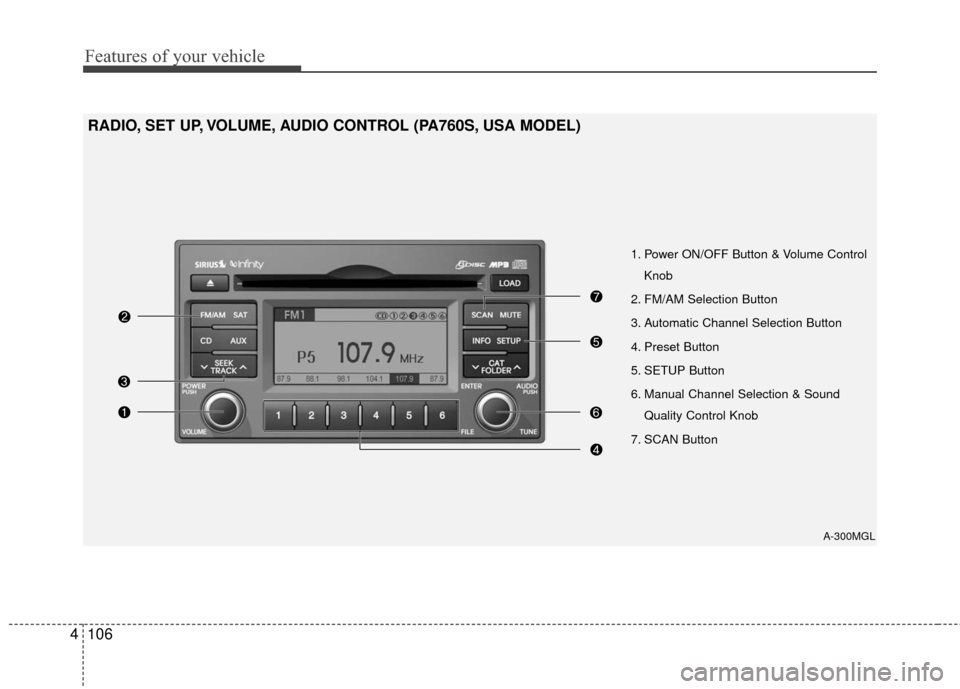
1. Power ON/OFF Button & Volume Control
Knob
2. FM/AM Selection Button
3. Automatic Channel Selection Button
4. Preset Button
5. SETUP Button
6. Manual Channel Selection & Sound Quality Control Knob
7. SCAN Button
RADIO, SET UP, VOLUME, AUDIO CONTROL (PA760S, USA MODEL)
A-300MGL
Page 173 of 336

4107
Features of your vehicle
1. Power ON/OFF Button &Volume Control Knob
Turns the set on/off when the IGNITION
SWITH is on ACC or ON. If the button is
turned to the right, it increases the vol-
ume and left,decreases the volume.
2. FM/AM Selection Button
Turns to FM or AM mode, and toggles in
the order of FM1
➟ FM2 ➟ AM ➟ FM1...
when the button is pressed each time.
3. Automatic Channel Selection Button
] button is pressed,
it increases the band frequency to auto-
matically select a channel. Stops at the
previous frequency if no channel is
found.
] button is press- ed, it reduces the band frequency to
automatically select a channel. Stops at
the previous frequency if no channel is
found.
4. Preset Button
Push [1]~[6] buttons less than 0.8 sec-
ond to play the channel saved in each
button. Push Preset button for 0.8 sec-
ond or longer to save current channel to
the respective button with a beep.
5. SETUP Button
USA MODEL (PA710S ONLY)
Press this button to turn to the SIRIUS,
TEXT SCROLL and SDVC adjustment
mode. If no action is taken for 5 seconds
after pressing the button, it will return to
the play mode. (After entering SETUP
mode, move between items using the
left, right and PUSH functions of the
[TUNE] button.)
The setup item changes from TEXT
SCROLL
↔ SDVC ↔ SAT ↔ RETURN...
USA MODEL
Press this button to turn to the TEXT
SCROLL and SDVC adjustment mode. If
no action is taken for 5 seconds after
pressing the button, it will return to the
play mode.(After entering SETUP mode,
move between items using the left, right
and PUSH functions of the [TUNE] but-
ton.)
The setup item changes from TEXT
SCROLL
↔ SDVC↔ RETURN...
6. Manual Channel Selection & Sound Quality Control Knob
Turn this control while listening to a radio
channel to manually adjust frequency.
Turn clockwise to increase frequency and
counterclockwise to reduce frequency.
Pressing the button changes the BASS,
MIDDLE, TREBLE, FADER and BAL-
ANCE TUNE mode. The mode selected
is shown on the display. After selecting
each mode, rotate the Audio control knob
clockwise or counterclockwise.
BASS Control
To increase the BASS, rotate the knob
clockwise, while to decrease the BASS,
rotate the knob counterclockwise.
MIDDLE Control
To increase the MIDDLE, rotate the knob
clockwise, while to decrease the MID-
DLE, rotate the knob counterclockwise.
TREBLE Control
To increase the TREBLE, rotate the knob
clockwise, while to decrease the TRE-
BLE, rotate the knob counterclockwise.
Page 179 of 336

4113
Features of your vehicle
CAUTION IN USING
USB DEVICE
To use an external USB device,
make sure the device is notmounted when starting up thevehicle and mount the deviceafter starting up.
If you start the vehicle when the USB device is mounted, it maydamage the USB device. (USB isnot ESA)
If the vehicle is started up or turned off while the external USBdevice is connected, the external USB device may not work.
It may not play inauthentic MP3 or WMA files.
1) It can only play MP3 files with the compression rate between8Kbps~320Kbps.
2) It can only play WMA music files with the compression ratebetween 8Kbps~320Kbps.
Take cautions for static electricity when mounting or dismountingthe external USB device.
An encoded MP3 PLAYER is not recognizable.
(Continued)
(Continued) Depending on the condition of the external USB device, the con-nected external USB device canbe unrecognizable.
When the formatted byte/sector setting of External USB devices isnot either 512BYTE or 2048BYTE,then the device will not be recog-nized.
Use only a USB device formatted to FAT 12/16/32.
USB devices without USB IF authentication may not be recog-nizable.
Make sure the USB connection terminal does not come in contactwith a human body or any object.
If you repeat mounting or dis- mounting USB device in a shortperiod of time, it may break the device.
You might hear a strange noise when mounting or dismounting aUSB device.
(Continued)(Continued) If you dismount the external USB device during playback in USBmode, the external USB device canbe damaged or malfunction. Therefore, mount the external USBdevice when the engine is turned off or in another mode.
Depending on the type and capac- ity of the external USB device orthe type of the files stored in thedevice, there is a difference in thetime taken for recognition of the device, but this is not an indicatorof trouble and you only have to wait.
Do not use the USB device for other purposes than playing music files.
Use of USB accessories such as recharger or heater using USB I/Fmay lower performance or causetrouble.
If you use devices such as a USB hub you purchased separately,the vehicle’s audio system may not recognize the USB device.Connect the USB device directlyto the multimedia terminal of the vehicle.
(Continued)
Page 180 of 336
Features of your vehicle
114
4
(Continued)
If USB device is divided by logical drives, only the music files on thehighest-priority drive are recog-nized by car audio.
Devices such as MP3 Player/ Cellular phone/Digital camerathose are not recognizable bystandard USB I/F can be unrecog-nizable.
USB devices other than standard- ized goods (METAL COVER TYPEUSB) can be unrecognizable.
USB flash memory reader (such as CF, SD, microSD, etc.) or exter-nal-HDD type devices can be unrecognizable.
Music files protected by DRM (DIGITAL RIGHTS MANAGEMENT)are not recognizalbe.
The data in the USB memory may lost while using this AUDIO, It isrecommeded to back up impor-tant data on a personal.
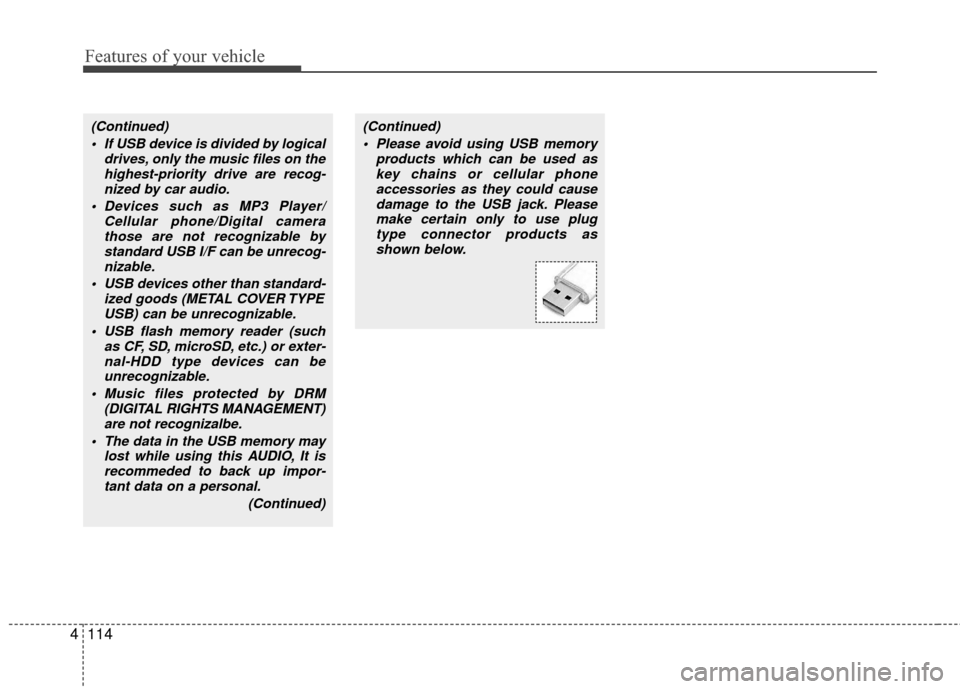
(Continued)(Continued) Please avoid using USB memory products which can be used askey chains or cellular phoneaccessories as they could causedamage to the USB jack. Pleasemake certain only to use plug type connector products asshown below.
Page 187 of 336
4121
Features of your vehicle
✽
✽NOTICE FOR USING iPod
DEVICE
• Some iPod models might not sup- port the communication protocol
and the files will not be played.
(iPod models supported: Mini, 4G,
Photo, Nano, 5G)
• The order of search or playback of songs in the iPod can be different
from the order searched in the
audio system.
• If the iPod crashes due to its own trouble, reset the iPod. (Reset:
Refer to iPod manual)
• An iPod may not operate normally on low battery.
CAUTION IN USING
iPod DEVICE
You need the power cable exclu-
sive for an iPod in order to oper-ate an iPod with the buttons onthe audio system. The PC cableprovided by Apple may cause amalfunction and do not use it forvehicle use.
When connecting the device with an iPod cable, push in the jackfully to not to interfere with com-munication.
When adjusting the sound effects of an iPod and the audio system,the sound effects of both deviceswill overlap and might reduce ordistort the quality of the sound.
Deactivate (turn off) the equalizer function of an iPod when adjust-ing the audio system’s volume,and turn off the equalizer of the audio system when using theequalizer of an iPod.
(Continued)
(Continued) When the iPod cable is connected, the system can be switched to theAUX mode even without the iPoddevice and can cause noise. Disconnect the iPod cable whenyou are not using the iPod device.
When the iPod is not used for the audio system, the iPod cable hasto be separate from iPod devies.Origin display of iPod may not bedisplayed.
Page 294 of 336
729
Maintenance
G190300AUN
Reset items
Items should be reset after the battery
has been discharged or the battery has
been disconnected.
Auto up/down window (See section 4)
Sunroof (See section 4)
Trip computer (See section 4)
Climate control system (See section 4)
Clock (See section 4)
Audio (See section 4)
(Continued)
Disconnect the battery charger in the following order.
1. Turn off the battery charger main switch.
2. Unhook the negative clamp from the negative battery terminal.
3. Unhook the positive clamp from the positive battery terminal.
Before performing maintenance or recharging the battery, turn off
all accessories and stop the
engine.
The negative battery cable must be removed first and installed
last when the battery is discon-
nected.
Page 310 of 336
745
Maintenance
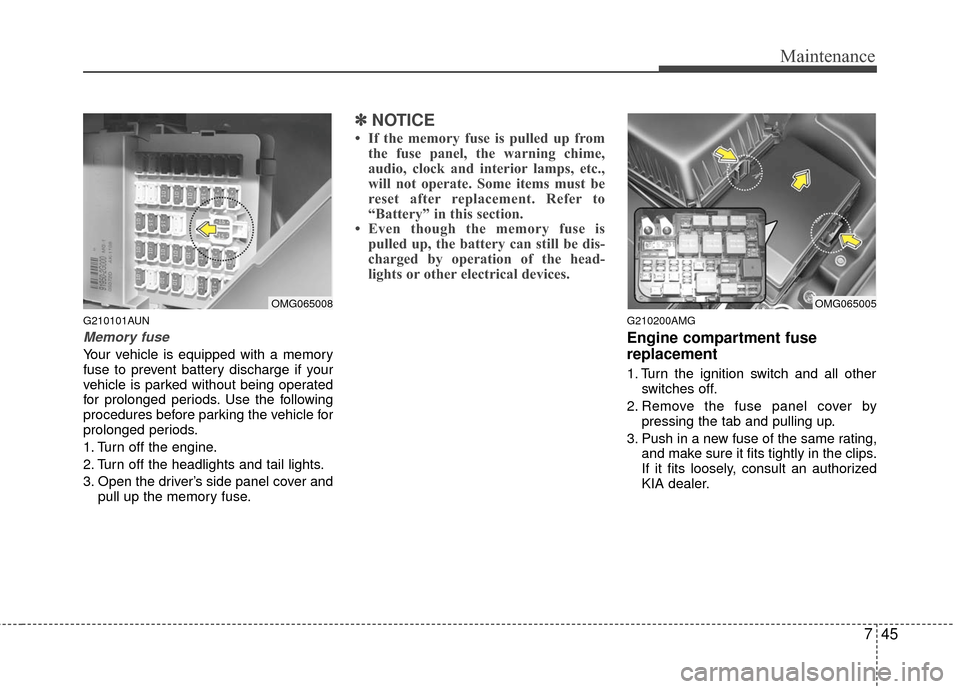
G210101AUN
Memory fuse
Your vehicle is equipped with a memory
fuse to prevent battery discharge if your
vehicle is parked without being operated
for prolonged periods. Use the following
procedures before parking the vehicle for
prolonged periods.
1. Turn off the engine.
2. Turn off the headlights and tail lights.
3. Open the driver’s side panel cover andpull up the memory fuse.
✽ ✽NOTICE
• If the memory fuse is pulled up from
the fuse panel, the warning chime,
audio, clock and interior lamps, etc.,
will not operate. Some items must be
reset after replacement. Refer to
“Battery” in this section.
• Even though the memory fuse is pulled up, the battery can still be dis-
charged by operation of the head-
lights or other electrical devices.
G210200AMG
Engine compartment fuse
replacement
1. Turn the ignition switch and all other
switches off.
2. Remove the fuse panel cover by pressing the tab and pulling up.
3. Push in a new fuse of the same rating, and make sure it fits tightly in the clips.
If it fits loosely, consult an authorized
KIA dealer.
OMG065008OMG065005
Page 313 of 336
Maintenance
48
7
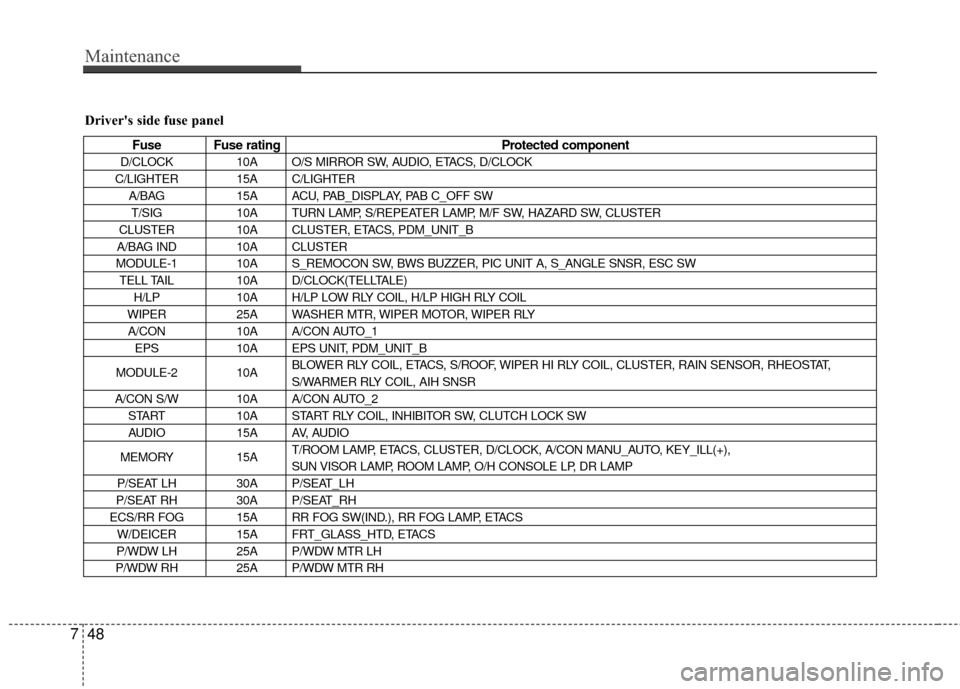
Driver's side fuse panel
Fuse Fuse rating Protected component
D/CLOCK10A O/S MIRROR SW, AUDIO, ETACS, D/CLOCK
C/LIGHTER 15A C/LIGHTER A/BAG 15A ACU, PAB_DISPLAY, PAB C_OFF SW
T/SIG 10A TURN LAMP, S/REPEATER LAMP, M/F SW, HAZARD SW, CLUSTER
CLUSTER 10A CLUSTER, ETACS, PDM_UNIT_B
A/BAG IND 10A CLUSTER
MODULE-1 10A S_REMOCON SW, BWS BUZZER, PIC UNIT A, S_ANGLE SNSR, ESC SW TELL TAIL 10A D/CLOCK(TELLTALE)
H/LP 10A H/LP LOW RLY COIL, H/LP HIGH RLY COIL
WIPER 25A WASHER MTR, WIPER MOTOR, WIPER RLY
A/CON 10A A/CON AUTO_1
EPS 10A EPS UNIT, PDM_UNIT_B
MODULE-2 10A BLOWER RLY COIL, ETACS, S/ROOF, WIPER HI RLY COIL, CLUSTER, RAIN SENSOR, RHEOSTAT,
S/WARMER RLY COIL, AIH SNSR
A/CON S/W 10A A/CON AUTO_2 START 10A START RLY COIL, INHIBITOR SW, CLUTCH LOCK SW
AUDIO 15A AV, AUDIO
MEMORY 15AT/ROOM LAMP, ETACS, CLUSTER, D/CLOCK, A/CON MANU_AUTO, KEY_ILL(+),
SUN VISOR LAMP, ROOM LAMP, O/H CONSOLE LP, DR LAMP
P/SEAT LH 30A P/SEAT_LH
P/SEAT RH 30A P/SEAT_RH
ECS/RR FOG 15A RR FOG SW(IND.), RR FOG LAMP, ETACS W/DEICER 15A FRT_GLASS_HTD, ETACS
P/WDW LH 25A P/WDW MTR LH
P/WDW RH 25A P/WDW MTR RH
Page 334 of 336

Index
2I
Air bag - supplemental restraint system ··················\
······3-34
Air cleaner ··················\
··················\
··················\
···············7-24
Appearance care··················\
··················\
··················\
·······7-52
Audio system ··················\
··················\
··················\
···········4-99
Automatic climate control system ··················\
···············4-82
Automatic transaxle ··················\
··················\
··················\
·5-14
Automatic transaxle fluid ··················\
··················\
··········7-21
Battery··················\
··················\
··················\
··················\
····7-27
Before driving ··················\
··················\
··················\
············5-3
Brake fluid ··················\
··················\
··················\
···············7-19
Brake system··················\
··················\
··················\
············5-20
Bulb wattage ··················\
··················\
··················\
··············8-2
Child restraint system ··················\
··················\
················3-26
Climate control air filter ··················\
··················\
············7-24
Cruise control system ··················\
··················\
················5-30
Defroster ··················\
··················\
··················\
··················\
4-71Dimensions ··················\
··················\
··················\
················8-2
Door locks··················\
··················\
··················\
················4-16
Economical operation ··················\
··················\
················5-34
Emergency starting ··················\
··················\
··················\
····6-4
Emission control system ··················\
··················\
············7-58
Engine compartment ··················\
··················\
············2-4, 7-2
Engine coolant ··················\
··················\
··················\
·········7-16
Engine number ··················\
··················\
··················\
···········8-7
Engine oil ··················\
··················\
··················\
·················7-15\
Engine START/STOP button ··················\
··················\
·······5-7
Explanation of scheduled maintenance items ···············7-12
Fuel filler lid ··················\
··················\
··················\
············4-28
Fuel requirements ··················\
··················\
··················\
······1-3
Fuses ··················\
··················\
··················\
··················\
······7-43
Hazard warning flasher ··················\
··················\
··············4-61
Hood··················\
··················\
··················\
··················\
·······4-27
How to use this manual ··················\
··················\
···············1-2
A
E
F
H
B
C
D