child lock KIA Optima 2010 3.G User Guide
[x] Cancel search | Manufacturer: KIA, Model Year: 2010, Model line: Optima, Model: KIA Optima 2010 3.GPages: 336, PDF Size: 6.46 MB
Page 87 of 336
421
Features of your vehicle
B540B04Y-AAT
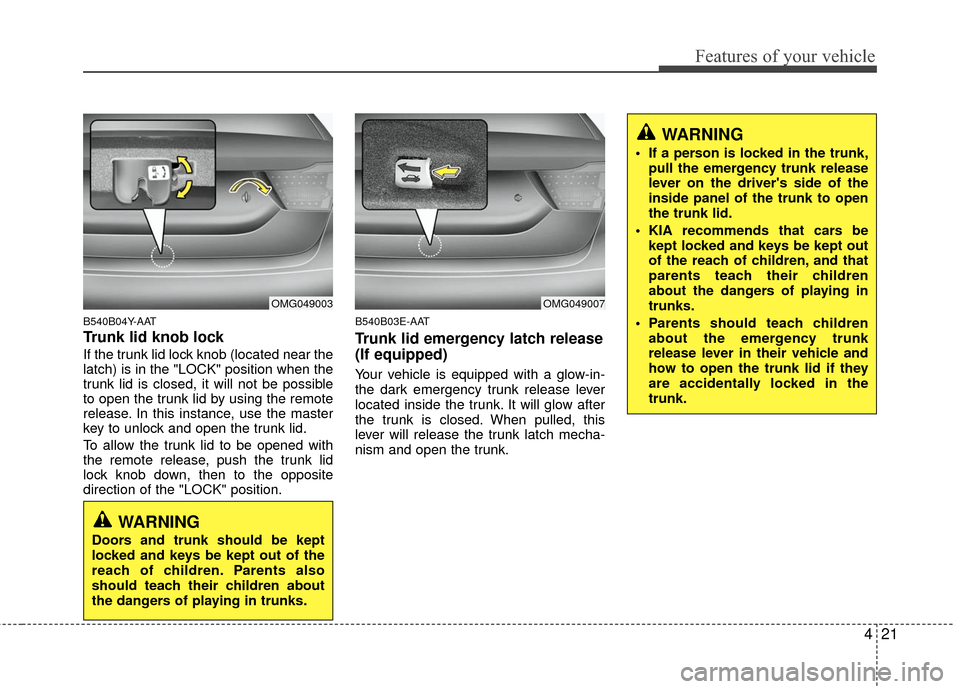
Trunk lid knob lock
If the trunk lid lock knob (located near the
latch) is in the "LOCK" position when the
trunk lid is closed, it will not be possible
to open the trunk lid by using the remote
release. In this instance, use the master
key to unlock and open the trunk lid.
To allow the trunk lid to be opened with
the remote release, push the trunk lid
lock knob down, then to the opposite
direction of the "LOCK" position.
B540B03E-AAT
Trunk lid emergency latch release
(If equipped)
Your vehicle is equipped with a glow-in-
the dark emergency trunk release lever
located inside the trunk. It will glow after
the trunk is closed. When pulled, this
lever will release the trunk latch mecha-
nism and open the trunk.
WARNING
Doors and trunk should be kept
locked and keys be kept out of the
reach of children. Parents also
should teach their children about
the dangers of playing in trunks.
WARNING
If a person is locked in the trunk,pull the emergency trunk release
lever on the driver's side of the
inside panel of the trunk to open
the trunk lid.
KIA recommends that cars be kept locked and keys be kept out
of the reach of children, and that
parents teach their children
about the dangers of playing in
trunks.
Parents should teach children about the emergency trunk
release lever in their vehicle and
how to open the trunk lid if they
are accidentally locked in the
trunk.
OMG049003OMG049007
Page 92 of 336
Features of your vehicle
26
4
WARNING - Windows
NEVER leave the ignition key in
the vehicle.
NEVER leave any child unattend- ed in the vehicle. Even very
young children may inadvertently
cause the vehicle to move, entan-
gle themselves in the windows,
or otherwise injure themselves or
others.
Always double check to make sure all arms, hands, head and
other obstructions are safely out
of the way before closing a win-
dow.
Do not allow children to play with the power windows. Keep the dri-
ver’s door power window lock
switch in the LOCK position
(depressed). Serious injury can
result from unintentional window
operation by the child.
Do not extend any head or arms outside through the window
opening while driving.
CAUTION
To prevent possible damage to the power window system, do notopen or close two windows ormore at the same time. This willalso ensure the longevity of the fuse.
Never try to operate the main switch on the driver's door andthe individual door windowswitch in opposing directions atthe same time. If this is done, thewindow will stop and cannot beopened or closed.
Page 178 of 336

Features of your vehicle
112
4
8. CD Indicator (CDP Only)
When the ignition switch is in ACC or ON
and if the CD is loaded, this indicator is
lighted. If the CD is ejected the light is
turned off.
9. FOLDER Moving Button
] button child folder
of the current folder and displays the
first song in the folder. Press TUNE/
ENTER knob to move to the folder dis-
played. It will play the first song in the
folder.
], [PTY ], [FOLDER ] button parent folder and displays
the first song in the folder. Press
TUNE/ENTER knob to move to the fold-
er displayed.
10. SEARCH Knob & ENTER Button
Turn this button clockwise to display the
songs next to the currently played song.
Turn the button counterclockwise to dis-
play the songs before the currently
played song. Press the button to skip and
play the selected song.
11. SCAN Play Button
Plays first 10 seconds of each song in
the DISC. To cancel the mode, press the
button once again.
12. AUX Selection Button
If the auxiliary device is connected, it
turns to AUX mode from the other mode
to play the sound from the auxiliary play-
er. If no auxiliary device is connected, it
displays "NO Media" for 3 seconds and
returns to the previous mode.
13. DISC Selection Button
] Change button
Changes disc to the previous disc.
] Change button Changes disc to the next disc.
14. CD LOAD Button
Push [LOAD] button to load CDs to avail-
able CDC deck (from 1~6). Push [LOAD]
button for more than 2 seconds to load
into all available decks. The last CD will
play. 10 seconds idle status will disable
loading process.
Page 195 of 336
53
Driving your vehicle
E020100AUN
Before entering vehicle
• Be sure that all windows, outside mir-ror(s), and outside lights are clean.
Check the condition of the tires.
Check under the vehicle for any sign of leaks.
Be sure there are no obstacles behind you if you intend to back up.
E020200AUN
Necessary inspections
Fluid levels, such as engine oil, engine
coolant, brake fluid, and washer fluid
should be checked on a regular basis,
with the exact interval depending on the
fluid. Further details are provided in sec-
tion 7, “Maintenance”.
E020300BUN
Before starting
Close and lock all doors.
Position the seat so that all controls areeasily reached.
Adjust the inside and outside rearview mirrors.
Be sure that all lights work.
Check all gauges.
Check the operation of warning lights when the ignition switch is turned to
the ON position.
Release the parking brake and make sure the brake warning light goes out.
For safe operation, be sure you are famil-
iar with your vehicle and its equipment.
BEFORE DRIVING
WARNING
All passengers must be properly
belted whenever the vehicle is mov-
ing. Refer to “Seat belts” in section
3 for more information on their
proper use.
WARNING
Always check the surrounding
areas near your vehicle for people,
especially children, before putting a
car into D (Drive) or R (Reverse).
WARNING- Driving under
the influence of alcohol or
drugs
Drinking and driving is dangerous.
Drunk driving is the number one
contributor to the highway death
toll each year. Even a small amount
of alcohol will affect your reflexes,
perceptions and judgment. Driving
while under the influence of drugs
is as dangerous or more dangerous
than driving drunk.
You are much more likely to have a
serious accident if you drink or
take drugs and drive.
If you are drinking or taking drugs,
don’t drive. Do not ride with a driv-
er who has been drinking or taking
drugs. Choose a designated driver
or call a cab.
Page 207 of 336

515
Driving your vehicle
For smooth operation, depress the brakepedal when shifting from N (Neutral) to aforward or reverse gear.
E060101AMG
Transaxle ranges
The indicator lights in the instrument
cluster displays the shift lever position
when the ignition switch is in the ON
position.
P (Park)
Always come to a complete stop before
shifting into P (Park). This position locks
the transaxle and prevents the front
wheels from rotating.
WARNING- Automatic transaxle
Always check the surrounding
areas near your vehicle for peo-
ple, especially children, before
putting a car into D (Drive) or R
(Reverse).
Before leaving the driver’s seat, always make sure the shift lever
is in the P (Park) position; then
set the parking brake fully and
shut the engine off. Unexpected
and sudden vehicle movement
can occur if these precautions
are not followed in the order iden-
tified.
CAUTION
To avoid damage to your transaxle, do not accelerate theengine in R (Reverse) or any for-ward gear position with thebrakes on.
When stopped on an upgrade, do not hold the vehicle stationarywith engine power. Use the serv-ice brake or the parking brake.
Do not shift from N (Neutral) or P (Park) into D (Drive), or R(Reverse) when the engine isabove idle speed.WARNING
Shifting into P (Park) while the vehicle is in motion will cause the
drive wheels to lock which will
cause you to lose control of the
vehicle.
Do not use the P (Park) position in place of the parking brake.
Always make sure the shift lever
is latched in the P (Park) position
and set the parking brake fully.
Before leaving the driver’s seat, always make sure the shift lever
is in the P (Park) position. Set the
parking brake fully, shut the
engine off and take the key with
you. Unexpected and sudden
vehicle movement can occur if
you do not follow these precau-
tions in the order specified.
Never leave a child unattended in a vehicle.
CAUTION
The transaxle may be damaged ifyou shift into P (Park) while the vehicle is in motion.
Page 334 of 336

Index
2I
Air bag - supplemental restraint system ··················\
······3-34
Air cleaner ··················\
··················\
··················\
···············7-24
Appearance care··················\
··················\
··················\
·······7-52
Audio system ··················\
··················\
··················\
···········4-99
Automatic climate control system ··················\
···············4-82
Automatic transaxle ··················\
··················\
··················\
·5-14
Automatic transaxle fluid ··················\
··················\
··········7-21
Battery··················\
··················\
··················\
··················\
····7-27
Before driving ··················\
··················\
··················\
············5-3
Brake fluid ··················\
··················\
··················\
···············7-19
Brake system··················\
··················\
··················\
············5-20
Bulb wattage ··················\
··················\
··················\
··············8-2
Child restraint system ··················\
··················\
················3-26
Climate control air filter ··················\
··················\
············7-24
Cruise control system ··················\
··················\
················5-30
Defroster ··················\
··················\
··················\
··················\
4-71Dimensions ··················\
··················\
··················\
················8-2
Door locks··················\
··················\
··················\
················4-16
Economical operation ··················\
··················\
················5-34
Emergency starting ··················\
··················\
··················\
····6-4
Emission control system ··················\
··················\
············7-58
Engine compartment ··················\
··················\
············2-4, 7-2
Engine coolant ··················\
··················\
··················\
·········7-16
Engine number ··················\
··················\
··················\
···········8-7
Engine oil ··················\
··················\
··················\
·················7-15\
Engine START/STOP button ··················\
··················\
·······5-7
Explanation of scheduled maintenance items ···············7-12
Fuel filler lid ··················\
··················\
··················\
············4-28
Fuel requirements ··················\
··················\
··················\
······1-3
Fuses ··················\
··················\
··················\
··················\
······7-43
Hazard warning flasher ··················\
··················\
··············4-61
Hood··················\
··················\
··················\
··················\
·······4-27
How to use this manual ··················\
··················\
···············1-2
A
E
F
H
B
C
D