instrument panel KIA Optima 2010 3.G User Guide
[x] Cancel search | Manufacturer: KIA, Model Year: 2010, Model line: Optima, Model: KIA Optima 2010 3.GPages: 336, PDF Size: 6.46 MB
Page 113 of 336

447
Features of your vehicle
D150100AUN
Instrument panel illumination
(if equipped)
When the vehicle’s parking lights or
headlights are on, rotate the illumination
control knob to adjust the brightness of
the instrument panel illumination.
Gauges
D150201AUN-EC
Speedometer
The speedometer indicates the forward
speed of the vehicle.
The speedometer is calibrated in kilome-
ters per hour and miles per hour.
D150202AFD
Tachometer
The tachometer indicates the approxi-
mate number of engine revolutions per
minute (rpm).
Use the tachometer to select the correct
shift points and to prevent lugging and/or
over-revving the engine.
The tachometer pointer may move slight-
ly when the ignition switch is in ACC or
ON position with the engine OFF. This
movement is normal and will not affect
the accuracy of the tachometer once the
engine is running.
OMG049042OMG049043COMG040044N
CAUTION
Do not operate the engine within thetachometer's RED ZONE.
This may cause severe engine damage.
Page 128 of 336

Features of your vehicle
62
4
D190100AMG-EU
Battery saver function
The purpose of this feature is to pre-
vent the battery from being dis-
charged. The system automatically
turns off the exterior lights when the
driver removes the ignition key and
opens the driver-side door.
With this feature, the parking lights will be turned off automatically if the driver
parks on the side of road at night.
If necessary, to keep the lights on
when the ignition key is removed, per-
form the following:
1) Open the driver-side door.
2) Turn the parking lights OFF and ON again using the light switch on the
steering column.
D190400AUN
Lighting control
The light switch has a Headlight and a
Parking light position.
To operate the lights, turn the knob at the
end of the control lever to one of the fol-
lowing positions:
(1) OFF position
(2) Parking light position
(3) Headlight position
(4) Auto light position (if equipped)
D190401AMG
Parking light position ( )
When the light switch is in the parking
light position (1st position), the tail,
license and instrument panel lights are
ON.
LIGHTING
OUN020220OUN020221
Page 129 of 336
463
Features of your vehicle
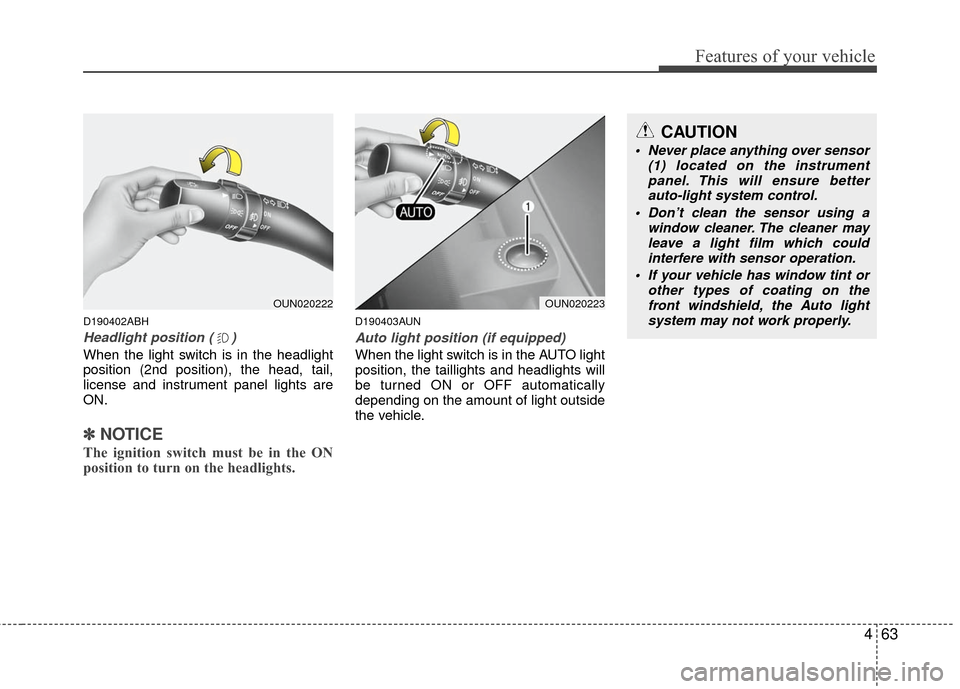
D190402ABH
Headlight position ( )
When the light switch is in the headlight
position (2nd position), the head, tail,
license and instrument panel lights are
ON.
✽ ✽NOTICE
The ignition switch must be in the ON
position to turn on the headlights.
D190403AUN
Auto light position (if equipped)
When the light switch is in the AUTO light
position, the taillights and headlights will
be turned ON or OFF automatically
depending on the amount of light outside
the vehicle.
CAUTION
Never place anything over sensor
(1) located on the instrumentpanel. This will ensure better auto-light system control.
Don’t clean the sensor using a window cleaner. The cleaner mayleave a light film which could interfere with sensor operation.
If your vehicle has window tint or other types of coating on thefront windshield, the Auto light system may not work properly.
OUN020223OUN020222
Page 142 of 336

Features of your vehicle
76
4
Instrument panel vents
The outlet port can be opened or closed
separately using the horizontal thumb-
wheel. To close the vent, rotate it to the
far left position. To open the vent, rotate it
right to the desired position.
Also, you can adjust the direction of air
delivery from these vents using the vent
control lever as shown.D230102AFD
Temperature control
The temperature control knob allows you
to control the temperature of the air flow-
ing from the ventilation system. To
change the air temperature in the pas-
senger compartment, turn the knob to
the right position for warm air or left posi-
tion for cooler air.
D230103AFD
Air intake control
This is used to select outside (fresh) air
position or recirculated air position.
To change the air intake control position,
push the control button.
OMG049075LOMG049077OMG049076
Page 149 of 336

483
Features of your vehicle
D240100ANF
Automatic heating and air condi-
tioning
The automatic climate control system is
controlled by simply setting the desired
temperature.
The Full Automatic Temperature Control
(FATC) system automatically controls the
heating and cooling system as follows;
1. Push the AUTO button. It is indicatedby AUTO on the display. The modes,
fan speeds, air intake and air-condi-
tioning will be controlled automatically
by temperature setting. 2. Push the temperature control button to
set the desired temperature.
If the temperature is set to the lowest
setting (Lo), the air conditioning sys-
tem will operate continuously.
3. To turn the automatic operation off, press any button except temperature
control button. If you press the mode
selection button, air-conditioning but-
ton, defrost button, air intake control
button or fan speed button, the select-
ed function will be controlled manually
while other functions operate automat-
ically.
Regardless of the temperature setting,
when using automatic operation, the air
conditioning system can automatically
turn on to decrease the humidity inside
the vehicle, even if the temperature is set
to warm.
✽ ✽ NOTICE
Never place anything over the sensor
located on the instrument panel to
ensure better control of the heating and
cooling system.
OMG045045OMG049081
Page 151 of 336
485
Features of your vehicle
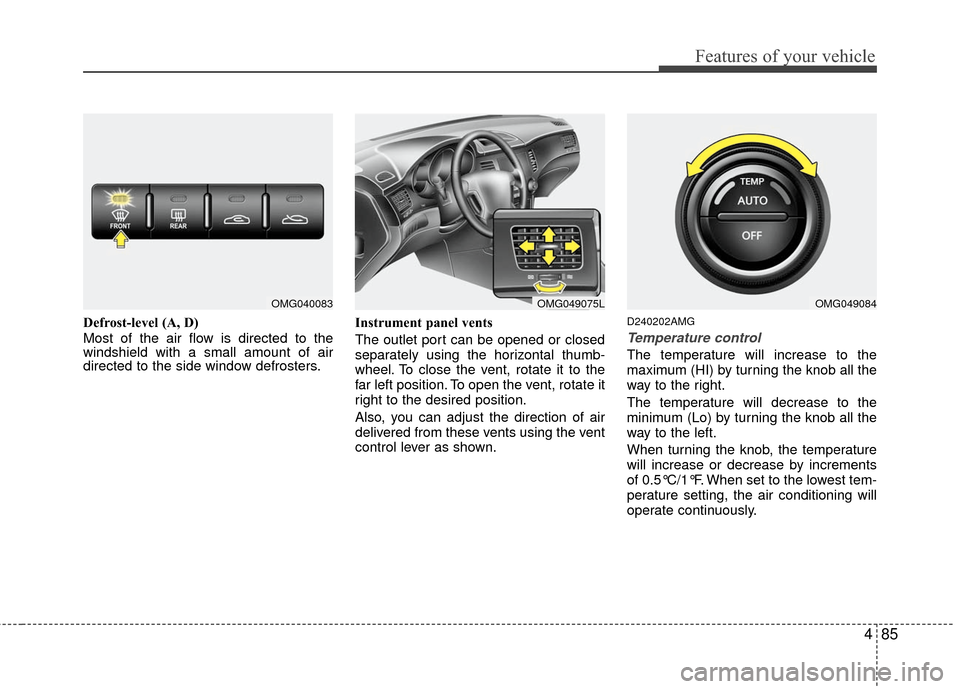
Defrost-level (A, D)
Most of the air flow is directed to the
windshield with a small amount of air
directed to the side window defrosters.Instrument panel vents
The outlet port can be opened or closed
separately using the horizontal thumb-
wheel. To close the vent, rotate it to the
far left position. To open the vent, rotate it
right to the desired position.
Also, you can adjust the direction of air
delivered from these vents using the vent
control lever as shown.D240202AMG
Temperature control
The temperature will increase to the
maximum (HI) by turning the knob all the
way to the right.
The temperature will decrease to the
minimum (Lo) by turning the knob all the
way to the left.
When turning the knob, the temperature
will increase or decrease by increments
of 0.5°C/1°F. When set to the lowest tem-
perature setting, the air conditioning will
operate continuously.
OMG049075LOMG049084OMG040083
Page 237 of 336

545
Driving your vehicle
E140400ASA
Driving with a trailer
Towing a trailer requires a certain
amount of experience. Before setting out
for the open road, you must get to know
your trailer. Acquaint yourself with the
feel of handling and braking with the
added weight of the trailer. And always
keep in mind that the vehicle you are
driving is now a good deal longer and not
nearly so responsive as your vehicle is
by itself.
Before you start, check the trailer hitch
and platform, safety chains, electrical
connector(s), lights, tires and mirror
adjustment. If the trailer has electric
brakes, start your vehicle and trailer mov-
ing and then apply the trailer brake con-
troller by hand to be sure the brakes are
working. This lets you check your electri-
cal connection at the same time.
During your trip, check occasionally to be
sure that the load is secure, and that the
lights and trailer brakes are still working.
E140401AUN
Following distance
Stay at least twice as far behind the vehi-
cle ahead as you would when driving
your vehicle without a trailer. This can
help you avoid situations that require
heavy braking and sudden turns.
E140402AUN
Passing
You’ll need more passing distance up
ahead when you’re towing a trailer. And,
because of the increased vehicle length,
you’ll need to go much farther beyond the
passed vehicle before you can return to
your lane.
E140403AUN
Backing up
Hold the bottom of the steering wheel
with one hand. Then, to move the trailer
to the left, just move your hand to the left.
To move the trailer to the right, move your
hand to the right. Always back up slowly
and, if possible, have someone guide
you.
E140404AUN
Making turns
When you’re turning with a trailer, make
wider turns than normal. Do this so your
trailer won’t strike soft shoulders, curbs,
road signs, trees, or other objects. Avoid
jerky or sudden maneuvers. Signal well
in advance.
E140405AUN
Turn signals when towing a trailer
When you tow a trailer, your vehicle has
to have a different turn signal flasher and
extra wiring. The green arrows on your
instrument panel will flash whenever you
signal a turn or lane change. Properly
connected, the trailer lights will also flash
to alert other drivers you’re about to turn,
change lanes, or stop.
When towing a trailer, the green arrows
on your instrument panel will flash for
turns even if the bulbs on the trailer are
burned out. Thus, you may think drivers
behind you are seeing your signals
when, in fact, they are not. It’s important
to check occasionally to be sure the trail-
er bulbs are still working. You must also
check the lights every time you discon-
nect and then reconnect the wires.
Do not connect a trailer lighting system
directly to your vehicle’s lighting system.
Use only an approved trailer wiring har-
ness.
Page 335 of 336

I3
Index
If the engine overheats··················\
··················\
·················6-6
If the engine will not start ··················\
··················\
···········6-3
If you have a flat tire ··················\
··················\
··················\
·6-7
In case of an emergency while driving ··················\
··········6-2
Indicator symbols on the instrument cluster ··················\
·1-6
Instrument cluster ··················\
··················\
··················\
····4-46
Instrument panel overview··················\
··················\
···········2-3
Interior features··················\
··················\
··················\
········4-94
Interior light ··················\
··················\
··················\
·············4-69
Interior overview··················\
··················\
··················\
········2-2
Key ··················\
··················\
··················\
··················\
···········5-4
Keys ··················\
··················\
··················\
··················\
·········4-3
Lighting··················\
··················\
··················\
··················\
··4-62
Maintenance services ··················\
··················\
··················\
·7-4
Manual climate control system··················\
··················\
··4-73
Manual transaxle··················\
··················\
··················\
······5-11Mirrors ··················\
··················\
··················\
··················\
···4-36
Normal maintenance schedule ··················\
··················\
·····7-8
Owner maintenance ··················\
··················\
··················\
···7-5
Parking brake ··················\
··················\
··················\
··········7-23
Power steering fluid ··················\
··················\
··················\
·7-20
Recommended lubricants and capacities ··················\
·······8-4
Remote keyless entry ··················\
··················\
·················4-11\
Road warning ··················\
··················\
··················\
·············6-2
Seat belts ··················\
··················\
··················\
··················\
3-15
Seats ··················\
··················\
··················\
··················\
·········3-2
Smart key ··················\
··················\
··················\
··················\
·4-7
Special driving conditions ··················\
··················\
·········5-36
K
L
M
I
N
O
P
R
S