warning KIA Optima 2011 3.G Manual PDF
[x] Cancel search | Manufacturer: KIA, Model Year: 2011, Model line: Optima, Model: KIA Optima 2011 3.GPages: 385, PDF Size: 8.85 MB
Page 98 of 385
Features of your vehicle
20
4
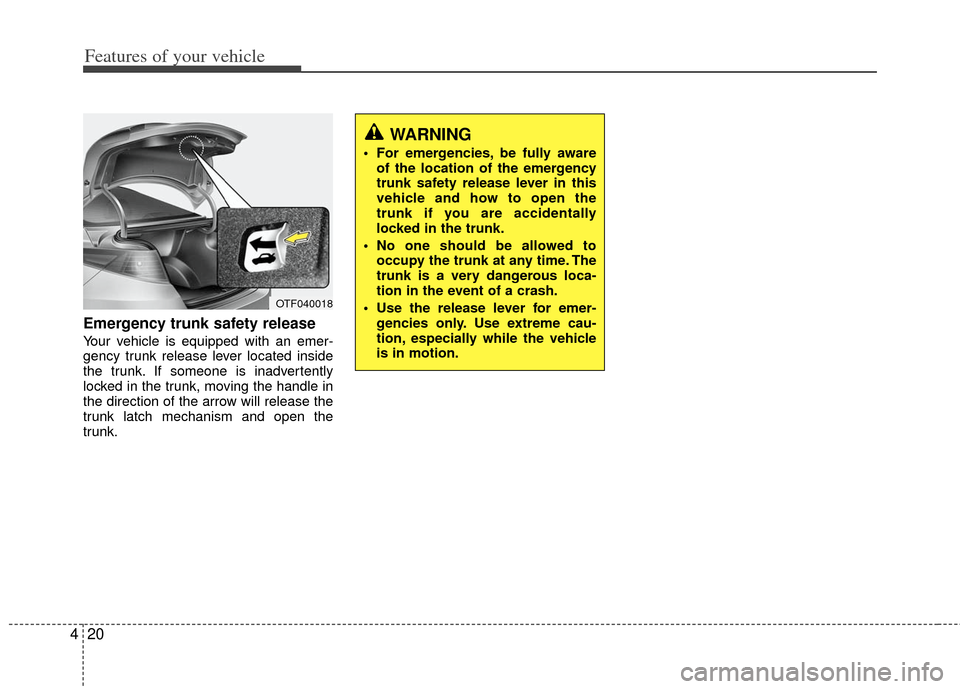
Emergency trunk safety release
Your vehicle is equipped with an emer-
gency trunk release lever located inside
the trunk. If someone is inadvertently
locked in the trunk, moving the handle in
the direction of the arrow will release the
trunk latch mechanism and open the
trunk.
WARNING
For emergencies, be fully aware
of the location of the emergency
trunk safety release lever in this
vehicle and how to open the
trunk if you are accidentally
locked in the trunk.
No one should be allowed to occupy the trunk at any time. The
trunk is a very dangerous loca-
tion in the event of a crash.
Use the release lever for emer- gencies only. Use extreme cau-
tion, especially while the vehicle
is in motion.
OTF040018
Page 101 of 385
423
Features of your vehicle
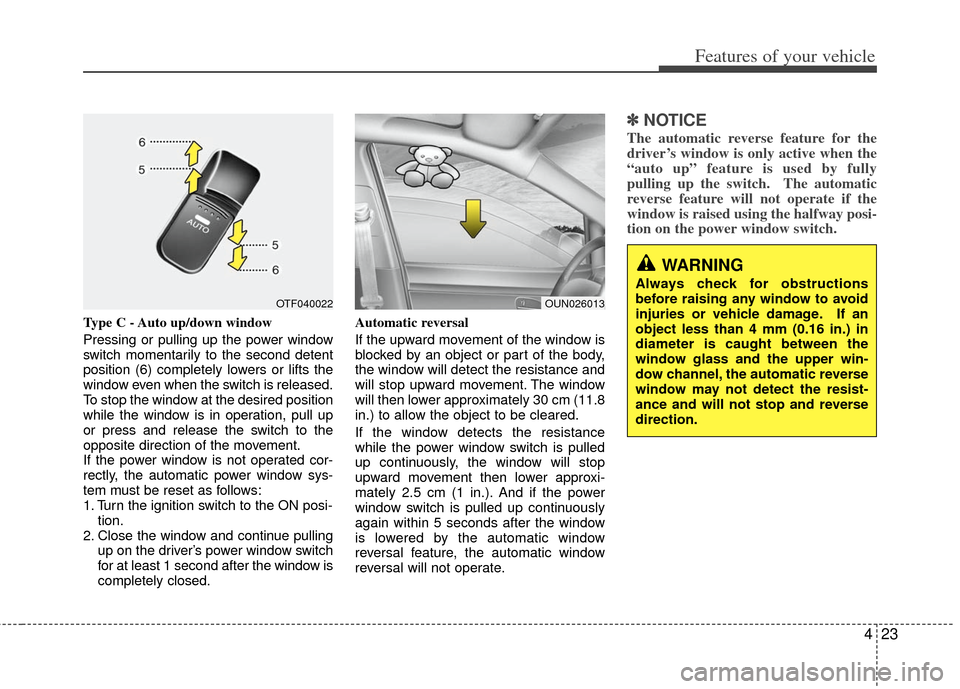
Type C - Auto up/down window
Pressing or pulling up the power window
switch momentarily to the second detent
position (6) completely lowers or lifts the
window even when the switch is released.
To stop the window at the desired position
while the window is in operation, pull up
or press and release the switch to the
opposite direction of the movement.
If the power window is not operated cor-
rectly, the automatic power window sys-
tem must be reset as follows:
1. Turn the ignition switch to the ON posi-tion.
2. Close the window and continue pulling up on the driver’s power window switch
for at least 1 second after the window is
completely closed. Automatic reversal
If the upward movement of the window is
blocked by an object or part of the body,
the window will detect the resistance and
will stop upward movement. The window
will then lower approximately 30 cm (11.8
in.) to allow the object to be cleared.
If the window detects the resistance
while the power window switch is pulled
up continuously, the window will stop
upward movement then lower approxi-
mately 2.5 cm (1 in.). And if the power
window switch is pulled up continuously
again within 5 seconds after the window
is lowered by the automatic window
reversal feature, the automatic window
reversal will not operate.
✽ ✽
NOTICE
The automatic reverse feature for the
driver’s window is only active when the
“auto up” feature is used by fully
pulling up the switch. The automatic
reverse feature will not operate if the
window is raised using the halfway posi-
tion on the power window switch.
OTF040022
WARNING
Always check for obstructions
before raising any window to avoid
injuries or vehicle damage. If an
object less than 4 mm (0.16 in.) in
diameter is caught between the
window glass and the upper win-
dow channel, the automatic reverse
window may not detect the resist-
ance and will not stop and reverse
direction.
OUN026013
Page 102 of 385
Features of your vehicle
24
4
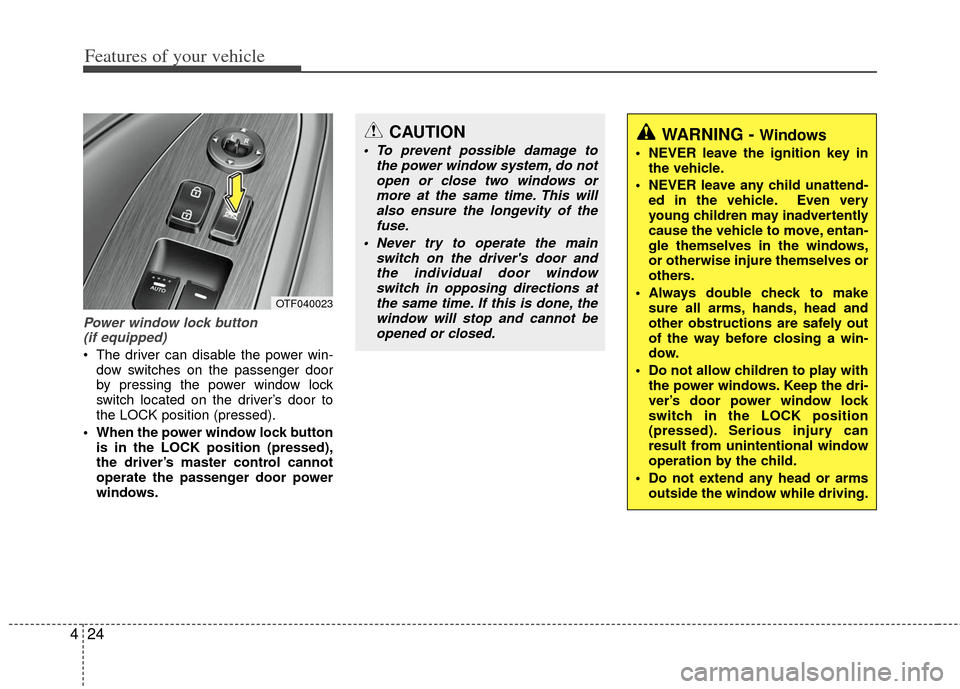
Power window lock button
(if equipped)
The driver can disable the power win-
dow switches on the passenger door
by pressing the power window lock
switch located on the driver’s door to
the LOCK position (pressed).
When the power window lock button is in the LOCK position (pressed),
the driver’s master control cannot
operate the passenger door power
windows.
OTF040023
CAUTION
To prevent possible damage to the power window system, do notopen or close two windows ormore at the same time. This willalso ensure the longevity of the fuse.
Never try to operate the main switch on the driver's door andthe individual door windowswitch in opposing directions atthe same time. If this is done, thewindow will stop and cannot beopened or closed.WARNING - Windows
NEVER leave the ignition key in the vehicle.
NEVER leave any child unattend- ed in the vehicle. Even very
young children may inadvertently
cause the vehicle to move, entan-
gle themselves in the windows,
or otherwise injure themselves or
others.
Always double check to make sure all arms, hands, head and
other obstructions are safely out
of the way before closing a win-
dow.
Do not allow children to play with the power windows. Keep the dri-
ver’s door power window lock
switch in the LOCK position
(pressed). Serious injury can
result from unintentional window
operation by the child.
Do not extend any head or arms outside the window while driving.
Page 103 of 385
425
Features of your vehicle
HOOD
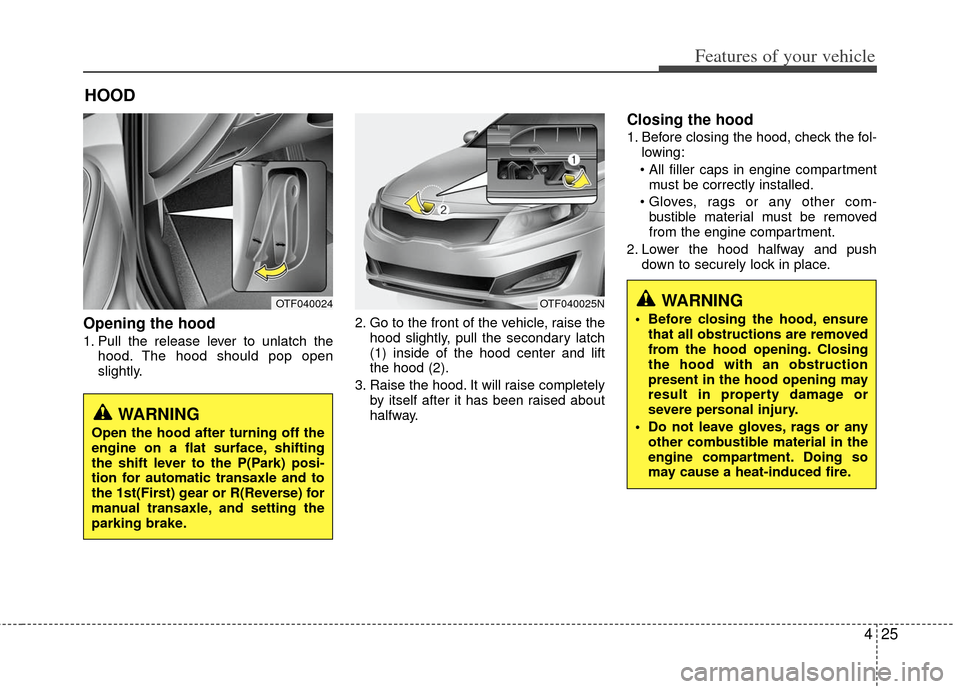
Opening the hood
1. Pull the release lever to unlatch thehood. The hood should pop open
slightly. 2. Go to the front of the vehicle, raise the
hood slightly, pull the secondary latch
(1) inside of the hood center and lift
the hood (2).
3. Raise the hood. It will raise completely by itself after it has been raised about
halfway.
Closing the hood
1. Before closing the hood, check the fol-lowing:
must be correctly installed.
bustible material must be removed
from the engine compartment.
2. Lower the hood halfway and push down to securely lock in place.
OTF040024OTF040025NWARNING
Before closing the hood, ensurethat all obstructions are removed
from the hood opening. Closing
the hood with an obstruction
present in the hood opening may
result in property damage or
severe personal injury.
Do not leave gloves, rags or any other combustible material in the
engine compartment. Doing so
may cause a heat-induced fire.
WARNING
Open the hood after turning off the
engine on a flat surface, shifting
the shift lever to the P(Park) posi-
tion for automatic transaxle and to
the 1st(First) gear or R(Reverse) for
manual transaxle, and setting the
parking brake.
Page 104 of 385
Features of your vehicle
26
4
WARNING
Always double check to be sure
that the hood is firmly latched
before driving away. If it is not
latched, the hood could fly open
while the vehicle is being driven,
causing a total loss of visibility,
which might result in an accident.
Do not move the vehicle with the hood raised. The view will be
blocked and the hood could fall
or be damaged.
Page 105 of 385
427
Features of your vehicle
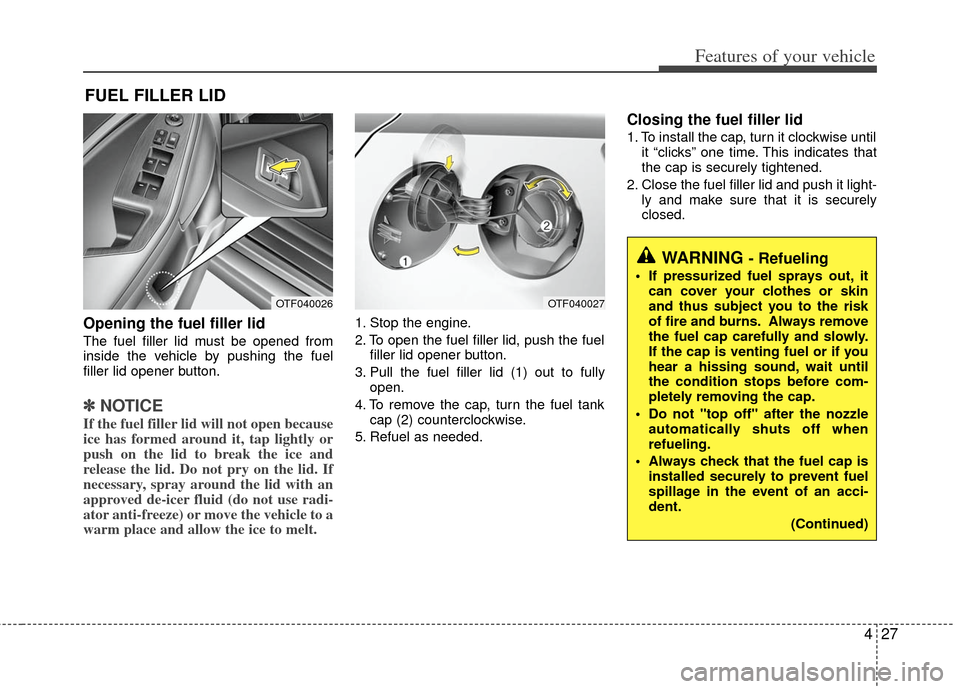
Opening the fuel filler lid
The fuel filler lid must be opened from
inside the vehicle by pushing the fuel
filler lid opener button.
✽ ✽NOTICE
If the fuel filler lid will not open because
ice has formed around it, tap lightly or
push on the lid to break the ice and
release the lid. Do not pry on the lid. If
necessary, spray around the lid with an
approved de-icer fluid (do not use radi-
ator anti-freeze) or move the vehicle to a
warm place and allow the ice to melt.
1. Stop the engine.
2. To open the fuel filler lid, push the fuel
filler lid opener button.
3. Pull the fuel filler lid (1) out to fully open.
4. To remove the cap, turn the fuel tank cap (2) counterclockwise.
5. Refuel as needed.
Closing the fuel filler lid
1. To install the cap, turn it clockwise until it “clicks” one time. This indicates that
the cap is securely tightened.
2. Close the fuel filler lid and push it light- ly and make sure that it is securely
closed.
FUEL FILLER LID
OTF040026OTF040027
WARNING - Refueling
If pressurized fuel sprays out, itcan cover your clothes or skin
and thus subject you to the risk
of fire and burns. Always remove
the fuel cap carefully and slowly.
If the cap is venting fuel or if you
hear a hissing sound, wait until
the condition stops before com-
pletely removing the cap.
Do not "top off" after the nozzle automatically shuts off when
refueling.
Always check that the fuel cap is installed securely to prevent fuel
spillage in the event of an acci-
dent.
(Continued)
Page 106 of 385
Features of your vehicle
28
4
(Continued)
Do not get back into a vehicle
once you have begun refueling
since you can generate static
electricity by touching, rubbing
or sliding against any item or fab-
ric (polyester, satin, nylon, etc.)
capable of producing static elec-
tricity. Static electricity discharge
can ignite fuel vapors resulting in
rapid burning. If you must re-
enter the vehicle, you should
once again eliminate potentially
dangerous static electricity dis-
charge by touching a metal part
of the vehicle, away from the fuel
filler neck, nozzle or other gaso-
line source.
When using an approved portable fuel container, be sure to
place the container on the
ground prior to refueling. Static
electricity discharge from the
container can ignite fuel vapors
causing a fire. Once refueling has
begun, contact with the vehicle
should be maintained until the
filling is complete.
(Continued)WARNING - Refueling dan-
gers
Automotive fuels are flammable
materials. When refueling, please
note the following guidelines care-
fully. Failure to follow these guide-
lines may result in severe personal
injury, severe burns or death by fire
or explosion.
Read and follow all warnings atthe gas station facility.
Before refueling note the location of the Emergency Gasoline Shut-
Off, if available, at the gas station
facility.
Before touching the fuel nozzle, you should eliminate potentially
dangerous static electricity dis-
charge by touching another metal
part of the vehicle, a safe dis-
tance away from the fuel filler
neck, nozzle, or other gas source.
(Continued)
(Continued)
Gasoline vapors are dangerous.Before refueling, always stop the
engine and never smoke or allow
sparks and open flames near the
filler area.
Never operate your vehicle with- out a filler cap properly installed,
flammable vapors and gasoline
could leak out in dangerous situ-
ations such as a collision or
rollover. If the filler cap must be
replaced, only use genuine KIA
replacement parts.
Tighten the cap until it clicks one time, otherwise the " "light will
illuminate.
Page 108 of 385

Features of your vehicle
30
4
If your vehicle is equipped with a sunroof,
you can slide or tilt your sunroof with the
sunroof control lever located on the over-
head console.
The sunroof can only be opened, closed,
or tilted when the ignition switch is in the
ON position.
✽ ✽
NOTICE
• In cold and wet climates, the sunroof
may not work properly due to freez-
ing conditions.
• After washing the car or after there is rain, be sure to wipe off any water
that is on the sunroof before operating
it.
✽ ✽ NOTICE
The sunroof cannot slide when it is in
the tilt position nor can it be tilted while
in an open or slide position.
PANORAMA SUNROOF (IF EQUIPPED)
OVG049031
CAUTION
Do not continue to move the sun-
roof control lever after the sunroofis in the fully open, closed, or tiltposition(s). Damage to the motor orsystem components could occur.
WARNING
Never adjust the sunroof or sun-
shade while driving. This could
result in loss of control and an acci-
dent that may cause death, serious
injury, or property damage.
Page 110 of 385
Features of your vehicle
32
4
Closing the sunroof
To close the sunroof glass only
Push the sunroof control lever forward to
the first detent position or pull the lever
downward.
To close the sunroof glass with the
sunshade
Push the sunroof control lever forward to
the second detent position. The sunroof
glass will close then the sunshade close
automatically.
To stop the sunroof movement at any
point, pull or push the sunroof control
lever momentarily.
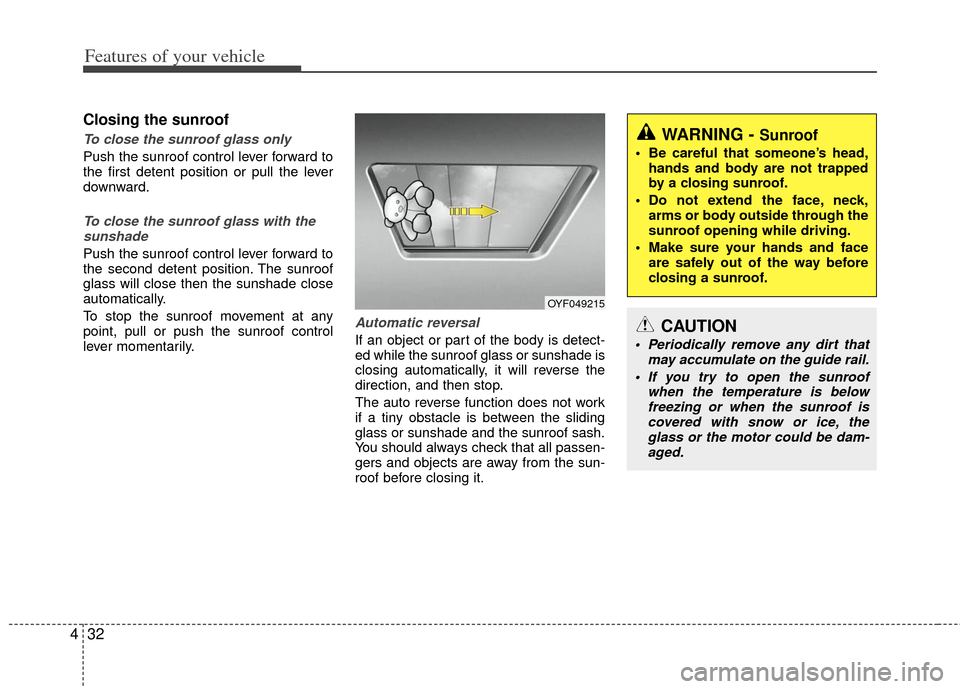
Automatic reversal
If an object or part of the body is detect-
ed while the sunroof glass or sunshade is
closing automatically, it will reverse the
direction, and then stop.
The auto reverse function does not work
if a tiny obstacle is between the sliding
glass or sunshade and the sunroof sash.
You should always check that all passen-
gers and objects are away from the sun-
roof before closing it.
OYF049215
WARNING - Sunroof
Be careful that someone’s head, hands and body are not trapped
by a closing sunroof.
Do not extend the face, neck, arms or body outside through the
sunroof opening while driving.
Make sure your hands and face are safely out of the way before
closing a sunroof.
CAUTION
Periodically remove any dirt that may accumulate on the guide rail.
If you try to open the sunroof when the temperature is belowfreezing or when the sunroof iscovered with snow or ice, theglass or the motor could be dam- aged.
Page 112 of 385
Features of your vehicle
34
4
A driver position memory system is pro-
vided to store and recall the driver seat
position with a simple button operation.
By saving the desired position into the
system memory, different drivers can
reposition the driver seat based upon
their driving preference. If the battery is
disconnected, the position memory will
be lost and the driving position should be
restored in the system.
Storing positions into memory
using the buttons on the door
Storing driver’s seat positions
1. Shift the shift lever into P while the
ignition switch is ON.
2. Adjust the driver seat to position com- fortable for the driver.
3. Press SET button on the control panel. The system will beep once.
4. Press one of the memory buttons (1 or 2) within 5 seconds after pressing the
SET button. The system will beep
twice when memory has been suc-
cessfully stored.
DRIVER POSITION MEMORY SYSTEM (IF EQUIPPED)
OTF040035
WARNING
Never attempt to operate the driver
position memory system while the
vehicle is moving.
This could result in loss of control,
and an accident causing death,
serious injury, or property damage.