homelink KIA Optima 2013 3.G Owner's Manual
[x] Cancel search | Manufacturer: KIA, Model Year: 2013, Model line: Optima, Model: KIA Optima 2013 3.GPages: 382, PDF Size: 8.75 MB
Page 6 of 382
 ··················\
················8-4
CareExterior care ··················\")
I3
Index
Capacities (Lubricants) ··················\
··················\
················8-4
CareExterior care ··················\
··················\
··················\
··········7-56
Interior care ··················\
··················\
··················\
···········7-61
Tire care ··················\
··················\
··················\
·················7-31\
Cargo weight ··················\
··················\
··················\
············5-55
Center console storage ··················\
··················\
·············4-113
Central door lock switch··················\
··················\
············4-15
Certification label ··················\
··················\
··················\
······8-6
Changing tires ··················\
··················\
··················\
············6-8
Checking tire inflation pressure··················\
··················\
·7-33
Child restraint system ··················\
··················\
················3-31 Passenger seat belt ··················\
··················\
··················\
·3-34
Tether anchor system ··················\
··················\
···············3-36
Lower anchor system··················\
··················\
···············3-37
Child-protector rear door lock ··················\
··················\
···4-17
Climate control air filter ··················\
··················\
·4-100, 7-24
Clock (Digital) ··················\
··················\
··················\
·······4-118
Clothes hanger ··················\
··················\
··················\
·······4-119
Combined instrument, see instrument cluster ···············4-48
Compact spare tire ··················\
··················\
··················\
···6-13
Compact spare tire replacement ··················\
··················\
7-36
Compass mirror, see the Electric chromic mirror (ECM) with homeLink system and compass··················\
·········4-39
Cool box··················\
··················\
··················\
·················4-11\
4 Coolant ··················\
··················\
··················\
··················\
···7-17
Cooling fluid, see engine coolant ··················\
················7-17
Crankcase emission control system ··················\
·············7-62
Cruise control system ··················\
··················\
················5-37
Cup holder ··················\
··················\
··················\
·············4-116
Curtain air bag ··················\
··················\
··················\
·········3-58
Dashboard illumination, see instrument panel
illumination··················\
··················\
··················\
············4-49
Dashboard, see instrument cluster ··················\
···············4-48
Defogging (Windshield) ··················\
··················\
··········4-109
Defogging logic (Windshield) ··················\
··················\
·4-111
Defroster (Rear window) ··················\
··················\
···········4-91
Defrosting (Windshield) ··················\
··················\
··········4-109
Digital clock··················\
··················\
··················\
···········4-118
Dimensions ··················\
··················\
··················\
················8-2
Display illumination, see instrument panel illumination··················\
··················\
··················\
············4-49
Displays, see instrument cluster ··················\
··················\
4-48
Distance to service ··················\
··················\
··················\
···4-55
Door locks··················\
··················\
··················\
················4-13 Central door lock switch ··················\
··················\
·········4-15
Child-protector rear door lock ··················\
··················\
·4-17
Drinks holders, see cup holders··················\
·················4-11\
6
Driver's 3-point system with evergency locking retractor··················\
··················\
··················\
··················\
3-21
C
D
Page 7 of 382

Index
4I
Driver's air bag··················\
··················\
··················\
·········3-52
Driver's position memory system ··················\
················4-34
Driving at night ··················\
··················\
··················\
········5-44
Driving in flooded areas ··················\
··················\
············5-45
Driving in the rain··················\
··················\
··················\
····5-45
Economical operation ··················\
··················\
················5-41
Electric chromic mirror (ECM) with HomeLink system and compass ··················\
··················\
··················\
··········4-39
Electric power steering ··················\
··················\
··············4-36
Electronic stability control (ESC) ··················\
···············5-28
Emergency starting ··················\
··················\
··················\
····6-4 Jump starting ··················\
··················\
··················\
···········6-4
Push starting ··················\
··················\
··················\
············6-5
Emergency while driving ··················\
··················\
·············6-2
Emission control system ··················\
··················\
············7-62 Crankcase emission control system··················\
···········7-62
Evaporative emission control System ··················\
·······7-62
Exhaust emission control system ··················\
··············7-63
Engine compartment ··················\
··················\
············2-4, 7-2
Engine coolant ··················\
··················\
··················\
·········7-17
Engine number ··················\
··················\
··················\
···········8-7
Engine oil ··················\
··················\
··················\
·················7-15\
Engine overheats ··················\
··················\
··················\
········6-6
Engine start/stop button ··················\
··················\
···············5-6
Engine temperature gauge ··················\
··················\
·········4-51 Engine will not start··················\
··················\
··················\
···6-3
Evaporative emission control System ··················\
·········7-62
Exhaust emission control system ··················\
···············7-63
Explanation of scheduled maintenance items ··············7-12
Exterior care··················\
··················\
··················\
·············7-56
Flat tire ··················\
··················\
··················\
··················\
·····6-7
Changing tires··················\
··················\
··················\
··········6-8
Compact spare tire ··················\
··················\
··················\
·6-13
Jack and tools ··················\
··················\
··················\
··········6-7
Removing and storing the spare tire···········\
··················\
·6-8
Floor mat anchor(s) ··················\
··················\
·················4-11\
8
Fluid Washer fluid··················\
··················\
··················\
···········7-21
Brakes/clutch fluid··················\
··················\
··················\
·7-20
Folding the rear seat ··················\
··················\
··················\
3-13
Front passenger and rear seat 3-point system with combination locking retractor ··················\
··················\
·3-21
Front seat adjustment - manual ··················\
··················\
···3-4
Front seat adjustment - power ··················\
··················\
·····3-6
Fuel filler lid ··················\
··················\
··················\
············4-27
Fuel gauge··················\
··················\
··················\
················4-50
Fuel requirements ··················\
··················\
··················\
······1-3
EF
Page 8 of 382

I5
Index
Fuses ··················\
··················\
··················\
··················\
······7-45Fuse/relay panel description ··················\
··················\
····7-50
Instrument panel fuse ··················\
··················\
··············7-46
Multi fuse ··················\
··················\
··················\
··············7-48
Memory fuse··················\
··················\
··················\
··········7-47
Gauge Engine temperature gauge ··················\
··················\
·······4-51
Fuel gauge ··················\
··················\
··················\
·············4-50
Glass antenna ··················\
··················\
··················\
·········4-120
Glassroof, see Panorama sunroof ··················\
················4-30
Glove box··················\
··················\
··················\
···············4-113
Hazard warning flasher ··················\
··················\
··············4-74
Hazardous driving conditions ··················\
··················\
····5-43
Headlight escort function··················\
··················\
···········4-80
Headlight leveling device ··················\
··················\
··········4-80
Headrest ··················\
··················\
··················\
············3-8, 3-15
Highway driving ··················\
··················\
··················\
······5-46
Hill-start assist control (HAC) ··················\
··················\
···5-32
Homelink mirror, see the electric chromic mirror (ECM) with homelink system and compass ··················\
··········4-39
Hood··················\
··················\
··················\
··················\
·······4-25
Horn ··················\
··················\
··················\
··················\
·······4-37
How to use this manual ··················\
··················\
···············1-2 Ignition key interlock system ··················\
··················\
····5-20
Immobilizer system ··················\
··················\
··················\
···4-3
Indicator symbols on the instrument cluster ··················\
·1-5
Indicators and warnings ··················\
··················\
·············4-58
Inside rearview mirror ··················\
··················\
···············4-39
Instrument cluster ··················\
··················\
··················\
····4-48
Engine temperature gauge ··················\
··················\
·······4-51
Fuel gauge ··················\
··················\
··················\
·············4-50
Instrument panel illumination ··················\
··················\
·4-49
Odometer ··················\
··················\
··················\
···············4-52
Speedometer ··················\
··················\
··················\
··········4-49
Tachometer ··················\
··················\
··················\
············4-49
Trip computer ··················\
··················\
··················\
········4-51
Distance to service··············\
··················\
··················\
·····4-55
Vehicle option ··················\
··················\
··················\
········4-57
Warning and indicators ··················\
··················\
············4-58
Instrument panel illumination··················\
··················\
····4-49
Instrument panel overview··················\
··················\
···········2-3
Interior care··················\
··················\
··················\
··············7-61
Interior features··················\
··················\
··················\
······4-116 Clothes hanger ··················\
··················\
··················\
·····4-119
Cup holder ··················\
··················\
··················\
···········4-116
Digital clock ··················\
··················\
··················\
········4-118
Floor mat anchor(s) ··················\
··················\
···············4-118
Power outlet ··················\
··················\
··················\
·········4-117
Sunvisor ··················\
··················\
··················\
···············4-116I
G
H
Page 9 of 382

Index
6I
Interior light ··················\
··················\
··················\
·············4-88
Interior overview··················\
··················\
··················\
········2-2
Interlock system ··················\
··················\
··················\
·······5-20
Jack and tools··················\
··················\
··················\
·············6-7
Jump starting··················\
··················\
··················\
··············6-4
Key positions ··················\
··················\
··················\
·············5-4
Keys ··················\
··················\
··················\
··················\
·········4-2
LabelAir bag warning label ··················\
··················\
··············3-66
Tire sidewall labeling ··················\
··················\
··············7-37
Tire specification and pressure label ··················\
···········8-7
Vehicle certification label ··················\
··················\
··········8-6
Latch system, see lower anchor system··················\
·······3-37
Lighting··················\
··················\
··················\
··················\
··4-80 Battery saver function··················\
··················\
··············4-80
Headlight escort function ··················\
··················\
········4-80
Headlight leveling device ··················\
··················\
········4-80
Lower anchor system ··················\
··················\
·················3-37\
Lubricants and capacities··················\
··················\
·············8-4
Lumbar support ··················\
··················\
··················\
··3-5, 3-7 Maintenance
Explanation of scheduled maintenance items ·············7-12
Maintenance services·············\
··················\
··················\
····7-3
Maintenance under severe usage conditions ···············7-11
Owner maintenance ··················\
··················\
··················\
·7-5
Tire maintenance ··················\
··················\
··················\
···7-44
Maintenance services ··················\
··················\
··················\
·7-3
Manual climate control system··················\
··················\
··4-92 Air conditioning ··················\
··················\
··················\
····4-97
Climate control air filter ··················\
··················\
········4-100
Heating and air conditioning ··················\
··················\
···4-93
Manual transaxle··················\
··················\
··················\
······5-12
Memory fuse ··················\
··················\
··················\
············7-47
Mirrors ··················\
··················\
··················\
··················\
···4-39 Day/night rearview mirror ··················\
··················\
·······4-39
Electric chromic mirror (ECM) with homelink system
and compass ··················\
··················\
··················\
··········4-39
Inside rearview mirror ··················\
··················\
·············4-39
Outside rearview mirror ··················\
··················\
··········4-46
Moonroof, see panorama sunroof ··················\
················4-30
Multi fuse ··················\
··················\
··················\
·················7-48\
Neck restraints, see headrest ··················\
················3-8, 3-15
J
K
L
M
N
Page 126 of 382
439
Features of your vehicle
Inside rearview mirror
Adjust the rearview mirror so that the
center view through the rear window is
seen. Make this adjustment before you
start driving.
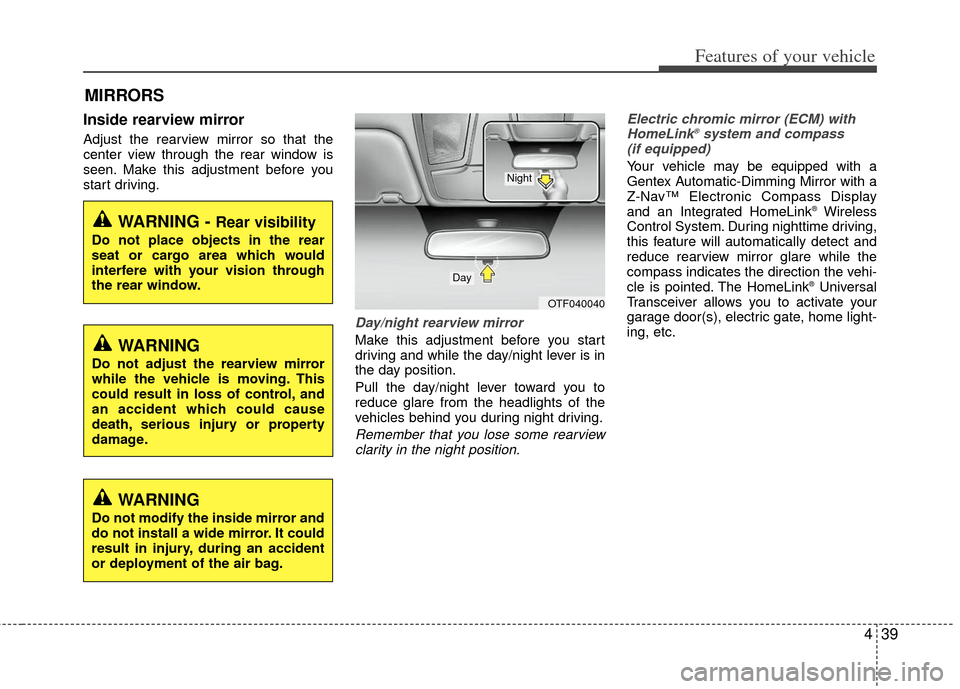
Day/night rearview mirror
Make this adjustment before you start
driving and while the day/night lever is in
the day position.
Pull the day/night lever toward you to
reduce glare from the headlights of the
vehicles behind you during night driving.
Remember that you lose some rearviewclarity in the night position. Electric chromic mirror (ECM) with
HomeLink
®system and compass
(if equipped)
Your vehicle may be equipped with a
Gentex Automatic-Dimming Mirror with a
Z-Nav™ Electronic Compass Display
and an Integrated HomeLink
®Wireless
Control System. During nighttime driving,
this feature will automatically detect and
reduce rearview mirror glare while the
compass indicates the direction the vehi-
cle is pointed. The HomeLink
®Universal
Transceiver allows you to activate your
garage door(s), electric gate, home light-
ing, etc.
MIRRORS
WARNING - Rear visibility
Do not place objects in the rear
seat or cargo area which would
interfere with your vision through
the rear window.
OTF040040
Day
Night
WARNING
Do not adjust the rearview mirror
while the vehicle is moving. This
could result in loss of control, and
an accident which could cause
death, serious injury or property
damage.
WARNING
Do not modify the inside mirror and
do not install a wide mirror. It could
result in injury, during an accident
or deployment of the air bag.
Page 129 of 382
Features of your vehicle
42
4
To adjust the Zone setting:
1. Determine the desired Zone Number
based upon your current location on
the Zone Map.
2. Press and hold the button for more than 3 but less than 6 seconds, the
current Zone Number will appear on
the display.
3. Pressing and holding the button again will cause the numbers to incre-
ment (Note: they will repeat …13, 14,
15, 1, 2, …). Releasing the button
when the desired Zone Number
appears on the display will set the new
Zone.
4. Within about 5 seconds the compass will start displaying a compass head-
ing again.
There are some conditions that can
cause changes to the vehicle magnets,
such as installing a ski rack or a CB
antenna. Body repair work on the vehicle
can also cause changes to the vehicle's
magnetic field. In these situations, the
compass will need to be re-calibrated to
quickly correct for these changes. To re-
calibrate the compass: 1. Press and hold the button for more
than 6 seconds. When the compass
memory is cleared a "C" will appear in
the display.
2. To calibrate the compass, drive the vehicle in 2 complete circles at less
than 8 km/h (5 mph).
Integrated HomeLink
®Wireless Control
System
The HomeLink® Wireless Control
System provides a convenient way to
replace up to three hand-held radio-fre-
quency (RF) transmitters with a single
built-in device. This innovative feature will
learn the radio frequency codes of most
current transmitters to operate devices
such as gate operators, garage door
openers, entry door locks, security sys-
tems, even home lighting. Both standard
and rolling code-equipped transmitters
can be programmed by following the out-
lined procedures. Additional HomeLink
®
information can be found at: www.home-
link.com or by calling 1-800-355-3515. Retain the original transmitter of the RF
device you are programming for use in
other vehicles as well as for future
HomeLink
®programming. It is also sug-
gested that upon the sale of the vehicle,
the programmed HomeLink
®buttons be
erased for security purposes.
CAUTION
Before programming HomeLink®to
a garage door opener or gate oper- ator, make sure that people and objects are out of the way of thedevice to prevent potential harm ordamage. Do not use HomeLink
®
with any garage door opener thatlacks the safety stop and reverse features required by U.S. federalsafety standards (this includes any garage door opener model manu-factured before April 1, 1982). Agarage door that cannot detect anobject - signaling the door to stop and reverse - does not meet currentU.S. federal safety standards. Using a garage door opener without thesefeatures increases the risk of seri- ous injury or death.
Page 130 of 382
443
Features of your vehicle
Programming HomeLink®
✽
✽NOTICE
• When programming a garage door
opener, it is advised to park the vehi-
cle outside of the garage.
• It is recommended that a new battery be placed in the hand-held transmit-
ter of the device being programmed to
HomeLink
®for quicker training and
accurate transaxle of the radio-fre-
quency signal.
• Some vehicles may require the igni- tion switch to be turned to the second
(or "accessories") position for pro-
gramming and/or operation of
HomeLink.
• In the event that there are still pro- gramming difficulties or questions
after following the programming steps
listed below, contact HomeLink
®at:
www.homelink.com or 1-800-355-
3515.
Standard programming
To train most devices, follow these
instructions:
1. For first-time programming, press and
hold the two outside buttons,
HomeLink
®Channel 1 and Channel 3
Buttons, until the indicator light begins
to flash (after 20 seconds). Release
both buttons. Do not hold the buttons
for longer than 30 seconds.
2. Position the end of your hand-held transmitter 2-8 cm (1-3 inches) away
from the HomeLink
®buttons while
keeping the indicator light in view.
3. Simultaneously press and hold both the HomeLink
®and hand-held trans-
mitter button. DO NOT release the but-
tons until step 4 has been completed.
4. While continuing to hold the buttons the red Indicator Status LED will flash
slowly and then rapidly after
HomeLink
®successfully trains to the
frequency signal from the hand-held
transmitter. Release both buttons. 5. Press and hold the just-trained
HomeLink
®button and observe the red
Status Indicator LED. If the indicator
light stays on constantly, programming
is complete and your device should
activate when the HomeLink
®button is
pressed and released.
6. To program the remaining two HomeLink
®buttons, follow steps 2
through 5.
Rolling code programming
Rolling code devices which are "code-
protected" and manufactured after 1996
may be determined by the following:
Reference the device owner's manual for verification.
The handheld transmitter appears to program the HomeLink
®Universal
Transceiver but does not activate the
device.
Press and hold the trained HomeLink button. The device has the rolling code
feature if the indicator light flashes rap-
idly and then turns solid after 2 sec-
onds.
Page 131 of 382
Features of your vehicle
44
4
To train rolling code devices, follow these
instructions:
1. At the garage door opener receiver
(motor-head unit) in the garage, locate
the "learn" or "smart" button. This can
usually be found where the hanging
antenna wire is attached to the motor-
head unit. Exact location and color of
the button may vary by garage door
opener brand.
If there is difficulty locating the training
button, reference the device owner's
manual or please visit our Web site at
www.homelink.com.
2. Firmly press and release the "learn" or "smart" button (which activates the
"training light").
✽ ✽NOTICE
There are 30 seconds in which to initiate
step3.
3. Return to the vehicle, firmly press and
hold for two seconds the desired
HomeLink
®button then release.
Repeat the "press/hold/release"
sequence a second time to complete
the programming. (Some devices may
require you to repeat this sequence a
third time to complete the program-
ming.)
4. Press and hold the just-trained HomeLink
®button and observe the red
Status Indicator LED. If the indicator
light stays on constantly, programming
is complete and your device should
activate.
5. To program the remaining two HomeLink
®buttons, follow either steps
1 through 4 above for other Rolling
Code devices or steps 2 through 5 in
Standard Programming for standard
devices. Gate operator & Canadian program-
ming
During programming, your handheld
transmitter may automatically stop trans-
mitting. Continue to press the Integrated
HomeLink
®Wireless Control System but-
ton (note steps 2 through 4 in the
Standard Programming portion of this
document) while you press and re-press
("cycle") your handheld transmitter every
two seconds until the frequency signal
has been learned. The indicator light will
flash slowly and then rapidly after sever-
al seconds upon successful training.
Operating HomeLink
®
To operate, simply press and release the
programmed HomeLink®button.
Activation will now occur for the trained
device (i.e. garage door opener, gate
operator, security system, entry door
lock, home/office lighting, etc.). For con-
venience, the hand-held transmitter of
the device may also be used at any time.
Page 132 of 382
445
Features of your vehicle
Reprogramming a single HomeLink®
button
To program a new device to a previously
trained HomeLink
®button, follow these
steps:
1. Press and hold the desired HomeLink
®
button. Do NOT release until step 4
has been completed.
2. When the indicator light begins to flash slowly (after 20 seconds), position the
handheld transmitter 1 to 3 inches
away from the HomeLink
®surface.
3. Press and hold the handheld transmit- ter button. The HomeLink
®indicator
light will flash, first slowly and then rap-
idly.
4. When the indicator light begins to flash rapidly, release both buttons.
5. Press and hold the just-trained HomeLink
®button and observe the red
Status Indicator LED. If the indicator
light stays on constantly, programming
is complete and your new device
should activate. Erasing HomeLink
®buttons
Individual buttons cannot be erased.
However, to erase all three programmed
buttons:
1. Press and hold the two outer HomeLink
®buttons until the indicator
light begins to flash-after 20 seconds.
2. Release both buttons. Do not hold for longer than 30 seconds.
The Integrated HomeLink
®Wireless
Control System is now in the training
(learn) mode and can be programmed at
any time following the appropriate steps
in the Programming sections above. FCC ID: NZLZTVHL3
IC: 4112A-ZTVHL3
This device complies with Industry
Canada standard RSS-210.
Operation is subject to the following two
conditions:
1. this device may not cause harmful
interference, and
2. This device must accept any interfer- ence received, including interference
that may cause undesired operation.
NVS
®is a registered trademark and Z-
Nav™ is a trademark of the Gentex
Corporation, Zeeland, Michigan.
HomeLink
®is a registered trademark
owned by Johnson Controls,
Incorporated, Milwaukee, Wisconsin.
WARNING
The transceiver has been tested
and complies with FCC and
Industry Canada rules. Changes or
modifications not expressly
approved by the party responsible
for compliance could void the
user's authority to operate the
device.