change time KIA Optima 2014 3.G User Guide
[x] Cancel search | Manufacturer: KIA, Model Year: 2014, Model line: Optima, Model: KIA Optima 2014 3.GPages: 479, PDF Size: 13.21 MB
Page 135 of 479
465
Features of your vehicle
Auto Door Unlock (if equipped)
Off:The auto door unlock operation will
be canceled.
Key Out or Power Off: All doors will be automatically
unlocked when the ignition key is
removed from ignition switch or
Engine Start/Stop Button is set to
the OFF position.
Shift Lever: All doors will be automatically
unlocked if the automatic transaxle
shift lever is shifted to the P (Park)
position. Two Press Unlock (if equipped)
Off:
The two press unlock function will
be deactivated. Therefore, all doors
will unlock if the door is unlocked.
On: The driver’s door will unlock if the
door is unlocked. When the door is
unlocked again within 4 seconds,
all doors will unlock.
Horn Feedback (if equipped)
Off: The Horn feedback operation will
be deactivated.
On: After locking the door by pressing
the lock button on the transmitter, if
you press the lock button again
within 4 seconds, the warning
sound will operate once to indicate
that all doors are locked.Lamp
One Touch Turn Lamp (if equipped)
If this item is checked, the lane
change signals will blink 3, 5 or 7
times when the turn signal lever is
moved slightly.
Head Lamp Delay (if equipped)
If this item is checked, the headlamp
delay and headlamp welcome func-
tion will be activated.
Welcome Light (if equipped)
If this item is checked, the welcome
light function of the puddle lamp will
be activated.
Page 146 of 479
Features of your vehicle
76
4
Overview
Description
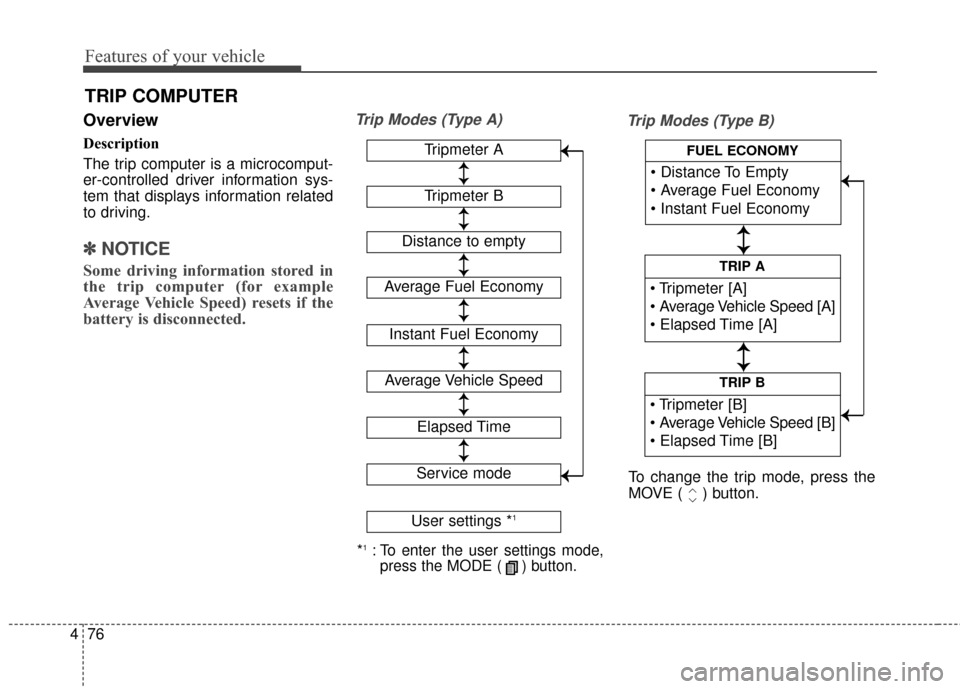
The trip computer is a microcomput-
er-controlled driver information sys-
tem that displays information related
to driving.
✽ ✽
NOTICE
Some driving information stored in
the trip computer (for example
Average Vehicle Speed) resets if the
battery is disconnected.
Trip Modes (Type A)
Trip Modes (Type B)
TRIP COMPUTER
*1:To enter the user settings mode,
press the MODE ( ) button.
Tripmeter A
Average Fuel Economy
Instant Fuel Economy
Average Vehicle Speed
Elapsed Time
Service mode
User settings *1
↕
↕
→
→
→
→
Tripmeter B
Distance to empty
↕
↕
↕ ↕
↕ ↕
↕ ↕
↕ ↕
↕ ↕
TRIP B
TRIP A
FUEL ECONOMY
To change the trip mode, press the
MOVE ( ) button.
↕
↕
↕ ↕
→
→ → →
Page 157 of 479
487
Features of your vehicle
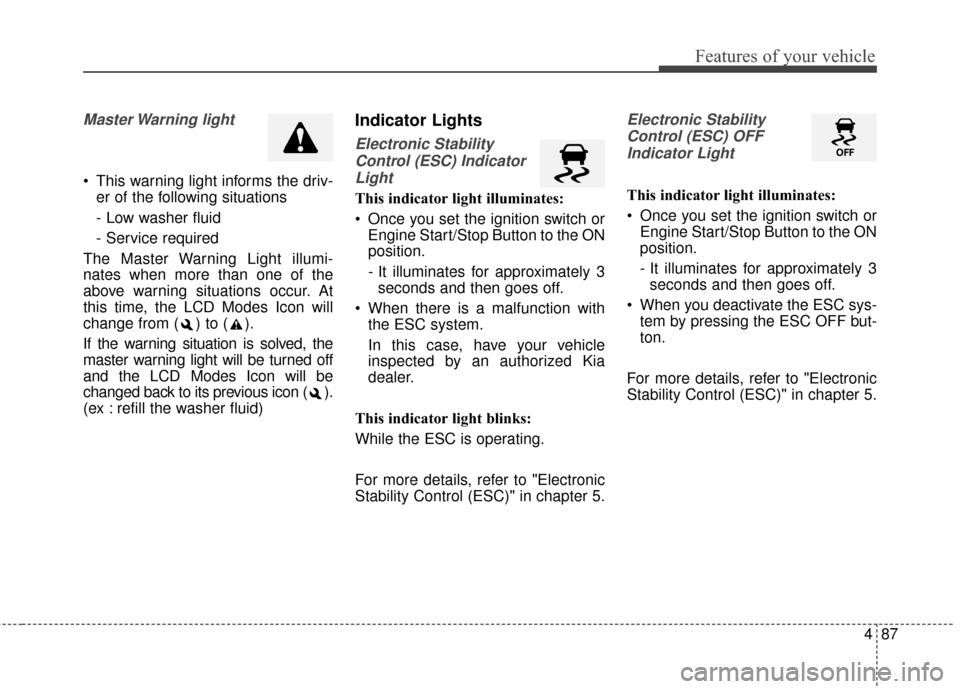
Master Warning light
This warning light informs the driv-er of the following situations
- Low washer fluid
- Service required
The Master Warning Light illumi-
nates when more than one of the
above warning situations occur. At
this time, the LCD Modes Icon will
change from ( ) to ( ).
If the warning situation is solved, the
master warning light will be turned off
and the LCD Modes Icon will be
changed back to its previous icon ( ).
(ex : refill the washer fluid)
Indicator Lights
Electronic Stability Control (ESC) IndicatorLight
This indicator light illuminates:
Once you set the ignition switch or Engine Start/Stop Button to the ON
position.
- It illuminates for approximately 3seconds and then goes off.
When there is a malfunction with the ESC system.
In this case, have your vehicle
inspected by an authorized Kia
dealer.
This indicator light blinks:
While the ESC is operating.
For more details, refer to "Electronic
Stability Control (ESC)" in chapter 5.
Electronic Stability Control (ESC) OFFIndicator Light
This indicator light illuminates:
Once you set the ignition switch or Engine Start/Stop Button to the ON
position.
- It illuminates for approximately 3seconds and then goes off.
When you deactivate the ESC sys- tem by pressing the ESC OFF but-
ton.
For more details, refer to "Electronic
Stability Control (ESC)" in chapter 5.
Page 170 of 479
Features of your vehicle
100
4
Turn signals and lane change
signals
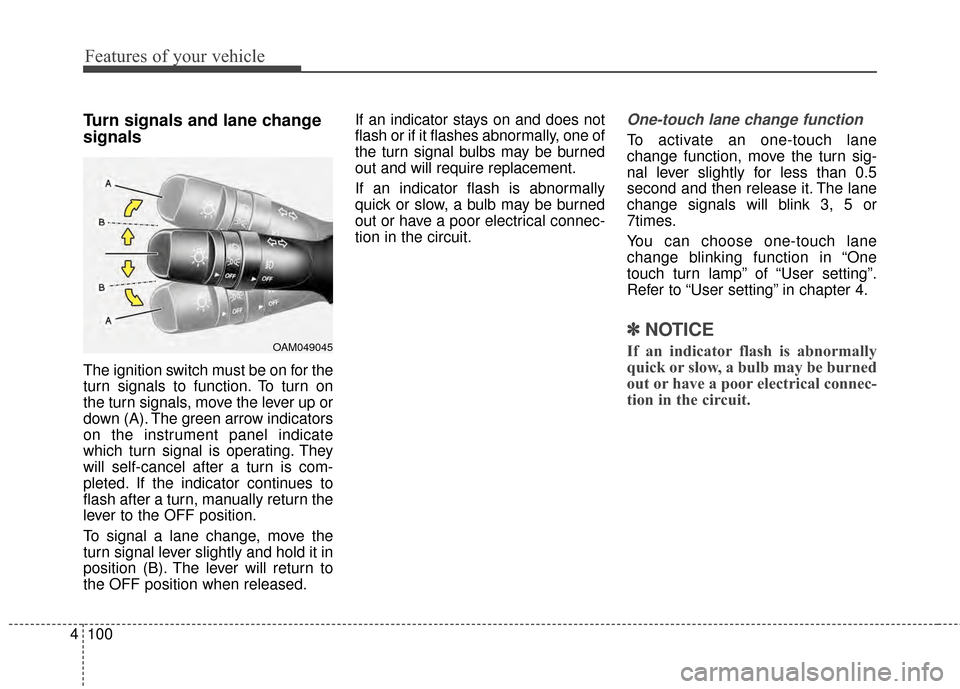
The ignition switch must be on for the
turn signals to function. To turn on
the turn signals, move the lever up or
down (A). The green arrow indicators
on the instrument panel indicate
which turn signal is operating. They
will self-cancel after a turn is com-
pleted. If the indicator continues to
flash after a turn, manually return the
lever to the OFF position.
To signal a lane change, move the
turn signal lever slightly and hold it in
position (B). The lever will return to
the OFF position when released. If an indicator stays on and does not
flash or if it flashes abnormally, one of
the turn signal bulbs may be burned
out and will require replacement.
If an indicator flash is abnormally
quick or slow, a bulb may be burned
out or have a poor electrical connec-
tion in the circuit.
One-touch lane change function
To activate an one-touch lane
change function, move the turn sig-
nal lever slightly for less than 0.5
second and then release it. The lane
change signals will blink 3, 5 or
7times.
You can choose one-touch lane
change blinking function in “One
touch turn lamp” of “User setting”.
Refer to “User setting” in chapter 4.
✽ ✽
NOTICE
If an indicator flash is abnormally
quick or slow, a bulb may be burned
out or have a poor electrical connec-
tion in the circuit.OAM049045
Page 187 of 479
4117
Features of your vehicle
Air conditioning system operation tips
If the vehicle has been parked indirect sunlight during hot weather,
open the windows for a short time
to let the hot air inside the vehicle
escape.
To help reduce moisture inside of the windows on rainy or humid
days, decrease the humidity inside
the vehicle by operating the air
conditioning system.
During air conditioning system operation, you may occasionally
notice a slight change in engine
speed as the air conditioning com-
pressor cycles. This is a normal
system operation characteristic.
Use the air conditioning system every month only for a few minutes
to ensure maximum system per-
formance.
When using the air conditioning system, you may notice clear water
dripping (or even puddling) on the
ground under the passenger side
of the vehicle. This is a normal sys-
tem operation characteristic. Operating the air conditioning sys-
tem in the recirculated air position
provides maximum cooling, how-
ever, continual operation in this
mode may cause the air inside the
vehicle to become stale.
During cooling operation, you may occasionally notice a misty air flow
because of rapid cooling and
humid air intake. This is a normal
system operation characteristic.CAUTION - Excessive
AC
While using the air conditioningsystem, monitor the tempera-ture gauge closely while drivingup hills or in heavy traffic whenoutside temperatures are high.
Air conditioning system opera-tion may cause engine over-heating and potential enginedamage. If the temperaturegauge indicates overheating,turn off the a/c, safely stop thevehicle, turn off the engine andcontact your authorized Kiadealer.
Page 188 of 479
Features of your vehicle
118
4
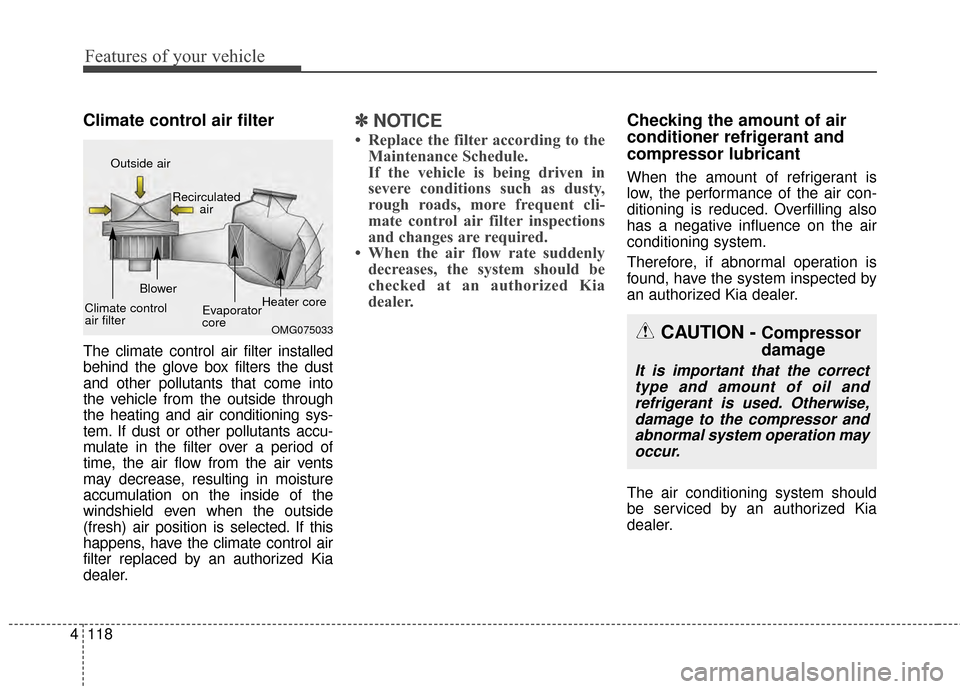
Climate control air filter
The climate control air filter installed
behind the glove box filters the dust
and other pollutants that come into
the vehicle from the outside through
the heating and air conditioning sys-
tem. If dust or other pollutants accu-
mulate in the filter over a period of
time, the air flow from the air vents
may decrease, resulting in moisture
accumulation on the inside of the
windshield even when the outside
(fresh) air position is selected. If this
happens, have the climate control air
filter replaced by an authorized Kia
dealer.
✽ ✽
NOTICE
• Replace the filter according to the
Maintenance Schedule.
If the vehicle is being driven in
severe conditions such as dusty,
rough roads, more frequent cli-
mate control air filter inspections
and changes are required.
• When the air flow rate suddenly decreases, the system should be
checked at an authorized Kia
dealer.
Checking the amount of air
conditioner refrigerant and
compressor lubricant
When the amount of refrigerant is
low, the performance of the air con-
ditioning is reduced. Overfilling also
has a negative influence on the air
conditioning system.
Therefore, if abnormal operation is
found, have the system inspected by
an authorized Kia dealer.
The air conditioning system should
be serviced by an authorized Kia
dealer.
CAUTION - Compressor
damage
It is important that the correct
type and amount of oil andrefrigerant is used. Otherwise,damage to the compressor andabnormal system operation mayoccur.
OMG075033
Outside air
Recirculatedair
Climate control
air filter Blower
Evaporator
coreHeater core
Page 191 of 479
4121
Features of your vehicle
✽
✽NOTICE
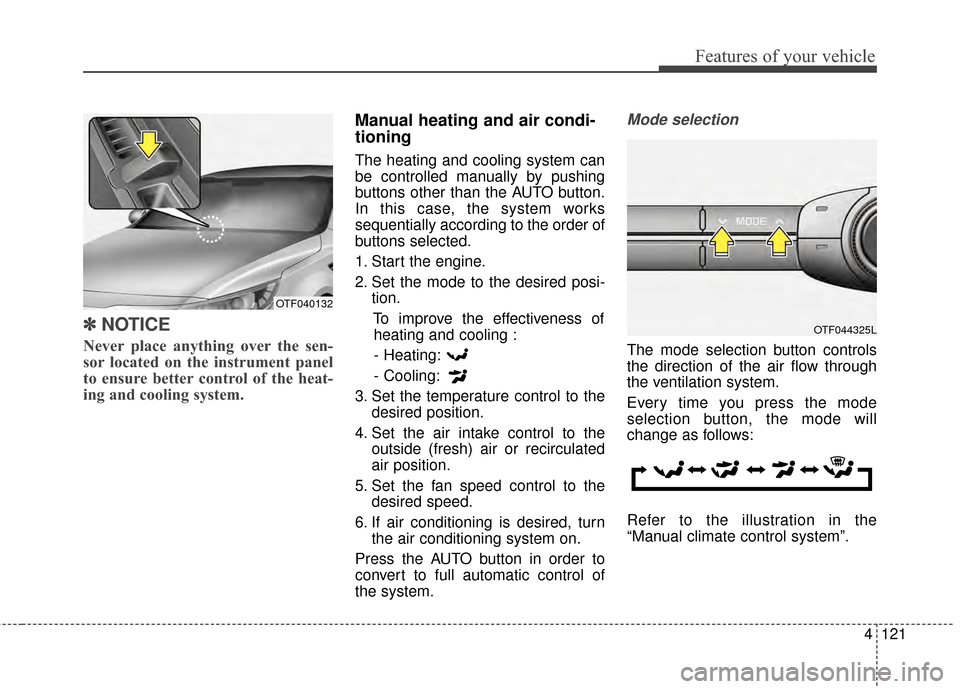
Never place anything over the sen-
sor located on the instrument panel
to ensure better control of the heat-
ing and cooling system.
Manual heating and air condi-
tioning
The heating and cooling system can
be controlled manually by pushing
buttons other than the AUTO button.
In this case, the system works
sequentially according to the order of
buttons selected.
1. Start the engine.
2. Set the mode to the desired posi-
tion.
To improve the effectiveness ofheating and cooling :
- Heating:
- Cooling:
3. Set the temperature control to the desired position.
4. Set the air intake control to the outside (fresh) air or recirculated
air position.
5. Set the fan speed control to the desired speed.
6. If air conditioning is desired, turn the air conditioning system on.
Press the AUTO button in order to
convert to full automatic control of
the system.
Mode selection
The mode selection button controls
the direction of the air flow through
the ventilation system.
Every time you press the mode
selection button, the mode will
change as follows:
Refer to the illustration in the
“Manual climate control system”.
OTF044325L
OTF040132
Page 198 of 479
Features of your vehicle
128
4
Air conditioning
Kia Air Conditioning Systems are
filled with environmentally friendly R-
134a refrigerant.
1. Start the engine. Press the air con-
ditioning button.
2. Set the mode to the position.
3. Set the air intake control to the outside air or recirculated air posi-
tion.
4. Adjust the fan speed control and temperature control to maintain
maximum comfort.
When maximum cooling is desired, set the temperature control to the
extreme left position, then set the
fan speed control to the highest
speed.
✽ ✽ NOTICE
• When using the air conditioning
system, monitor the temperature
gauge closely while driving up
hills or in heavy traffic when out-
side temperatures are high. Air
conditioning system operation
may cause engine overheating.
Continue to use the blower fan but
turn the air conditioning system
off if the temperature gauge indi-
cates engine overheating.
• When opening the windows in humid weather air conditioning
may create water droplets inside
the vehicle. Since excessive water
droplets may cause damage to
electrical equipment, air condi-
tioning should only be used with
the windows closed.
Air conditioning system operation tips
If the vehicle has been parked in
direct sunlight during hot weather,
open the windows for a short time
to let the hot air inside the vehicle
escape.
To help reduce moisture inside of the windows on rainy or humid
days, decrease the humidity inside
the vehicle by operating the air
conditioning system.
During air conditioning system operation, you may occasionally
notice a slight change in engine
speed as the air conditioning com-
pressor cycles. This is a normal
system operation characteristic.
Use the air conditioning system every month only for a few minutes
to ensure maximum system per-
formance.
Page 212 of 479
Features of your vehicle
142
4
Pressing the 'H" button will
advance the time display by one
hour.
Pressing the "M" button will
advance the time display by one
minute.
To change the 12 hour format to
the 24 hour format, press the "H"
and "M" button at the same time for
more than 5 seconds.
For example, if the time is 10:15
p.m., the display will change to
22:15.
Clothes hanger (if equipped)
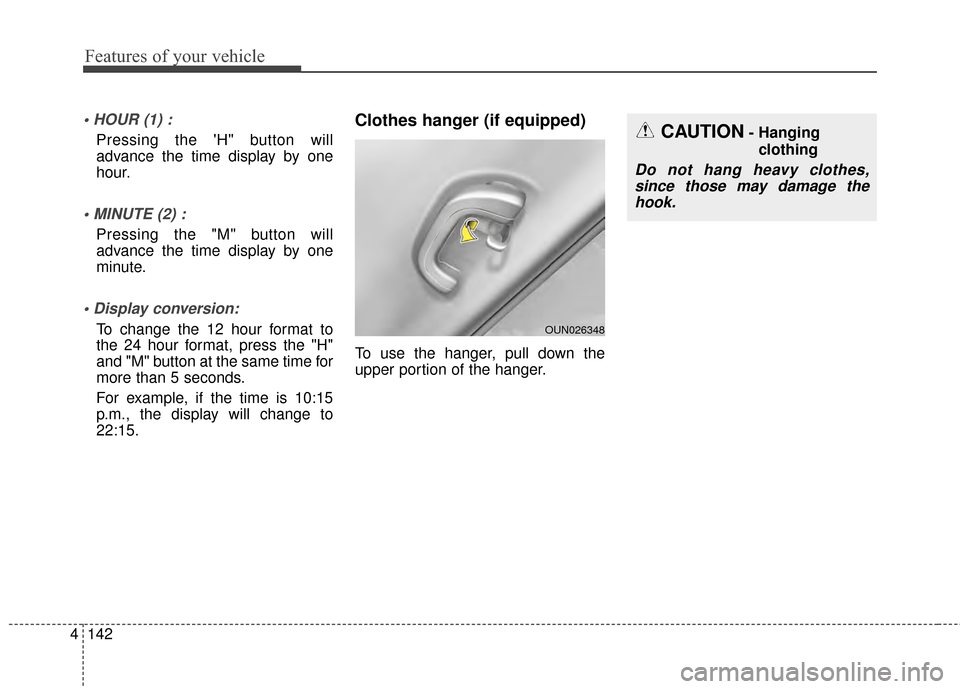
To use the hanger, pull down the
upper portion of the hanger.
CAUTION- Hanging
clothing
Do not hang heavy clothes,since those may damage thehook.
OUN026348
Page 225 of 479
4155
Features of your vehicle
USING iPod®DEVICE
iPod®is a registered trademark of
Apple Inc.
iPhone
® is a registered grademark
of Apple inc.
Some iPod
®models may not
support communication protocol
and files may not properly play.
Supported iPod
®models:
- iPhone
®3GS/4
- iPod
®touch 1st~4th generation
- iPod
®nano 1st~6th generation
- iPod
®classic
The order of search or playback of songs in the iPod
®can be dif-
ferent from the order searched in
the audio system.
If the iPod
®is disabled due to its
own malfunction, reset the
iPod
®. (Reset: Refer to iPod®
manual)
An iPod
®may not operate nor-
mally on low battery.
(Continued)(Continued)
Some iPod
®devices, such as the
iPhone®, can be connected
through the
Bluetooth®Wireless
Technology interface. The device
must have audio
Bluetooth®
Wireless Technology capability
(such as for stereo headphone
Bluetooth®Wireless Technology).
The device can play, but it will not
be controlled by the audio system.
To use iPod
®features within the
audio, use the cable provided
upon purchasing an iPod
®device.
Skipping or improper operation may occur depending on the
characteristics of your iPod
®/
iPhone®device.
If your iPhone
®is connected to
both the
Bluetooth®Wireless
Technology and USB, the sound
may not be properly played. In
your iPhone
®, select the Dock
connector or
Bluetooth®Wireless
Technology to change the sound
output (source).
(Continued)(Continued)
When connecting iPod
®with the
iPod®Power Cable, insert the
connector to the multimedia
socket completely. If not inserted
completely, communications
between iPod
®and audio may
be interrupted.
When adjusting the sound effects of the iPod
®and the
audio system, the sound effects
of both devices will overlap and
might reduce or distort the qual-
ity of the sound.
Deactivate (turn off) the equaliz- er function of an iPod
®when
adjusting the audio system’s vol-
ume, and turn off the equalizer
of the audio system when using
the equalizer of an iPod
®.
When not using iPod
®with car
audio, detach the iPod®cable
from iPod®. Otherwise, iPod®
may remain in accessory mode,
and may not work properly.