reset KIA Optima 2014 3.G Owner's Guide
[x] Cancel search | Manufacturer: KIA, Model Year: 2014, Model line: Optima, Model: KIA Optima 2014 3.GPages: 479, PDF Size: 13.21 MB
Page 254 of 479
![KIA Optima 2014 3.G Owners Guide Features of your vehicle
184
4
Pairing through [PHONE]
Setup
Press the key Select
[Phone] Select [Pair Phone]
Select TUNE knob
1. The following steps are the same
as those described in the section](/img/2/2952/w960_2952-253.png "KIA Optima 2014 3.G Owners Guide Features of your vehicle
184
4
Pairing through [PHONE]
Setup
Press the key Select
[Phone] Select [Pair Phone]
Select TUNE knob
1. The following steps are the same
as those described in the section")
Features of your vehicle
184
4
Pairing through [PHONE]
Setup
Press the key Select
[Phone] Select [Pair Phone]
Select TUNE knob
1. The following steps are the same
as those described in the section
"When No Devices have been
Paired" on the previous page.
Bluetooth®Wireless Technology
features supported within the vehi-
cle are as follows. Some features
may not be supported depending
on your
Bluetooth®Wireless
Technology device.
- Outgoing/Incoming Handsfree calls
- Operations during a call (Switch to Private, Switch to call waiting,
MIC on/off)
- Downloading Call History
- Downloading Mobile Contacts
-
Bluetooth®Wireless Technology
device auto connection
- Bluetooth Audio Streaming
Bluetooth®Wireless
Technology devices can be paired
to the Car Handsfree system.
Bluetooth®device can be
connected at a time.
one
Bluetooth®Wireless
Technology device can be connect-
ed at a time.
while a
Bluetooth®Wireless
Technology device is connected. Only
Bluetooth®Wireless Technology
Handsfree and Bluetooth audio relat-
ed features are supported.
possible only within devices that sup-
port Handsfree or audio features,
such as a
Bluetooth®Wireless
Technology mobile phone or a
Bluetooth audio device.
Bluetooth®Wireless
Technology device becomes discon-
nected due to being out of communi-
cation range, turning the device OFF,
or a
Bluetooth®Wireless Technology
communication error, corresponding
Bluetooth®Wireless Technology
devices are automatically searched
and reconnected.
to communication errors between
the car Handsfree and the
Bluetooth®
Wireless Technology device, reset
the device by turning off and back on
again. Upon resetting
Bluetooth®
Wireless Technology device, the sys-
tem will be restored.
SETUP
Page 267 of 479
4197
Features of your vehicle
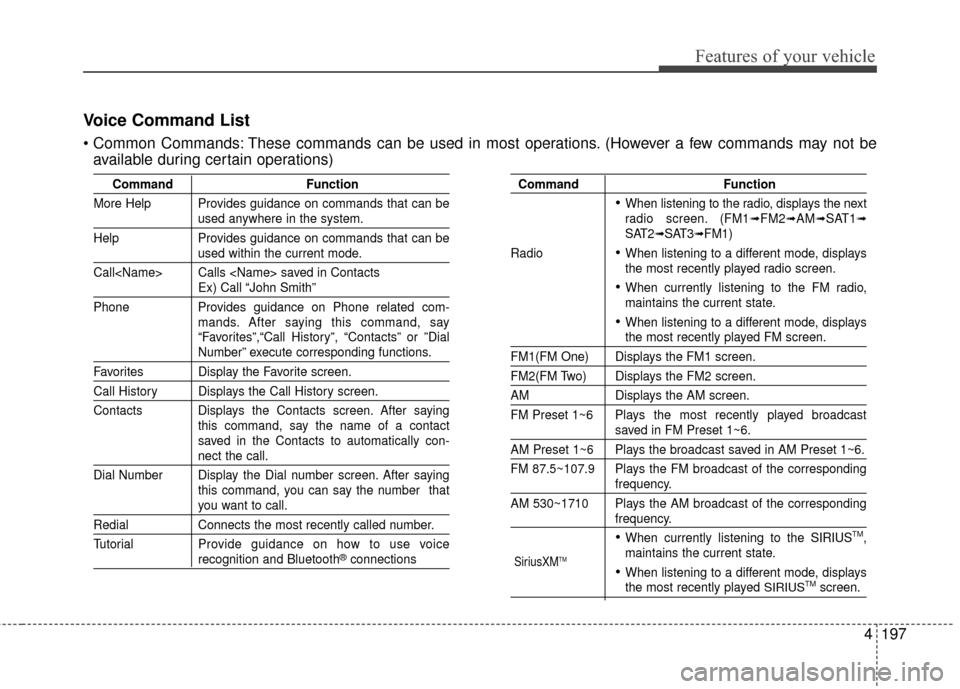
Voice Command List
These commands can be used in most operations. (However a few commands may not beavailable during certain operations)
Command Function
More Help Provides guidance on commands that can be
used anywhere in the system.
Help Provides guidance on commands that can be
used within the current mode.
Call
Ex) Call “John Smith”
Phone Provides guidance on Phone related com- mands. After saying this command, say
“Favorites”,“Call History”, “Contacts” or ”Dial
Number” execute corresponding functions.
Favorites Display the Favorite screen.
Call History Displays the Call History screen.
Contacts Displays the Contacts screen. After sayingthis command, say the name of a contact
saved in the Contacts to automatically con-
nect the call.
Dial Number Display the Dial number screen. After saying this command, you can say the number that
you want to call.
RedialConnects the most recently called number.
Tutorial Pro vide guidance on how to use voice
recognition and Bluetooth®connections
Command Function
When listening to the radio, displays the next
radio screen. (FM1➟FM2➟AM➟SAT1➟SAT2➟SAT3➟FM1)
Radio
When listening to a different mode, displays
the most recently played radio screen.
When currently listening to the FM radio,
maintains the current state.
When listening to a different mode, displaysthe most recently played FM screen.
FM1(FM One) Displays the FM1 screen.
FM2(FM Two) Displays the FM2 screen.
AM Displays the AM screen.
FM Preset 1~6 Plays the most recently played broadcast
saved in FM Preset 1~6.
AM Preset 1~6 Plays the broadcast saved in AM Preset 1~6.
FM 87.5~107.9 Plays the FM broadcast of the corresponding
frequency.
AM 530~1710 Plays the AM broadcast of the corresponding
frequency.
When currently listening to the SIRIUSTM,
maintains the current state.
When listening to a different mode, displaysthe most recently played SIRIUSTMscreen.
SiriusXMTM
Page 269 of 479
4199
Features of your vehicle
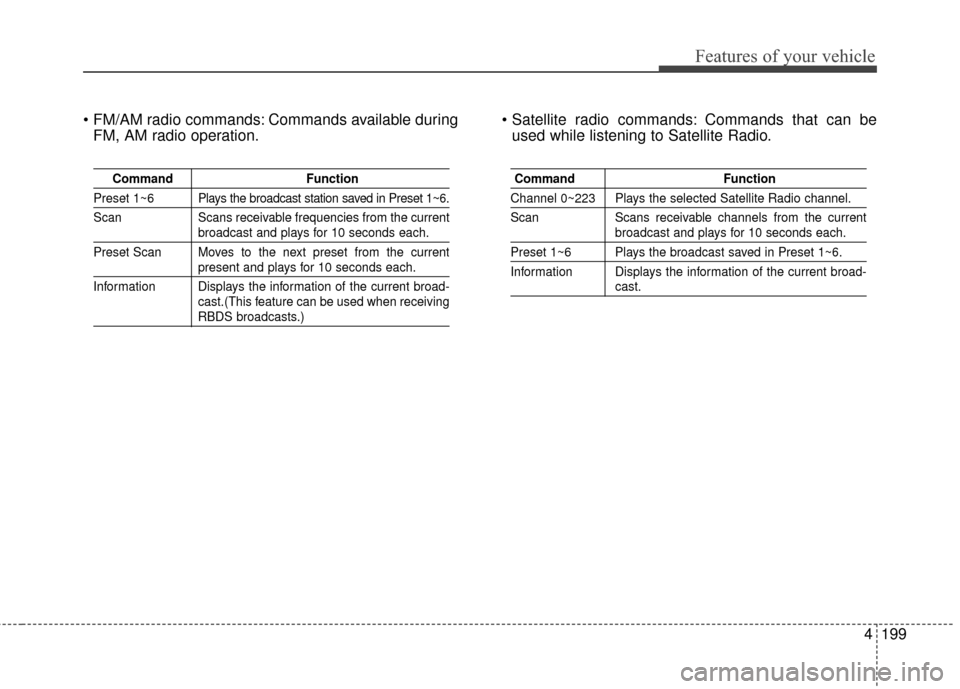
Commands available duringFM, AM radio operation. Commands that can be
used while listening to Satellite Radio.
Command Function
Preset 1~6 Plays the broadcast station saved in Preset 1~6.
Scan Scans receivable frequencies from the current
broadcast and plays for 10 seconds each.
Preset Scan Moves to the next preset from the current
present and plays for 10 seconds each.
Information Displays the information of the current broad- cast.(This feature can be used when receiving
RBDS broadcasts.)
Command Function
Channel 0~223 Plays the selected Satellite Radio channel.
Scan Scans receivable channels from the current
broadcast and plays for 10 seconds each.
Preset 1~6 Plays the broadcast saved in Preset 1~6.
Information Displays the information of the current broad-
cast.
Page 307 of 479
535
Driving your vehicle
To temporarily accelerate with
the cruise control on:
If you want to speed up temporarily
when the cruise control is on,
depress the accelerator pedal.
Increased speed will not interfere
with the cruise control operation or
change the set speed.
To return to the set speed, take your
foot off the accelerator.
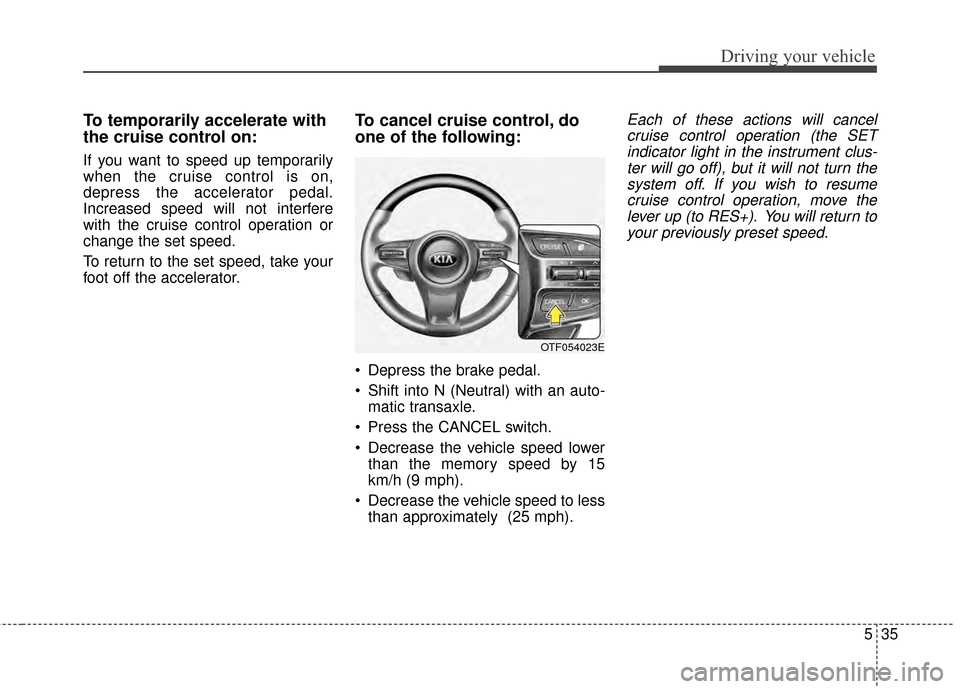
To cancel cruise control, do
one of the following:
Depress the brake pedal.
Shift into N (Neutral) with an auto-matic transaxle.
Press the CANCEL switch.
Decrease the vehicle speed lower than the memory speed by 15
km/h (9 mph).
Decrease the vehicle speed to less than approximately (25 mph).
Each of these actions will cancelcruise control operation (the SETindicator light in the instrument clus-ter will go off), but it will not turn thesystem off. If you wish to resumecruise control operation, move thelever up (to RES+). You will return toyour previously preset speed.
OTF054023E
Page 406 of 479
Maintenance
46
7
Battery recharging
Your vehicle has a maintenance-free,
calcium-based battery.
If the battery becomes discharged
in a short time (because, for exam-
ple, the headlights or interior lights
were left on while the vehicle was
not in use), recharge it by slow
charging (trickle) for 10 hours.
If the battery gradually discharges because of high electric load while
the vehicle is being used, recharge
it at 20-30A for two hours. When recharging the battery,
observe the following precautions:
The battery must be removed from
the vehicle and placed in an area
with good ventilation.
Watch the battery during charging, and stop or reduce the charging
rate if the battery cells begin
gassing (boiling) violently or if the
temperature of the electrolyte of
any cell exceeds 49°C (120°F ).
Wear eye protection when check- ing the battery during charging.
Disconnect the battery charger in the following order.
1. Turn off the battery charger main switch.
2. Unhook the negative clamp from the negative battery terminal.
3. Unhook the positive clamp from the positive battery terminal.
Before performing maintenance or recharging the battery, turn off all
accessories and stop the engine.
The negative battery cable must be removed first and installed last
when the battery is disconnected.
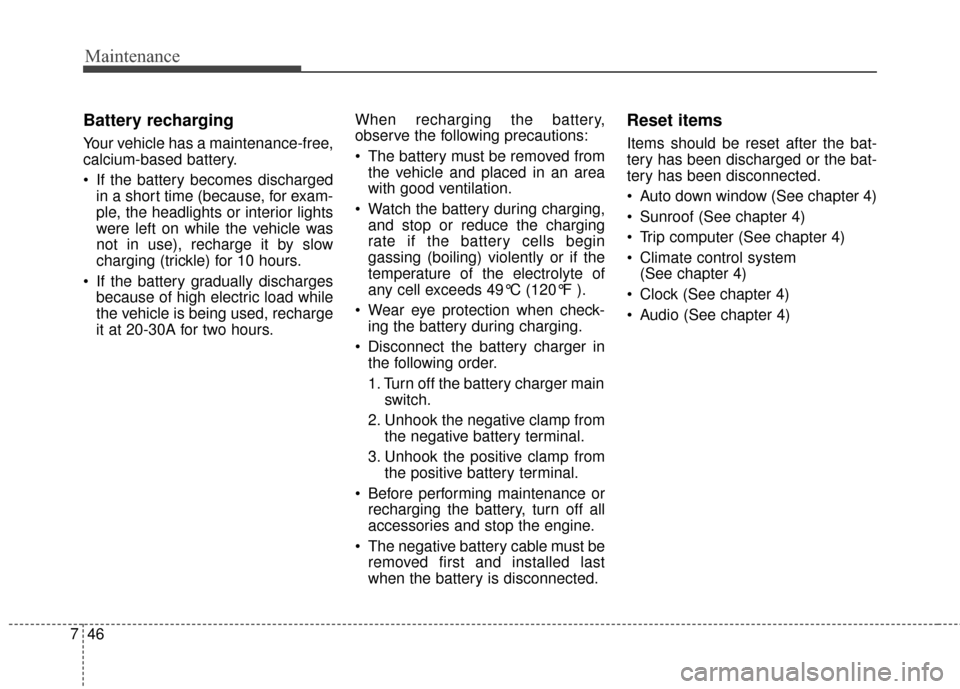
Reset items
Items should be reset after the bat-
tery has been discharged or the bat-
tery has been disconnected.
Auto down window (See chapter 4)
Sunroof (See chapter 4)
Trip computer (See chapter 4)
Climate control system (See chapter 4)
Clock (See chapter 4)
Audio (See chapter 4)
Page 410 of 479
Maintenance
50
7
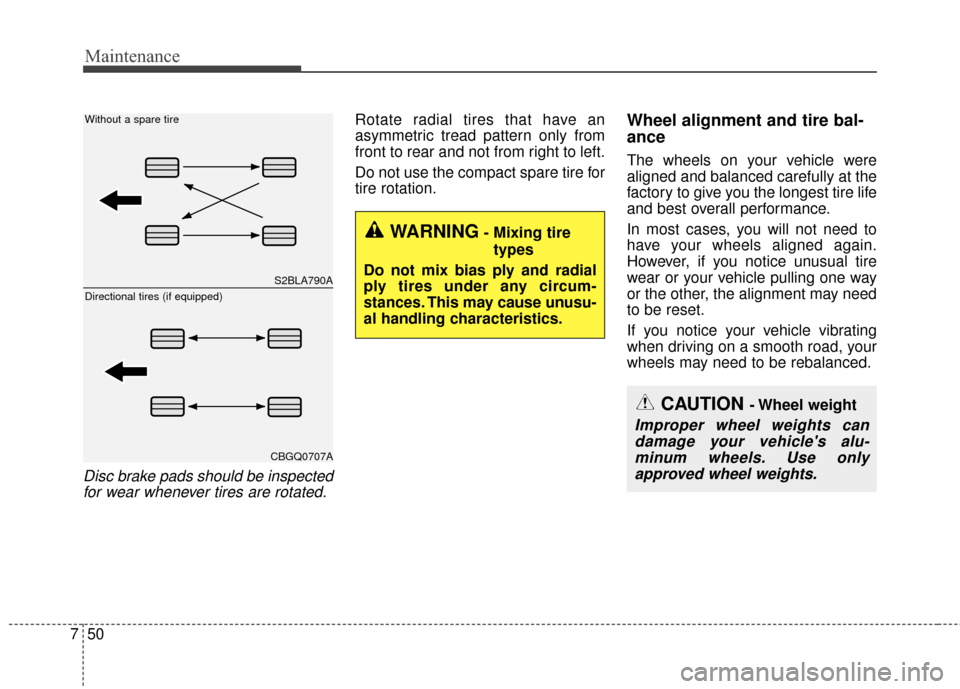
Disc brake pads should be inspected
for wear whenever tires are rotated.
Rotate radial tires that have an
asymmetric tread pattern only from
front to rear and not from right to left.
Do not use the compact spare tire for
tire rotation.Wheel alignment and tire bal-
ance
The wheels on your vehicle were
aligned and balanced carefully at the
factory to give you the longest tire life
and best overall performance.
In most cases, you will not need to
have your wheels aligned again.
However, if you notice unusual tire
wear or your vehicle pulling one way
or the other, the alignment may need
to be reset.
If you notice your vehicle vibrating
when driving on a smooth road, your
wheels may need to be rebalanced.
WARNING- Mixing tire
types
Do not mix bias ply and radial
ply tires under any circum-
stances. This may cause unusu-
al handling characteristics.
S2BLA790A
CBGQ0707A
Without a spare tire
Directional tires (if equipped)
CAUTION - Wheel weight
Improper wheel weights can damage your vehicle's alu-minum wheels. Use onlyapproved wheel weights.
Page 423 of 479
763
Maintenance
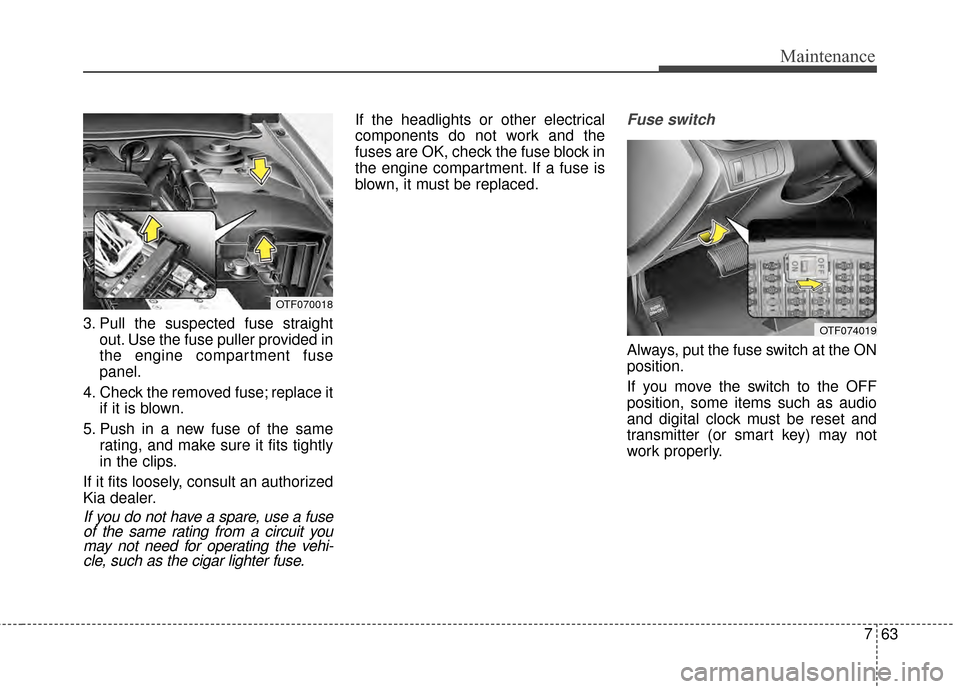
3. Pull the suspected fuse straightout. Use the fuse puller provided in
the engine compartment fuse
panel.
4. Check the removed fuse; replace it if it is blown.
5. Push in a new fuse of the same rating, and make sure it fits tightly
in the clips.
If it fits loosely, consult an authorized
Kia dealer.
If you do not have a spare, use a fuse of the same rating from a circuit youmay not need for operating the vehi-cle, such as the cigar lighter fuse.
If the headlights or other electrical
components do not work and the
fuses are OK, check the fuse block in
the engine compartment. If a fuse is
blown, it must be replaced.Fuse switch
Always, put the fuse switch at the ON
position.
If you move the switch to the OFF
position, some items such as audio
and digital clock must be reset and
transmitter (or smart key) may not
work properly.
OTF070018
OTF074019
Page 473 of 479
Index
2I
Active ECO system. . . . . . . . . . . . . . . . . . . . . . . . . . . . 5-37Active ECO operation . . . . . . . . . . . . . . . . . . . . . . . 5-37
Limitation of active ECO operation . . . . . . . . . . . . . 5-37
When active ECO is activated . . . . . . . . . . . . . . . . . 5-37
Air bag - advanced supplemental restraint system . . . . 3-35 Air bag warning label. . . . . . . . . . . . . . . . . . . . . . . . 3-56
Air bag warning light . . . . . . . . . . . . . . . . . . . . . . . . 3-38
Curtain air bag . . . . . . . . . . . . . . . . . . . . . . . . . . . . . 3-50
Driver's and passenger's front air bag . . . . . . . . . . . 3-46
How does the air bag system operate . . . . . . . . . . . 3-36
Inflation and non-inflation conditions of the air bag . . . 3-51
Occupant detection system. . . . . . . . . . . . . . . . . . . . 3-41
Side air bag. . . . . . . . . . . . . . . . . . . . . . . . . . . . . . . . 3-49
SRS Care . . . . . . . . . . . . . . . . . . . . . . . . . . . . . . . . . 3-56
SRS components and functions . . . . . . . . . . . . . . . . 3-39
Air cleaner . . . . . . . . . . . . . . . . . . . . . . . . . . . . . . . . . . 7-37\
Filter replacement. . . . . . . . . . . . . . . . . . . . . . . . . . . 7-37
Appearance care . . . . . . . . . . . . . . . . . . . . . . . . . . . . . . 7-92 Exterior care . . . . . . . . . . . . . . . . . . . . . . . . . . . . . . . 7-92
Interior care . . . . . . . . . . . . . . . . . . . . . . . . . . . . . . . 7-97
Audio system . . . . . . . . . . . . . . . . . . . . . . . . . . . . . . . 4-145
Aux, USB and iPod
®port . . . . . . . . . . . . . . . . . . . 4-147
Glass antenna . . . . . . . . . . . . . . . . . . . . . . . . . . . . . 4-145
Steering wheel audio controls . . . . . . . . . . . . . . . . 4-146
Automatic climate control system . . . . . . . . . . . . . . . 4-119 Automatic heating and air conditioning. . . . . . . . . 4-120 Manual heating and air conditioning . . . . . . . . . . . 4-121
System operation . . . . . . . . . . . . . . . . . . . . . . . . . . 4-127
Automatic transaxle . . . . . . . . . . . . . . . . . . . . . . . . . . . 5-14 Automatic transaxle operation . . . . . . . . . . . . . . . . . 5-14
Good driving practices . . . . . . . . . . . . . . . . . . . . . . . 5-19
Back-up warning system . . . . . . . . . . . . . . . . . . . . . . . 4-91 Back-up warning system precautions . . . . . . . . . . . 4-92
Non-operational conditions of back-up warningsystem. . . . . . . . . . . . . . . . . . . . . . . . . . . . . . . . . . . 4-\
92
Operation of the back-up warning system . . . . . . . . 4-91
Self-diagnosis . . . . . . . . . . . . . . . . . . . . . . . . . . . . . . 4-93
Battery. . . . . . . . . . . . . . . . . . . . . . . . . . . . . . . . . . . . \
. . 7-44 Battery recharging . . . . . . . . . . . . . . . . . . . . . . . . . . 7-46
For best battery service . . . . . . . . . . . . . . . . . . . . . . 7-44
Reset items . . . . . . . . . . . . . . . . . . . . . . . . . . . . . . . . 7-46
Before driving . . . . . . . . . . . . . . . . . . . . . . . . . . . . . . . . . 5-4 Before entering vehicle . . . . . . . . . . . . . . . . . . . . . . . 5-4
Before starting . . . . . . . . . . . . . . . . . . . . . . . . . . . . . . 5-4
Necessary inspections . . . . . . . . . . . . . . . . . . . . . . . . 5-4
Blind spot detection system (BSD) . . . . . . . . . . . . . . . 5-40 BSD (Blind Spot Detection) /LCA (Lane Change Assist) . . . . . . . . . . . . . . . . . . 5-41
Non-operating condition . . . . . . . . . . . . . . . . . . . . . 5-46
RCTA (Rear cross traffic alert) . . . . . . . . . . . . . . . . 5-44
Brake . . . . . . . . . . . . . . . . . . . . . . . . . . . . . . . . . . . . \
. . . 7-34
A
B
Page 478 of 479
I7
Index
Pre-tensioner seat belt . . . . . . . . . . . . . . . . . . . . . . . 3-23
Seat belt precautions . . . . . . . . . . . . . . . . . . . . . . . . 3-25
Seat belt restraint system . . . . . . . . . . . . . . . . . . . . . 3-18
Smart key . . . . . . . . . . . . . . . . . . . . . . . . . . . . . . . . . . . . \
4-6 Smart key functions . . . . . . . . . . . . . . . . . . . . . . . . . . 4-6
Smart key precautions . . . . . . . . . . . . . . . . . . . . . . . . 4-7
Special driving conditions . . . . . . . . . . . . . . . . . . . . . . 5-50 Driving at night . . . . . . . . . . . . . . . . . . . . . . . . . . . . 5-51
Driving in flooded areas. . . . . . . . . . . . . . . . . . . . . . 5-52
Driving in the rain . . . . . . . . . . . . . . . . . . . . . . . . . . 5-52
Driving off-road . . . . . . . . . . . . . . . . . . . . . . . . . . . . 5-53
Hazardous driving conditions . . . . . . . . . . . . . . . . . 5-50
Highway driving. . . . . . . . . . . . . . . . . . . . . . . . . . . . 5-53
Rocking the vehicle . . . . . . . . . . . . . . . . . . . . . . . . . 5-50
Smooth cornering . . . . . . . . . . . . . . . . . . . . . . . . . . . 5-51
Starting the engine . . . . . . . . . . . . . . . . . . . . . . . . . . . . 5-11 Starting the engine with a smart key . . . . . . . . . . . . 5-12
Starting the engine with an ignition key . . . . . . . . . 5-11
Steering wheel . . . . . . . . . . . . . . . . . . . . . . . . . . . . . . . 4-41 Electric power steering. . . . . . . . . . . . . . . . . . . . . . . 4-41
Heated steering wheel . . . . . . . . . . . . . . . . . . . . . . . 4-43
Horn . . . . . . . . . . . . . . . . . . . . . . . . . . . . . . . . . . . . \
. 4-42
Tilt and telescoping steering . . . . . . . . . . . . . . . . . . 4-42
Storage compartment . . . . . . . . . . . . . . . . . . . . . . . . . 4-136 Center console storage . . . . . . . . . . . . . . . . . . . . . . 4-136
Cool box . . . . . . . . . . . . . . . . . . . . . . . . . . . . . . . . . 4-137
Glove box . . . . . . . . . . . . . . . . . . . . . . . . . . . . . . . . 4-136
Sunglass holder . . . . . . . . . . . . . . . . . . . . . . . . . . . 4-137 Sunroof . . . . . . . . . . . . . . . . . . . . . . . . . . . . . . . . . . . . \
. 4-35
Closing the sunroof . . . . . . . . . . . . . . . . . . . . . . . . . 4-36
Resetting the sunroof . . . . . . . . . . . . . . . . . . . . . . . . 4-38
Sliding the sunroof . . . . . . . . . . . . . . . . . . . . . . . . . 4-35
Sunshade. . . . . . . . . . . . . . . . . . . . . . . . . . . . . . . . . . 4-38\
Tilting the sunroof . . . . . . . . . . . . . . . . . . . . . . . . . 4-37
Theft-alarm system . . . . . . . . . . . . . . . . . . . . . . . . . . . . 4-14 Armed stage . . . . . . . . . . . . . . . . . . . . . . . . . . . . . . . 4-14
Disarmed stage . . . . . . . . . . . . . . . . . . . . . . . . . . . . . 4-16
Theft-alarm stage . . . . . . . . . . . . . . . . . . . . . . . . . . . 4-16
Tire specification and pressure label . . . . . . . . . . . . . . 8-10
Tires and wheels . . . . . . . . . . . . . . . . . . . . . . . . . . . . . . . 8-5
Tires and wheels . . . . . . . . . . . . . . . . . . . . . . . . . . . . . . 7-47 Checking tire inflation pressure . . . . . . . . . . . . . . . . 7-48
Recommended cold tire inflation pressures . . . . . . . 7-47
Tire care . . . . . . . . . . . . . . . . . . . . . . . . . . . . . . . . . . 7-47\
Tire maintenance . . . . . . . . . . . . . . . . . . . . . . . . . . . 7-52
Tire replacement . . . . . . . . . . . . . . . . . . . . . . . . . . . . 7-51
Tire rotation . . . . . . . . . . . . . . . . . . . . . . . . . . . . . . . 7-49
Tire sidewall labeling . . . . . . . . . . . . . . . . . . . . . . . . 7-52
Tire traction . . . . . . . . . . . . . . . . . . . . . . . . . . . . . . . 7-52
Wheel alignment and tire balance . . . . . . . . . . . . . . 7-50
Wheel replacement . . . . . . . . . . . . . . . . . . . . . . . . . . 7-52
Towing . . . . . . . . . . . . . . . . . . . . . . . . . . . . . . . . . . . . \
. 6-23 Emergency towing . . . . . . . . . . . . . . . . . . . . . . . . . . 6-24
T