heating KIA Optima 2015 4.G User Guide
[x] Cancel search | Manufacturer: KIA, Model Year: 2015, Model line: Optima, Model: KIA Optima 2015 4.GPages: 487, PDF Size: 13.4 MB
Page 197 of 487
Features of your vehicle
124
4
✽
✽
NOTICE
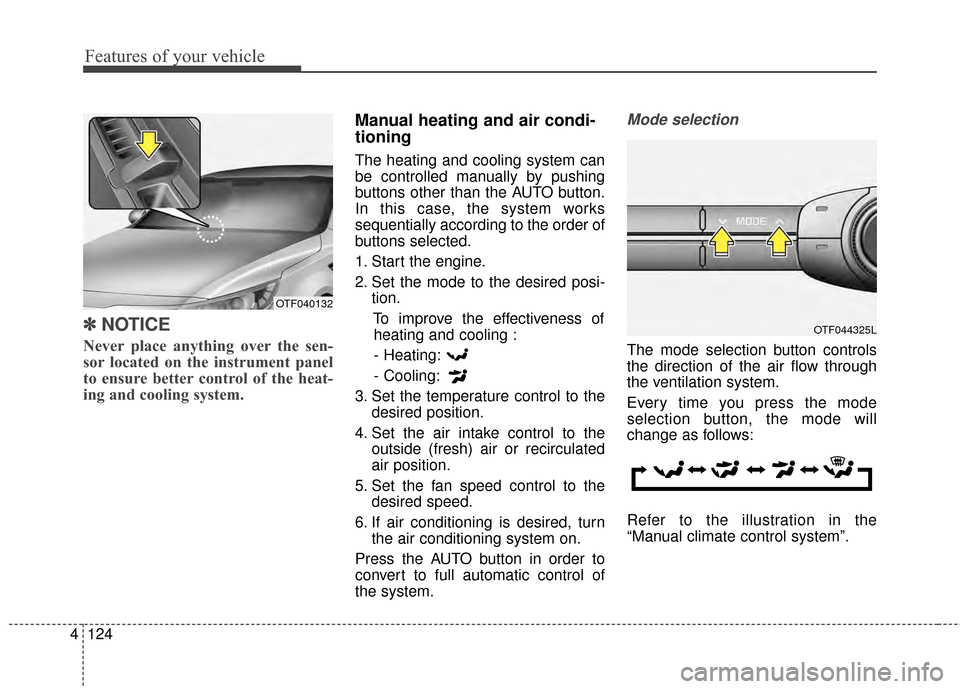
Never place anything over the sen-
sor located on the instrument panel
to ensure better control of the heat-
ing and cooling system.
Manual heating and air condi-
tioning
The heating and cooling system can
be controlled manually by pushing
buttons other than the AUTO button.
In this case, the system works
sequentially according to the order of
buttons selected.
1. Start the engine.
2. Set the mode to the desired posi-
tion.
To improve the effectiveness ofheating and cooling :
- Heating:
- Cooling:
3. Set the temperature control to the desired position.
4. Set the air intake control to the outside (fresh) air or recirculated
air position.
5. Set the fan speed control to the desired speed.
6. If air conditioning is desired, turn the air conditioning system on.
Press the AUTO button in order to
convert to full automatic control of
the system.
Mode selection
The mode selection button controls
the direction of the air flow through
the ventilation system.
Every time you press the mode
selection button, the mode will
change as follows:
Refer to the illustration in the
“Manual climate control system”.
OTF044325L
OTF040132
Page 203 of 487
Features of your vehicle
130
4
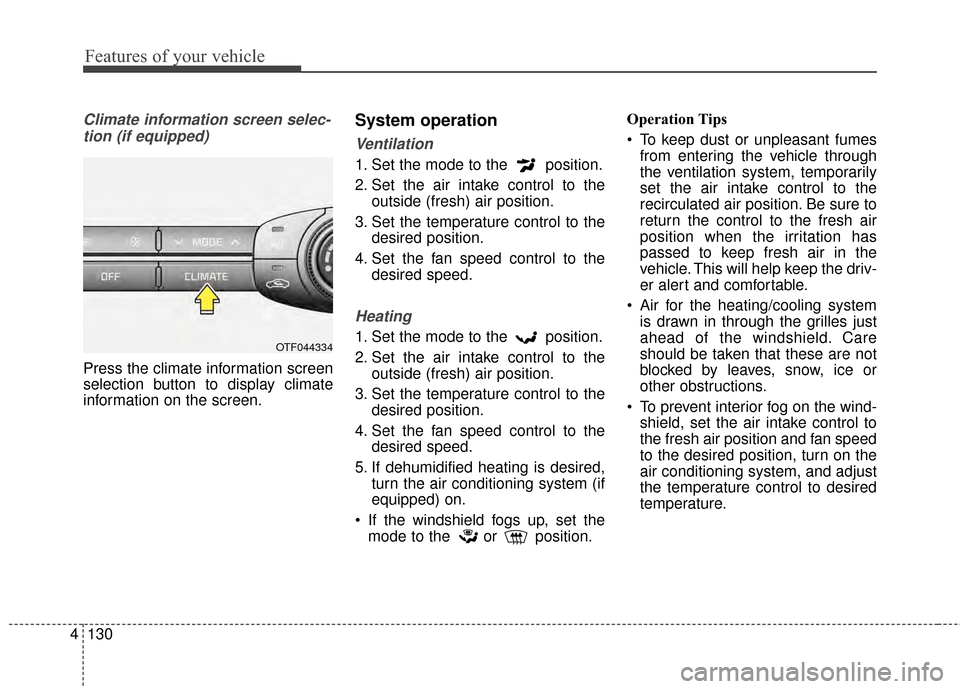
Climate information screen selec-
tion (if equipped)
Press the climate information screen
selection button to display climate
information on the screen.
System operation
Ventilation
1. Set the mode to the position.
2. Set the air intake control to the outside (fresh) air position.
3. Set the temperature control to the desired position.
4. Set the fan speed control to the desired speed.
Heating
1. Set the mode to the position.
2. Set the air intake control to theoutside (fresh) air position.
3. Set the temperature control to the desired position.
4. Set the fan speed control to the desired speed.
5. If dehumidified heating is desired, turn the air conditioning system (if
equipped) on.
If the windshield fogs up, set the mode to the or position. Operation Tips
To keep dust or unpleasant fumes
from entering the vehicle through
the ventilation system, temporarily
set the air intake control to the
recirculated air position. Be sure to
return the control to the fresh air
position when the irritation has
passed to keep fresh air in the
vehicle. This will help keep the driv-
er alert and comfortable.
Air for the heating/cooling system is drawn in through the grilles just
ahead of the windshield. Care
should be taken that these are not
blocked by leaves, snow, ice or
other obstructions.
To prevent interior fog on the wind- shield, set the air intake control to
the fresh air position and fan speed
to the desired position, turn on the
air conditioning system, and adjust
the temperature control to desired
temperature.OTF044334
Page 204 of 487
4131
Features of your vehicle
Air conditioning
Kia Air Conditioning Systems are
filled with environmentally friendly R-
134a refrigerant.
1. Start the engine. Press the air con-ditioning button.
2. Set the mode to the position.
3. Set the air intake control to the outside air or recirculated air posi-
tion.
4. Adjust the fan speed control and temperature control to maintain
maximum comfort.
When maximum cooling is desired, set the temperature control to the
extreme left position, then set the
fan speed control to the highest
speed.
✽ ✽ NOTICE
• When using the air conditioning
system, monitor the temperature
gauge closely while driving up
hills or in heavy traffic when out-
side temperatures are high. Air
conditioning system operation
may cause engine overheating.
Continue to use the blower fan but
turn the air conditioning system
off if the temperature gauge indi-
cates engine overheating.
• When opening the windows in humid weather air conditioning
may create water droplets inside
the vehicle. Since excessive water
droplets may cause damage to
electrical equipment, air condi-
tioning should only be used with
the windows closed.
Air conditioning system operation tips
If the vehicle has been parked in
direct sunlight during hot weather,
open the windows for a short time
to let the hot air inside the vehicle
escape.
To help reduce moisture inside of the windows on rainy or humid
days, decrease the humidity inside
the vehicle by operating the air
conditioning system.
During air conditioning system operation, you may occasionally
notice a slight change in engine
speed as the air conditioning com-
pressor cycles. This is a normal
system operation characteristic.
Use the air conditioning system every month only for a few minutes
to ensure maximum system per-
formance.
Page 206 of 487
4133
Features of your vehicle
WINDSHIELD DEFROSTING AND DEFOGGING
For maximum defrosting, set thetemperature control to the extreme
right/hot position and the fan speed
control to the highest speed.
If warm air to the floor is desired while defrosting or defogging, set the
mode to the floor-defrost position.
Before driving, clear all snow and ice from the windshield, rear win-
dow, outside rear view mirrors, and
all side windows.
Clear all snow and ice from the hood and air inlet in the cowl grill to
improve heater and defroster effi-
ciency and to reduce the probabili-
ty of fogging up the inside of the
windshield.Manual climate control system
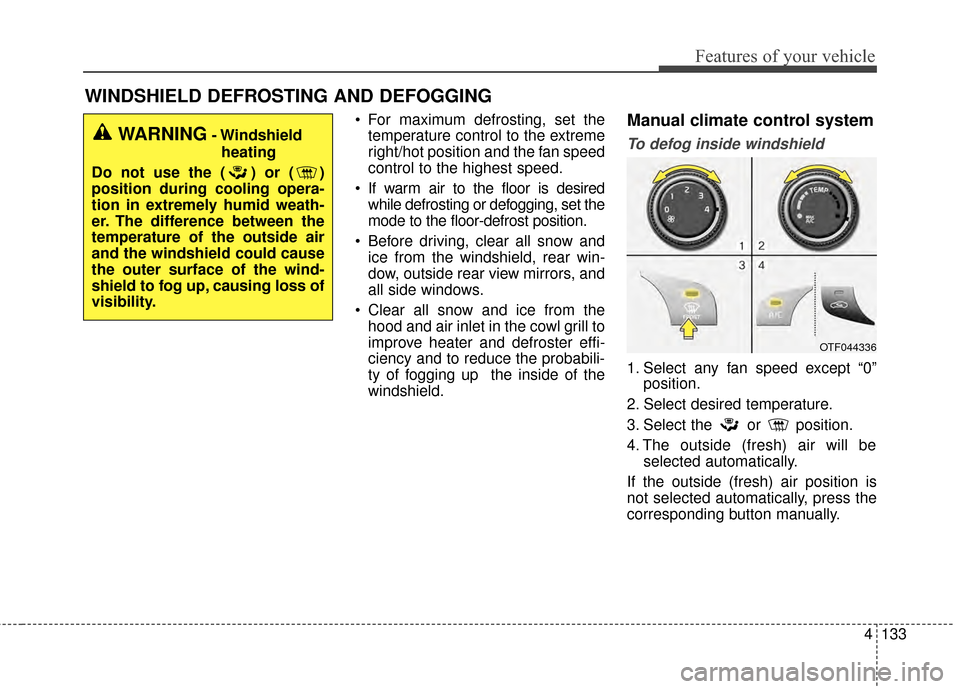
To defog inside windshield
1. Select any fan speed except “0” position.
2. Select desired temperature.
3. Select the or position.
4. The outside (fresh) air will be selected automatically.
If the outside (fresh) air position is
not selected automatically, press the
corresponding button manually.
OTF044336
WARNING- Windshield heating
Do not use the ( ) or ( )
position during cooling opera-
tion in extremely humid weath-
er. The difference between the
temperature of the outside air
and the windshield could cause
the outer surface of the wind-
shield to fog up, causing loss of
visibility.
Page 329 of 487
551
Driving your vehicle
Hazardous driving conditions
When hazardous driving conditions
are encountered such as water,
snow, ice, mud, sand, or similar haz-
ards, follow these suggestions:
Drive cautiously and allow extradistance for braking.
Avoid sudden braking or steering.
When braking with non-ABS brakes pump the brake pedal with
a light up-and-down motion until
the vehicle is stopped. Do not pump the brake pedal on a
vehicle equipped with ABS.
If stalled in snow, mud, or sand,
use second gear. Accelerate slow-
ly to avoid spinning the drive
wheels.
Use sand, rock salt, or other non- slip material under the drive
wheels to provide traction when
stalled in ice, snow, or mud.
Rocking the vehicle
If it is necessary to rock the vehicle
to free it from snow, sand, or mud,
first turn the steering wheel right and
left to clear the area around your
front wheels. Then, shift back and
forth between R (Reverse) and any
forward gear in vehicles equipped
with an automatic transaxle. Do not
race the engine, and spin the wheels
as little as possible. If you are still
stuck after a few tries, have the vehi-
cle pulled out by a tow vehicle to
avoid engine overheating and possi-
ble damage to the transaxle.
The ESC system should be turned
OFF prior to rocking the vehicle.
SPECIAL DRIVING CONDITIONS
WARNING - Downshifting
Do not downshift with an auto-
matic transaxle while driving on
slippery surfaces. The sudden
change in tire speed could
cause the tires to skid and
result in an accident.
CAUTION - Vehicle rocking
Prolonged rocking may causeengine overheating, transaxledamage or failure, and tire dam-age.
Page 332 of 487
Driving your vehicle
54
5
Driving off-road
Drive carefully off-road because your
vehicle may be damaged by rocks or
roots of trees. Become familiar with
the off-road conditions where you
are going to drive before you begin
driving.
Highway driving
Tires
Adjust the tire inflation pressures to
specification. Low tire inflation pres-
sures will result in overheating and
possible failure of the tires.
Avoid using worn or damaged tires
which may result in reduced traction
or tire failure.
Never exceed the maximum tire
inflation pressure shown on the tires.
Fuel, engine coolant and engine
oil
High speed travel consumes more
fuel than urban motoring. Do not for-
get to check both the engine coolant
and engine oil.
Drive belt
A loose or damaged drive belt may
overheat the engine.
WARNING - Tire tread
Always check the tire tread
before driving your vehicle.
Worn-out tires can result in loss
of vehicle control. Worn-out
tires should be replaced as
soon as possible. For further
information and tread limits,
refer to "Tires and wheels" in
chapter 7.
WARNING- Under/Over Inflated Tires
Always check the tires for prop-
er inflation before driving.
Underinflated or overinflated
tires can cause poor handling,
loss of vehicle control, and sud-
den tire failure leading to acci-
dents, injuries, and even death.
Page 349 of 487
What to do in an emergency
86
IF THE ENGINE OVERHEATS
If your temperature gauge indicates
overheating, you will experience a
loss of power, or hear loud pinging or
knocking, the engine is probably too
hot. If this happens, you should:
1.Pull off the road and stop as soonas it is safe to do so.
2.Place the shift lever in P (automat- ic transaxle) and set the parking
brake. If the air conditioning is on,
turn it off.
3.If engine coolant is running out under the vehicle or steam is com-
ing out from underneath the hood,
stop the engine. Do not open the
hood until the coolant has stopped
running or the steaming has
stopped. If there is no visible loss
of engine coolant and no steam,
leave the engine running and
check to be sure the engine cool-
ing fan is operating. If the fan is not
running, turn the engine off. 4.Check to see if the water pump
drive belt is missing. If it is not
missing, check to see that it is
tight. If the drive belt seems to be
satisfactory, check for coolant leak-
ing from the radiator, hoses or
under the vehicle. (If the air condi-
tioning had been in use, it is nor-
mal for cold water to be draining
from it when you stop).
5.If the water pump drive belt is bro- ken or engine coolant leaks, stop
the engine immediately and call
the nearest authorized Kia dealer
for assistance. 6.If you cannot find the cause of the
overheating, wait until the engine
temperature has returned to nor-
mal. Then, if coolant has been lost,
carefully add coolant to the reser-
voir to bring the fluid level in the
reservoir up to the halfway mark.
7.Proceed with caution, keeping alert for further signs of overheat-
ing. If overheating happens again,
call an authorized Kia dealer for
assistance.
Serious loss of coolant indicates
there is a leak in the cooling system
and this should be checked as soon
as possible by an authorized Kia
dealer.
WARNING - Under the hood
While the engine is running,
keep hair, hands and clothing
away from moving parts such
as the fan and drive belts.
WARNING - Radiator cap
Do not remove the radiator cap
when the engine is hot. This can
allow coolant to be blown out of
the opening and cause serious
burns.
Page 480 of 487
Index
2I
Active ECO system. . . . . . . . . . . . . . . . . . . . . . . . . . . . 5-38Active ECO operation . . . . . . . . . . . . . . . . . . . . . . . 5-38
Limitation of active ECO operation . . . . . . . . . . . . . 5-38
When active ECO is activated . . . . . . . . . . . . . . . . . 5-38
Air bag - advanced supplemental restraint system . . . . 3-36 Air bag warning label. . . . . . . . . . . . . . . . . . . . . . . . 3-58
Air bag warning light . . . . . . . . . . . . . . . . . . . . . . . . 3-39
Curtain air bag . . . . . . . . . . . . . . . . . . . . . . . . . . . . . 3-51
Driver's and passenger's front air bag . . . . . . . . . . . 3-47
How does the air bag system operate . . . . . . . . . . . 3-37
Inflation and non-inflation conditions of the air bag . . . 3-52
Occupant detection system. . . . . . . . . . . . . . . . . . . . 3-42
Side air bag. . . . . . . . . . . . . . . . . . . . . . . . . . . . . . . . 3-50
SRS Care . . . . . . . . . . . . . . . . . . . . . . . . . . . . . . . . . 3-57
SRS components and functions . . . . . . . . . . . . . . . . 3-40
Air cleaner . . . . . . . . . . . . . . . . . . . . . . . . . . . . . . . . . . 7-37\
Filter replacement. . . . . . . . . . . . . . . . . . . . . . . . . . . 7-37
Appearance care . . . . . . . . . . . . . . . . . . . . . . . . . . . . . . 7-92 Exterior care . . . . . . . . . . . . . . . . . . . . . . . . . . . . . . . 7-92
Interior care . . . . . . . . . . . . . . . . . . . . . . . . . . . . . . . 7-97
Audio system . . . . . . . . . . . . . . . . . . . . . . . . . . . . . . . 4-148
Aux, USB and iPod
®port . . . . . . . . . . . . . . . . . . . 4-150
Glass antenna . . . . . . . . . . . . . . . . . . . . . . . . . . . . . 4-148
Steering wheel audio controls . . . . . . . . . . . . . . . . 4-149
Automatic climate control system . . . . . . . . . . . . . . . 4-122 Automatic heating and air conditioning. . . . . . . . . 4-123 Manual heating and air conditioning . . . . . . . . . . . 4-124
System operation . . . . . . . . . . . . . . . . . . . . . . . . . . 4-130
Automatic transaxle . . . . . . . . . . . . . . . . . . . . . . . . . . . 5-14 Automatic transaxle operation . . . . . . . . . . . . . . . . . 5-14
Good driving practices . . . . . . . . . . . . . . . . . . . . . . . 5-19
Back-up warning system . . . . . . . . . . . . . . . . . . . . . . . 4-94 Back-up warning system precautions . . . . . . . . . . . 4-95
Non-operational conditions of back-up warningsystem. . . . . . . . . . . . . . . . . . . . . . . . . . . . . . . . . . . 4-\
95
Operation of the back-up warning system . . . . . . . . 4-94
Self-diagnosis . . . . . . . . . . . . . . . . . . . . . . . . . . . . . . 4-96
Battery. . . . . . . . . . . . . . . . . . . . . . . . . . . . . . . . . . . . \
. . 7-44 Battery recharging . . . . . . . . . . . . . . . . . . . . . . . . . . 7-46
For best battery service . . . . . . . . . . . . . . . . . . . . . . 7-44
Reset items . . . . . . . . . . . . . . . . . . . . . . . . . . . . . . . . 7-46
Before driving . . . . . . . . . . . . . . . . . . . . . . . . . . . . . . . . . 5-4 Before entering vehicle . . . . . . . . . . . . . . . . . . . . . . . 5-4
Before starting . . . . . . . . . . . . . . . . . . . . . . . . . . . . . . 5-4
Necessary inspections . . . . . . . . . . . . . . . . . . . . . . . . 5-4
Blind spot detection system (BSD) . . . . . . . . . . . . . . . 5-41 BSD (Blind Spot Detection) /LCA (Lane Change Assist) . . . . . . . . . . . . . . . . . . 5-42
Non-operating condition . . . . . . . . . . . . . . . . . . . . . 5-47
RCTA (Rear cross traffic alert) . . . . . . . . . . . . . . . . 5-45
Brake . . . . . . . . . . . . . . . . . . . . . . . . . . . . . . . . . . . . \
. . . 7-34
A
B
Page 484 of 487
Index
6I
Front fog light . . . . . . . . . . . . . . . . . . . . . . . . . . . . 4-104
Headlight escort function . . . . . . . . . . . . . . . . . . . . . 4-99
Headlight leveling device . . . . . . . . . . . . . . . . . . . . . 4-99
High beam operation . . . . . . . . . . . . . . . . . . . . . . . 4-102
Lighting control . . . . . . . . . . . . . . . . . . . . . . . . . . . 4-100
Turn signals and lane change signals . . . . . . . . . . . 4-103
Luggage volume . . . . . . . . . . . . . . . . . . . . . . . . . . . . . . . 8-3
Maintenance services . . . . . . . . . . . . . . . . . . . . . . . . . . . 7-4 Owner maintenance precautions . . . . . . . . . . . . . . . . 7-5
Owner’s responsibility . . . . . . . . . . . . . . . . . . . . . . . . 7-4
Manual climate control system. . . . . . . . . . . . . . . . . . 4-113 Climate control air filter. . . . . . . . . . . . . . . . . . . . . 4-121
Heating and air conditioning . . . . . . . . . . . . . . . . . 4-114
System operation . . . . . . . . . . . . . . . . . . . . . . . . . . 4-119
Mirrors . . . . . . . . . . . . . . . . . . . . . . . . . . . . . . . . . . . . \
. 4-45 Inside rearview mirror . . . . . . . . . . . . . . . . . . . . . . . 4-45
Outside rearview mirror . . . . . . . . . . . . . . . . . . . . . 4-55
Owner maintenance . . . . . . . . . . . . . . . . . . . . . . . . . . . . 7-6 Owner maintenance schedule. . . . . . . . . . . . . . . . . . . 7-6 Parking brake . . . . . . . . . . . . . . . . . . . . . . . . . . . . . . . . 7-36
Checking the parking brake . . . . . . . . . . . . . . . . . . . 7-36
Rear camera display . . . . . . . . . . . . . . . . . . . . . . . . . . . 4-97
Recommended lubricants and capacities . . . . . . . . . . . . 8-6 Recommended sae viscosity number . . . . . . . . . . . . . 8-8
Remote keyless entry . . . . . . . . . . . . . . . . . . . . . . . . . . . 4-9 Battery replacement . . . . . . . . . . . . . . . . . . . . . . . . . 4-11
Immobilizer system . . . . . . . . . . . . . . . . . . . . . . . . . 4-12
Remote keyless entry system operations . . . . . . . . . . 4-9
Transmitter precautions . . . . . . . . . . . . . . . . . . . . . . 4-10
Road warning . . . . . . . . . . . . . . . . . . . . . . . . . . . . . . . . . 6-2 Hazard warning flasher . . . . . . . . . . . . . . . . . . . . . . . 6-2
Scheduled maintenance service . . . . . . . . . . . . . . . . . . . 7-8
Seat . . . . . . . . . . . . . . . . . . . . . . . . . . . . . . . . . . . . \
. . . . . 3-2 Air ventilation seat . . . . . . . . . . . . . . . . . . . . . . . . . . 3-12
Armrest . . . . . . . . . . . . . . . . . . . . . . . . . . . . . . . . . . . 3-\
16
Folding the rear seat . . . . . . . . . . . . . . . . . . . . . . . . . 3-16
Front seat adjustment - manual . . . . . . . . . . . . . . . . . 3-4
Front seat adjustment - power . . . . . . . . . . . . . . . . . . 3-6
Rear seat adjustment . . . . . . . . . . . . . . . . . . . . . . . . 3-14
M
O
P
R
S