audio KIA Optima 2015 4.G Owner's Guide
[x] Cancel search | Manufacturer: KIA, Model Year: 2015, Model line: Optima, Model: KIA Optima 2015 4.GPages: 487, PDF Size: 13.4 MB
Page 266 of 487
![KIA Optima 2015 4.G Owners Guide 4193
Features of your vehicle
Contacts
Press the key Select
[Contacts]
The list of saved phone book entries
is displayed.
NOTE:
Find a contact in an alphabetical
order, press the key.
Bluetooth®Wir](/img/2/2963/w960_2963-265.png "KIA Optima 2015 4.G Owners Guide 4193
Features of your vehicle
Contacts
Press the key Select
[Contacts]
The list of saved phone book entries
is displayed.
NOTE:
Find a contact in an alphabetical
order, press the key.
Bluetooth®Wir")
4193
Features of your vehicle
Contacts
Press the key Select
[Contacts]
The list of saved phone book entries
is displayed.
NOTE:
Find a contact in an alphabetical
order, press the key.
Bluetooth®Wireless Technology
phone can be downloaded into the
car contacts. Contacts that have
been downloaded to the car cannot
be edited or deleted on the phone.
aged separately for each paired
Bluetooth®Wireless Technology
device (max 5 devices x 1,000 con-
tacts each). Previously downloaded
data is maintained even if the
Bluetooth®Wireless Technology
device has been disconnected.
(However, the contacts and call his-
tory saved to the phone will be
deleted if a paired phone is delet-
ed.)
during Bluetooth streaming audio.
icon will be displayed within the sta-
tus bar.
loading a contact list when the con-
tact download feature has been
turned off within the
Bluetooth®
Wireless Technology device. In
addition, some devices may require
device authorization upon attempt-
ing to download contacts. If down-
loading does not normally occur,
check the
Bluetooth®Wireless
Technology device settings or the
screen state.
not be supported in some mobile
phones. For more information of
supported
Bluetooth®devices and
function support, refer to your
phone’s user manual.
MENU
PHONE
Page 267 of 487
Features of your vehicle
194
4
Bluetooth®Wireless
Technology Setting
The Bluetooth®word mark and logos
are registered trademarks owned by
Bluetooth SIG, Inc. and any use of
such marks by Kia is under license.
Other trademarks and trade names
are those of their respective owners.
A
Bluetooth®enabled cell phone is
required to use
Bluetooth®Wireless
Technology
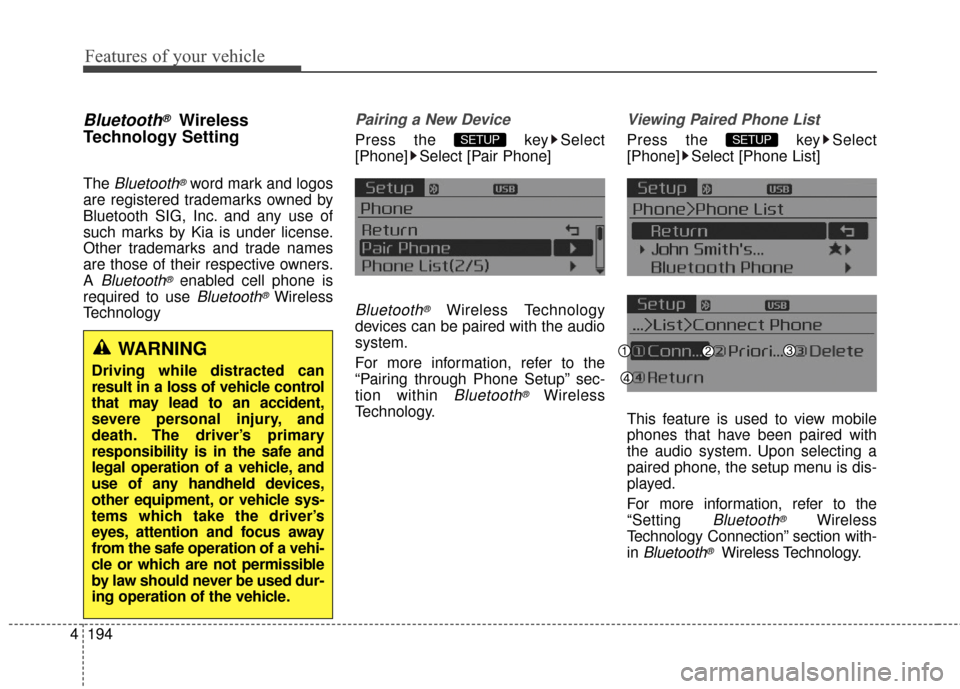
Pairing a New Device
Press the key Select
[Phone] Select [Pair Phone]
Bluetooth®Wireless Technology
devices can be paired with the audio
system.
For more information, refer to the
“Pairing through Phone Setup” sec-
tion within
Bluetooth®Wireless
Technology.
Viewing Paired Phone List
Press the key Select
[Phone] Select [Phone List]
This feature is used to view mobile
phones that have been paired with
the audio system. Upon selecting a
paired phone, the setup menu is dis-
played.
For more information, refer to the
“Setting
Bluetooth®Wireless
Technology Connection” section with-
in
Bluetooth®Wireless Technology.
SETUPSETUP
WARNING
Driving while distracted can
result in a loss of vehicle control
that may lead to an accident,
severe personal injury, and
death. The driver’s primary
responsibility is in the safe and
legal operation of a vehicle, and
use of any handheld devices,
other equipment, or vehicle sys-
tems which take the driver’s
eyes, attention and focus away
from the safe operation of a vehi-
cle or which are not permissible
by law should never be used dur-
ing operation of the vehicle.
Page 269 of 487
![KIA Optima 2015 4.G Owners Guide Features of your vehicle
196
4
Audio Streaming
Press the key Select
[Phone] Select [Audio Streaming]
When Audio Streaming is turned on,
you can play music files saved in
your
Bluetooth®Wireless Tec](/img/2/2963/w960_2963-268.png "KIA Optima 2015 4.G Owners Guide Features of your vehicle
196
4
Audio Streaming
Press the key Select
[Phone] Select [Audio Streaming]
When Audio Streaming is turned on,
you can play music files saved in
your
Bluetooth®Wireless Tec")
Features of your vehicle
196
4
Audio Streaming
Press the key Select
[Phone] Select [Audio Streaming]
When Audio Streaming is turned on,
you can play music files saved in
your
Bluetooth®Wireless Technology
device through the audio system.
Outgoing Volume
Press the key Select
[Phone] Select [Outgoing Volume]
Use TUNE knob to adjust the out-
going volume level.
on a call, the volume can be
changed by using the
key.
Turning Bluetooth System Off
Press the key Select
[Phone] Select [Bluetooth System
Off]
Once
Bluetooth®Wireless Technology
is turned off,
Bluetooth®Wireless
Technology related features will not be
supported within the audio system.
turn
Bluetooth®Wireless
Technology back on, go to [Phone] and select “Yes”.SETUP
SETUP
SEEK
TRACK
SETUPSETUP
Page 274 of 487
4201
Features of your vehicle
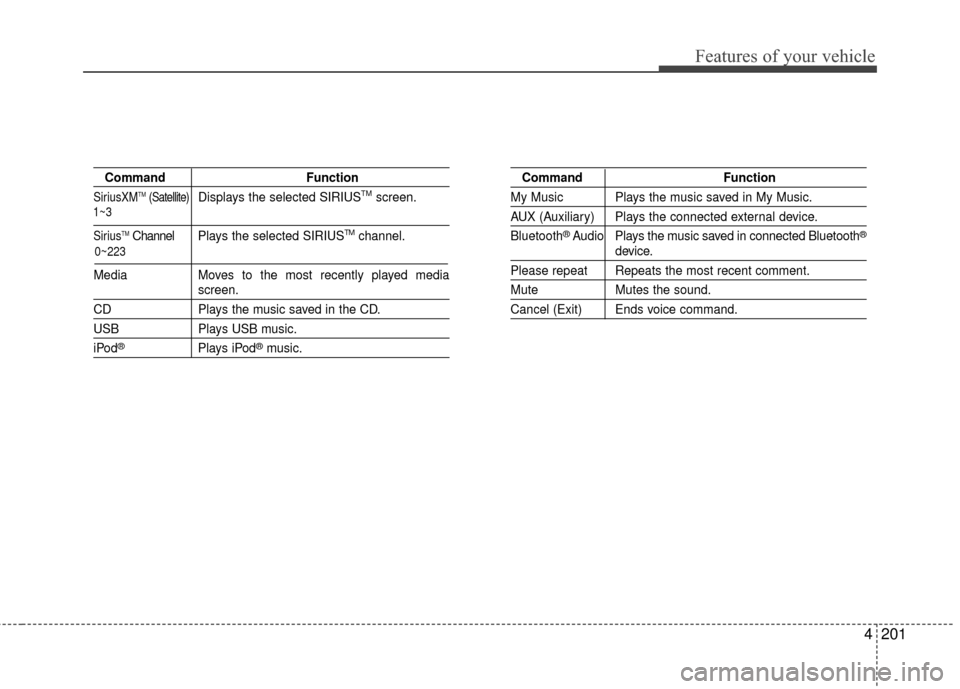
CommandFunction
SiriusXMTM(Satellite)Displays the selected SIRIUSTMscreen.
SiriusTMChannel P l ay s the selected SIRIUSTMchannel.
Media Moves to the most recently played media
screen.
CD Plays the music saved in the CD.
USBPlays USB music.
iPod®Plays iPod®music.
Command Function
My Music Plays the music saved in My Music.
AUX (Auxiliary) Plays the connected external device.
Bluetooth
®Audio Plays the music saved in connected Bluetooth®
device.
Please repeat Repeats the most recent comment.
Mute Mutes the sound.
Cancel (Exit) Ends voice command.
0~223
1~3
Page 276 of 487
4203
Features of your vehicle
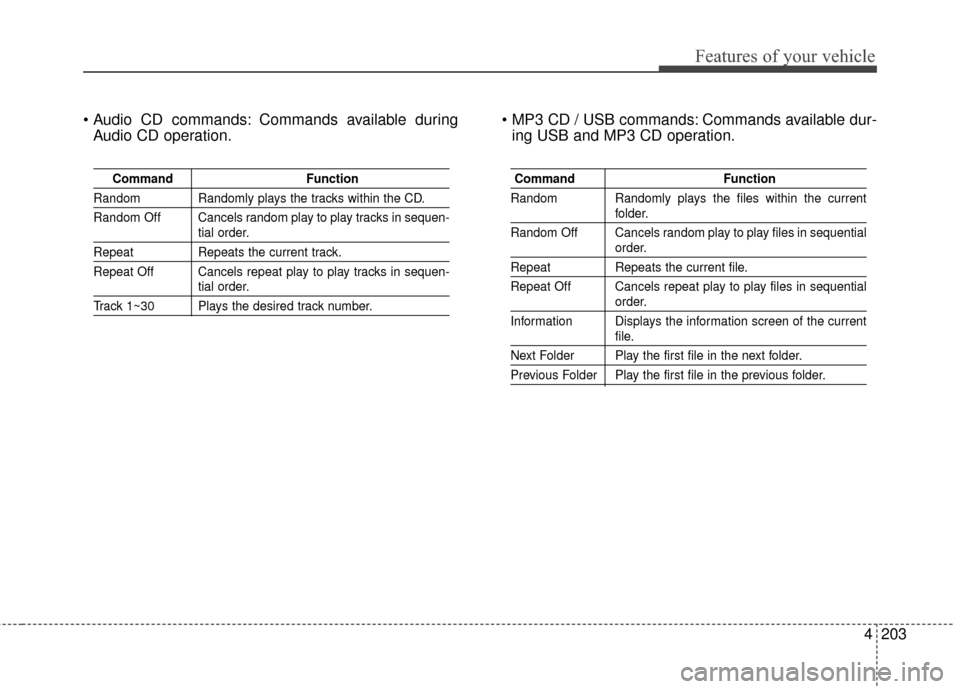
Commands available duringAudio CD operation. Commands available dur-
ing USB and MP3 CD operation.
Command Function
Random Randomly plays the tracks within the CD.
Random Off Cancels random play to play tracks in sequen-
tial order.
RepeatRepeats the current track.
Repeat Off Cancels repeat play to play tracks in sequen-
tial order.
Track 1~30 Plays the desired track number.
Command Function
Random Randomly plays the files within the current
folder.
Random Off Cancels random play to play files in sequential
order.
Repeat Repeats the current file.
Repeat Off Cancels repeat play to play files in sequential
order.
Information Displays the information screen of the current
file.
Next Folder Play the first file in the next folder.
Previous Folder Play the first file in the previous folder.
Page 278 of 487
4205
Features of your vehicle
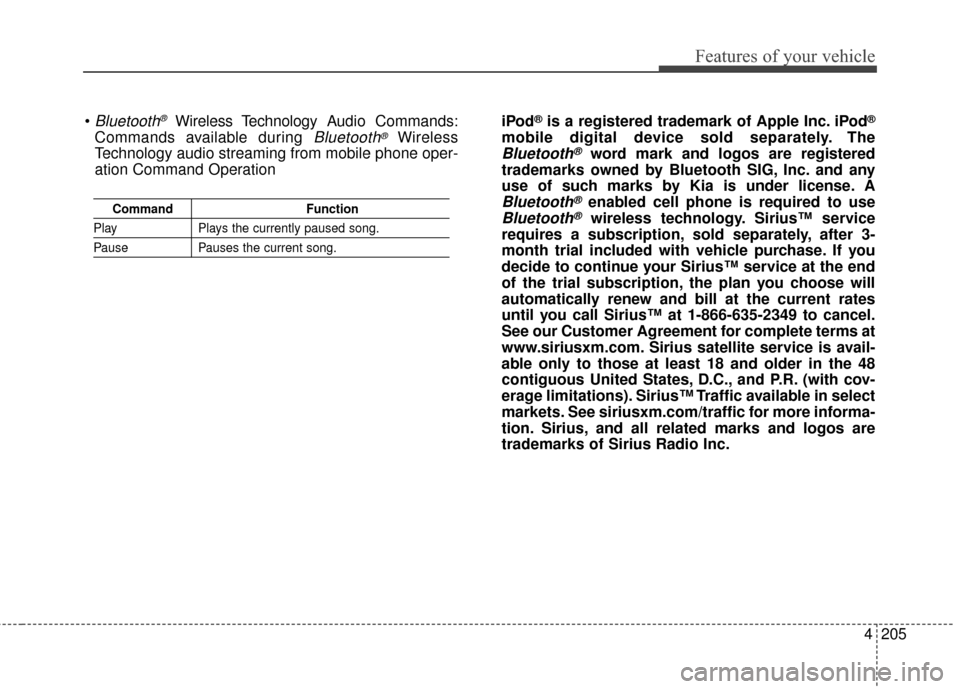
CommandFunction
PlayPlays the currently paused song.
PausePauses the current song.
Bluetooth®Wireless Technology A udio Commands:
Commands available during
Bluetooth®Wireless
Technology audio streaming from mobile phone oper-
ation Command Operation iPod
®is a registered trademark of Apple Inc. iPod®
mobile digital device sold separately. The
Bluetooth®word mark and logos are registered
trademarks owned by Bluetooth SIG, Inc. and any
use of such marks by Kia is under license. A
Bluetooth®enabled cell phone is required to use
Bluetooth®wireless technology. Sirius™ service
requires a subscription, sold separately, after 3-
month trial included with vehicle purchase. If you
decide to continue your Sirius™ service at the end
of the trial subscription, the plan you choose will
automatically renew and bill at the current rates
until you call Sirius™ at 1-866-635-2349 to cancel.
See our Customer Agreement for complete terms at
www.siriusxm.com. Sirius satellite service is avail-
able only to those at least 18 and older in the 48
contiguous United States, D.C., and P.R. (with cov-
erage limitations). Sirius™ Traffic available in select
markets. See siriusxm.com/traffic for more informa-
tion. Sirius, and all related marks and logos are
trademarks of Sirius Radio Inc.
Page 413 of 487
Maintenance
46
7
Battery recharging
Your vehicle has a maintenance-free,
calcium-based battery.
If the battery becomes discharged
in a short time (because, for exam-
ple, the headlights or interior lights
were left on while the vehicle was
not in use), recharge it by slow
charging (trickle) for 10 hours.
If the battery gradually discharges because of high electric load while
the vehicle is being used, recharge
it at 20-30A for two hours. When recharging the battery,
observe the following precautions:
The battery must be removed from
the vehicle and placed in an area
with good ventilation.
Watch the battery during charging, and stop or reduce the charging
rate if the battery cells begin
gassing (boiling) violently or if the
temperature of the electrolyte of
any cell exceeds 49°C (120°F ).
Wear eye protection when check- ing the battery during charging.
Disconnect the battery charger in the following order.
1. Turn off the battery charger main switch.
2. Unhook the negative clamp from the negative battery terminal.
3. Unhook the positive clamp from the positive battery terminal.
Before performing maintenance or recharging the battery, turn off all
accessories and stop the engine.
The negative battery cable must be removed first and installed last
when the battery is disconnected.
Reset items
Items should be reset after the bat-
tery has been discharged or the bat-
tery has been disconnected.
Auto down window (See chapter 4)
Sunroof (See chapter 4)
Trip computer (See chapter 4)
Climate control system (See chapter 4)
Clock (See chapter 4)
Audio (See chapter 4)
Page 430 of 487
763
Maintenance
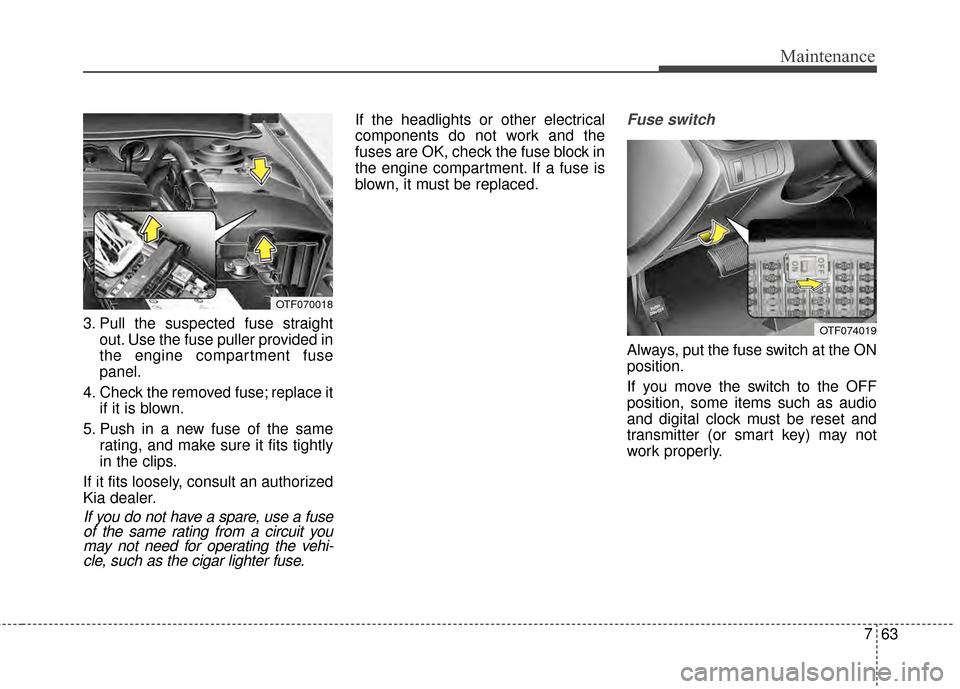
3. Pull the suspected fuse straightout. Use the fuse puller provided in
the engine compartment fuse
panel.
4. Check the removed fuse; replace it if it is blown.
5. Push in a new fuse of the same rating, and make sure it fits tightly
in the clips.
If it fits loosely, consult an authorized
Kia dealer.
If you do not have a spare, use a fuse of the same rating from a circuit youmay not need for operating the vehi-cle, such as the cigar lighter fuse.
If the headlights or other electrical
components do not work and the
fuses are OK, check the fuse block in
the engine compartment. If a fuse is
blown, it must be replaced.Fuse switch
Always, put the fuse switch at the ON
position.
If you move the switch to the OFF
position, some items such as audio
and digital clock must be reset and
transmitter (or smart key) may not
work properly.
OTF070018
OTF074019
Page 434 of 487
767
Maintenance
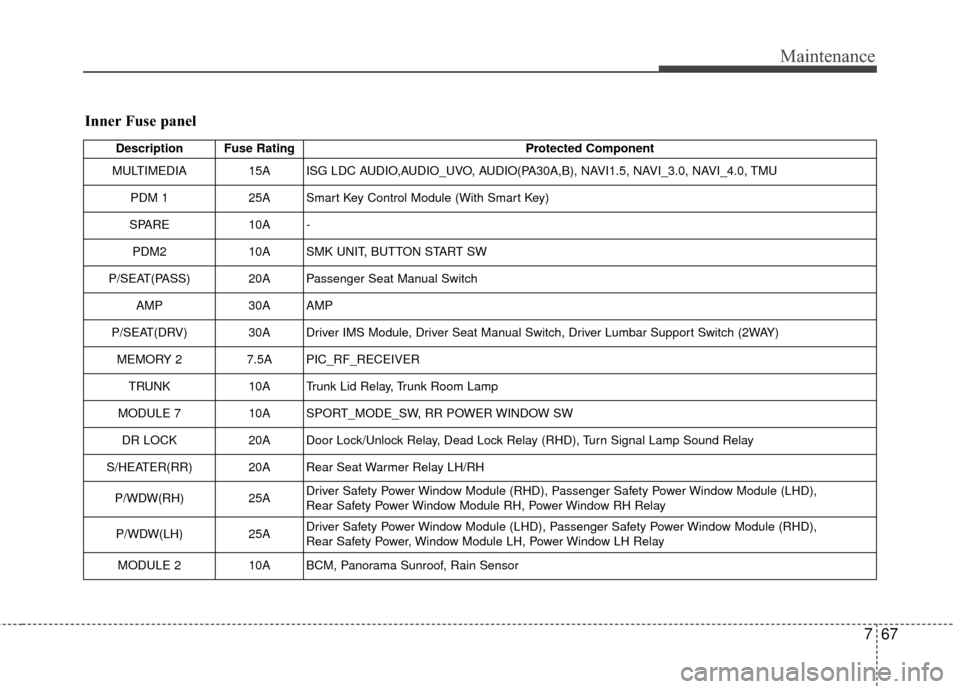
Inner Fuse panel
Description Fuse RatingProtected Component
MULTIMEDIA 15A ISG LDC AUDIO,AUDIO_UVO, AUDIO(PA30A,B), NAVI1.5, NAVI_3.0, NAVI_4.0, TMU
PDM 1 25A Smart Key Control Module (With Smart Key)
SPARE 10A -
PDM2 10A SMK UNIT, BUTTON START SW
P/SEAT(PASS) 20A Passenger Seat Manual Switch AMP 30A AMP
P/SEAT(DRV) 30A Driver IMS Module, Driver Seat Manual Switch, Driver Lumbar Support Switch (2WAY) MEMORY 2 7.5A PIC_RF_RECEIVER
TRUNK 10A Trunk Lid Relay, Trunk Room Lamp
MODULE 7 10A SPORT_MODE_SW, RR POWER WINDOW SW
DR LOCK 20A Door Lock/Unlock Relay, Dead Lock Relay (RHD), Turn Signal Lamp Sound Relay
S/HEATER(RR) 20A Rear Seat Warmer Relay LH/RH
P/WDW(RH) 25ADriver Safety Power Window Module (RHD), Passenger Safety Power Window Module (LHD),
Rear Safety Power Window Module RH, Power Window RH Relay
P/WDW(LH) 25ADriver Safety Power Window Module (LHD), Passenger Safety Power Window Module (RHD),
Rear Safety Power, Window Module LH, Power Window LH Relay
MODULE 2 10A BCM, Panorama Sunroof, Rain Sensor
Page 480 of 487
Index
2I
Active ECO system. . . . . . . . . . . . . . . . . . . . . . . . . . . . 5-38Active ECO operation . . . . . . . . . . . . . . . . . . . . . . . 5-38
Limitation of active ECO operation . . . . . . . . . . . . . 5-38
When active ECO is activated . . . . . . . . . . . . . . . . . 5-38
Air bag - advanced supplemental restraint system . . . . 3-36 Air bag warning label. . . . . . . . . . . . . . . . . . . . . . . . 3-58
Air bag warning light . . . . . . . . . . . . . . . . . . . . . . . . 3-39
Curtain air bag . . . . . . . . . . . . . . . . . . . . . . . . . . . . . 3-51
Driver's and passenger's front air bag . . . . . . . . . . . 3-47
How does the air bag system operate . . . . . . . . . . . 3-37
Inflation and non-inflation conditions of the air bag . . . 3-52
Occupant detection system. . . . . . . . . . . . . . . . . . . . 3-42
Side air bag. . . . . . . . . . . . . . . . . . . . . . . . . . . . . . . . 3-50
SRS Care . . . . . . . . . . . . . . . . . . . . . . . . . . . . . . . . . 3-57
SRS components and functions . . . . . . . . . . . . . . . . 3-40
Air cleaner . . . . . . . . . . . . . . . . . . . . . . . . . . . . . . . . . . 7-37\
Filter replacement. . . . . . . . . . . . . . . . . . . . . . . . . . . 7-37
Appearance care . . . . . . . . . . . . . . . . . . . . . . . . . . . . . . 7-92 Exterior care . . . . . . . . . . . . . . . . . . . . . . . . . . . . . . . 7-92
Interior care . . . . . . . . . . . . . . . . . . . . . . . . . . . . . . . 7-97
Audio system . . . . . . . . . . . . . . . . . . . . . . . . . . . . . . . 4-148
Aux, USB and iPod
®port . . . . . . . . . . . . . . . . . . . 4-150
Glass antenna . . . . . . . . . . . . . . . . . . . . . . . . . . . . . 4-148
Steering wheel audio controls . . . . . . . . . . . . . . . . 4-149
Automatic climate control system . . . . . . . . . . . . . . . 4-122 Automatic heating and air conditioning. . . . . . . . . 4-123 Manual heating and air conditioning . . . . . . . . . . . 4-124
System operation . . . . . . . . . . . . . . . . . . . . . . . . . . 4-130
Automatic transaxle . . . . . . . . . . . . . . . . . . . . . . . . . . . 5-14 Automatic transaxle operation . . . . . . . . . . . . . . . . . 5-14
Good driving practices . . . . . . . . . . . . . . . . . . . . . . . 5-19
Back-up warning system . . . . . . . . . . . . . . . . . . . . . . . 4-94 Back-up warning system precautions . . . . . . . . . . . 4-95
Non-operational conditions of back-up warningsystem. . . . . . . . . . . . . . . . . . . . . . . . . . . . . . . . . . . 4-\
95
Operation of the back-up warning system . . . . . . . . 4-94
Self-diagnosis . . . . . . . . . . . . . . . . . . . . . . . . . . . . . . 4-96
Battery. . . . . . . . . . . . . . . . . . . . . . . . . . . . . . . . . . . . \
. . 7-44 Battery recharging . . . . . . . . . . . . . . . . . . . . . . . . . . 7-46
For best battery service . . . . . . . . . . . . . . . . . . . . . . 7-44
Reset items . . . . . . . . . . . . . . . . . . . . . . . . . . . . . . . . 7-46
Before driving . . . . . . . . . . . . . . . . . . . . . . . . . . . . . . . . . 5-4 Before entering vehicle . . . . . . . . . . . . . . . . . . . . . . . 5-4
Before starting . . . . . . . . . . . . . . . . . . . . . . . . . . . . . . 5-4
Necessary inspections . . . . . . . . . . . . . . . . . . . . . . . . 5-4
Blind spot detection system (BSD) . . . . . . . . . . . . . . . 5-41 BSD (Blind Spot Detection) /LCA (Lane Change Assist) . . . . . . . . . . . . . . . . . . 5-42
Non-operating condition . . . . . . . . . . . . . . . . . . . . . 5-47
RCTA (Rear cross traffic alert) . . . . . . . . . . . . . . . . 5-45
Brake . . . . . . . . . . . . . . . . . . . . . . . . . . . . . . . . . . . . \
. . . 7-34
A
B