Eco KIA Optima 2015 4.G Repair Manual
[x] Cancel search | Manufacturer: KIA, Model Year: 2015, Model line: Optima, Model: KIA Optima 2015 4.GPages: 487, PDF Size: 13.4 MB
Page 126 of 487
453
Features of your vehicle
3. Return to the vehicle, firmly pressand hold for two seconds the
desired HomeLink
®button then
release. Repeat the
"press/hold/release" sequence a
second time to complete the pro-
gramming. (Some devices may
require you to repeat this
sequence a third time to complete
the programming.)
4. Press and hold the just-trained HomeLink
®button and observe
the red Status Indicator LED. If the
indicator light stays on constantly,
programming is complete and
your device should activate.
5. To program the remaining two HomeLink
®buttons, follow either
steps 1 through 4 above for other
Rolling Code devices or steps 2
through 5 in Standard Programming
for standard devices. Gate operator & Canadian pro-
gramming
During programming, your handheld
transmitter may automatically stop
transmitting. Continue to press the
Integrated HomeLink
®Wireless
Control System button (note steps 2
through 4 in the Standard
Programming portion of this docu-
ment) while you press and re-press
("cycle") your handheld transmitter
every two seconds until the frequen-
cy signal has been learned. The indi-
cator light will flash slowly and then
rapidly after several seconds upon
successful training.
Operating HomeLink
®
To operate, simply press and release
the programmed HomeLink®button.
Activation will now occur for the
trained device (i.e. garage door
opener, gate operator, security sys-
tem, entry door lock, home/office
lighting, etc.). For convenience, the
hand-held transmitter of the device
may also be used at any time. Reprogramming a single
HomeLink
®button
To program a new device to a previ-
ously trained HomeLink
®button, fol-
low these steps:
1. Press and hold the desired HomeLink
®button. Do NOT release
until step 4 has been completed.
2. When the indicator light begins to flash slowly (after 20 seconds),
position the handheld transmitter 1
to 3 inches away from the
HomeLink
®surface.
3. Press and hold the handheld transmitter button. The HomeLink
®
indicator light will flash, first slowly
and then rapidly.
4. When the indicator light begins to flash rapidly, release both buttons.
5. Press and hold the just-trained HomeLink
®button and observe
the red Status Indicator LED. If the
indicator light stays on constantly,
programming is complete and
your new device should activate.
Page 127 of 487
Features of your vehicle
54
4
Erasing HomeLink®buttons
Individual buttons cannot be erased.
However, to erase all three pro-
grammed buttons:
1. Press and hold the two outer HomeLink
®buttons until the indi-
cator light begins to flash-after 20
seconds.
2. Release both buttons. Do not hold for longer than 30 seconds.
The Integrated HomeLink
®Wireless
Control System is now in the training
(learn) mode and can be pro-
grammed at any time following the
appropriate steps in the
Programming sections above. FCC ID: NZLZTVHL3
IC: 4112A-ZTVHL3
This device complies with Industry
Canada Standard RSS-210.
Operation is subject to the following
two conditions:
1. This device may not cause harm-
ful interference, and
2. This device must accept any inter- ference received, including inter-
ference that may cause undesired
operation.
The transceiver has been tested and
complies with FCC and Industry
Canada rules. Changes or modifica-
tions not expressly approved by the
party responsible for compliance
could void the user's authority to
operate the device. NVS
®and ZNavTMare registered
trademarks. NavTMare of Gentex
Corporation, Zeeland, Michigan.
HomeLink
®is a registered trade-
mark owned by Gentex corporation.
Page 135 of 487
Features of your vehicle
62
4
Odometer
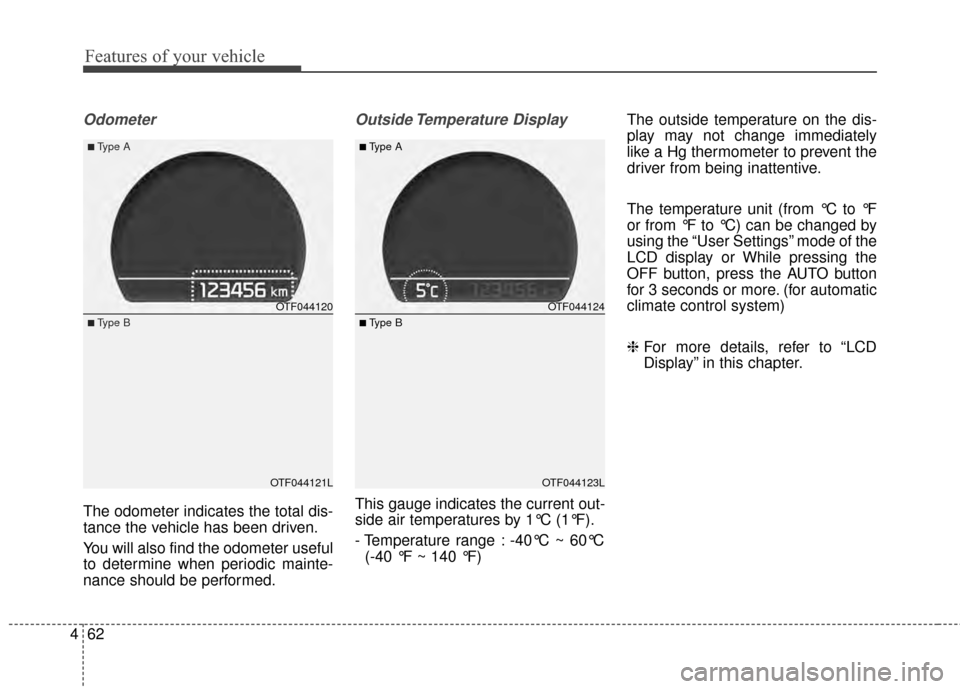
The odometer indicates the total dis-
tance the vehicle has been driven.
You will also find the odometer useful
to determine when periodic mainte-
nance should be performed.
Outside Temperature Display
This gauge indicates the current out-
side air temperatures by 1°C (1°F).
- Temperature range : -40°C ~ 60°C
(-40 °F ~ 140 °F) The outside temperature on the dis-
play may not change immediately
like a Hg thermometer to prevent the
driver from being inattentive.
The temperature unit (from °C to °F
or from °F to °C) can be changed by
using the “User Settings” mode of the
LCD display or While pressing the
OFF button, press the AUTO button
for 3 seconds or more. (for automatic
climate control system)
❈
For more details, refer to “LCD
Display” in this chapter.
OTF044120
OTF044121L
■Type A
■Type B
OTF044124
OTF044123L
■Type A
■ Type B
Page 137 of 487
Features of your vehicle
64
4
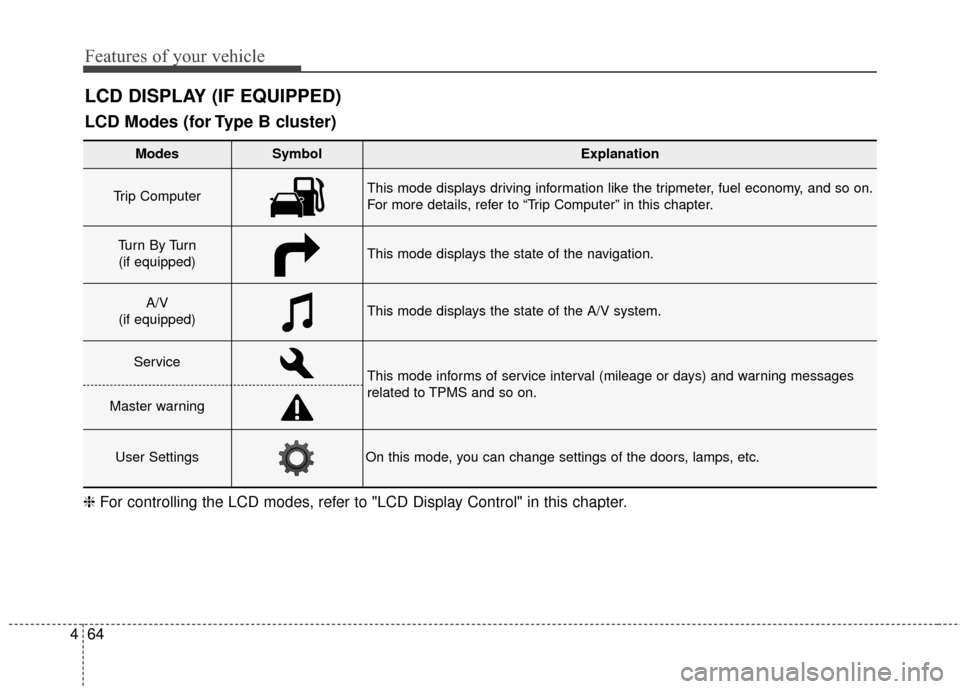
LCD DISPLAY (IF EQUIPPED)
❈ For controlling the LCD modes, refer to "LCD Display Control" in this chapter.
LCD Modes (for Type B cluster)
Modes SymbolExplanation
Trip Computer This mode displays driving information like the tripmeter, fuel economy, and so on.
For more details, refer to “Trip Computer” in this chapter.
Tu r n B y Tu r n
(if equipped)This mode displays the state of the navigation.
A/V
(if equipped)This mode displays the state of the A/V system.
ServiceThis mode informs of service interval (mileage or days) and warning messages
related to TPMS and so on.
Master warning
User SettingsOn this mode, you can change settings of the doors, lamps, etc.
Page 138 of 487
465
Features of your vehicle
Service Mode
Service Interval
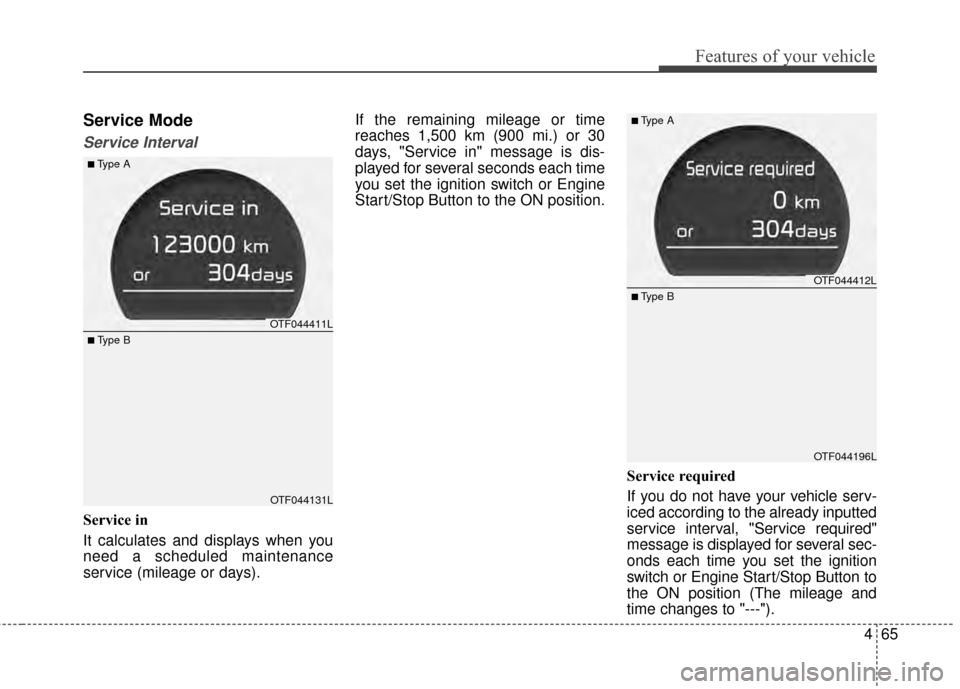
Service in
It calculates and displays when you
need a scheduled maintenance
service (mileage or days).If the remaining mileage or time
reaches 1,500 km (900 mi.) or 30
days, "Service in" message is dis-
played for several seconds each time
you set the ignition switch or Engine
Start/Stop Button to the ON position.
Service required
If you do not have your vehicle serv-
iced according to the already inputted
service interval, "Service required"
message is displayed for several sec-
onds each time you set the ignition
switch or Engine Start/Stop Button to
the ON position (The mileage and
time changes to "---").
OTF044411L
OTF044131L
■Type A
■ Type B
OTF044412L
OTF044196L
■Type A
■ Type B
Page 139 of 487
Features of your vehicle
66
4
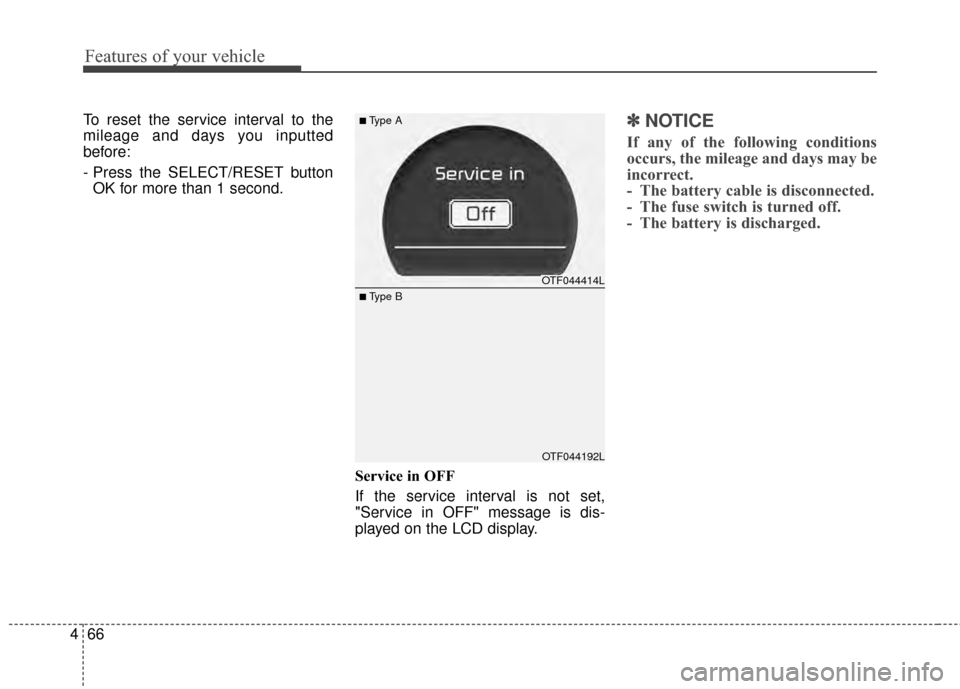
To reset the service interval to the
mileage and days you inputted
before:
- Press the SELECT/RESET button
OK for more than 1 second.
Service in OFF
If the service interval is not set,
"Service in OFF" message is dis-
played on the LCD display.✽ ✽NOTICE
If any of the following conditions
occurs, the mileage and days may be
incorrect.
- The battery cable is disconnected.
- The fuse switch is turned off.
- The battery is discharged.
OTF044414L
OTF044192L
■Type A
■ Type B
Page 141 of 487
Features of your vehicle
68
4
Auto Door Unlock (if equipped)
Off:
The auto door unlock operation will
be canceled.
Key Out or Power Off: All doors will be automatically
unlocked when the ignition key is
removed from ignition switch or
Engine Start/Stop Button is set to
the OFF position.
Shift Lever: All doors will be automatically
unlocked if the automatic transaxle
shift lever is shifted to the P (Park)
position. Two Press Unlock (if equipped)
Off:
The two press unlock function will
be deactivated. Therefore, all doors
will unlock if the door is unlocked.
On: The driver’s door will unlock if the
door is unlocked. When the door is
unlocked again within 4 seconds,
all doors will unlock.
Horn Feedback (if equipped)
Off: The Horn feedback operation will
be deactivated.
On: After locking the door by pressing
the lock button on the transmitter, if
you press the lock button again
within 4 seconds, the warning
sound will operate once to indicate
that all doors are locked.Lamp
One Touch Turn Lamp (if equipped)
If this item is checked, the lane
change signals will blink 3, 5 or 7
times when the turn signal lever is
moved slightly.
Head Lamp Delay (if equipped)
If this item is checked, the headlamp
delay and headlamp welcome func-
tion will be activated.
Welcome Light (if equipped)
If this item is checked, the welcome
light function of the puddle lamp will
be activated.
Page 142 of 487
469
Features of your vehicle
Convenience
Language
Choose the language you prefer
within the LCD.
Temperature Unit
Convert the temperature unit from °C
to °F or from °F to °C.
AVG Fuel Eco Reset
Auto Reset:The average fuel economy will
reset automatically when refueling.
Manual Reset: The average fuel economy will not
reset automatically whenever refu-
eling.
For more details, refer to "Trip
Computer" in this chapter. Seat Easy Access (if equipped)
If this item is checked, the driver’s
seat will automatically move forward
or rearward for the driver to enter or
exit the vehicle comfortably.
Welcome Sound
If this item is checked, the welcome
sound function will be activated.
Steering Position (if equipped)
If this item is checked, the warning
function regarding the steering wheel
alignment will be activated.
For more details, refer to "Warning
Messages" in this chapter.
Driving Assist (if equipped)
RCTA
If this item is checked RCTA (Rear
Cross Traffic Alert) function in BSD
(Blind Spot Detection) system will be
activated.
For more details, refer to Blind spot
detection system in chapter 5.
Page 149 of 487
Features of your vehicle
76
4
It means that you should replace
the fuse with a new one. If that is
not possible, you can start the
engine by pressing the Engine
Start/Stop Button for 10 seconds in
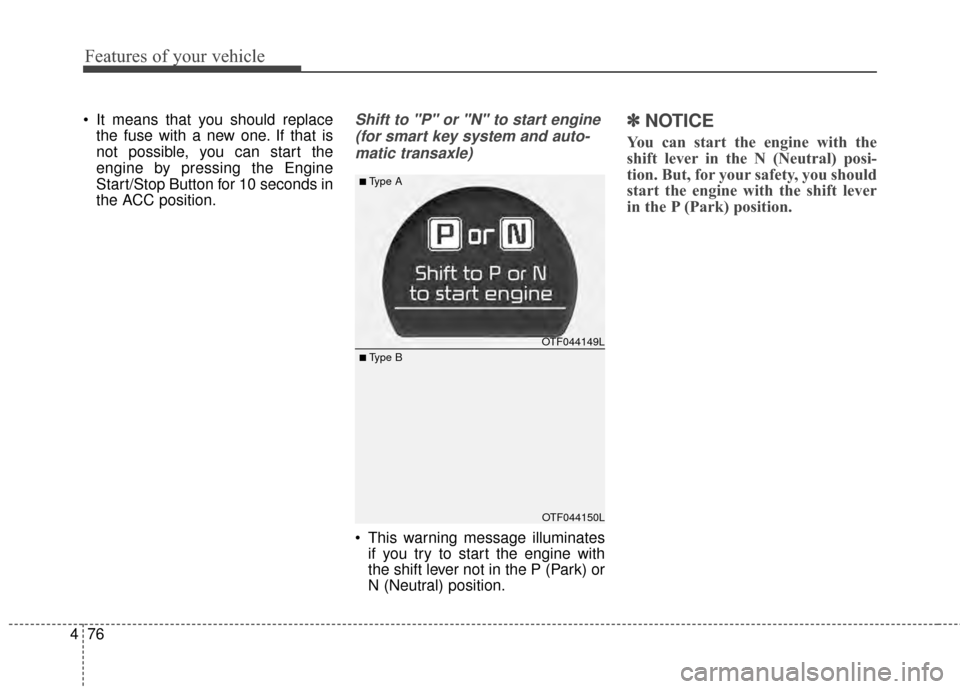
the ACC position.Shift to "P" or "N" to start engine
(for smart key system and auto-matic transaxle)
This warning message illuminates if you try to start the engine with
the shift lever not in the P (Park) or
N (Neutral) position.
✽ ✽ NOTICE
You can start the engine with the
shift lever in the N (Neutral) posi-
tion. But, for your safety, you should
start the engine with the shift lever
in the P (Park) position.
OTF044149L
OTF044150L
■Type A
■ Type B
Page 152 of 487
479
Features of your vehicle
Overview
Description
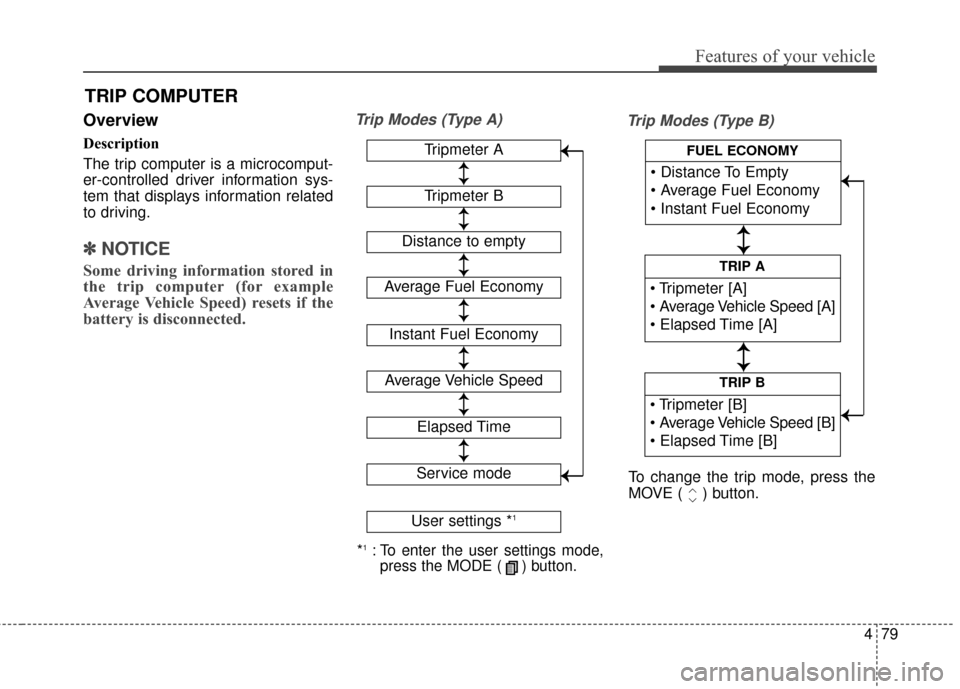
The trip computer is a microcomput-
er-controlled driver information sys-
tem that displays information related
to driving.
✽ ✽NOTICE
Some driving information stored in
the trip computer (for example
Average Vehicle Speed) resets if the
battery is disconnected.
Trip Modes (Type A)
Trip Modes (Type B)
TRIP COMPUTER
*1:To enter the user settings mode,
press the MODE ( ) button.
Tripmeter A
Average Fuel Economy
Instant Fuel Economy
Average Vehicle Speed
Elapsed Time
Service mode
User settings *1
↕
↕
→
→
→
→
Tripmeter B
Distance to empty
↕
↕
↕ ↕
↕ ↕
↕ ↕
↕ ↕
↕ ↕
TRIP B
TRIP A
FUEL ECONOMY
To change the trip mode, press the
MOVE ( ) button.
↕
↕
↕ ↕
→
→ → →