key KIA OPTIMA 2017 Features and Functions Guide
[x] Cancel search | Manufacturer: KIA, Model Year: 2017, Model line: OPTIMA, Model: KIA OPTIMA 2017Pages: 50, PDF Size: 4.64 MB
Page 3 of 50
ESSENTIAL FEATURES
OPTIMA FE ATURES & FUNCTIONS GUIDE*IF EQUIPPED
Air Conditioning / Climate Control . . . . . . . . . . . .28
Audio System - Standard Audio System* . . . . . . . . . 22
Audio System - UVO eServices Setup* . . . . . . . . . . . .23
Audio System - UVO eServices System* . . . . . . . . . . .24
Audio System - UVO eServices with Premium Navigation* . .25
Aux/USB/iPod®* Port* & Power Outlets . . . . . . . . . 27
Bluetooth® Wireless Technology . . . . . . . . . . . . .18
Cruise Control . . . . . . . . . . . . . . . . . . . . . . 21
Digital Clock . . . . . . . . . . . . . . . . . . . . . . . 27
ECO Mode (Active ECO)* . . . . . . . . . . . . . . . . .09
Passenger Airbag Off Indicator . . . . . . . . . . . . . . 40
Tire Mobility Kit* . . . . . . . . . . . . . . . . . . . . .39
Tire Pressure Monitoring System (TPMS) . . . . . . . . 05
Windshield Wipers & Washers . . . . . . . . . . . . . .16
Driving while distracted can result in a loss of vehicle control that may lead to an accident, severe personal injury and death. The driver’s primary responsibility is in the safe and legal operation of a vehicle, and use of any handheld devices, other equipment or vehicle systems which take the driver’s eyes, attention and focus away from the safe operation of a vehicle or that are not permissible by law should never be used during operation of the vehicle.
VIDEOS & QR CODES . . . . . . . . . . . . . . . . . . 02
INSTRUMENT CLUSTER
Instrument Cluster Overview . . . . . . . . . . . . . . . . 03Indicators & Warning Lights . . . . . . . . . . . . . . . . 04Tire Pressure Monitoring System (TPMS) . . . . . . . . . 05LCD Instrument Cluster Modes . . . . . . . . . . . . . . . 06Trip Modes / Trip Computer . . . . . . . . . . . . . . . . . 06Instant Fuel Consumption Mode* . . . . . . . . . . . . . . 07Fuel Economy . . . . . . . . . . . . . . . . . . . . . . . . 07User Settings . . . . . . . . . . . . . . . . . . . . . . . . 08Service Mode . . . . . . . . . . . . . . . . . . . . . . . . 08Drive Mode Integrated Control System* . . . . . . . . . . 09ECO Mode (Active ECO)* . . . . . . . . . . . . . . . . . . 09
DRIVER’S PANEL
Blind Spot Detection System* . . . . . . . . . . . . . . . 10Instrument Panel Dimmer* . . . . . . . . . . . . . . . . . 11Electronic Stability Control (ESC) . . . . . . . . . . . . . . 11Hill-Start Assist Control (HAC) . . . . . . . . . . . . . . . 11Lane Departure Warning System (LDWS)* . . . . . . . . . 12Autonomous (Assist) Emergency Braking (AEB) /Forward Collision Warning System (FCWS)* . . . . . . . . 12Engine Start/Stop Button* . . . . . . . . . . . . . . . . . 13Power Windows, Window Lock & Central Door Lock* . . . 14Automatic Door Lock /Unlock . . . . . . . . . . . . . . . . 14Power/Heated Outside Mirrors* . . . . . . . . . . . . . . 14Power Folding Mirrors* . . . . . . . . . . . . . . . . . . . 14
STEERING WHEEL CONTROLS
Turn Signals . . . . . . . . . . . . . . . . . . . . . . . . 15Headlights & High Beams . . . . . . . . . . . . . . . . . . 15Windshield Wipers & Washers . . . . . . . . . . . . . . . 16Heated Steering Wheel* . . . . . . . . . . . . . . . . . . 16Tilt/ Telescoping Steering Wheel* . . . . . . . . . . . . . . 17Paddle Shifters* . . . . . . . . . . . . . . . . . . . . . . 17Bluetooth® Wireless Technology . . . . . . . . . . . . . . 18Advanced Smart Cruise Control (ASCC)* . . . . . . . . . 20Audio Controls* . . . . . . . . . . . . . . . . . . . . . . 21Cruise Control . . . . . . . . . . . . . . . . . . . . . . . 21
AUDIO SYSTEMS
Standard Audio System* . . . . . . . . . . . . . . . . . . 22UVO eServices Setup* . . . . . . . . . . . . . . . . . . . 23UVO eServices System* . . . . . . . . . . . . . . . . . . 24UVO eServices with Premium Navigation* . . . . . . . . . 25
CENTER PANEL
Surround View Monitoring (SVM) System* . . . . . . . . . 26 Digital Clock . . . . . . . . . . . . . . . . . . . . . . . . 27Aux/USB/iPod® Port & Power Outlets . . . . . . . . . . . 27USB Charger* . . . . . . . . . . . . . . . . . . . . . . . . 27Wireless Smartphone Charging System* . . . . . . . . . . 27Automatic Climate Control* . . . . . . . . . . . . . . . . 28Manual Climate Control* . . . . . . . . . . . . . . . . . . 29Electric Parking Brake (EPB)* . . . . . . . . . . . . . . . 30Auto Hold* . . . . . . . . . . . . . . . . . . . . . . . . . 30Automatic Gear Shift with Sportmatic® Shifting . . . . . . 31
S E AT I N G
Front Seat Headrest Adjustment . . . . . . . . . . . . . . 32Driver Position Memory System* . . . . . . . . . . . . . . 32Power Adjustable Driver’s Seat* . . . . . . . . . . . . . . 326-Way Manual Adjustable Driver’s Seat* . . . . . . . . . . 33Seat Warmers / Ventilated Seats* . . . . . . . . . . . . . 33
OTHER KEY FEATURES
Smart Key* . . . . . . . . . . . . . . . . . . . . . . . . . 34Remote Keyless Entry (Folding Key)* . . . . . . . . . . . . 35Double-Turn Lock /Unlock All . . . . . . . . . . . . . . . . 35Fuel Cap / Malfunction Indicator (Check Engine Light) . . . 35Sunvisor . . . . . . . . . . . . . . . . . . . . . . . . . . 35Map/Room Lamps . . . . . . . . . . . . . . . . . . . . . 36Panoramic Sunroof Operation* . . . . . . . . . . . . . . . 36Fuel Door and Trunk Release . . . . . . . . . . . . . . . . 37Trunk Release Button (Exterior) . . . . . . . . . . . . . . 37Smart Trunk* . . . . . . . . . . . . . . . . . . . . . . . . 37Hood Release Lever and Latch . . . . . . . . . . . . . . . 38Child-Protector Rear Door Lock . . . . . . . . . . . . . . 38Back-Up Warning System (Rear Parking Assist System)* . 38Rear-Camera Display* . . . . . . . . . . . . . . . . . . . 39Tire Mobility Kit . . . . . . . . . . . . . . . . . . . . . . . 39
SAFETY FEATURES
Occupant Detection System (ODS) /Passenger Airbag Off Indicator . . . . . . . . . . . . . . . 40Seat Belts . . . . . . . . . . . . . . . . . . . . . . . . . . 40Seat Belt Retractor Locks . . . . . . . . . . . . . . . . . 40
NORMAL MAINTENANCE SCHEDULE . . . . . 41
LEGAL DISCLAIMERS . . . (See Back Inside Cover Page)
Page 15 of 50
13ALWAYS CHECK THE OWNER’S MANUAL FOR COMPLETE OPER ATING INFORMATION AND SAFET Y WARNINGS . *IF EQUIPPED
Engine Start/Stop Button & Smart Key Video
To view a video on your mobile device, snap this QR Code or visit the listed website .
Refer to page 2 for more information .
www.KuTechVideos.com/jf13/2017
AB
QR CODEEngine Start/Stop Button*
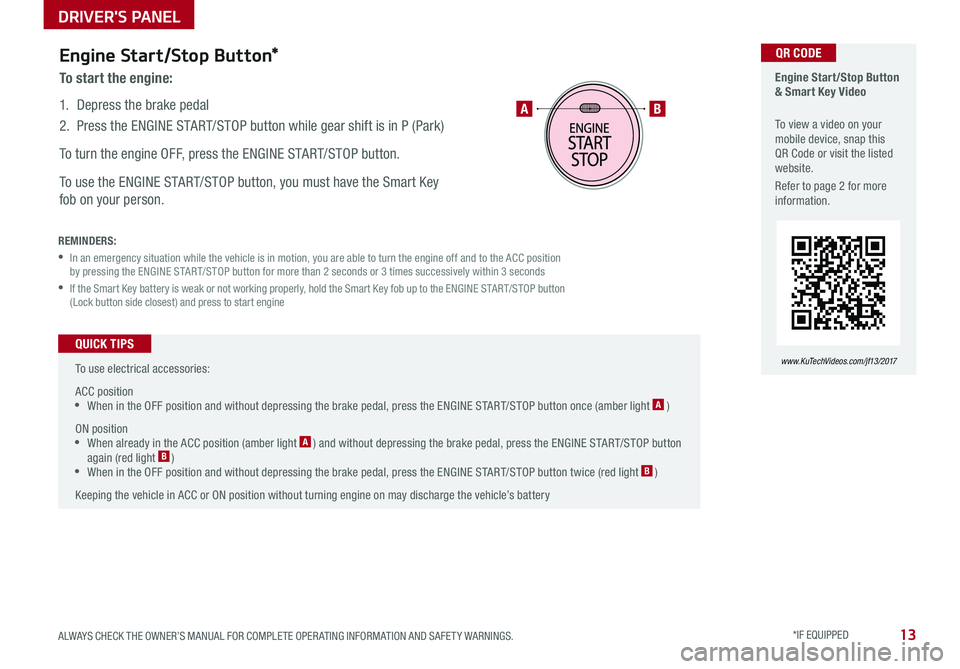
To start the engine:
1 . Depress the brake pedal
2 .
Press the ENGINE START/STOP button while gear shift is in P (Park)
To turn the engine OFF, press the ENGINE START/STOP button .
To use the ENGINE START/STOP button, you must have the Smart Key
fob on your person .
REMINDERS:
•
In an emergency situation while the vehicle is in motion, you are able to turn the engine off and to the ACC position by pressing the ENGINE START/STOP button for more than 2 seconds or 3 times successively within 3 seconds
•
If the Smart Key battery is weak or not working properly, hold the Smart Key fob up to the ENGINE START/STOP button (Lock button side closest) and press to start engine
To use electrical accessories:
ACC position •When in the OFF position and without depressing the brake pedal, press the ENGINE START/STOP button once (amber light A )
ON position •When already in the ACC position (amber light A ) and without depressing the brake pedal, press the ENGINE START/STOP button again (red light B ) •
When in the OFF position and without depressing the brake pedal, press the ENGINE START/STOP button twice (red light B )
Keeping the vehicle in ACC or ON position without turning engine on may discharge the vehicle’s battery
QUICK TIPS
DRIVER'S PANEL
Page 16 of 50

OPTIMA FEATURES & FUNCTIONS GUIDE14*IF EQUIPPED
A
B
C
D
F
E
Power Windows, Window Lock
& Central Door Lock
A Pull/Press to operate Driver’s and Front Passenger’s Windows
Auto-Up/Down*
B Press to Unlock /Lock All Doors
C Press to disable Rear Passenger Windows
REMINDER: When pressed C, window controls for the Rear Passenger Windows are disabled .
Automatic Door Lock/Unlock
Auto Door Lock /Unlock will engage when the gear shift is moved in to
or out of the P (Park) position . Refer to the User Settings in the LCD
Instrument Cluster modes on how to turn Auto Door Lock /Unlock ON/OFF .
Power/Heated Outside Mirrors*
Mirror heaters controlled with Rear Defroster .
Power Folding Outside Mirrors*
Toggle D left or right to select mirror . Then press arrows E to adjust
mirror position .
To both fold and unfold the outside rearview mirror, press the folding
mirror button F as pictured .
REMINDER: To lock position of mirrors, toggle switch to the neutral (center) position .
To automatically fold mirrors when exiting vehicle, press the LOCK button once on the key fob or Smart Key* .
QUICK TIP
Press button again to stop Auto Up/Down function
QUICK TIP
DRIVER'S PANEL
Page 21 of 50
19ALWAYS CHECK THE OWNER’S MANUAL FOR COMPLETE OPER ATING INFORMATION AND SAFET Y WARNINGS . *IF EQUIPPED
Voice Recognition and Phone
Contact Tips
The Kia Voice Recognition System may
have difficulty understanding some
accents or uncommon names . When
using Voice Recognition to place a call,
speak in a moderate tone, with clear
pronunciation .
Help your Bluetooth® Wireless Technology
Voice Recognition performance by making
a few simple changes to your phone
contacts:
•Use full names vs . short or single-
syllable names (“John Smith” vs .
“Dad”; “Smith Residence” vs . “Home”)
•Avoid using special characters or
hyphens (@, &, #, /, -, *, +, etc . )
•Avoid using acronyms (“In Case
Emergency” vs . “ICE”)
•Spell words completely, no abbreviations (“Doctor Goodman” vs .
“Dr . Goodman”)
Bluetooth® Wireless Technology
Pairing a Phone
For instructions on how to pair a phone, refer to the audio system’s user’s
guide or your vehicle’s Quick Start Guide .
During the pairing process, be sure to accept the connection requests on the phone for phonebook download and to allow acceptance of all future Bluetooth® connection requests .
QUICK TIP
Voice Recognition Tips Video To view a video on your mobile device, snap this QR Code or visit the listed website .
Refer to page 2 for more information .
www.KuTechVideos.com/jf13/2017
How to Place a Call
When using the voice command feature, wait for the system BEEP before
speaking the command .
There are two options for placing a call:
Standard Audio System
•Option 1: Press the Receive/Place Call button D (system will prompt
you through call process)
•Option 2: Press the Talk button C (system will BEEP to indicate it is
ready for call placement) . Then say the command “Call {name}” or “Dial
{number}”
UVO eServices with Premium Navigation System
•Option 1: Press the Receive/Place Call button D (displays the phone
screen with number keypad)
•Option 2: Press the Talk button C . Then say the command “Call
Name” or “Dial Number”, followed by phonebook name or number
QR CODE
STEERING WHEEL CONTROLS
Page 24 of 50
OPTIMA FEATURES & FUNCTIONS GUIDE22*IF EQUIPPED
AUDIO SYSTEMS
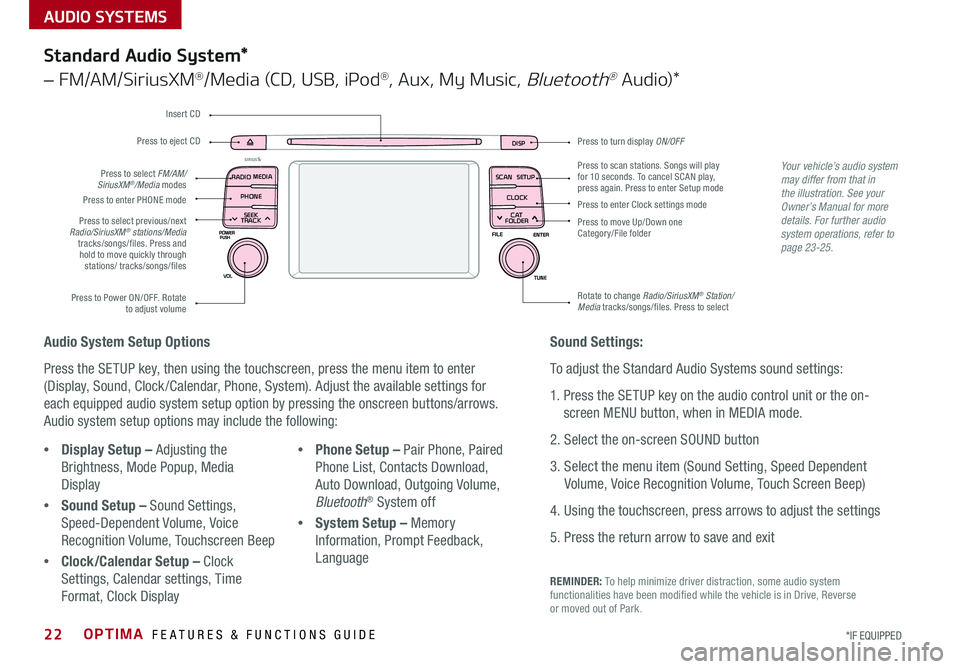
Press to turn display ON/OFFDISP
SCAN
RADIO
MEDIA
PHONE SEEK
TRACKSETUP
CLOCK
C AT
FOLDER
Press to scan stations . Songs will play for 10 seconds . To cancel SCAN play, press again . Press to enter Setup mode
Press to enter Clock settings mode
Press to move Up/Down one Category/File folder
Rotate to change Radio/SiriusXM® Station/Media tracks/songs/files . Press to selectPress to Power ON/OFF . Rotate to adjust volume
Press to select previous/next Radio/SiriusXM® stations/Media tracks/songs/files . Press and hold to move quickly through stations/ tracks/songs/files
Press to enter PHONE mode
Press to select FM/AM/SiriusXM®/Media modes
Press to eject CD
Insert CD
Audio System Setup Options
Press the SETUP key, then using the touchscreen, press the menu item to enter
(Display, Sound, Clock /Calendar, Phone, System) . Adjust the available settings for
each equipped audio system setup option by pressing the onscreen buttons/arrows .
Audio system setup options may include the following:
•Display Setup – Adjusting the
Brightness, Mode Popup, Media
Display
•Sound Setup – Sound Settings,
Speed-Dependent Volume, Voice
Recognition Volume, Touchscreen Beep
•Clock/Calendar Setup – Clock
Settings, Calendar settings, Time
Format, Clock Display
•Phone Setup – Pair Phone, Paired
Phone List, Contacts Download,
Auto Download, Outgoing Volume,
Bluetooth® System off
•System Setup – Memory
Information, Prompt Feedback,
Language
Your vehicle’s audio system may differ from that in the illustration. See your Owner’s Manual for more details. For further audio system operations, refer to page 23-25.
Sound Settings:
To adjust the Standard Audio Systems sound settings:
1 . Press the SETUP key on the audio control unit or the on-
screen MENU button, when in MEDIA mode .
2 . Select the on-screen SOUND button
3 . Select the menu item (Sound Setting, Speed Dependent
Volume, Voice Recognition Volume, Touch Screen Beep)
4 . Using the touchscreen, press arrows to adjust the settings
5 . Press the return arrow to save and exit
Standard Audio System*
– FM/AM/SiriusXM®/Media (CD, USB, iPod®, Aux, My Music, Bluetooth® Au d io)*
REMINDER: To help minimize driver distraction, some audio system functionalities have been modified while the vehicle is in Drive, Reverse or moved out of Park .
Page 25 of 50

23ALWAYS CHECK THE OWNER’S MANUAL FOR COMPLETE OPER ATING INFORMATION AND SAFET Y WARNINGS . *IF EQUIPPED
AUDIO SYSTEMS
REMINDERS:
• Android Auto compatibility requirements: Micro-USB cable that came with your phone, OS Android™ 5 .0 or higher, compatible Android smartphone and data and wireless plan for applicable feature(s) .
• Apple CarPlay compatibility requirements: Apple Lightning cable, latest iOS software, iPhone 5 or later and data and wireless plan for applicable feature(s)
For further UVO eServices System operations, refer to the Car Multimedia System User's Manual. For other audio system information, refer to pages 22-25.
UVO eServices Setup*
UVO eServices Registration/Activation – To use UVO eServices:
1 . On your Smartphone, go to an app store or marketplace to download the free Kia UVO eServices app .
2 . Open the UVO eServices app and create an account by clicking on REGISTER . After entering your information and following the prompts to complete
registration, go to your email and click on the confirmation link ( You can also register an account by logging into MyUVO .com) .
3 . In the app, click CONTINUE, accept the terms and click CONTINUE once again .
4 . Follow the app’s IN-CAR SETUP instructions to connect your smartphone and complete UVO eServices activation .
Apple CarPlay®*
Setting up and starting Apple CarPlay®:
1 . Connect the Apple CarPlay® compatible iPhone with the vehicle’s USB
port using the manufacture’s cable provided with your iPhone .
2 . On the UVO eServices System audio control unit, press the SETUP key .
3 . Press the CONNECTIVIT Y button on the screen and select Apple
CarPlay® .
4 . Select ENABLE APPLE CARPL AY .
5 . From the vehicle’s home screen, select the Apple CarPlay® button,
where you’ll see all the Apple CarPlay® supported apps
Android Auto™*
Setting up Android Auto™:
1 . From an Android Auto™ compatible device, download the Android
Auto™ app from the Google Play™ Store .
2 . Open the Android Auto™ app and proceed with the on-screen
instructions to complete setup on the mobile device .
How to start Android Auto™:
1 . Press the SETUP key on your UVO eServices system’s control panel .
2 . Press the CONNECTIVIT Y button, select Android Auto™ then select
ENABLE ANDROID AUTO .
3 . Connect the Android™ device with the vehicle’s USB port using the
manufacturer’s cable provided with your phone .
4 . From the vehicle’s home screen, select the Android Auto™ button,
where you’ll see all the Android Auto™ supported apps .
Page 26 of 50
AUDIO SYSTEMS
OPTIMA FEATURES & FUNCTIONS GUIDE24*IF EQUIPPED
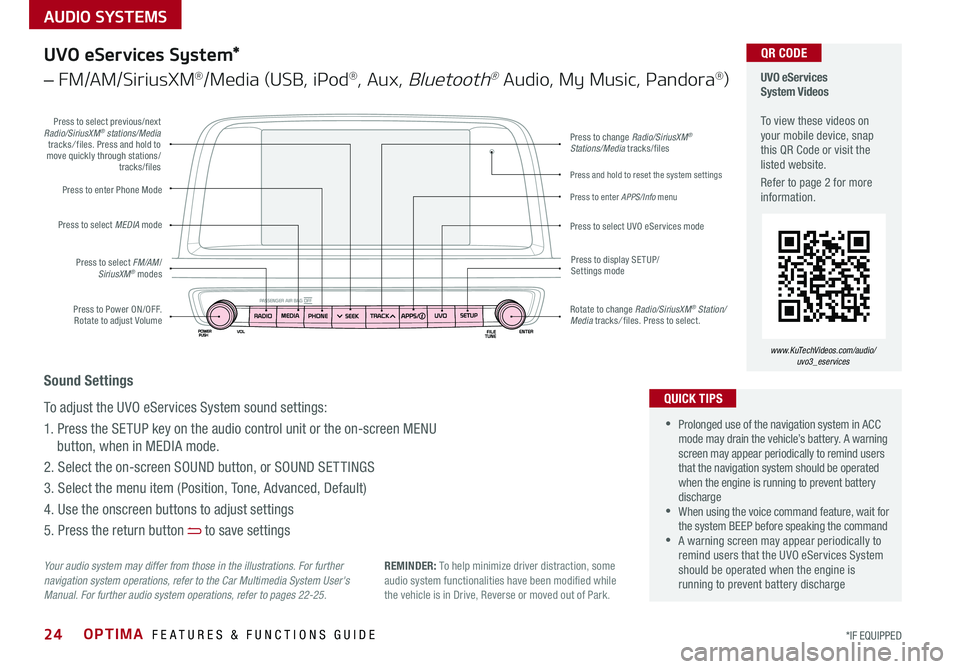
Press to Power ON/OFF . Rotate to adjust Volume
Press to enter Phone Mode
Press to select FM/AM/SiriusXM® modes
Press to select MEDIA mode
Press to display SE TUP/Settings mode
Press to change Radio/SiriusXM® Stations/Media tracks/files
Press to enter APPS/Info menu
Press and hold to reset the system settings
Press to select UVO eServices mode
Press to select previous/next Radio/SiriusXM® stations/Media tracks/ files . Press and hold to move quickly through stations/tracks/files
Rotate to change Radio/SiriusXM® Station/Media tracks/ files . Press to select .
UVO eServices System Videos To view these videos on your mobile device, snap this QR Code or visit the listed website .
Refer to page 2 for more information .
www.KuTechVideos.com/audio/ uvo3_eservices
QR CODE
Your audio system may differ from those in the illustrations. For further navigation system operations, refer to the Car Multimedia System User's Manual. For further audio system operations, refer to pages 22-25.
UVO eServices System*
– FM/AM/SiriusXM®/Media (USB, iPod®, Aux, Bluetooth® Audio, My Music, Pandora®)
•Prolonged use of the navigation system in ACC mode may drain the vehicle’s battery . A warning screen may appear periodically to remind users that the navigation system should be operated when the engine is running to prevent battery discharge •When using the voice command feature, wait for the system BEEP before speaking the command •A warning screen may appear periodically to remind users that the UVO eServices System should be operated when the engine is running to prevent battery discharge
QUICK TIPS
Sound Settings
To adjust the UVO eServices System sound settings:
1 . Press the SETUP key on the audio control unit or the on-screen MENU
button, when in MEDIA mode .
2 . Select the on-screen SOUND button, or SOUND SET TINGS
3 . Select the menu item (Position, Tone, Advanced, Default)
4 . Use the onscreen buttons to adjust settings
5 . Press the return button to save settings
REMINDER: To help minimize driver distraction, some audio system functionalities have been modified while the vehicle is in Drive, Reverse or moved out of Park .
Page 27 of 50
AUDIO SYSTEMS
25ALWAYS CHECK THE OWNER’S MANUAL FOR COMPLETE OPER ATING INFORMATION AND SAFET Y WARNINGS . *IF EQUIPPED
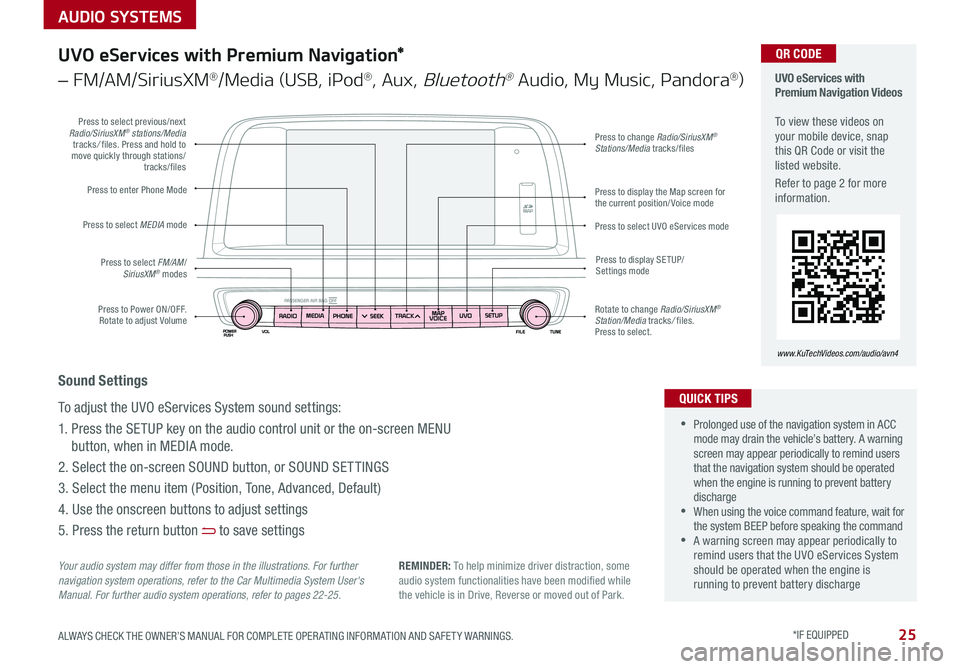
Press to Power ON/OFF . Rotate to adjust Volume
Press to enter Phone Mode
Press to select FM/AM/SiriusXM® modes
Press to select MEDIA mode
Press to display SE TUP/Settings mode
Press to change Radio/SiriusXM® Stations/Media tracks/files
Press to display the Map screen for the current position/ Voice mode
Press to select UVO eServices mode
Press to select previous/next Radio/SiriusXM® stations/Media tracks/ files . Press and hold to move quickly through stations/tracks/files
Rotate to change Radio/SiriusXM® Station/Media tracks/ files . Press to select .
UVO eServices with Premium Navigation Videos To view these videos on your mobile device, snap this QR Code or visit the listed website .
Refer to page 2 for more information .
www.KuTechVideos.com/audio/avn4
QR CODE
Your audio system may differ from those in the illustrations. For further navigation system operations, refer to the Car Multimedia System User's Manual. For further audio system operations, refer to pages 22-25.
•Prolonged use of the navigation system in ACC mode may drain the vehicle’s battery . A warning screen may appear periodically to remind users that the navigation system should be operated when the engine is running to prevent battery discharge •When using the voice command feature, wait for the system BEEP before speaking the command •A warning screen may appear periodically to remind users that the UVO eServices System should be operated when the engine is running to prevent battery discharge
QUICK TIPS
Sound Settings
To adjust the UVO eServices System sound settings:
1 . Press the SETUP key on the audio control unit or the on-screen MENU
button, when in MEDIA mode .
2 . Select the on-screen SOUND button, or SOUND SET TINGS
3 . Select the menu item (Position, Tone, Advanced, Default)
4 . Use the onscreen buttons to adjust settings
5 . Press the return button to save settings
UVO eServices with Premium Navigation*
– FM/AM/SiriusXM®/Media (USB, iPod®, Aux, Bluetooth® Audio, My Music, Pandora®)
REMINDER: To help minimize driver distraction, some audio system functionalities have been modified while the vehicle is in Drive, Reverse or moved out of Park .
Page 29 of 50
27ALWAYS CHECK THE OWNER’S MANUAL FOR COMPLETE OPER ATING INFORMATION AND SAFET Y WARNINGS . *IF EQUIPPED
REMINDERS:
•
Avoid placing other metal items in the bin while charging as to not impede the charging area
•
This vehicle is equipped with wireless charging technology which allows for a device to be charged using inductive charging, however, device compatibility varies . See your owner’s manual for more detailed information and the back page for legal disclaimers
•
Inductive charging systems are less ef ficient than conventional charging through cable . As a result, higher device operating temperatures may be experienced during use
•
Charging Performance - Device position on the wireless charging system can affect charging performance . Other factor that may affect the charging rate includes foreign objects, such as coins or pens, and phone case thickness
The power outlets are inactive when ignition is in the OFF position .
Wireless Charging Video To view a video on your mobile device, snap this QR Code or visit the listed website .
Refer to page 2 for more information .
www.KuTechVideos.com/jf13/2017
Standard Audio System Clock Setup:
Press the CLOCK key to display the Clock setting screen . Then use the
on-screen buttons to navigate through setup and return to exit .
UVO eServices / UVO eServices with Premium Navigation*
Clock Setup:
Press the SETUP key, then the CLOCK button to display the Clock setting
screen . Then use the on-screen buttons to navigate through setup and return
to exit . To access manual date and time setting, turn GPS time OFF in the
Clock Settings (UVO eServices with Premium Navigation System*)
QR CODEDigital Clock*
12V180W
B
A
Aux/USB/iPod® Port & Power Outlets
QUICK TIP
REMINDER: Using the power outlet (accessory plug) for prolonged periods of time with the engine off could cause the battery to discharge .
For more information on the Aux/USB/iPod® Port & Power Outlets, refer to the Owner's Manual.
USB Charger*
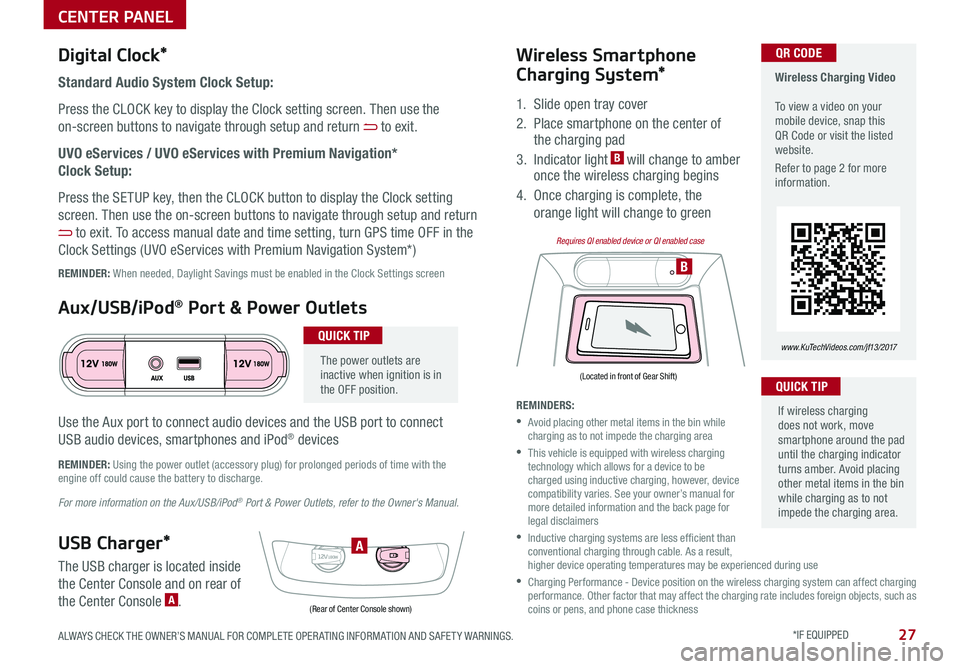
The USB charger is located inside
the Center Console and on rear of
the Center Console A .
Wireless Smartphone
Charging System*
1 . Slide open tray cover
2 . Place smartphone on the center of the charging pad
3 . Indicator light B will change to amber once the wireless charging begins
4 . Once charging is complete, the
orange light will change to green
If wireless charging does not work, move smartphone around the pad until the charging indicator turns amber . Avoid placing other metal items in the bin while charging as to not impede the charging area .
QUICK TIP
(Rear of Center Console shown)
(Located in front of Gear Shift)
Requires QI enabled device or QI enabled case
Use the Aux port to connect audio devices and the USB port to connect
USB audio devices, smartphones and iPod® devices
REMINDER: When needed, Daylight Savings must be enabled in the Clock Settings screen
CENTER PANEL
Page 32 of 50

OPTIMA FEATURES & FUNCTIONS GUIDE30*IF EQUIPPED
•When leaving your keys with parking lot attendants or valet, make sure to inform them how to operate the EPB •If parked on a steep incline, pull up the EPB switch for more than 3 seconds for a firmer EPB application •Pull up and hold EPB switch a second time to increase brake pressure if parked on a decline or incline
Electric Parking Brake (EPB)* Electric Parking Break (EPB) Video
To view a video on your mobile device, snap this QR Code or visit the listed website .
Refer to page 2 for more information .
www.KuTechVideos.com/jf13/2017
QR CODE
The Electric Parking Brake (EPB) system utilizes
an electric motor to engage the parking brake .
Applying the Parking Brake
Depress the brake pedal and pull up the
EPB switch . Ensure that the indicator light is
illuminated on the instrument cluster .
Releasing the Parking Brake
The EPB will automatically release when the
shifter is placed in Reverse or Drive .
To release EPB manually, depress the brake pedal, then press the EPB
switch A, with the ignition switch in the ON position . Ensure that the
indicator light is OFF .
REMINDERS:
•
As a bulb check, the EPB malfunction indicator will illuminate for approximately 3 seconds when the ignition switch is turned ON
•
If the warning light does not illuminate temporarily, or continues to remain lit, take your vehicle to an authorized Kia dealer and have the system checked
•The EPB should not be operated while the vehicle is moving
•
A click or electric brake motor sound may be heard while operating or releasing the EPB, but these conditions are normal and indicates that the EPB is functioning properly
QUICK TIPS
Auto Hold*
Auto Hold temporarily maintains the
vehicle at a standstill even if the brake
pedal is released . Auto Hold can be turned
On/Off using the AUTO HOLD switch B
on the center panel below gear shift .
Before Auto Hold will operate, the driver’s
door, engine hood and trunk must be
closed, and the driver’s seat belt must be
fastened .
The Auto Hold indicator on the
Instrument Cluster has four states:
White: Standby - With vehicle at a
standstill, and AUTO HOLD switch B is
pressed On, the indicator will illuminate
white . While driving the vehicle (vehicle is
not at a standstill), the Auto Hold indicator
will remain white .
Green: Engaged - When coming to a complete stop by depressing the
brake pedal, the Auto Hold indicator changes from white to green .
Off (not illuminated) - The indicator will turn Off when the AUTO
HOLD switch B is manually pressed Off or when the EPB is manually
turned On .
Yellow: Malfunction - When the indicator is illuminated yellow, there
may be a system malfunction . Take your vehicle to a local Kia dealer .
Refer to page 4 for location of Instrument Cluster indicators.
A
B
(Located below gear shift)
CENTER PANEL