reset KIA OPTIMA 2017 User Guide
[x] Cancel search | Manufacturer: KIA, Model Year: 2017, Model line: OPTIMA, Model: KIA OPTIMA 2017Pages: 629, PDF Size: 15.24 MB
Page 220 of 629
4133
Features of your vehicle
Adjusting the driver and passenger
side temperature individually
Press the “SYNC” button again toadjust the driver and passenger
side temperature individually. The
illumination of button turns off.
Operate the driver side tempera- ture control knob to adjust the driv-
er side temperature.
Operate the passenger side tem- perature control knob to adjust the
passenger side temperature.
Temperature conversion
You can switch the temperature
mode from Centigrade to Fahrenheit
as follows:
While pressing the OFF button,
press the AUTO button for 3 seconds
or more.
The display will change from
Centigrade to Fahrenheit, or from
Fahrenheit to Centigrade.
If the battery has been discharged or
disconnected, the temperature mode
display will reset to Fahrenheit.Air intake control
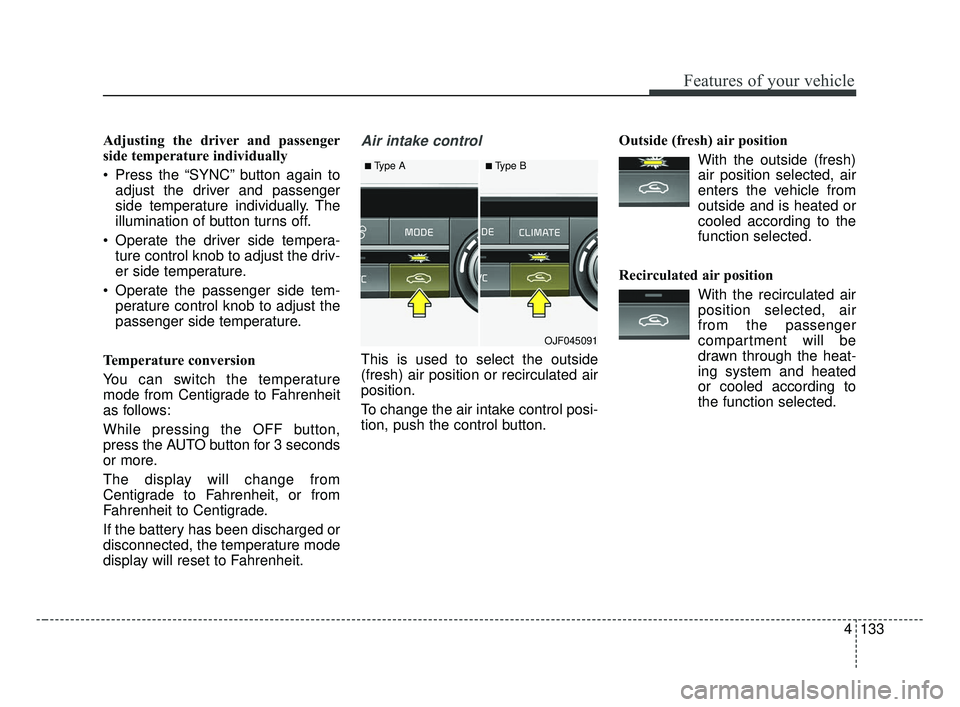
This is used to select the outside
(fresh) air position or recirculated air
position.
To change the air intake control posi-
tion, push the control button. Outside (fresh) air position
With the outside (fresh)air position selected, air
enters the vehicle from
outside and is heated or
cooled according to the
function selected.
Recirculated air position With the recirculated airposition selected, air
from the passenger
compartment will be
drawn through the heat-
ing system and heated
or cooled according to
the function selected.
■Type A■Type B
OJF045091
JF CAN (ENG) 4.qxp 2016-09-21 11:18 Page 133
Page 229 of 629
Features of your vehicle
142
4
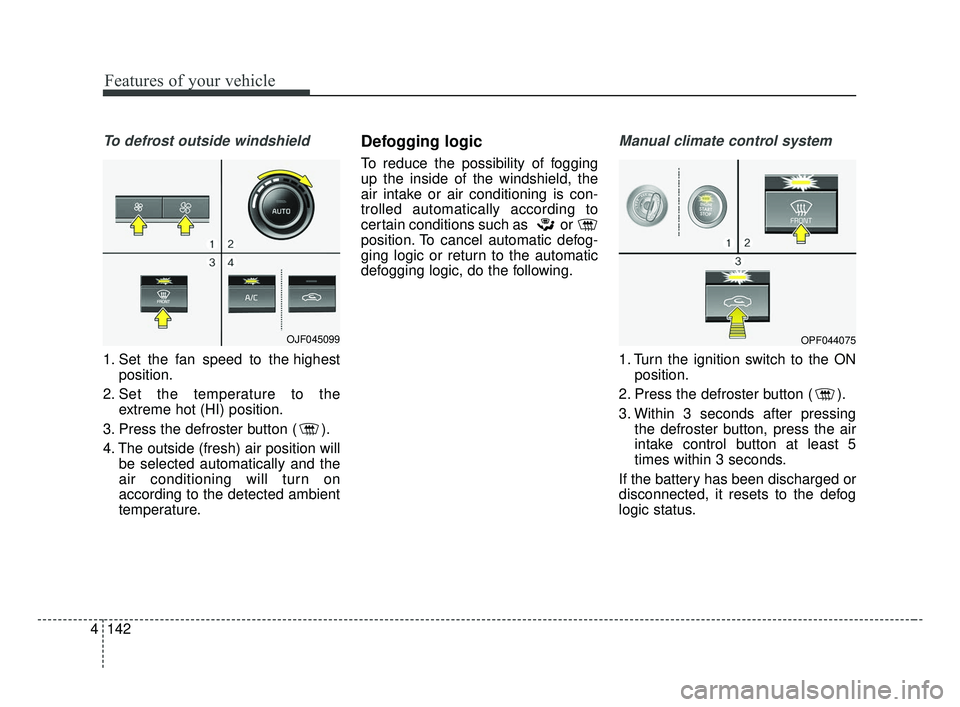
To defrost outside windshield
1. Set the fan speed to the highest
position.
2. Set the temperature to the extreme hot (HI) position.
3. Press the defroster button ( ).
4. The outside (fresh) air position will be selected automatically and the
air conditioning will turn on
according to the detected ambient
temperature.
Defogging logic
To reduce the possibility of fogging
up the inside of the windshield, the
air intake or air conditioning is con-
trolled automatically according to
certain conditions such as or
position. To cancel automatic defog-
ging logic or return to the automatic
defogging logic, do the following.
Manual climate control system
1. Turn the ignition switch to the ONposition.
2. Press the defroster button ( ).
3. Within 3 seconds after pressing the defroster button, press the air
intake control button at least 5
times within 3 seconds.
If the battery has been discharged or
disconnected, it resets to the defog
logic status.
OJF045099OPF044075
JF CAN (ENG) 4.qxp 2016-09-21 11:19 Page 142
Page 230 of 629
4143
Features of your vehicle
Automatic climate control system
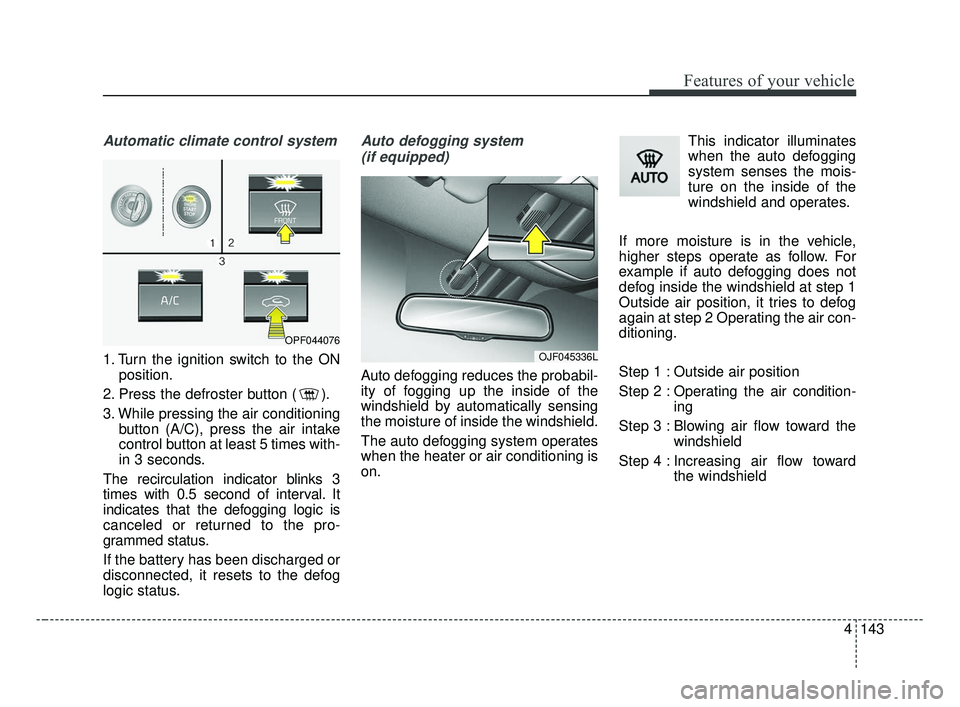
1. Turn the ignition switch to the ONposition.
2. Press the defroster button ( ).
3. While pressing the air conditioning button (A/C), press the air intake
control button at least 5 times with-
in 3 seconds.
The recirculation indicator blinks 3
times with 0.5 second of interval. It
indicates that the defogging logic is
canceled or returned to the pro-
grammed status.
If the battery has been discharged or
disconnected, it resets to the defog
logic status.
Auto defogging system (if equipped)
Auto defogging reduces the probabil-
ity of fogging up the inside of the
windshield by automatically sensing
the moisture of inside the windshield.
The auto defogging system operates
when the heater or air conditioning is
on. This indicator illuminates
when the auto defogging
system senses the mois-
ture on the inside of the
windshield and operates.
If more moisture is in the vehicle,
higher steps operate as follow. For
example if auto defogging does not
defog inside the windshield at step 1
Outside air position, it tries to defog
again at step 2 Operating the air con-
ditioning.
Step 1 : Outside air position
Step 2 : Operating the air condition- ing
Step 3 : Blowing air flow toward the windshield
Step 4 : Increasing air flow toward the windshield
OJF045336L
OPF044076
JF CAN (ENG) 4.qxp 2016-09-21 11:19 Page 143
Page 231 of 629
Features of your vehicle
144
4
To cancel or reset the Auto Defogging
System
Press the front windshield defroster
button for 3 seconds when the igni-
tion switch is in the ON position.
When the Auto Defogging System is
canceled, ADS OFF symbol will blink
3 times and the ADS OFF will be dis-
played on the climate control infor-
mation screen.
When the Auto Defogging System is
reset, ADS OFF symbol will blink 6
times without a signal.
Do not remove the sensor cover
located on the upper end of the pas-
senger side windshield glass.
Damage to the system parts could
occur and may not be covered by
your vehicle warranty.Automatic Ventilation
(if equipped)
When the ignition is ON or when the
engine is running and the outside
temperature is below 59°F (15°C),
the automatic ventilation feature will
activate if the recirculated air intake
position is selected for more than 5
minutes while A/C is off and floor
mode is selected. In this condition
the air intake position will automati-
cally switch to the outside (fresh) air
intake position.
To cancel or reset the Automatic
Ventilation
When the air conditioning system is
on, select Face Level mode and
while pressing the A/C button, press
the recirculated air position button
five times within three seconds.
JF CAN (ENG) 4.qxp 2016-09-21 11:19 Page 144
Page 246 of 629
Audio system
53
✽ ✽NOTICE
Tinted rear window may affect the
proper functioning of the antenna.
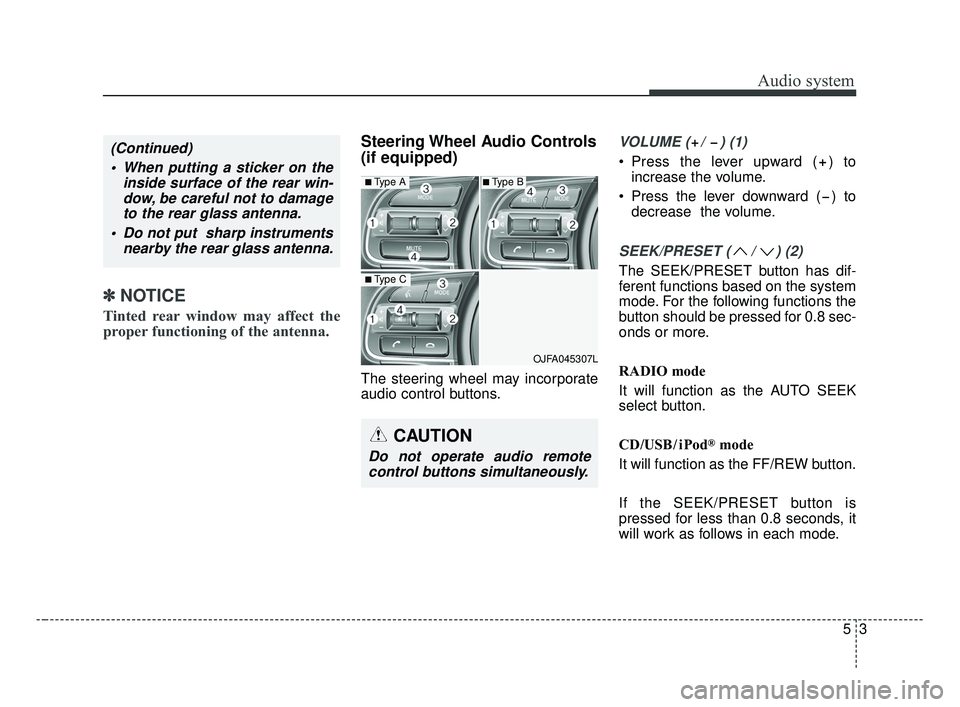
Steering Wheel Audio Controls
(if equipped)
The steering wheel may incorporate
audio control buttons.
VOLUME ( / ) (1)
• Press the lever upward ( ) to
increase the volume.
Press the lever downward ( ) to decrease the volume.
SEEK/PRESET ( / ) (2)
The SEEK/PRESET button has dif-
ferent functions based on the system
mode. For the following functions the
button should be pressed for 0.8 sec-
onds or more.
RADIO mode
It will function as the AUTO SEEK
select button.
CD/USB/ iPod
®mode
It will function as the FF/REW button.
If the SEEK/PRESET button is
pressed for less than 0.8 seconds, it
will work as follows in each mode.
OJFA045307L
■Type A
■Type C
■Type B
CAUTION
Do not operate audio remote control buttons simultaneously.
(Continued)
When putting a sticker on the inside surface of the rear win-dow, be careful not to damageto the rear glass antenna.
Do not put sharp instruments nearby the rear glass antenna.
JF CAN (ENG) 5 (Audio).qxp 2016-09-21 11:21 Page 3
Page 247 of 629
Audio system
45
RADIO mode
It will function as the PRESET STA-
TION buttons.
CD/USB/ iPod
®mode
It will function as TRACK UP/DOWN
button.
MODE (3)
Press the button to change audio
source.
FM(1~2)
➟ AM ➟ SAT(1~3) ➟ CD ➟
USB (iPod®) ➟AUX ➟ MY MUSIC ➟
BT Audio ➟ FM...
In addition to mode change, Power
on/off can be made by pressing this
button when the ignition switch is on
ACC or ON.
- Power ON: Press the button when the audio is off
- Power OFF: Press the button for more than 0.8 seconds when the
audio is on.
MUTE (4, if equipped)
Press the button to mute the sound.
Press the button to turn off the microphone during a telephone
call.
Detailed information for audio control
buttons are described in the following
pages in this section.
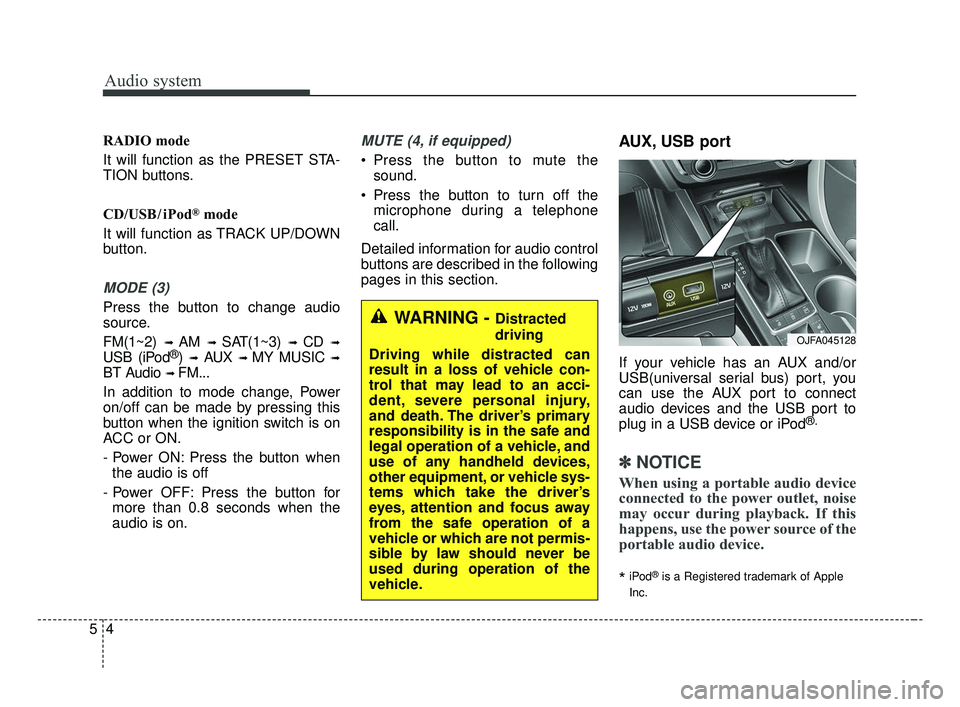
AUX, USB port
If your vehicle has an AUX and/or
USB(universal serial bus) port, you
can use the AUX port to connect
audio devices and the USB port to
plug in a USB device or iPod
®.
✽ ✽ NOTICE
When using a portable audio device
connected to the power outlet, noise
may occur during playback. If this
happens, use the power source of the
portable audio device.
*iPod®is a Registered trademark of Apple
Inc.
OJFA045128
WARNING - Distracted
driving
Driving while distracted can
result in a loss of vehicle con-
trol that may lead to an acci-
dent, severe personal injury,
and death. The driver’s primary
responsibility is in the safe and
legal operation of a vehicle, and
use of any handheld devices,
other equipment, or vehicle sys-
tems which take the driver’s
eyes, attention and focus away
from the safe operation of a
vehicle or which are not permis-
sible by law should never be
used during operation of the
vehicle.
JF CAN (ENG) 5 (Audio).qxp 2016-09-21 11:21 Page 4
Page 252 of 629
Audio system
59
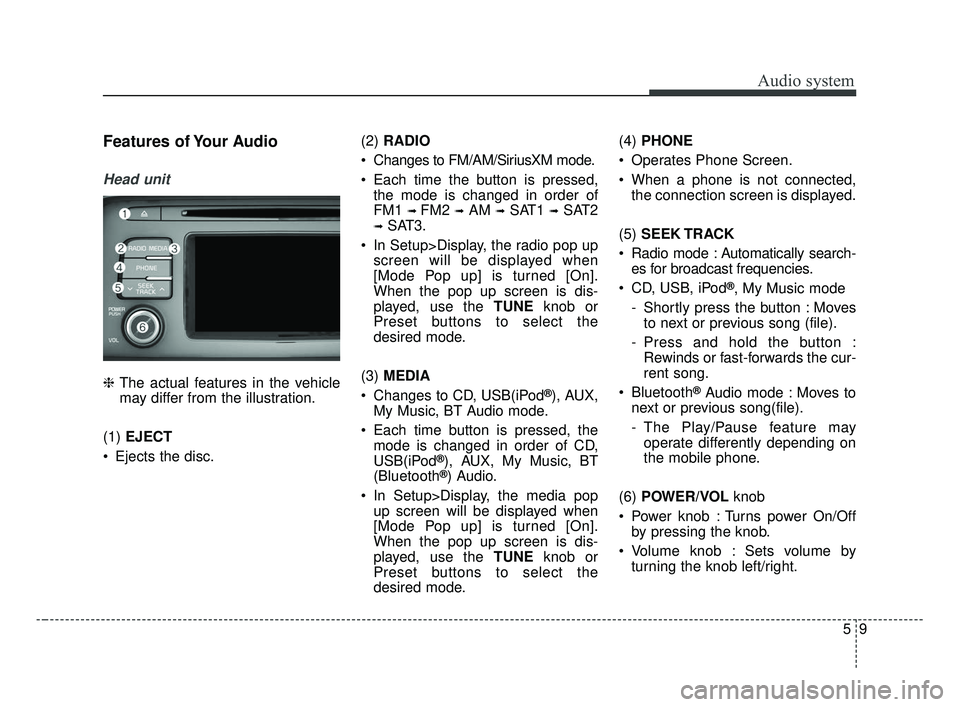
Features of Your Audio
Head unit
❈The actual features in the vehicle
may differ from the illustration.
(1) EJECT
Ejects the disc. (2)
RADIO
Changes to FM/AM/SiriusXM mode.
Each time the button is pressed, the mode is changed in order of
FM1
➟ FM2 ➟AM ➟SAT1 ➟SAT2
➟SAT3.
In Setup>Display, the radio pop up screen will be displayed when
[Mode Pop up] is turned [On].
When the pop up screen is dis-
played, use the TUNE knob or
Preset buttons to select the
desired mode.
(3) MEDIA
Changes to CD, USB(iPod
®), AUX,
My Music, BT Audio mode.
Each time button is pressed, the mode is changed in order of CD,
USB(iPod
®), AUX, My Music, BT
(Bluetooth®) Audio.
In Setup>Display, the media pop up screen will be displayed when
[Mode Pop up] is turned [On].
When the pop up screen is dis-
played, use the TUNE knob or
Preset buttons to select the
desired mode. (4)
PHONE
Operates Phone Screen.
When a phone is not connected, the connection screen is displayed.
(5) SEEK TRACK
Radio mode : Automatically search- es for broadcast frequencies.
CD, USB, iPod
®, My Music mode
- Shortly press the button : Moves to next or previous song (file).
- Press and hold the button : Rewinds or fast-forwards the cur-
rent song.
Bluetooth
®Audio mode : Moves to
next or previous song(file).
- The Play/Pause feature may operate differently depending on
the mobile phone.
(6) POWER/VOL knob
Power knob : Turns power On/Off by pressing the knob.
Volume knob : Sets volume by turning the knob left/right.
JF CAN (ENG) 5 (Audio).qxp 2016-09-21 11:21 Page 9
Page 253 of 629
![KIA OPTIMA 2017 User Guide Audio system
10
5 (7)
[1] ~ [6] (Preset)
Radio mode: Saves frequencies (channels) or receives saved fre-
quencies (channels).
CD, USB, iPod
®, My Music mode
- [RPT] : Repeat
- [RDM] : Random
In th](/img/2/40406/w960_40406-252.png "KIA OPTIMA 2017 User Guide Audio system
10
5 (7)
[1] ~ [6] (Preset)
Radio mode: Saves frequencies (channels) or receives saved fre-
quencies (channels).
CD, USB, iPod
®, My Music mode
- [RPT] : Repeat
- [RDM] : Random
In th")
Audio system
10
5 (7)
[1] ~ [6] (Preset)
Radio mode: Saves frequencies (channels) or receives saved fre-
quencies (channels).
CD, USB, iPod
®, My Music mode
- [RPT] : Repeat
- [RDM] : Random
In the Radio, Media, Setup, and
Menu pop up screen, the number
menu is selected. (8)
DISP
Each time the button is shortly pressed, sets the Screen Off
➟
Screen On ➟Screen Off.
Audio operation is maintained and only the Screen will be turned Off.
In the Screen Off state, press any button to turn the Screen On again. (9)
SCAN
Radio mode - Shortly press the button :Previews each broadcast for 5
seconds each.
- Press and hold the button : Previews the broadcasts saved
in Preset [1] ~ [6] for 5 seconds
each.
- Press the [SCAN] button again
to continue listening to the cur-
rent frequency.
- SAT Radio does not support the Preset scan feature.
CD, USB, My Music mode - Shortly press the button :Previews each song (file) for 10
seconds each.
- Press the [SCAN] button again
to continue listening to the cur-
rent song (file).
(10) SETUP/CLOCK
Moves to the Display, Sound, Clock, Phone, System setting
modes.
JF CAN (ENG) 5 (Audio).qxp 2016-09-21 11:21 Page 10
Page 259 of 629
Audio system
16
5
(Continued)
• If you use devices such as a USB
hub purchased separately, the
vehicle’s audio system may not
recognize the USB device. In that
case, connect the USB device
directly to the multimedia termi-
nal of the vehicle.
• If the USB device is divided by log- ical drives, only the music files on
the highest-priority drive are rec-
ognized by car audio.
• Devices such as MP3 Player/ Cellular phone/Digital camera can
be unrecognizable by standard
USB I/F.
• Charging through the USB may not be supported in some mobile
devices.
• USB HDD or USB types liable to connection failures due to vehicle
vibrations are not supported. (i-
stick type)
• Some non-standard USB devices (METAL COVER TYPE USB)
can be unrecognizable. (Continued)(Continued)
• Some USB flash memory readers
(such as CF, SD, micro SD, etc.) or
external-HDD type devices can be
unrecognizable.
• Music files protected by DRM (DIG- ITAL RIGHTS MANAGEMENT)
are not recognizable.
• The data in the USB memory may be lost while using this audio.
Always back up important data on
a personal storage device.
• Please avoid using USB memory products
which can be used as
key chains or cellular
phone accessories as
they could cause damage to the
USB jack. Please make certain
only to use plug type connector
products.✽ ✽ NOTICE - Using iPod®Device
iPod®is a registered trademark of
Apple inc.
• Some iPod
®models may not sup-
port communication protocol and
files may not play properly.
Supported iPod
®models :
- iPhone®3GS/4
- iPod®touch 1st~4th generation
- iPod®nano 1st~6th generation
- iPod®classic
• The order of search or playback of songs in the iPod
®can be different
from the order searched in the
audio system.
• If the iPod
®is disabled due to its
own malfunction, reset the iPod®.
(Reset : Refer to iPod®manual)
• An iPod®may not operate nor-
mally on low battery. (Continued)
JF CAN (ENG) 5 (Audio).qxp 2016-09-21 11:22 Page 16
Page 265 of 629
![KIA OPTIMA 2017 User Guide Audio system
22
5
Radio Mode
With the Radio Mode Button
SEEK
Press the [SEEK TRACK] button.
Shortly pressing the button : Automatically searches for the next
station.
Pressing and holding the button](/img/2/40406/w960_40406-264.png "KIA OPTIMA 2017 User Guide Audio system
22
5
Radio Mode
With the Radio Mode Button
SEEK
Press the [SEEK TRACK] button.
Shortly pressing the button : Automatically searches for the next
station.
Pressing and holding the button")
Audio system
22
5
Radio Mode
With the Radio Mode Button
SEEK
Press the [SEEK TRACK] button.
Shortly pressing the button : Automatically searches for the next
station.
Pressing and holding the button : While holding the button, frequen-
cy changes without stopping.
When the button is released, auto-
matically searches for the next fre-
quency from that point. Preset SEEK
Press the [1]
~ [6] button.
Shortly pressing the button : Plays the frequency saved in the corre-
sponding button.
Pressing and holding the button : Pressing and holding the desired
button from [1] ~ [6] will save the
currently playing broadcast to the
selected button and sound a BEEP.
SCAN
Press the [SCAN] button.
Shortly pressing the button : The broadcast frequency increases
and previews each broadcast for 5
seconds each. After scanning all
frequencies, returns and plays the
current broadcast frequency.
Pressing and holding the button : Previews the broadcasts saved in
Preset [1]~ [6] for 5 seconds
each. Selecting through manual search
Turn the TUNE
knob left/right to
adjust the frequency.
MENU : Radio
Within [MENU] button is the A.Store
(Auto Store).
A.Store (Auto Store) : [1] Button
Select A.Store (Auto Store) to save
frequencies with superior reception
to presets [1] ~ [6]. If no frequencies
are received, then the most recently
received frequency will be broad-
cast.
JF CAN (ENG) 5 (Audio).qxp 2016-09-21 11:22 Page 22