ECU KIA OPTIMA 2017 Owner's Manual
[x] Cancel search | Manufacturer: KIA, Model Year: 2017, Model line: OPTIMA, Model: KIA OPTIMA 2017Pages: 629, PDF Size: 15.24 MB
Page 129 of 629
Features of your vehicle
42
4
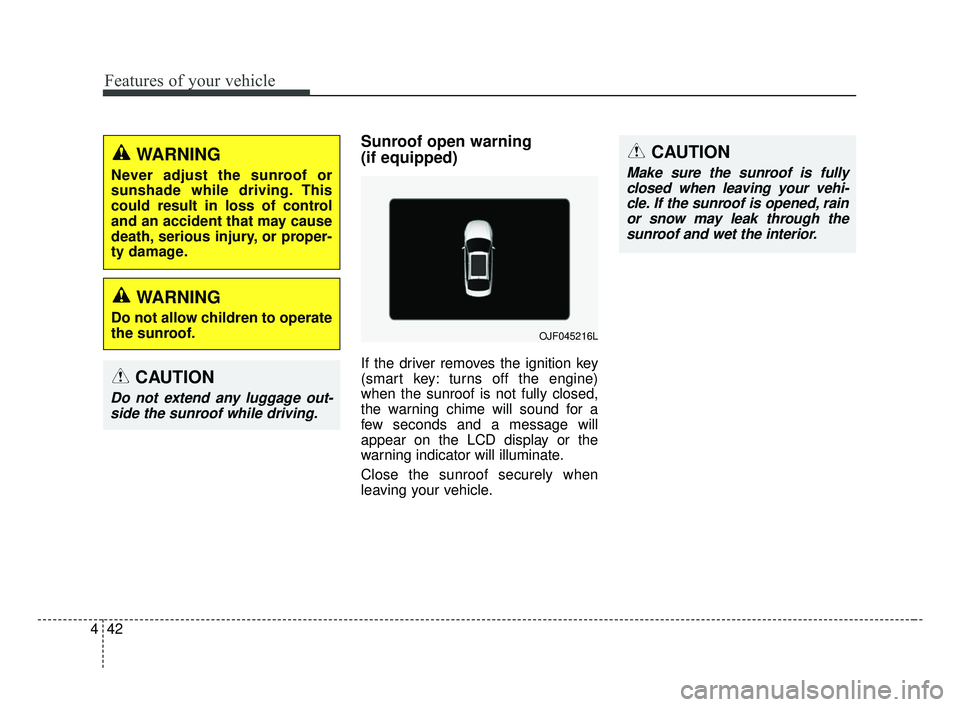
Sunroof open warning
(if equipped)
If the driver removes the ignition key
(smart key: turns off the engine)
when the sunroof is not fully closed,
the warning chime will sound for a
few seconds and a message will
appear on the LCD display or the
warning indicator will illuminate.
Close the sunroof securely when
leaving your vehicle.
WARNING
Do not allow children to operate
the sunroof.
WARNING
Never adjust the sunroof or
sunshade while driving. This
could result in loss of control
and an accident that may cause
death, serious injury, or proper-
ty damage.
CAUTION
Do not extend any luggage out-
side the sunroof while driving.
OJF045216L
CAUTION
Make sure the sunroof is fullyclosed when leaving your vehi-cle. If the sunroof is opened, rainor snow may leak through thesunroof and wet the interior.
JF CAN (ENG) 4.qxp 2016-09-21 11:14 Page 42
Page 150 of 629
463
Features of your vehicle
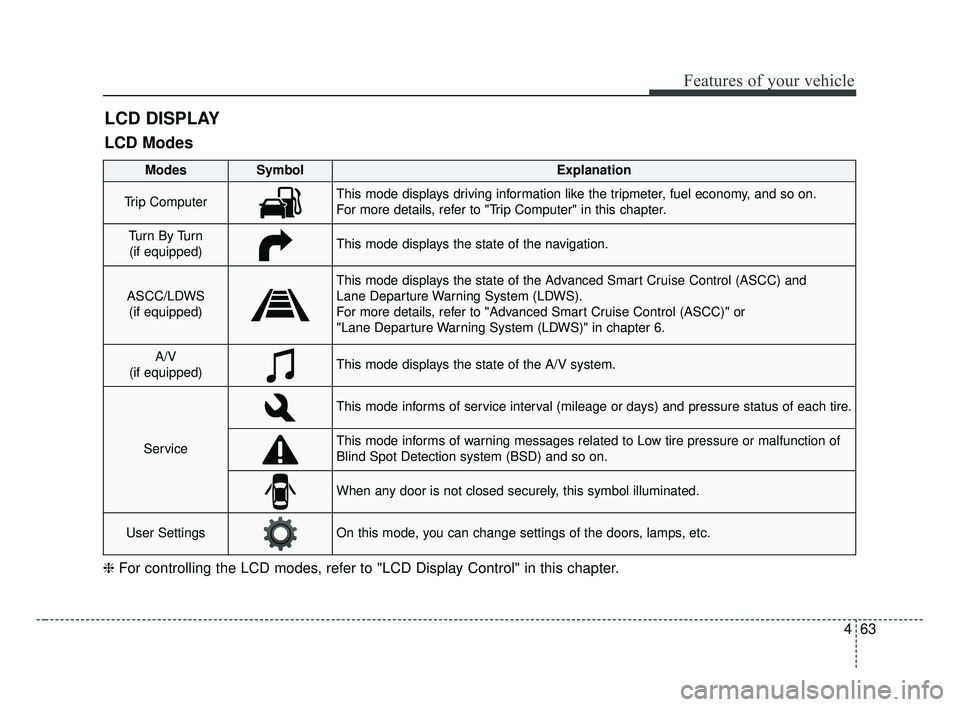
LCD DISPLAY
❈For controlling the LCD modes, refer to "LCD Display Control" in this chapter.
LCD Modes
Modes SymbolExplanation
Trip ComputerThis mode displays driving information like the tripmeter, fuel economy, and so on.
For more details, refer to "Trip Computer" in this chapter.
Tu r n B y Tu r n
(if equipped)This mode displays the state of the navigation.
ASCC/LDWS (if equipped)
This mode displays the state of the Advanced Smart Cruise Control (ASCC) and
Lane Departure Warning System (LDWS).
For more details, refer to "Advanced Smart Cruise Control (ASCC)" or
"Lane Departure Warning System (LDWS)" in chapter 6.
A/V
(if equipped)This mode displays the state of the A/V system.
Service
This mode informs of service interval (mileage or days) and pressure status of each tire.
This mode informs of warning messages related to Low tire pressure or malfunction of
Blind Spot Detection system (BSD) and so on.
When any door is not closed securely, this symbol illuminated.
User SettingsOn this mode, you can change settings of the doors, lamps, etc.
JF CAN (ENG) 4.qxp 2016-09-21 11:15 Page 63
Page 202 of 629
4115
Features of your vehicle
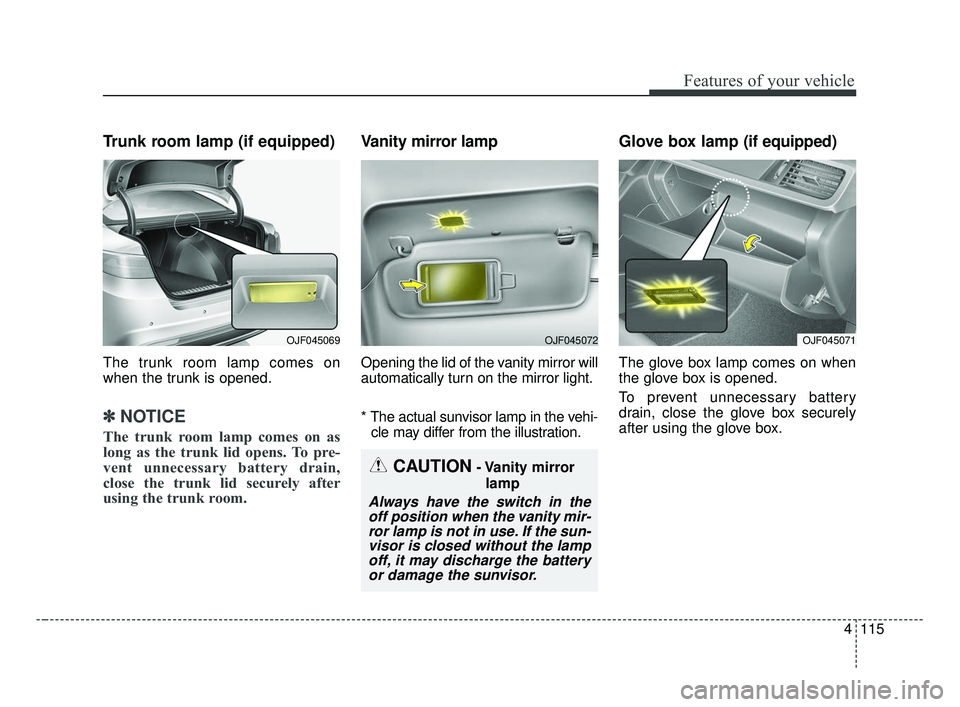
Trunk room lamp (if equipped)
The trunk room lamp comes on
when the trunk is opened.
✽ ✽NOTICE
The trunk room lamp comes on as
long as the trunk lid opens. To pre-
vent unnecessary battery drain,
close the trunk lid securely after
using the trunk room.
Vanity mirror lamp
Opening the lid of the vanity mirror will
automatically turn on the mirror light.
* The actual sunvisor lamp in the vehi-
cle may differ from the illustration.
Glove box lamp (if equipped)
The glove box lamp comes on when
the glove box is opened.
To prevent unnecessary battery
drain, close the glove box securely
after using the glove box.
CAUTION- Vanity mirror
lamp
Always have the switch in theoff position when the vanity mir-ror lamp is not in use. If the sun-visor is closed without the lampoff, it may discharge the batteryor damage the sunvisor.
OJF045069OJF045072OJF045071
JF CAN (ENG) 4.qxp 2016-09-21 11:17 Page 115
Page 232 of 629
4145
Features of your vehicle
STORAGE COMPARTMENTS
These compartments can be used to
store small items required by the
driver or passengers.
To avoid possible theft, do notleave valuables in the storage
compartment.
Always keep the storage compart- ment covers closed while driving.
Do not attempt to place so many
items in the storage compartment
that the storage compartment
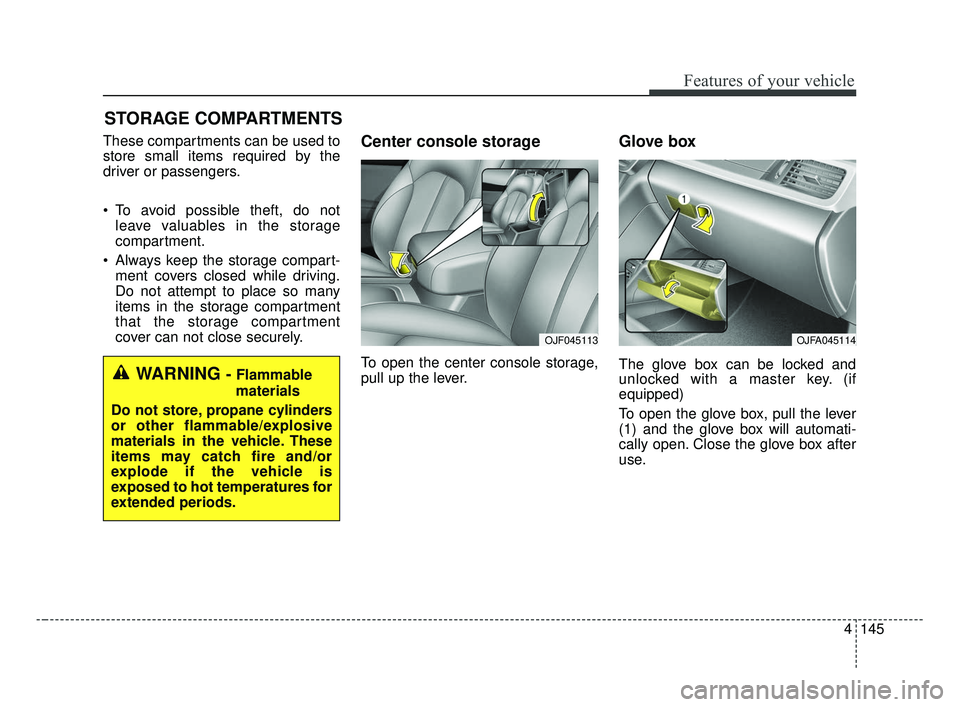
cover can not close securely.Center console storage
To open the center console storage,
pull up the lever.
Glove box
The glove box can be locked and
unlocked with a master key. (if
equipped)
To open the glove box, pull the lever
(1) and the glove box will automati-
cally open. Close the glove box after
use.WARNING - Flammable
materials
Do not store, propane cylinders
or other flammable/explosive
materials in the vehicle. These
items may catch fire and/or
explode if the vehicle is
exposed to hot temperatures for
extended periods.
OJFA045114OJF045113
JF CAN (ENG) 4.qxp 2016-09-21 11:19 Page 145
Page 240 of 629
4153
Features of your vehicle
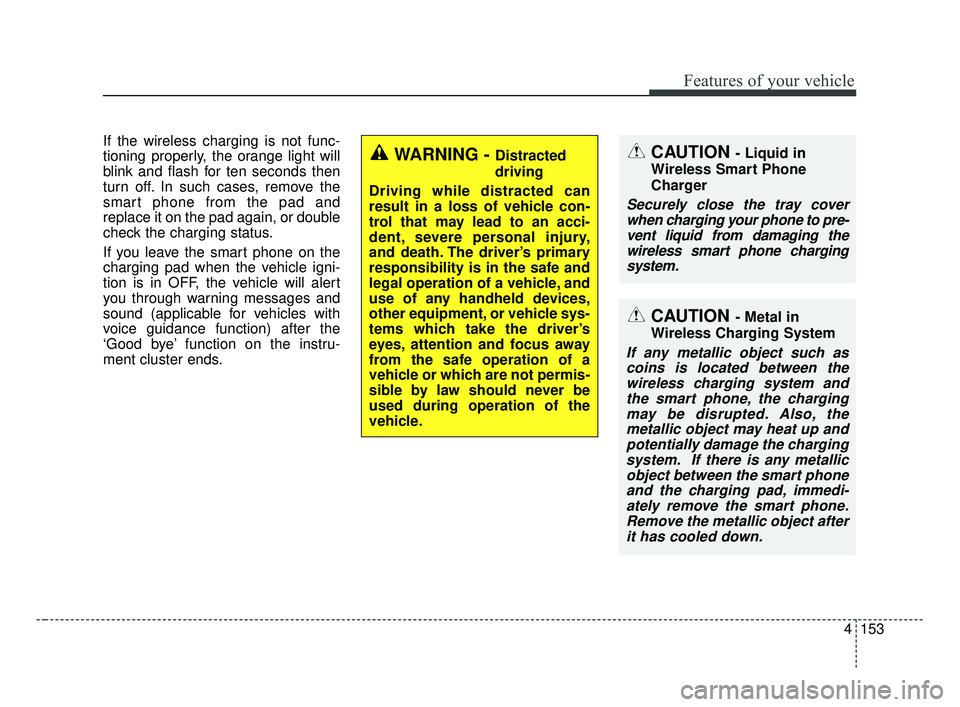
If the wireless charging is not func-
tioning properly, the orange light will
blink and flash for ten seconds then
turn off. In such cases, remove the
smart phone from the pad and
replace it on the pad again, or double
check the charging status.
If you leave the smart phone on the
charging pad when the vehicle igni-
tion is in OFF, the vehicle will alert
you through warning messages and
sound (applicable for vehicles with
voice guidance function) after the
‘Good bye’ function on the instru-
ment cluster ends.
WARNING - Distracted
driving
Driving while distracted can
result in a loss of vehicle con-
trol that may lead to an acci-
dent, severe personal injury,
and death. The driver’s primary
responsibility is in the safe and
legal operation of a vehicle, and
use of any handheld devices,
other equipment, or vehicle sys-
tems which take the driver’s
eyes, attention and focus away
from the safe operation of a
vehicle or which are not permis-
sible by law should never be
used during operation of the
vehicle.CAUTION - Liquid in
Wireless Smart Phone
Charger
Securely close the tray cover when charging your phone to pre-vent liquid from damaging thewireless smart phone chargingsystem.
CAUTION - Metal in
Wireless Charging System
If any metallic object such as coins is located between thewireless charging system andthe smart phone, the chargingmay be disrupted. Also, themetallic object may heat up andpotentially damage the chargingsystem. If there is any metallicobject between the smart phoneand the charging pad, immedi-ately remove the smart phone.Remove the metallic object afterit has cooled down.
JF CAN (ENG) 4.qxp 2016-09-21 11:19 Page 153
Page 243 of 629
Features of your vehicle
156
4
The following must be observed
when installing ANY floor mat to the
vehicle.
Ensure that the floor mats are
securely attached to the vehicle's
floor mat anchor(s) before driving
the vehicle.
Do not use ANY floor mat that can- not be firmly attached to the vehi-
cle's floor mat anchors.
Do not stack floor mats on top of one another (e.g. all-weather rub-
ber mat on top of a carpeted floor
mat). Only a single floor mat should
be installed in each position.
✽ ✽ NOTICE
Your vehicle was manufactured with
driver's side floor mat anchors that
are designed to securely hold the
floor mat in place. To avoid any
interference with pedal operation,
Kia recommends that only the Kia
floor mat designed for use in your
vehicle be installed.
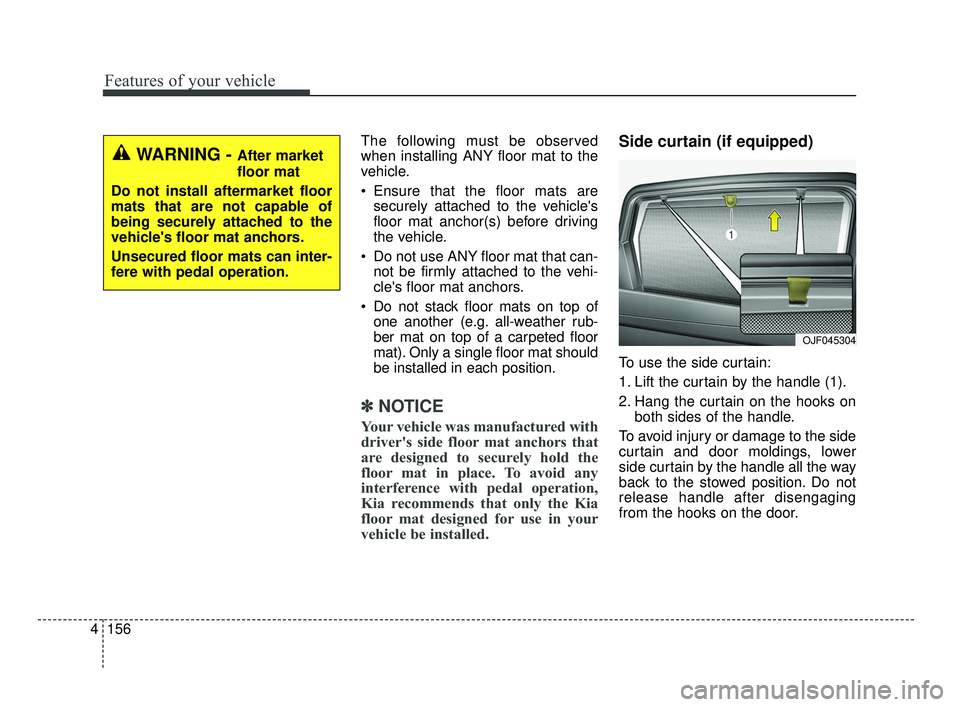
Side curtain (if equipped)
To use the side curtain:
1. Lift the curtain by the handle (1).
2. Hang the curtain on the hooks on
both sides of the handle.
To avoid injury or damage to the side
curtain and door moldings, lower
side curtain by the handle all the way
back to the stowed position. Do not
release handle after disengaging
from the hooks on the door.
OJF045304
WARNING - After market
floor mat
Do not install aftermarket floor
mats that are not capable of
being securely attached to the
vehicle's floor mat anchors.
Unsecured floor mats can inter-
fere with pedal operation.
JF CAN (ENG) 4.qxp 2016-09-21 11:19 Page 156
Page 276 of 629
Audio system
533
3. From your Bluetooth®Wireless
Technology device (i.e. Mobile
Phone), search and select your
car audio system.
❈ SSP : Secure Simple Pairing
Non SSP supported device :
4. After a few moments, a screen is displayed where the passkey is
entered. Enter the passkey “0000”
to pair your
Bluetooth®Wireless
Technology device with the car
audio system.
SSP supported device :
4. After a few moments, a screen is displayed that has the 6 digit
passkey from any nearby SSP
device that is found. Check the
passkey on your
Bluetooth®
Wireless Technology. Some phones (i.e., iPhone
®, Android TM
and Blackberry®phones) may offer
an option to allow acceptance of all
future Bluetooth
®connection requests
by default.
If
Bluetooth®Wireless Technology
devices are paired but none are
currently connected, pressing the
[CALL] button on the steering
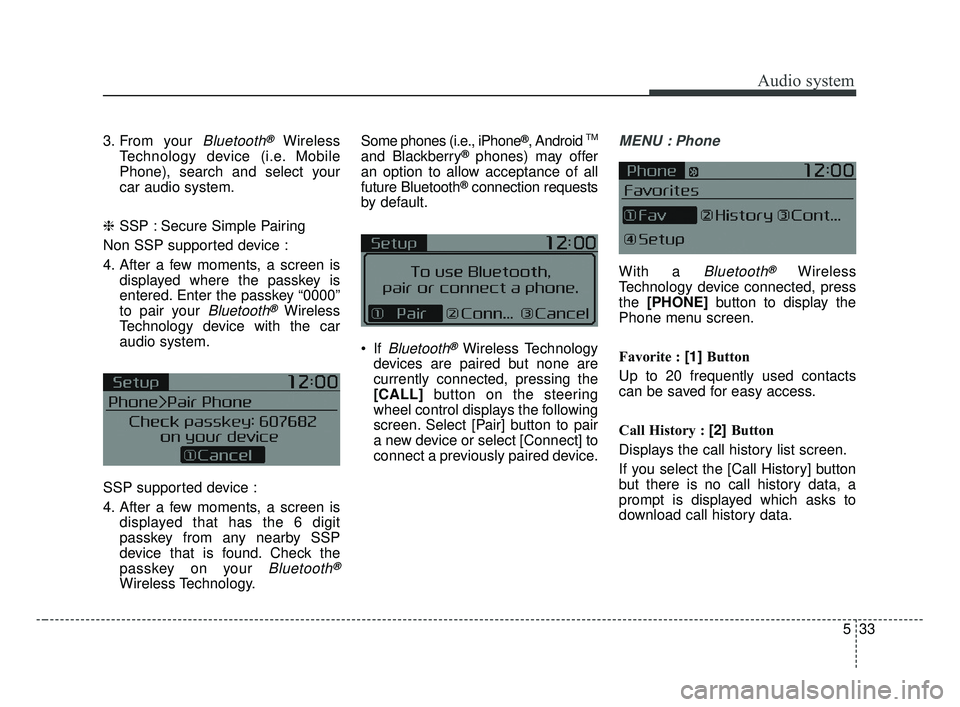
wheel control displays the following
screen. Select [Pair] button to pair
a new device or select [Connect] to
connect a previously paired device.
MENU : Phone
With a Bluetooth®Wireless
Technology device connected, press
the [PHONE] button to display the
Phone menu screen.
Favorite : [1] Button
Up to 20 frequently used contacts
can be saved for easy access.
Call History : [2] Button
Displays the call history list screen.
If you select the [Call History] button
but there is no call history data, a
prompt is displayed which asks to
download call history data.
JF CAN (ENG) 5 (Audio).qxp 2016-09-21 11:22 Page 33
Page 283 of 629
Audio system
40
5
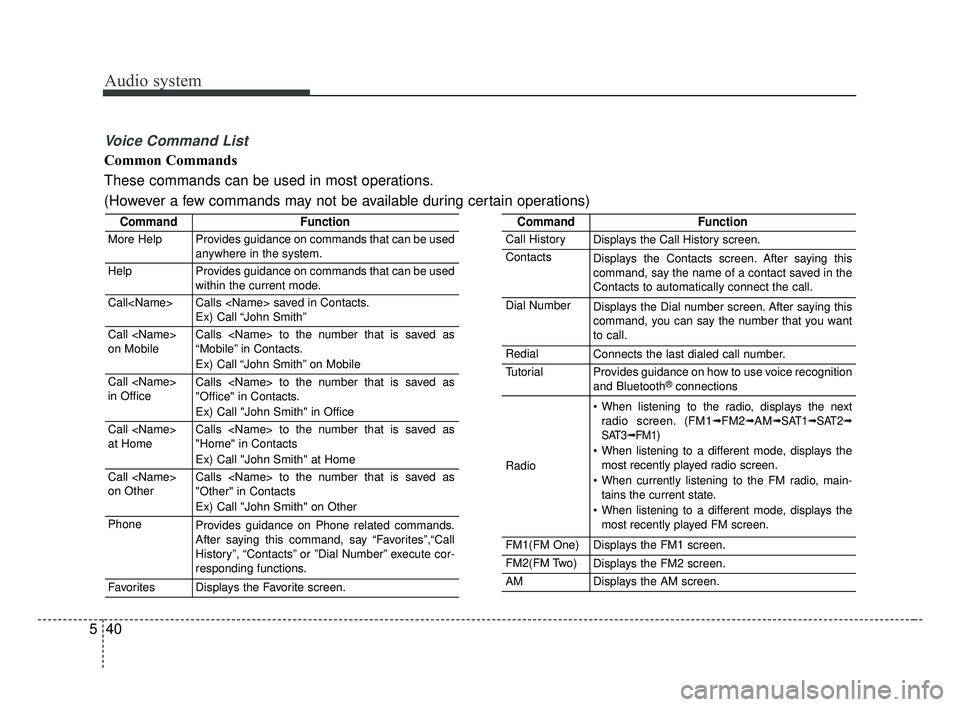
Voice Command List
Common Commands
These commands can be used in most operations.
(However a few commands may not be available during certain operations)
CommandFunction
More HelpProvides guidance on commands that can be used
anywhere in the system.
HelpProvides guidance on commands that can be used
within the current mode.
Call
Ex) Call “John Smith”
Call
on MobileCalls
“Mobile” in Contacts.
Ex) Call “John Smith” on Mobile
Call
in OfficeCalls
"Office" in Contacts.
Ex) Call "John Smith" in Office
Call
at HomeCalls
"Home" in Contacts
Ex) Call "John Smith" at Home
Call
on OtherCalls
"Other" in Contacts
Ex) Call "John Smith" on Other
PhoneProvides guidance on Phone related commands.
After saying this command, say “Favorites”,“Call
History”, “Contacts” or ”Dial Number” execute cor-
responding functions.
FavoritesDisplays the Favorite screen.
CommandFunction
Call HistoryDisplays the Call History screen.
ContactsDisplays the Contacts screen. After saying this
command, say the name of a contact saved in the
Contacts to automatically connect the call.
Dial NumberDisplays the Dial number screen. After saying this
command, you can say the number that you want
to call.
RedialConnects the last dialed call number.
TutorialProvides guidance on how to use voice recognition
and Bluetooth®connections
Radio
When listening to the radio, displays the next
radio screen. (FM1➟FM2➟AM➟ SAT1➟ SAT2➟
SAT3➟ FM1)
When listening to a different mode, displays the most recently played radio screen.
When currently listening to the FM radio, main- tains the current state.
When listening to a different mode, displays the most recently played FM screen.
FM1(FM One)Displays the FM1 screen.
FM2(FM Two)Displays the FM2 screen.
AMDisplays the AM screen.
JF CAN (ENG) 5 (Audio).qxp 2016-09-21 11:22 Page 40
Page 333 of 629
![KIA OPTIMA 2017 Owners Manual Audio system
90
5
Bluetooth®Wireless Technology
When No Devices have been
Paired
➀ Press the [PHONE] button or the
[CALL] button on the steering
wheel controls. The following
screen is displayed.](/img/2/40406/w960_40406-332.png "KIA OPTIMA 2017 Owners Manual Audio system
90
5
Bluetooth®Wireless Technology
When No Devices have been
Paired
➀ Press the [PHONE] button or the
[CALL] button on the steering
wheel controls. The following
screen is displayed.")
Audio system
90
5
Bluetooth®Wireless Technology
When No Devices have been
Paired
➀ Press the [PHONE] button or the
[CALL] button on the steering
wheel controls. The following
screen is displayed.
\b Press the [OK] button to enter the
Pair Phone screen. Vehicle Name : Name of device as
shown when searching from your
Bluetooth®Wireless Technology
device
Passkey : Passkey used to pair the device
➂ From your
Bluetooth®Wireless
Technology device (i.e. Mobile
Phone), search and select your
car audio system.
❈ SSP: Secure Simple Pairing
Non SSP supported device :
➃ After a few moments, a screen is
displayed where the passkey is
entered.
Enter the passkey “0000” to pair your
Bluetooth®Wireless Technology
device with the car audio system. SSP supported device :
➃
After a few moments, a screen is
displayed 6 digits passkey.
Check the passkey on your
Bluetooth®Wireless Technology
device and confirm.
➄ Once pairing is complete, the fol-
lowing screen is displayed.
JF CAN (ENG) 5 (Audio).qxp 2016-09-21 11:22 Page 90
Page 342 of 629
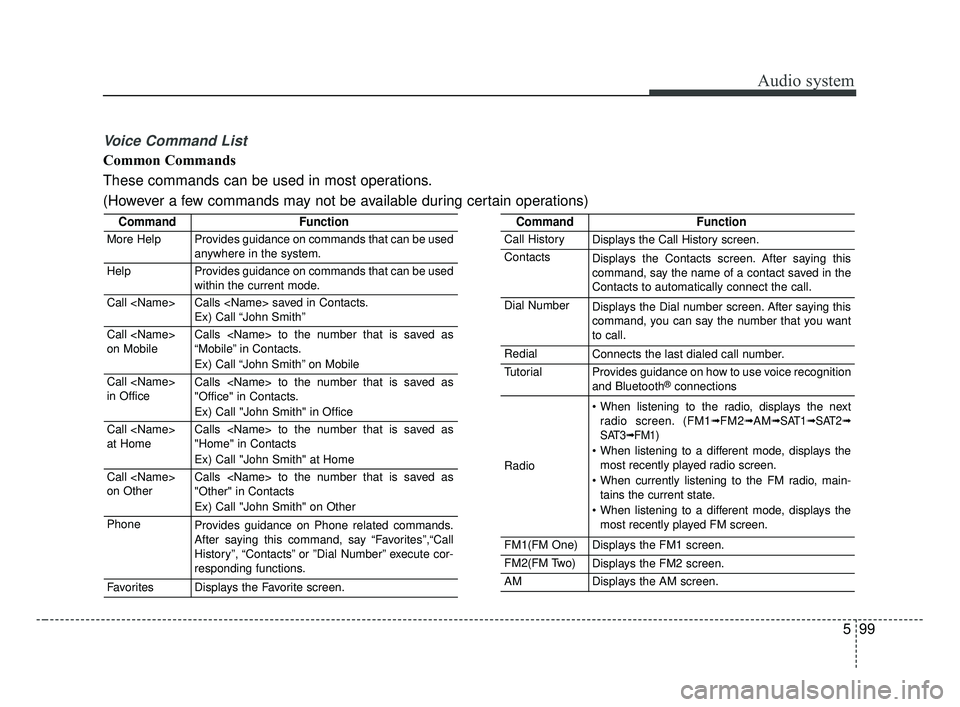
Audio system
599
Voice Command List
Common Commands
These commands can be used in most operations.
(However a few commands may not be available during certain operations)
CommandFunction
More HelpProvides guidance on commands that can be used
anywhere in the system.
HelpProvides guidance on commands that can be used
within the current mode.
Call
Ex) Call “John Smith”
Call
on MobileCalls
“Mobile” in Contacts.
Ex) Call “John Smith” on Mobile
Call
in OfficeCalls
"Office" in Contacts.
Ex) Call "John Smith" in Office
Call
at HomeCalls
"Home" in Contacts
Ex) Call "John Smith" at Home
Call
on OtherCalls
"Other" in Contacts
Ex) Call "John Smith" on Other
PhoneProvides guidance on Phone related commands.
After saying this command, say “Favorites”,“Call
History”, “Contacts” or ”Dial Number” execute cor-
responding functions.
FavoritesDisplays the Favorite screen.
CommandFunction
Call HistoryDisplays the Call History screen.
ContactsDisplays the Contacts screen. After saying this
command, say the name of a contact saved in the
Contacts to automatically connect the call.
Dial NumberDisplays the Dial number screen. After saying this
command, you can say the number that you want
to call.
RedialConnects the last dialed call number.
TutorialProvides guidance on how to use voice recognition
and Bluetooth®connections
Radio
When listening to the radio, displays the nextradio screen. (FM1➟FM2➟AM➟ SAT1➟ SAT2➟
SAT3➟ FM1)
When listening to a different mode, displays the most recently played radio screen.
When currently listening to the FM radio, main- tains the current state.
When listening to a different mode, displays the most recently played FM screen.
FM1(FM One)Displays the FM1 screen.
FM2(FM Two)Displays the FM2 screen.
AMDisplays the AM screen.
JF CAN (ENG) 5 (Audio).qxp 2016-09-21 11:22 Page 99