display KIA OPTIMA 2017 Owner's Manual
[x] Cancel search | Manufacturer: KIA, Model Year: 2017, Model line: OPTIMA, Model: KIA OPTIMA 2017Pages: 629, PDF Size: 15.24 MB
Page 170 of 629
483
Features of your vehicle
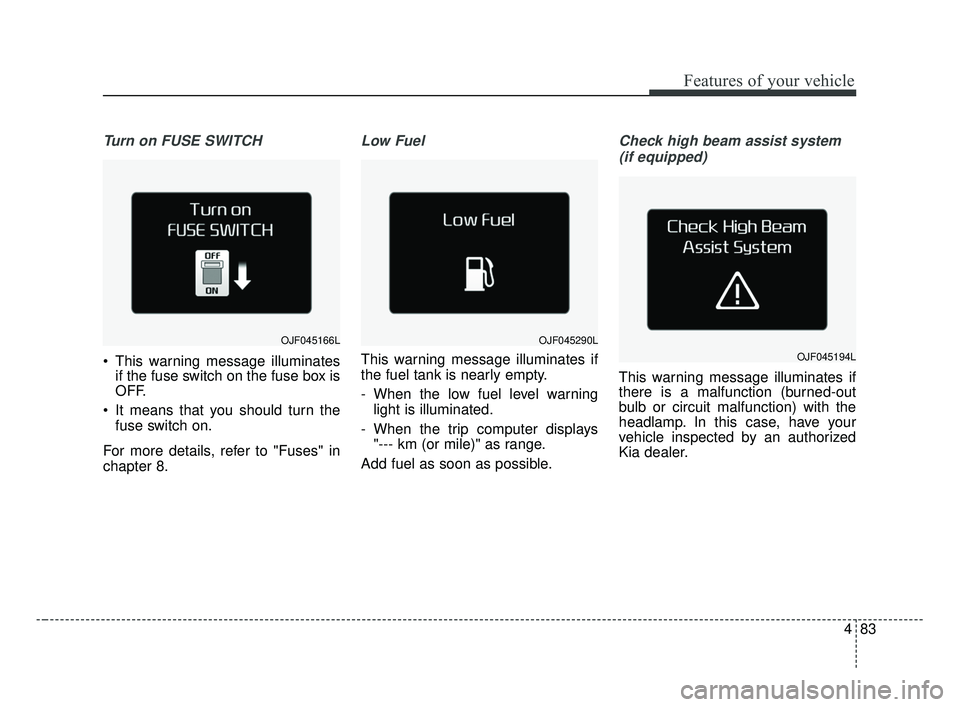
Turn on FUSE SWITCH
This warning message illuminatesif the fuse switch on the fuse box is
OFF.
It means that you should turn the fuse switch on.
For more details, refer to "Fuses" in
chapter 8.
Low Fuel
This warning message illuminates if
the fuel tank is nearly empty.
- When the low fuel level warning light is illuminated.
- When the trip computer displays "--- km (or mile)" as range.
Add fuel as soon as possible.
Check high beam assist system (if equipped)
This warning message illuminates if
there is a malfunction (burned-out
bulb or circuit malfunction) with the
headlamp. In this case, have your
vehicle inspected by an authorized
Kia dealer.
OJF045166LOJF045290L
OJF045194L
JF CAN (ENG) 4.qxp 2016-09-21 11:16 Page 83
Page 171 of 629
Features of your vehicle
84
4
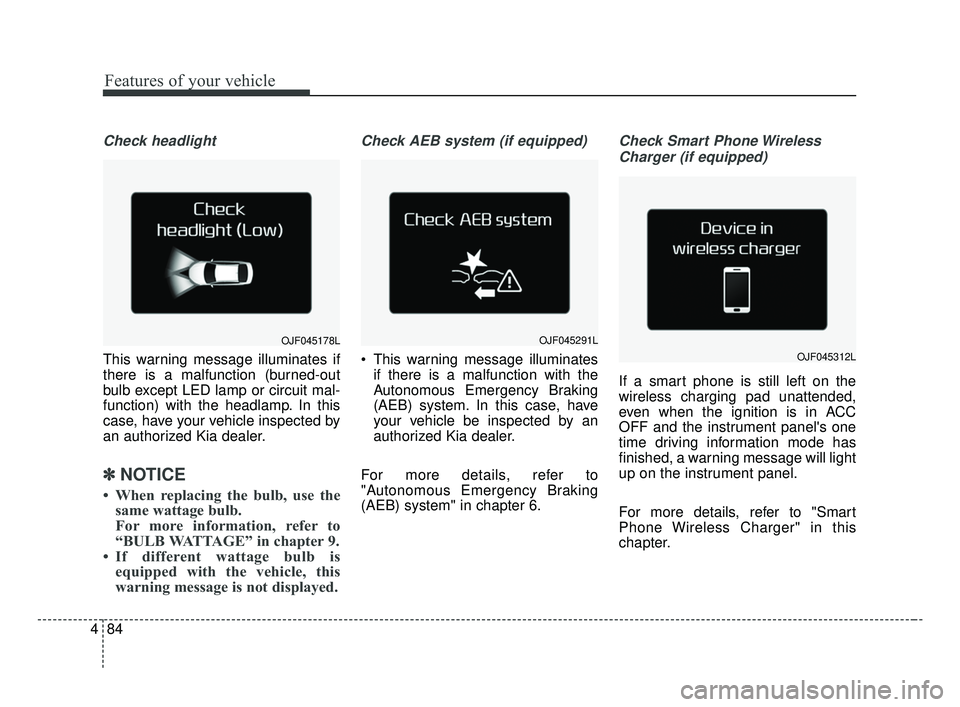
Check headlight
This warning message illuminates if
there is a malfunction (burned-out
bulb except LED lamp or circuit mal-
function) with the headlamp. In this
case, have your vehicle inspected by
an authorized Kia dealer.
✽ ✽
NOTICE
• When replacing the bulb, use the
same wattage bulb.
For more information, refer to
“BULB WATTAGE” in chapter 9.
• If different wattage bulb is equipped with the vehicle, this
warning message is not displayed.
Check AEB system (if equipped)
This warning message illuminates
if there is a malfunction with the
Autonomous Emergency Braking
(AEB) system. In this case, have
your vehicle be inspected by an
authorized Kia dealer.
For more details, refer to
"Autonomous Emergency Braking
(AEB) system" in chapter 6.
Check Smart Phone Wireless Charger (if equipped)
If a smart phone is still left on the
wireless charging pad unattended,
even when the ignition is in ACC
OFF and the instrument panel's one
time driving information mode has
finished, a warning message will light
up on the instrument panel.
For more details, refer to "Smart
Phone Wireless Charger" in this
chapter.
OJF045178LOJF045291L
OJF045312L
JF CAN (ENG) 4.qxp 2016-09-21 11:16 Page 84
Page 188 of 629
4101
Features of your vehicle
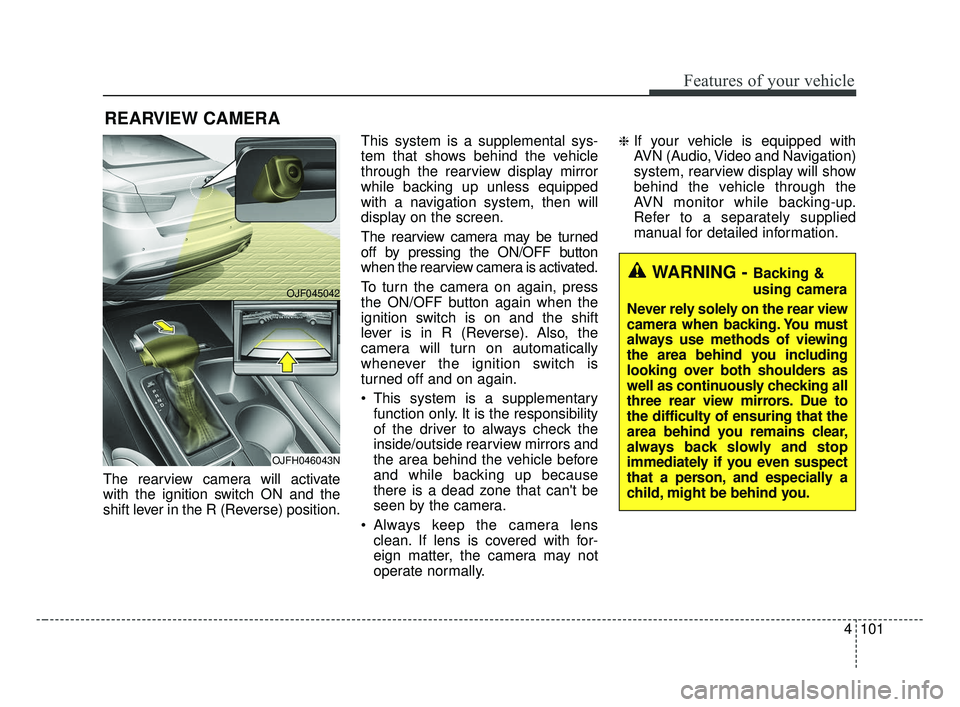
The rearview camera will activate
with the ignition switch ON and the
shift lever in the R (Reverse) position.This system is a supplemental sys-
tem that shows behind the vehicle
through the rearview display mirror
while backing up unless equipped
with a navigation system, then will
display on the screen.
The rearview camera may be turned
off by pressing the ON/OFF button
when the rearview camera is activated.
To turn the camera on again, press
the ON/OFF button again when the
ignition switch is on and the shift
lever is in R (Reverse). Also, the
camera will turn on automatically
whenever the ignition switch is
turned off and on again.
This system is a supplementary
function only. It is the responsibility
of the driver to always check the
inside/outside rearview mirrors and
the area behind the vehicle before
and while backing up because
there is a dead zone that can't be
seen by the camera.
Always keep the camera lens clean. If lens is covered with for-
eign matter, the camera may not
operate normally.
❈If your vehicle is equipped with
AVN (Audio, Video and Navigation)
system, rearview display will show
behind the vehicle through the
AVN monitor while backing-up.
Refer to a separately supplied
manual for detailed information.
REARVIEW CAMERA
WARNING - Backing &
using camera
Never rely solely on the rear view
camera when backing. You must
always use methods of viewing
the area behind you including
looking over both shoulders as
well as continuously checking all
three rear view mirrors. Due to
the difficulty of ensuring that the
area behind you remains clear,
always back slowly and stop
immediately if you even suspect
that a person, and especially a
child, might be behind you.
OJF045042
OJFH046043N
JF CAN (ENG) 4.qxp 2016-09-21 11:16 Page 101
Page 195 of 629
Features of your vehicle
108
4
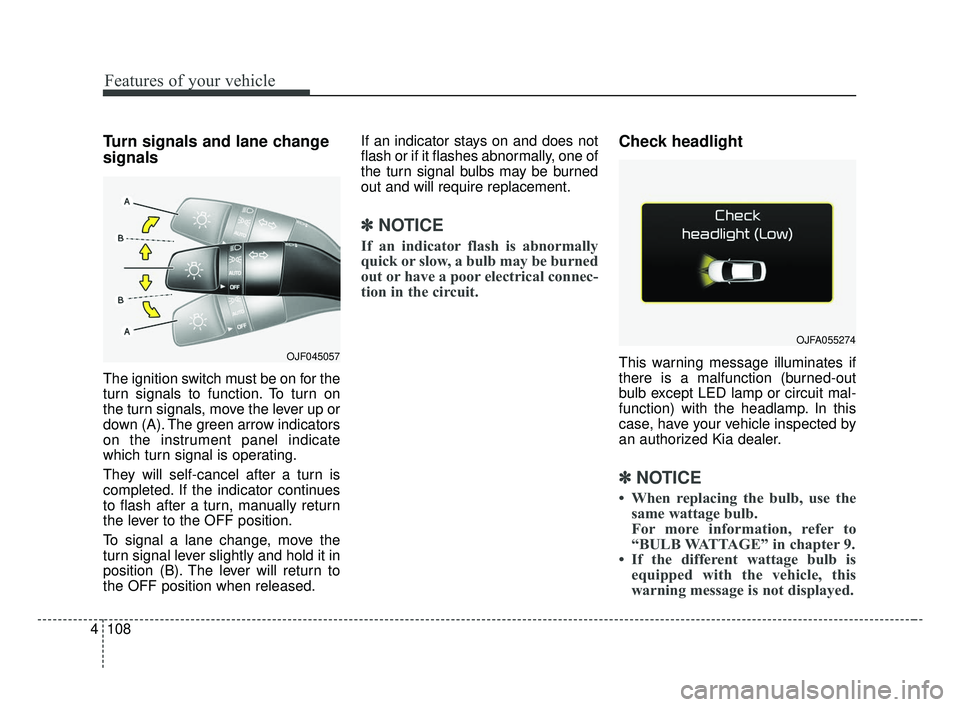
Turn signals and lane change
signals
The ignition switch must be on for the
turn signals to function. To turn on
the turn signals, move the lever up or
down (A). The green arrow indicators
on the instrument panel indicate
which turn signal is operating.
They will self-cancel after a turn is
completed. If the indicator continues
to flash after a turn, manually return
the lever to the OFF position.
To signal a lane change, move the
turn signal lever slightly and hold it in
position (B). The lever will return to
the OFF position when released. If an indicator stays on and does not
flash or if it flashes abnormally, one of
the turn signal bulbs may be burned
out and will require replacement.
✽ ✽
NOTICE
If an indicator flash is abnormally
quick or slow, a bulb may be burned
out or have a poor electrical connec-
tion in the circuit.
Check headlight
This warning message illuminates if
there is a malfunction (burned-out
bulb except LED lamp or circuit mal-
function) with the headlamp. In this
case, have your vehicle inspected by
an authorized Kia dealer.
✽ ✽NOTICE
• When replacing the bulb, use the
same wattage bulb.
For more information, refer to
“BULB WATTAGE” in chapter 9.
• If the different wattage bulb is equipped with the vehicle, this
warning message is not displayed.
OJF045057
OJFA055274
JF CAN (ENG) 4.qxp 2016-09-21 11:17 Page 108
Page 215 of 629
Features of your vehicle
128
4
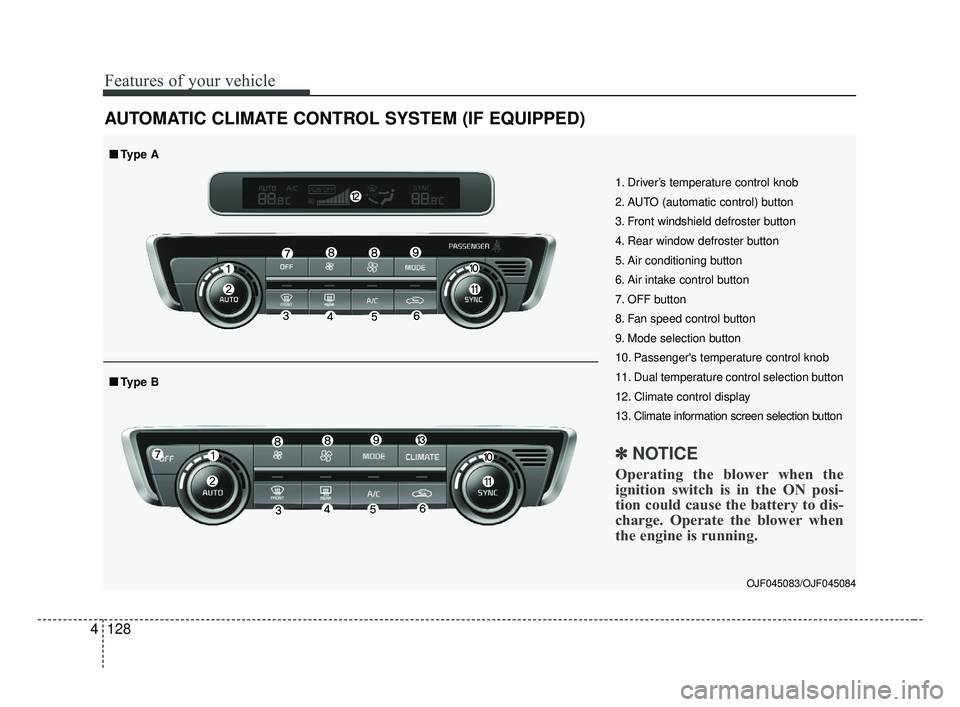
AUTOMATIC CLIMATE CONTROL SYSTEM (IF EQUIPPED)
OJF045083/OJF045084
1. Driver’s temperature control knob
2. AUTO (automatic control) button
3. Front windshield defroster button
4. Rear window defroster button
5. Air conditioning button
6. Air intake control button
7. OFF button
8. Fan speed control button
9. Mode selection button
10. Passenger's temperature control knob
11. Dual temperature control selection button
12. Climate control display
13. Climate information screen selection button
✽ ✽
NOTICE
Operating the blower when the
ignition switch is in the ON posi-
tion could cause the battery to dis-
charge. Operate the blower when
the engine is running.
■ ■Type B
■ ■Type A
JF CAN (ENG) 4.qxp 2016-09-21 11:18 Page 128
Page 216 of 629
4129
Features of your vehicle
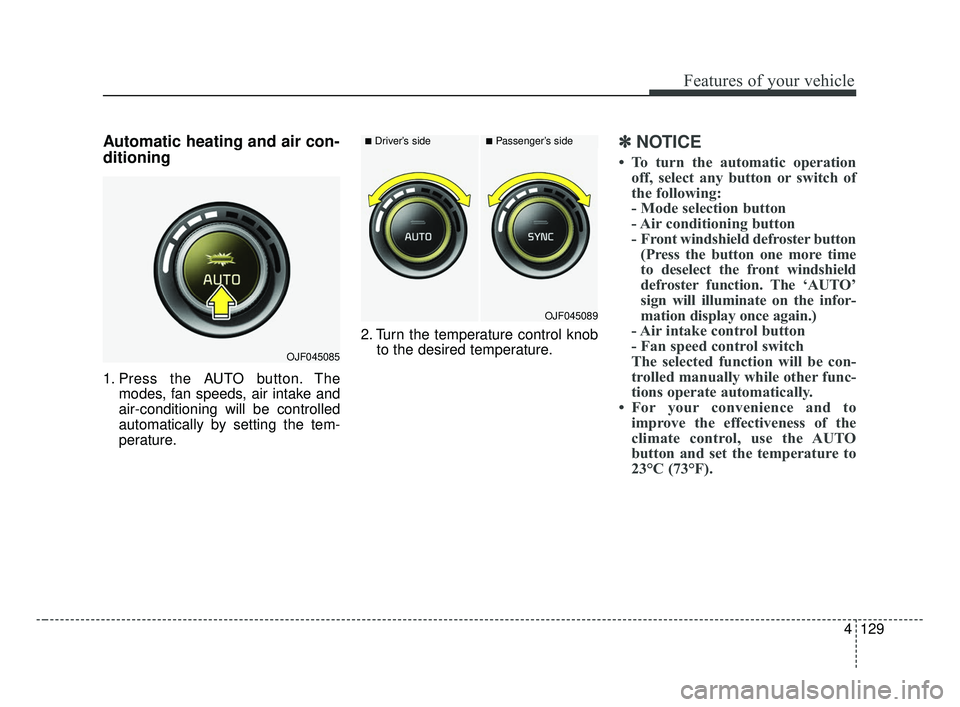
Automatic heating and air con-
ditioning
1. Press the AUTO button. Themodes, fan speeds, air intake and
air-conditioning will be controlled
automatically by setting the tem-
perature. 2. Turn the temperature control knob
to the desired temperature.
✽ ✽NOTICE
• To turn the automatic operation
off, select any button or switch of
the following:
- Mode selection button
- Air conditioning button
- Front windshield defroster button(Press the button one more time
to deselect the front windshield
defroster function. The ‘AUTO’
sign will illuminate on the infor-
mation display once again.)
- Air intake control button
- Fan speed control switch
The selected function will be con-
trolled manually while other func-
tions operate automatically.
• For your convenience and to improve the effectiveness of the
climate control, use the AUTO
button and set the temperature to
23°C (73°F).
OJF045085
■Driver’s side■Passenger’s side
OJF045089
JF CAN (ENG) 4.qxp 2016-09-21 11:18 Page 129
Page 220 of 629
4133
Features of your vehicle
Adjusting the driver and passenger
side temperature individually
Press the “SYNC” button again toadjust the driver and passenger
side temperature individually. The
illumination of button turns off.
Operate the driver side tempera- ture control knob to adjust the driv-
er side temperature.
Operate the passenger side tem- perature control knob to adjust the
passenger side temperature.
Temperature conversion
You can switch the temperature
mode from Centigrade to Fahrenheit
as follows:
While pressing the OFF button,
press the AUTO button for 3 seconds
or more.
The display will change from
Centigrade to Fahrenheit, or from
Fahrenheit to Centigrade.
If the battery has been discharged or
disconnected, the temperature mode
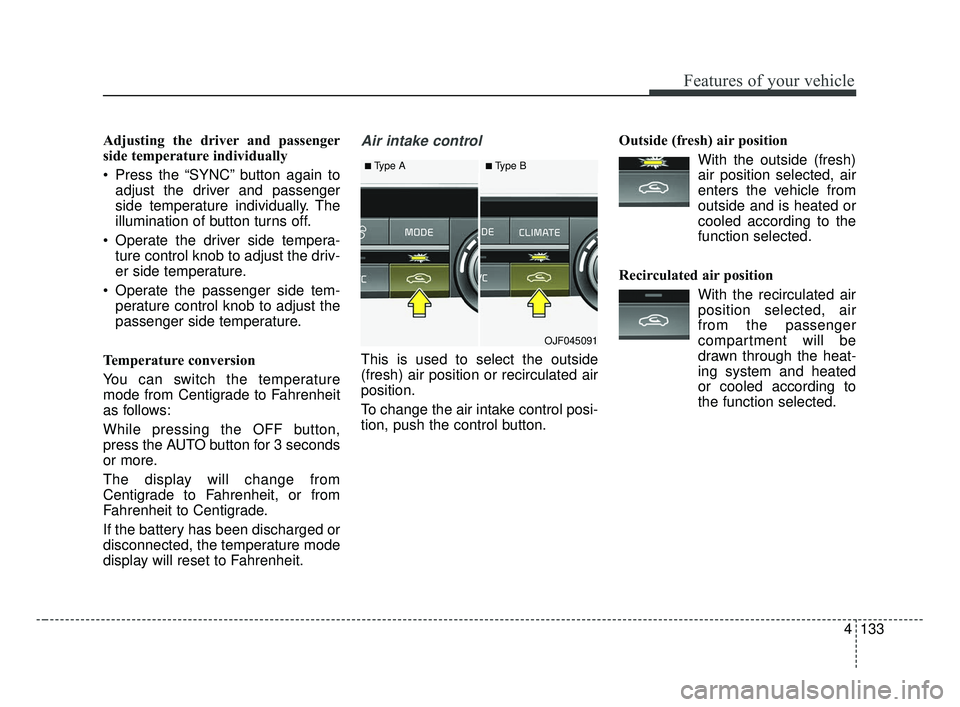
display will reset to Fahrenheit.Air intake control
This is used to select the outside
(fresh) air position or recirculated air
position.
To change the air intake control posi-
tion, push the control button. Outside (fresh) air position
With the outside (fresh)air position selected, air
enters the vehicle from
outside and is heated or
cooled according to the
function selected.
Recirculated air position With the recirculated airposition selected, air
from the passenger
compartment will be
drawn through the heat-
ing system and heated
or cooled according to
the function selected.
■Type A■Type B
OJF045091
JF CAN (ENG) 4.qxp 2016-09-21 11:18 Page 133
Page 222 of 629
4135
Features of your vehicle
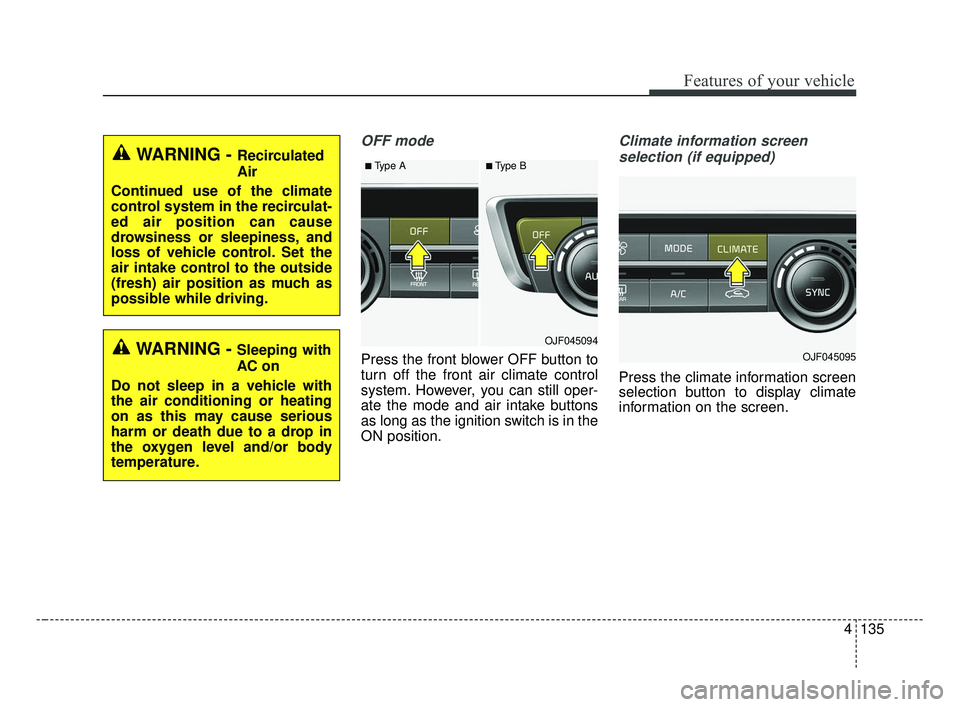
OFF mode
Press the front blower OFF button to
turn off the front air climate control
system. However, you can still oper-
ate the mode and air intake buttons
as long as the ignition switch is in the
ON position.
Climate information screen selection (if equipped)
Press the climate information screen
selection button to display climate
information on the screen.
■Type A■Type B
OJF045094
OJF045095
WARNING - Recirculated
Air
Continued use of the climate
control system in the recirculat-
ed air position can cause
drowsiness or sleepiness, and
loss of vehicle control. Set the
air intake control to the outside
(fresh) air position as much as
possible while driving.
WARNING - Sleeping with
AC on
Do not sleep in a vehicle with
the air conditioning or heating
on as this may cause serious
harm or death due to a drop in
the oxygen level and/or body
temperature.
JF CAN (ENG) 4.qxp 2016-09-21 11:18 Page 135
Page 241 of 629
Features of your vehicle
154
4
✽ ✽
NOTICE
• If it is not possible to close the tray
cover due to the size of your smart
phone or because the tray cover
has been broken, do not use the
wireless smart phone charging
function.
• When the interior temperature of the wireless charging system rises
above a set temperature, the wire-
less charging will cease to func-
tion. After the interior tempera-
ture drops below the threshold,
the wireless charging function will
resume.
• The wireless charging may not function properly when there is a
heavy accessory cover on the
smart phone.
• The wireless charging will stop when using the wireless smart key
search function to prevent radio
wave disruption.
• The wireless charging will stop when the smart key is moved out
of the vehicle with the ignition in
ON. (Continued)(Continued)
• The wireless charging will stop
when any of the doors is opened
(applicable for vehicles equipped
with smart keys).
• The wireless charging will stop when the vehicle is turned OFF.
• The wireless charging will stop when the smart phone is not in
complete contact with the wireless
charging pad.
• Items equipped with magnetic components such as credit card,
telephone card, bankbook, any
transportation ticket and such
may become damaged during
wireless charging.
• Place the smart phone on the cen- ter of the charge pad for best
results. The smart phone may not
charge when placed near the rim
of the charging pad. When the
smart phone does get charged, it
may heat up excessively.
• For smart phones without built-in wireless charging system, an
appropriate accessory has to be
equipped. (Continued)(Continued)
• Smart phones of some manufac-
turers may display messages on
weak current. This is due to the
particular characteristic of the
smart phone and does not imply a
malfunction on wireless charging
function.
• The indicator light of some manu- facturers’ smart phones may still
be yellow after the smart phone is
fully charged. This is due to the
particular characteristic of the
smart phone and not a malfunc-
tion of the wireless charging.
• When any smart phone without a wireless charging function or a
metallic object is placed on the
charging pad, a small noise may
sound. This small sound is due to
the vehicle discerning compatibili-
ty of the object placed on the
charging pad. It does not affect
your vehicle or the smart phone in
any way.
JF CAN (ENG) 4.qxp 2016-09-21 11:19 Page 154
Page 252 of 629
Audio system
59
Features of Your Audio
Head unit
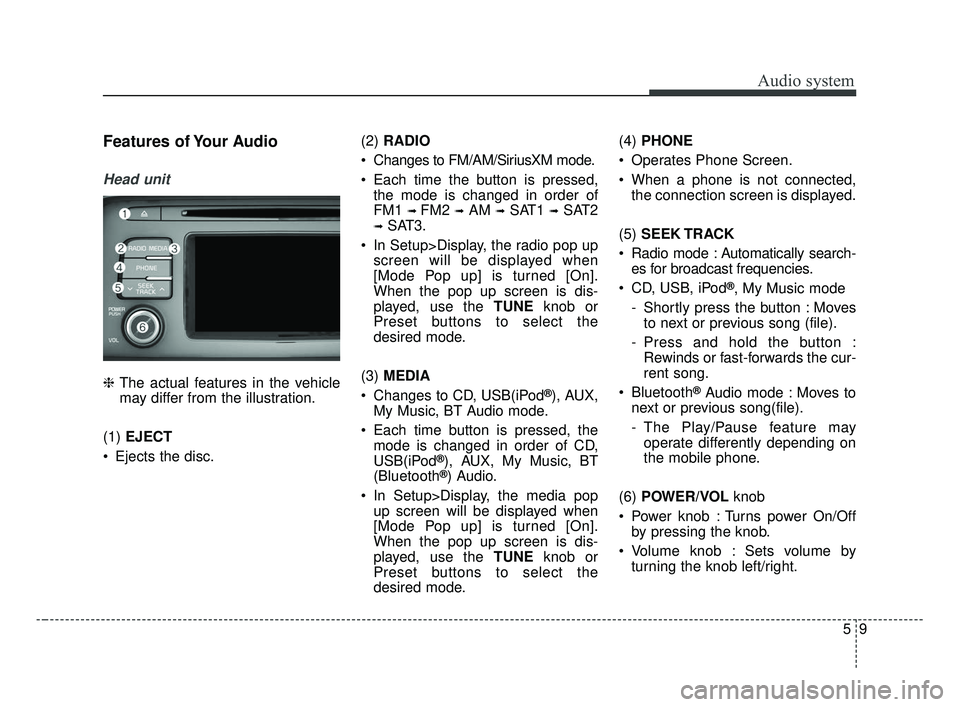
❈The actual features in the vehicle
may differ from the illustration.
(1) EJECT
Ejects the disc. (2)
RADIO
Changes to FM/AM/SiriusXM mode.
Each time the button is pressed, the mode is changed in order of
FM1
➟ FM2 ➟AM ➟SAT1 ➟SAT2
➟SAT3.
In Setup>Display, the radio pop up screen will be displayed when
[Mode Pop up] is turned [On].
When the pop up screen is dis-
played, use the TUNE knob or
Preset buttons to select the
desired mode.
(3) MEDIA
Changes to CD, USB(iPod
®), AUX,
My Music, BT Audio mode.
Each time button is pressed, the mode is changed in order of CD,
USB(iPod
®), AUX, My Music, BT
(Bluetooth®) Audio.
In Setup>Display, the media pop up screen will be displayed when
[Mode Pop up] is turned [On].
When the pop up screen is dis-
played, use the TUNE knob or
Preset buttons to select the
desired mode. (4)
PHONE
Operates Phone Screen.
When a phone is not connected, the connection screen is displayed.
(5) SEEK TRACK
Radio mode : Automatically search- es for broadcast frequencies.
CD, USB, iPod
®, My Music mode
- Shortly press the button : Moves to next or previous song (file).
- Press and hold the button : Rewinds or fast-forwards the cur-
rent song.
Bluetooth
®Audio mode : Moves to
next or previous song(file).
- The Play/Pause feature may operate differently depending on
the mobile phone.
(6) POWER/VOL knob
Power knob : Turns power On/Off by pressing the knob.
Volume knob : Sets volume by turning the knob left/right.
JF CAN (ENG) 5 (Audio).qxp 2016-09-21 11:21 Page 9