parking brake KIA OPTIMA 2017 Owner's Manual
[x] Cancel search | Manufacturer: KIA, Model Year: 2017, Model line: OPTIMA, Model: KIA OPTIMA 2017Pages: 629, PDF Size: 15.24 MB
Page 376 of 629
619
Driving your vehicle
5. Move the shift lever.
6. Remove the tool from the shiftlockoverride access hole then install
the cap.
7. We recommend that the system be inspected by an authorized Kia
dealer.
Ignition key interlock system
The ignition key cannot be removed
unless the shift lever is in the P
(Park) position. Even if the ignition
switch is in the LOCK position, the
key cannot be removed.
If your vehicle is equipped with
ENGINE START/STOP button, the
button will not change to the OFF
position unless the shift lever is in the
P (Park) position.
Good driving practices
Never move the gear shift leverfrom P (Park) to any other position
with the accelerator pedal
depressed.
Never move the gear shift lever into P (Park) when the vehicle is in
motion.
Slow down before shifting to a lower gear. Otherwise, the lower
gear may not be engaged.
Always use the parking brake. Do not depend on placing the
transaxle in P (Park) to keep the
vehicle from moving.
Optimum vehicle performance and economy is obtained by smoothly
depressing and releasing the
accelerator pedal.
✽ ✽ NOTICE- Kickdown
Mechanism
Use the kickdown mechanism for
maximum acceleration. Depress the
accelerator pedal beyond the pres-
sure point. The automatic transaxle
will shift to a lower gear depending
on the engine speed.
Moving up a steep grade from astanding start
To move up a steep grade from a
standing start, depress the brake
pedal, shift the shift lever to D
(Drive). Select the appropriate gear
depending on load weight and steep-
ness of the grade, and release the
parking brake. Depress the accelera-
tor gradually while releasing the
service brakes.
When accelerating from a stop on
a steep hill, the vehicle may have a
tendency to roll backwards.
Shifting the shift lever into 2
(Second Gear) will help prevent
the vehicle from rolling back-
wards.
JF CAN (ENG) 6.qxp 2016-09-21 11:24 Page 19
Page 377 of 629
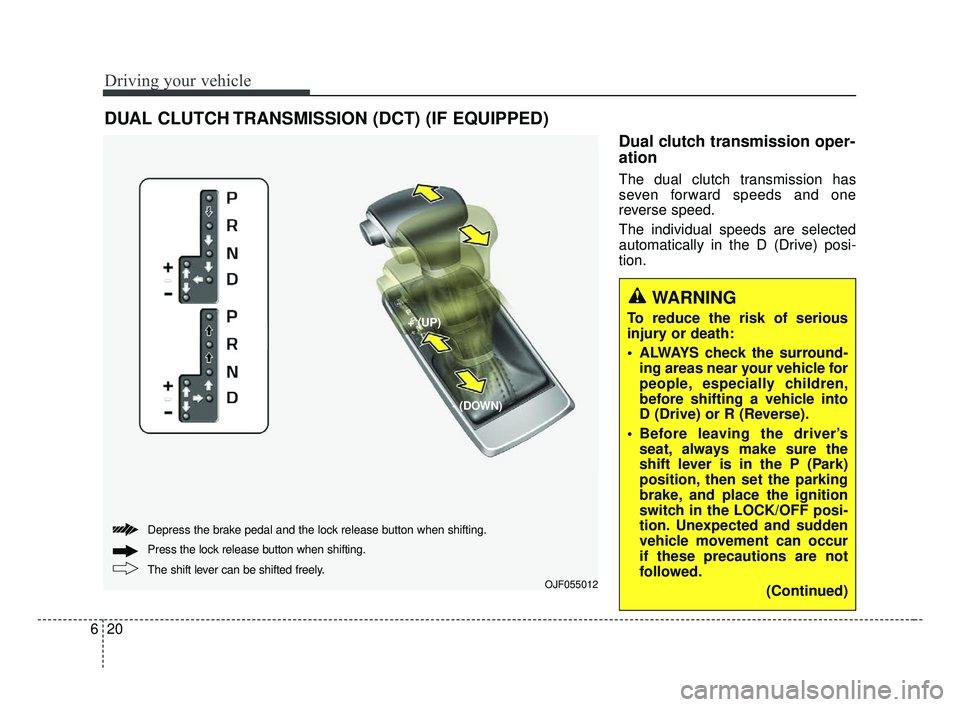
Dual clutch transmission oper-
ation
The dual clutch transmission has
seven forward speeds and one
reverse speed.
The individual speeds are selected
automatically in the D (Drive) posi-
tion.
Driving your vehicle
20
6
WARNING
To reduce the risk of serious
injury or death:
ALWAYS check the surround-
ing areas near your vehicle for
people, especially children,
before shifting a vehicle into
D (Drive) or R (Reverse).
Before leaving the driver’s seat, always make sure the
shift lever is in the P (Park)
position, then set the parking
brake, and place the ignition
switch in the LOCK/OFF posi-
tion. Unexpected and sudden
vehicle movement can occur
if these precautions are not
followed.
(Continued)
DUAL CLUTCH TRANSMISSION (DCT) (IF EQUIPPED)
OJF055012
+ (UP)
- (DOWN)
The shift lever can be shifted freely. Press the loc
k release button when shifting.
Depress the brake pedal and the lock release button when shifting.
JF CAN (ENG) 6.qxp 2016-09-21 11:24 Page 20
Page 378 of 629
621
Driving your vehicle
The Dual Clutch Transmission givesthe driving feel of a manual transmis-
sion, yet provides the ease of a fully
automatic transmission. Unlike a tra-
ditional automatic transmission, the
gear shifting can be felt (and heard)
on the dual clutch transmission
- Think of it as an automatically shift-ing manual transmission.
- Shift into Drive range and get fully automatic shifting, similar to a con-
ventional automatic transmission.
Dual clutch transmission adopts dry- type dual clutch, which is different
from the torque converter of an auto-
matic transmission, and shows bet-
ter acceleration performance during
driving. But, initial launch from a stop
might be little bit slower than with an
Automatic Transmission. The dry-type clutch transfers torque
and provides a direct driving feeling
which may feel different from a con-
ventional automatic transmission
with a torque converter. This may be
more noticeable when starting from
a stop or low vehicle speed.
When rapidly accelerating at low vehicle speed, engine could rev at
higher rpm than with a comparable
Automatic Transmission.
For smooth launch uphill, press down the accelerator pedal smooth-
ly depending on the current condi-
tions.
If you release your foot from the accelerator pedal at a low vehicle
speed, you may feel strong engine
brake, which is similar to a manual
transmission.
When driving downhill, you may use Sports Mode and press the paddle
shifters to downshift to a lower gear
in order to control your speed without
using the brake pedal excessively. When you turn the engine on and off,
you may hear clicking sounds as the
system goes through a self test. This
is a normal sound for the Dual Clutch
Transmission.
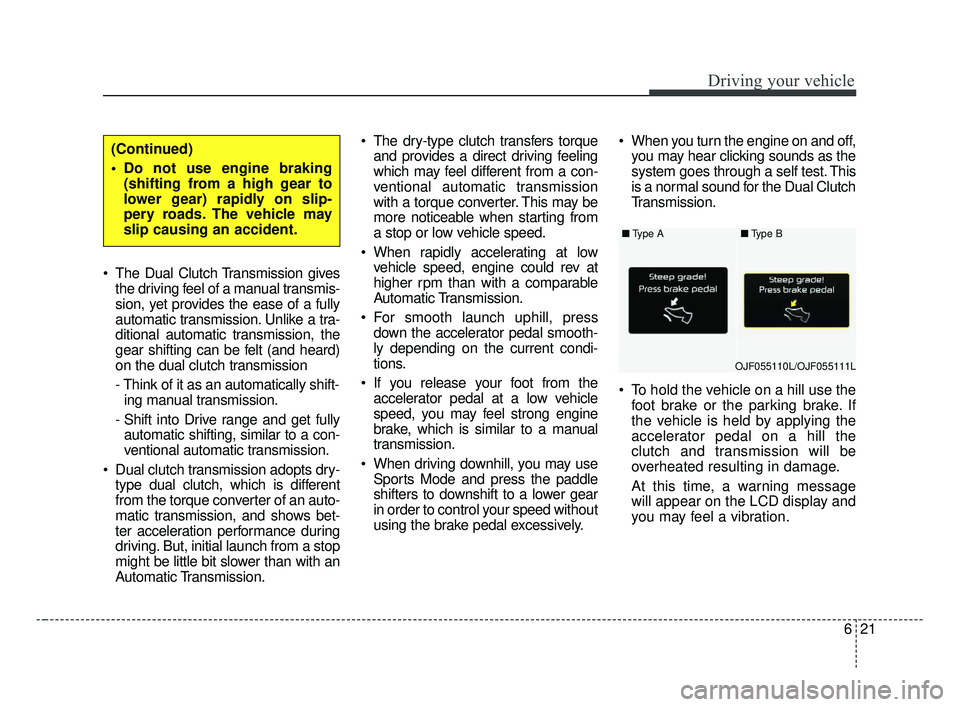
To hold the vehicle on a hill use the foot brake or the parking brake. If
the vehicle is held by applying the
accelerator pedal on a hill the
clutch and transmission will be
overheated resulting in damage.
At this time, a warning message
will appear on the LCD display and
you may feel a vibration.
(Continued)
Do not use engine braking(shifting from a high gear to
lower gear) rapidly on slip-
pery roads. The vehicle may
slip causing an accident.
■ Type A
OJF055110L/OJF055111L■
Type B
JF CAN (ENG) 6.qxp 2016-09-21 11:24 Page 21
Page 380 of 629
Do not use the kickdown mecha-nism to return to normal driving.
Also, temporarily stop the vehicle
at a safe location, when the warn-
ing message illuminates on the
LCD display.
During the first 1,500km (1,000miles), you may feel that the
vehicle may not be smooth when
accelerating at low speed. During
this break-in period, the shift quali-
ty and performance of your new
vehicle is continuously optimized.
Always come to a complete stop before shifting into D (Drive) or R
(Reverse).
Do not put the shift lever in N (Neutral) while driving. The indicator in the instrument clus-
ter displays the shift lever position
when the ignition switch is in the ON
position.
P (Park)
Always come to a complete stop
before shifting into P (Park).
To shift from P (Park), you must
depress firmly on the brake pedal
and make sure your foot is off the
accelerator pedal.
The shift lever must be in P (Park)
before turning the engine off.
R (Reverse)
Use this position to drive the vehicle
backward.
N (Neutral)
The wheels and transmission are not
engaged.
Use N (Neutral) if you need to restart
a stalled engine, or if it is necessary
to stop with the engine ON. Shift into
P (Park) if you need to leave your
vehicle for any reason.
Always depress the brake pedal
when you are shifting from N
(Neutral) to another gear.
623
Driving your vehicle
CAUTION
- Holding the Vehicle Using
Accelerator Pedal
Do not attempt to hold yourvehicle on a hill by applying theaccelerator pedal. This cancause your clutch and transmis-sion to be damaged as a resultof overheating.
WARNING
Shifting into P (Park) while the vehicle is in motion may
cause you to lose control of
the vehicle.
After the vehicle has stopped, always make sure the shift
lever is in P (Park), apply the
parking brake, and turn the
engine off.
Do not use the P (Park) position in place of the parking brake.
CAUTION
Always come to a complete stopbefore shifting into or out of R(Reverse); you may damage thetransmission if you shift into R(Reverse) while the vehicle is inmotion.
JF CAN (ENG) 6.qxp 2016-09-21 11:24 Page 23
Page 381 of 629
Driving your vehicle
24
6
- Parking in N (Neutral) gear
Follow below steps when parking
and you want the vehicle to move
when pushed.
1.After stopping your vehicle, depress
the brake pedal and move the
transaxle shift lever to [P] with the
ignition button in [ON] or while the
engine is running.
2.If the parking brake is applied, release the parking brake.
- For EPB (Electronic ParkingBrake) equipped vehicles,
depress the brake pedal with the
ignition button in [ON] or while the
engine is running to disengage
the parking brake. If [AUTO
HOLD] function is used while
driving (If [AUTO HOLD] indicator
is on in the cluster), press [AUTO
HOLD] switch and [AUTO HOLD]
function should be turn off.
3.While depressing the brake pedal, turn the ignition button [OFF].
- For smart key equipped vehicles,the ignition switch can be moved
to [OFF] only when the shift lever
is in [P]. 4.Change the gear shift lever to [N]
(Neutral) while depressing the
brake pedal and pressing down a
tool (e.g. flathead screw-driver) into
the [SHIFT LOCK RELEASE]
access hole at the same time. Then,
the vehicle will move when external
force is applied.
WARNING
Do not shift into gear unless
your foot is firmly on the brake
pedal. Shifting into gear when
the engine is running at high
speed can cause the vehicle to
move very rapidly. You could
lose control of the vehicle and
hit people or objects.
WARNING
Do not drive with the shift lever
in N (Neutral).
The engine brake will not work
and may lead to an accident.
WARNING
With the exception of parkingin neutral gear, always park the
vehicle in [P] (Park) for safety
and apply the parking brake.
Before parking in [N] (Neutral) gear, first make sure the park-
ing ground is level and flat. Do
not park in [N] gear on any
slopes or gradients.
If parked and left in [N], the
vehicle may move and cause
serious damage or injury.
JF CAN (ENG) 6.qxp 2016-09-21 11:24 Page 24
Page 382 of 629
625
Driving your vehicle
✽ ✽NOTICE
After the ignition switch has been
turned off, the EPB (Electronic
Parking Brake) cannot be released.
For EPB (Electronic Parking Brake)
equipped vehicles with [AUTO
HOLD] function used while driving, if
the ignition button has been turned
[OFF], the EPB (Electronic Parking
Brake) will be engaged automatical-
ly. Therefore, [AUTO HOLD] function
should be turned off before the igni-
tion button is turned off.
D (Drive)
This is the normal driving position.
The transmission will automatically
shift through a seven-gear
sequence, providing the best fuel
economy and power.
For extra power when passing anoth-
er vehicle or driving uphill depress
the accelerator pedal further until
you feel the transmission downshift
to a lower gear. Manual mode
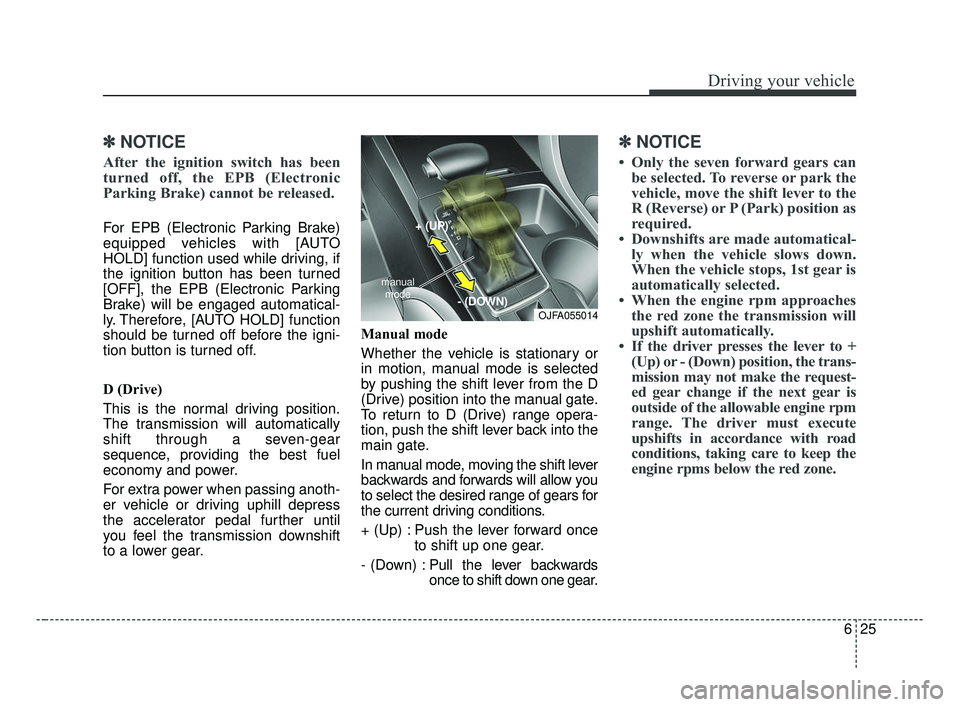
Whether the vehicle is stationary or
in motion, manual mode is selected
by pushing the shift lever from the D
(Drive) position into the manual gate.
To return to D (Drive) range opera-
tion, push the shift lever back into the
main gate.
In manual mode, moving the shift lever
backwards and forwards will allow you
to select the desired range of gears for
the current driving conditions.
+ (Up) : Push the lever forward once
to shift up one gear.
- (Down) : Pull the lever backwards
once to shift down one gear.
✽ ✽
NOTICE
• Only the seven forward gears can
be selected. To reverse or park the
vehicle, move the shift lever to the
R (Reverse) or P (Park) position as
required.
• Downshifts are made automatical- ly when the vehicle slows down.
When the vehicle stops, 1st gear is
automatically selected.
• When the engine rpm approaches the red zone the transmission will
upshift automatically.
• If the driver presses the lever to + (Up) or - (Down) position, the trans-
mission may not make the request-
ed gear change if the next gear is
outside of the allowable engine rpm
range. The driver must execute
upshifts in accordance with road
conditions, taking care to keep the
engine rpms below the red zone.
OJFA055014
manual
mode
+ (UP)
- (DOWN)
JF CAN (ENG) 6.qxp 2016-09-21 11:24 Page 25
Page 383 of 629
Driving your vehicle
26
6
Shift lock system
For your safety, the Dual clutch trans-
mission has a shift lock system which
prevents shifting the transaxle from P
(Park) into R (Reverse) unless the
brake pedal is depressed.
To shift the transaxle from P (Park)
into R (Reverse):
1. Depress and hold the brake pedal.
2. Start the engine or turn the ignition
switch to the ON position.
3. Move the shift lever.
If the brake pedal is repeatedly
depressed and released with the shift
lever in the P (Park) position, a chat-
tering noise & vibration near the shift
lever may be heard. This is a normal
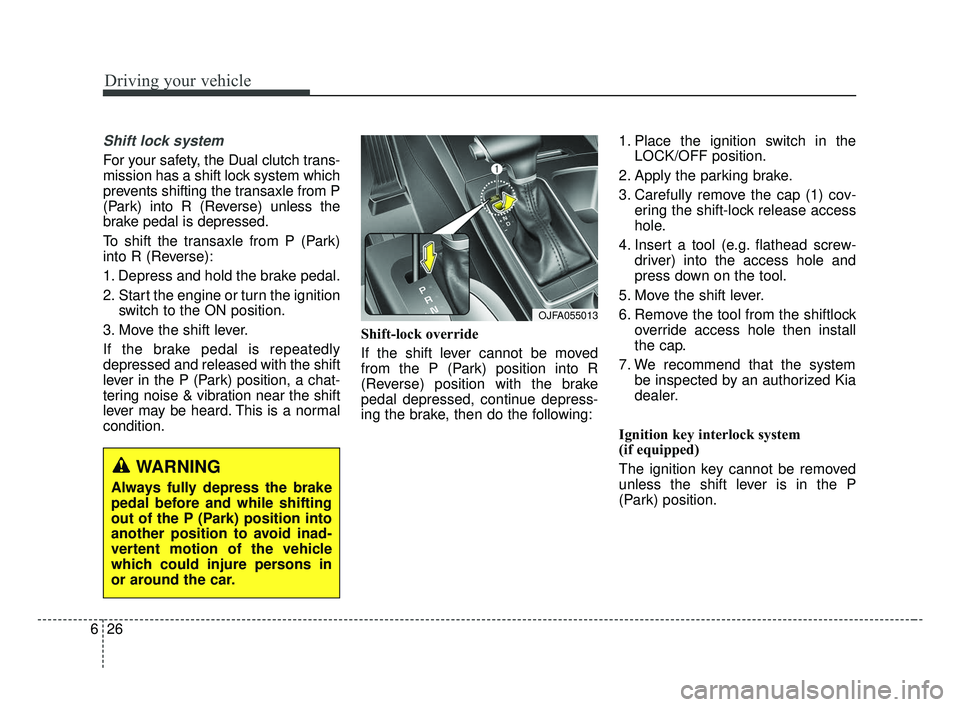
condition. Shift-lock override
If the shift lever cannot be moved
from the P (Park) position into R
(Reverse) position with the brake
pedal depressed, continue depress-
ing the brake, then do the following:1. Place the ignition switch in the
LOCK/OFF position.
2. Apply the parking brake.
3. Carefully remove the cap (1) cov- ering the shift-lock release access
hole.
4. Insert a tool (e.g. flathead screw- driver) into the access hole and
press down on the tool.
5. Move the shift lever.
6. Remove the tool from the shiftlock override access hole then install
the cap.
7. We recommend that the system be inspected by an authorized Kia
dealer.
Ignition key interlock system
(if equipped)
The ignition key cannot be removed
unless the shift lever is in the P
(Park) position.
WARNING
Always fully depress the brake
pedal before and while shifting
out of the P (Park) position into
another position to avoid inad-
vertent motion of the vehicle
which could injure persons in
or around the car.
OJFA055013
JF CAN (ENG) 6.qxp 2016-09-21 11:24 Page 26
Page 384 of 629
627
Driving your vehicle
Good driving practices
Never move the shift lever from P(Park) or N (Neutral) to any other
position with the accelerator pedal
depressed.
Never move the shift lever into P (Park) when the vehicle is in motion.
Be sure the car is completely stopped before you attempt to shift
into R (Reverse) or D (Drive).
Never take the car out of gear and coast down a hill. This may be
extremely hazardous. Always leave
the car in gear when moving.
Do not "ride" the brakes. This can cause them to overheat and mal-
function. Instead, when you are
driving down a long hill, slow down
and shift to a lower gear. When you
do this, engine braking will help
slow the car.
Slow down before shifting to a lower gear. Otherwise, the lower
gear may not be engaged. Always use the parking brake. Do
not depend on placing the
transaxle in P (Park) to keep the
car from moving.
Exercise extreme caution when driving on a slippery surface. Be
especially careful when braking,
accelerating or shifting gears. On a
slippery surface, an abrupt change
in vehicle speed can cause the
drive wheels to lose traction and
the vehicle to go out of control.
Optimum vehicle performance and economy is obtained by smoothly
depressing and releasing the
accelerator pedal.
✽ ✽ NOTICE- Kickdown
Mechanism
Use the kickdown mechanism for
maximum acceleration. Depress the
accelerator pedal beyond the pres-
sure point. The dual clutch trans-
mission will shift to a lower gear
depending on the engine speed.
Moving up a steep grade from astanding start
To move up a steep grade from a
standing start, depress the brake
pedal, shift the shift lever to D
(Drive). Select the appropriate gear
depending on load weight and steep-
ness of the grade, and release the
parking brake. Depress the accelera-
tor gradually while releasing the
service brakes.
JF CAN (ENG) 6.qxp 2016-09-21 11:24 Page 27
Page 386 of 629
629
Driving your vehicle
In the event of brake failure
If service brakes fail to operate while
the vehicle is in motion, you can
make an emergency stop with the
parking brake. The stopping dis-
tance, however, will be much greater
than normal.
Disc brakes wear indicator
When your brake pads are worn and
new pads are required, you will hear
a high-pitched warning sound from
your front brakes or rear brakes. You
may hear this sound come and go or
it may occur whenever you depress
the brake pedal.
Please remember that some driving
conditions or climates may cause a
brake squeal when you first apply (or
lightly apply) the brakes. This is nor-
mal and does not indicate a problem
with your brakes.
Always replace the front or rear
brake pads as pairs.
WARNING- Parkingbrake
Avoid applying the parking
brake to stop the vehicle while it
is moving except in an emer-
gency situation. Applying the
parking brake while the vehicle
is moving at normal speeds can
cause a sudden loss of control
of the vehicle. If you must use
the parking brake to stop the
vehicle, use great caution in
applying the brake.
WARNING- Brake wear
Do not ignore high pitched wear
sounds from your brakes. If you
ignore this audible warning, you
will eventually lose braking per-
formance, which could lead to a
serious accident.
CAUTION- Replace brake pads
Do not continue to drive withworn brake pads. Continuing todrive with worn brake pads candamage the braking system andresult in costly brake repairs.
JF CAN (ENG) 6.qxp 2016-09-21 11:24 Page 29
Page 387 of 629
Driving your vehicle
30
6
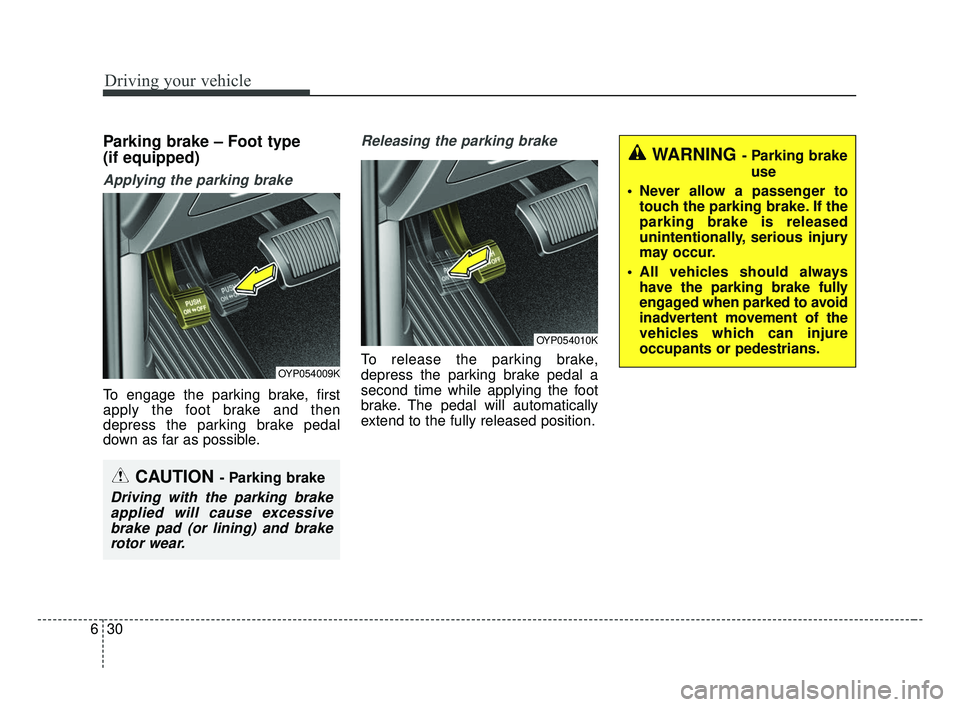
Parking brake – Foot type
(if equipped)
Applying the parking brake
To engage the parking brake, first
apply the foot brake and then
depress the parking brake pedal
down as far as possible.
Releasing the parking brake
To release the parking brake,
depress the parking brake pedal a
second time while applying the foot
brake. The pedal will automatically
extend to the fully released position.OYP054009K
OYP054010K
CAUTION - Parking brake
Driving with the parking brake
applied will cause excessivebrake pad (or lining) and brakerotor wear.
WARNING - Parking brake
use
Never allow a passenger to touch the parking brake. If the
parking brake is released
unintentionally, serious injury
may occur.
All vehicles should always have the parking brake fully
engaged when parked to avoid
inadvertent movement of the
vehicles which can injure
occupants or pedestrians.
JF CAN (ENG) 6.qxp 2016-09-21 11:24 Page 30