start stop button KIA OPTIMA 2017 Owner's Guide
[x] Cancel search | Manufacturer: KIA, Model Year: 2017, Model line: OPTIMA, Model: KIA OPTIMA 2017Pages: 629, PDF Size: 15.24 MB
Page 238 of 629
4151
Features of your vehicle
Plug in battery equipped electronicdevices with reverse current protec-
tion. The current from the battery
may flow into the vehicle’s electri
cal/electronic system and cause
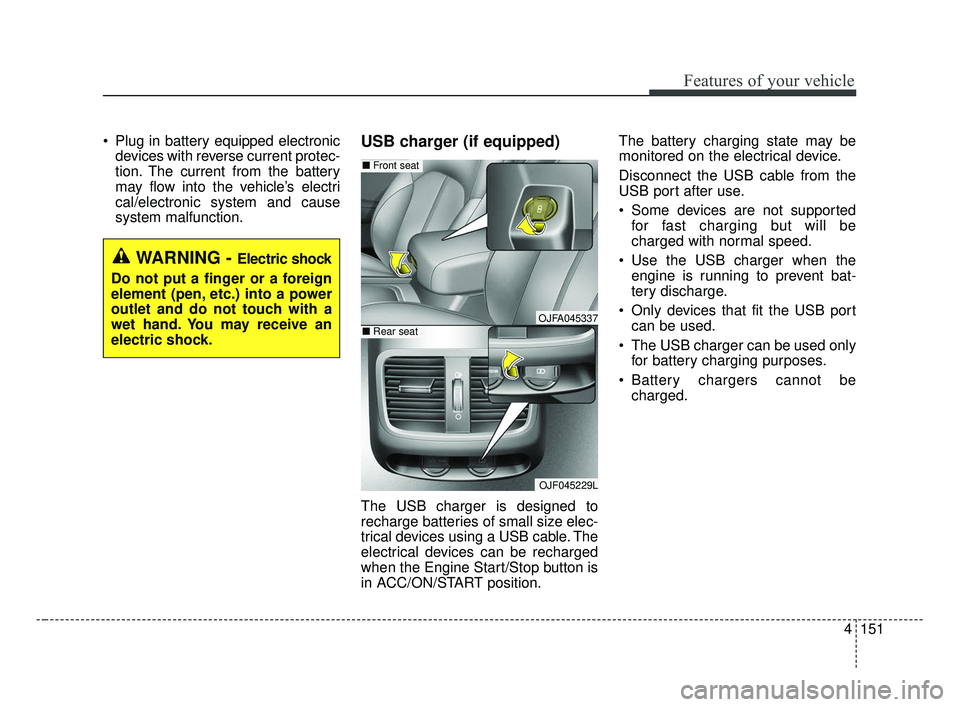
system malfunction.USB charger (if equipped)
The USB charger is designed to
recharge batteries of small size elec-
trical devices using a USB cable. The
electrical devices can be recharged
when the Engine Start/Stop button is
in ACC/ON/START position. The battery charging state may be
monitored on the electrical device.
Disconnect the USB cable from the
USB port after use.
Some devices are not supported
for fast charging but will be
charged with normal speed.
Use the USB charger when the engine is running to prevent bat-
tery discharge.
Only devices that fit the USB port can be used.
The USB charger can be used only for battery charging purposes.
Battery chargers cannot be charged.
WARNING - Electric shock
Do not put a finger or a foreign
element (pen, etc.) into a power
outlet and do not touch with a
wet hand. You may receive an
electric shock.
OJFA045337
OJF045229L
■ Front seat
■Rear seat
JF CAN (ENG) 4.qxp 2016-09-21 11:19 Page 151
Page 332 of 629
Audio system
589
Phone Mode
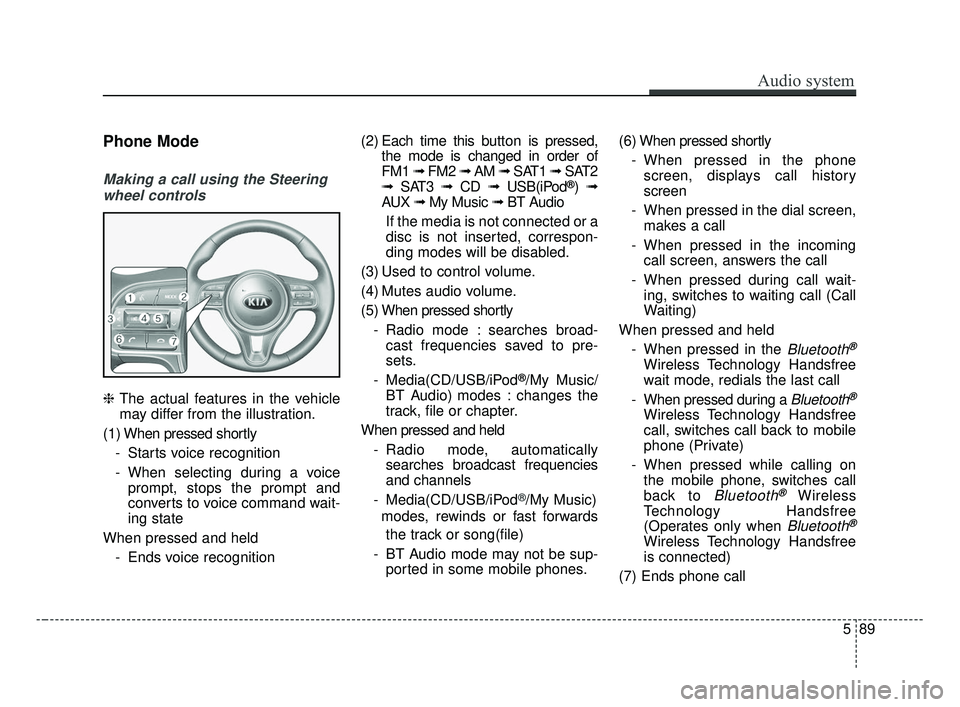
Making a call using the Steeringwheel controls
❈ The actual features in the vehicle
may differ from the illustration.
(1) When pressed shortly - Starts voice recognition
- When selecting during a voiceprompt, stops the prompt and
converts to voice command wait-
ing state
When pressed and held - Ends voice recognition (2) Each time this button is
pressed,
the mode is changed in order of
FM1 ➟ FM2 ➟ AM ➟ SAT1 ➟ SAT2
➟ SAT3 ➟ CD ➟ USB(iPod
®)➟
AUX ➟ My Music ➟ BT Audio
If the media is not connected or a
disc is not inserted, correspon-
ding modes will be disabled.
(3) Used to control volume.
(4) Mutes audio volume.
(5) When pressed shortly - Radio mode : searches broad-cast frequencies saved to pre-
sets.
- Media(CD/USB/iPod
®/My Music/
BT Audio) modes : changes the
track, file or chapter.
When pressed and held - Radio mode, automaticallysearches broadcast frequencies
and channels
- Media(CD/USB/iPod
®/My Music)
modes, rewinds or fast forwards
the track or song(file)
- BT Audio mode may not be sup- ported in some mobile phones. (6) When pressed shortly
- When pressed in the phonescreen, displays call history
screen
- When pressed in the dial screen, makes a call
- When pressed in the incoming call screen, answers the call
- When pressed during call wait- ing, switches to waiting call (Call
Waiting)
When pressed and held - When pressed in the
Bluetooth®
Wireless Technology Handsfree
wait mode, redials the last call
- When pressed during a
Bluetooth®
Wireless Technology Handsfree
call, switches call back to mobile
phone (Private)
- When pressed while calling on the mobile phone, switches call
back to
Bluetooth®Wireless
Technology Handsfree
(Operates only when
Bluetooth®
Wireless Technology Handsfree
is connected)
(7) Ends phone call
JF CAN (ENG) 5 (Audio).qxp 2016-09-21 11:22 Page 89
Page 358 of 629
Driving your vehicle
Before driving . . . . . . . . . . . . . . . . . . . . . . . . . . . . . . 6-4
• Before entering vehicle . . . . . . . . . . . . . . . . . . . . . . . . . 6-4
• Necessary inspections . . . . . . . . . . . . . . . . . . . . . . . . . . 6-4
• Before starting . . . . . . . . . . . . . . . . . . . . . . . . . . . . . . . 6-4
Key positions . . . . . . . . . . . . . . . . . . . . . . . . . . . . . . . 6-6
• Illuminated ignition switch . . . . . . . . . . . . . . . . . . . . . 6-6
• Ignition switch position . . . . . . . . . . . . . . . . . . . . . . . . . 6-6
• Starting the engine . . . . . . . . . . . . . . . . . . . . . . . . . . . . 6-8
ENGINE START/STOP button . . . . . . . . . . . . . . . 6-9
• Illuminated ENGINE START/STOP button . . . . . . . 6-9
• ENGINE START/STOP button position . . . . . . . . . . . 6-9
• Starting the engine with a smart key . . . . . . . . . . . . . 6-11
Automatic transaxle . . . . . . . . . . . . . . . . . . . . . . . . 6-13
• Automatic transaxle operation. . . . . . . . . . . . . . . . . . 6-13
• Paddle shifter . . . . . . . . . . . . . . . . . . . . . . . . . . . . . . . . 6-17
• Shift lock system . . . . . . . . . . . . . . . . . . . . . . . . . . . . . 6-18
• Good driving practices . . . . . . . . . . . . . . . . . . . . . . . . 6-19
Dual clutch transmission (DCT) . . . . . . . . . . . . . . 6-20
• Dual clutch transmission operation . . . . . . . . . . . . . 6-20
• Good driving practices . . . . . . . . . . . . . . . . . . . . . . . . 6-27
Brake system . . . . . . . . . . . . . . . . . . . . . . . . . . . . . . 6-28
• Power brakes . . . . . . . . . . . . . . . . . . . . . . . . . . . . . . . . 6-28
• Parking brake – Foot type . . . . . . . . . . . . . . . . . . . . . 6-30
• Electronic parking brake (EPB) . . . . . . . . . . . . . . . . 6-31
• Auto hold . . . . . . . . . . . . . . . . . . . . . . . . . . . . . . . . . . . 6-\
38• Anti-lock brake system (ABS) . . . . . . . . . . . . . . . . . . 6-42
• Electronic stability control (ESC) . . . . . . . . . . . . . . . 6-44
• Vehicle stability management (VSM) . . . . . . . . . . . . 6-48
• Hill-start assist control (HAC) . . . . . . . . . . . . . . . . . . 6-49
• Good braking practices. . . . . . . . . . . . . . . . . . . . . . . . 6-50
Autonomous emergency braking (AEB)/
Forward collision warning (FCW) . . . . . . . . . . . 6-51
• System setting and activation . . . . . . . . . . . . . . . . . . . 6-51
• AEB warning message and system control . . . . . . . . 6-54
• Brake operation . . . . . . . . . . . . . . . . . . . . . . . . . . . . . . 6-55
• Sensor to detect the distance from the
vehicle in front (front radar) . . . . . . . . . . . . . . . . . . 6-56
• System malfunction . . . . . . . . . . . . . . . . . . . . . . . . . . . 6-57
• Limitations of the system . . . . . . . . . . . . . . . . . . . . . . 6-58
• Recognizing pedestrians . . . . . . . . . . . . . . . . . . . . . . . 6-61
Cruise Control system . . . . . . . . . . . . . . . . . . . . . . 6-62
• To set cruise control speed . . . . . . . . . . . . . . . . . . . . . 6-63
• To increase cruise control set speed. . . . . . . . . . . . . . 6-63
• To decrease the cruising speed . . . . . . . . . . . . . . . . . . 6-64
• To temporarily accelerate with the cruise control on . . . . . . . . . . . . . . . . . . . . . . . . . . . . 6-64
• To cancel cruise control . . . . . . . . . . . . . . . . . . . . . . . 6-64
• To resume cruising speed at more than approximately 30 km/h (20 mph) . . . . . . . . . . . . . . 6-65
• To turn cruise control off . . . . . . . . . . . . . . . . . . . . . . 6-65
6
JF CAN (ENG) 6.qxp 2016-09-21 11:24 Page 1
Page 366 of 629
69
Driving your vehicle
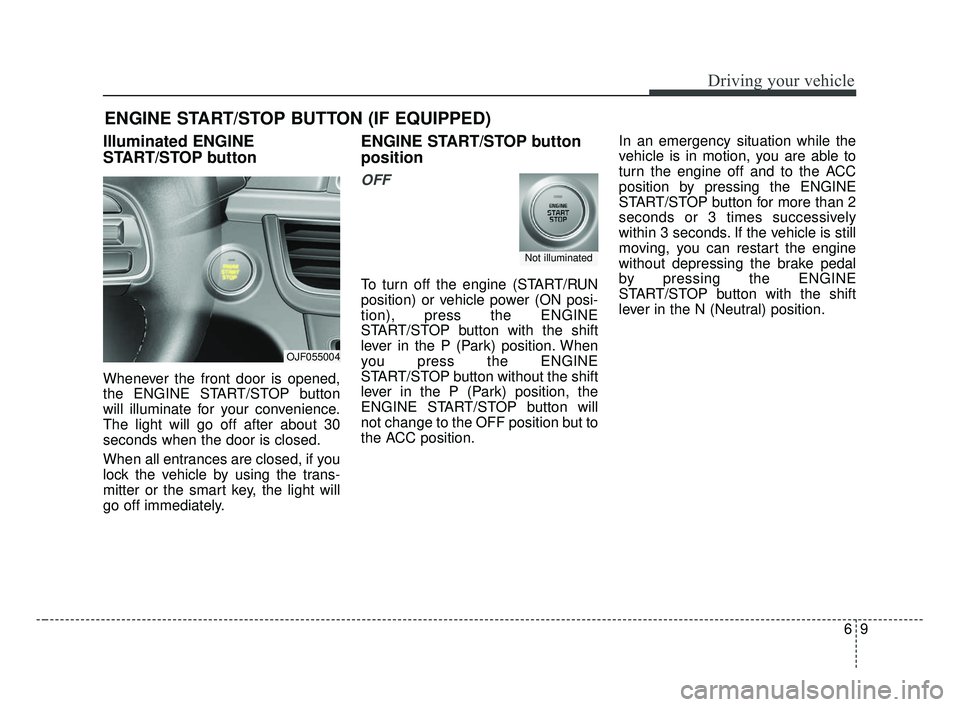
Illuminated ENGINE
START/STOP button
Whenever the front door is opened,
the ENGINE START/STOP button
will illuminate for your convenience.
The light will go off after about 30
seconds when the door is closed.
When all entrances are closed, if you
lock the vehicle by using the trans-
mitter or the smart key, the light will
go off immediately.
ENGINE START/STOP button
position
OFF
To turn off the engine (START/RUN
position) or vehicle power (ON posi-
tion), press the ENGINE
START/STOP button with the shift
lever in the P (Park) position. When
you press the ENGINE
START/STOP button without the shift
lever in the P (Park) position, the
ENGINE START/STOP button will
not change to the OFF position but to
the ACC position.In an emergency situation while the
vehicle is in motion, you are able to
turn the engine off and to the ACC
position by pressing the ENGINE
START/STOP button for more than 2
seconds or 3 times successively
within 3 seconds. If the vehicle is still
moving, you can restart the engine
without depressing the brake pedal
by pressing the ENGINE
START/STOP button with the shift
lever in the N (Neutral) position.
ENGINE START/STOP BUTTON (IF EQUIPPED)
OJF055004
Not illuminated
JF CAN (ENG) 6.qxp 2016-09-21 11:24 Page 9
Page 367 of 629
Driving your vehicle
10
6
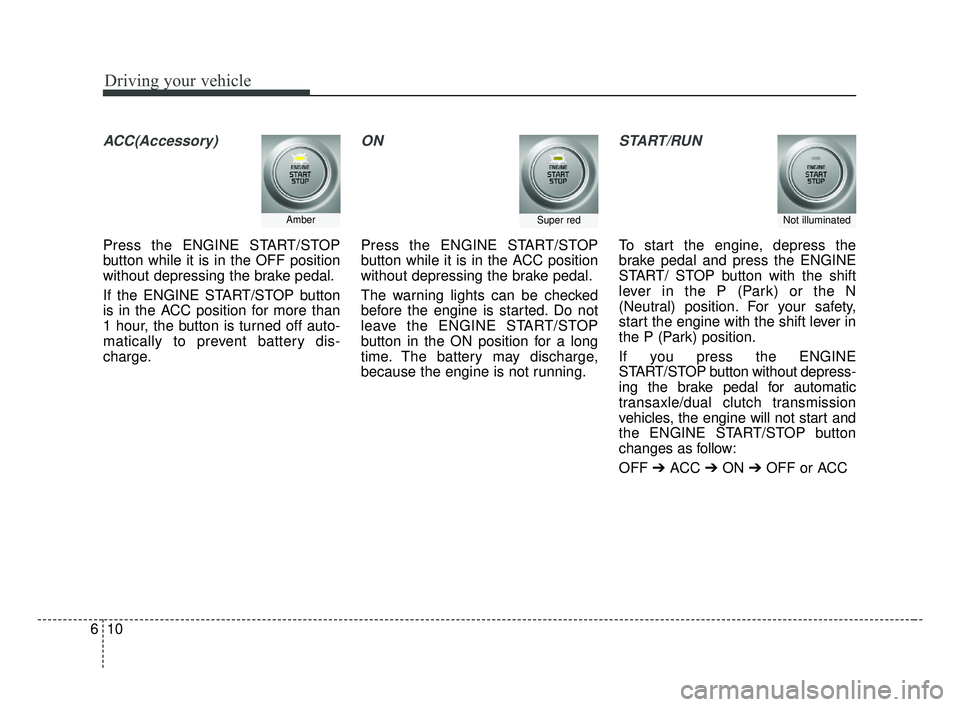
ACC(Accessory)
Press the ENGINE START/STOP
button while it is in the OFF position
without depressing the brake pedal.
If the ENGINE START/STOP button
is in the ACC position for more than
1 hour, the button is turned off auto-
matically to prevent battery dis-
charge.
ON
Press the ENGINE START/STOP
button while it is in the ACC position
without depressing the brake pedal.
The warning lights can be checked
before the engine is started. Do not
leave the ENGINE START/STOP
button in the ON position for a long
time. The battery may discharge,
because the engine is not running.
START/RUN
To start the engine, depress the
brake pedal and press the ENGINE
START/ STOP button with the shift
lever in the P (Park) or the N
(Neutral) position. For your safety,
start the engine with the shift lever in
the P (Park) position.
If you press the ENGINE
START/STOP button without depress-
ing the brake pedal for automatic
transaxle/dual clutch transmission
vehicles, the engine will not start and
the ENGINE START/STOP button
changes as follow:
OFF ➔ACC ➔ON ➔OFF or ACC
AmberSuper redNot illuminated
JF CAN (ENG) 6.qxp 2016-09-21 11:24 Page 10
Page 368 of 629
611
Driving your vehicle
✽ ✽
NOTICE
If you leave the ENGINE START/
STOP button in the ACC or ON
position for a long time, the battery
will discharge.
Starting the engine with a
smart key
1.Carry the smart key or place it
inside the vehicle.
2.Make sure the parking brake is firmly applied
3.Place the transaxle shift lever in P (Park). Depress the brake pedal
fully.
You can also start the engine whenthe shift lever is in the N (Neutral)position.
4.Press the ENGINE START/STOP button while depressing the brake
pedal.
It should be started withoutdepressing the accelerator.
5.Do not wait for the engine to warm up while the vehicle remains sta-
tionary.
Start driving at moderate engine
speeds. (Steep accelerating and
decelerating should be avoided.) Even if the smart key is in the vehi-
cle, if it is far away from you, the
engine may not start.
When the ENGINE START/STOP button is in the ACC position or
above, if any door is opened, the
system checks for the smart key. If
the smart key is not in the vehicle,
a message "key is not in the vehi-
cle" will appear on the LCD display.
And if all doors are closed, the
chime will sound for 5 seconds.
The indicator or warning will turn
off while the vehicle is moving.
Always have the smart key with
you.
WARNING- Starting
vehicle
Never press the ENGINE
START/STOP button while the
vehicle is in motion except in an
emergency. This would result in
loss of directional control and
braking function, which could
cause an accident.
JF CAN (ENG) 6.qxp 2016-09-21 11:24 Page 11
Page 369 of 629
Driving your vehicle
12
6
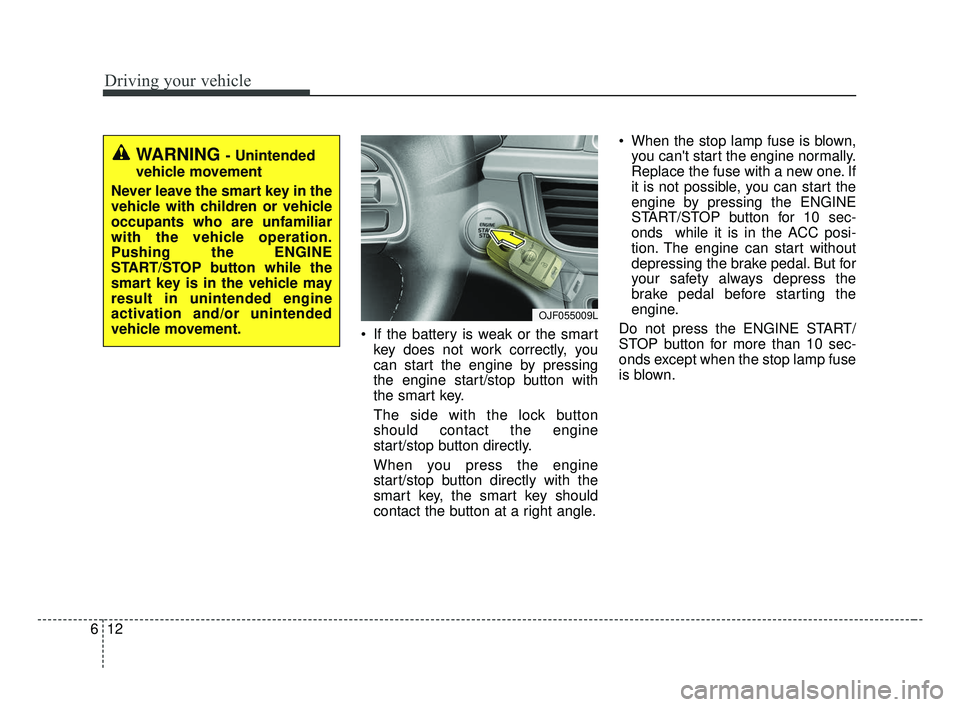
If the battery is weak or the smart
key does not work correctly, you
can start the engine by pressing
the engine start/stop button with
the smart key.
The side with the lock button
should contact the engine
start/stop button directly.
When you press the engine
start/stop button directly with the
smart key, the smart key should
contact the button at a right angle. When the stop lamp fuse is blown,
you can't start the engine normally.
Replace the fuse with a new one. If
it is not possible, you can start the
engine by pressing the ENGINE
START/STOP button for 10 sec-
onds while it is in the ACC posi-
tion. The engine can start without
depressing the brake pedal. But for
your safety always depress the
brake pedal before starting the
engine.
Do not press the ENGINE START/
STOP button for more than 10 sec-
onds except when the stop lamp fuse
is blown.
WARNING - Unintended
vehicle movement
Never leave the smart key in the
vehicle with children or vehicle
occupants who are unfamiliar
with the vehicle operation.
Pushing the ENGINE
START/STOP button while the
smart key is in the vehicle may
result in unintended engine
activation and/or unintended
vehicle movement.
OJF055009L
JF CAN (ENG) 6.qxp 2016-09-21 11:24 Page 12
Page 376 of 629
619
Driving your vehicle
5. Move the shift lever.
6. Remove the tool from the shiftlockoverride access hole then install
the cap.
7. We recommend that the system be inspected by an authorized Kia
dealer.
Ignition key interlock system
The ignition key cannot be removed
unless the shift lever is in the P
(Park) position. Even if the ignition
switch is in the LOCK position, the
key cannot be removed.
If your vehicle is equipped with
ENGINE START/STOP button, the
button will not change to the OFF
position unless the shift lever is in the
P (Park) position.
Good driving practices
Never move the gear shift leverfrom P (Park) to any other position
with the accelerator pedal
depressed.
Never move the gear shift lever into P (Park) when the vehicle is in
motion.
Slow down before shifting to a lower gear. Otherwise, the lower
gear may not be engaged.
Always use the parking brake. Do not depend on placing the
transaxle in P (Park) to keep the
vehicle from moving.
Optimum vehicle performance and economy is obtained by smoothly
depressing and releasing the
accelerator pedal.
✽ ✽ NOTICE- Kickdown
Mechanism
Use the kickdown mechanism for
maximum acceleration. Depress the
accelerator pedal beyond the pres-
sure point. The automatic transaxle
will shift to a lower gear depending
on the engine speed.
Moving up a steep grade from astanding start
To move up a steep grade from a
standing start, depress the brake
pedal, shift the shift lever to D
(Drive). Select the appropriate gear
depending on load weight and steep-
ness of the grade, and release the
parking brake. Depress the accelera-
tor gradually while releasing the
service brakes.
When accelerating from a stop on
a steep hill, the vehicle may have a
tendency to roll backwards.
Shifting the shift lever into 2
(Second Gear) will help prevent
the vehicle from rolling back-
wards.
JF CAN (ENG) 6.qxp 2016-09-21 11:24 Page 19
Page 389 of 629
Driving your vehicle
32
6
If Auto Hold is operating (Green
light), EPB is applied automatically
when the engine is turned off.
If Auto Hold is in ready position (White light), EPB is applied auto-
matically After 1 second from the
engine off timing. In this case, if the
EPB switch is pressed within 1
second, the EPB will not be
applied.
✽ ✽ NOTICE
On a steep incline or when pulling a
trailer, if the vehicle does not remain
at a standstill, do as follows:
1. Apply the EPB.
2. Pull up the EPB switch for more
than 3 seconds.
Do not operate the parking brake/
EPB while the vehicle is moving
except in an emergency situation.
✽ ✽NOTICE
A click or electric brake motor
whine sound may be heard while
operating or releasing the EPB, but
these conditions are normal and
indicate that the EPB is functioning
properly.
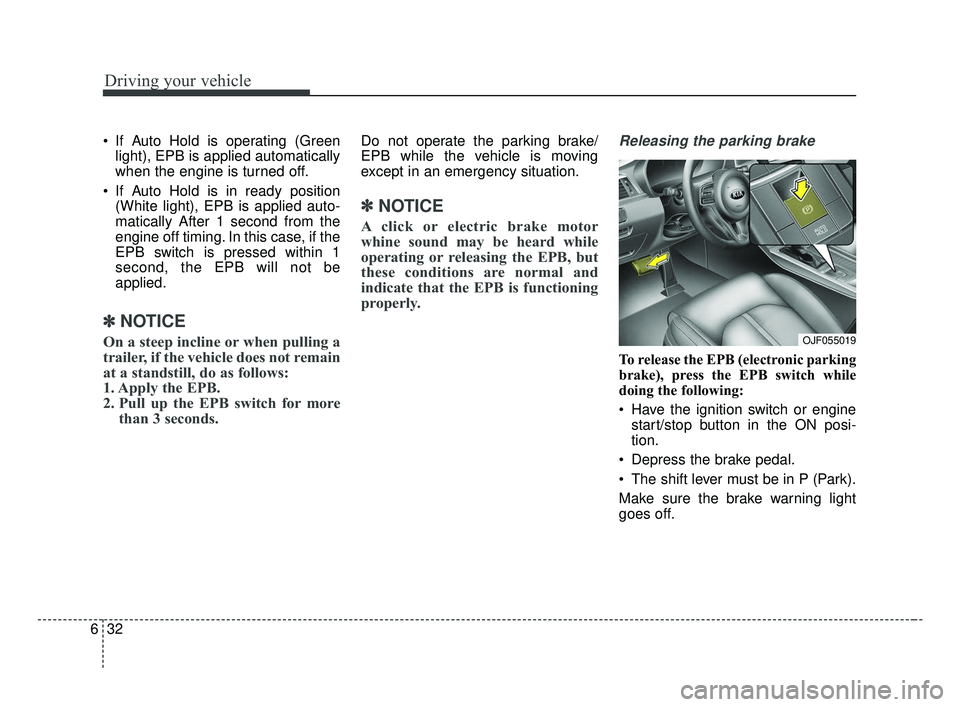
Releasing the parking brake
To release the EPB (electronic parking
brake), press the EPB switch while
doing the following:
Have the ignition switch or engine
start/stop button in the ON posi-
tion.
Depress the brake pedal.
The shift lever must be in P (Park).
Make sure the brake warning light
goes off.
OJF055019
JF CAN (ENG) 6.qxp 2016-09-21 11:24 Page 32
Page 390 of 629
633
Driving your vehicle
To release EPB (electronic parking
brake) automatically:
Shift lever in P (Park)With the engine running depress
the brake pedal and shift out of P
(Park) to R (Reverse) or D (Drive).
Shift lever in N (Neutral) With the engine running depress
the brake pedal and shift out of N
(Neutral) to R (Reverse) or D
(Drive).
Automatic Transaxle / Dual clutch transmission vehicle
1. Start the engine.
2. Fasten the driver's seat belt.
3. Close the driver's door, engine hood and trunk.
4. Depress the accelerator pedal while the shift lever is in R (Rear),
D (Drive) or Sports mode.
Make sure the brake warning light
goes off.✽ ✽ NOTICE
• For your safety, you can engage
the EPB even though the ignition
switch or engine stop/start button
is in the OFF position, but you
cannot release it.
• For your safety, depress the brake pedal and release the parking
brake manually with the EPB
switch when you drive downhill or
when backing up the vehicle.
Do not follow the above procedure
when driving on a flat level ground.
The vehicle may suddenly move for-
ward.
✽ ✽ NOTICE
If the parking brake warning light is
still on even though the EPB has
been released, have the system
checked by an authorized Kia dealer.
EPB (electronic parking brake) may
be automatically applied when:
The EPB is overheated
Requested by other systems
✽ ✽NOTICE
If the driver turns the engine off by
mistake while Auto Hold is operat-
ing, EPB will be automatically
applied. (Vehicles equipped with
Auto Hold)
CAUTION
Do not drive your vehicle with
the EPB applied. It may causeexcessive brake pad and brakerotor wear.
JF CAN (ENG) 6.qxp 2016-09-21 11:24 Page 33