Driver door KIA OPTIMA 2017 Owners Manual
[x] Cancel search | Manufacturer: KIA, Model Year: 2017, Model line: OPTIMA, Model: KIA OPTIMA 2017Pages: 629, PDF Size: 15.24 MB
Page 14 of 629
Your vehicle at a glance
42
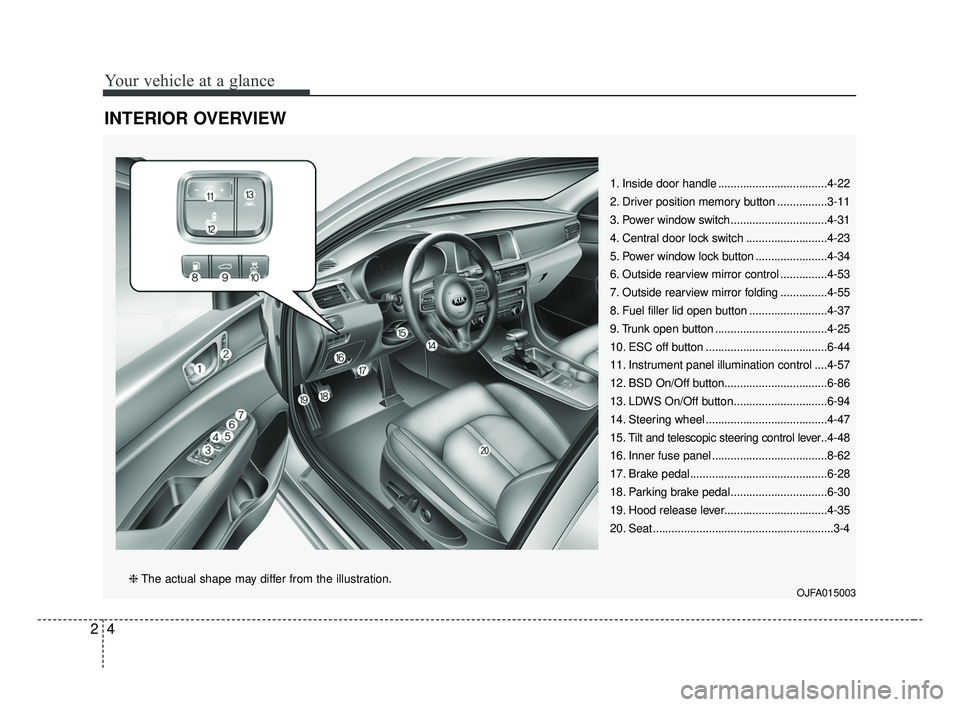
INTERIOR OVERVIEW
1. Inside door handle ...................................4-22
2. Driver position memory button ................3-11
3. Power window switch...............................4-31
4. Central door lock switch ..........................4-23
5. Power window lock button .......................4-34
6. Outside rearview mirror control ...............4-53
7. Outside rearview mirror folding ...............4-55
8. Fuel filler lid open button .........................4-37
9. Trunk open button ....................................4-25
10. ESC off button .......................................6-44
11. Instrument panel illumination control ....4-57
12. BSD On/Off button.................................6-86
13. LDWS On/Off button..............................6-94
14. Steering wheel .......................................4-47
15. Tilt and telescopic steering control lever..4-48
16. Inner fuse panel .....................................8-62
17. Brake pedal............................................6-28
18. Parking brake pedal...............................6-30
19. Hood release lever.................................4-35
20. Seat..........................................................3-4
OJFA015003❈ The actual shape may differ from the illustration.
JF CAN (ENG) 2.qxp 8/25/2016 5:06 PM Page 4
Page 29 of 629
Safety features of your vehicle
12
3
Storing positions into memory
using the buttons on the door
Storing driver’s seat positions
1. Shift the shift lever into P (for Automatic transaxle / Dual clutch
transmission) while the engine
start/stop button is ON or ignition
switch ON.
2. Adjust the driver’s seat and out- side rearview mirror comfortable
for the driver.
3. Press SET button on the control panel. The system will beep once.
4. Press one of the memory buttons (1 or 2) within 5 seconds after
pressing the SET button. The sys-
tem will beep twice when memory
has been successfully stored. When recalling an adjustment mem-
ory button while sitting in the vehicle,
you can be surprised by the setting
chosen if the memory has been
adjusted by someone else. If that
occurs, immediately push the seat
position control knob in the direction
of the desired position to stop further
undesired movement.
Recalling positions from memory
1. Shift the shift lever into P (for
Automatic transaxle / Dual clutch
transmission) while the engine
start/stop button is ON or ignition
switch ON.
2. To recall the position in the memo- ry, press the desired memory but-
ton (1 or 2). The system will beep
once, then the driver’s seat will
automatically adjust to the stored
position.
Adjusting the control switch for the
driver’s seat while the system is
recalling the stored position will
cause the movement to stop and
move in the direction that the control
switch is moved.
JF CAN (ENG) 3.qxp 2016-09-21 11:04 Page 12
Page 30 of 629
313
Safety features of your vehicle
Easy access function (if equipped)
The system will move the driver's
seat automatically as follows:
Without smart key system- It will move the driver’s seat rear-ward when the ignition key is
removed and front driver`s door is
opened.
- It will move the driver’s seat for- ward when the ignition key is
inserted.
With smart key system - It will move the driver’s seat rear-ward when the engine start/stop
button is changed to the OFF
position and front driver`s door is
opened.
- It will move the driver’s seat for- ward when the engine start/stop
button is changed to the ACC or
START position.
- It will move the driver's seat for- ward when you get in your vehicle
with the smart key after closing
the driver's door.
You can activate or deactivate this
feature. Refer to "User settings" in
chapter 4.
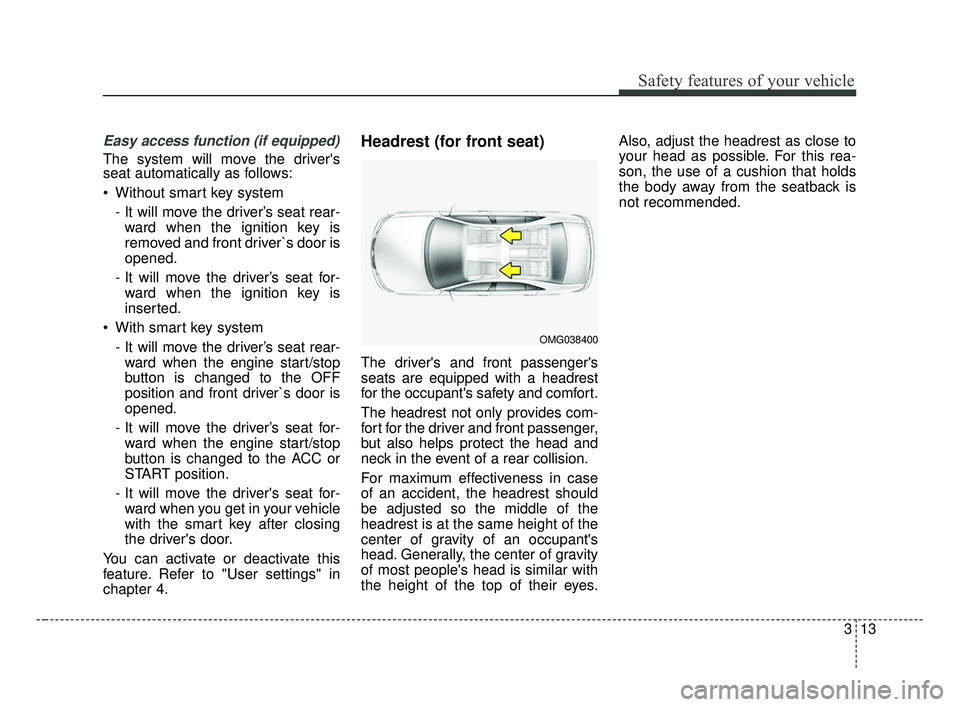
Headrest (for front seat)
The driver's and front passenger's
seats are equipped with a headrest
for the occupant's safety and comfort.
The headrest not only provides com-
fort for the driver and front passenger,
but also helps protect the head and
neck in the event of a rear collision.
For maximum effectiveness in case
of an accident, the headrest should
be adjusted so the middle of the
headrest is at the same height of the
center of gravity of an occupant's
head. Generally, the center of gravity
of most people's head is similar with
the height of the top of their eyes. Also, adjust the headrest as close to
your head as possible. For this rea-
son, the use of a cushion that holds
the body away from the seatback is
not recommended.
OMG038400
JF CAN (ENG) 3.qxp 2016-09-21 11:04 Page 13
Page 41 of 629
Safety features of your vehicle
24
3
Seat belt - Driver's 3-point system
with emergency locking retractor
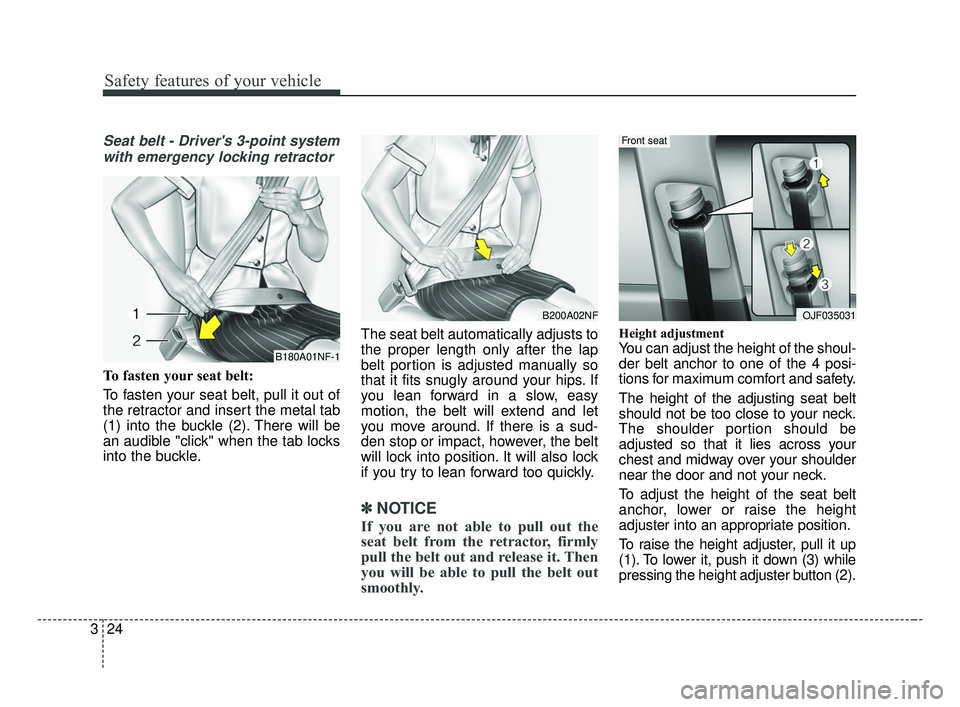
To fasten your seat belt:
To fasten your seat belt, pull it out of
the retractor and insert the metal tab
(1) into the buckle (2). There will be
an audible "click" when the tab locks
into the buckle. The seat belt automatically adjusts to
the proper length only after the lap
belt portion is adjusted manually so
that it fits snugly around your hips. If
you lean forward in a slow, easy
motion, the belt will extend and let
you move around. If there is a sud-
den stop or impact, however, the belt
will lock into position. It will also lock
if you try to lean forward too quickly.
✽ ✽
NOTICE
If you are not able to pull out the
seat belt from the retractor, firmly
pull the belt out and release it. Then
you will be able to pull the belt out
smoothly.
Height adjustment
You can adjust the height of the shoul-
der belt anchor to one of the 4 posi-
tions for maximum comfort and safety.
The height of the adjusting seat belt
should not be too close to your neck.
The shoulder portion should be
adjusted so that it lies across your
chest and midway over your shoulder
near the door and not your neck.
To adjust the height of the seat belt
anchor, lower or raise the height
adjuster into an appropriate position.
To raise the height adjuster, pull it up
(1). To lower it, push it down (3) while
pressing the height adjuster button (2).B180A01NF-1
B200A02NFOJF035031
Front seat
JF CAN (ENG) 3.qxp 2016-09-21 11:04 Page 24
Page 62 of 629
345
Safety features of your vehicle
Noise and smoke
When inflated, the air bags make a
loud noise and leave smoke and
powder in the air inside the vehicle.
This is normal and is a result of the
ignition of the air bag inflator. After
the air bag inflates, you may feel sub-
stantial discomfort in breathing due
to the contact of your chest with both
the seat belt and the air bag, as well
as from breathing the smoke and
powder.Open your doors and/or
windows as soon as possible after
impact in order to reduce discom-
fort and prevent prolonged expo-
sure to the smoke and powder.
Though smoke and powder are non-
toxic, it may cause irritation to the
skin (eyes, nose and throat, etc). If
this is the case, wash and rinse with
cold water immediately and consult a
doctor if the symptom persists.WARNING- Hot compo-
nents
Do not touch the air bag storage
area's internal components
immediately after airbag infla-
tion. The air bag related parts in
the steering wheel, instrument
panel and the roof rails above
the front and rear doors are
very hot. Hot components can
result in burn injuries.WARNING- Airbag infla- tion
Sit as far back as possible from
the steering wheel while still
maintaining comfortable con-
trol of your vehicle. A distance
of at least 250mm (10 inches)
from your chest to the steering
wheel is recommended. Failure
to do so can result in airbag
inflation injuries to the driver.
JF CAN (ENG) 3.qxp 2016-09-21 11:05 Page 45
Page 66 of 629
349
Safety features of your vehicle
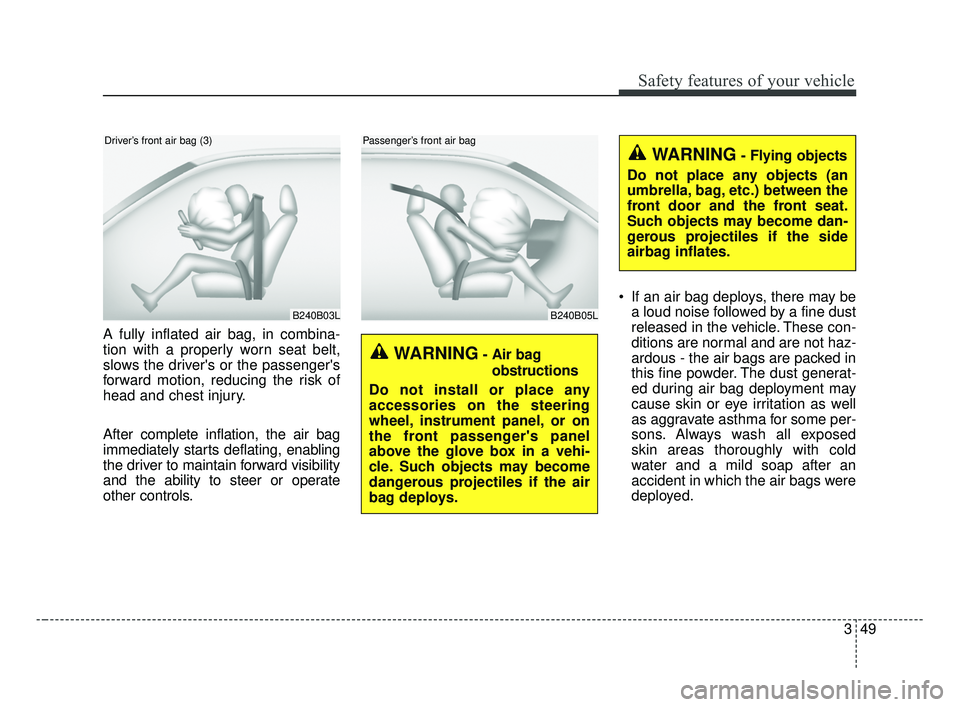
A fully inflated air bag, in combina-
tion with a properly worn seat belt,
slows the driver's or the passenger's
forward motion, reducing the risk of
head and chest injury.
After complete inflation, the air bag
immediately starts deflating, enabling
the driver to maintain forward visibility
and the ability to steer or operate
other controls. If an air bag deploys, there may be
a loud noise followed by a fine dust
released in the vehicle. These con-
ditions are normal and are not haz-
ardous - the air bags are packed in
this fine powder. The dust generat-
ed during air bag deployment may
cause skin or eye irritation as well
as aggravate asthma for some per-
sons. Always wash all exposed
skin areas thoroughly with cold
water and a mild soap after an
accident in which the air bags were
deployed.
B240B03L
Driver’s front air bag (3)
B240B05L
Passenger’s front air bag
WARNING- Air bag
obstructions
Do not install or place any
accessories on the steering
wheel, instrument panel, or on
the front passenger's panel
above the glove box in a vehi-
cle. Such objects may become
dangerous projectiles if the air
bag deploys.
WARNING- Flying objects
Do not place any objects (an
umbrella, bag, etc.) between the
front door and the front seat.
Such objects may become dan-
gerous projectiles if the side
airbag inflates.
JF CAN (ENG) 3.qxp 2016-09-21 11:05 Page 49
Page 79 of 629
Safety features of your vehicle
62
3
The side air bag is supplemental to
the driver's and the passenger's
seat belt systems and is not a sub-
stitute for them. Therefore your
seat belts must be worn at all times
while the vehicle is in operation.
For best protection from the side air bag system and to avoid being
injured by the deploying side air
bag, both front seat occupants
should sit in an upright position
with the seat belt properly fas-
tened. The driver's hands should
be placed on the steering wheel at
the 9:00 and 3:00 positions. The
passenger's arms and hands
should be placed on their laps. If seat or seat cover is damaged,
have the vehicle checked and
repaired by an authorized Kia deal-
er. Inform the dealer that your vehi-
cle is equipped with side air bags
and an occupant detection system.
WARNING- Flying objects
Do not place any objects (an
umbrella, bag, etc.) between the
front door and the front seat.
Such objects may become dan-
gerous projectiles if the side
airbag inflates.
WARNING- No attaching objects
Do not place any objects over the air bag or between the air
bag and yourself. Also, do not
attach any objects around the
area the air bag inflates such
as the door, side door glass,
front and rear pillar.
Do not place any objects between the door and the
seat. They may become dan-
gerous projectiles if the side
air bag inflates.
Do not install any accessories on the side or near the side air
bags.WARNING- Deployment
Do not install any accessories
including seat covers, on the
side or near the side air bag as
this may affect the deployment
of the side air bags.WARNING- Unexpected deployment
Avoid impact to the side impact
airbag sensor when the ignition
switch is ON to prevent unex-
pected deployment of the side
air bag.
JF CAN (ENG) 3.qxp 2016-09-21 11:06 Page 62
Page 93 of 629
Features of your vehicle
64
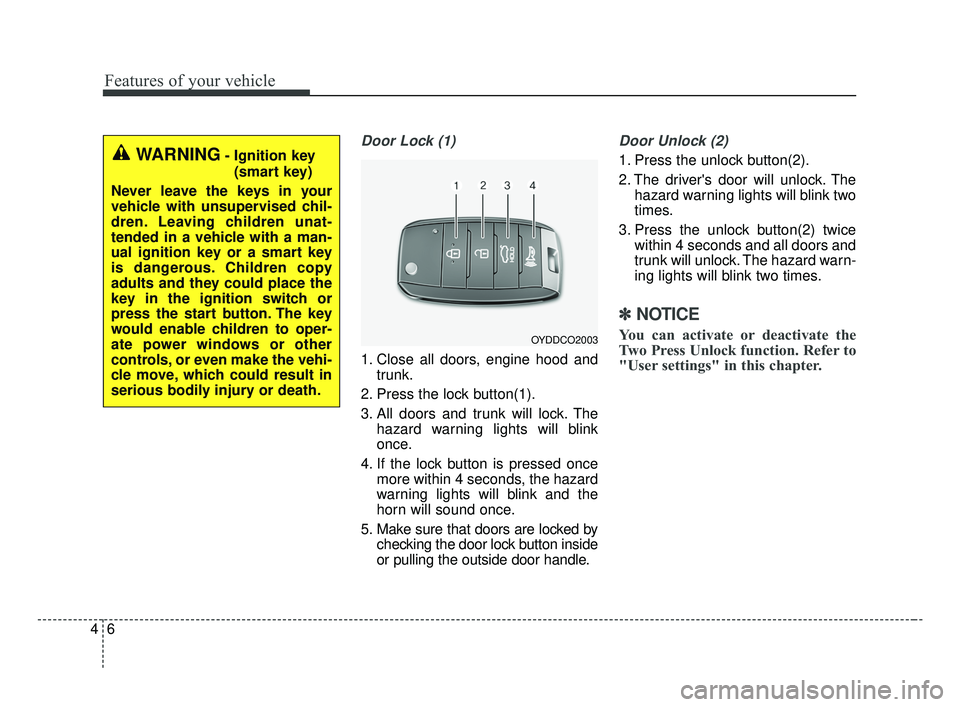
Door Lock (1)
1. Close all doors, engine hood andtrunk.
2. Press the lock button(1).
3. All doors and trunk will lock. The hazard warning lights will blink
once.
4. If the lock button is pressed once more within 4 seconds, the hazard
warning lights will blink and the
horn will sound once.
5. Make sure that doors are locked by checking the door lock button inside
or pulling the outside door handle.
Door Unlock (2)
1. Press the unlock button(2).
2. The driver's door will unlock. Thehazard warning lights will blink two
times.
3. Press the unlock button(2) twice within 4 seconds and all doors and
trunk will unlock. The hazard warn-
ing lights will blink two times.
✽ ✽NOTICE
You can activate or deactivate the
Two Press Unlock function. Refer to
"User settings" in this chapter.
WARNING- Ignition key
(smart key)
Never leave the keys in your
vehicle with unsupervised chil-
dren. Leaving children unat-
tended in a vehicle with a man-
ual ignition key or a smart key
is dangerous. Children copy
adults and they could place the
key in the ignition switch or
press the start button. The key
would enable children to oper-
ate power windows or other
controls, or even make the vehi-
cle move, which could result in
serious bodily injury or death.
OYDDCO2003
JF CAN (ENG) 4.qxp 2016-09-21 11:12 Page 6
Page 108 of 629
421
Features of your vehicle
DOOR LOCKS
Operating door locks from
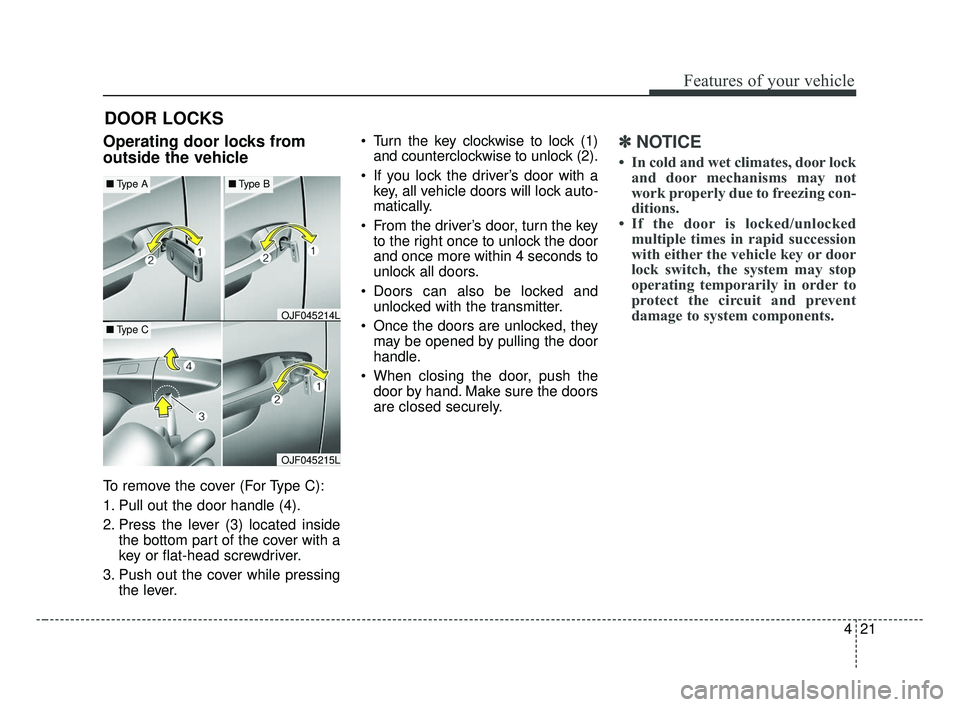
outside the vehicle
To remove the cover (For Type C):
1. Pull out the door handle (4).
2. Press the lever (3) located insidethe bottom part of the cover with a
key or flat-head screwdriver.
3. Push out the cover while pressing the lever. Turn the key clockwise to lock (1)
and counterclockwise to unlock (2).
If you lock the driver’s door with a key, all vehicle doors will lock auto-
matically.
From the driver’s door, turn the key to the right once to unlock the door
and once more within 4 seconds to
unlock all doors.
Doors can also be locked and unlocked with the transmitter.
Once the doors are unlocked, they may be opened by pulling the door
handle.
When closing the door, push the door by hand. Make sure the doors
are closed securely.
✽ ✽ NOTICE
• In cold and wet climates, door lock
and door mechanisms may not
work properly due to freezing con-
ditions.
• If the door is locked/unlocked multiple times in rapid succession
with either the vehicle key or door
lock switch, the system may stop
operating temporarily in order to
protect the circuit and prevent
damage to system components.
OJF045215L
OJF045214L
■ Type A■Type B
■Type C
JF CAN (ENG) 4.qxp 2016-09-21 11:13 Page 21
Page 110 of 629
423
Features of your vehicle
If a power door lock ever fails to func-
tion while you are in the vehicle, try
one or more of the following tech-
niques to exit:
Operate the door unlock featurerepeatedly (both electronic and
manual) while simultaneously
pulling on the door handle.
Operate the other door locks and handles, front and rear.
Lower a front window and use the key to unlock the door from out-
side.With central door lock switch
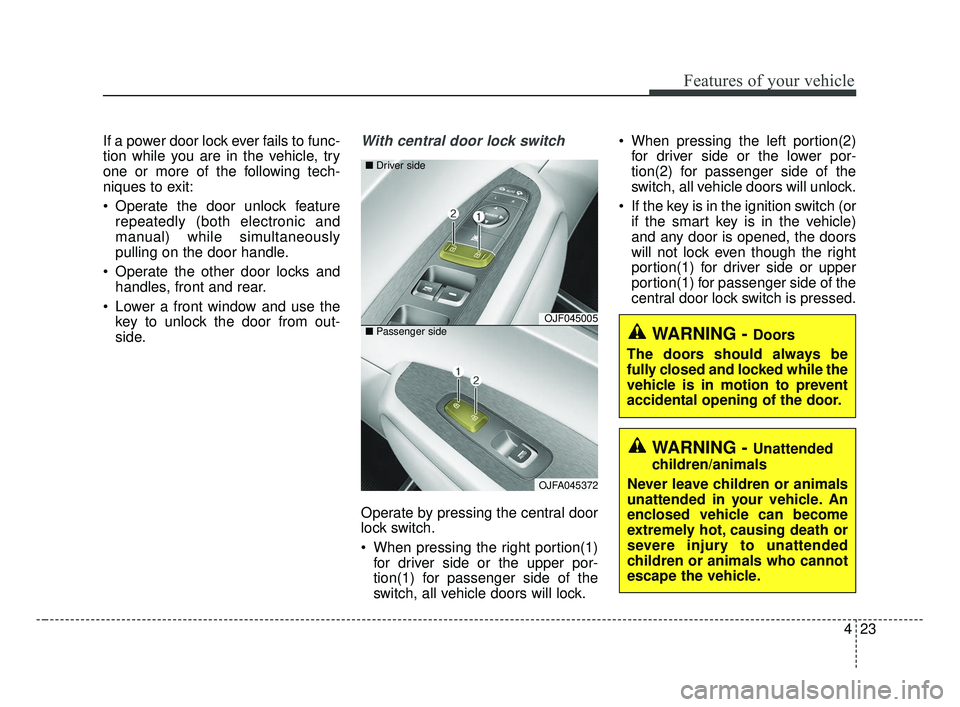
Operate by pressing the central door
lock switch.
When pressing the right portion(1)for driver side or the upper por-
tion(1) for passenger side of the
switch, all vehicle doors will lock. When pressing the left portion(2)
for driver side or the lower por-
tion(2) for passenger side of the
switch, all vehicle doors will unlock.
If the key is in the ignition switch (or if the smart key is in the vehicle)
and any door is opened, the doors
will not lock even though the right
portion(1) for driver side or upper
portion(1) for passenger side of the
central door lock switch is pressed.
WARNING - Doors
The doors should always be
fully closed and locked while the
vehicle is in motion to prevent
accidental opening of the door.
WARNING - Unattended
children/animals
Never leave children or animals
unattended in your vehicle. An
enclosed vehicle can become
extremely hot, causing death or
severe injury to unattended
children or animals who cannot
escape the vehicle.
OJF045005
OJFA045372
■
Driver side
■ Passenger side
JF CAN (ENG) 4.qxp 2016-09-21 11:13 Page 23