parking assist KIA OPTIMA 2019 Owners Manual
[x] Cancel search | Manufacturer: KIA, Model Year: 2019, Model line: OPTIMA, Model: KIA OPTIMA 2019Pages: 577, PDF Size: 13.79 MB
Page 92 of 577

Steering wheel . . . . . . . . . . . . . . . . . . . . . . . . . . . . . 4-49
• Electric Power Steering (EPS) . . . . . . . . . . . . . . . . . . 4-49
• Tilt and telescopic steering . . . . . . . . . . . . . . . . . . . . . 4-50
• Heated steering wheel . . . . . . . . . . . . . . . . . . . . . . . . . 4-51
• Horn . . . . . . . . . . . . . . . . . . . . . . . . . . . . . . . . . . . . \
. . . 4-52
Mirrors . . . . . . . . . . . . . . . . . . . . . . . . . . . . . . . . . . 4-53\
• Inside rearview mirror . . . . . . . . . . . . . . . . . . . . . . . . 4-53
• Outside rearview mirror. . . . . . . . . . . . . . . . . . . . . . . 4-55
Instrument cluster . . . . . . . . . . . . . . . . . . . . . . . . . 4-59
• Instrument cluster control . . . . . . . . . . . . . . . . . . . . . 4-60
• LCD display control . . . . . . . . . . . . . . . . . . . . . . . . . . 4-60
• Gauges . . . . . . . . . . . . . . . . . . . . . . . . . . . . . . . . . . . . \
. 4-61
• Transmission shift indicator . . . . . . . . . . . . . . . . . . . . 4-64
LCD display . . . . . . . . . . . . . . . . . . . . . . . . . . . . . . 4-65
• LCD modes. . . . . . . . . . . . . . . . . . . . . . . . . . . . . . . . . . 4-65\
• User settings mode. . . . . . . . . . . . . . . . . . . . . . . . . . . . 4-68
Trip modes (Trip computer) . . . . . . . . . . . . . . . . . 4-74
• Trip modes . . . . . . . . . . . . . . . . . . . . . . . . . . . . . . . . . . 4-74\
• Fuel economy . . . . . . . . . . . . . . . . . . . . . . . . . . . . . . . . 4-75
• Warning messages . . . . . . . . . . . . . . . . . . . . . . . . . . . . 4-78
Warning and indicator lights . . . . . . . . . . . . . . . . 4-85
• Warning lights . . . . . . . . . . . . . . . . . . . . . . . . . . . . . . . 4-85
• Indicator lights. . . . . . . . . . . . . . . . . . . . . . . . . . . . . . . 4-93
Parking distance warning-reverse . . . . . . . . . . . . 4-98
• Operation of the parking distance warning-reverse. 4-98
• Non-operational conditions of parking distance warning-reverse . . . . . . . . . . . . . . . . . . . . . . . . . . . . . 4-99
• Parking distance warning-reverse precautions . . . 4-100
• Self-diagnosis . . . . . . . . . . . . . . . . . . . . . . . . . . . . . . . 4-100
Rear view monitor . . . . . . . . . . . . . . . . . . . . . . . . 4-101
Surround view monitoring system (SVM) . . . . . 4-102
Lighting . . . . . . . . . . . . . . . . . . . . . . . . . . . . . . . . . 4-103
• Battery saver function. . . . . . . . . . . . . . . . . . . . . . . . 4-103
• Daytime running light . . . . . . . . . . . . . . . . . . . . . . . . 4-103
• Lighting control . . . . . . . . . . . . . . . . . . . . . . . . . . . . . 4-103
• High beam operation. . . . . . . . . . . . . . . . . . . . . . . . . 4-105
• High beam assist . . . . . . . . . . . . . . . . . . . . . . . . . . . . 4-106
• Turn signals and lane change signals . . . . . . . . . . . 4-109
• Check headlight . . . . . . . . . . . . . . . . . . . . . . . . . . . . . 4-110
• Front fog light . . . . . . . . . . . . . . . . . . . . . . . . . . . . . . 4-110
• Headlight leveling device. . . . . . . . . . . . . . . . . . . . . . 4-111
• Dynamic Bending Light (DBL) . . . . . . . . . . . . . . . . 4-111
Wipers and washers . . . . . . . . . . . . . . . . . . . . . . . 4-113
• Windshield wiper/washer . . . . . . . . . . . . . . . . . . . . . 4-113
• Windshield wipers . . . . . . . . . . . . . . . . . . . . . . . . . . . 4-113
• Front windshield washers . . . . . . . . . . . . . . . . . . . . . 4-114
4
JFa PE USA 4.qxp 5/18/2018 7:18 PM Page 2
Page 159 of 577
469
Features of your vehicle
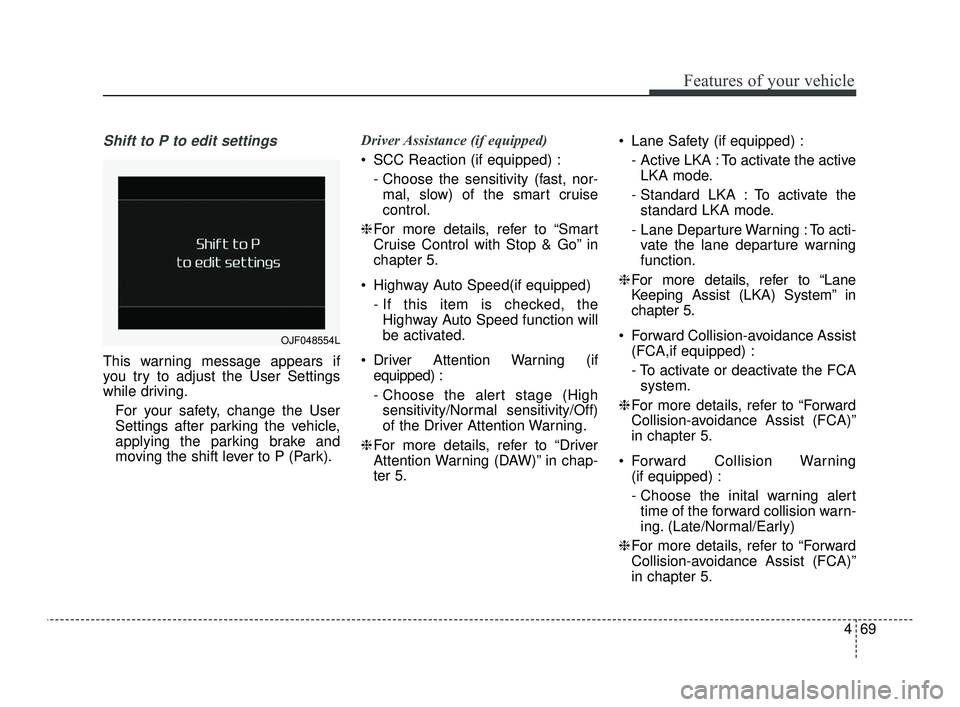
Shift to P to edit settings
This warning message appears if
you try to adjust the User Settings
while driving.For your safety, change the User
Settings after parking the vehicle,
applying the parking brake and
moving the shift lever to P (Park). Driver Assistance (if equipped)
SCC Reaction (if equipped) :
- Choose the sensitivity (fast, nor-mal, slow) of the smart cruise
control.
❈ For more details, refer to “Smart
Cruise Control with Stop & Go” in
chapter 5.
Highway Auto Speed(if equipped) - If this item is checked, theHighway Auto Speed function will
be activated.
Driver Attention Warning (if equipped) :
- Choose the alert stage (Highsensitivity/Normal sensitivity/Off)
of the Driver Attention Warning.
❈ For more details, refer to “Driver
Attention Warning (DAW)” in chap-
ter 5. Lane Safety (if equipped) :
- Active LKA : To activate the activeLKA mode.
- Standard LKA : To activate the standard LKA mode.
- Lane Departure Warning : To acti- vate the lane departure warning
function.
❈ For more details, refer to “Lane
Keeping Assist (LKA) System” in
chapter 5.
Forward Collision-avoidance Assist (FCA,if equipped) :
- To activate or deactivate the FCAsystem.
❈ For more details, refer to “Forward
Collision-avoidance Assist (FCA)”
in chapter 5.
Forward Collision Warning (if equipped) :
- Choose the inital warning alerttime of the forward collision warn-
ing. (Late/Normal/Early)
❈ For more details, refer to “Forward
Collision-avoidance Assist (FCA)”
in chapter 5.
OJF048554L
JFa PE USA 4.qxp 5/18/2018 7:22 PM Page 69
Page 161 of 577
471
Features of your vehicle
Lights
One Touch Turn Signal :- Off: The one touch turn signalfunction will be deactivated.
- 3, 5, 7 Flashes : The lane change signals will blink 3, 5 or 7 times
when the turn signal lever is
moved slightly.
❈ For more details, refer to “Lighting”
in this chapter.
Ambient Light Brightness (if equipped) :
- To select the brightness of theambient light. (Level 1 ~ 4)
Ambient Light Color (if equipped) : - To select the color of the ambientlight. (White / Orange / Red / Green
/ Blue / Violet / Link to Driver Mode) Headlight Delay :
- If this item is checked, the headlamp delay function will be acti-
vated.
❈ For more details, refer to “Lighting”
in this chapter.
Welcome Light(if equipped) : - If this item is checked, the wel-come light function will be activat-
ed. Sound
Parking Distance Warning Volume
(if equipped) :
- Adjust the Park Assist Systemvolume. (Level 1 ~ 3)
Welcome Sound (if equipped) : - If this item is checked, the wel-come sound function will be acti-
vated.
JFa PE USA 4.qxp 5/18/2018 7:22 PM Page 71
Page 181 of 577
491
Features of your vehicle
The TPMS cannot alert you tosevere and sudden tire damage
caused by external factors.
If you notice any vehicle instability, immediately take your foot off the
accelerator pedal, apply the brakes
gradually with light force, and slow-
ly move to a safe position off the
road.
Electronic Parking Brake
(EPB) Warning Light(if equipped)
This warning light illuminates:
Once you set the ignition switch or Engine Start/Stop Button to the ON
position.
- It illuminates for approximately 3seconds and then goes off.
When there is a malfunction with the EPB.
In this case, have your vehicle
inspected by an authorized Kia
dealer.
✽ ✽ NOTICE- Electronic Parking
Brake (EPB) Warning Light
The Electronic Parking Brake
(EPB) Warning Light may illumi-
nate when the Electronic Stability
control (ESC) Indicator Light comes
on to indicate that the ESC is not
working properly (This does not
indicate malfunction of the EPB).
Master Warning light (if equipped)
This warning light informs the driver of the following situations
- Blind Spot Detection (BSD) mal-function (if equipped)
- Advanced Smart Cruise Control (ASCC) malfunction (if equipped)
- Tire Pressure Monitoring System (TPMS) malfunction (if equipped)
- Forward Collision-avoidance Assist malfunction(if equipped)
- High Beam Assist(HBA) malfunc- tion (if equipped)
- Lamp malfunction and so on.
The Master Warning Light illumi-
nates when more than one of the
above warning situations occur. At
this time, the LCD Modes Icon will
change from ( ) to ( ).
If the warning situation is resolved, the
master warning light will turn off and
the LCD Modes Icon will be changed
back to its previous icon ( ).
EPBWARNING - Low tire pressure
Significantly low tire pressure makes the vehicle unstable
and can contribute to loss of
vehicle control and increased
braking distances.
Continued driving on low pres- sure tires will cause the tires to
overheat and fail.
JFa PE USA 4.qxp 5/18/2018 7:22 PM Page 91
Page 188 of 577
Features of your vehicle
98
4
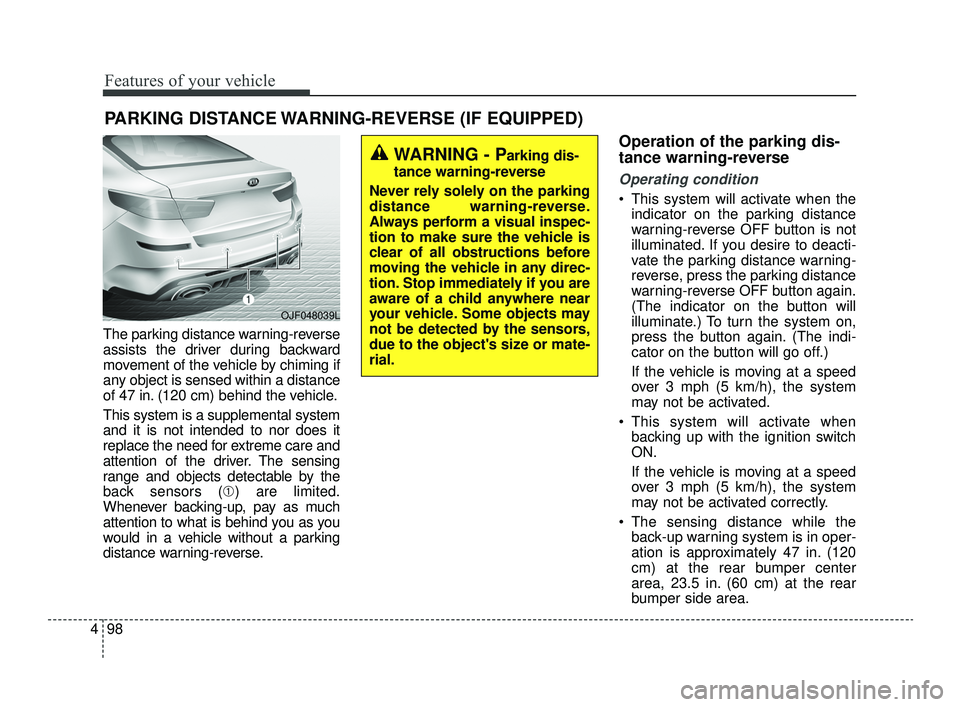
The parking distance warning-reverse
assists the driver during backward
movement of the vehicle by chiming if
any object is sensed within a distance
of 47 in. (120 cm) behind the vehicle.
This system is a supplemental system
and it is not intended to nor does it
replace the need for extreme care and
attention of the driver. The sensing
range and objects detectable by the
back sensors (➀ ) are limited.
Whenever backing-up, pay as much
attention to what is behind you as you
would in a vehicle without a parking
distance warning-reverse.
Operation of the parking dis-
tance warning-reverse
Operating condition
This system will activate when the indicator on the parking distance
warning-reverse OFF button is not
illuminated. If you desire to deacti-
vate the parking distance warning-
reverse, press the parking distance
warning-reverse OFF button again.
(The indicator on the button will
illuminate.) To turn the system on,
press the button again. (The indi-
cator on the button will go off.)
If the vehicle is moving at a speed
over 3 mph (5 km/h), the system
may not be activated.
This system will activate when backing up with the ignition switch
ON.
If the vehicle is moving at a speed
over 3 mph (5 km/h), the system
may not be activated correctly.
The sensing distance while the back-up warning system is in oper-
ation is approximately 47 in. (120
cm) at the rear bumper center
area, 23.5 in. (60 cm) at the rear
bumper side area.
PARKING DISTANCE WARNING-REVERSE (IF EQUIPPED)
WARNING - Parking dis-
tance warning-reverse
Never rely solely on the parking
distance warning-reverse.
Always perform a visual inspec-
tion to make sure the vehicle is
clear of all obstructions before
moving the vehicle in any direc-
tion. Stop immediately if you are
aware of a child anywhere near
your vehicle. Some objects may
not be detected by the sensors,
due to the object's size or mate-
rial.
OJF048039L
JFa PE USA 4.qxp 5/18/2018 7:22 PM Page 98
Page 192 of 577
Features of your vehicle
102
4
The Surround View Monitoring
System (SVM) is not a substitute for
proper and safe parking procedures.
The Surround View Monitoring
System (SVM) may not detect every
object surrounding the vehicle.
Always drive safely and use caution
when parking.
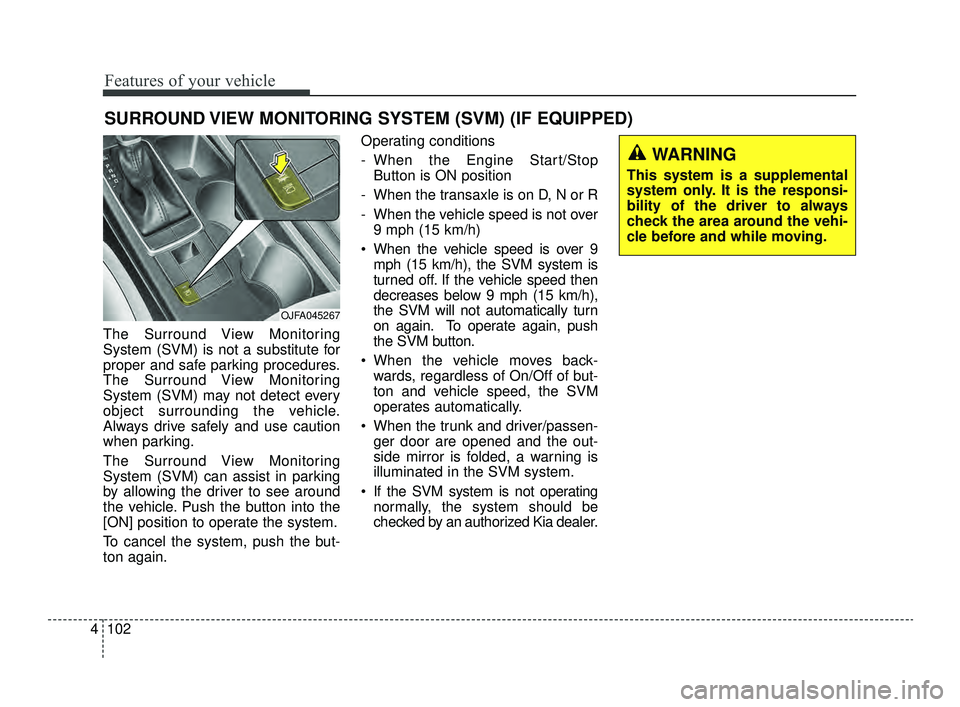
The Surround View Monitoring
System (SVM) can assist in parking
by allowing the driver to see around
the vehicle. Push the button into the
[ON] position to operate the system.
To cancel the system, push the but-
ton again. Operating conditions
- When the Engine Start/Stop
Button is ON position
- When the transaxle is on D, N or R
- When the vehicle speed is not over 9 mph (15 km/h)
When the vehicle speed is over 9 mph (15 km/h), the SVM system is
turned off. If the vehicle speed then
decreases below 9 mph (15 km/h),
the SVM will not automatically turn
on again. To operate again, push
the SVM button.
When the vehicle moves back- wards, regardless of On/Off of but-
ton and vehicle speed, the SVM
operates automatically.
When the trunk and driver/passen- ger door are opened and the out-
side mirror is folded, a warning is
illuminated in the SVM system.
If the SVM system is not operating normally, the system should be
checked by an authorized Kia dealer.
SURROUND VIEW MONITORING SYSTEM (SVM) (IF EQUIPPED)
OJFA045267
WARNING
This system is a supplemental
system only. It is the responsi-
bility of the driver to always
check the area around the vehi-
cle before and while moving.
JFa PE USA 4.qxp 5/18/2018 7:22 PM Page 102
Page 253 of 577
Driving your vehicle
Before driving . . . . . . . . . . . . . . . . . . . . . . . . . . . . . . 5-5
• Before entering vehicle . . . . . . . . . . . . . . . . . . . . . . . . . 5-5
• Necessary inspections . . . . . . . . . . . . . . . . . . . . . . . . . . 5-5
• Before starting . . . . . . . . . . . . . . . . . . . . . . . . . . . . . . . . 5-5
key positions . . . . . . . . . . . . . . . . . . . . . . . . . . . . . . . 5-7
• Illuminated ignition switch . . . . . . . . . . . . . . . . . . . . . . 5-7
• Ignition switch position . . . . . . . . . . . . . . . . . . . . . . . . . 5-7
• Starting the engine. . . . . . . . . . . . . . . . . . . . . . . . . . . . . 5-9
Engine start/stop button . . . . . . . . . . . . . . . . . . . . 5-10
• Illuminated engine start/stop button . . . . . . . . . . . . . 5-10
• Engine start/stop button position. . . . . . . . . . . . . . . . 5-10
• Starting the engine with a smart key. . . . . . . . . . . . . 5-12
Automatic transaxle . . . . . . . . . . . . . . . . . . . . . . . . 5-14
• Automatic transaxle operation. . . . . . . . . . . . . . . . . . 5-14
• Good driving practices . . . . . . . . . . . . . . . . . . . . . . . . 5-21
Dual Clutch Transmission (DCT) . . . . . . . . . . . . . 5-22
• Dual clutch transmission operation . . . . . . . . . . . . . 5-22
• LCD display for transmission temperature and warning message . . . . . . . . . . . . . . . . . . . . . . . . . . . . 5-24
• Good driving practices . . . . . . . . . . . . . . . . . . . . . . . . 5-33
Brake system . . . . . . . . . . . . . . . . . . . . . . . . . . . . . . 5-36
• Power brakes . . . . . . . . . . . . . . . . . . . . . . . . . . . . . . . . 5-36
• Parking brake – Foot type . . . . . . . . . . . . . . . . . . . . . 5-38
• Electronic Parking Brake (EPB) . . . . . . . . . . . . . . . . 5-39 • Auto hold . . . . . . . . . . . . . . . . . . . . . . . . . . . . . . . . . . . 5-\
46
• Anti-lock Brake System (ABS). . . . . . . . . . . . . . . . . . 5-50
• Electronic Stability Control (ESC) . . . . . . . . . . . . . . 5-52
• Vehicle Stability Management (VSM) . . . . . . . . . . . . 5-56
• Hill-start Assist Control (HAC) . . . . . . . . . . . . . . . . . 5-58
• Good braking practices. . . . . . . . . . . . . . . . . . . . . . . . 5-58
Forward Collision-avoidance Assist (FCA)
(Camera type) . . . . . . . . . . . . . . . . . . . . . . . . . . . . 5-60
• System setting and activation . . . . . . . . . . . . . . . . . . . 5-60
• FCA warning message and system control . . . . . . . . 5-62
• Brake operation . . . . . . . . . . . . . . . . . . . . . . . . . . . . . . 5-63
• FCA front radar/Camera sensor . . . . . . . . . . . . . . . . 5-64
• System malfunction . . . . . . . . . . . . . . . . . . . . . . . . . . . 5-65
• Limitation of the system . . . . . . . . . . . . . . . . . . . . . . . 5-67
Forward Collision-avoidance Assist (FCA) (Smart cruise control system equipped) . . . . . . 5-72
• System setting and activation . . . . . . . . . . . . . . . . . . . 5-72
• FCA warning message and system control . . . . . . . . 5-74
• Brake operation . . . . . . . . . . . . . . . . . . . . . . . . . . . . . . 5-75
• FCA front radar/Camera sensor . . . . . . . . . . . . . . . . 5-76
• System malfunction . . . . . . . . . . . . . . . . . . . . . . . . . . . 5-78
• Limitation of the system . . . . . . . . . . . . . . . . . . . . . . . 5-80
• Recognizing pedestrians . . . . . . . . . . . . . . . . . . . . . . . 5-84
5
JFa PE USA 5.QXP 5/17/2018 6:09 PM Page 1
Page 310 of 577
Driving your vehicle
58
5
The Vehicle Stability Management
system is not a substitute for safe
driving practices but a supplemen-
tary function only. It is the respon-
sibility of the driver to always check
the speed and the distance to the
vehicle ahead. Always hold the
steering wheel firmly while driving.
Your vehicle is designed to activate according to the driver’s intention,
even with installed VSM. Always fol-
low all the normal precautions for
driving at safe speeds for the condi-
tions – including driving in inclement
weather and on a slippery road.Hill-start assist control (HAC)
A vehicle has the tendency to roll
back on a steep hill when it starts to
go after stopping. The Hill-start
Assist Control (HAC) prevents the
vehicle from rolling back by applying
the brakes automatically for about 2
seconds. The brakes are released
when the accelerator pedal is
depressed or after about 2 seconds.
The HAC is activated only for about 2
seconds, so when the vehicle is
starting off always depress the accel-
erator pedal.
Good braking practices
Check to be sure the parking brakeis not engaged and the parking
brake indicator light is out before
driving away.
Driving through water may get the brakes wet. They can also get wet
when the vehicle is washed. Wet
brakes can be dangerous! Your
vehicle will not stop as quickly if the
brakes are wet. Wet brakes may
cause the vehicle to pull to one side.
To dry the brakes, apply the brakes
lightly until the braking action
returns to normal, taking care to
keep the vehicle under control at all
times. If the braking action does not
return to normal, stop as soon as it
is safe to do so and call an author-
ized Kia dealer for assistance.
Don't coast down hills with the vehicle out of gear. This is extreme-
ly hazardous. Keep the vehicle in
gear at all times, use the brakes to
slow down, then shift to a lower
gear so that engine braking will
help you maintain a safe speed.
WARNING- Maintaining
Brake Pressure on Incline
HAC does not replace the need
to apply brakes while stopped on
an incline. While stopped, make
sure you maintain brake pres-
sure sufficient to prevent your
vehicle from rolling backward
and causing an accident. Don’t
release the brake pedal until you
are ready to accelerate forward.WARNING
For maximum protection, always
wear your seat belt. No system,
no matter how advanced, can
compensate for all driver error
and/or driving conditions.
Always drive responsibly.
JFa PE USA 5.QXP 5/17/2018 6:11 PM Page 58
Page 348 of 577
Driving your vehicle
96
5
Smart cruise control will be tem-
porarily canceled when:
Cancelled manually
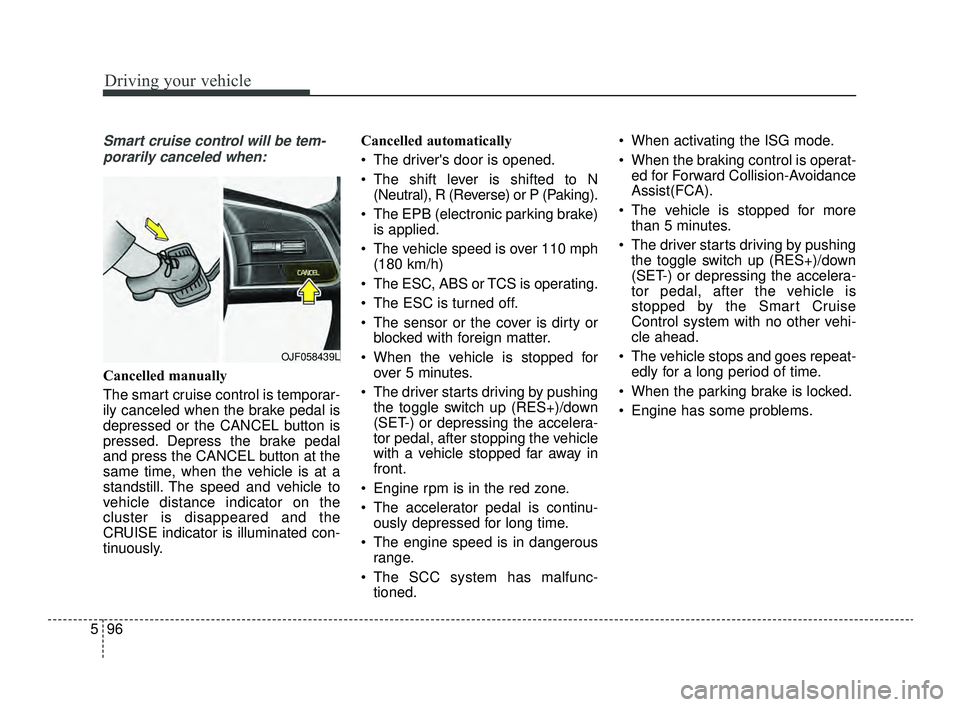
The smart cruise control is temporar-
ily canceled when the brake pedal is
depressed or the CANCEL button is
pressed. Depress the brake pedal
and press the CANCEL button at the
same time, when the vehicle is at a
standstill. The speed and vehicle to
vehicle distance indicator on the
cluster is disappeared and the
CRUISE indicator is illuminated con-
tinuously. Cancelled automatically
The driver's door is opened.
The shift lever is shifted to N
(Neutral), R (Reverse) or P (Paking).
The EPB (electronic parking brake) is applied.
The vehicle speed is over 110 mph (180 km/h)
The ESC, ABS or TCS is operating.
The ESC is turned off.
The sensor or the cover is dirty or blocked with foreign matter.
When the vehicle is stopped for over 5 minutes.
The driver starts driving by pushing the toggle switch up (RES+)/down
(SET-) or depressing the accelera-
tor pedal, after stopping the vehicle
with a vehicle stopped far away in
front.
Engine rpm is in the red zone.
The accelerator pedal is continu- ously depressed for long time.
The engine speed is in dangerous range.
The SCC system has malfunc- tioned. When activating the ISG mode.
When the braking control is operat-
ed for Forward Collision-Avoidance
Assist(FCA).
The vehicle is stopped for more than 5 minutes.
The driver starts driving by pushing the toggle switch up (RES+)/down
(SET-) or depressing the accelera-
tor pedal, after the vehicle is
stopped by the Smart Cruise
Control system with no other vehi-
cle ahead.
The vehicle stops and goes repeat- edly for a long period of time.
When the parking brake is locked.
Engine has some problems.
OJF058439L
JFa PE USA 5.QXP 5/17/2018 6:13 PM Page 96
Page 409 of 577
63
What to do in an emergency
If the engine stalls at a cross-
road or crossing
If the engine stalls at a crossroad or
crossing, set the shift lever in the N
(Neutral) position and then push the
vehicle to a safe place.
If you have a flat tire while
driving
If a tire goes flat while you are driv-
ing:
1. Take your foot off the acceleratorpedal and let the vehicle slow
down while driving straight ahead.
Do not apply the brakes immedi-
ately or attempt to pull off the road
as this may cause a loss of con-
trol. When the vehicle has slowed
to such a speed that it is safe to do
so, brake carefully and pull off the
road. Drive off the road as far as
possible and park on firm level
ground. If you are on a divided
highway, do not park in the median
area between the two traffic lanes. 2. When the vehicle is stopped, turn
on your emergency hazard flash-
ers, set the parking brake and put
the transmission in P (for
Automatic transmission / Dual
clutch transmission).
3. Have all passengers get out of the vehicle. Be sure they all get out on
the side of the vehicle that is away
from traffic.
4. When changing a flat tire, follow the instruction provided later in
this section.
If the engine stalls while driv-
ing
1. Reduce your speed gradually,keeping a straight line. Move cau-
tiously off the road to a safe place.
2. Turn on your emergency flashers.
3. Try to start the engine again. If your vehicle will not start, contact
an authorized Kia dealer or seek
other qualified assistance.
✽ ✽NOTICE
If there was a check engine light and
loss of power or stall and if safe to do
so, wait at least 10 seconds to restart
the vehicle after it stalls. This may
reset the car so it will no longer run
at low power (limp home) condition.
IN CASE OF AN EMERGENCY WHILE DRIVING
JFa PE USA 6.qxp 5/17/2018 6:25 PM Page 3